remote control TOYOTA GT86 2012 User Guide
[x] Cancel search | Manufacturer: TOYOTA, Model Year: 2012, Model line: GT86, Model: TOYOTA GT86 2012Pages: 448, PDF Size: 13.47 MB
Page 49 of 448
49 1-2. Opening, closing and locking the doors and trunk
1
Before driving
FT86_EE
If the wireless remote control does not operate properly (vehicles with
a smart entry & start system)
Locking and unlocking the doors, unlocking the trunk: Use the mechanical
key. (P. 399)
Key battery depletion
Vehicles without a smart entry & start system
If the wireless remote control function does not operate, the battery may be
depleted. Replace the battery when necessary. (P. 320)
Vehicles with a smart entry & start system
P. 4 2
When the electronic key battery is fully depleted
P. 320
Confirmation of the registered key number (vehicles with a smart entry
& start system)
The number of keys already registered to the vehicle can be confirmed. Ask
any authorized Toyota dealer or repairer, or another duly qualified and
equipped professional for details.
Customization that can be configured at any authorized Toyota dealer
or repairer, or another duly qualified and equipped professional
Settings (e.g. wireless remote control system) can be changed.
(Customizable features P. 430)
Certification for wireless remote control
-Replace only with the same or equivalent type recommended by the manufacturer.
-Dispose of used batterites according to the local laws.
Hereby, DENSO CORPORATION declares that this 13BDD/12BBY is in compliance with the essen-
tial requirements and other relevant provisions of Directive 1999/5/EC.
Page 50 of 448
50
1-2. Opening, closing and locking the doors and trunk
FT86_EE
Doors
The vehicle can be locked and unlocked using the entry function,
wireless remote control, key or door lock switch.
Entry function (vehicles with a smart entry & start system)
P. 3 2
Wireless remote control
P. 4 7
Key
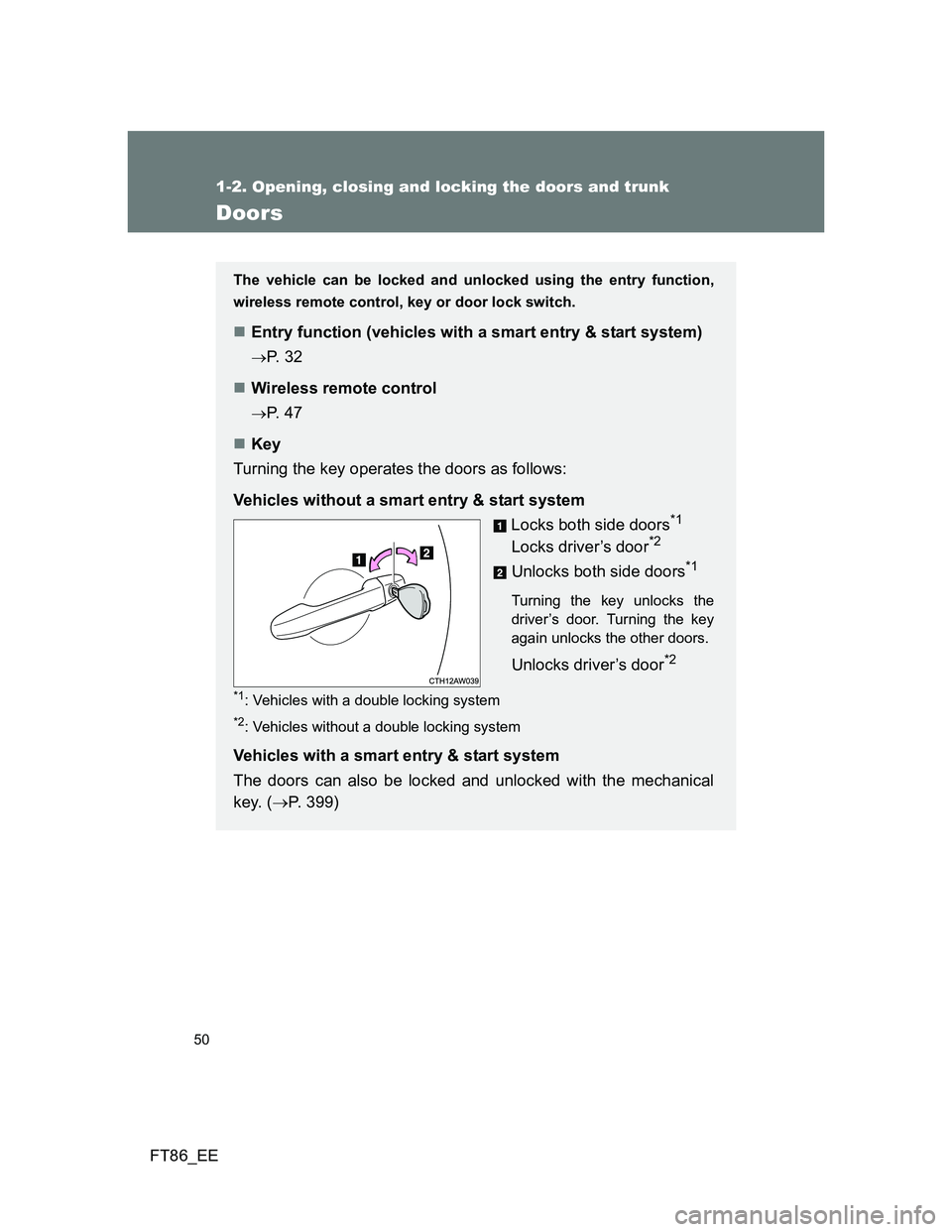
Turning the key operates the doors as follows:
Vehicles without a smart entry & start system
Locks both side doors
*1
Locks driver’s door*2
Unlocks both side doors*1
Turning the key unlocks the
driver’s door. Turning the key
again unlocks the other doors.
Unlocks driver’s door*2
*1: Vehicles with a double locking system
*2: Vehicles without a double locking system
Vehicles with a smart entry & start system
The doors can also be locked and unlocked with the mechanical
key. (P. 399)
Page 52 of 448
52 1-2. Opening, closing and locking the doors and trunk
FT86_EE
Window open/close function linked to door operation
In order to make opening and closing the doors easier, completely closed
windows are linked to door operations. Therefore, when a door is opened, its
window opens slightly. When a door is closed, its window closes completely.
However, if the battery has discharged or is disconnected, this function will
not operate. (P. 407)
If a wrong key is used (vehicles with a double locking system)
The key cylinder rotates freely to isolate inside mechanism.
If the smart entry & start system has been deactivated in a customized
setting (vehicles with a smart entry & start system)
Use the wireless remote control or mechanical key. (P. 47, 399)
CAUTION
To prevent an accident
Observe the following precautions while driving the vehicle.
Failure to do so may result in a door opening and an occupant falling out,
resulting in death or serious injury.
Always use a seat belt.
Ensure that both side doors are properly closed.
Do not pull the inside handle of the doors while driving.
The doors may be opened and the passengers are thrown out of the vehi-
cle and it may result in serious injury or death.
Page 53 of 448
53
1
1-2. Opening, closing and locking the doors and trunk
Before driving
FT86_EE
Trunk
The trunk can be opened using the key, trunk opener, entry function
or wireless remote control.
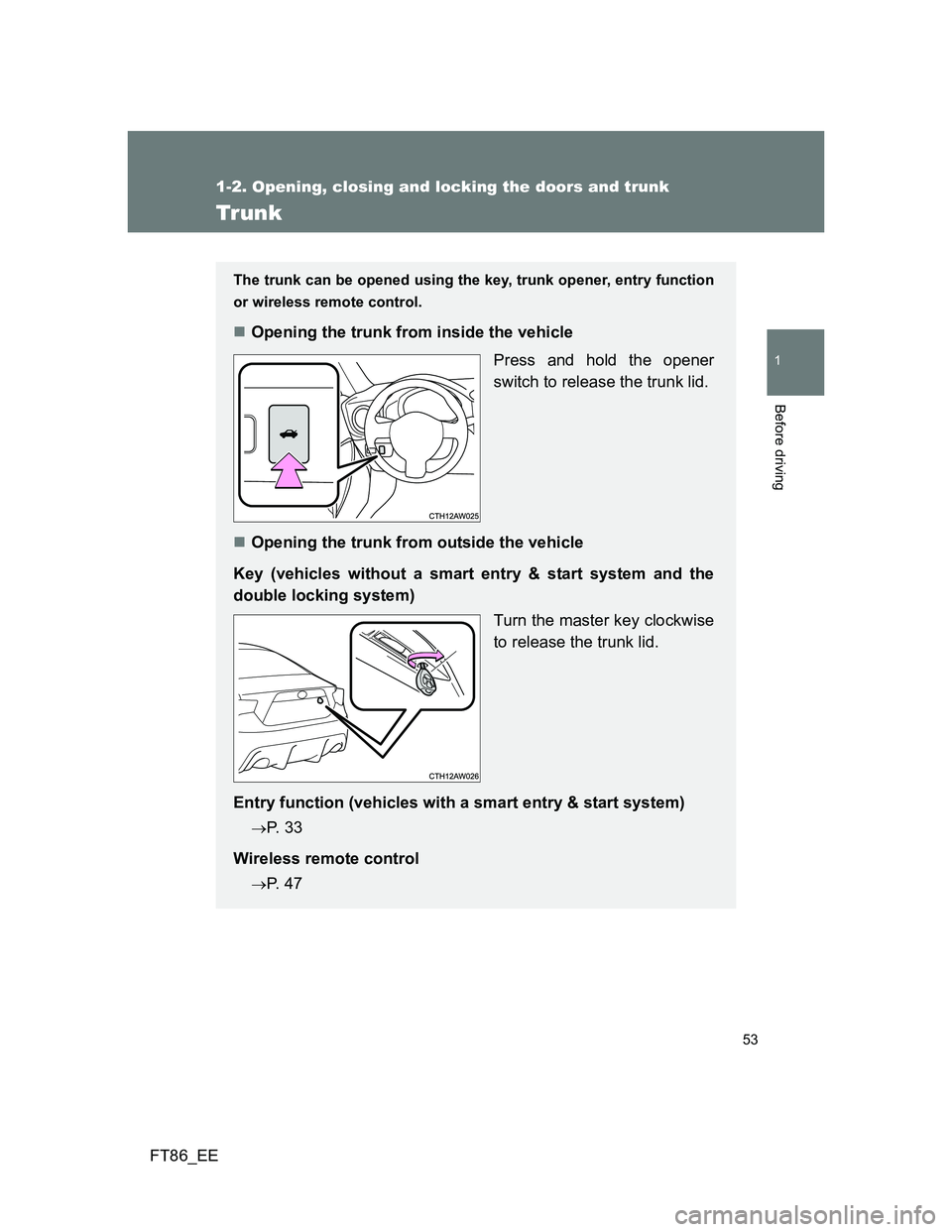
Opening the trunk from inside the vehicle
Press and hold the opener
switch to release the trunk lid.
Opening the trunk from outside the vehicle
Key (vehicles without a smart entry & start system and the
double locking system)
Turn the master key clockwise
to release the trunk lid.
Entry function (vehicles with a smart entry & start system)
P. 3 3
Wireless remote control
P. 4 7
Page 92 of 448
92
1-6. Theft deterrent system
FT86_EE
Double locking system
Setting the double locking system
Vehicles without a smart entry & start system: Turn the engine switch
off, have all the passengers exit the vehicle and ensure that all the
doors are closed.
Vehicles with a smart entry & start system: Turn the “ENGINE START
STOP” switch off, have all the passengers exit the vehicle and ensure
that all the doors are closed.
Using the entry function (vehicles with a smart entry & start system):
Press the lock button on the outside door handle.
Using the wireless remote control:
Press .
: If equipped
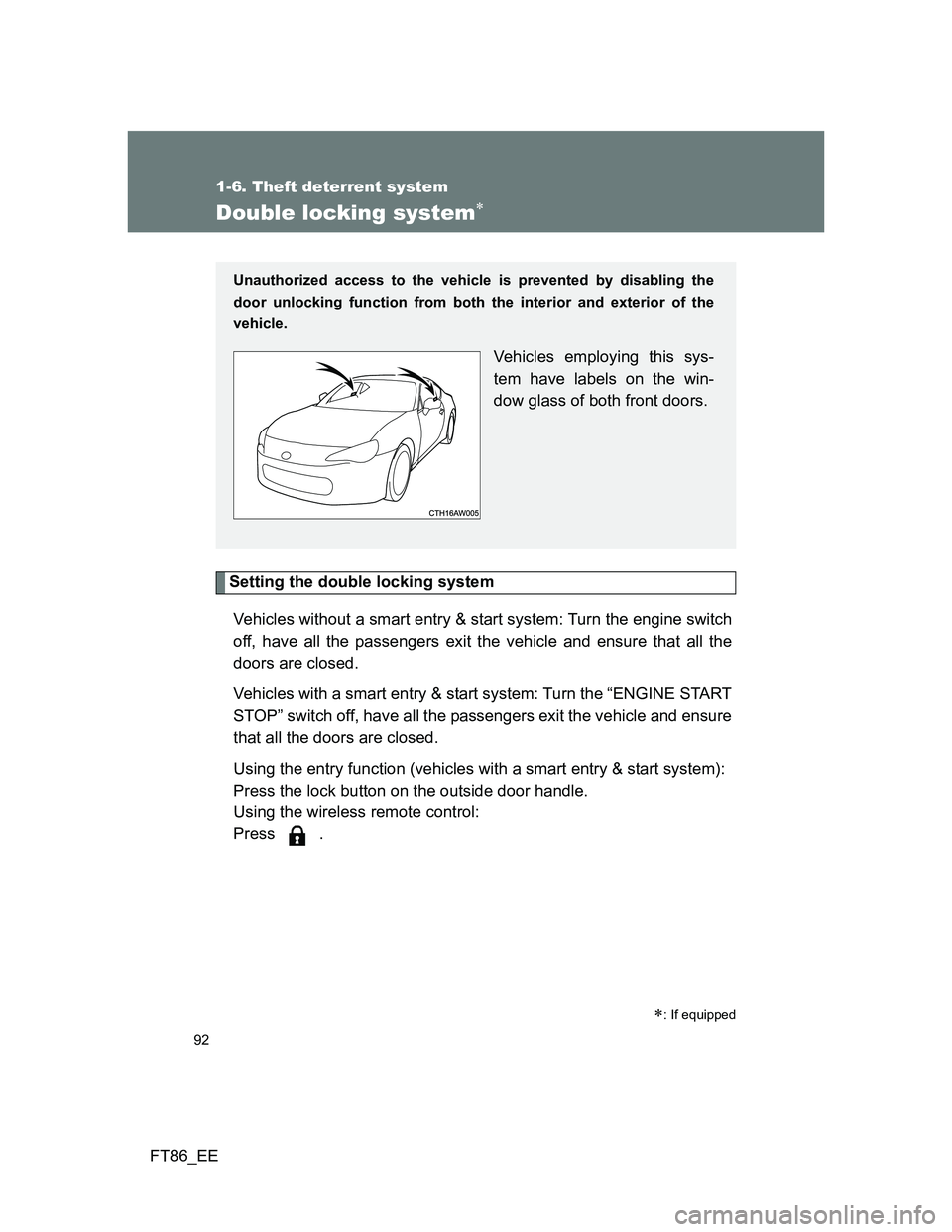
Unauthorized access to the vehicle is prevented by disabling the
door unlocking function from both the interior and exterior of the
vehicle.
Vehicles employing this sys-
tem have labels on the win-
dow glass of both front doors.
Page 277 of 448
4Maintenance and care
277
FT86_EE
4-1. Maintenance and care
Cleaning and protecting
the vehicle exterior ......... 278
Cleaning and protecting
the vehicle interior .......... 282
Cleaning and protecting
the Alcantara
® area ........ 286
4-2. Maintenance
Maintenance
requirements................... 288
4-3. Do-it-yourself maintenance
Do-it-yourself service
precautions ..................... 291
Hood ................................. 294
Positioning a floor jack ...... 296
Engine compartment......... 298
Tires .................................. 311
Tire inflation pressure ....... 314
Wheels .............................. 316
Air conditioning filter ......... 318
Wireless remote control/
electronic key battery...... 320
Checking and replacing
fuses ............................... 324
Light bulbs ........................ 332
Page 307 of 448
307 4-3. Do-it-yourself maintenance
4
Maintenance and care
FT86_EE
Before recharging
When recharging, the battery produces hydrogen gas which is flammable
and explosive. Therefore, before recharging:
If recharging with the battery installed on the vehicle, be sure to discon-
nect the ground cable.
Make sure the power switch on the charger is off when connecting and
disconnecting the charger cables to the battery.
After recharging/reconnecting the battery (vehicles with a smart entry
& start system)
Unlocking the doors using the smart entry & start system may not be
possible immediately after reconnecting the battery. If this happens, use
the wireless remote control or the mechanical key to lock/unlock the
doors.
Start the engine with the “ENGINE START STOP” switch in ACCES-
SORY mode. The engine may not start with the “ENGINE START STOP”
switch turned off. However, the engine will operate normally from the sec-
ond attempt.
The “ENGINE START STOP” switch mode is recorded by the vehicle. If
the battery is reconnected, the vehicle will return the “ENGINE START
STOP” switch mode to the status it was in before the battery was discon-
nected. Make sure to turn off the engine before disconnect the battery.
Take extra care when connecting the battery if the “ENGINE START
STOP” switch mode prior to discharge is unknown.
If the engine will not start even after multiple attempts, contact any
authorized Toyota dealer or repairer, or another duly qualified and equipped
professional.
Page 320 of 448
320
4-3. Do-it-yourself maintenance
FT86_EE
Wireless remote control/electronic key batter y
Replace the battery with a new one if it is depleted.
You will need the following items:
Flathead screwdriver
Lithium battery CR2016 (vehicles without a smart entry & start
system), or CR1632 (vehicles with a smart entry & start sys-
tem)
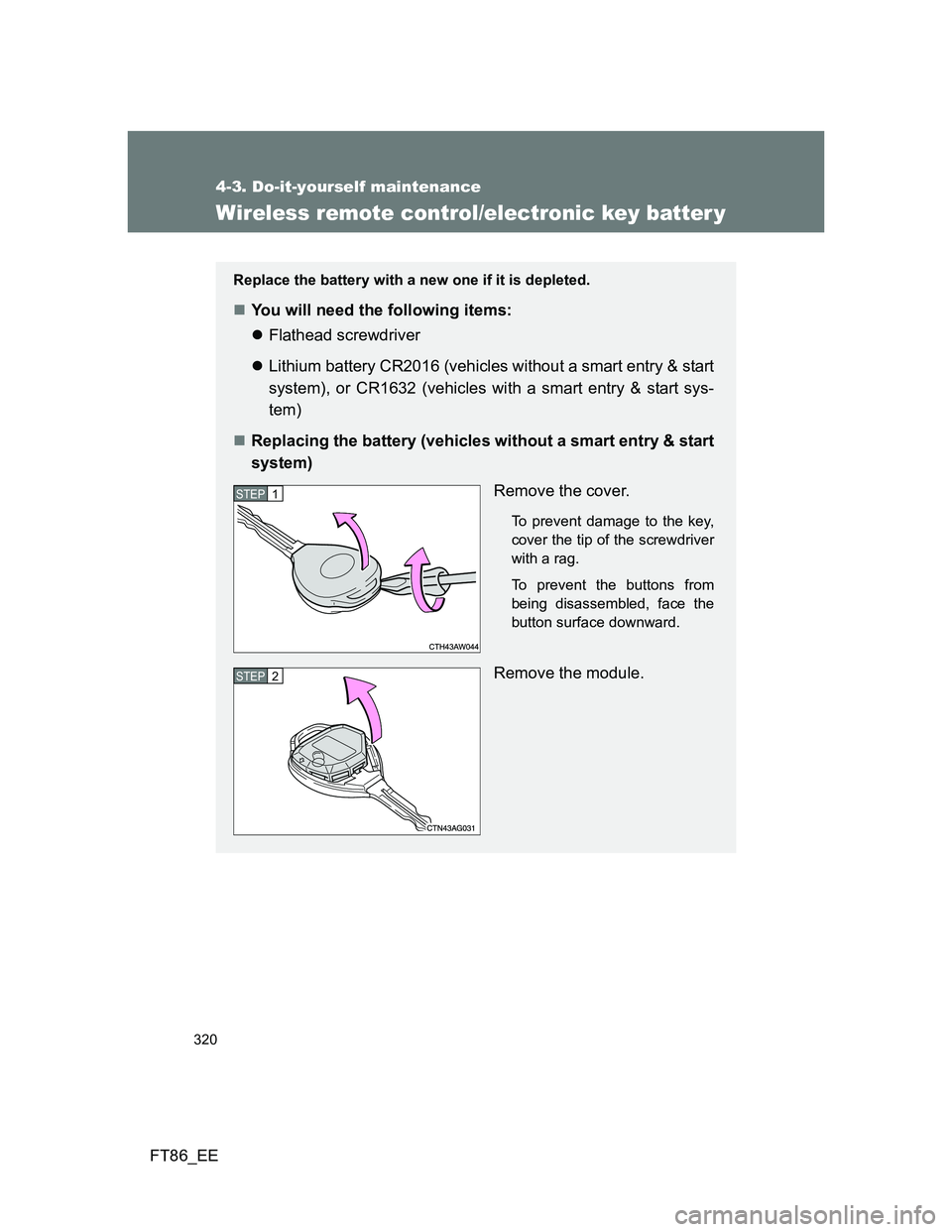
Replacing the battery (vehicles without a smart entry & start
system)
Remove the cover.
To prevent damage to the key,
cover the tip of the screwdriver
with a rag.
To prevent the buttons from
being disassembled, face the
button surface downward.
Remove the module.
STEP 1
STEP 2
Page 322 of 448
322 4-3. Do-it-yourself maintenance
FT86_EE
Use a CR2016 (vehicles without a smart entry & start system) or
CR1632 (vehicles with a smart entry & start system) lithium battery
Batteries can be purchased at any authorized Toyota dealer or repairer,
or another duly qualified and equipped professional, local electrical appli-
ance shops or camera stores.
Replace only with the same or equivalent type recommended by the
manufacturer.
Dispose of used batteries according to local laws.
If the key battery is depleted
The following symptoms may occur:
The smart entry & start system (if equipped) and wireless remote control
will not function properly.
The operational range will be reduced.
When putting the module back (vehicles without a smart entry & start
system)
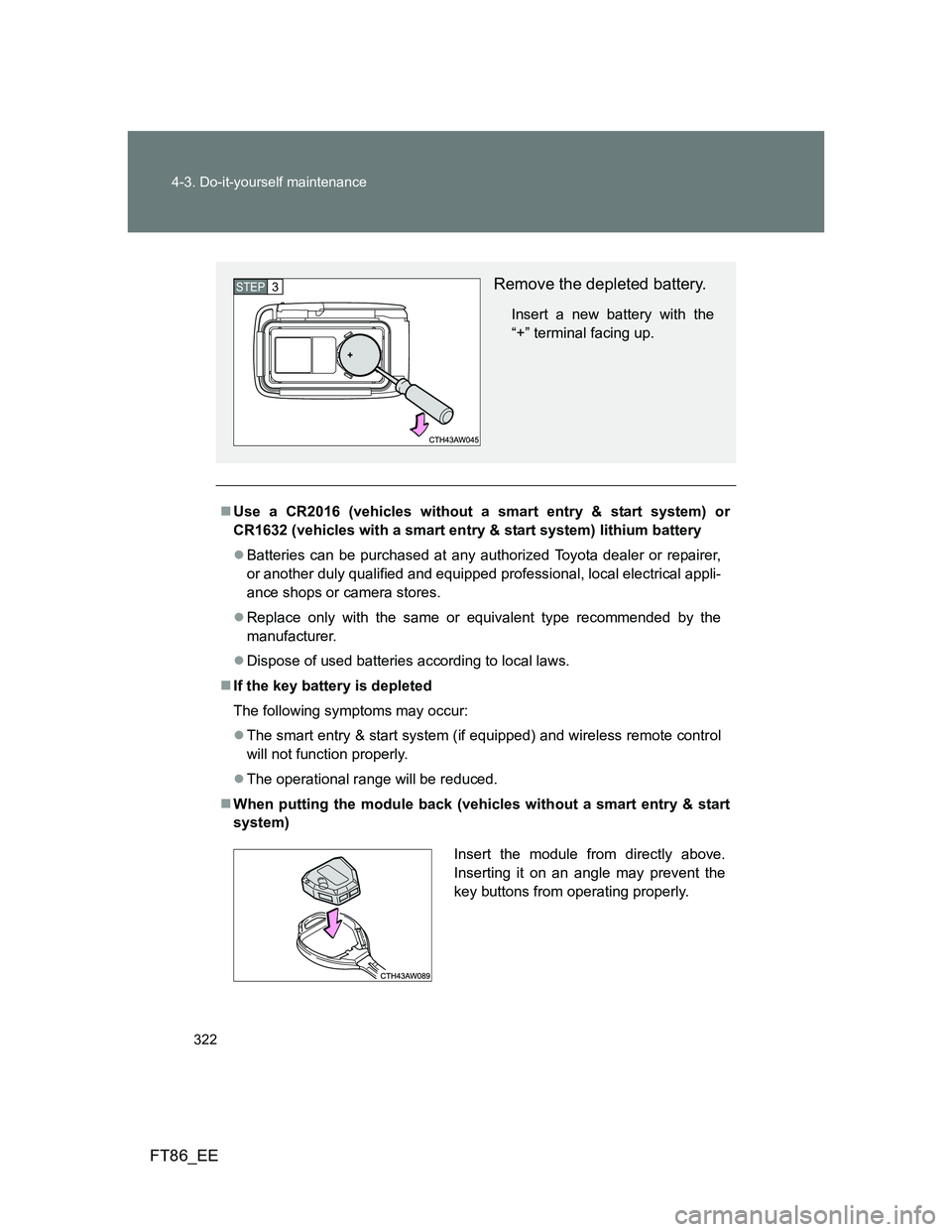
Remove the depleted battery.
Insert a new battery with the
“+” terminal facing up.
STEP 3
Insert the module from directly above.
Inserting it on an angle may prevent the
key buttons from operating properly.
Page 323 of 448
323 4-3. Do-it-yourself maintenance
4
Maintenance and care
FT86_EE
CAUTION
Removed battery and other parts
Keep away from children. These parts are small and if swallowed by a child,
they can cause choking. Failure to do so could result in death or serious
injury.
Certification for the lithium battery
RISK OF EXPLOSION IF BATTERY IS REPLACED BY AN INCORRECT
TYPE. DISPOSE OF USED BATTERIES ACCORDING TO THE
INSTRUCTIONS
Batteries shall not be exposed to excessive heat such as sunshine, fire or
the like.
NOTICE
For normal operation after replacing the battery
Observe the following precautions to prevent accidents:
Always work with dry hands.
Moisture may cause the battery to rust.
Do not touch or move any other component inside the remote control.
Do not bend either of the battery terminals.