radio TOYOTA GT86 2014 Owners Manual (in English)
[x] Cancel search | Manufacturer: TOYOTA, Model Year: 2014, Model line: GT86, Model: TOYOTA GT86 2014Pages: 452, PDF Size: 14.38 MB
Page 29 of 452
29 1-1. Key information
1
Before driving
FT86_EE
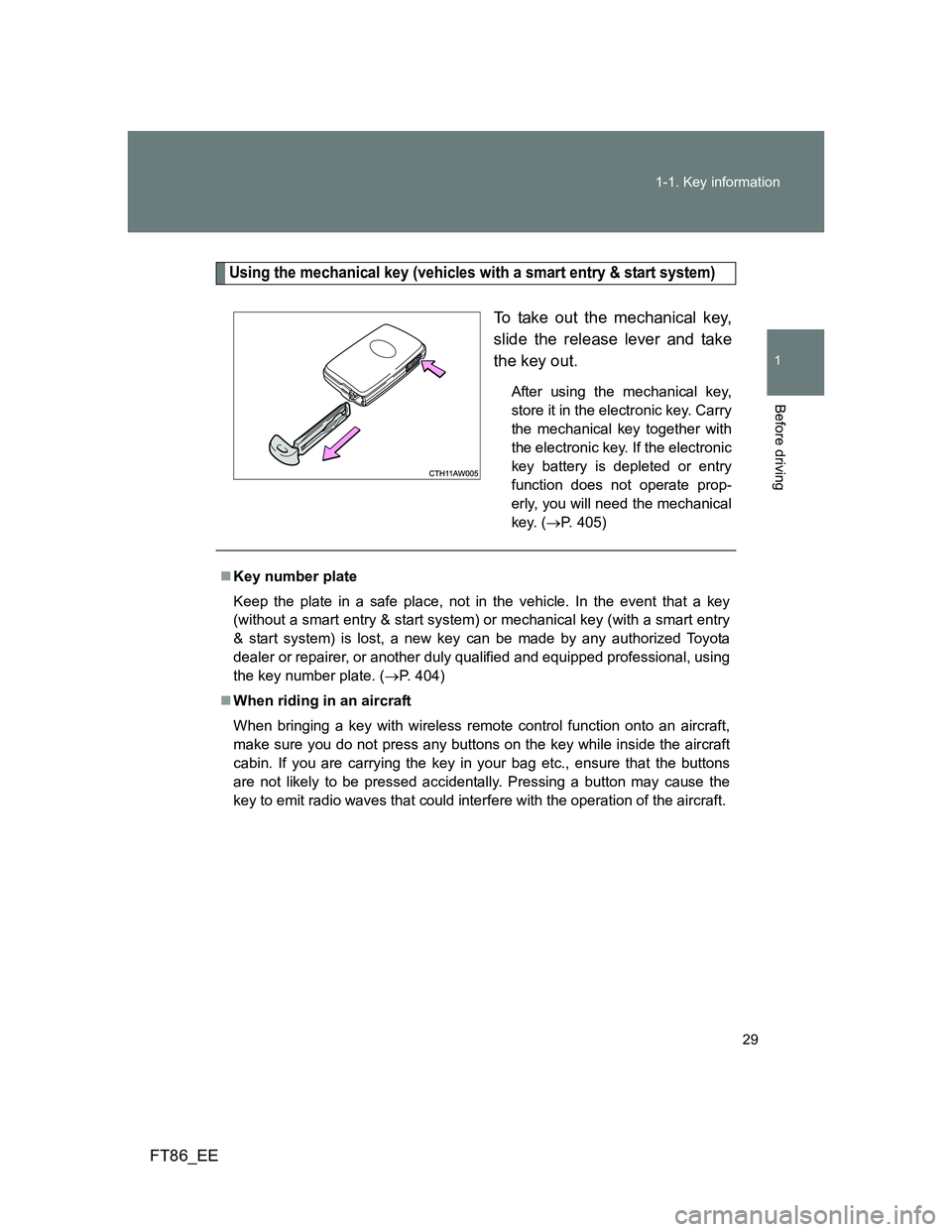
Using the mechanical key (vehicles with a smart entry & start system)
To take out the mechanical key,
slide the release lever and take
the key out.
After using the mechanical key,
store it in the electronic key. Carry
the mechanical key together with
the electronic key. If the electronic
key battery is depleted or entry
function does not operate prop-
erly, you will need the mechanical
key. (P. 405)
Key number plate
Keep the plate in a safe place, not in the vehicle. In the event that a key
(without a smart entry & start system) or mechanical key (with a smart entry
& start system) is lost, a new key can be made by any authorized Toyota
dealer or repairer, or another duly qualified and equipped professional, using
the key number plate. (P. 404)
When riding in an aircraft
When bringing a key with wireless remote control function onto an aircraft,
make sure you do not press any buttons on the key while inside the aircraft
cabin. If you are carrying the key in your bag etc., ensure that the buttons
are not likely to be pressed accidentally. Pressing a button may cause the
key to emit radio waves that could interfere with the operation of the aircraft.
Page 30 of 452
30 1-1. Key information
FT86_EE
NOTICE
To prevent key damage
Observe the following:
Do not drop the keys, subject them to strong shocks or bend them.
Do not expose the keys to high temperatures for a long period of time.
Do not get the keys wet or wash them in an ultrasonic washer etc.
Do not attach metallic or magnetic materials to the keys or place the keys
close to such materials.
Do not disassemble the keys.
Do not attach a sticker or anything else to the surface of the key.
Vehicles with a smart entry & start system: Do not place the keys near
objects that produce magnetic fields, such as TVs, audio systems, induc-
tion cookers, or medical electrical equipment, such as low-frequency ther-
apy equipment.
Carrying the electronic key on your person (vehicles with a smart entry
& start system)
Carry the electronic key 10 cm (3.9 in.) or more away from electric appli-
ances that are turned on. Radio waves emitted from electric appliances
within 10 cm (3.9 in.) of the electronic key may interfere with the key, causing
the key to not function properly.
In case of a smart entry & start system malfunction or other key-related
problems (vehicles with a smart entry & start system)
Take your vehicle with all the electronic keys provided with your vehicle to
any authorized Toyota dealer or repairer, or another duly qualified and
equipped professional.
When a vehicle key is lost
If the key remains lost, the risk of vehicle theft increases significantly. Visit
any authorized Toyota dealer or repairer, or another duly qualified and
equipped professional immediately with all remaining keys that was provided
with your vehicle.
Page 38 of 452
38 1-2. Opening, closing and locking the doors and trunk
FT86_EE
Conditions affecting operation
The smart entry & start system uses weak radio waves. In the following situ-
ations, the communication between the electronic key and the vehicle may
be affected, preventing the smart entry & start system, wireless remote con-
trol and engine immobilizer system from operating properly.
(Way of coping P. 405)
When the electronic key battery is depleted
Near a TV tower, electric power plant, gas station, radio station, large dis-
play, airport or other facility that generates strong radio waves or electri-
cal noise
When the electronic key is in contact with, or is covered by the following
metallic objects
• Cards to which aluminum foil is attached
• Cigarette boxes that have aluminum foil inside
• Metallic wallets or bags
• Coins
• Hand warmers made of metal
• Media such as CDs and DVDs
When other wireless key (that emit radio waves) is being used nearby
When carrying the electronic key together with the following devices that
emit radio waves
• A portable radio, cellular phone, cordless phone or other wireless com-
munication device
• Another vehicle's electronic key or a wireless key that emits radio
waves
• Personal computers or personal digital assistants (PDAs)
• Digital audio players
• Portable game systems
If window tint with a metallic content or metallic objects are attached to
the rear window
When the electronic key is placed near a battery charger or electronic
devices
Page 39 of 452
39 1-2. Opening, closing and locking the doors and trunk
1
Before driving
FT86_EE
Notes for the entry function
Even when the electronic key is within the effective range (detection
areas), the system may not operate properly in the following cases:
• The electronic key is too close to the window or outside door handle,
near the ground, or in a high place when the doors are locked or
unlocked.
• The electronic key is near the ground or in a high place, or too close to
the rear bumper center when the trunk is unlocked.
• The electronic key is on the instrument panel, rear package tray or
floor, in the door pockets or glove box or auxiliary box when the engine
is started or “ENGINE START STOP” switch modes are changed.
Do not leave the electronic key on top of the instrument panel or near the
door pockets when exiting the vehicle. Depending on the radio wave
reception conditions, it may be detected by the antenna outside the cabin
and the door will become lockable from the outside, possibly trapping the
electronic key inside the vehicle.
As long as the electronic key is within the effective range, the doors may
be locked or unlocked by anyone.
Even if the electronic key is not inside the vehicle, it may be possible to
start the engine if the electronic key is near the window.
The doors may unlock if a large amount of water splashes on the door
handle, such as in the rain or in a car wash when the electronic key is
within the effective range. (The door will automatically be locked after
approximately 30 seconds if the doors are not opened and closed.)
Gripping the door handle when wearing a glove may not unlock the door.
If the wireless remote control is used to lock the doors when the elec-
tronic key is near the vehicle, there is a possibility that the door may not
be unlocked by the entry function. (Use the wireless remote control to
unlock the doors.)
A sudden approach to the effective range or door handle may prevent the
doors from being unlocked. In this case, return the door handle to the
original position and check that the doors unlock before pulling the door
handle again.
Page 41 of 452
41 1-2. Opening, closing and locking the doors and trunk
1
Before driving
FT86_EE
When the vehicle is not driven for extended periods
To prevent theft of the vehicle, do not leave the electronic key within 2 m
(6 ft.) of the vehicle.
The smart entry & start system can be deactivated in advance. (P. 437)
To operate the system properly
Make sure to carry the electronic key when operating the system. Do not
get the electronic key too close to the vehicle when operating the system
from the outside of the vehicle.
Depending on the position and holding condition of the electronic key, the
key may not be detected correctly and the system may not operate prop-
erly. (The alarm may go off accidentally, or the door lock prevention func-
tion may not operate.)
Do not leave the electronic key inside the trunk.
The key confinement prevention function may not operate, depending on
the location of the key (close to a spare tire, the inside edge of the trunk),
conditions (inside a metal bag, close to metallic objects) and the radio
waves in the surrounding area. (P. 57)
If the smart entry & start system does not operate properly
Locking and unlocking the doors, unlocking the trunk: Use the mechani-
cal key. (P. 405)
Starting the engine:P. 406
Page 42 of 452
42 1-2. Opening, closing and locking the doors and trunk
FT86_EE
Electronic key battery depletion
The standard battery life is 1 to 2 years.
If the battery becomes low, an alarm will sound in the cabin when the
engine stops. (P. 373)
As the electronic key always receives radio waves, the battery will
become depleted even if the electronic key is not used. The following
symptoms indicate that the electronic key battery may be depleted.
Replace the battery when necessary. (P. 326)
• The smart entry & start system or the wireless remote control does not
operate.
• The detection area becomes smaller.
• The LED indicator on the key surface does not turn on.
To avoid serious deterioration, do not leave the electronic key close to
any of the following electrical appliances that produce a magnetic field:
•TVs
• Personal computers
• Cellular phones, cordless phones and battery chargers
• Recharging cellular phones or cordless phones
• Induction cookers
• Table lamps
When the electronic key battery is fully depleted
P. 326
If the smart entry & start system has been deactivated in a customized
setting
Locking and unlocking the doors, unlocking the trunk: Use the wireless
remote control or mechanical key. (P. 49, 405)
Starting the engine and changing “ENGINE START STOP” switch
modes: P. 406
Stopping the engine: P. 408
Customization that can be configured at any authorized Toyota dealer
or repairer, or another duly qualified and equipped professional
Settings (e. g. smart entry & start system) can be changed.
(Customizable features: P. 437)
Page 48 of 452
48 1-2. Opening, closing and locking the doors and trunk
FT86_EE
CAUTION
Caution regarding interference with electronic devices
People with implantable cardiac pacemakers, cardiac resynchronization
therapy-pacemakers or implantable cardioverter defibrillators should main-
tain a reasonable distance between themselves and the smart entry &
start system antennas. (P. 33)
The radio waves may affect the operation of such devices. If necessary,
the entry function can be disabled. Ask any authorized Toyota dealer or
repairer, or another duly qualified and equipped professional for details,
such as the frequency of radio waves and timing of the emitted radio
waves. Then, consult your doctor to see if you should disable the entry
function.
User of any electrical medical device other than implantable cardiac pace-
makers, cardiac resynchronization therapy-pacemakers or implantable
cardioverter defibrillators should consult the manufacturer of the device for
information about its operation under the influence of radio waves.
Radio waves could have unexpected effects on the operation of such
medical devices.
Ask any authorized Toyota dealer or repairer, or another duly qualified and
equipped professional for details for disabling the entry function.
Page 50 of 452

50 1-2. Opening, closing and locking the doors and trunk
FT86_EE
Operation signals
The emergency flashers flash to indicate that the doors have been locked/
unlocked. (Locked: Once; Unlocked: Twice)
Door lock buzzer (vehicles with a smart entry & start system)
If an attempt to lock the doors is made when a door is not fully closed, a
buzzer sounds continuously. Fully close the door to stop the buzzer, and lock
the vehicle once more.
Security feature
If a door is not opened within approximately 30 seconds after the vehicle is
unlocked, the security feature automatically locks the vehicle again.
Conditions affecting operation
Vehicles without a smart entry & start system
The wireless remote control function may not operate normally in the follow-
ing situations:
When the wireless key battery is depleted
Near a TV tower, electric power plant, gas station, radio station, large dis-
play, airport or other facility that generates strong radio waves or electri-
cal noise
When carrying a portable radio, cellular phone or other wireless commu-
nication devices
When the wireless key is in contact with, or is covered by a metallic
object
When other wireless key (that emit radio waves) is being used nearby
If window tint with a metallic content or metallic objects are attached to
the rear window
Vehicles with a smart entry & start system
P. 3 8
Page 57 of 452
57 1-2. Opening, closing and locking the doors and trunk
1
Before driving
FT86_EE
Function to prevent the trunk being locked with the electronic key
inside (vehicles with a smart entry & start system)
When all doors are being locked, closing the trunk lid with the electronic
key left inside the trunk will sound an alarm.
In this case, the trunk lid can be opened using the entry function.
Even when the spare electronic key is put in the trunk with all the doors
locked, the key confinement prevention function can be activated so the
trunk can be opened. In order to prevent theft, take all electronic keys
with you when leaving the vehicle.
Even when the electronic key is put in the trunk with all the doors are
locked, the key may not be detected depending on the places and the
surrounding radio wave conditions. In this case, the key confinement pre-
vention function cannot be activated, causing the doors to lock when the
trunk is closed. Make sure to check where the key is before closing the
trunk.
The key confinement prevention function cannot be activated if any one
of the doors is unlocked. In this case, open the trunk using the trunk
opener.
Using the mechanical key (vehicles with a smart entry & start system
but without the double locking system)
The trunk can be also opened using the mechanical key. (P. 405)
Page 126 of 452
126 1-7. Safety information
FT86_EE
CAUTION
SRS airbag precautions
If the areas where the SRS airbags are stored, such as the steering wheel
pad and front and rear pillar garnishes, are damaged or cracked, have
them replaced by any authorized Toyota dealer or repairer, or another duly
qualified and equipped professional.
The SRS side airbag and SRS curtain shield airbag are designed only to
be a supplement to the primary protection provided by the seat belt. They
do not do away with the need to fasten seat belts. It is also important to
wear your seat belt to help avoid injuries that can result when an occupant
is not seated in a proper upright position.
Modification and disposal of SRS airbag system components
Do not dispose of your vehicle or perform any of the following modifications
without consulting any authorized Toyota dealer or repairer, or another duly
qualified and equipped professional.
The SRS airbags may malfunction or deploy (inflate) accidentally, causing
death or serious injury.
Installation, removal, disassembly and repair of the SRS airbags.
Repairs, modifications, removal or replacement of the steering wheel,
instrument panel, dashboard, seats or seat upholstery, front, side and rear
pillars or roof side rails.
Repairs or modifications of the front fender, front bumper, or side of the
occupant compartment.
Installation of a grille guard (bull bars, kangaroo bar, etc.), snow plows,
winches.
Modifications to the vehicle's suspension system.
Installation of electronic devices such as mobile two-way radios and CD
players.
Installation of electronic devices such as an RF-transmitter and CD play-
ers.
Modifications to your vehicle for a person with a physical disability.