key TOYOTA GT86 2014 Service Manual
[x] Cancel search | Manufacturer: TOYOTA, Model Year: 2014, Model line: GT86, Model: TOYOTA GT86 2014Pages: 464, PDF Size: 10.65 MB
Page 281 of 464
4Maintenance and care
281
4-1. Maintenance and care
Cleaning and protecting
the vehicle exterior ......... 282
Cleaning and protecting
the vehicle interior .......... 285
Cleaning and protecting
the Alcantara
® area ........ 289
4-2. Maintenance
Maintenance
requirements................... 291
4-3. Do-it-yourself
maintenance
Do-it-yourself service
precautions ..................... 294
Hood ................................. 297
Positioning a floor jack ...... 299
Engine compartment......... 301
Tires .................................. 314
Tire inflation pressure ....... 323
Wheels .............................. 325
Air conditioning filter ......... 328
Wireless remote control/
electronic key battery...... 331
Checking and replacing
fuses ............................... 335
Light bulbs ........................ 343
Page 310 of 464

310 4-3. Do-it-yourself maintenance
Before recharging
When recharging, the battery produces hydrogen gas which is flammable
and explosive. Therefore, before recharging:
If recharging with the battery installed on the vehicle, be sure to discon-
nect the ground cable.
Make sure the power switch on the charger is off when connecting and
disconnecting the charger cables to the battery.
After recharging/reconnecting the battery (vehicles with a smart entry
& start system)
Unlocking the doors using the smart entry & start system may not be
possible immediately after reconnecting the battery. If this happens, use
the wireless remote control or the mechanical key to lock/unlock the
doors.
Start the engine with the “ENGINE START STOP” switch in ACCES-
SORY mode. The engine may not start with the “ENGINE START STOP”
switch turned off. However, the engine will operate normally from the sec-
ond attempt.
The “ENGINE START STOP” switch mode is recorded by the vehicle. If
the battery is reconnected, the vehicle will return the “ENGINE START
STOP” switch mode to the status it was in before the battery was discon-
nected. Make sure to turn off the engine before disconnect the battery.
Take extra care when connecting the battery if the “ENGINE START
STOP” switch mode prior to discharge is unknown.
If the engine will not start even after multiple attempts, contact any
authorized Toyota dealer or repairer, or another duly qualified and equipped
professional.
Page 331 of 464
331
4-3. Do-it-yourself maintenance
4
Maintenance and care
Wireless remote control/electronic key batter y
Replace the battery with a new one if it is depleted.
You will need the following items:
Flathead screwdriver
Lithium battery CR2016 (vehicles without a smart entry & start
system), or CR1632 (vehicles with a smart entry & start sys-
tem)
Replacing the battery (vehicles without a smart entry & start
system)
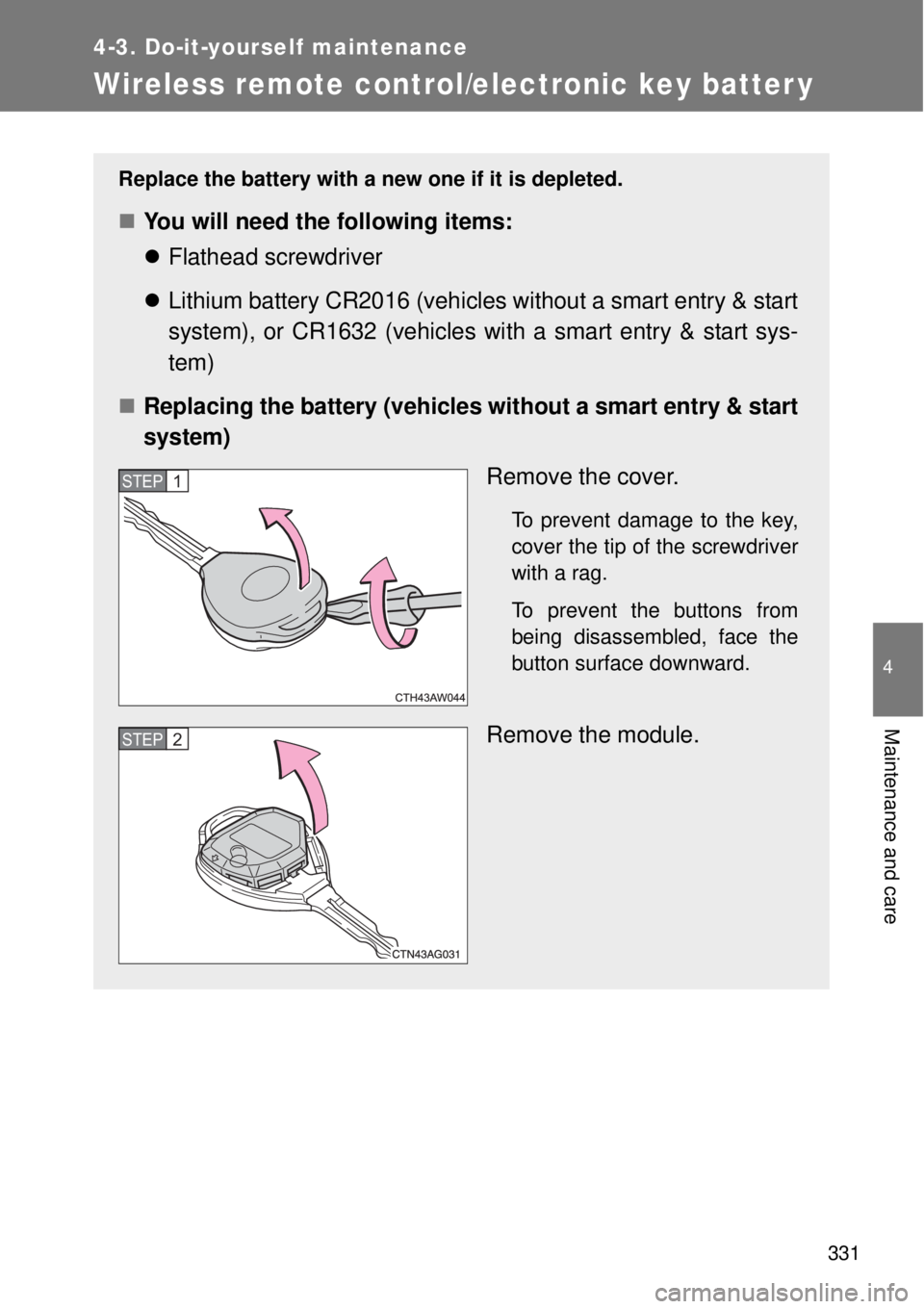
Remove the cover.
To prevent damage to the key,
cover the tip of the screwdriver
with a rag.
To prevent the buttons from
being disassembled, face the
button surface downward.
Remove the module.
STEP 1
STEP 2
Page 332 of 464
332 4-3. Do-it-yourself maintenance
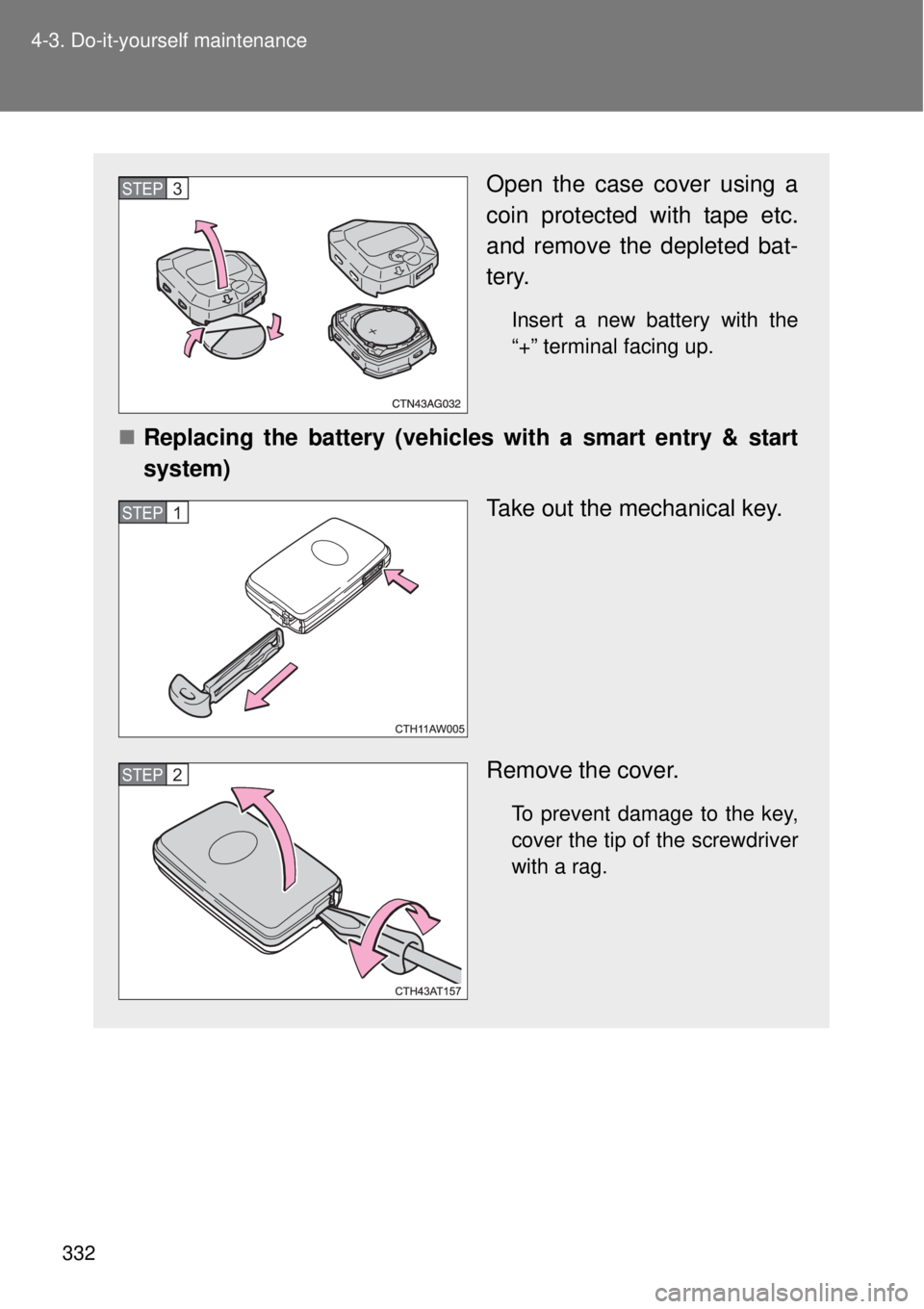
Open the case cover using a
coin protected with tape etc.
and remove the depleted bat-
tery.
Insert a new battery with the
“+” terminal facing up.
Replacing the battery (vehicles with a smart entry & start
system)
Take out the mechanical key.
Remove the cover.
To prevent damage to the key,
cover the tip of the screwdriver
with a rag.
STEP 3
STEP 1
STEP 2
Page 333 of 464
333 4-3. Do-it-yourself maintenance
4
Maintenance and care
Use a CR2016 (vehicles without a smart entry & start system) or
CR1632 (vehicles with a smart entry & start system) lithium battery
Batteries can be purchased at any authorized Toyota dealer or repairer,
or another duly qualified and equipped professional, local electrical appli-
ance shops or camera stores.
Replace only with the same or equivalent type recommended by the
manufacturer.
Dispose of used batteries according to local laws.
If the key battery is depleted
The following symptoms may occur:
The smart entry & start system (if equipped) and wireless remote control
will not function properly.
The operational range will be reduced.
When putting the module back (vehicles without a smart entry & start
system)
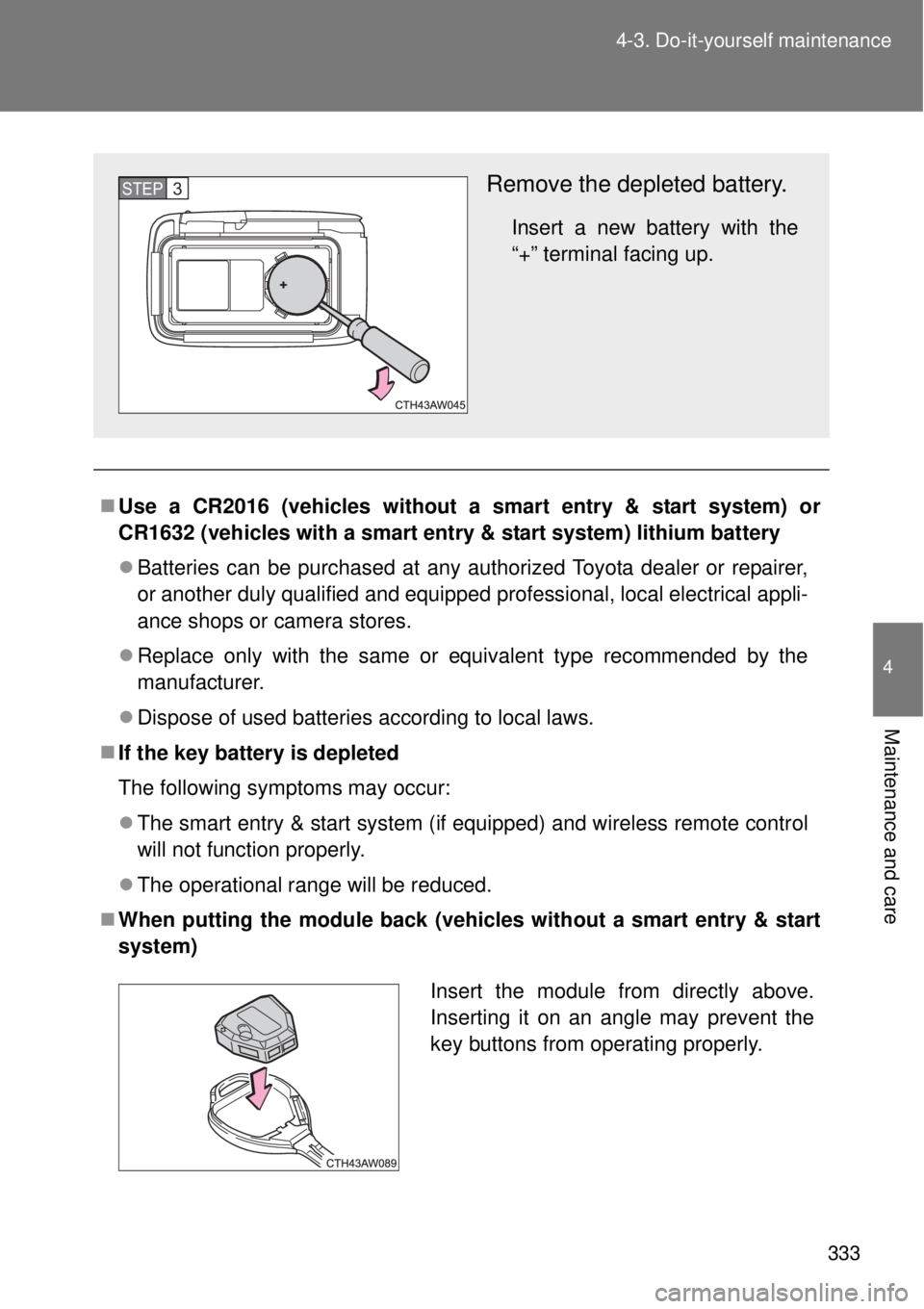
Remove the depleted battery.
Insert a new battery with the
“+” terminal facing up.
STEP 3
Insert the module from directly above.
Inserting it on an angle may prevent the
key buttons from operating properly.
Page 361 of 464
5When trouble arises
361
5-1. Essential information
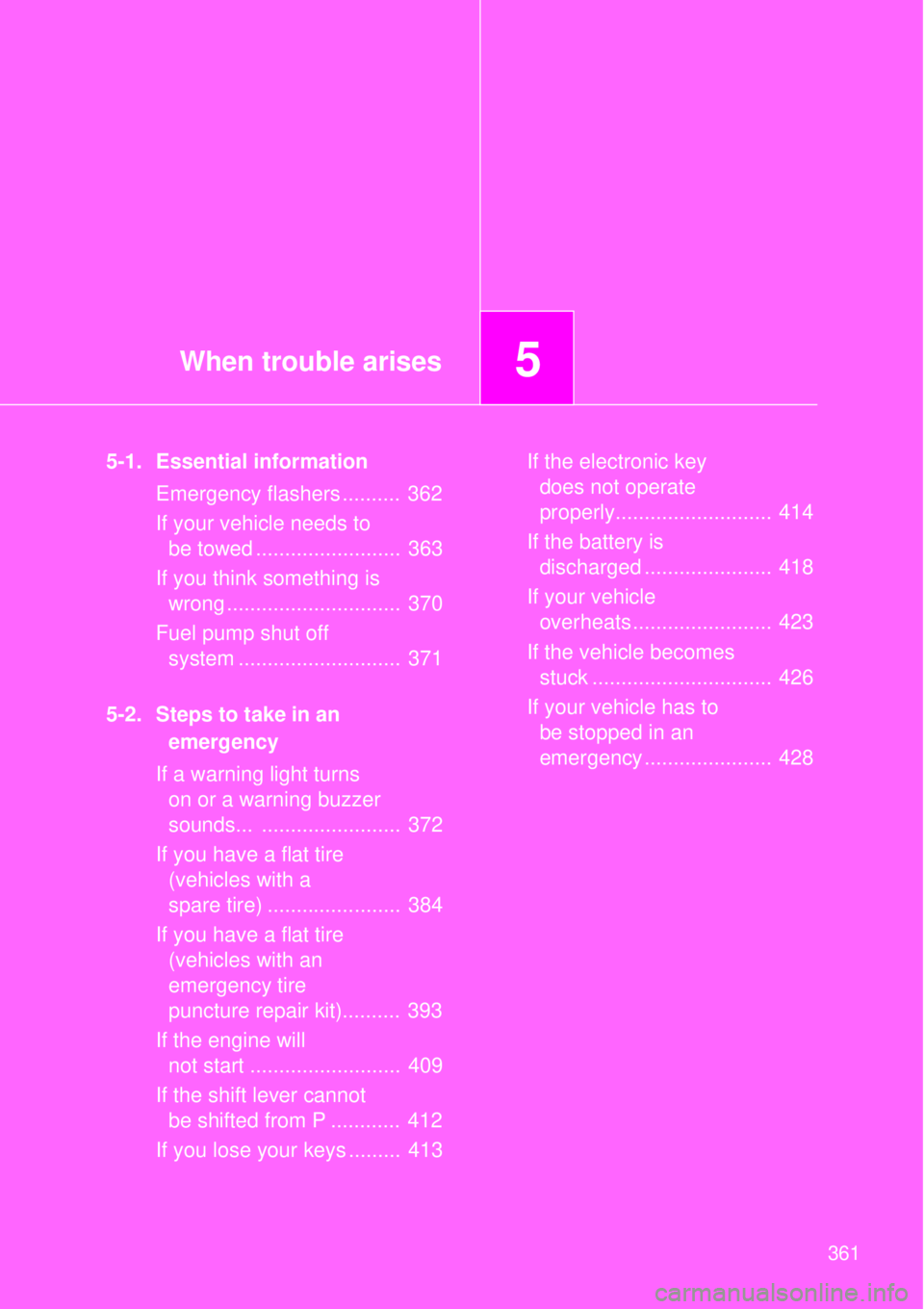
Emergency flashers .......... 362
If your vehicle needs to
be towed ......................... 363
If you think something is
wrong .............................. 370
Fuel pump shut off
system ............................ 371
5-2. Steps to take in an
emergency
If a warning light turns
on or a warning buzzer
sounds... ........................ 372
If you have a flat tire
(vehicles with a
spare tire) ....................... 384
If you have a flat tire
(vehicles with an
emergency tire
puncture repair kit).......... 393
If the engine will
not start .......................... 409
If the shift lever cannot
be shifted from P ............ 412
If you lose your keys ......... 413If the electronic key
does not operate
properly........................... 414
If the battery is
discharged ...................... 418
If your vehicle
overheats ........................ 423
If the vehicle becomes
stuck ............................... 426
If your vehicle has to
be stopped in an
emergency ...................... 428
Page 369 of 464
5
369 5-1. Essential information
When trouble arises
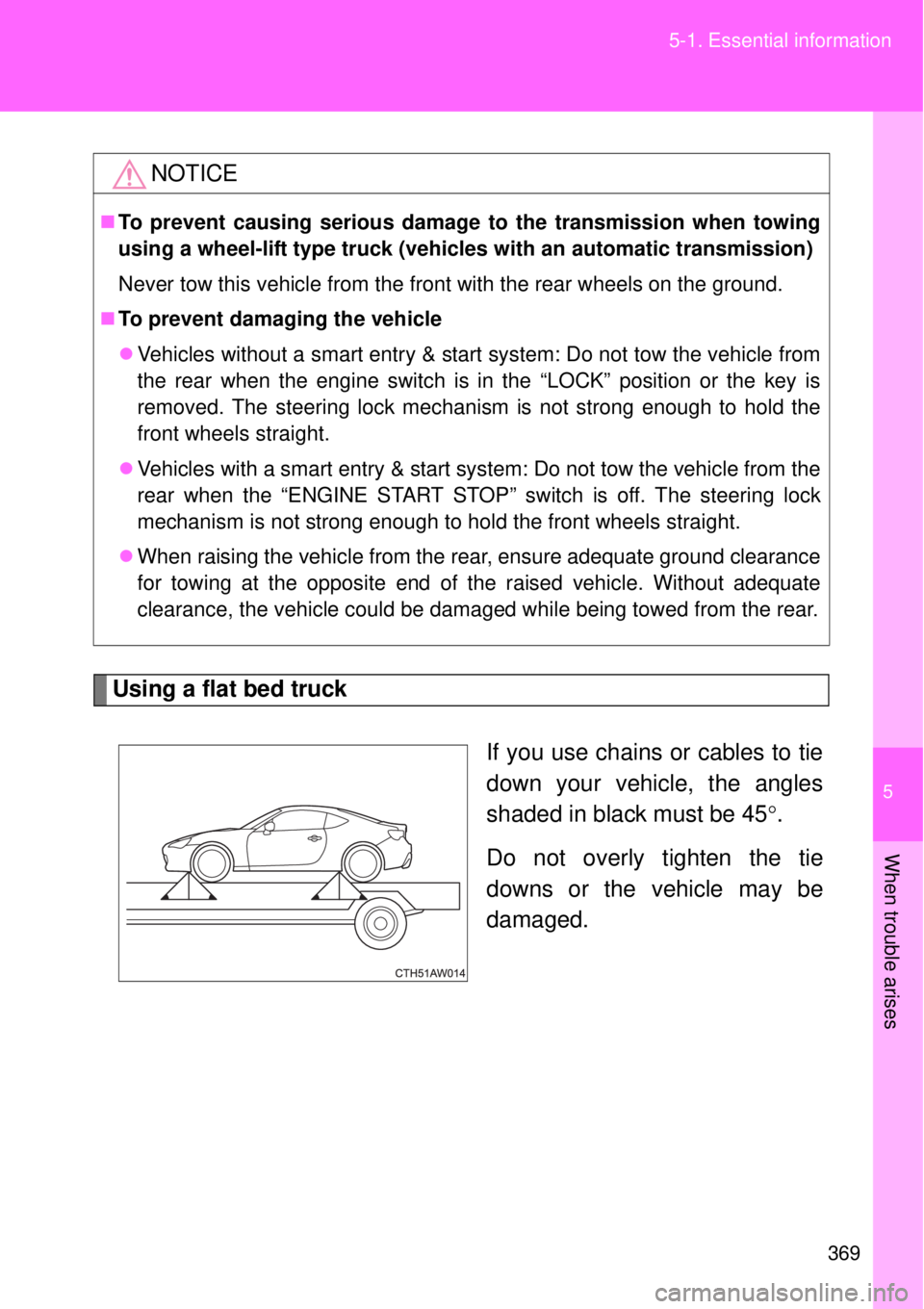
Using a flat bed truck
If you use chains or cables to tie
down your vehicle, the angles
shaded in black must be 45.
Do not overly tighten the tie
downs or the vehicle may be
damaged.
NOTICE
To prevent causing serious damage to the transmission when towing
using a wheel-lift type truck (vehicles with an automatic transmission)
Never tow this vehicle from the front with the rear wheels on the ground.
To prevent damaging the vehicle
Vehicles without a smart entry & start system: Do not tow the vehicle from
the rear when the engine switch is in the “LOCK” position or the key is
removed. The steering lock mechanism is not strong enough to hold the
front wheels straight.
Vehicles with a smart entry & start system: Do not tow the vehicle from the
rear when the “ENGINE START STOP” switch is off. The steering lock
mechanism is not strong enough to hold the front wheels straight.
When raising the vehicle from the rear, ensure adequate ground clearance
for towing at the opposite end of the raised vehicle. Without adequate
clearance, the vehicle could be damaged while being towed from the rear.
Page 380 of 464
380 5-2. Steps to take in an emergency
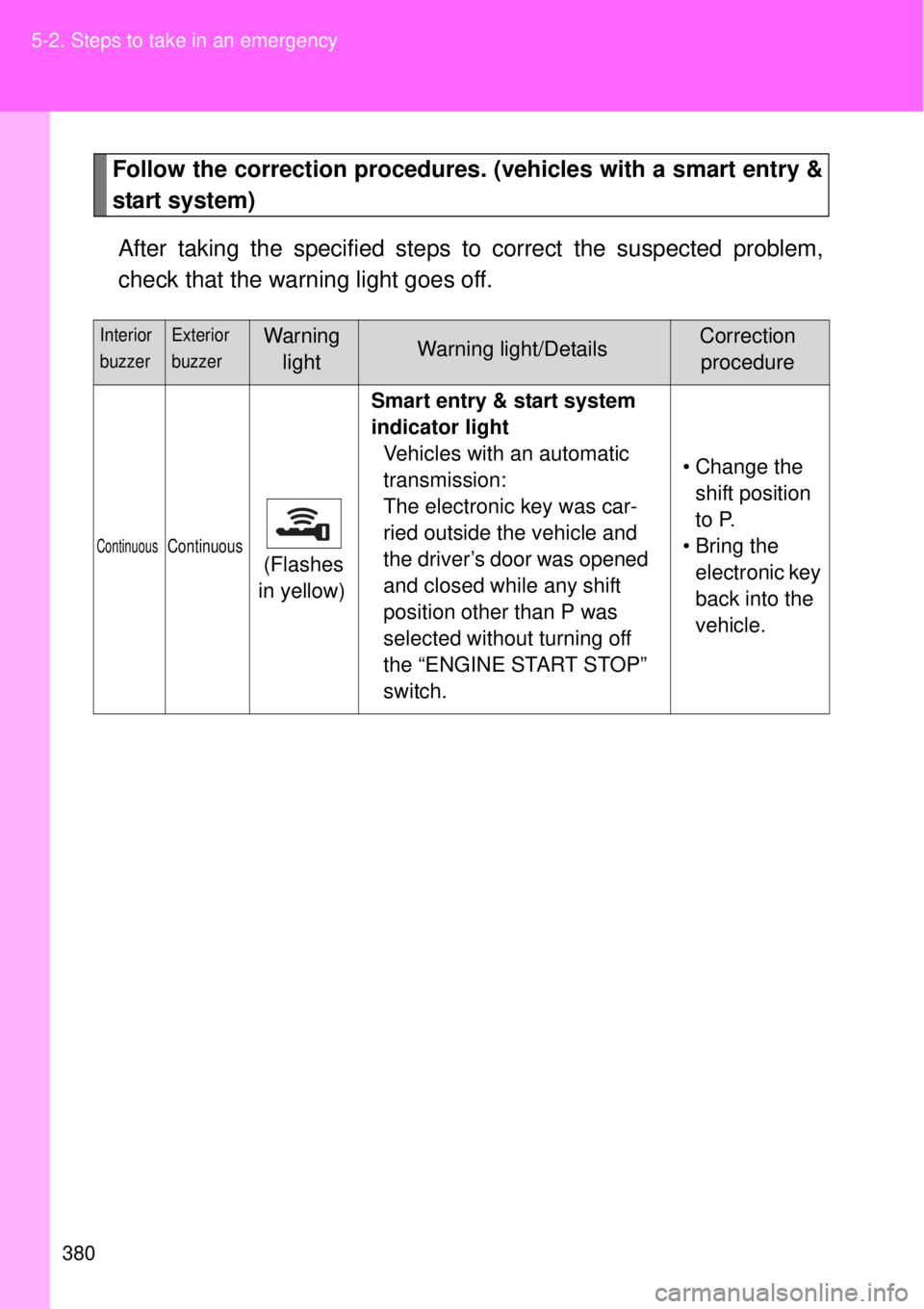
Follow the correction procedures. (vehicles with a smart entry &
start system)
After taking the specified steps to correct the suspected problem,
check that the warning light goes off.
Interior
buzzerExterior
buzzerWarning
lightWarning light/DetailsCorrection
procedure
ContinuousContinuous (Flashes
in yellow)Smart entry & start system
indicator light
Vehicles with an automatic
transmission:
The electronic key was car-
ried outside the vehicle and
the driver’s door was opened
and closed while any shift
position other than P was
selected without turning off
the “ENGINE START STOP”
switch.• Change the
shift position
to P.
• Bring the
electronic key
back into the
vehicle.
Page 381 of 464
5
381 5-2. Steps to take in an emergency
When trouble arises
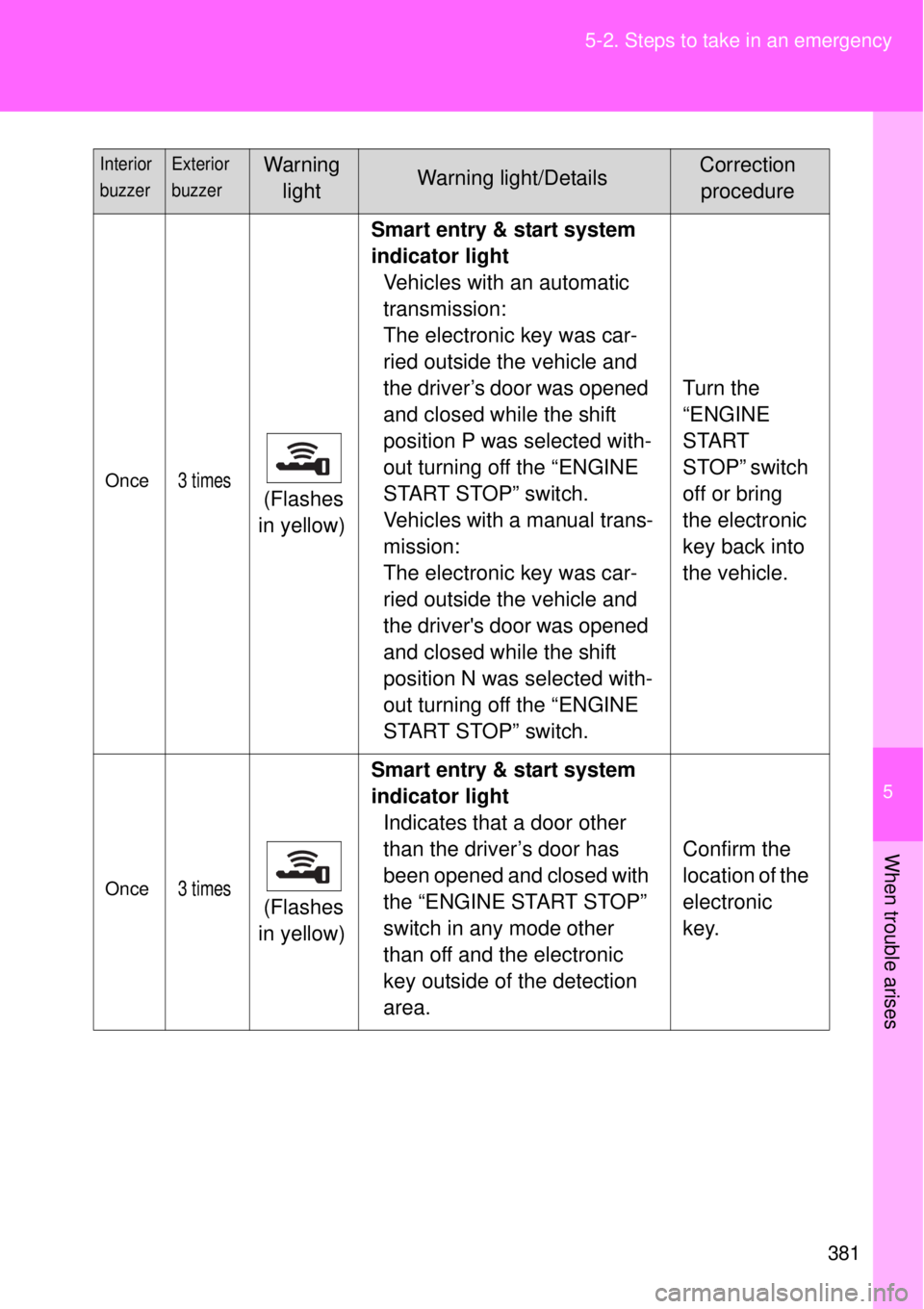
Once3 times (Flashes
in yellow)Smart entry & start system
indicator light
Vehicles with an automatic
transmission:
The electronic key was car-
ried outside the vehicle and
the driver’s door was opened
and closed while the shift
position P was selected with-
out turning off the “ENGINE
START STOP” switch.
Vehicles with a manual trans-
mission:
The electronic key was car-
ried outside the vehicle and
the driver's door was opened
and closed while the shift
position N was selected with-
out turning off the “ENGINE
START STOP” switch.Turn the
“ENGINE
START
STOP” switch
off or bring
the electronic
key back into
the vehicle.
Once3 times (Flashes
in yellow)Smart entry & start system
indicator light
Indicates that a door other
than the driver’s door has
been opened and closed with
the “ENGINE START STOP”
switch in any mode other
than off and the electronic
key outside of the detection
area.Confirm the
location of the
electronic
key.
Interior
buzzerExterior
buzzerWarning
lightWarning light/DetailsCorrection
procedure
Page 382 of 464
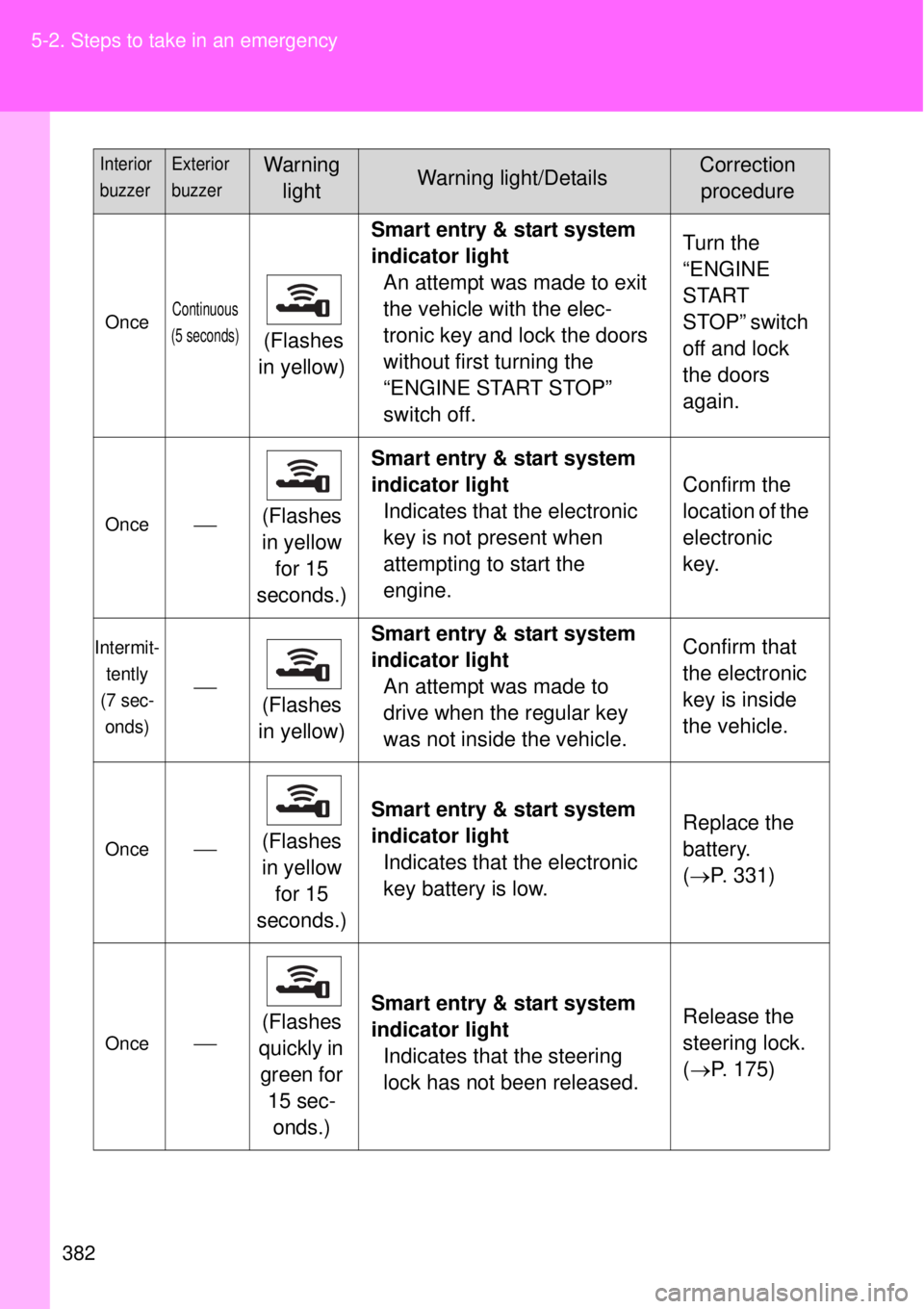
382 5-2. Steps to take in an emergency
OnceContinuous
(5 seconds)
(Flashes
in yellow)Smart entry & start system
indicator light
An attempt was made to exit
the vehicle with the elec-
tronic key and lock the doors
without first turning the
“ENGINE START STOP”
switch off.Turn the
“ENGINE
START
STOP” switch
off and lock
the doors
again.
Once(Flashes
in yellow
for 15
seconds.)Smart entry & start system
indicator light
Indicates that the electronic
key is not present when
attempting to start the
engine.Confirm the
location of the
electronic
key.
Intermit-
tently
(7 sec-
onds)
(Flashes
in yellow)Smart entry & start system
indicator light
An attempt was made to
drive when the regular key
was not inside the vehicle.Confirm that
the electronic
key is inside
the vehicle.
Once(Flashes
in yellow
for 15
seconds.)Smart entry & start system
indicator light
Indicates that the electronic
key battery is low.Replace the
battery.
(P. 331)
Once(Flashes
quickly in
green for
15 sec-
onds.)Smart entry & start system
indicator light
Indicates that the steering
lock has not been released.Release the
steering lock.
(P. 175)
Interior
buzzerExterior
buzzerWarning
lightWarning light/DetailsCorrection
procedure