stop start TOYOTA GT86 2014 Manual PDF
[x] Cancel search | Manufacturer: TOYOTA, Model Year: 2014, Model line: GT86, Model: TOYOTA GT86 2014Pages: 464, PDF Size: 10.65 MB
Page 378 of 464

378 5-2. Steps to take in an emergency
If the tire pressure warning system is inoperative
The tire pressure warning system will be disabled in the following conditions:
(When the condition becomes normal, the system will work properly.)
If tires not equipped with tire pressure warning valves and transmitters
are used.
If the ID code on the tire pressure warning valves and transmitters is not
registered in the tire pressure warning computer.
If the tire inflation pressure is 380 kPa (3.87 kgf/cm
2 or bar, 55 psi) or
higher.
The tire pressure warning system may be disabled in the following condi-
tions:
(When the condition becomes normal, the system will work properly.)
If electronic devices or facilities using similar radio wave frequencies are
nearby.
If a radio set at similar frequencies is in use in the vehicle.
If a window tint that affects the radio wave signals is installed.
If there is a lot of snow or ice on the vehicle, in particular around the
wheels or wheel housings.
If non-genuine Toyota wheels are used. (Even if you use Toyota wheels,
the tire pressure warning system may not work properly with some types
of tires.)
If tire chains are used.
If a large metallic object which can interfere with signal reception is put in
the trunk.
If the tire pressure warning light frequently comes on after blinking for
approximately one minute
If the tire pressure warning light frequently comes on after blinking for
approximately one minute when the “ENGINE START STOP” switch is
turned to IGNITION ON mode (vehicles with a smart entry & start system) or
the engine switch is turned to the “ON” position (vehicles without a smart
entry & start system), have it checked by any authorized Toyota dealer or
repairer, or another duly qualified and equipped professional.
Page 380 of 464
380 5-2. Steps to take in an emergency
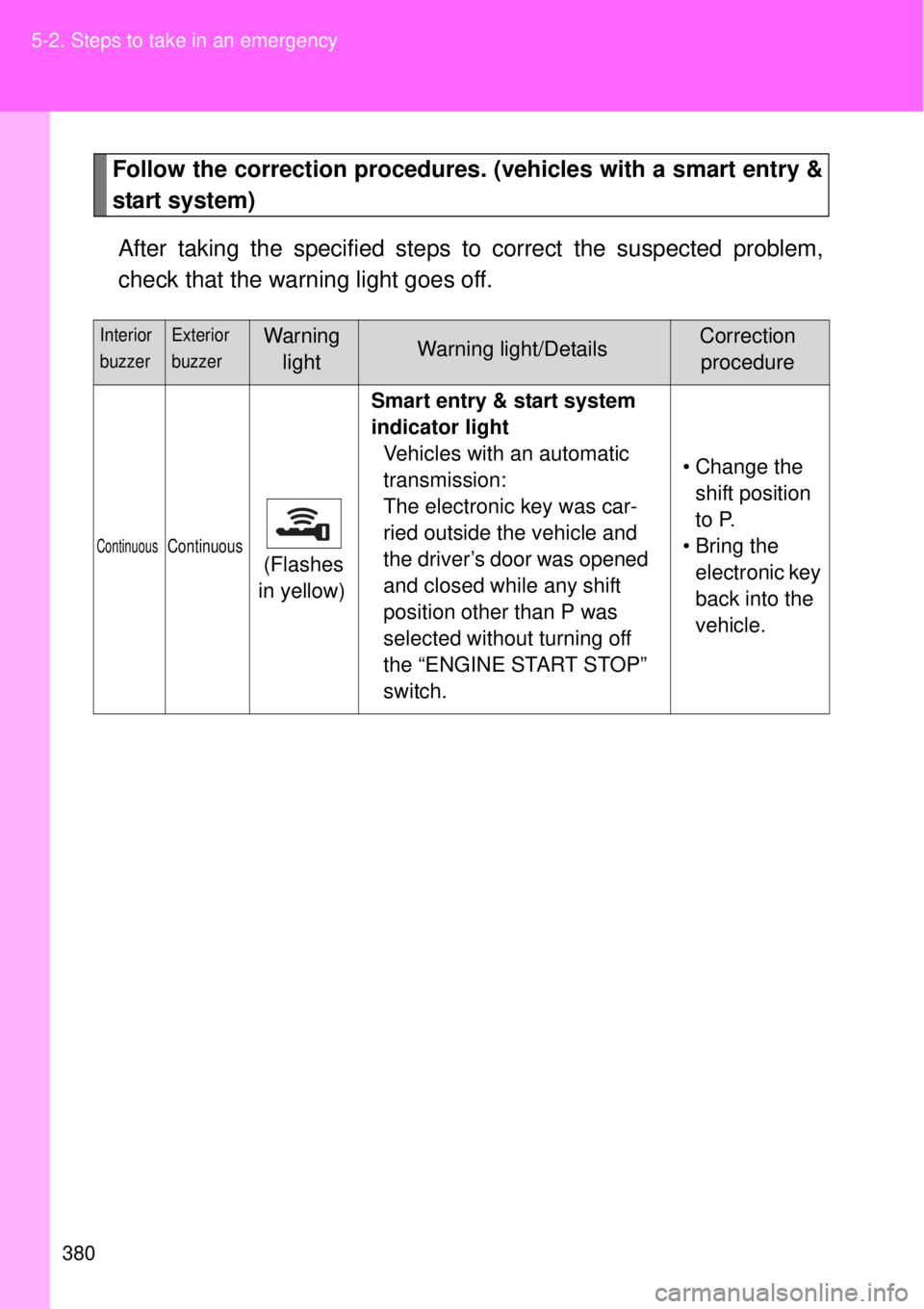
Follow the correction procedures. (vehicles with a smart entry &
start system)
After taking the specified steps to correct the suspected problem,
check that the warning light goes off.
Interior
buzzerExterior
buzzerWarning
lightWarning light/DetailsCorrection
procedure
ContinuousContinuous (Flashes
in yellow)Smart entry & start system
indicator light
Vehicles with an automatic
transmission:
The electronic key was car-
ried outside the vehicle and
the driver’s door was opened
and closed while any shift
position other than P was
selected without turning off
the “ENGINE START STOP”
switch.• Change the
shift position
to P.
• Bring the
electronic key
back into the
vehicle.
Page 381 of 464
5
381 5-2. Steps to take in an emergency
When trouble arises
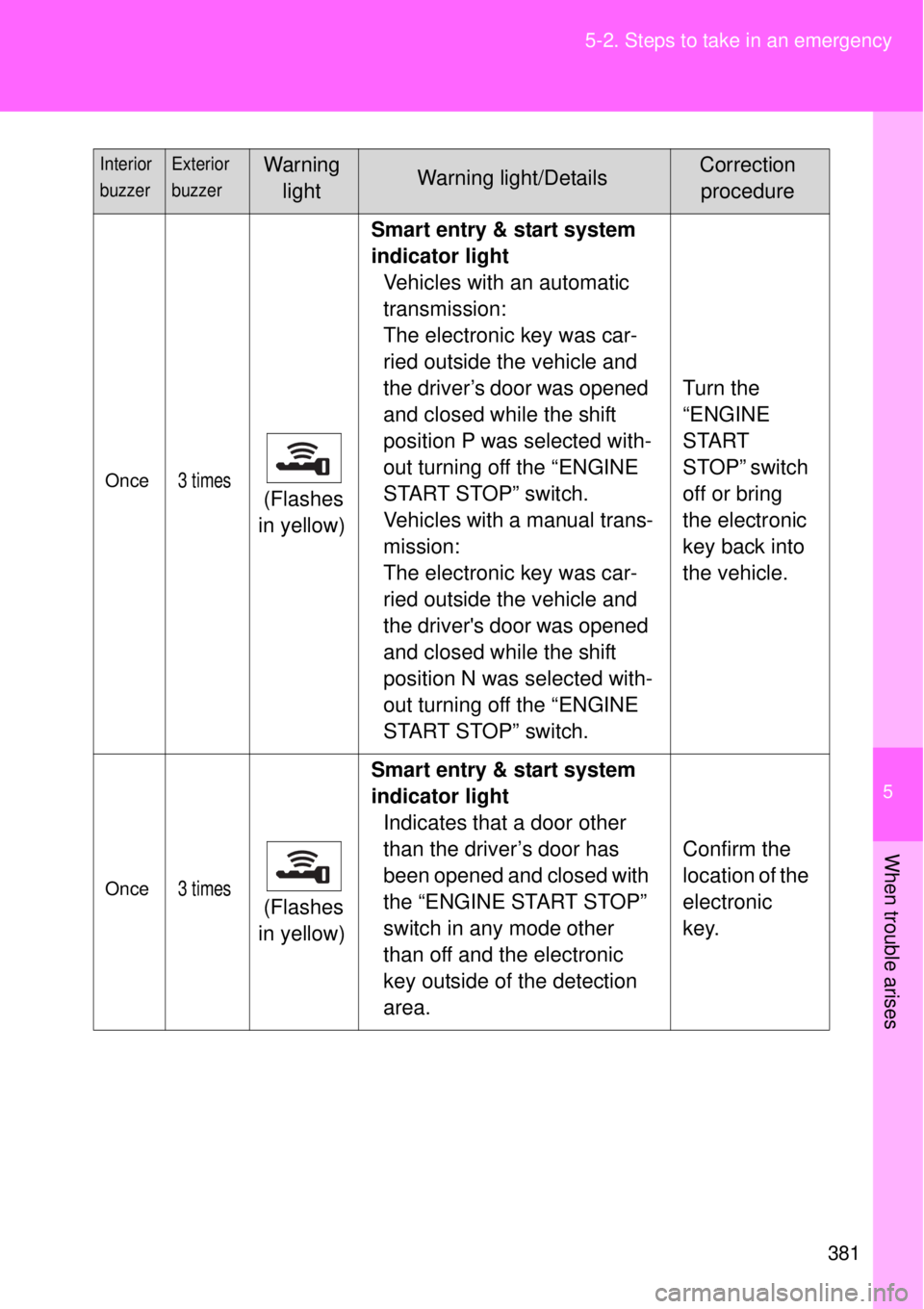
Once3 times (Flashes
in yellow)Smart entry & start system
indicator light
Vehicles with an automatic
transmission:
The electronic key was car-
ried outside the vehicle and
the driver’s door was opened
and closed while the shift
position P was selected with-
out turning off the “ENGINE
START STOP” switch.
Vehicles with a manual trans-
mission:
The electronic key was car-
ried outside the vehicle and
the driver's door was opened
and closed while the shift
position N was selected with-
out turning off the “ENGINE
START STOP” switch.Turn the
“ENGINE
START
STOP” switch
off or bring
the electronic
key back into
the vehicle.
Once3 times (Flashes
in yellow)Smart entry & start system
indicator light
Indicates that a door other
than the driver’s door has
been opened and closed with
the “ENGINE START STOP”
switch in any mode other
than off and the electronic
key outside of the detection
area.Confirm the
location of the
electronic
key.
Interior
buzzerExterior
buzzerWarning
lightWarning light/DetailsCorrection
procedure
Page 382 of 464
382 5-2. Steps to take in an emergency
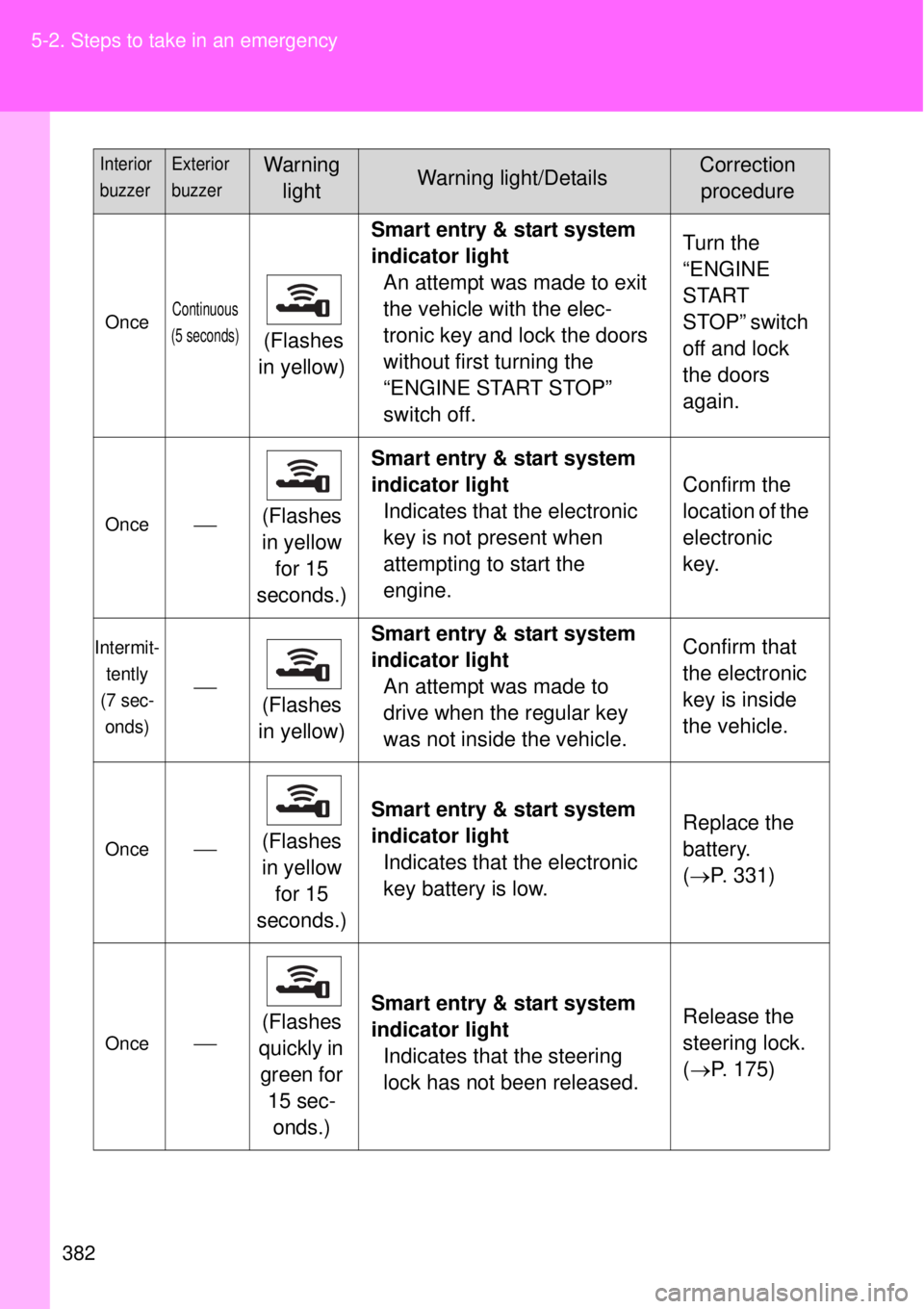
OnceContinuous
(5 seconds)
(Flashes
in yellow)Smart entry & start system
indicator light
An attempt was made to exit
the vehicle with the elec-
tronic key and lock the doors
without first turning the
“ENGINE START STOP”
switch off.Turn the
“ENGINE
START
STOP” switch
off and lock
the doors
again.
Once(Flashes
in yellow
for 15
seconds.)Smart entry & start system
indicator light
Indicates that the electronic
key is not present when
attempting to start the
engine.Confirm the
location of the
electronic
key.
Intermit-
tently
(7 sec-
onds)
(Flashes
in yellow)Smart entry & start system
indicator light
An attempt was made to
drive when the regular key
was not inside the vehicle.Confirm that
the electronic
key is inside
the vehicle.
Once(Flashes
in yellow
for 15
seconds.)Smart entry & start system
indicator light
Indicates that the electronic
key battery is low.Replace the
battery.
(P. 331)
Once(Flashes
quickly in
green for
15 sec-
onds.)Smart entry & start system
indicator light
Indicates that the steering
lock has not been released.Release the
steering lock.
(P. 175)
Interior
buzzerExterior
buzzerWarning
lightWarning light/DetailsCorrection
procedure
Page 383 of 464
5
383 5-2. Steps to take in an emergency
When trouble arises
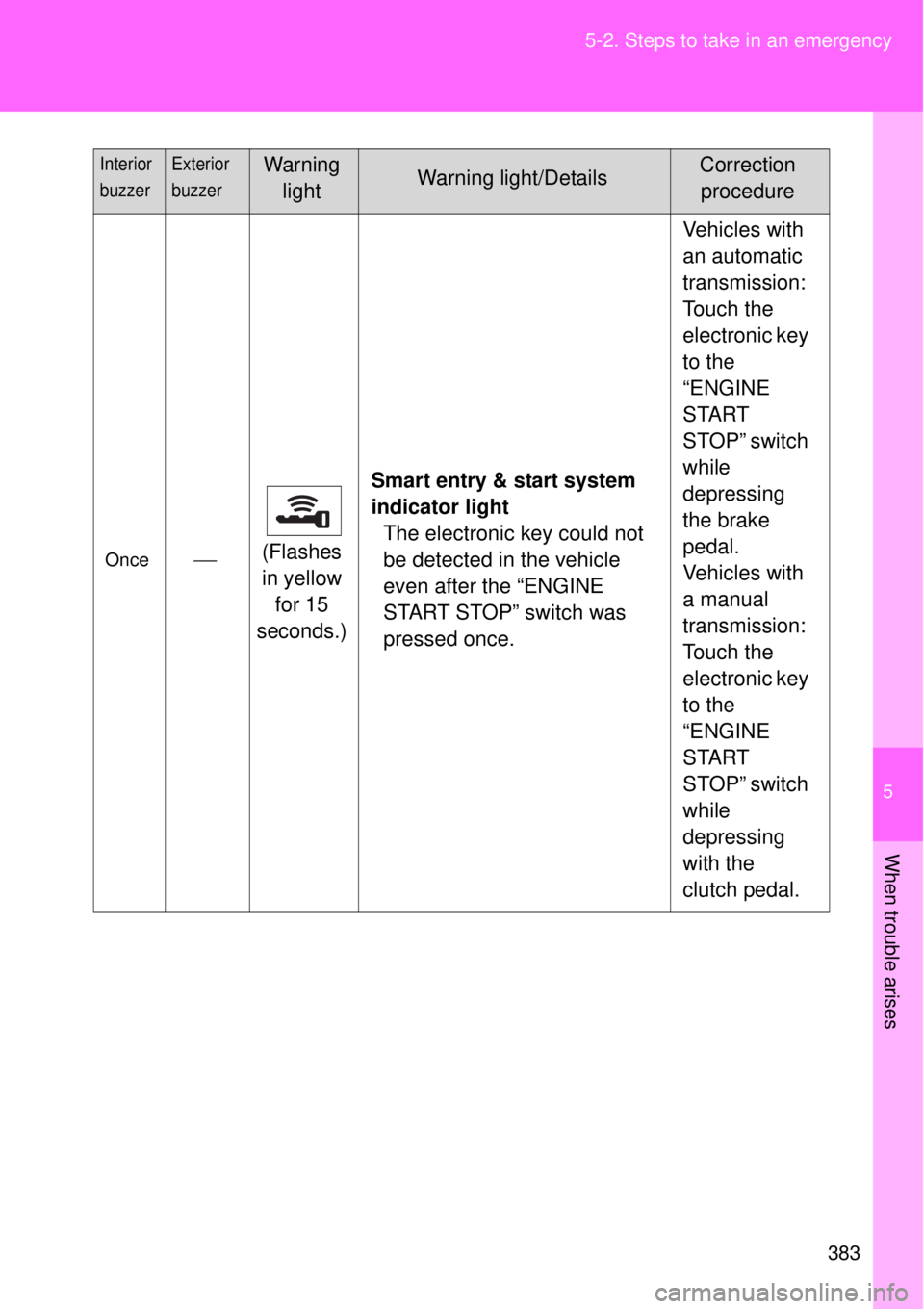
Once(Flashes
in yellow
for 15
seconds.)Smart entry & start system
indicator light
The electronic key could not
be detected in the vehicle
even after the “ENGINE
START STOP” switch was
pressed once.Vehicles with
an automatic
transmission:
Touch the
electronic key
to the
“ENGINE
START
STOP” switch
while
depressing
the brake
pedal.
Vehicles with
a manual
transmission:
Touch the
electronic key
to the
“ENGINE
START
STOP” switch
while
depressing
with the
clutch pedal.
Interior
buzzerExterior
buzzerWarning
lightWarning light/DetailsCorrection
procedure
Page 400 of 464
400 5-2. Steps to take in an emergency
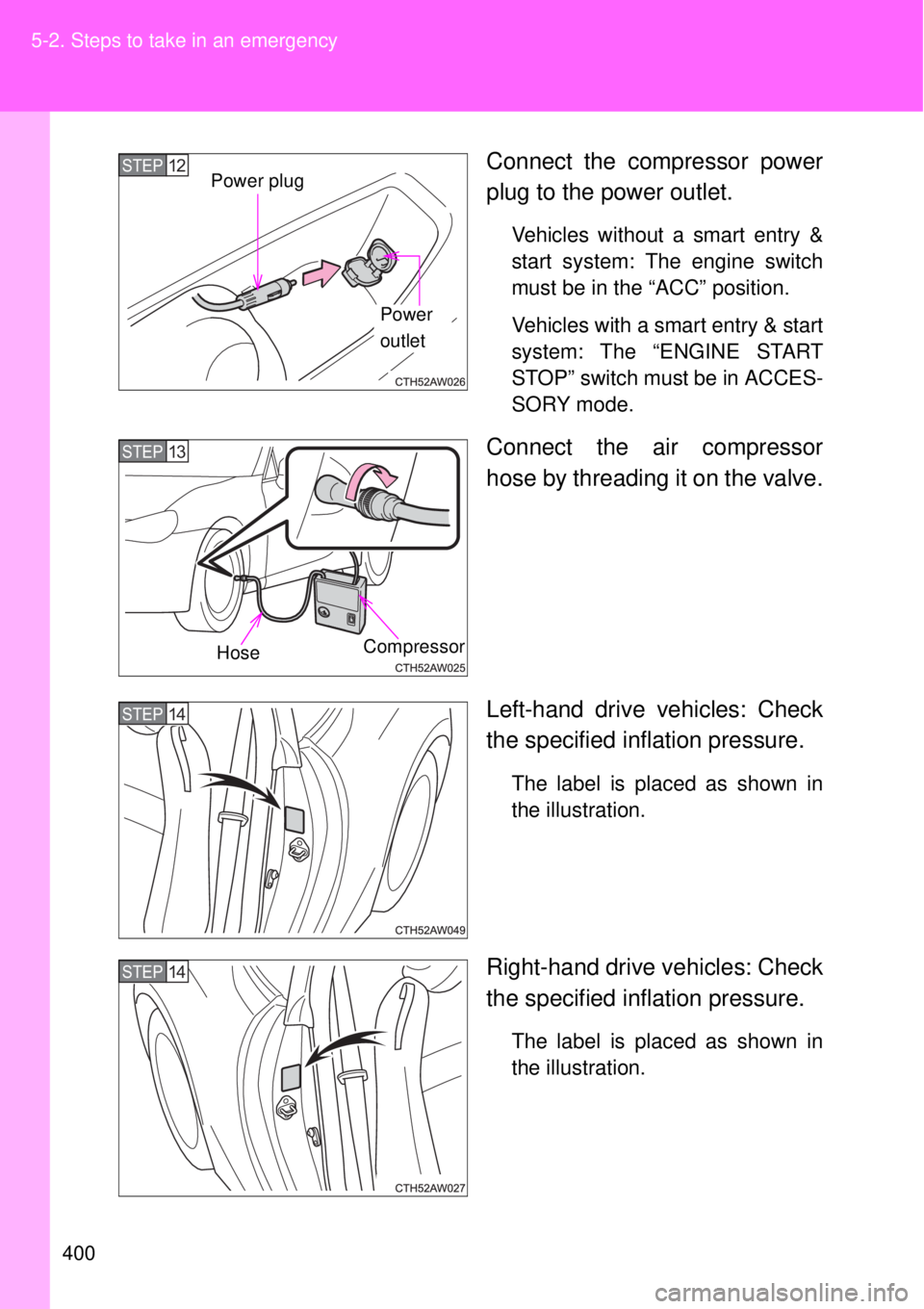
Connect the compressor power
plug to the power outlet.
Vehicles without a smart entry &
start system: The engine switch
must be in the “ACC” position.
Vehicles with a smart entry & start
system: The “ENGINE START
STOP” switch must be in ACCES-
SORY mode.
Connect the air compressor
hose by threading it on the valve.
Left-hand drive vehicles: Check
the specified inflation pressure.
The label is placed as shown in
the illustration.
Right-hand drive vehicles: Check
the specified inflation pressure.
The label is placed as shown in
the illustration.
Power
outlet
STEP12Power plug
STEP13
CompressorHose
STEP14
STEP14
Page 410 of 464
410 5-2. Steps to take in an emergency
Emergency start function (vehicles with a smart entry & start system)
When the engine does not start, the following steps can be used as
an interim measure to start the engine if the “ENGINE START STOP”
switch is functioning normally:
Vehicles with an automatic transmission
Set the parking brake.
Put the shift lever in P.
Set the “ENGINE START STOP” switch to ACCESSORY
mode.
Press and hold the “ENGINE START STOP” switch about 15
seconds while depressing the brake pedal firmly.
Even if the engine can be started using the above steps, the system
may be malfunctioning. Have the vehicle checked by any authorized
Toyota dealer or repairer, or another duly qualified and equipped pro-
fessional.
The starter motor does not turn over, the interior lights and
headlights do not turn on, or the horn does not sound.
One of the following may be the cause of the problem.
One or both of the battery terminals may be disconnected.
The battery may be discharged. (P. 418)
There may be a malfunction in the steering lock system. (vehi-
cles with a smart entry & start system)
Contact any authorized Toyota dealer or repairer, or another duly
qualified and equipped professional if the problem cannot be
repaired, or if repair procedures are unknown.
STEP 1
STEP 2
STEP 3
STEP 4
Page 411 of 464

5
411 5-2. Steps to take in an emergency
When trouble arises
Vehicles with a manual transmission
Set the parking brake.
Put the shift lever in N.
Turn the “ENGINE START STOP” switch to ACCESSORY
mode.
Push and hold the “ENGINE START STOP” switch for about
15 seconds while depressing the brake pedal and clutch
pedal firmly.
Even if the engine can be started using the above steps, the system
may be malfunctioning. Have the vehicle checked by any authorized
Toyota dealer or repairer, or another duly qualified and equipped pro-
fessional.
STEP 1
STEP 2
STEP 3
STEP 4
Page 412 of 464
412
5-2. Steps to take in an emergency
If the shift lever cannot be shifted from P (vehicles with an automatic transmission)
If the shift lever cannot be shifted with your foot on the brake, there
may be a problem with the shift lock system (a system to prevent
accidental operation of the shift lever). Have the vehicle inspected by
any authorized Toyota dealer or repairer, or another duly qualified
and equipped professional immediately.
The following steps may be used as an emergency measure to
ensure that the shift lever can be shifted.
Set the parking brake.
Vehicles without a smart entry & start system: Turn the
engine switch to the “ACC” position.
Vehicles with a smart entry & start system: Turn the
“ENGINE START STOP” switch to ACCESSORY mode.
Depress the brake pedal.
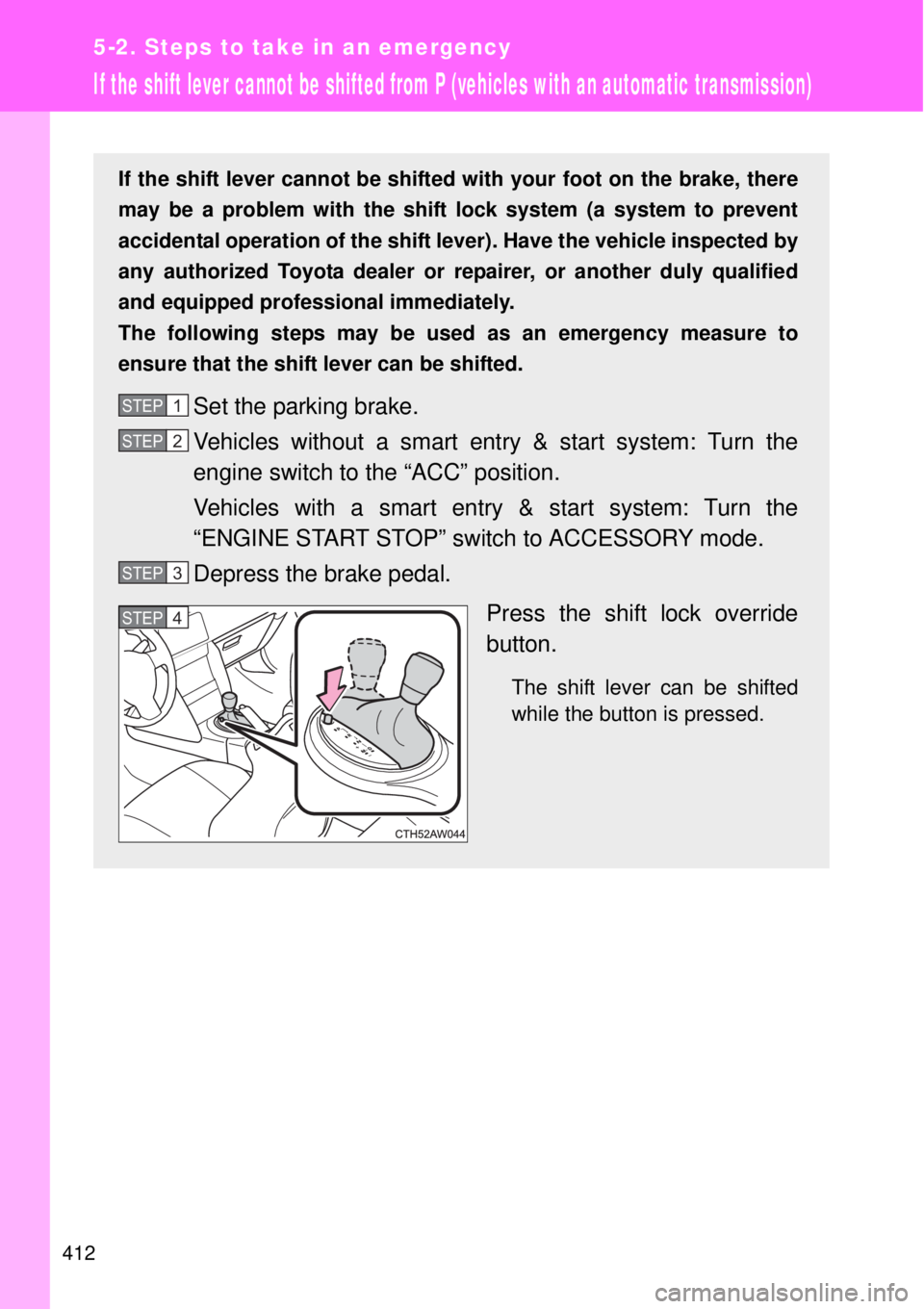
Press the shift lock override
button.
The shift lever can be shifted
while the button is pressed.
STEP 1
STEP 2
STEP 3
STEP 4
Page 415 of 464
5
415 5-2. Steps to take in an emergency
When trouble arises
Starting the engine
Vehicles with an automatic transmission
Ensure that the shift lever is in P and firmly depress the brake
pedal.
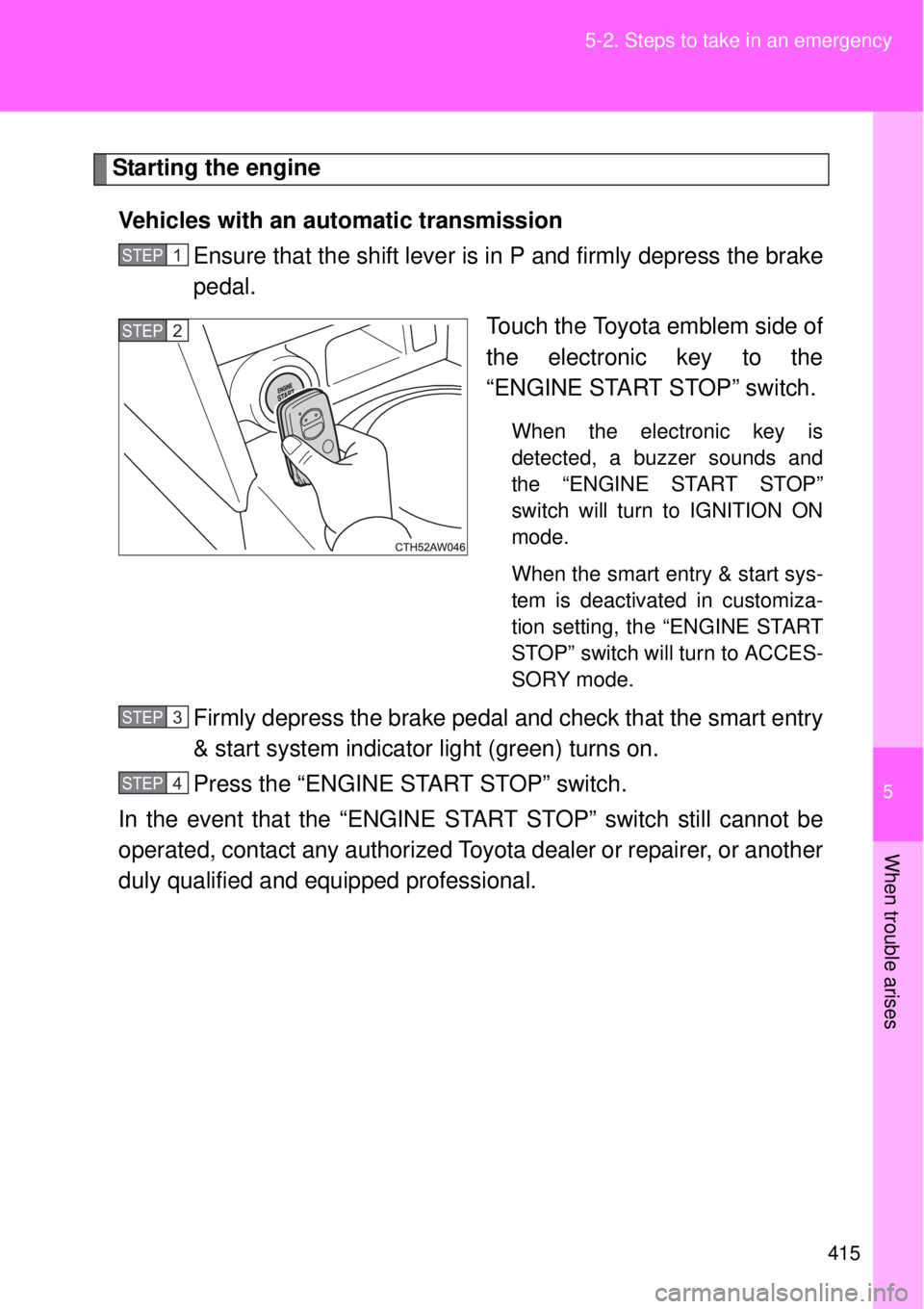
Touch the Toyota emblem side of
the electronic key to the
“ENGINE START STOP” switch.
When the electronic key is
detected, a buzzer sounds and
the “ENGINE START STOP”
switch will turn to IGNITION ON
mode.
When the smart entry & start sys-
tem is deactivated in customiza-
tion setting, the “ENGINE START
STOP” switch will turn to ACCES-
SORY mode.
Firmly depress the brake pedal and check that the smart entry
& start system indicator light (green) turns on.
Press the “ENGINE START STOP” switch.
In the event that the “ENGINE START STOP” switch still cannot be
operated, contact any authorized Toyota dealer or repairer, or another
duly qualified and equipped professional.
STEP 1
STEP 2
STEP 3
STEP 4