engine TOYOTA HIGHLANDER 2008 XU40 / 2.G User Guide
[x] Cancel search | Manufacturer: TOYOTA, Model Year: 2008, Model line: HIGHLANDER, Model: TOYOTA HIGHLANDER 2008 XU40 / 2.GPages: 577, PDF Size: 11.46 MB
Page 42 of 577
42 1-2. Opening, closing and locking the doors
*: A message will be shown on the multi-information display.
■ If the smart key system does not operate properly
● Locking and unlocking the doors: Use the mechanical key. ( P. 514)
● Starting the engine. ( P. 514)
■ When the electronic key battery is fully depleted
P. 453
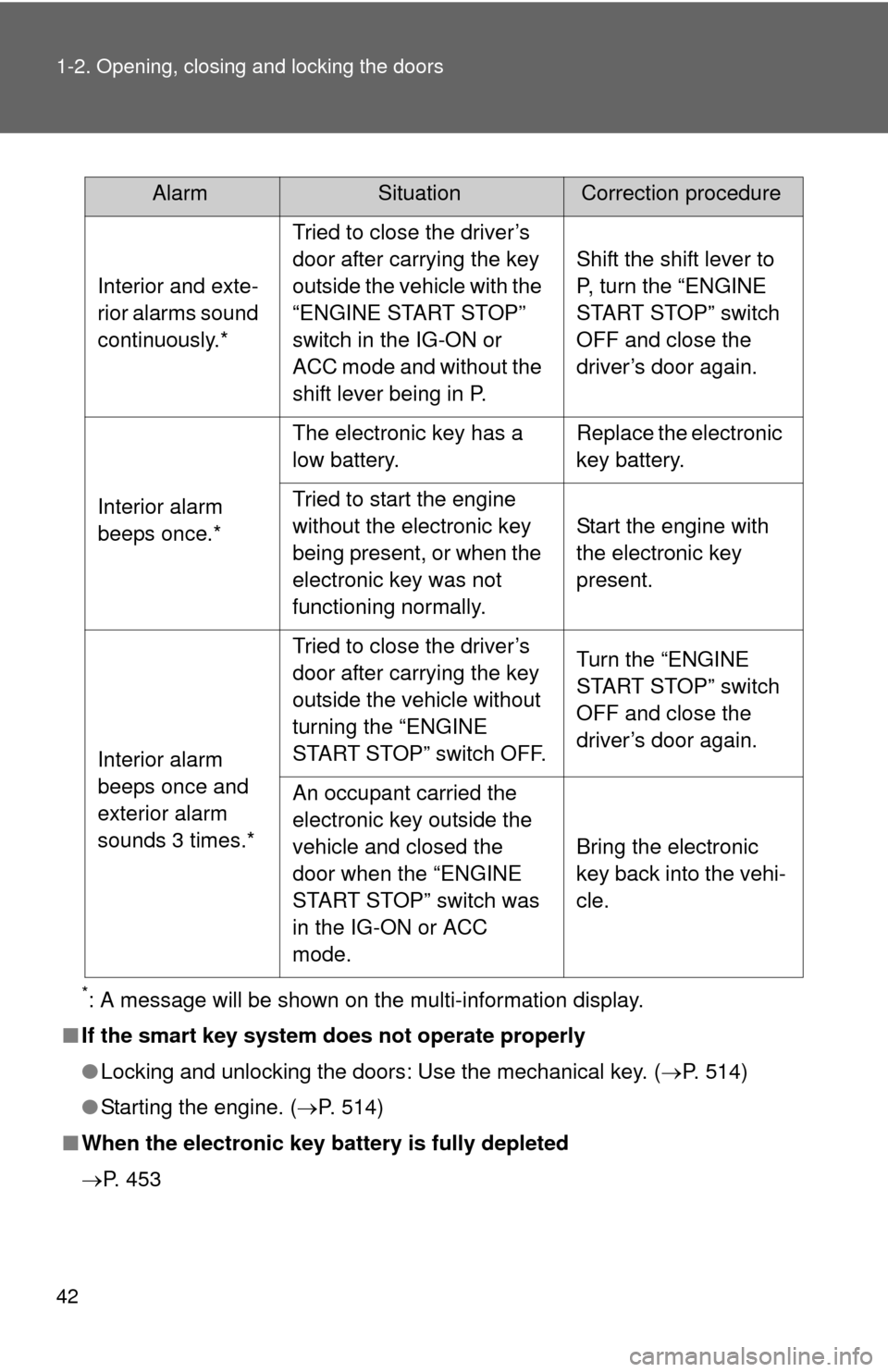
AlarmSituationCorrection procedure
Interior and exte-
rior alarms sound
continuously.* Tried to close the driver’s
door after carrying the key
outside the vehicle with the
“ENGINE START STOP”
switch in the IG-ON or
ACC mode and without the
shift lever being in P. Shift the shift lever to
P, turn the “ENGINE
START STOP” switch
OFF and close the
driver’s door again.
Interior alarm
beeps once.* The electronic key has a
low battery.
Replace the electronic
key battery.
Tried to start the engine
without the electronic key
being present, or when the
electronic key was not
functioning normally. Start the engine with
the electronic key
present.
Interior alarm
beeps once and
exterior alarm
sounds 3 times.* Tried to close the driver’s
door after carrying the key
outside the vehicle without
turning the “ENGINE
START STOP” switch OFF.
Turn the “ENGINE
START STOP” switch
OFF and close the
driver’s door again.
An occupant carried the
electronic key outside the
vehicle and closed the
door when the “ENGINE
START STOP” switch was
in the IG-ON or ACC
mode. Bring the electronic
key back into the vehi-
cle.
Page 56 of 577

56 1-2. Opening, closing and locking the doors
■If the wireless remote control does not operate
Vehicles without smart key system
Locking and unlocking the doors: Use the key. ( P. 64)
Vehicles with smart key system
● Locking and unlocking the doors: Use the mechanical key. ( P. 514)
● Starting the engine. ( P. 164)
■ Security feature
If a door is not opened within approximately 60 seconds after the vehicle is
unlocked, the security feature automatically locks the vehicle again.
■ Alarm
Using the wireless remote control to lock the door will set the alarm sy\
stem.
(P. 116)
■ Conditions affecting operation
Vehicles without smart key system
The wireless remote control function may not operate normally in the follow-
ing situations.
● Near a TV tower, radio station, electr ic power plant, airport or other facil-
ity that generates strong radio waves
● When carrying a portable radio, cell ular phone or other wireless commu-
nication device
● When multiple wireless keys are in the vicinity
● When the wireless key has come into contact with, or is covered by a
metallic object
● When a wireless key (that emits radio waves) is being used nearby
● When the wireless key has been left near an electrical appliance such as
a personal computer
Vehicles with smart key system
P. 3 7
■ Customization that can be co nfigured at Toyota dealer
Settings (e.g. wireless remote control) can be changed. (Customizable fea-
tures P. 554)
Page 66 of 577
66 1-2. Opening, closing and locking the doors
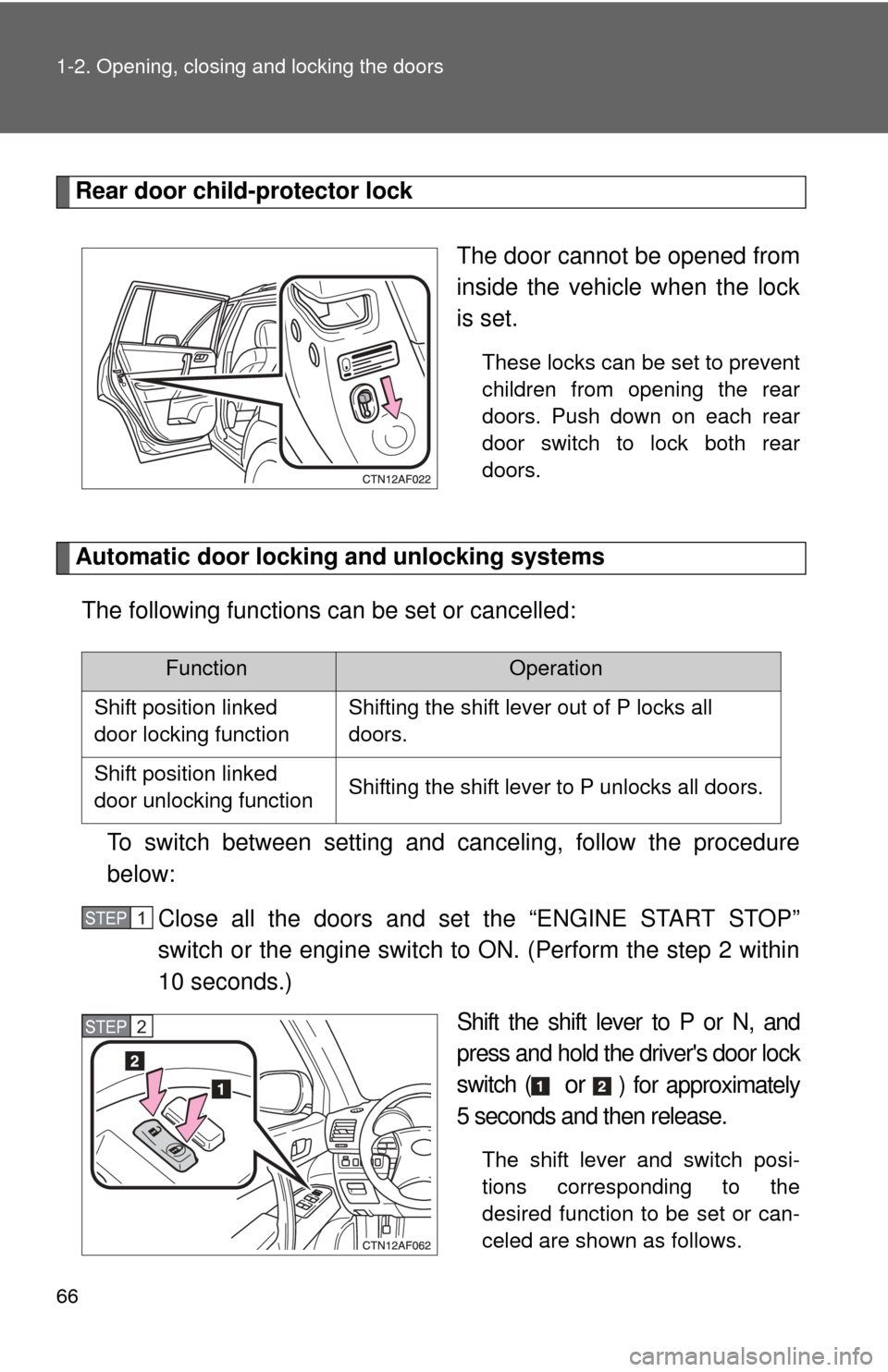
Rear door child-protector lockThe door cannot be opened from
inside the vehicle when the lock
is set.
These locks can be set to prevent
children from opening the rear
doors. Push down on each rear
door switch to lock both rear
doors.
Automatic door locking and unlocking systemsThe following functions can be set or cancelled:
To switch between setting and canceling, follow the procedure
below: Close all the doors and set the “ENGINE START STOP”
switch or the engine switch to ON. (Perform the step 2 within
10 seconds.) Shift the shift lever to P or N, and
press and hold the driver's door lock
switch (
or ) for approximately
5 seconds and then release.
The shift lever and switch posi-
tions corresponding to the
desired function to be set or can-
celed are shown as follows.
FunctionOperation
Shift position linked
door locking functionShifting the shift lever out of P locks all
doors.
Shift position linked
door unlocking functionShifting the shift lever to P unlocks all doors.
STEP1
STEP2
Page 67 of 577
67
1-2. Opening, closing and locking the doors
1
Before driving
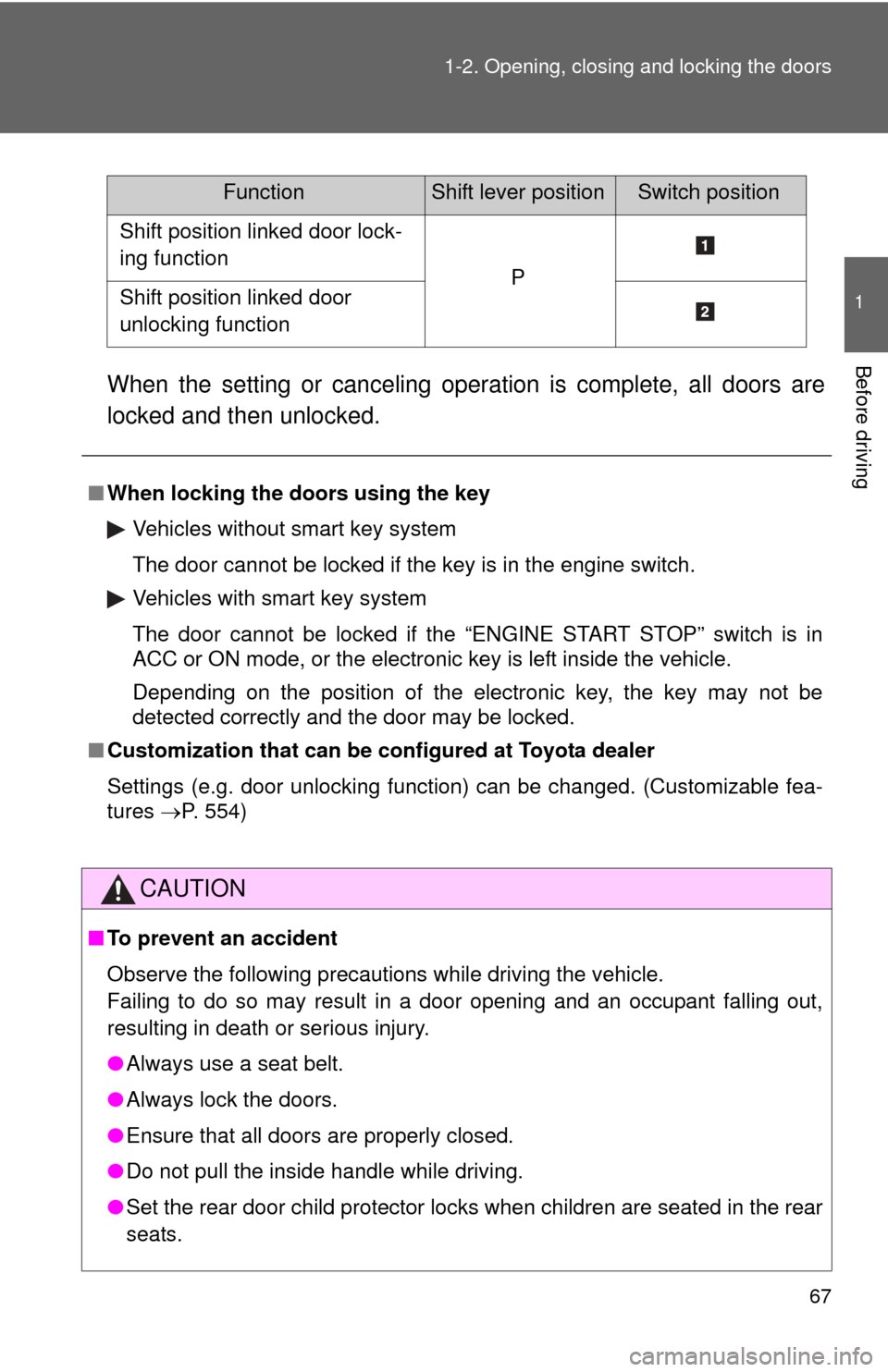
When the setting or canceling operation is complete, all doors are
locked and then unlocked.
FunctionShift lever positionSwitch position
Shift position linked door lock-
ing function
PShift position linked door
unlocking function
■
When locking the doors using the key
Vehicles without smart key system
The door cannot be locked if the key is in the engine switch.
Vehicles with smart key system
The door cannot be locked if the “ENGINE START STOP” switch is in
ACC or ON mode, or the electronic key is left inside the vehicle.
Depending on the position of the electronic key, the key may not be
detected correctly and the door may be locked.
■ Customization that can be co nfigured at Toyota dealer
Settings (e.g. door unlocking function) can be changed. (Customizable fea-
tures P. 554)
CAUTION
■To prevent an accident
Observe the following precautions while driving the vehicle.
Failing to do so may result in a door opening and an occupant falling out,
resulting in death or serious injury.
●Always use a seat belt.
● Always lock the doors.
● Ensure that all doors are properly closed.
● Do not pull the inside handle while driving.
● Set the rear door child protector locks when children are seated in the rear
seats.
Page 70 of 577
70 1-2. Opening, closing and locking the doors
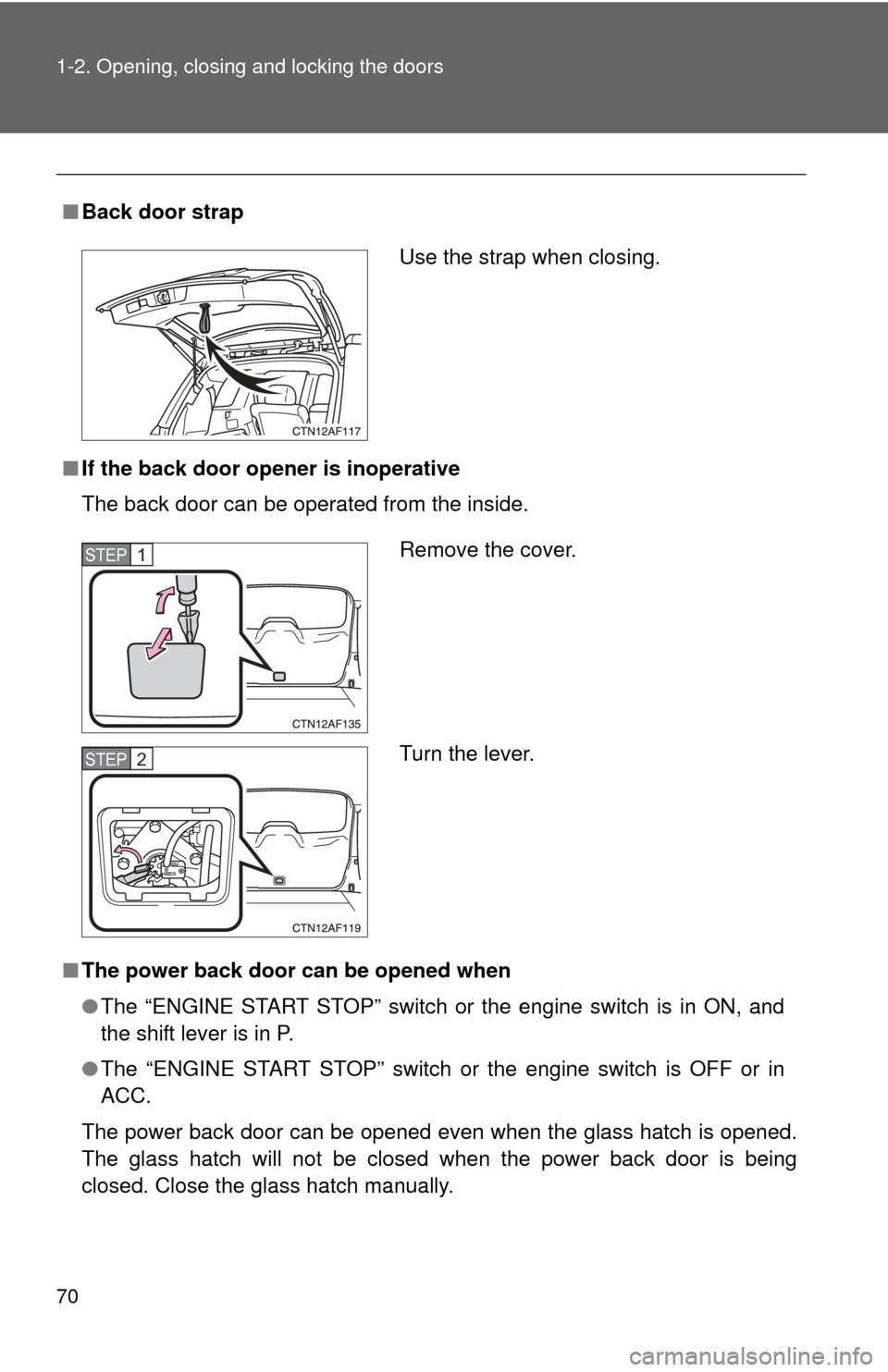
■Back door strap
■ If the back door opener is inoperative
The back door can be operated from the inside.
■ The power back door can be opened when
●The “ENGINE START STOP” switch or the engine switch is in ON, and
the shift lever is in P.
● The “ENGINE START STOP” switch or the engine switch is OFF or in
ACC.
The power back door can be opened even when the glass hatch is opened.
The glass hatch will not be closed when the power back door is being
closed. Close the glass hatch manually.
Use the strap when closing.
Remove the cover.
Turn the lever.STEP1
STEP2
Page 97 of 577
97
1
1-3. Adjustable components (seats, mirrors, steering wheel)
Before driving
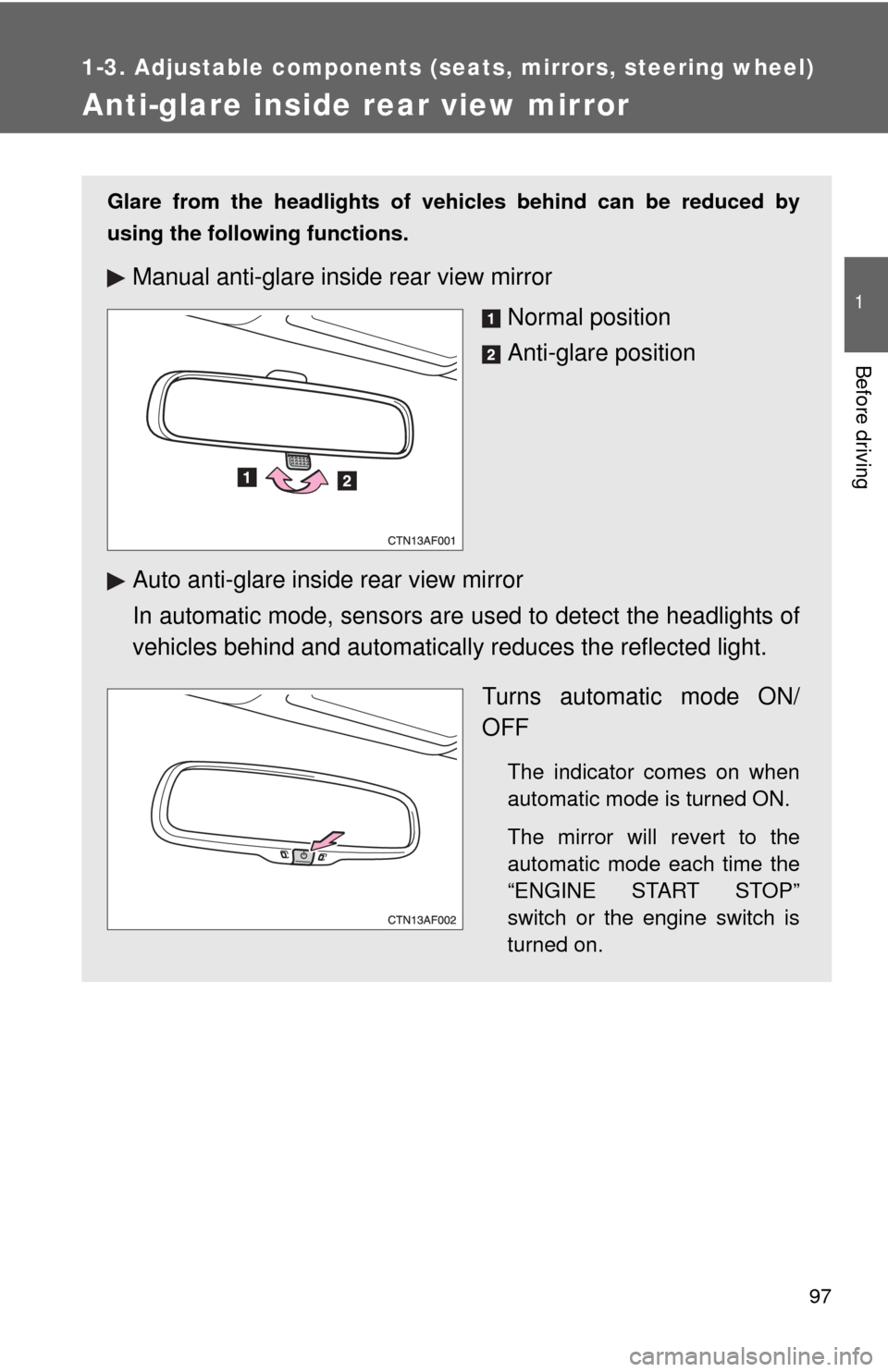
Anti-glare inside rear view mirror
Glare from the headlights of vehicles behind can be reduced by
using the following functions.
Manual anti-glare inside rear view mirrorNormal position
Anti-glare position
Auto anti-glare inside rear view mirror
In automatic mode, sensors are used to detect the headlights of
vehicles behind and automatical ly reduces the reflected light.
Turns automatic mode ON/
OFF
The indicator comes on when
automatic mode is turned ON.
The mirror will revert to the
automatic mode each time the
“ENGINE START STOP”
switch or the engine switch is
turned on.
Page 99 of 577
99
1
1-3. Adjustable components (seats, mirrors, steering wheel)
Before driving
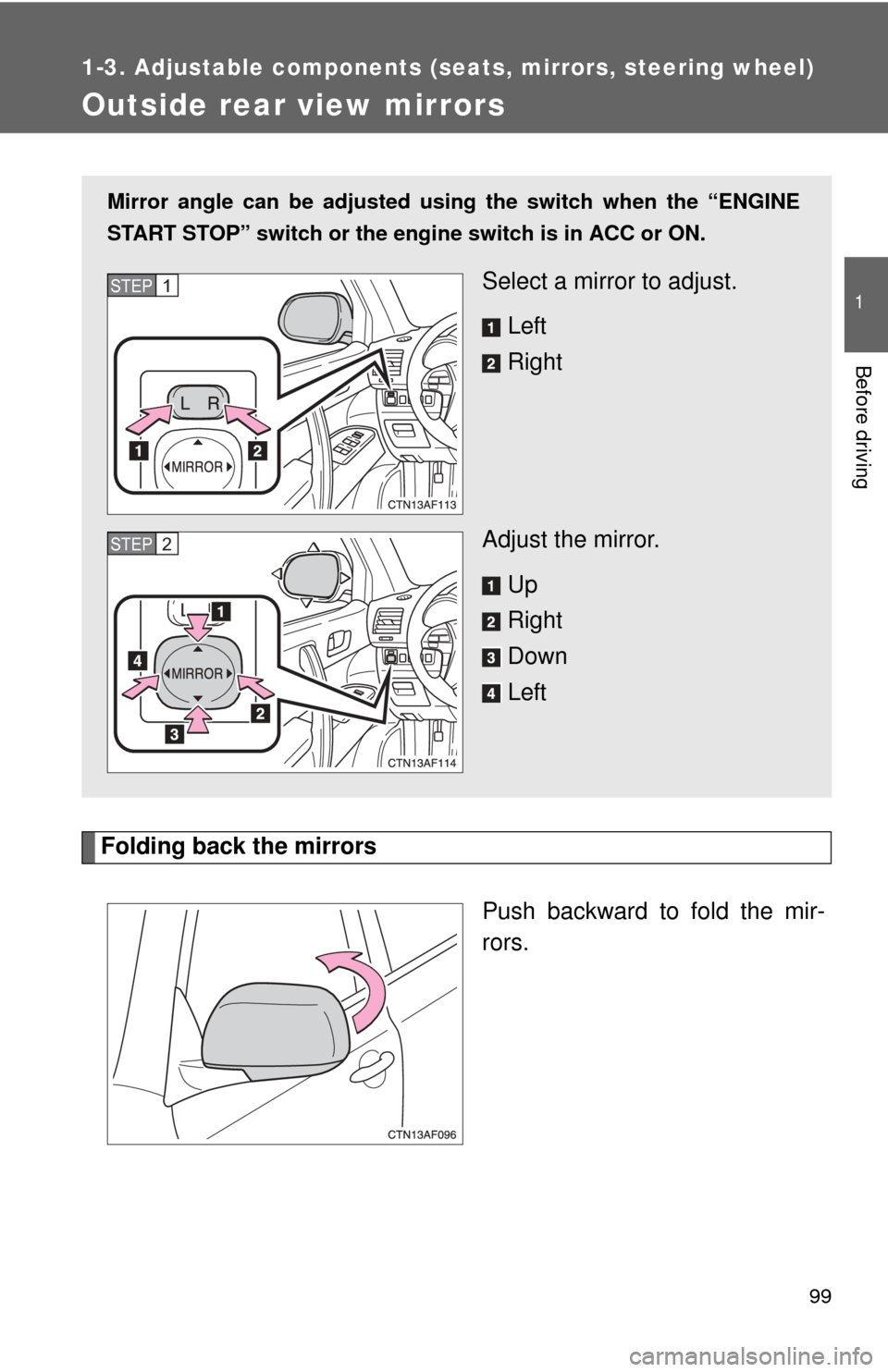
Outside rear view mirrors
Folding back the mirrorsPush backward to fold the mir-
rors.
Mirror angle can be adjusted usin g the switch when the “ENGINE
START STOP” switch or the engi ne switch is in ACC or ON.
Select a mirror to adjust.
Left
Right
Adjust the mirror. Up
Right
Down
LeftSTEP1
STEP2
Page 102 of 577
102 1-4. Opening and closing the windows and moon roof
■The power windows can be operated when
The “ENGINE START STOP” switch or the engine switch is in ON.
■ Operating the power windows after turning the “ENGINE START STOP”
switch or the engine swit ch OFF (driver’s window only)
The power windows can be operated for approximately 45 seconds even
after the “ENGINE START STOP” switch or the engine switch is turned to
ACC or turned OFF. They cannot, however, be operated once either front
door is opened.
■ Jam protection function (driver’s window only)
If an object becomes caught between the window and the window frame,
window travel is stopped and the window is opened slightly.
CAUTION
■Closing the windows
Observe the following precautions.
Failing to do so may result in death or serious injury.
●Check to make sure that all passengers do not have any part of their body
in a position where it could be caught when a window is being operated.
● Do not allow children to operate the power windows.
Closing a power window on someone can cause serious injury, and in
some instances, even death.
■ Jam protection function (driver’s window only)
●Never try jamming any part of your body to activate the jam protection
function intentionally.
● The jam protection function may not work if something gets caught just
before the window fully closes.
Page 104 of 577

104 1-4. Opening and closing the windows and moon roof
■The moon roof can be operated when
The “ENGINE START STOP” switch or the engine switch is in ON.
■ Operating the moon roof after tu rning the “ENGINE START STOP”
switch or the engine switch OFF
The moon roof can be operated for approximately 45 seconds even after the
“ENGINE START STOP” switch or the engine switch is turned to ACC or
turned OFF. It cannot, however, be operated once either front door is
opened.
■ Jam protection function
If an object is detected between the moon roof and the frame while closing
or tilting down, travel is stopped and the moon roof opens slightly.
■ If the moon roof cannot be closed
If the moon roof cannot be closed automatically, such as when the jam pro-
tection function activates accidentally due to a malfunction, pressing and
holding the switch close the moon roof.
■ To reduce wind noise
Drive with the moon roof opened to slightly before the fully open position as
driving with the moon roof opened fully will cause wind noise.
■ Sunshade
The sunshade can be opened and closed manually. However, the sunshade
will open automatically when the moon roof is opened.
■ Moon roof open reminder function (vehicles with multi-information dis-
play)
An alarm will sound when the driver’s door is opened with the moon roof not
fully closed and the “ENGINE START STOP” switch or the engine switch
OFF.
Page 106 of 577
106
1-5. Refueling
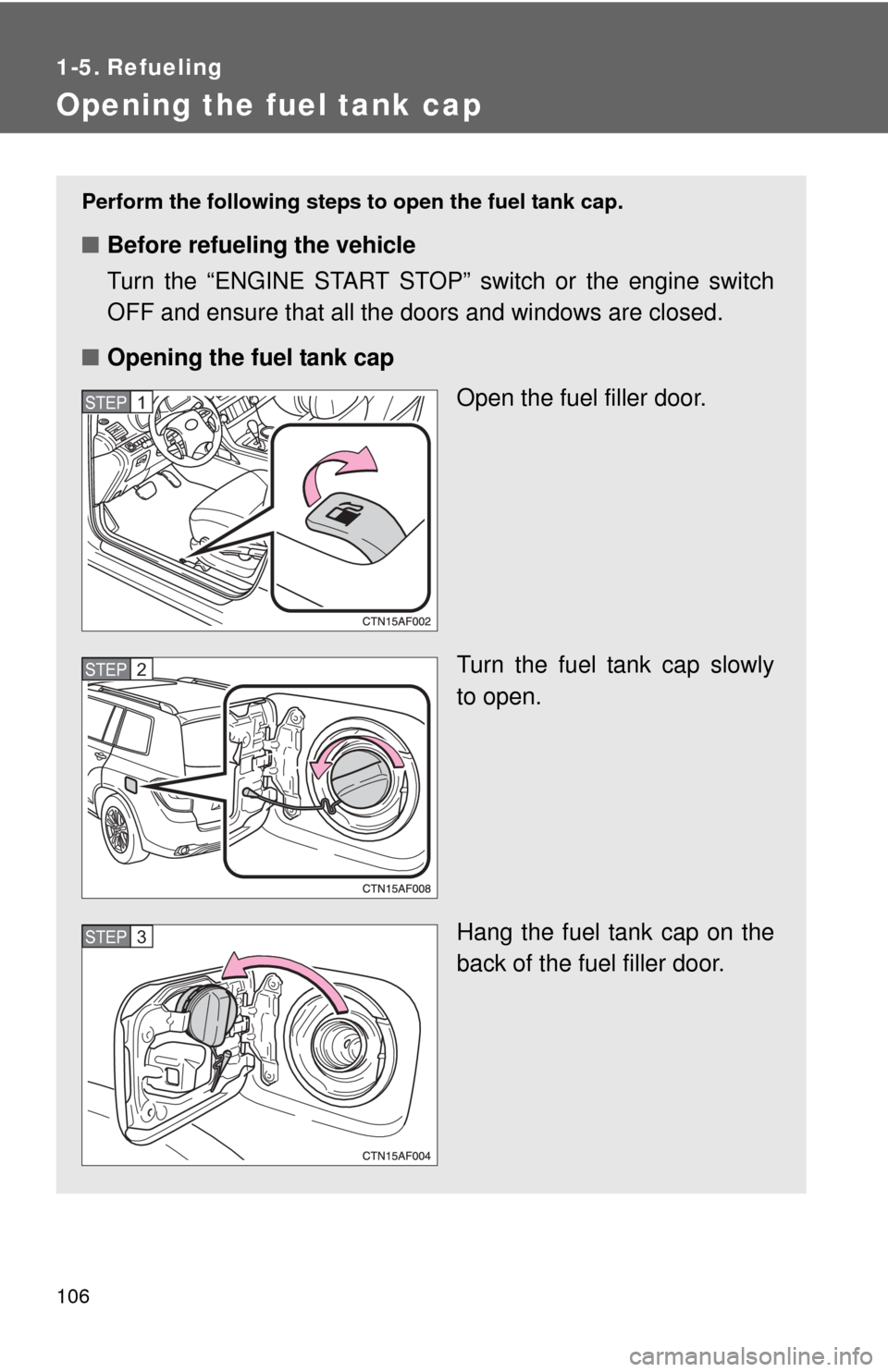
Opening the fuel tank cap
Perform the following steps to open the fuel tank cap.
■Before refueling the vehicle
Turn the “ENGINE START STOP” switch or the engine switch
OFF and ensure that all the doors and windows are closed.
■ Opening the fuel tank cap
Open the fuel filler door.
Turn the fuel tank cap slowly
to open.
Hang the fuel tank cap on the
back of the fuel filler door.
STEP1
STEP2
STEP3