AUX TOYOTA HIGHLANDER 2008 XU40 / 2.G Owners Manual
[x] Cancel search | Manufacturer: TOYOTA, Model Year: 2008, Model line: HIGHLANDER, Model: TOYOTA HIGHLANDER 2008 XU40 / 2.GPages: 577, PDF Size: 11.46 MB
Page 3 of 577

1
2
3
4
5
6
7
3
2-3. Operating the lights and wipers .............................. 192
Headlight switch .................. 192
Fog light switch ................... 196
Windshield wipers and washer .............................. 197
Rear window wiper and washer .............................. 199
2-4. Using other driving systems ........................... 200
Cruise control ...................... 200
Rear view monitor system (vehicles with
multi-information
display) ............................. 203
Downhill Assist Control system
(4WD models only) ........... 207
Driving assist systems ........ 209
2-5. Driving information ........... 214 Off-road precautions ........... 214
Cargo and luggage ............. 219
Vehicle load limits ............... 223
Winter driving tips ............... 224
Trailer towing ...................... 228
Dinghy towing ..................... 238 3-1. Using the air
conditioning system
and defogger .................. 242
Front manual air conditioning system.......... 242
Front automatic air conditioning system.......... 247
Rear manual air conditioning system.......... 255
Rear automatic air conditioning system.......... 258
Rear window and outside rear view mirror
defoggers ......................... 261
Windshield wiper de-icer .............................. 263
Using the steering wheel climate remote control
switches ........................... 264
3-2. Using the audio system ............................. 265
Audio system (without navigation system) ........... 265
Using the radio ................... 268
Using the CD player ........... 274
Playing back MP3 and WMA discs ....................... 281
Optimal use of the audio system .............................. 288
Using the AUX adapter....... 291
Using the steering wheel audio switches.................. 293
3Interior features
Page 4 of 577

TABLE OF CONTENTSIndex
4
3-3. Using the rear audio system ............................. 295
Rear seat entertainment system features ................ 295
Using the DVD player (DVD video)...................... 302
Using the DVD player (video CD) ........................ 310
Using the DVD player (audio CD/CD text) ........... 312
Using the DVD player (MP3 discs) ...................... 313
Using the video mode ........ 315
Changing the initial setting .............................. 317
3-4. Using the hands-free phone system
(for cellular phone)......... 324
Hands-free phone system (for cellular phone)
features ............................ 324
Using the hands-free phone system
(for cellular phone) ........... 328
Making a phone call ........... 336
Setting a cellular phone...... 340
Security and system setup ................................ 345
Using the phone book ........ 348
3-5. Using the interior lights ............................... 355
Interior lights list ................. 355
• Personal/interior light main switch ...................... 356
• Personal/interior lights...... 356
• Interior light ...................... 357 3-6. Using the storage
features ........................... 358
List of storage features ....... 358
• Glove box ......................... 359
• Console box ..................... 359
• Overhead console ............ 360
• Cup holders ...................... 362
• Bottle holders ................... 366
• Auxiliary boxes ................. 367
• Side table ......................... 369
3-7. Other interior features...... 371 Sun visors ........................... 371
Vanity mirror ....................... 372
Clock (vehicles without multi-information
display) ............................. 373
Conversation mirror ............ 374
Power outlet........................ 375
Seat heaters ....................... 378
Armrests ............................. 380
Floor mat ............................ 381
Luggage compartment features ............................ 382
Garage door opener ........... 388
Compass ............................ 393
4-1. Maintenance and care .................................. 398
Cleaning and protecting the vehicle exterior ........... 398
Cleaning and protecting the vehicle interior ............ 401
4Maintenance and care
Page 11 of 577
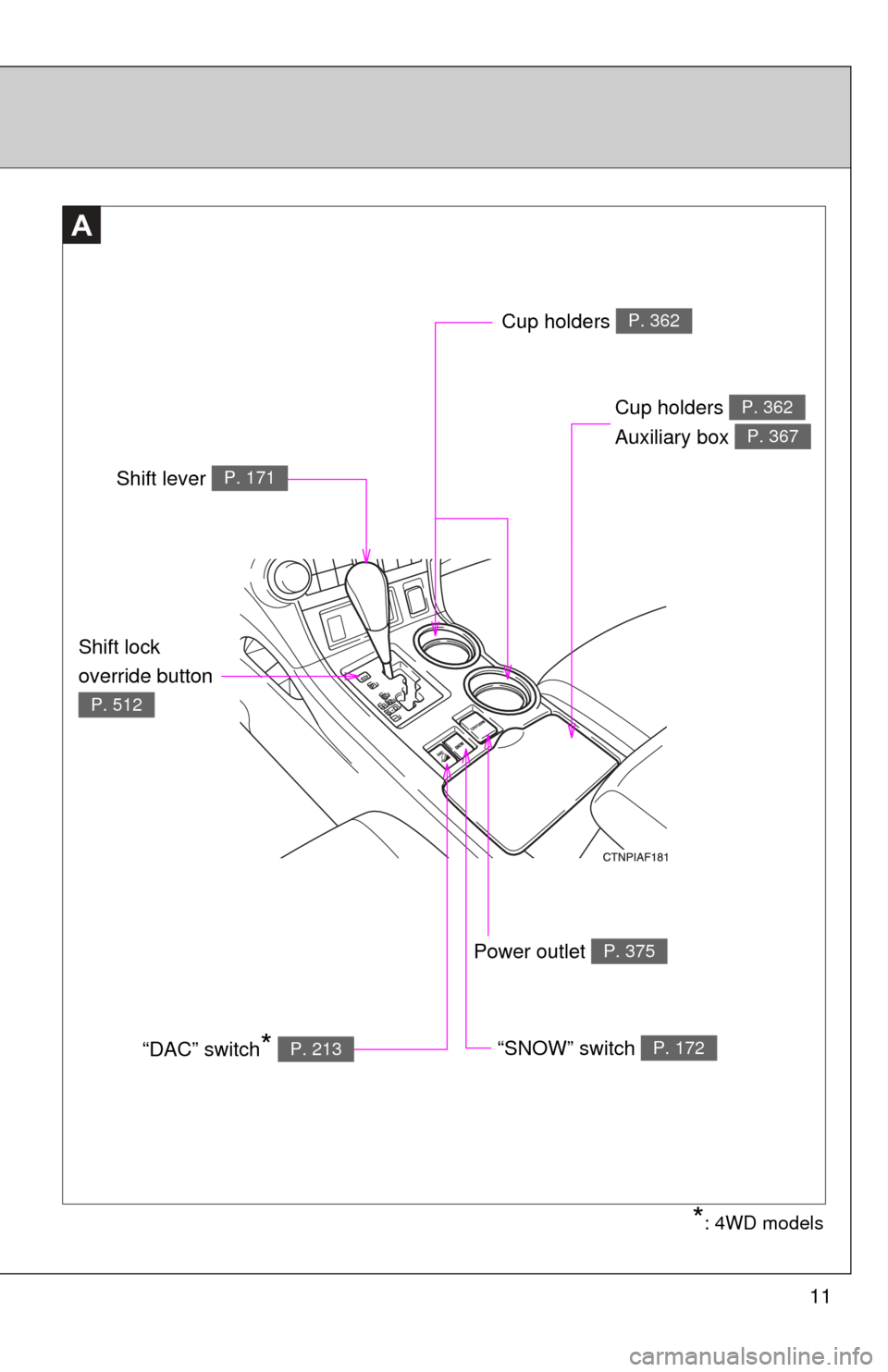
11
A
Power outlet P. 375
Cup holders
Auxiliary box P. 362
P. 367
*: 4WD models
Cup holders P. 362
Shift lever P. 171
“SNOW” switch P. 172“DAC” switch* P. 213
Shift lock
override button
P. 512
Page 15 of 577
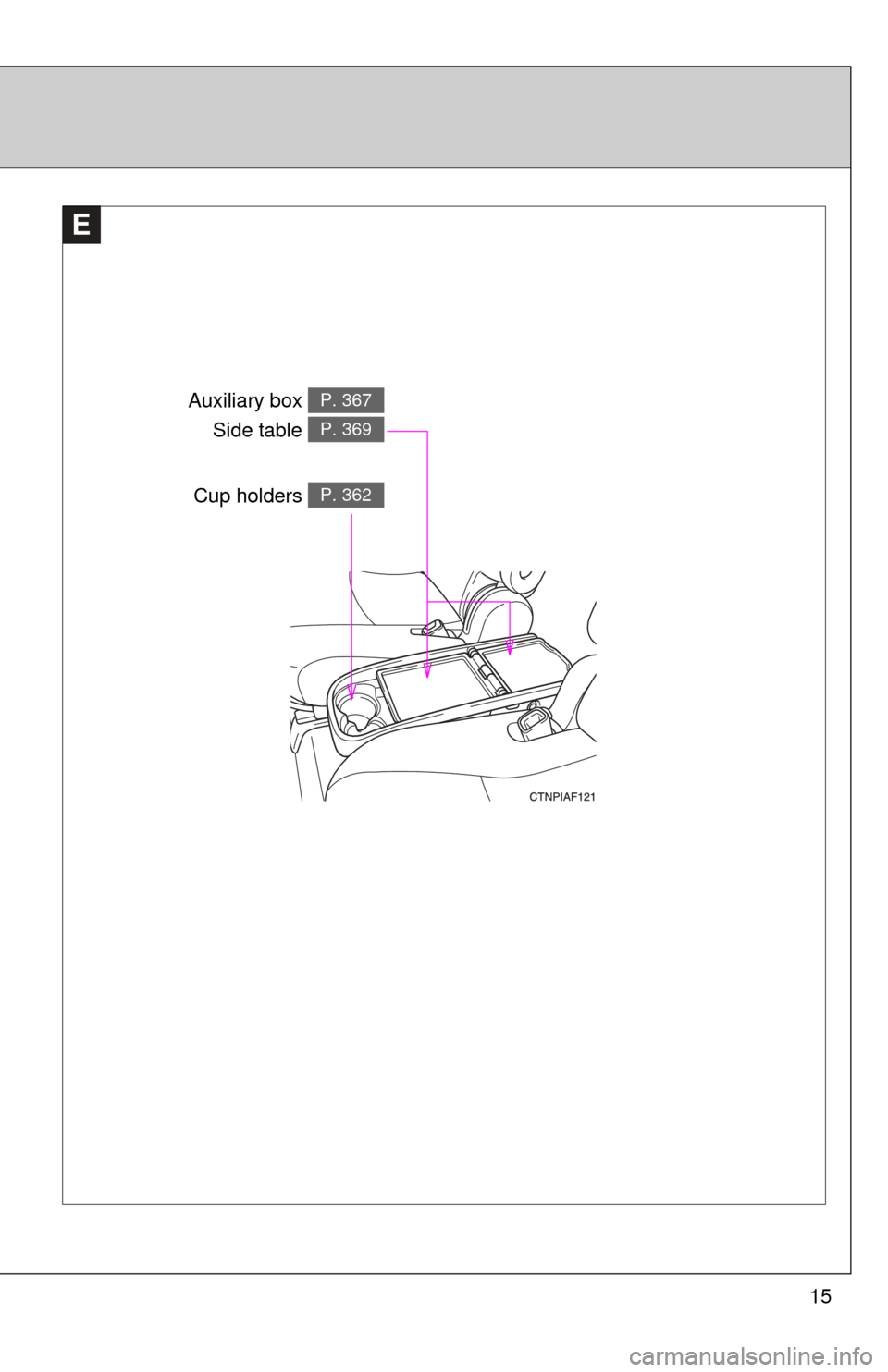
15
E
Auxiliary box Side table P. 367
P. 369
Cup holders P. 362
Page 16 of 577
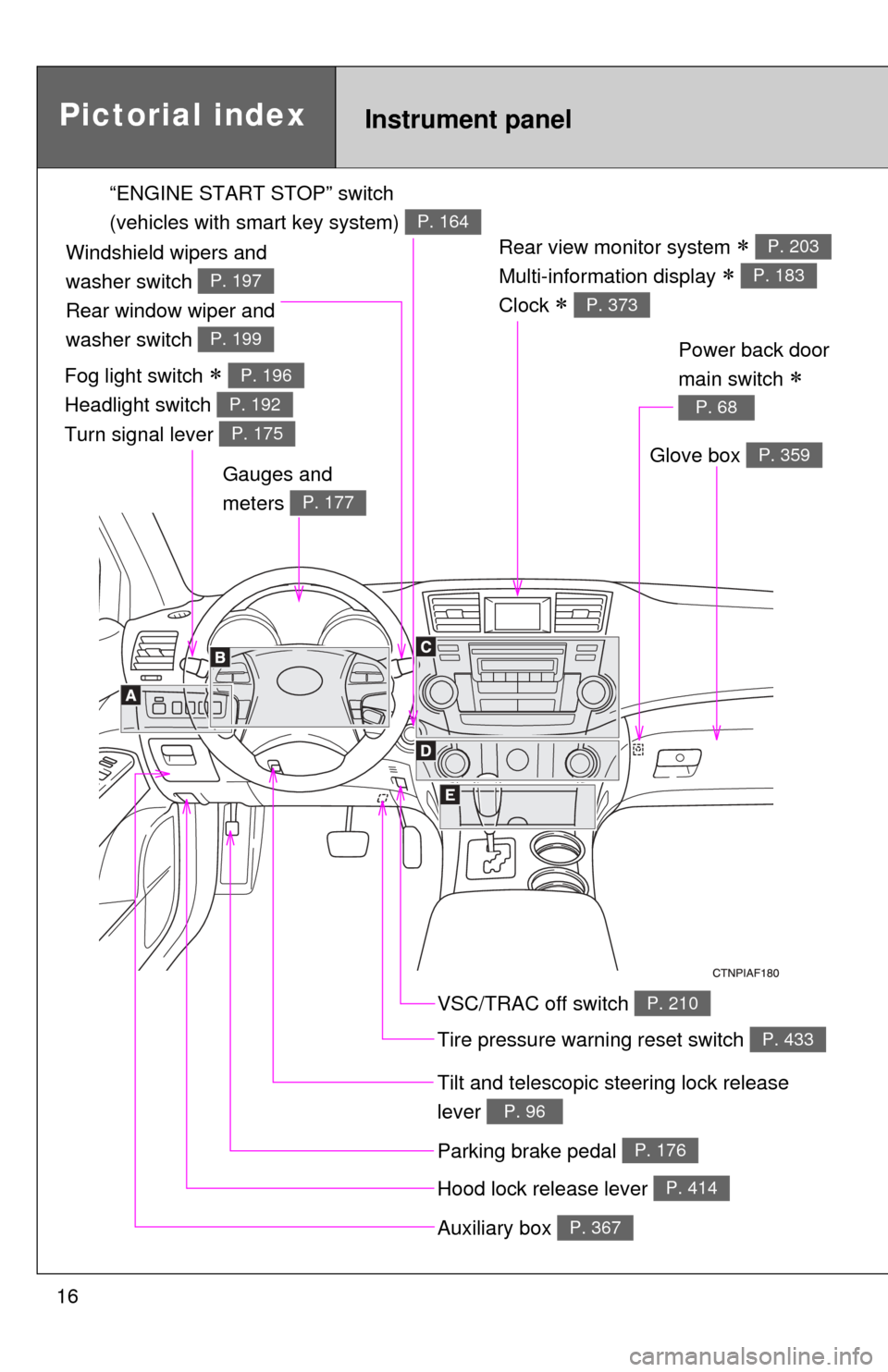
16
Rear view monitor system
Multi-information display
Clock
P. 203
P. 183
P. 373
Gauges and
meters
P. 177
Tilt and telescopic steering lock release
lever
P. 96
Glove box P. 359
Pictorial indexInstrument panel
Power back door
main switch
P. 68
VSC/TRAC off switch P. 210
Tire pressure warning reset switch P. 433
Parking brake pedal P. 176
Hood lock release lever P. 414
Auxiliary box P. 367
“ENGINE START STOP” switch
(vehicles with smart key system)
P. 164
Fog light switch
Headlight switch
Turn signal lever P. 196
P. 192
P. 175
Windshield wipers and
washer switch
Rear window wiper and
washer switch
P. 197
P. 199
Page 21 of 577
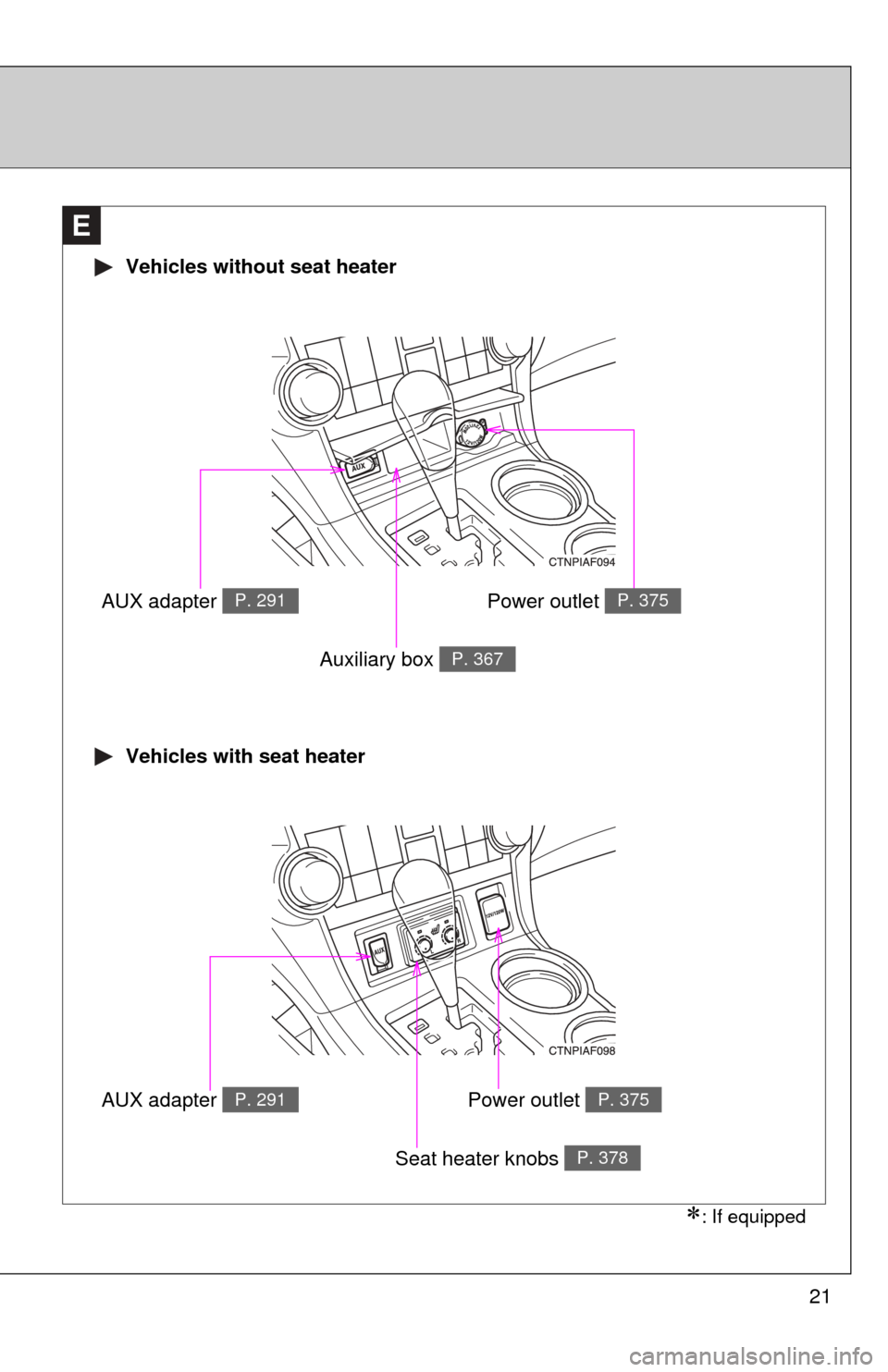
21
E
Vehicles without seat heater
Vehicles with seat heater
AUX adapter P. 291
Auxiliary box P. 367
AUX adapter P. 291
Seat heater knobs P. 378
Power outlet P. 375
Power outlet P. 375
: If equipped
Page 22 of 577
22
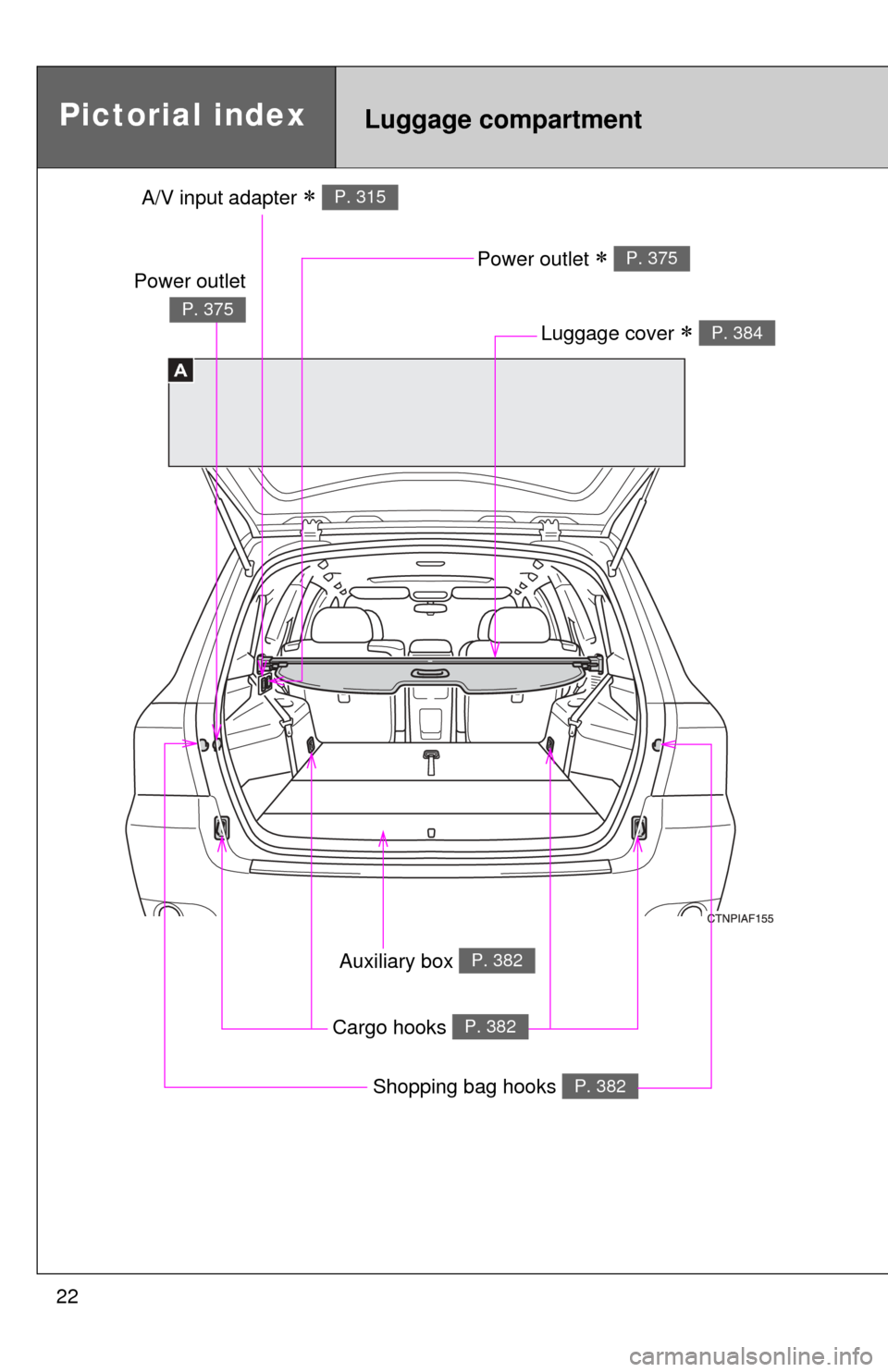
A
Pictorial indexLuggage compartment
A/V input adapter P. 315
Power outlet P. 375
Luggage cover P. 384
Auxiliary box P. 382
Shopping bag hooks P. 382
Cargo hooks P. 382
Power outlet
P. 375
Page 121 of 577

121
1-7. Safety information
1
Before driving
CAUTION
■
While driving
●Do not adjust the position of the driver's seat while driving.
Doing so could cause the driver to lose control of the vehicle.
● Do not place a cushion between the driver or passenger and the seatback.
A cushion may prevent correct posture from being achieved, and reduce
the effectiveness of the seat belt and head restraint, increasing the risk of
death or serious injury to the driver or passenger.
● Do not place anything under the front seats except for putting them in the
auxiliary box.
Objects placed under the front seats may become jammed in the seat
tracks and stop the seat from locking in place. This may lead to an acci-
dent. The adjustment mechanism may also be damaged.
■ Adjusting the seat position
●Take care when adjusting the seat position to ensure that other passen-
gers are not injured by the moving seat.
● Do not put your hands under the seat or near the moving parts to avoid
injury.
Fingers or hands may become jammed in the seat mechanism.
Page 222 of 577

221
2-5. Driving information
2
When driving
CAUTION
■Things that must not be carried in the luggage compartment
The following things may cause a fire if loaded in the luggage compart-
ment.
●Receptacles containing gasoline
●Aerosol cans
■Storage precautions
●Do not place anything on the luggage cover, and do not stack anything
in the luggage compartment higher than the seatbacks.
Such items may be thrown about and possibly injure people in the
vehicle during sudden braking or in an accident.
●Do not place cargo or luggage in or on the following locations as the
item may get under the brake or accelerator pedal and prevent the
pedals from being depressed properly,
block the driver’s vision, or hit
the driver or passengers, causing an accident.
• Driver’s feet
• Front passenger or rear seats (when stacking items)
• Luggage cover
• Instrument panel
• Dashboard
• Auxiliary box or tray that has no lid
●Secure all items in the occupant compartment, as they may shift and
injure someone during an accident or sudden braking.
●Never allow anyone to ride in the luggage compartment. It is not
designed for passengers. They should ride in their seats with their seat
belts properly fastened. Otherwise, they are much more likely to suffer
serious bodily injury, in the even t of sudden braking or a collision.
■Capacity and distribution
●Do not exceed the maximum axle weight rating or the total vehicle
weight rating.
●Even if the total load of occupant's weight and the cargo load is less
than the total load capacity, do not apply the load unevenly.
Improper loading may cause deterioration of steering or braking con-
trol which may cause death or serious injury.
Page 241 of 577
240
3-1. Using the air conditioning system
and defogger ................ 242
Front manual air conditioning system ....... 242
Front automatic air conditioning system ....... 247
Rear manual air conditioning system ....... 255
Rear automatic air conditioning system ....... 258
Rear window and outside rear view mirror
defoggers ....................... 261
Windshield wiper de-icer ............................ 263
Using the steering wheel climate remote control
switches ......................... 264
3-2. Using the audio system .......................... 265
Audio system (without navigation system) ......... 265
Using the radio ................. 268
Using the CD player ......... 274
Playing back MP3 and WMA discs ..................... 281 Optimal use of the audio
system ........................... 288
Using the AUX adapter .... 291
Using the steering wheel audio switches ............... 293
3-3. Using the rear audio system .......................... 295
Rear seat entertainment system features ............. 295
Using the DVD player (DVD video) ................... 302
Using the DVD player (video CD)...................... 310
Using the DVD player (audio CD/CD text) ........ 312
Using the DVD player (MP3 discs) .................... 313
Using the video mode ...... 315
Changing the initial setting ............................ 317