glove box TOYOTA HIGHLANDER 2008 XU40 / 2.G Owners Manual
[x] Cancel search | Manufacturer: TOYOTA, Model Year: 2008, Model line: HIGHLANDER, Model: TOYOTA HIGHLANDER 2008 XU40 / 2.GPages: 577, PDF Size: 11.46 MB
Page 4 of 577

TABLE OF CONTENTSIndex
4
3-3. Using the rear audio system ............................. 295
Rear seat entertainment system features ................ 295
Using the DVD player (DVD video)...................... 302
Using the DVD player (video CD) ........................ 310
Using the DVD player (audio CD/CD text) ........... 312
Using the DVD player (MP3 discs) ...................... 313
Using the video mode ........ 315
Changing the initial setting .............................. 317
3-4. Using the hands-free phone system
(for cellular phone)......... 324
Hands-free phone system (for cellular phone)
features ............................ 324
Using the hands-free phone system
(for cellular phone) ........... 328
Making a phone call ........... 336
Setting a cellular phone...... 340
Security and system setup ................................ 345
Using the phone book ........ 348
3-5. Using the interior lights ............................... 355
Interior lights list ................. 355
• Personal/interior light main switch ...................... 356
• Personal/interior lights...... 356
• Interior light ...................... 357 3-6. Using the storage
features ........................... 358
List of storage features ....... 358
• Glove box ......................... 359
• Console box ..................... 359
• Overhead console ............ 360
• Cup holders ...................... 362
• Bottle holders ................... 366
• Auxiliary boxes ................. 367
• Side table ......................... 369
3-7. Other interior features...... 371 Sun visors ........................... 371
Vanity mirror ....................... 372
Clock (vehicles without multi-information
display) ............................. 373
Conversation mirror ............ 374
Power outlet........................ 375
Seat heaters ....................... 378
Armrests ............................. 380
Floor mat ............................ 381
Luggage compartment features ............................ 382
Garage door opener ........... 388
Compass ............................ 393
4-1. Maintenance and care .................................. 398
Cleaning and protecting the vehicle exterior ........... 398
Cleaning and protecting the vehicle interior ............ 401
4Maintenance and care
Page 16 of 577
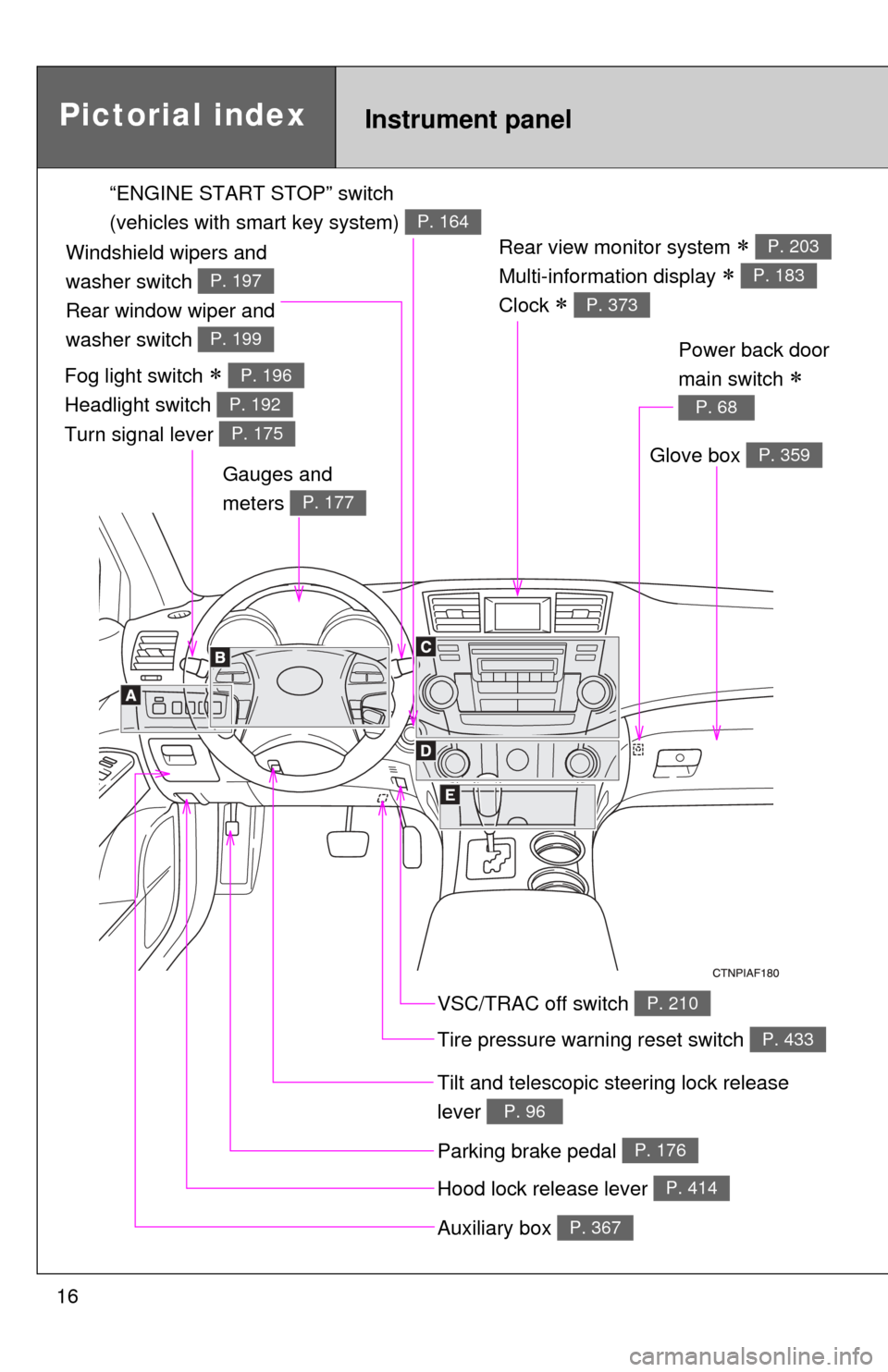
16
Rear view monitor system
Multi-information display
Clock
P. 203
P. 183
P. 373
Gauges and
meters
P. 177
Tilt and telescopic steering lock release
lever
P. 96
Glove box P. 359
Pictorial indexInstrument panel
Power back door
main switch
P. 68
VSC/TRAC off switch P. 210
Tire pressure warning reset switch P. 433
Parking brake pedal P. 176
Hood lock release lever P. 414
Auxiliary box P. 367
“ENGINE START STOP” switch
(vehicles with smart key system)
P. 164
Fog light switch
Headlight switch
Turn signal lever P. 196
P. 192
P. 175
Windshield wipers and
washer switch
Rear window wiper and
washer switch
P. 197
P. 199
Page 31 of 577
31
1-1. Key information
1
Before driving
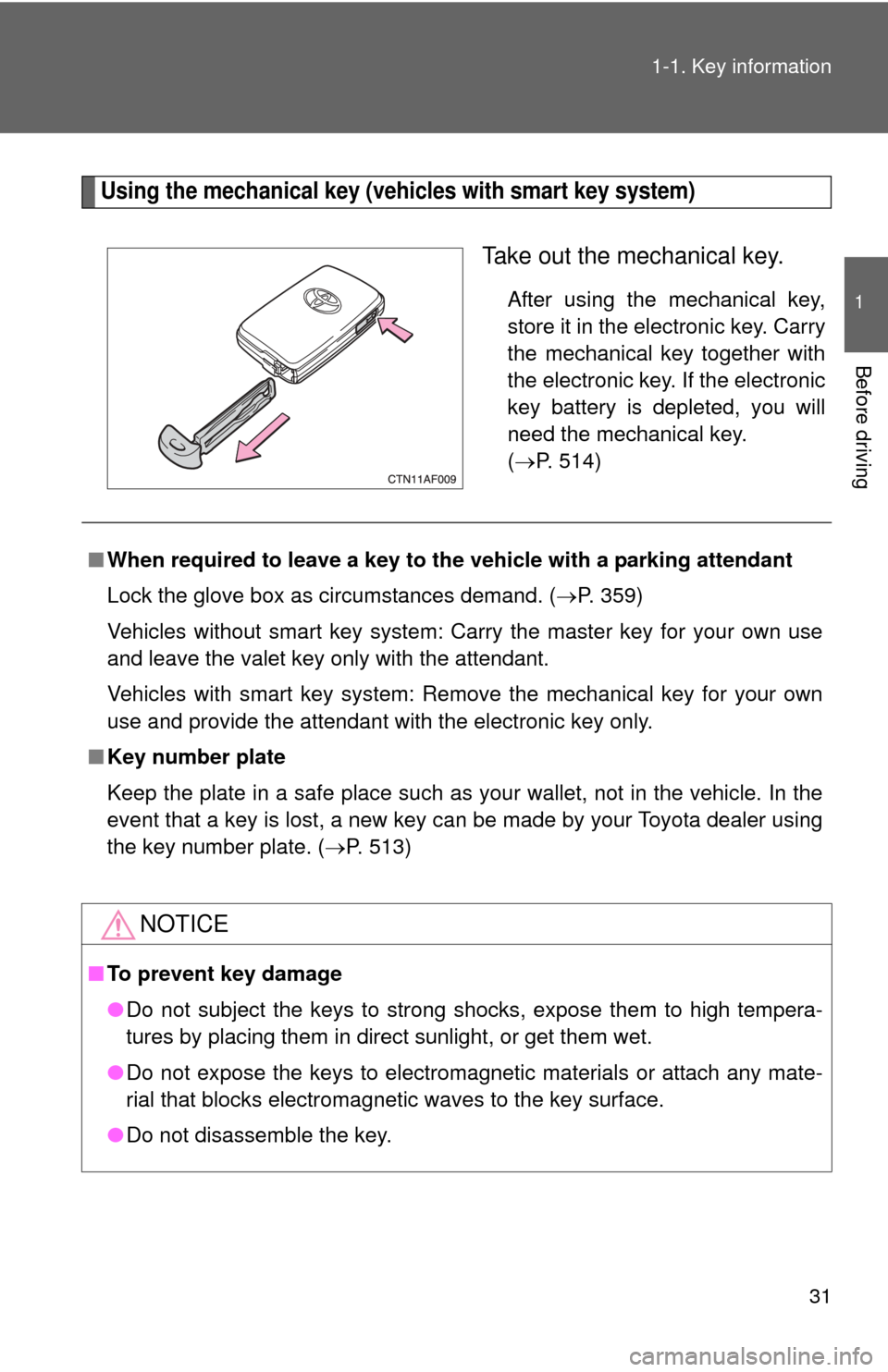
Using the mechanical key (vehicles with smart key system)
Take out the mechanical key.
After using the mechanical key,
store it in the electronic key. Carry
the mechanical key together with
the electronic key. If the electronic
key battery is depleted, you will
need the mechanical key.
(
P. 514)
■ When required to leave a key to th e vehicle with a parking attendant
Lock the glove box as circumstances demand. ( P. 359)
Vehicles without smart key system: Carry the master key for your own use
and leave the valet key only with the attendant.
Vehicles with smart key system: Remove the mechanical key for your own
use and provide the attendant with the electronic key only.
■ Key number plate
Keep the plate in a safe place such as your wallet, not in the vehicle. In the
event that a key is lost, a new key can be made by your Toyota dealer using
the key number plate. ( P. 513)
NOTICE
■To prevent key damage
●Do not subject the keys to strong shocks, expose them to high tempera-
tures by placing them in direct sunlight, or get them wet.
● Do not expose the keys to electromagnetic materials or attach any mate-
rial that blocks electromagnetic waves to the key surface.
● Do not disassemble the key.
Page 39 of 577

39
1-2. Opening, closing and locking the doors
1
Before driving
■
Key battery depletion
●The standard battery life is 1 to 2 years. (The battery becomes depleted
even if the electronic key is not used.) If the smart key system or the
wireless remote control function does not operate, or the detection area
becomes smaller, the battery may be depleted. Replace the battery when
necessary. ( P. 453)
● To avoid serious deterioration, do not leave the electronic key within 3 ft.
(1 m) of the following electrical appliances that produce a magnetic field.
•TVs
• Personal computers
• Recharging cellular phones or cordless phones
• Table lamps
■ To operate the system properly
Make sure to carry the electronic key when operating the system. Do not get
the electronic key too close to the vehicle when operating the system from
the outside of the vehicle.
Depending on the position and holding condition of the electronic key, the
key may not be detected correctly and the system may not operate properly.
(The alarm may go off accidentally, or the door lock prevention may not func-
tion.)
■ Note for the entry function
●Even when the electronic key is within the effective range (detection
areas), the system may not operate properly in the following cases.
• The electronic key is too close to the window or outside door handle,
near the ground, or in a high place when the doors are locked or
unlocked.
• The electronic key is on the instrument panel, luggage cover, floor or in the glove box when the engine is started or “ENGINE START STOP”
switch modes are changed.
● As long as the electronic key is within the effective range, the doors may
be locked or unlocked by anyone.
● Even if the electronic key is not inside the vehicle, it may be possible to
start the engine if the electronic key is near the window.
Page 69 of 577
69
1-2. Opening, closing and locking the doors
1
Before driving
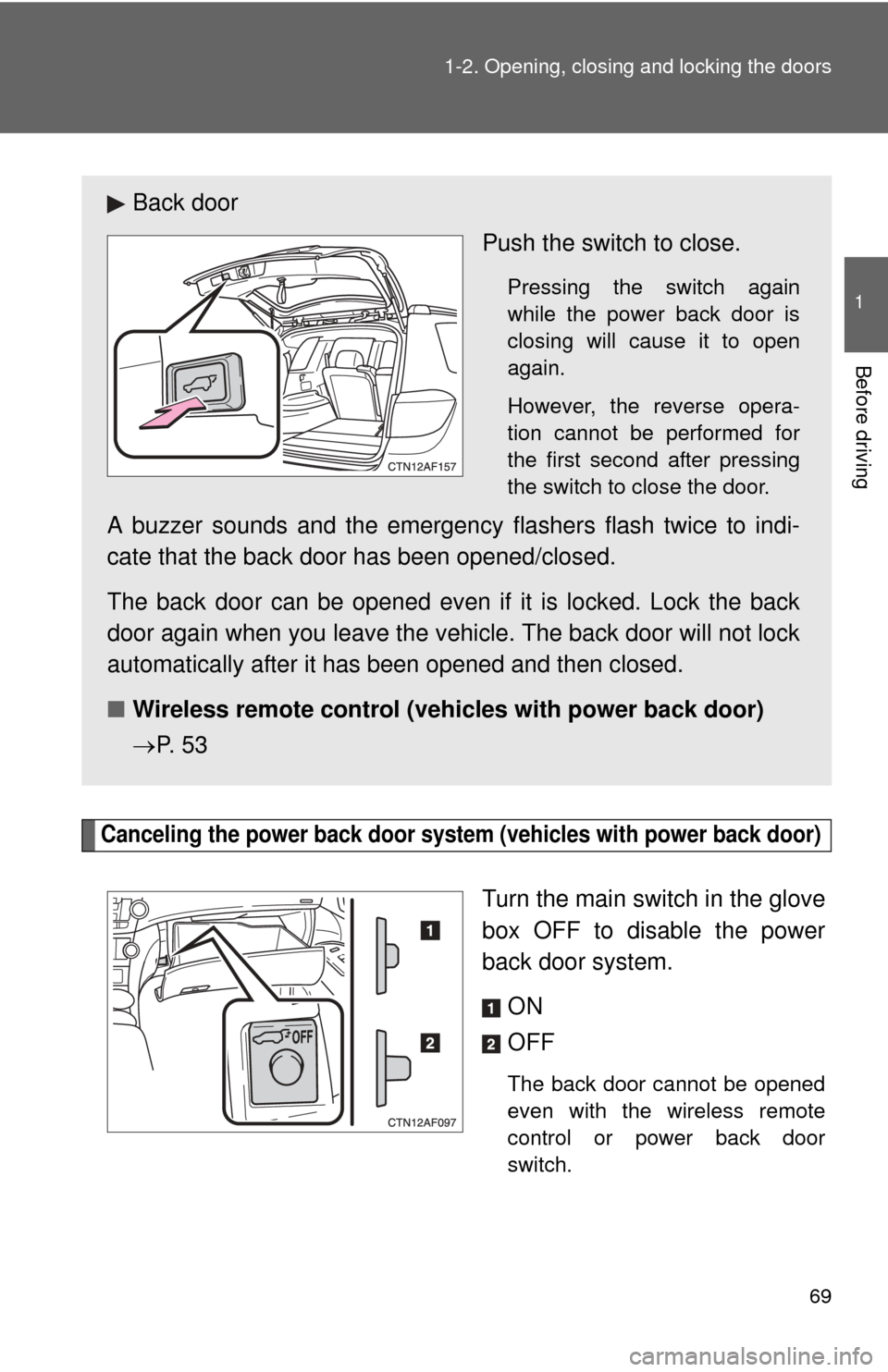
Canceling the power back door system
(vehicles with power back door)
Turn the main switch in the glove
box OFF to disable the power
back door system.
ON
OFF
The back door cannot be opened
even with the wireless remote
control or power back door
switch.
Back door Push the switch to close.
Pressing the switch again
while the power back door is
closing will cause it to open
again.
However, the reverse opera-
tion cannot be performed for
the first second after pressing
the switch to close the door.
A buzzer sounds and the emergency flashers flash twice to indi-
cate that the back door has been opened/closed.
The back door can be opened even if it is locked. Lock the back
door again when you leave the vehicle. The back door will not lock
automatically after it has been opened and then closed.
■ Wireless remote control (veh icles with power back door)
P. 5 3
Page 242 of 577
Interior features3
241
3-4. Using the hands-free phone system
(for cellular phone) ...... 324
Hands-free phone system (for cellular phone)
features .......................... 324
Using the hands-free phone system
(for cellular phone) ......... 328
Making a phone call ......... 336
Setting a cellular phone ............................. 340
Security and system setup .............................. 345
Using the phone book ...... 348
3-5. Using the interior lights ............................. 355
Interior lights list ............... 355
• Personal/interior light main switch .................... 356
• Personal/interior lights .............................. 356
• Interior light .................... 357 3-6. Using the storage
features ......................... 358
List of storage features .... 358
• Glove box....................... 359
• Console box ................... 359
• Overhead console .......... 360
• Cup holders ................... 362
• Bottle holders ................. 366
• Auxiliary boxes ............... 367
• Side table ....................... 369
3-7. Other interior features ......................... 371
Sun visors ........................ 371
Vanity mirror..................... 372
Clock (vehicles without multi-information
display) .......................... 373
Conversation mirror ......... 374
Power outlet ..................... 375
Seat heaters..................... 378
Armrests........................... 380
Floor mat .......................... 381
Luggage compartment features .......................... 382
Garage door opener......... 388
Compass .......................... 393
Page 359 of 577
358
3-6. Using the storage features
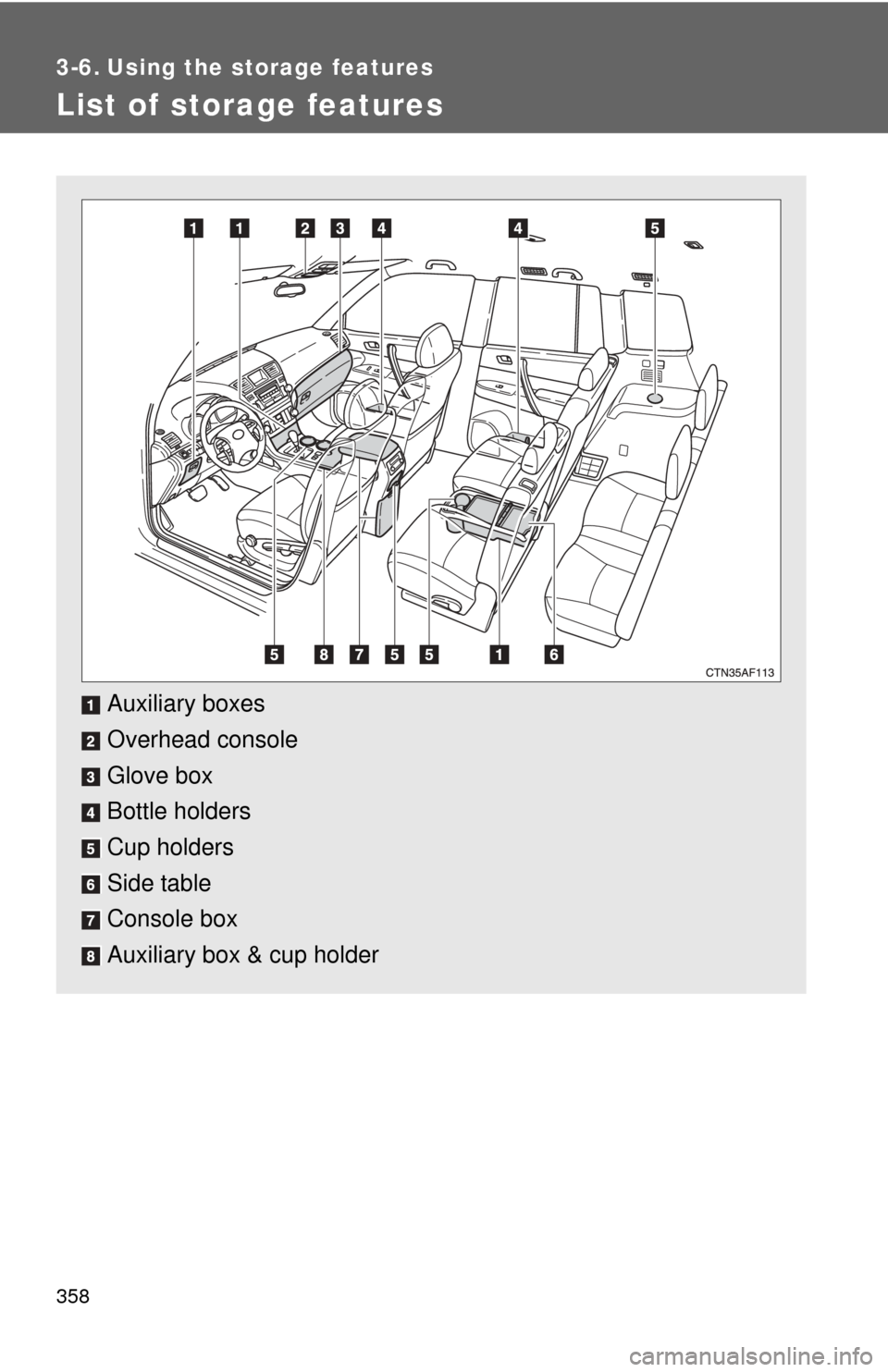
List of storage features
Auxiliary boxes
Overhead console
Glove box
Bottle holders
Cup holders
Side table
Console box
Auxiliary box & cup holder
Page 360 of 577
359
3-6. Using the
storage features
3
Interior features
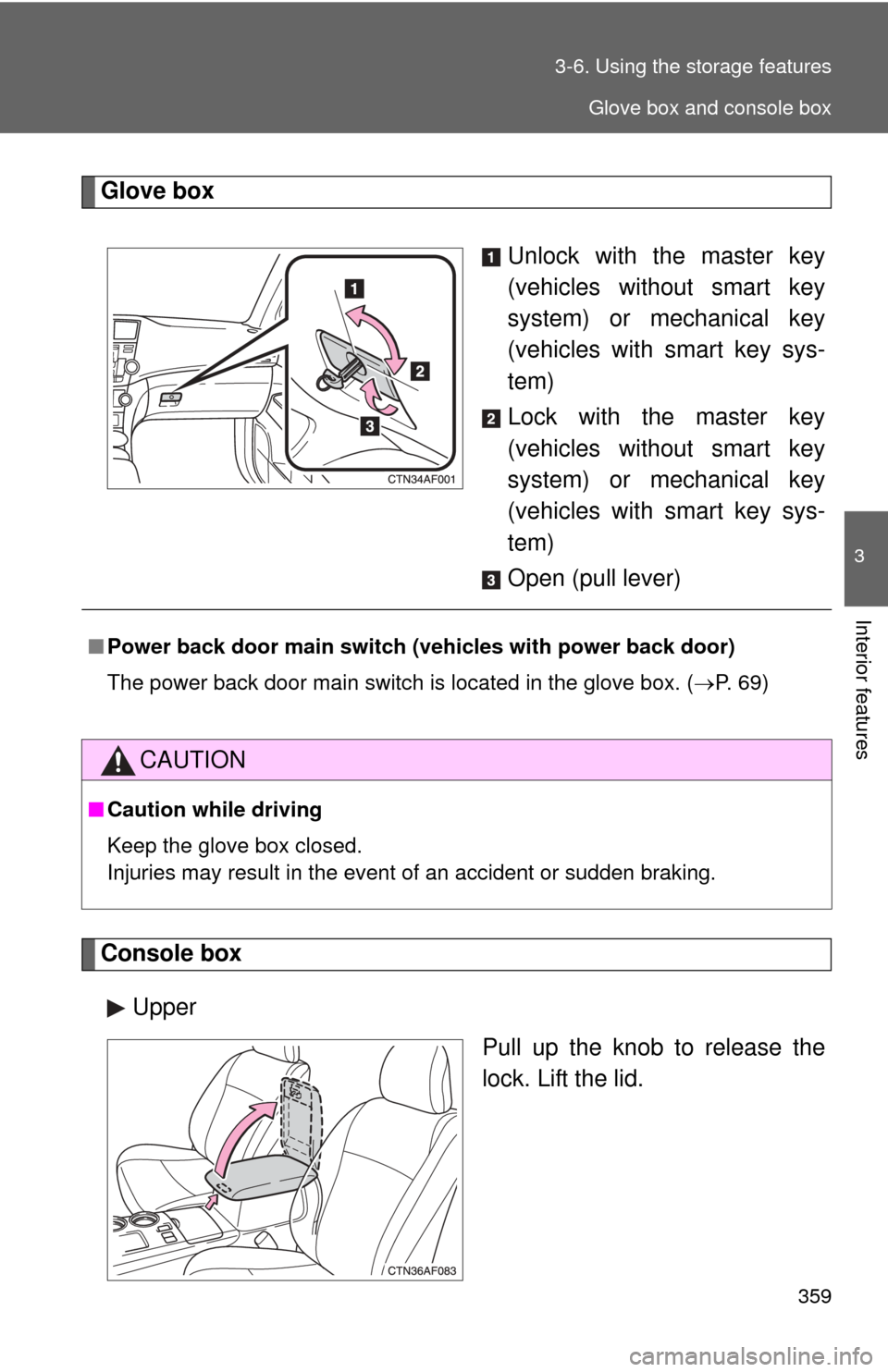
Glove box
Unlock with the master key
(vehicles without smart key
system) or mechanical key
(vehicles with smart key sys-
tem)
Lock with the master key
(vehicles without smart key
system) or mechanical key
(vehicles with smart key sys-
tem)
Open (pull lever)
Console box
Upper Pull up the knob to release the
lock. Lift the lid.
■Power back door main switch ( vehicles with power back door)
The power back door main switch is located in the glove box. ( P. 69)
CAUTION
■Caution while driving
Keep the glove box closed.
Injuries may result in the event of an accident or sudden braking.
Glove box and console box
Page 450 of 577
449
4-3. Do-it-yourself maintenance
4
Maintenance and care
Air conditioning filter
The air conditioning filter must be changed regularly to maintain air
conditioning efficiency.
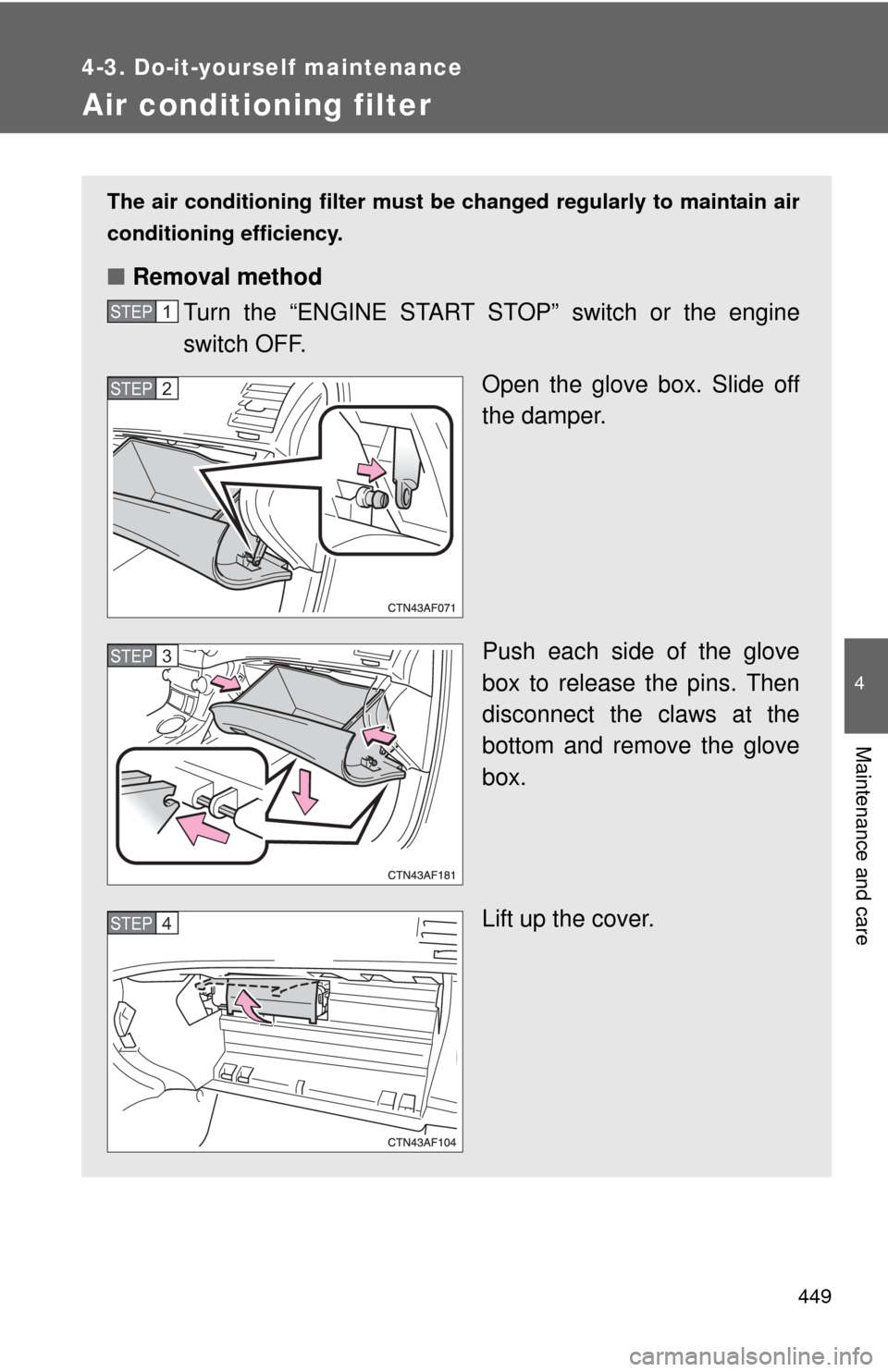
■ Removal method
Turn the “ENGINE START STOP” switch or the engine
switch OFF.
Open the glove box. Slide off
the damper.
Push each side of the glove
box to release the pins. Then
disconnect the claws at the
bottom and remove the glove
box.
Lift up the cover.
STEP1
STEP2
STEP3
STEP4
Page 464 of 577
463
4-3. Do-it-yourself maintenance
4
Maintenance and care
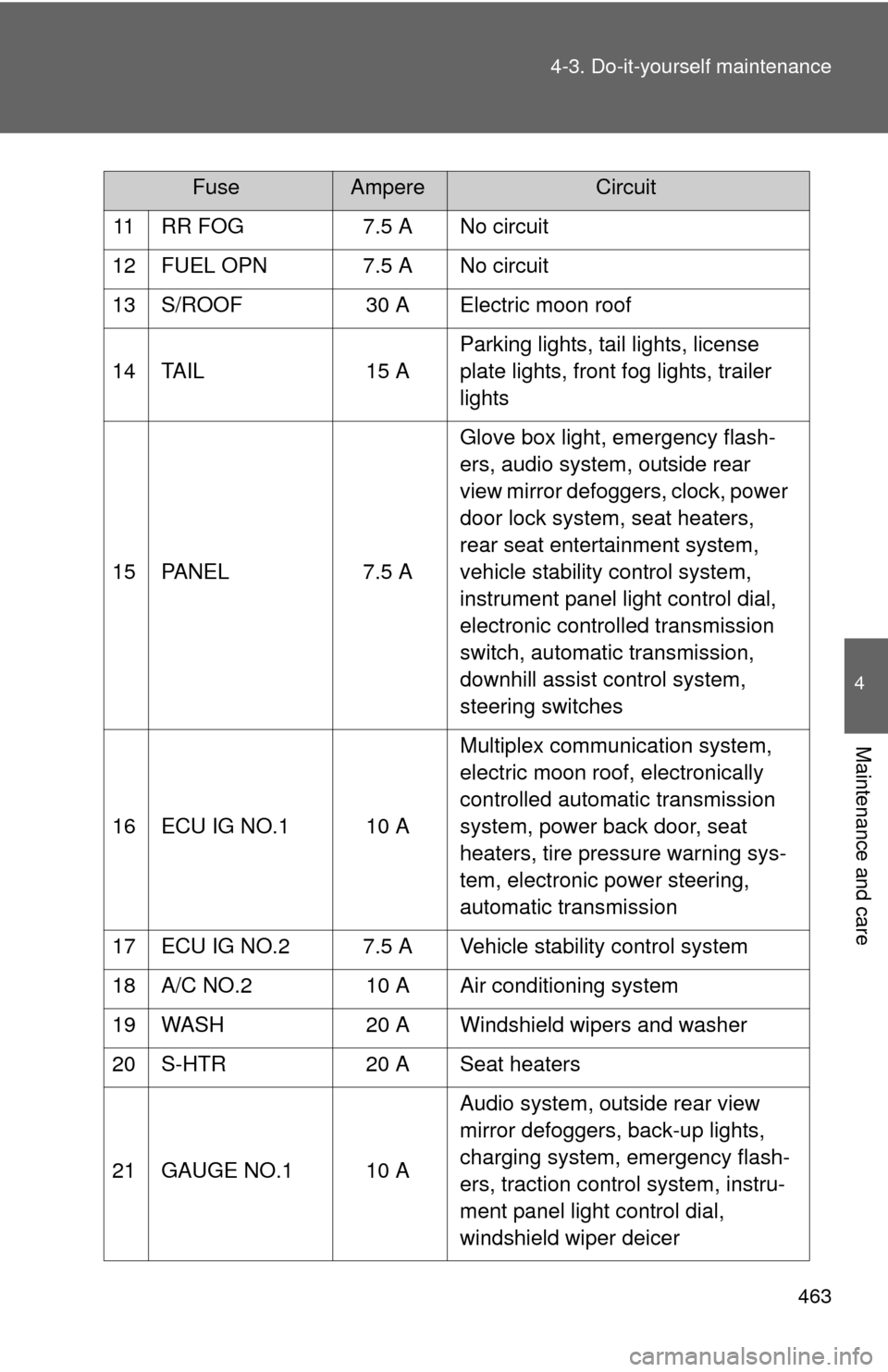
11 RR FOG
7.5 A No circuit
12 FUEL OPN 7.5 A No circuit
13 S/ROOF 30 A Electric moon roof
14 TAIL 15 AParking lights, tail lights, license
plate lights, front fog lights, trailer
lights
15 PANEL 7.5 AGlove box light, emergency flash-
ers, audio system, outside rear
view mirror defoggers, clock, power
door lock system, seat heaters,
rear seat entertainment system,
vehicle stability control system,
instrument panel light control dial,
electronic controlled transmission
switch, automatic transmission,
downhill assist control system,
steering switches
16 ECU IG NO.1 10 A Multiplex communication system,
electric moon roof, electronically
controlled automatic transmission
system, power back door, seat
heaters, tire pressure warning sys-
tem, electronic power steering,
automatic transmission
17 ECU IG NO.2 7.5 A Vehicle stability control system
18 A/C NO.2 10 A Air conditioning system
19 WASH 20 A Windshield wipers and washer
20 S-HTR 20 A Seat heaters
21 GAUGE NO.1 10 A Audio system, outside rear view
mirror defoggers, back-up lights,
charging system, emergency flash-
ers, traction control system, instru-
ment panel light control dial,
windshield wiper deicer
FuseAmpereCircuit