remote control TOYOTA HIGHLANDER 2008 XU40 / 2.G Owners Manual
[x] Cancel search | Manufacturer: TOYOTA, Model Year: 2008, Model line: HIGHLANDER, Model: TOYOTA HIGHLANDER 2008 XU40 / 2.GPages: 577, PDF Size: 11.46 MB
Page 2 of 577

TABLE OF CONTENTSIndex
2
1-1. Key information .................. 30Keys ..................................... 30
1-2. Opening, closing and locking the doors ............. 32
Smart key system................. 32
Wireless remote control ....... 53
Side doors ............................ 64
Back door ............................. 68
Glass hatch .......................... 73
1-3. Adjustable components (seats, mirrors,
steering wheel) ................. 75
Front seats ........................... 75
Rear seats ............................ 78
Head restraints ..................... 87
Seat belts ............................. 90
Steering wheel ..................... 96
Anti-glare inside rear view mirror .................................. 97
Outside rear view mirrors ..... 99
1-4. Opening and closing the windows and
moon roof ....................... 101
Power windows .................. 101
Moon roof ........................... 103
1-5. Refueling ........................... 106 Opening the fuel tank cap ................................... 106 1-6. Theft deterrent
system ............................. 110
Engine immobilizer system .............................. 110
Alarm .................................. 116
Theft prevention labels (U.S.A.)............................. 119
1-7. Safety information ............ 120 Correct driving posture ....... 120
SRS airbags ....................... 122
Front passenger occupant classification system ......... 134
Child restraint systems ....... 140
Installing child restraints ..... 144
2-1. Driving procedures........... 156 Driving the vehicle .............. 156
Engine (ignition) switch (vehicles with smart key
system) ............................. 164
Engine (ignition) switch (vehicles without smart
key system) ...................... 168
Automatic Transmission ..... 171
Turn signal lever ................. 175
Parking brake ..................... 176
2-2. Instrument cluster ............ 177 Gauges and meters ............ 177
Indicators and warning lights ................................. 179
Multi-information display ..... 183
1Before driving
2When driving
Page 3 of 577

1
2
3
4
5
6
7
3
2-3. Operating the lights and wipers .............................. 192
Headlight switch .................. 192
Fog light switch ................... 196
Windshield wipers and washer .............................. 197
Rear window wiper and washer .............................. 199
2-4. Using other driving systems ........................... 200
Cruise control ...................... 200
Rear view monitor system (vehicles with
multi-information
display) ............................. 203
Downhill Assist Control system
(4WD models only) ........... 207
Driving assist systems ........ 209
2-5. Driving information ........... 214 Off-road precautions ........... 214
Cargo and luggage ............. 219
Vehicle load limits ............... 223
Winter driving tips ............... 224
Trailer towing ...................... 228
Dinghy towing ..................... 238 3-1. Using the air
conditioning system
and defogger .................. 242
Front manual air conditioning system.......... 242
Front automatic air conditioning system.......... 247
Rear manual air conditioning system.......... 255
Rear automatic air conditioning system.......... 258
Rear window and outside rear view mirror
defoggers ......................... 261
Windshield wiper de-icer .............................. 263
Using the steering wheel climate remote control
switches ........................... 264
3-2. Using the audio system ............................. 265
Audio system (without navigation system) ........... 265
Using the radio ................... 268
Using the CD player ........... 274
Playing back MP3 and WMA discs ....................... 281
Optimal use of the audio system .............................. 288
Using the AUX adapter....... 291
Using the steering wheel audio switches.................. 293
3Interior features
Page 5 of 577

1
2
3
4
5
6
7
5
4-2. Maintenance ...................... 404Maintenance requirements ..................... 404
General maintenance.......... 406
Emission inspection and maintenance (I/M)
programs........................... 409
4-3. Do-it-yourself maintenance .................... 410
Do-it-yourself service precautions ....................... 410
Hood ................................... 414
Positioning a floor jack ........ 416
Engine compartment ........... 419
Tires .................................... 433
Tire inflation pressure ......... 443
Wheels ................................ 447
Air conditioning filter............ 449
Key battery .......................... 452
Checking and replacing fuses ................................. 455
Light bulbs........................... 466
5-1. Essential information ....... 478 If your vehicle needs to be towed ........................... 478
If you think something is wrong ............................ 485
Fuel pump shut off system .............................. 486
Event data recorder ............ 487 5-2. Steps to take in an
emergency ...................... 489
If a warning light turns on or a warning buzzer
sounds... .......................... 489
If a warning message is displayed (vehicles with
multi-information
display) ............................. 498
If you have a flat tire ........... 499
If the engine will not start .................................. 510
If the shift lever cannot be shifted from P ................... 512
If you lose your keys/ wireless remote control
transmitter ........................ 513
If the electronic key does not operate properly
(vehicles with smart
key system) ...................... 514
If the battery is discharged........................ 516
If your vehicle overheats ......................... 520
If the vehicle becomes stuck ................................. 523
6-1. Specifications ................... 526 Maintenance data (fuel, oil level, etc.) ........... 526
Fuel information.................. 539
Tire information .................. 542
6-2. Customization................... 554 Customizable features........ 554
5When trouble arises
6Vehicle specifications
Page 18 of 577
18
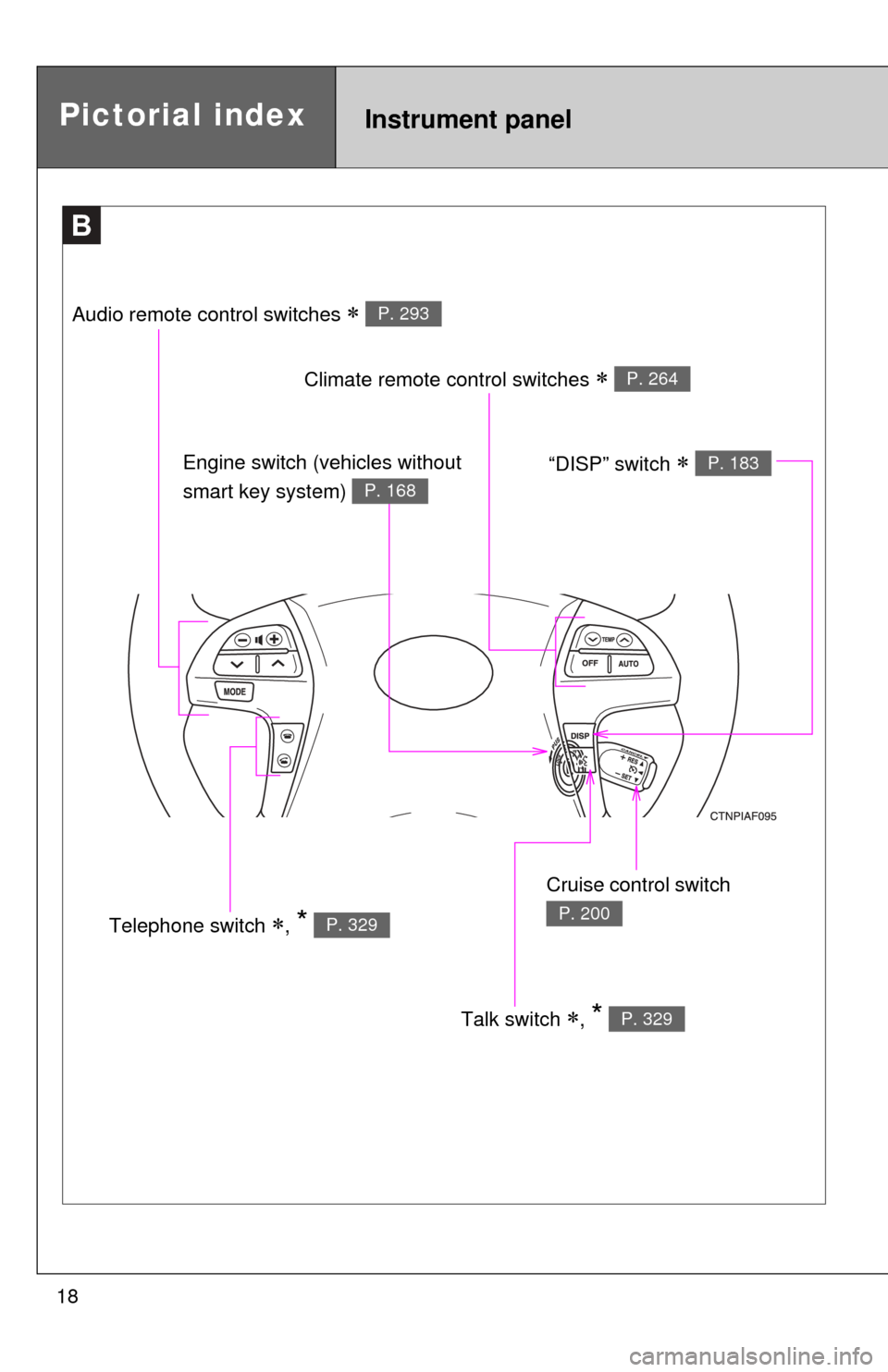
B
Talk switch , * P. 329
Pictorial indexInstrument panel
Audio remote control switches P. 293
Climate remote control switches P. 264
Cruise control switch
P. 200Telephone switch , * P. 329
Engine switch (vehicles without
smart key system)
P. 168
“DISP” switch P. 183
Page 29 of 577
Before driving1
29
1-1. Key information................ 30Keys ................................... 30
1-2. Opening, closing and locking the doors ........... 32
Smart key system .............. 32
Wireless remote control ..... 53
Side doors .......................... 64
Back door ........................... 68
Glass hatch ........................ 73
1-3. Adjustable components (seats, mirrors,
steering wheel)............... 75
Front seats ......................... 75
Rear seats.......................... 78
Head restraints................... 87
Seat belts ........................... 90
Steering wheel ................... 96
Anti-glare inside rear view mirror ............................... 97
Outside rear view mirrors ... 99 1-4. Opening and closing the
windows and
moon roof ..................... 101
Power windows ................ 101
Moon roof ......................... 103
1-5. Refueling......................... 106 Opening the fuel tank cap ................................. 106
1-6. Theft deterrent system .......................... 110
Engine immobilizer system ........................... 110
Alarm................................ 116
Theft prevention labels (U.S.A.) .......................... 119
1-7. Safety information ......... 120 Correct driving posture..... 120
SRS airbags ..................... 122
Front passenger occupant classification system ...... 134
Child restraint systems..... 140
Installing child restraints ........................ 144
Page 30 of 577
30
1-1. Key information
Keys
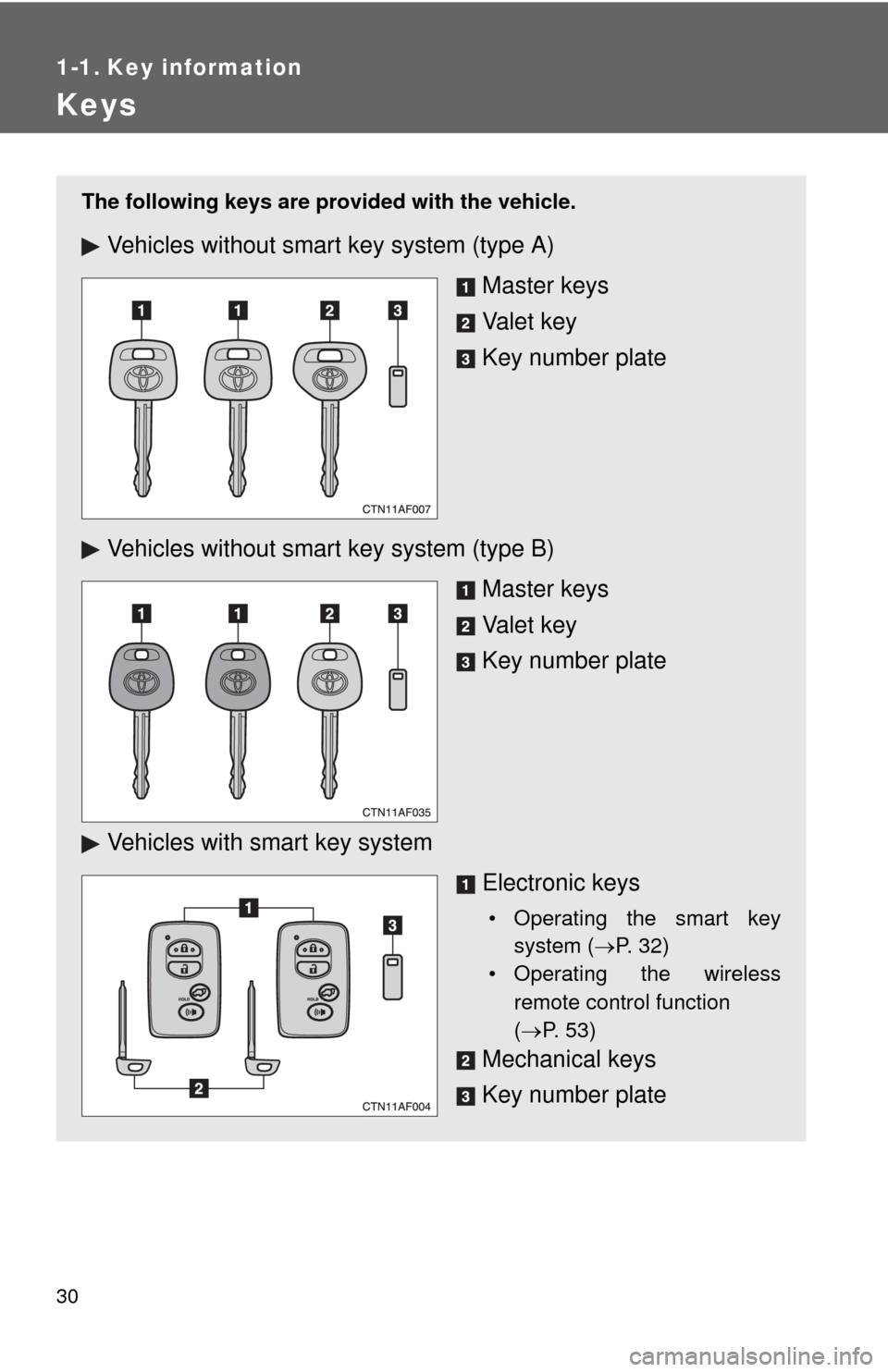
The following keys are provided with the vehicle.
Vehicles without smart key system (type A)
Master keys
Va l e t k e y
Key number plate
Vehicles without smar t key system (type B)
Master keys
Va l e t k e y
Key number plate
Vehicles with smart key system Electronic keys
• Operating the smart keysystem ( P. 32)
• Operating the wireless
remote control function
( P. 53)
Mechanical keys
Key number plate
Page 37 of 577
37
1-2. Opening, closing and locking the doors
1
Before driving
■
Operation signals
A buzzer sounds and the emergency flashers flash to indicate that the doors
have been locked/unlocked. (Locked: Once; Unlocked: Twice)
■ Conditions affecting operation
The smart key system uses weak radio waves. In the following situations,
the communication between the electronic key and the vehicle may be
affected, preventing the smart key system and wireless remote control from
operating properly. (Ways of coping: P. 514)
● When the electronic key battery is depleted
● Near a TV tower, electronic power plant, gas station, radio station, large
display, airport or other facility that generates strong radio waves or elec-
trical noise
● When carrying a portable radio, ce llular phone, cordless phone or other
wireless communication devices
● When the electronic key has come into contact with, or is covered by a
metallic object
● When multiple electronic keys are in the vicinity
● When carrying or using the electronic key together with the following
devices that emit radio waves
• Another vehicle’s electronic key
• A wireless key that emits radio waves
• Personal computer
● If window tint with a metallic content or metallic objects are attached to
the rear window
■ Switching the door unlock function
It is possible to set which doors the entry function unlocks.
Turn the “ENGINE START STOP” switch OFF.
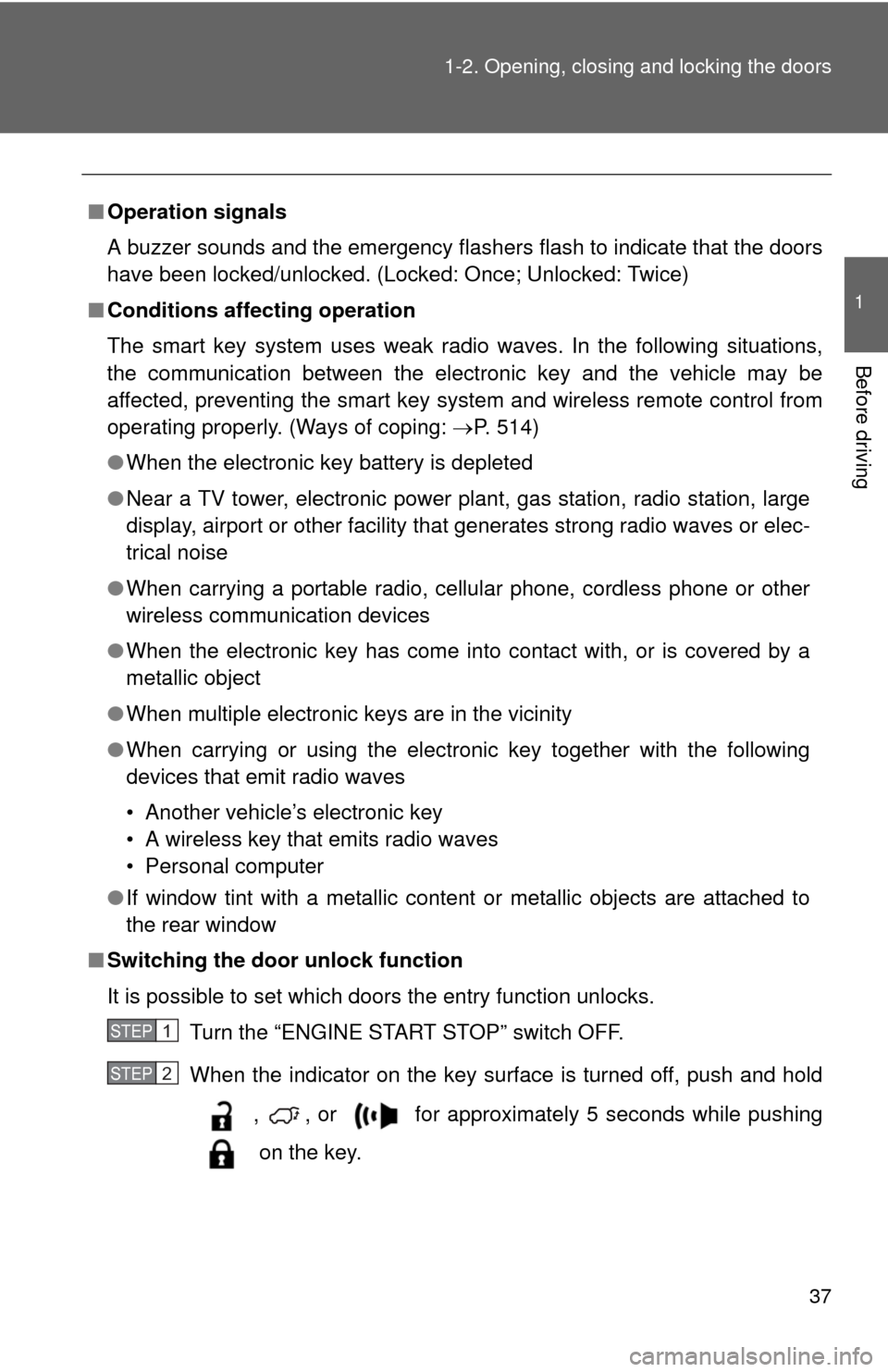
When the indicator on the key surface is turned off, push and hold
, , or for approximately 5 seconds while pushing
on the key.
STEP1
STEP2
Page 38 of 577
38 1-2. Opening, closing and locking the doors
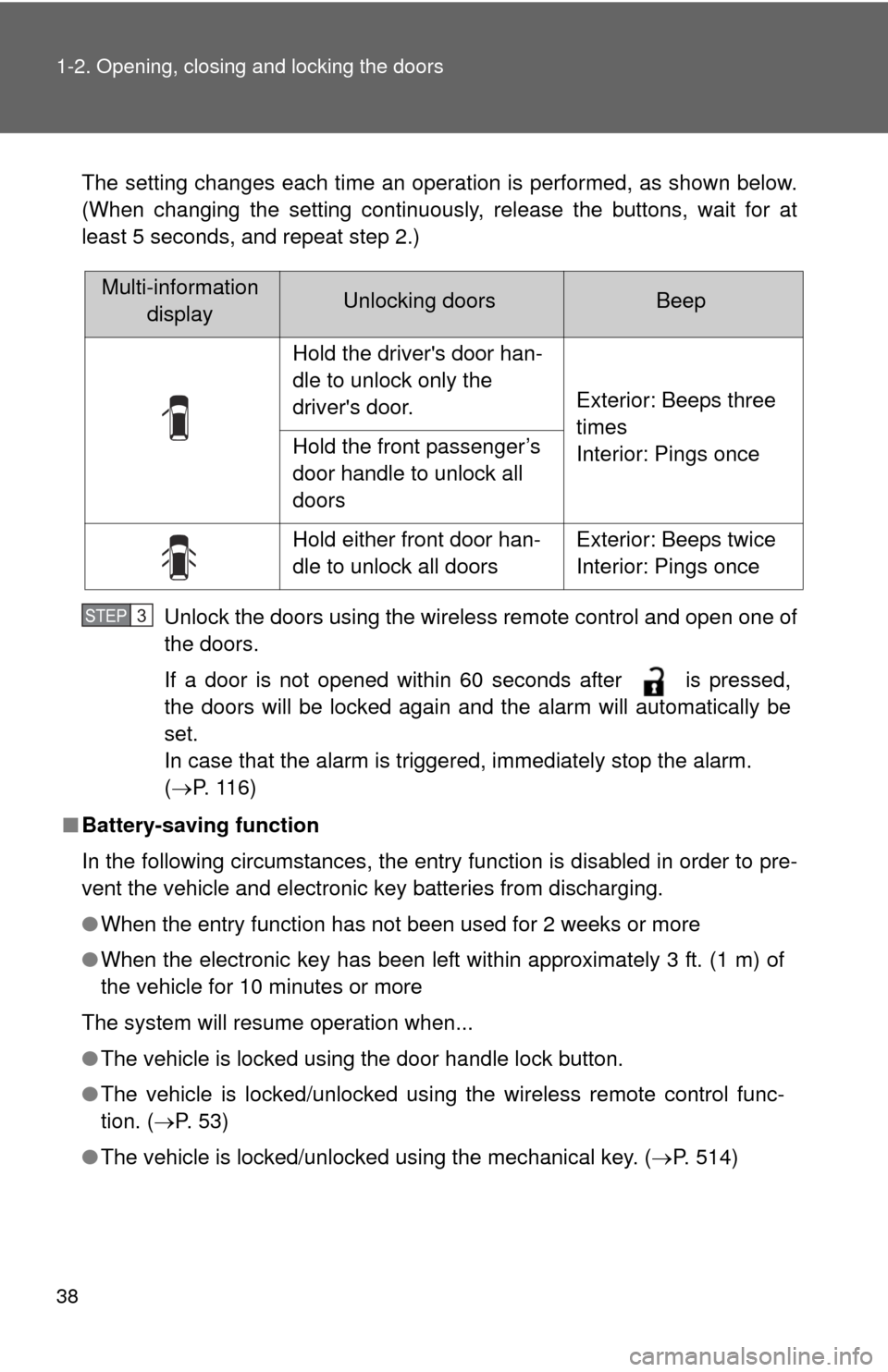
The setting changes each time an operation is performed, as shown below.
(When changing the setting continuously, release the buttons, wait for at
least 5 seconds, and repeat step 2.)Unlock the doors using the wireless remote control and open one of
the doors.
If a door is not opened within 60 seconds after is pressed,
the doors will be locked again and the alarm will automatically be
set.
In case that the alarm is triggered, immediately stop the alarm.
(P. 116)
■ Battery-saving function
In the following circumstances, the entry function is disabled in order to pre-
vent the vehicle and electronic key batteries from discharging.
●When the entry function has not been used for 2 weeks or more
● When the electronic key has been left within approximately 3 ft. (1 m) of
the vehicle for 10 minutes or more
The system will resume operation when...
● The vehicle is locked using the door handle lock button.
● The vehicle is locked/unlocked using the wireless remote control func-
tion. ( P. 5 3 )
● The vehicle is locked/unlocked using the mechanical key. ( P. 514)
Multi-information
displayUnlocking doorsBeep
Hold the driver's door han-
dle to unlock only the
driver's door.
Exterior: Beeps three
times
Interior: Pings once
Hold the front passenger’s
door handle to unlock all
doors
Hold either front door han-
dle to unlock all doorsExterior: Beeps twice
Interior: Pings once
STEP3
Page 39 of 577

39
1-2. Opening, closing and locking the doors
1
Before driving
■
Key battery depletion
●The standard battery life is 1 to 2 years. (The battery becomes depleted
even if the electronic key is not used.) If the smart key system or the
wireless remote control function does not operate, or the detection area
becomes smaller, the battery may be depleted. Replace the battery when
necessary. ( P. 453)
● To avoid serious deterioration, do not leave the electronic key within 3 ft.
(1 m) of the following electrical appliances that produce a magnetic field.
•TVs
• Personal computers
• Recharging cellular phones or cordless phones
• Table lamps
■ To operate the system properly
Make sure to carry the electronic key when operating the system. Do not get
the electronic key too close to the vehicle when operating the system from
the outside of the vehicle.
Depending on the position and holding condition of the electronic key, the
key may not be detected correctly and the system may not operate properly.
(The alarm may go off accidentally, or the door lock prevention may not func-
tion.)
■ Note for the entry function
●Even when the electronic key is within the effective range (detection
areas), the system may not operate properly in the following cases.
• The electronic key is too close to the window or outside door handle,
near the ground, or in a high place when the doors are locked or
unlocked.
• The electronic key is on the instrument panel, luggage cover, floor or in the glove box when the engine is started or “ENGINE START STOP”
switch modes are changed.
● As long as the electronic key is within the effective range, the doors may
be locked or unlocked by anyone.
● Even if the electronic key is not inside the vehicle, it may be possible to
start the engine if the electronic key is near the window.
Page 40 of 577

40 1-2. Opening, closing and locking the doors
●The doors may unlock if a large amount of water splashes on the door
handle, such as in the rain or in a car wash. (The doors will automatically
be locked after approximately 60 seconds if the doors are not opened
and closed.)
● Gripping the door handle when wearing a glove may not unlock the door.
● If the wireless remote control is used to lock the doors when the elec-
tronic key is near the vehicle, there is a possibility that the door may not
be unlocked by the entry function. (Use the wireless remote control to
unlock the doors.)
■ When the vehicle is not driven for extended periods
To prevent theft of the vehicle, do not leave the electronic key within 6 ft. (2
m) of the vehicle.
■ Security feature
If a door is not opened within approximately 60 seconds after the vehicle is
unlocked, the security feature automatically locks the vehicle again.
■ Alarms and warning indicators
A combination of exterior and interior alarms as well as warning lights and
warning messages shown on the multi-information display are used to
reduce the chance of vehicle theft and accidents resulting from erroneous
operation.
●When any warning lights come on:
Take appropriate measures according to which warning light comes on.
( P. 489)
● When a warning message is shown on the multi-information display:
Take appropriate measures according to the warning message on the
multi-information display. ( P. 498)