window TOYOTA HIGHLANDER 2010 XU40 / 2.G Owner's Guide
[x] Cancel search | Manufacturer: TOYOTA, Model Year: 2010, Model line: HIGHLANDER, Model: TOYOTA HIGHLANDER 2010 XU40 / 2.GPages: 608, PDF Size: 11.99 MB
Page 287 of 608
287
3-2. Using the audio system
3
Interior features
■
When the battery is disconnected
Stations presets are erased.
■ Reception sensitivity
●Maintaining perfect radio reception at all times is difficult due to the con-
tinually changing position of the antenna, differences in signal strength
and surrounding objects, such as trains and transmitters.
● Mast type antenna The radio antenna is mounted on the right-side
front fender. The antenna can be removed from the base by turning it.
● Print type antenna The radio antenna is mounted inside the left-side
rear quarter window. To maintain clear radio reception, do not attach
metallic window tinting or other metallic objects to the antenna wire
mounted inside the left-side rear quarter window.
■ XM
® Satellite Radio (type B and C)
An XM
® Satellite Radio is a tuner designed exclusively to receive broadcasts
provided under a separate subscription. Availability is limited to the 48 con-
tiguous states and 10 Canadian provinces.
● XM
® subscriptions
For detailed information about XM® Satellite Radio or to subscribe:
U.S.A.
Visit on the web at www.xmradio.com
or call 1-800-967-2346.
Canada
Visit on the web at www.xmradio.ca
or call 1-877-438-9677.
● Radio ID
You will need the radio ID when activating XM
® service or reporting a
problem. Select “CH000” using , and the receiver's 8-character ID
number will appear.
● Satellite tuner
The tuner supports only Audio Services (Music and Talk) and the accom-
panying Text Information of XM
® Satellite Radio.
Page 301 of 608
301
3-2. Using the audio system
3
Interior features
■
MP3 and WMA files
MP3 (MPEG Audio LAYER3) is a standard audio compression format.
Files can be compressed to approximately 1/10 of their original size by using
MP3 compression.
WMA (Windows Media
TM Audio) is a Microsoft audio compression format.
This format compresses audio data to a size smaller than that of the MP3
format.
There is a limit to the MP3 and WMA file standards that can be used and to
the media/formats on which the files are recorded.
● MP3 file compatibility
• Compatible standards
MP3 (MPEG1 LAYER3, MPEG2 LSF LAYER3)
• Compatible sampling frequencies MPEG1 LAYER3: 32, 44.1, 48 (kHz)
MPEG2 LSF LAYER3: 16, 22.05, 24 (kHz)
• Compatible bit rates (compatible with VBR) MPEG1 LAYER3: 64, 80, 96, 112, 128, 160, 192, 224, 256, 320 (kbps)
MPEG2 LSF LAYER3: 64, 80, 96, 112, 128, 144, 160 (kbps)
• Compatible channel modes: stereo, joint stereo, dual channel and monaural
● WMA file compatibility
• Compatible standards
WMA Ver. 7, 8, 9
• Compatible sampling frequencies 32, 44.1, 48 (kHz)
• Compatible bit rates (only compatible with 2-channel playback) Ver. 7, 8: CBR 48, 64, 80, 96, 128, 160, 192 (kbps)
Ver. 9: CBR 48, 64, 80, 96, 128, 160, 192, 256, 320 (kbps)
● Compatible media
Media that can be used for MP3 and WMA playback are CD-Rs and CD-
RWs.
Playback in some instances may not be possible, depending on the status
of the CD-R or CD-RW. Playback may not be possible or the audio may
jump if the disc is scratched or marked with fingerprints.
Page 303 of 608
303
3-2. Using the audio system
3
Interior features
●
Extensions
If the file extensions .mp3 and .wma are used for files other than MP3 and
WMA files, they will be mistakenly recognized and played as MP3 and
WMA files. This may result in large amounts of interference and damage
to the speakers.
● Playback
• To play MP3 file with steady sound quality, we recommend a fixed bit
rate of at least 128 kbps and a sampling frequency of 44.1 kHz.
• CD-R or CD-RW playback may not be possible in some instances, depending on the characteristics of the disc.
• There is a wide variety of freeware and other encoding software for MP3 and WMA files on the market, and depending on the status of the
encoding and the file format, poor sound quality or noise at the start of
playback may result. In some cases, playback may not be possible at
all.
• When files other than MP3 or WMA files are recorded on a disc, it may take more time to recognize the disc and in some cases, playback may
not be possible at all.
• Microsoft, Windows, and Windows Media are the registered trade- marks of Microsoft Corporation in the U.S. and other countries.
NOTICE
■ CDs and adapters that cannot be used
P. 295
■ CD player precautions
P. 296
Page 342 of 608
342
3-4. Using the hands-free phone system (for cellular phone)
Hands-free phone system (for cellular phone) features
■When using the hands-free system
●The audio system and voice guidance are muted when making a call.
● If both parties speak at the same time it may be difficult to hear.
● If the received call volume is overly loud, an echo may be heard.
● Try to face toward the microphone as much as possible when speaking.
● In the following circumstances it may be difficult to hear the other party:
• When driving on unpaved roads
• When driving at high speeds
• If the window is open
• If the air conditioning is blowing directly on the microphone
• If the air conditioning is set to high
Vehicles with navigation system
Owners of models equipped with a navigation system should refer to
the “Navigation System Owner's Manual”.
Vehicles without navigation system
This system supports Bluetooth®, which allows you to make or
receive calls without using cables to connect a cellular phone and
the system, and without oper ating the cellular phone.
TitlePage
Using the hands-free phone system (for
cellular phone) P. 346
Making a phone call P. 353
Setting a cellular phone P. 357
Security and system setup P. 362
Using the phone book P. 365
: If equipped
Page 416 of 608
416
4-1. Maintenance and care
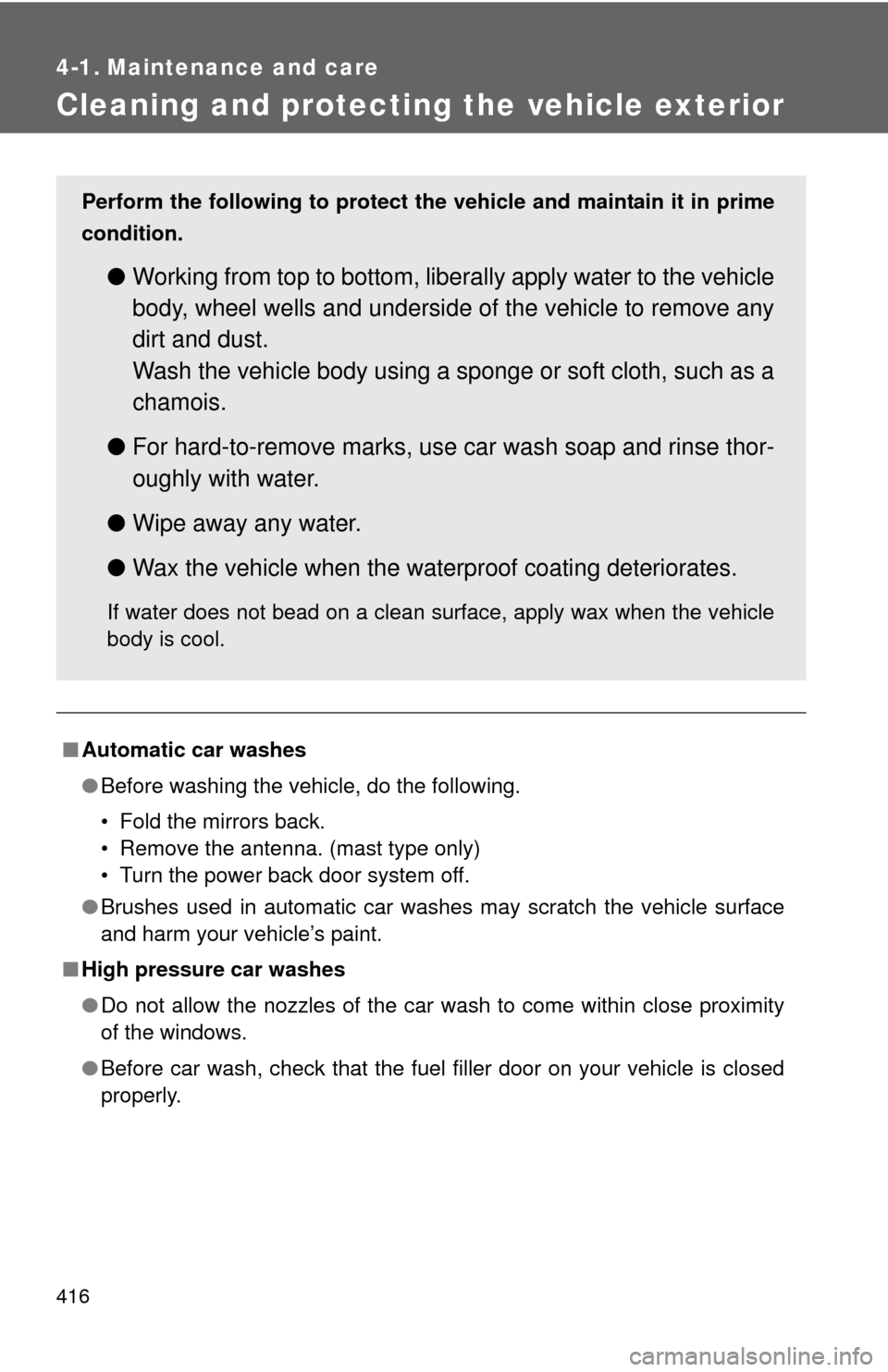
Cleaning and protecting the vehicle exterior
■Automatic car washes
●Before washing the vehicle, do the following.
• Fold the mirrors back.
• Remove the antenna. (mast type only)
• Turn the power back door system off.
● Brushes used in automatic car washes may scratch the vehicle surface
and harm your vehicle’s paint.
■ High pressure car washes
●Do not allow the nozzles of the car wash to come within close proximity
of the windows.
● Before car wash, check that the fuel filler door on your vehicle is closed
properly.
Perform the following to protect the vehicle and maintain it in prime
condition.
● Working from top to bottom, liber ally apply water to the vehicle
body, wheel wells and underside of the vehicle to remove any
dirt and dust.
Wash the vehicle body using a sponge or soft cloth, such as a
chamois.
● For hard-to-remove marks, use car wash soap and rinse thor-
oughly with water.
● Wipe away any water.
● Wax the vehicle when the waterproof coating deteriorates.
If water does not bead on a clean surface, apply wax when the vehicle
body is cool.
Page 420 of 608
420 4-1. Maintenance and care
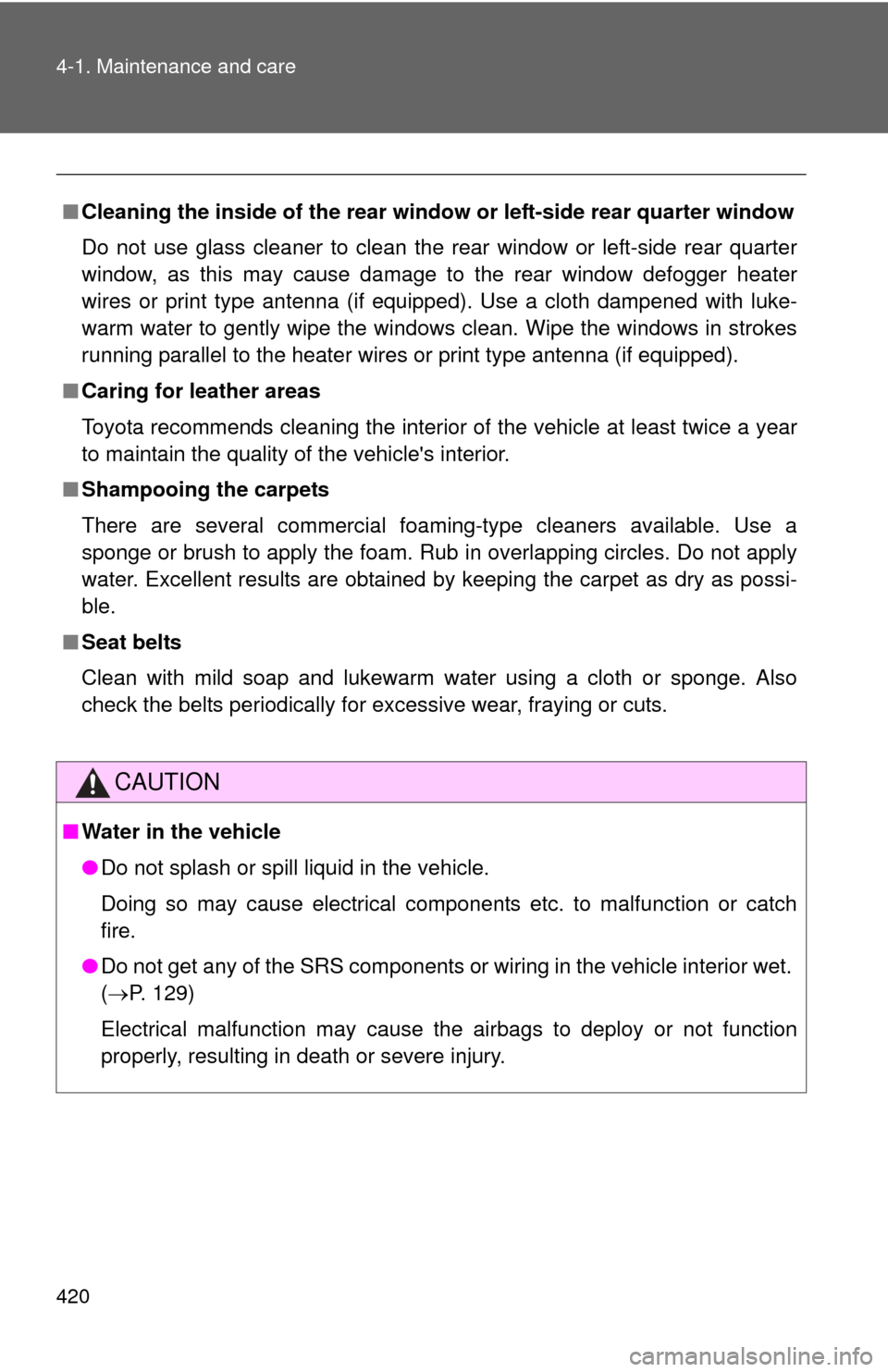
■Cleaning the inside of the rear windo w or left-side rear quarter window
Do not use glass cleaner to clean the rear window or left-side rear quarter
window, as this may cause damage to the rear window defogger heater
wires or print type antenna (if equipped). Use a cloth dampened with luke-
warm water to gently wipe the windows clean. Wipe the windows in strokes
running parallel to the heater wires or print type antenna (if equipped).
■ Caring for leather areas
Toyota recommends cleaning the interior of the vehicle at least twice a year
to maintain the quality of the vehicle's interior.
■ Shampooing the carpets
There are several commercial foaming-type cleaners available. Use a
sponge or brush to apply the foam. Rub in overlapping circles. Do not apply
water. Excellent results are obtained by keeping the carpet as dry as possi-
ble.
■ Seat belts
Clean with mild soap and lukewarm water using a cloth or sponge. Also
check the belts periodically for excessive wear, fraying or cuts.
CAUTION
■Water in the vehicle
●Do not splash or spill liquid in the vehicle.
Doing so may cause electrical components etc. to malfunction or catch
fire.
● Do not get any of the SRS components or wiring in the vehicle interior wet.
( P. 129)
Electrical malfunction may cause the airbags to deploy or not function
properly, resulting in death or severe injury.
Page 421 of 608

421
4-1. Maintenance and care
4
Maintenance and care
NOTICE
■
Cleaning detergents
Do not use organic substances such as benzene or gasoline, acidic or alka-
line solutions, dye, bleach or other detergent. Doing so may discolor the
vehicle interior or cause streaks or damage to painted surfaces.
■ Preventing damage to leather surfaces
Observe the following precautions to avoid damage to and deterioration o\
f
leather surfaces.
●Remove any dust or dirt on leather surfaces immediately.
● Do not expose the vehicle to direct sunlight for extended periods of time.
Park the vehicle in the shade, especially during summer.
● Do not place items made of vinyl, plastic, or that contain wax on the uphol-
stery, as they may stick to the leather surface if the vehicle interior heats
up significantly.
■ Water on the floor
Do not wash the vehicle floor with water.
Vehicle systems such as the audio system may be damaged if water comes
into contact with electrical components under the floor of the vehicle, and
may also cause the body to rust.
■ Cleaning the inside of the rear wind ow or left-side rear quarter window
Be careful not to scratch or damage the heater wires or print type antenna (if
equipped).
Page 479 of 608
479
4-3. Do-it-yourself maintenance
4
Maintenance and care
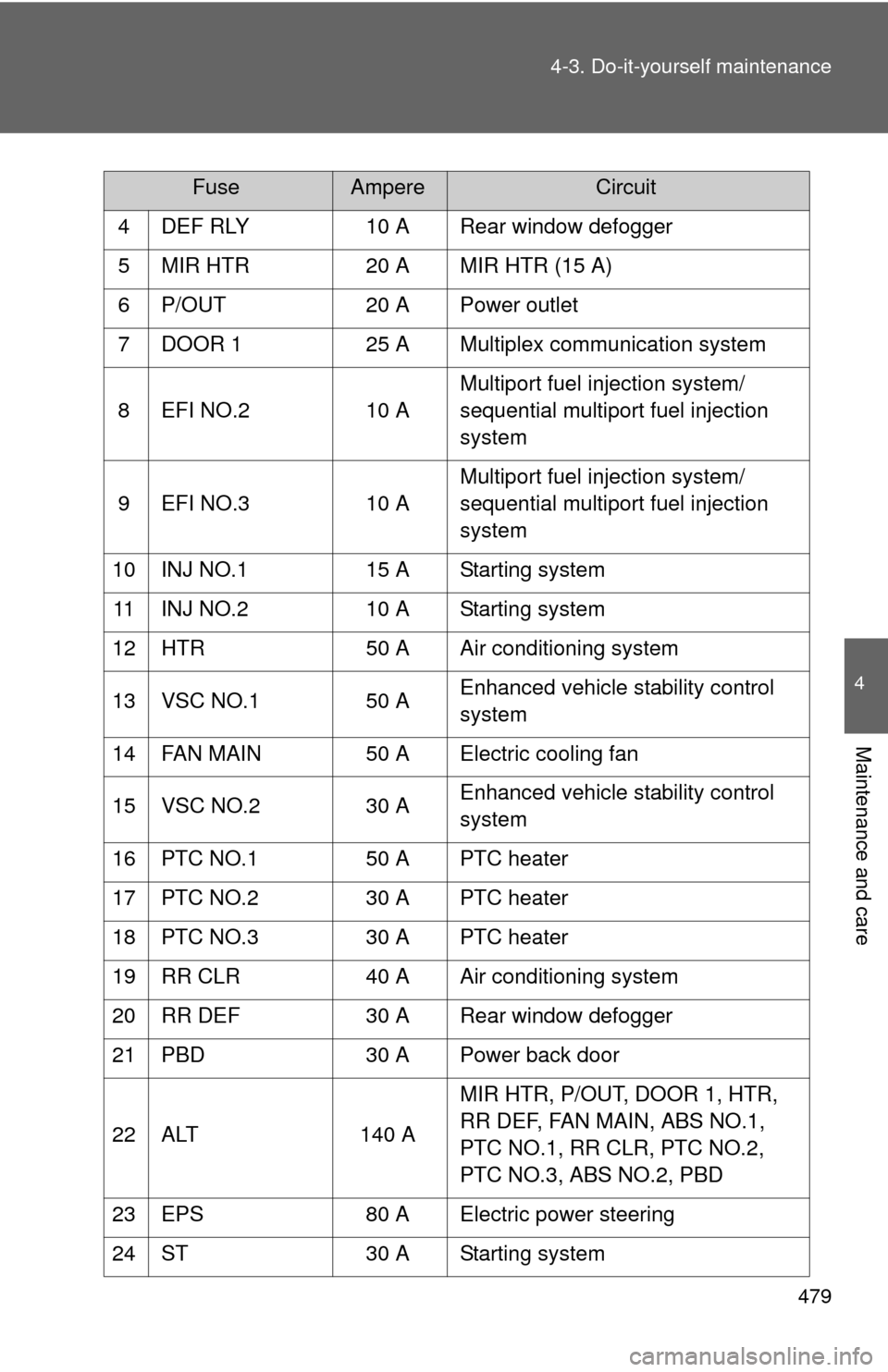
4 DEF RLY
10 A Rear window defogger
5 MIR HTR 20 A MIR HTR (15 A)
6 P/OUT 20 A Power outlet
7 DOOR 1 25 A Multiplex communication system
8 EFI NO.2 10 AMultiport fuel injection system/
sequential multiport fuel injection
system
9 EFI NO.3 10 AMultiport fuel injection system/
sequential multiport fuel injection
system
10 INJ NO.1 15 A Starting system
11 INJ NO.2 10 A Starting system
12 HTR 50 A Air conditioning system
13 VSC NO.1 50 A Enhanced vehicle stability control
system
14 FAN MAIN 50 A Electric cooling fan
15 VSC NO.2 30 A Enhanced vehicle stability control
system
16 PTC NO.1 50 A PTC heater
17 PTC NO.2 30 A PTC heater
18 PTC NO.3 30 A PTC heater
19 RR CLR 40 A Air conditioning system
20 RR DEF 30 A Rear window defogger
21 PBD 30 A Power back door
22 ALT 140 AMIR HTR, P/OUT, DOOR 1, HTR,
RR DEF, FAN MAIN, ABS NO.1,
PTC NO.1, RR CLR, PTC NO.2,
PTC NO.3, ABS NO.2, PBD
23 EPS 80 A Electric power steering
24 ST 30 A Starting system
FuseAmpereCircuit
Page 482 of 608
482 4-3. Do-it-yourself maintenance
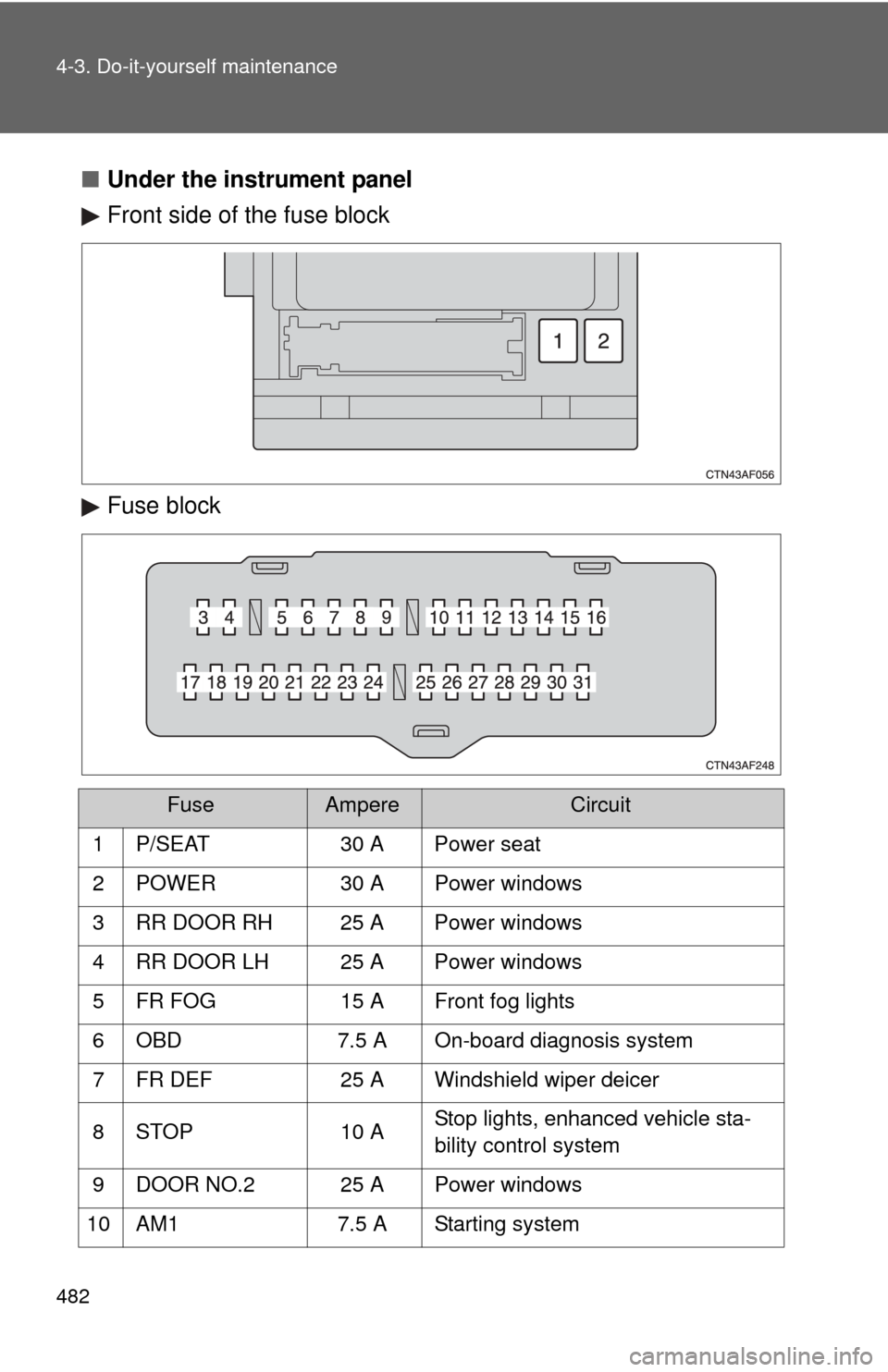
■Under the instrument panel
Front side of the fuse block
Fuse block
FuseAmpereCircuit
1 P/SEAT 30 A Power seat
2 POWER 30 A Power windows
3 RR DOOR RH 25 A Power windows
4 RR DOOR LH 25 A Power windows
5 FR FOG 15 A Front fog lights
6 OBD 7.5 A On-board diagnosis system
7 FR DEF 25 A Windshield wiper deicer
8 STOP 10 A Stop lights, enhanced vehicle sta-
bility control system
9 DOOR NO.2 25 A Power windows
10 AM1 7.5 A Starting system
Page 484 of 608

484 4-3. Do-it-yourself maintenance
22 GAUGE NO.1 10 AAudio system, outside rear view
mirror defoggers, back-up lights,
charging system, emergency flash-
ers, traction control system, instru-
ment panel light control dial,
windshield wiper deicer
23 FR WIP 30 A Windshield wipers and washer
24 RR WIP 15 A Rear window wiper and washer
25 IGN 10 A Multiport fuel injection system/
sequential multiport fuel injection
system, steering lock system, anti-
lock brake system, smart key sys-
tem, SRS airbag system
26 GAUGE NO.2 7.5 A Gauges and meters, rear view
monitor
27 ECU-ACC 7.5 A Auto anti-glare rear view mirrors,
shift lock system, smart key system
28 ACC SOCK
NO.1 10 A Power outlet
29 ACC SOCK
NO.2 20 A Power outlet
30 RADIO NO.2 7.5 A Audio system, clock, rear seat
entertainment system, charging
system, interior lights, personal
lights
31 MIR HTR 15 A Outside rear view mirror defoggers
FuseAmpereCircuit