park assist TOYOTA HIGHLANDER 2016 XU50 / 3.G Navigation Manual
[x] Cancel search | Manufacturer: TOYOTA, Model Year: 2016, Model line: HIGHLANDER, Model: TOYOTA HIGHLANDER 2016 XU50 / 3.GPages: 352, PDF Size: 5.22 MB
Page 9 of 352
9
HIGHLANDER_Navi_U
1
2
3
4
5
6
7
9
8
3. MEDIA OPERATION ..................... 100
CD ....................................................... 100
USB MEMORY .................................... 103
iPod ..................................................... 107
Bluetooth
® AUDIO ............................... 111
AUX ..................................................... 116
4. AUDIO/VISUAL REMOTE CONTROLS ................................. 118
STEERING SWITCHES ...................... 118
5. SETUP ........................................... 121
AUDIO SETTINGS .............................. 121
6. TIPS FOR OPERATING THE AUDIO/VISUAL SYSTEM ............ 123
OPERATING INFORMATION ............. 123
7. REAR SEAT ENTERTAINMENT SYSTEM OPERATION ................ 133
REAR SEAT ENTERTAINMENT
SYSTEM FEATURES ........................... 133
PLAYING A Blu-ray Disc™ (BD) AND DVD DISCS .............................. 146
PLAYING AN AUDIO CD AND MP3/WMA DISCS ............................. 159
PLAYING AN SD CARD ...................... 162
USING THE VIDEO MODE ................. 167
1. VOICE COMMAND SYSTEM OPERATION ................................ 170
VOICE COMMAND SYSTEM.............. 170
CASUAL SPEECH
RECOGNIZATION ............................ 176
COMMAND LIST ................................. 177
2. MOBILE ASSISTANT OPERATION ................................ 179
MOBILE ASSISTANT .......................... 179
1. USEFUL INFORMATION .............. 182
RECEIVING WEATHER
INFORMATION ................................. 182
RECEIVING TRAFFIC MAP INFORMATION ................................. 184
DATA SERVICES SETTINGS ............. 185
Driver Easy Speak ............................... 186
1. REAR VIEW MONITOR SYSTEM ....... ............................ ... 190
REAR VIEW MONITOR SYSTEM ....... 190
REAR VIEW MONITOR SYSTEM
PRECAUTIONS ................................ 192
THINGS YOU SHOULD KNOW .......... 197
2. TOYOTA PARKING ASSIST MONITOR ...................... 198
TOYOTA PARKING
ASSIST MONITOR ............................ 198
ESTIMATED COURSE LINE DISPLAY MODE ............................... 203
PARKING ASSIST GUIDE LINE DISPLAY MODE ............................... 205
TOYOTA PARKING ASSIST MONITOR PRECAUTIONS............... 207
THINGS YOU SHOULD KNOW .......... 212
3. INTUITIVE PARKING ASSIST ...... 214
INTUITIVE PARKING ASSIST............. 214
INTUITIVE PARKING ASSIST SETTING ............................. 219
4VOICE COMMAND SYSTEM
5INFORMATION
6PERIPHERAL MONITORING
SYSTEM
Page 67 of 352
67
3. OTHER SETTINGS
HIGHLANDER_Navi_U
BASIC FUNCTION
2
3. VEHICLE SETTINGS
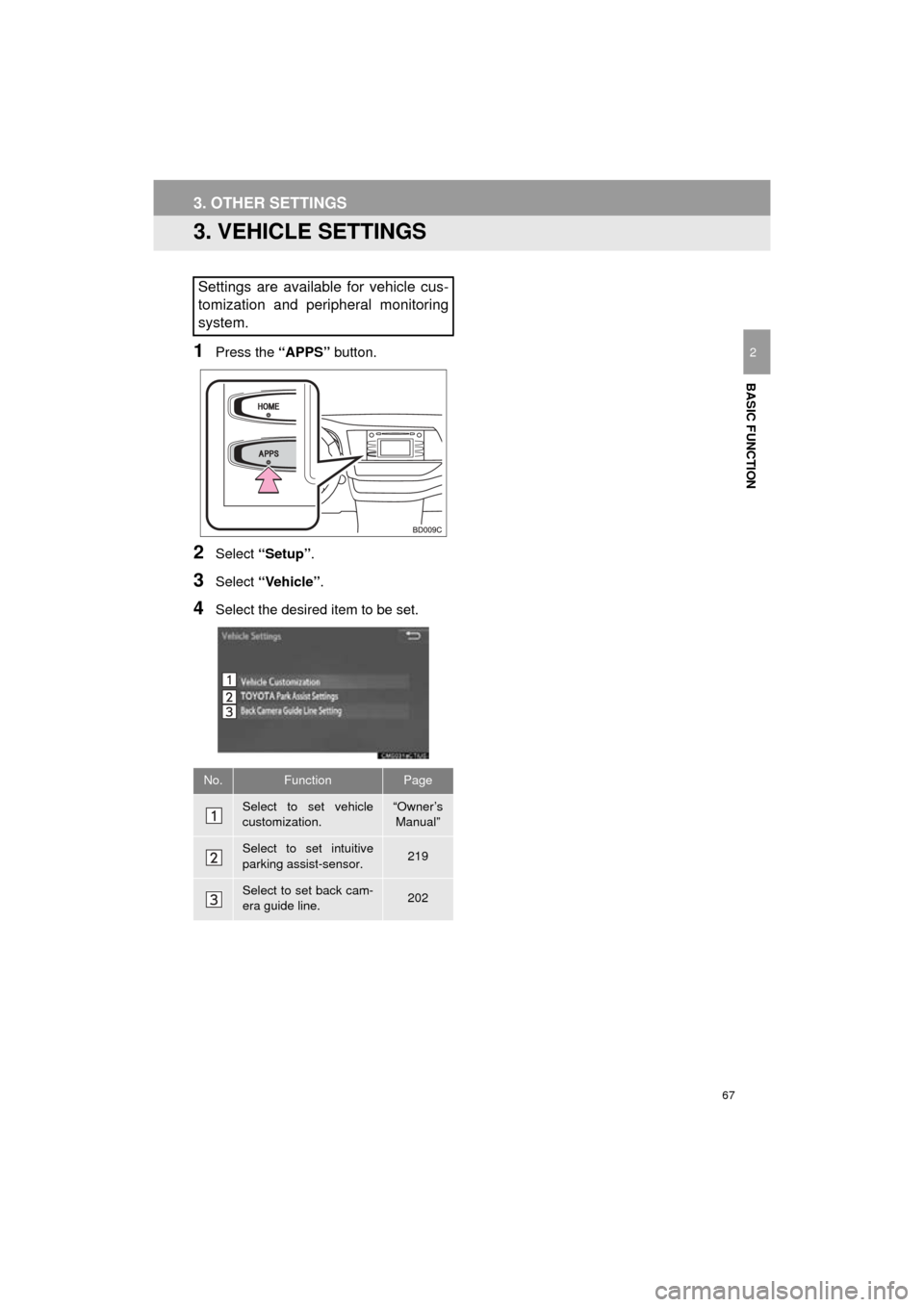
1Press the “APPS” button.
2Select “Setup” .
3Select “Vehicle”.
4Select the desired item to be set.
Settings are available for vehicle cus-
tomization and peripheral monitoring
system.
No.FunctionPage
Select to set vehicle
customization.“Owner’s
Manual”
Select to set intuitive
parking assist-sensor.219
Select to set back cam-
era guide line.202
Page 189 of 352
6
189
HIGHLANDER_Navi_U
4
5
7
8
9
1
2
3
6
1. TOYOTA PARKING ASSISTMONITOR .................................. 198
DRIVING PRECAUTIONS................... 198
SCREEN DISPLAY ............................. 200
USING THE SYSTEM ......................... 201
2. ESTIMATED COURSE LINEDISPLAY MODE ........................ 203
SCREEN DESCRIPTION .................... 203
PARKING ............................................ 204
3. PARKING ASSIST GUIDE LINEDISPLAY MODE ........................ 205
SCREEN DESCRIPTION .................... 205
PARKING ............................................ 206
4. TOYOTA PARKING ASSISTMONITOR PRECAUTIONS ....... 207
AREA DISPLAYED ON SCREEN ....... 207
THE CAMERA ..................................... 208
DIFFERENCES BETWEEN
THE SCREEN AND
THE ACTUAL ROAD ........................ 209
WHEN APPROACHING THREE-DIMENSIONAL
OBJECTS.......................................... 210
5. THINGS YOU SHOULD KNOW ........................................ 212
IF YOU NOTICE ANY
SYMPTOMS...................................... 212
1. INTUITIVE PARKING ASSIST ...................................... 214
TYPES OF SENSORS......................... 214
INTUITIVE PARKING ASSIST
SWITCH ............................................ 214
DISPLAY .............................................. 214
THE DISTANCE DISPLAY AND BUZZER ............................................ 215
DETECTION RANGE OF THE SENSORS................................. 216
SENSOR DETECTION INFORMATION ................................. 216
INTUITIVE PARKING ASSIST-SENSOR FAILURE
WARNING ......................................... 218
CERTIFICATION ................................. 218
2. INTUITIVE PARKING ASSIST SETTING ................................... 219
SETTING AN ALERT VOLUME........... 219
SETTING A PARKING SONAR
DISPLAY ........................................... 219
SETTING A DISPLAY AND TONE INDICATION ........................... 220
2TOYOTA PARKING ASSIST
MONITOR3INTUITIVE PARKING ASSIST
PERIPHERAL MONITORING SYSTEM
Page 190 of 352
190
HIGHLANDER_Navi_U
1. REAR VIEW MONITOR SYSTEM
1. REAR VIEW MONITOR SYSTEM*
The rear view monitor system assists
the driver by displaying an image of the
view behind the vehicle with fixed
guide lines on the screen while backing
up, for example while parking.
INFORMATION
●The screen illustrations used in this text
are intended as examples, and may dif-
fer from the image that is actually dis-
played on the screen.
DRIVING PRECAUTIONS
The rear view monitor system is a sup-
plemental device intended to assist the
driver when backing up. When backing
up, be sure to visually check all around
the vehicle both directly and using the
mirrors before proceeding. If you do
not, you may hit another vehicle, and
could possibly cause an accident.
Pay attention to the following precau-
tions when using the rear view monitor
system.
*: If equipped
WA R N I N G
●Never depend on the rear view monitor
system entirely when backing up. The
image and the position of the guide lines
displayed on the screen may differ from
the actual state.
Use caution, just as you would when
backing up any vehicle.
● Be sure to back up slowly, depressing
the brake pedal to control vehicle speed.
● The instructions given are only guide
lines. When and how much to turn the
steering wheel will vary according to
traffic conditions, road surface condi-
tions, vehicle condition, etc. when park-
ing. It is necessary to be fully aware of
this before using the rear view monitor
system.
● When parking, be sure to check that the
parking space will accommodate your
vehicle before maneuvering into it.
● Do not use the rear view monitor system
in the following cases:
• On icy or slick road surfaces, or in
snow
• When using tire chains or emergency tires
• When the back door is not closed com- pletely
• On roads that are not flat or straight,
such as curves or slopes
● In low temperatures, the screen may
darken or the image may become faint.
The image could distort when the vehi-
cle is moving, or you may become
unable to see the image on the screen.
Be sure to visually check all around the
vehicle both directly and using the mir-
rors before proceeding.
● If the tire sizes are changed, the position
of the fixed guide lines displayed on the
screen may change.
● The camera uses a special lens. The
distances between objects and pedestri-
ans that appear in the image displayed
on the screen will differ from the actual
distances.( P.193)
Page 198 of 352
198
HIGHLANDER_Navi_U
2. TOYOTA PARKING ASSIST MONITOR
1. TOYOTA PARKING ASSIST MONITOR*
The parking assist monitor assists the
driver by displaying an image of the
view behind the vehicle while backing
up, for example while parking.
INFORMATION
●The screen illustrations used in this text
are intended as examples, and may dif-
fer from the image that is actually dis-
played on the screen.
*: If equipped
DRIVING PRECAUTIONS
The parking assist monitor is a supple-
mental device intended to assist the
driver when backing up. When backing
up, be sure to visually check all around
the vehicle both directly and using the
mirrors before proceeding. If you do
not, you may hit another vehicle, and
could possibly cause an accident.
Pay attention to the following precau-
tions when using the parking assist
monitor.
WA R N I N G
●Never depend on the parking assist
monitor entirely when backing up. The
image and the position of the guide lines
displayed on the screen may differ from
the actual state.
Use caution, just as you would when
backing up any vehicle.
● Be sure to back up slowly, depressing
the brake pedal to control vehicle speed.
● If you seem likely to hit nearby vehicles,
obstacles, people or mount the shoulder,
depress the brake pedal to stop the
vehicle.
Page 199 of 352
199
2. TOYOTA PARKING ASSIST MONITOR
HIGHLANDER_Navi_U
PERIPHERAL MONITORING SYSTEM
6
WA R N I N G
●The instructions given are only guide-
lines. When and how much to turn the
steering wheel will vary according to
traffic conditions, road surface condi-
tions, vehicle condition, etc. when park-
ing. It is necessary to be fully aware of
this before using the parking assist sys-
tem.
● When parking, be sure to check that the
parking space will accommodate your
vehicle before maneuvering into it.
● Do not use the parking assist monitor in
the following cases:
• On icy or slick road surfaces, or in
snow
• When using tire chains or emergency
tires
• When the back door is not closed com- pletely
• On roads that are not flat or straight, such as curves or slopes
● In low temperatures, the screen may
darken or the image may become faint.
The image could distort when the vehi-
cle is moving, or you may become
unable to see the image on the screen.
Be sure to visually check all around the
vehicle both directly and using the mir-
rors before proceeding.
● If the tire sizes are changed, the position
of the guide lines displayed on the
screen may change.
● The camera uses a special lens. The
distances between objects and pedestri-
ans that appear in the image displayed
on the screen will differ from the actual
distances. ( P.209)
Page 200 of 352

200
2. TOYOTA PARKING ASSIST MONITOR
HIGHLANDER_Navi_U
Intuitive parking assist-sensor
If an obstacle is detected while the intuitive parking assist-sensor is \
on, a dis-
play is shown in the top right corner of the screen.
SCREEN DISPLAY
The parking assist monitor screen will be displayed if the shift lever is shifted to the
“R” position while the engine
CANCELING TOYOTA PARKING ASSIST MONITOR
The parking assist monitor is canceled when the shift lever is shifted into any posi-
tion other than the “R” position.
Page 201 of 352
201
2. TOYOTA PARKING ASSIST MONITOR
HIGHLANDER_Navi_U
PERIPHERAL MONITORING SYSTEM
6
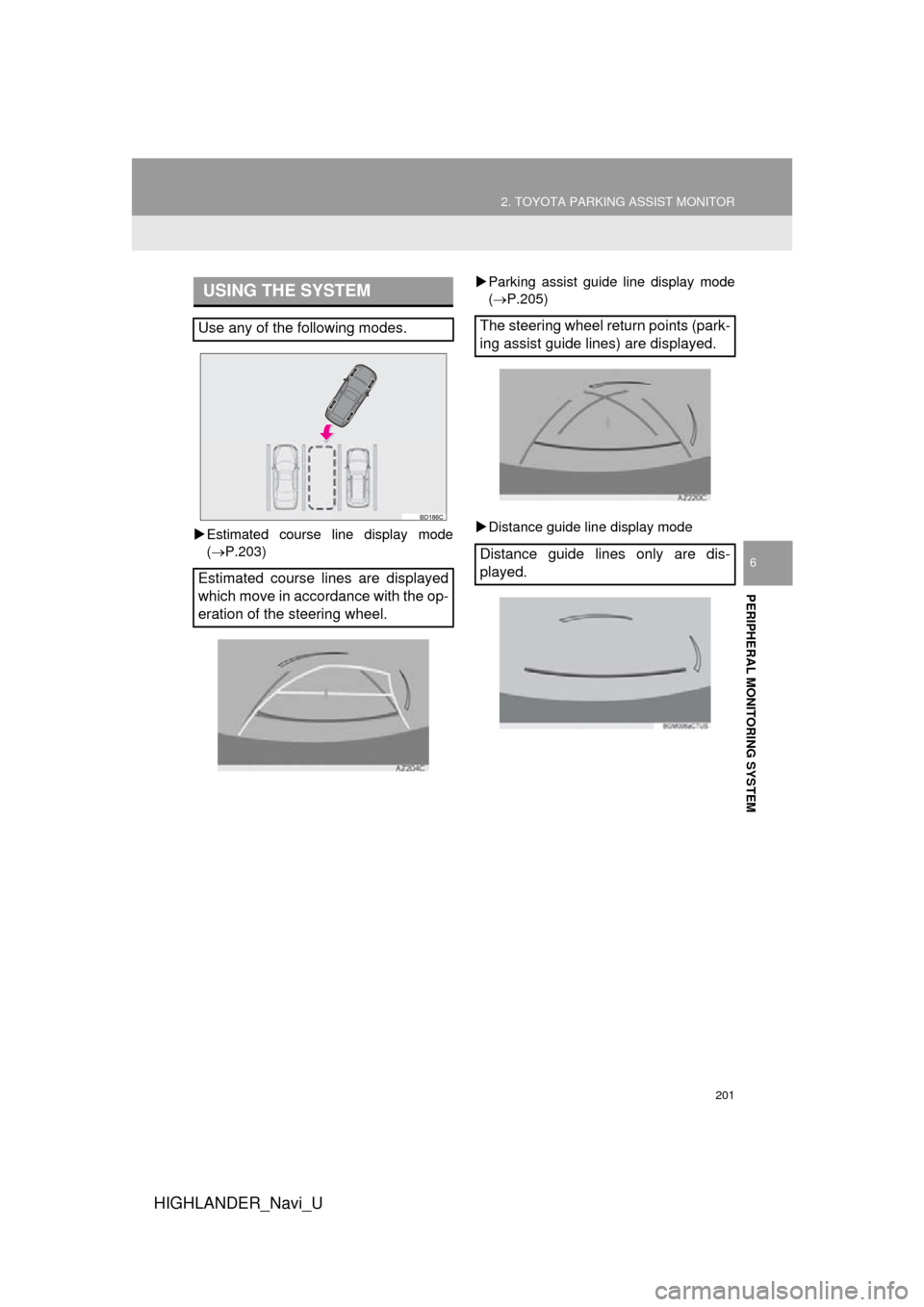
Estimated course line display mode
(P.203)
Parking assist guide line display mode
(P.205)
Distance guide line display mode
USING THE SYSTEM
Use any of the following modes.
Estimated course lines are displayed
which move in accordance with the op-
eration of the steering wheel.The steering wheel return points (park-
ing assist guide lines) are displayed.
Distance guide lines only are dis-
played.
Page 202 of 352
202
2. TOYOTA PARKING ASSIST MONITOR
HIGHLANDER_Navi_U
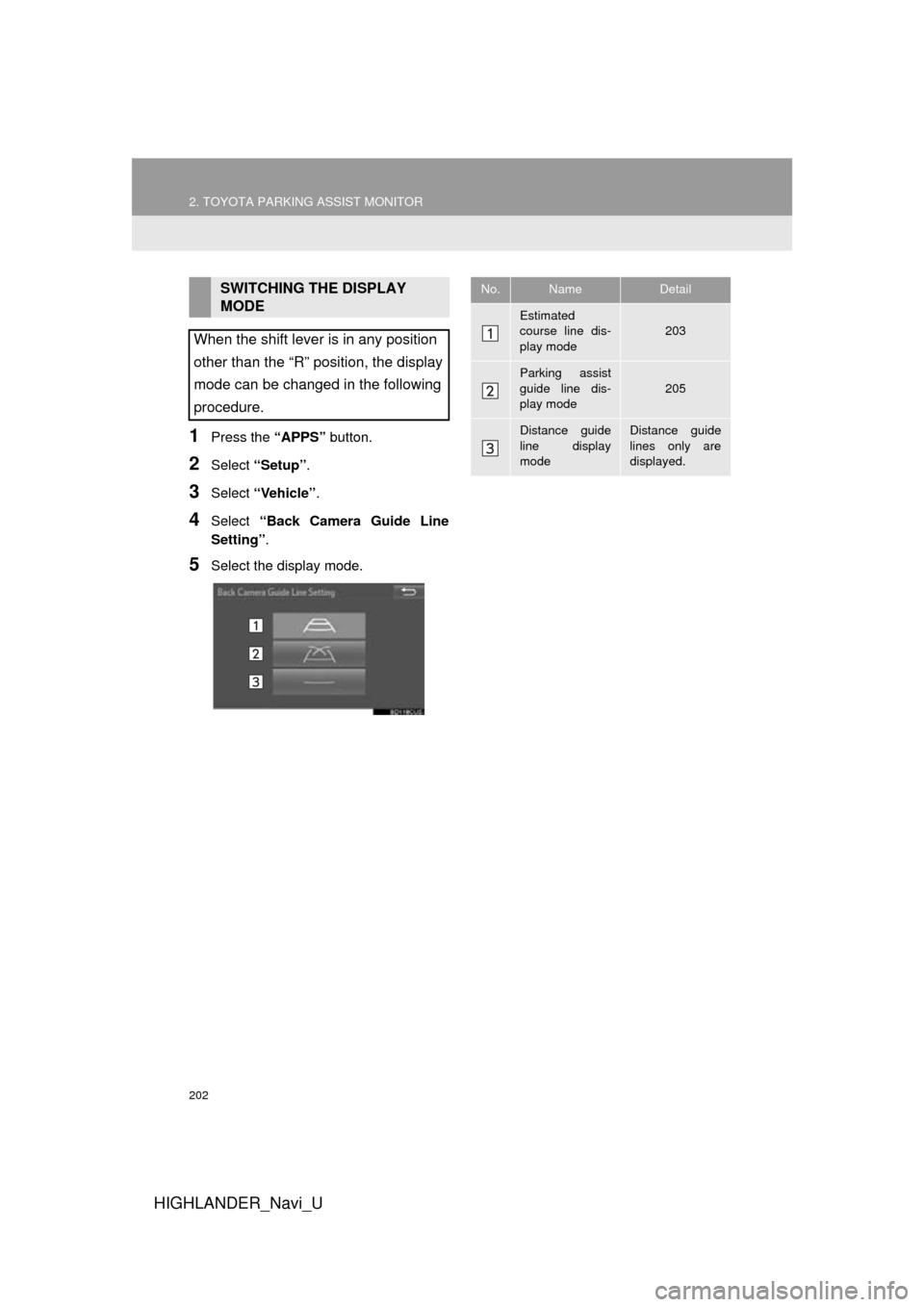
1Press the “APPS” button.
2Select “Setup” .
3Select “Vehicle” .
4Select “Back Camera Guide Line
Setting”.
5Select the display mode.
SWITCHING THE DISPLAY
MODE
When the shift lever is in any position
other than the “R” position, the display
mode can be changed in the following
procedure.No.NameDetail
Estimated
course line dis-
play mode203
Parking assist
guide line dis-
play mode
205
Distance guide
line display
modeDistance guide
lines only are
displayed.
Page 203 of 352
203
2. TOYOTA PARKING ASSIST MONITOR
HIGHLANDER_Navi_U
PERIPHERAL MONITORING SYSTEM
6
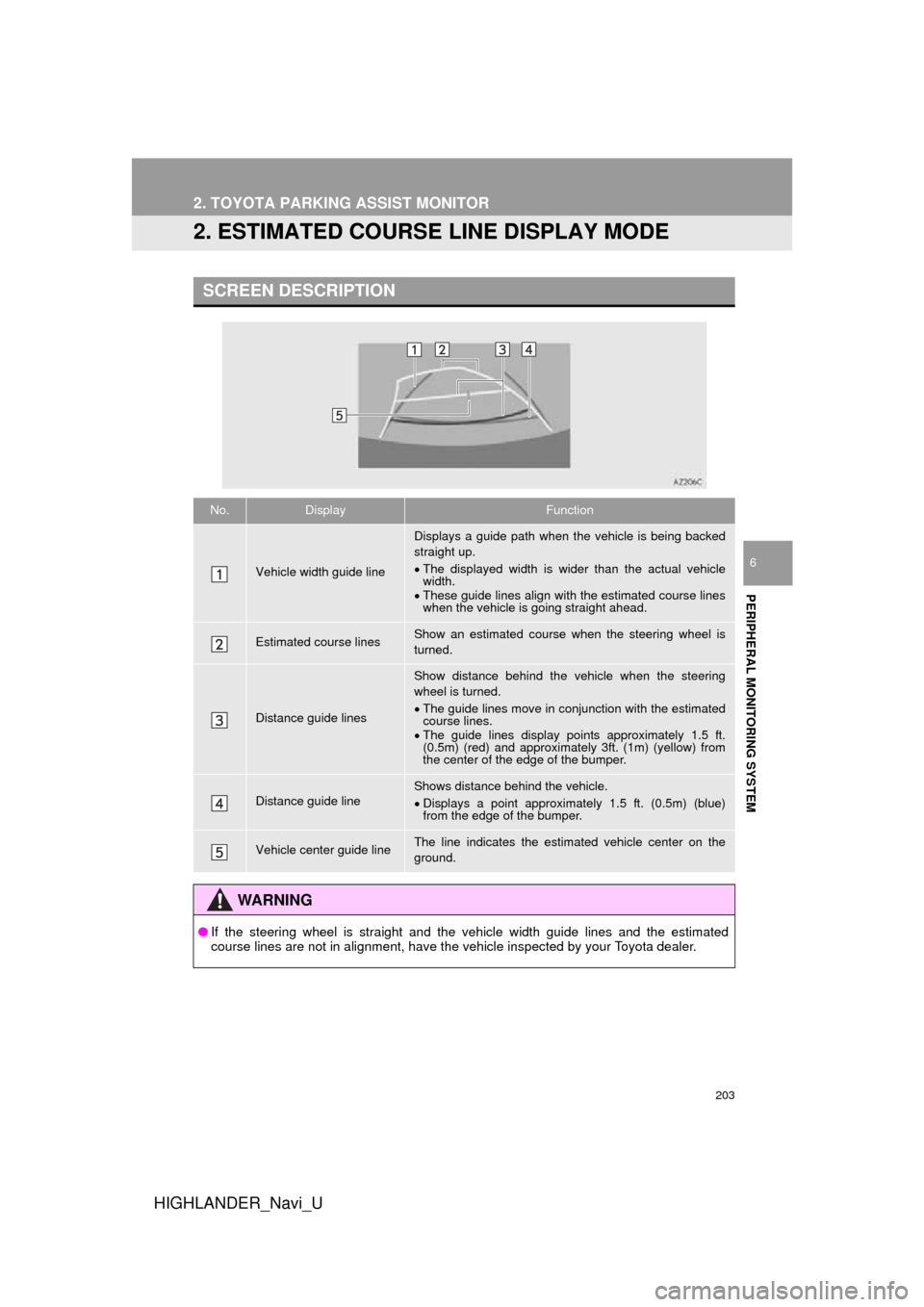
2. ESTIMATED COURSE LINE DISPLAY MODE
SCREEN DESCRIPTION
No.DisplayFunction
Vehicle width guide line
Displays a guide path when the vehicle is being backed
straight up.
The displayed width is wider than the actual vehicle
width.
These guide lines align with the estimated course lines
when the vehicle is going straight ahead.
Estimated course linesShow an estimated course when the steering wheel is
turned.
Distance guide lines
Show distance behind the vehicle when the steering
wheel is turned.
The guide lines move in conjunction with the estimated
course lines.
The guide lines display points approximately 1.5 ft.
(0.5m) (red) and approximately 3ft. (1m) (yellow) from
the center of the edge of the bumper.
Distance guide lineShows distance behind the vehicle.
Displays a point approximately 1.5 ft. (0.5m) (blue)
from the edge of the bumper.
Vehicle center guide lineThe line indicates the estimated vehicle center on the
ground.
WA R N I N G
● If the steering wheel is straight and the vehicle width guide lines and the estimated
course lines are not in alignment, have the vehicle inspected by your Toyota dealer.