Radio TOYOTA HIGHLANDER 2016 XU50 / 3.G User Guide
[x] Cancel search | Manufacturer: TOYOTA, Model Year: 2016, Model line: HIGHLANDER, Model: TOYOTA HIGHLANDER 2016 XU50 / 3.GPages: 716, PDF Size: 11.4 MB
Page 150 of 716

1503-2. Opening, closing and locking the doors
HIGHLANDER_U (OM48F09U)■
Note for the entry function
●Even when the electronic key is within the effective range (detection areas),
the system may not operate properly in the following cases:
• The electronic key is too close to the window or outside door handle, near
the ground, or in a high place when the doors are locked or unlocked.
• The electronic key is near the ground or in a high place, or too close to
the rear bumper center when the back door is opened.
• The electronic key is on the instrument panel or floor, or in the auxiliary box of the driver's side instrument panel, door pockets or glove box when
the engine is started or engine switch modes are changed.
● Do not leave the electronic key on top of the instrument panel or near the
door pockets when exiting the vehicle. Depending on the radio wave recep-
tion conditions, it may be detected by the antenna outside the cabin and the
door will become lockable from the outside, possibly trapping the electronic
key inside the vehicle.
● As long as the electronic key is within the effective range, the doors may be
locked or unlocked by anyone. However, only the doors detecting the elec-
tronic key can be used to unlock the vehicle.
● Even if the electronic key is not inside the vehicle, it may be possible to start
the engine if the electronic key is near the window.
● The doors may unlock or lock if a large amount of water splashes on the
door handle, such as in the rain or in a car wash when the electronic key is
within the effective range. (The doors will automatically be locked after
approximately 60 seconds if the doors are not opened and closed.)
● If the wireless remote control is used to lock the doors when the electronic
key is near the vehicle, there is a possibility that the door may not be
unlocked by the entry function. (Use the wireless remote control to unlock
the doors.)
● Touching the door lock or unlock sensor while wearing gloves may prevent
lock or unlock operation. Remove the gloves and touch the lock or unlock
sensor again.
● When the lock operation is performed using the lock sensor, recognition sig-
nals will be shown up to two consecutive times. After this, no recognition
signals will be given.
● If the door handle becomes wet while the electronic key is within the effec-
tive range, the door may lock and unlock repeatedly. In that case, follow the
following correction procedures to wash the vehicle:
• Place the electronic key in a location 6 ft. (2 m) or more away from the
vehicle. (Take care to ensure that the key is not stolen.)
• Set the electronic key to battery-saving mode to disable the smart key system. ( P. 148)
Page 153 of 716

1533-2. Opening, closing and locking the doors
3
Operation of each component
HIGHLANDER_U (OM48F09U)
WARNING
■Caution regarding interfer ence with electronic devices
● People with implantable cardiac pacemakers, cardiac resynchronization
therapy-pacemakers or implantable cardioverter defibrillators should keep
away from the smart key system antennas. ( P. 146)
The radio waves may affect the operation of such devices. If necessary,
the entry function can be disabled. Ask your Toyota dealer for details, such
as the frequency of radio waves and timing of the emitted radio waves.
Then, consult your doctor to see if you should disable the entry function.
● Users of any electrical medical device other than implantable cardiac
pacemakers, cardiac resynchronization therapy-pacemakers or implant-
able cardioverter defibrillators should consult the manufacturer of the
device for information about its operation under the influence of radio
waves.
Radio waves could have unexpected effects on the operation of such
medical devices.
Ask your Toyota dealer for details on disabling the entry function.
Page 278 of 716

2784-5. Using the driving support systems
HIGHLANDER_U (OM48F09U)■
Certification for dynami c radar cruise control
For vehicles sold in the U.S.A.
FCC ID: HYQDNMWR007
This device complies with Part 15 of the FCC Rules. Operation is subject to
the following two conditions : (1) this device may not cause harmful interfer-
ence, and (2) this device must accept any interference received, including
interference that may cause undesired operation.
FCC WARNING
Changes or modifications not expressly approved by the party responsible for
compliance could void the user’s authority to operate the equipment.
Radiofrequency radiation exposure Information:
This equipment complies with FCC radiation exposure limits set forth for an
uncontrolled environment.
This equipment should be installed and operated with minimum distance of
20 cm between the radiator (antenna) and your body.
This transmitter must not be co-located or operating in conjunction with any
other antenna or transmitter.
For vehicles sold in Canada
Operation is subject to the following two conditions: (1) this device may not
cause interference, and (2) this device must accept any interference, includ-
ing interference that may cause undesired operation of the device.
Page 313 of 716

3134-5. Using the driving support systems
4
Driving
HIGHLANDER_U (OM48F09U)■
Certification for th e pre-collision system
For vehicles sold in the U.S.A.
FCC ID : HYQDNMWR007
This device complies with Part 15 of the FCC Rules. Operation is subject to
the following two conditions :(1) this device may not cause harmful interfer-
ence, and (2) this device must accept any interference received, including
interference that may cause undesired operation.
FCC WARNING
Changes or modifications not expressly approved by the party responsible for
compliance could void the user’s authority to operate the equipment.
Radiofrequency radiation exposure Information:
This equipment complies with FCC radiation exposure limits set forth for an
uncontrolled environment.
This equipment should be installed and operated with minimum distance of
20 cm between the radiator (antenna) and your body.
This transmitter must not be co-located or operating in conjunction with any
other antenna or transmitter.
For vehicles sold in Canada
Operation is subject to the following two conditions: (1) this device may not
cause interference, and (2) this device must accept any interference, includ-
ing interference that may cause undesired operation of the device.
Page 334 of 716

334
HIGHLANDER_U (OM48F09U)5-1. Basic Operations
Audio system types ........... 336
Audio system .................... 340
Steering wheel audio switches .......................... 343
AUX Port/USB Port ........... 344
Basic audio operations...... 345
5-2. Setup Setup menu....................... 347
General settings ................ 348
Audio settings ................... 349
Display settings ................. 350
Voice settings.................... 351
5-3. Using the Multimedia system
Selecting the audio source ............................. 352
List screen operation......... 353
Optimal use of the audio system ............................ 355
5-4. Using the radio Radio operation................. 356
5Audio system
Page 337 of 716

3375-1. Basic Operations
5
Audio system
HIGHLANDER_U (OM48F09U)■
Certification (caution)
U.S.A.
FCC ID: ACJ932YEAP01A473W
NOTE:
This device complies with Part 15 of the FCC Rules.
Operation is subject to the following two conditions:
(1) this device may not cause harmful interference, and
(2) this device must accept any interference received, including interference
that may cause undesired operation.
FCC WARNING:
Changes or modifications not expressly approved by the party responsible for
compliance could void the user’s authority to operate the equipment.
Radiofrequency radiation exposure information:
This equipment complies with FCC radiation exposure limits set forth for an
uncontrolled environment.
This equipment should be installed and operated with minimum distance of
7.9 in. (20cm) between the radiator and your body.
This transmitter must not be co-located or operating in conjunction with any
other antenna or transmitter.
U.S.A. and Canada
Part 15 of the FCC Rules
FCC Warning:
Any unauthorized changes or modifications to this equipment will void the
user’s authority to operate this device.
Page 338 of 716

3385-1. Basic Operations
HIGHLANDER_U (OM48F09U)
Canada
IC: 216J-YEAP01A473W
NOTE:
This device complies with Industry Canada license-exempt RSS standard(s).
Operation is subject to the following two conditions:
(1) this device may not cause interference, and
(2) this device must accept any interference, including interference that maycause undesired operation of the device.
Le présent appareil est conforme aux CNR d'Industrie Canada applicables
aux appareils radio exempts de licence. L'exploitation est autorisée aux deux
conditions suivantes :
(1) l'appareil ne doit pas produire de brouillage, et
(2) l'utilisateur de l'appareil doit accepter tout brouillage radioélectrique subi, même si le brouillage est susceptible d'en compromettre le fonctionne-
ment.
This radio transmitter (identify the dev ice by certification number, or model
number if Category II) has been approved by Industry Canada to operate with
the antenna types listed below with the maximum permissible gain and
required antenna impedance for each antenna type indicated. Antenna types
not included in this list, having a gain greater than the maximum gain indi-
cated for that type, are strictly prohibited for use with this device.
Le présent émetteur radio (identifier le dispositif par son numéro de certifica-
tion ou son numéro de modèle s'il fait partie du matériel de catégorie I) a été
approuvé par Industrie Canada pour fonctionner avec les types d'antenne
énumérés ci-dessous et ayant un gain admissible maximal et l'impédance
requise pour chaque type d'antenne. Les types d'antenne non inclus dans
cette liste, ou dont le gain est supérieur au gain maximal indiqué, sont stricte-
ment interdits pour l'exploitation de l'émetteur.
LASER PRODUCTS
● Do not take this unit apart or attempt to make any changes yourself.
This is an intricate unit that uses a laser pickup to retrieve information from
the surface of compact discs.
The laser is carefully shielded so that its rays remain inside the cabinet.
Therefore, never try to disassemble the player or alter any of its parts since
you may be exposed to laser rays and dangerous voltages.
● This product utilizes a laser.
Use of controls or adjustments or performance of procedures other than
those specified herein may result in hazardous radiation exposure.
Page 343 of 716
3435-1. Basic Operations
5
Audio system
HIGHLANDER_U (OM48F09U)
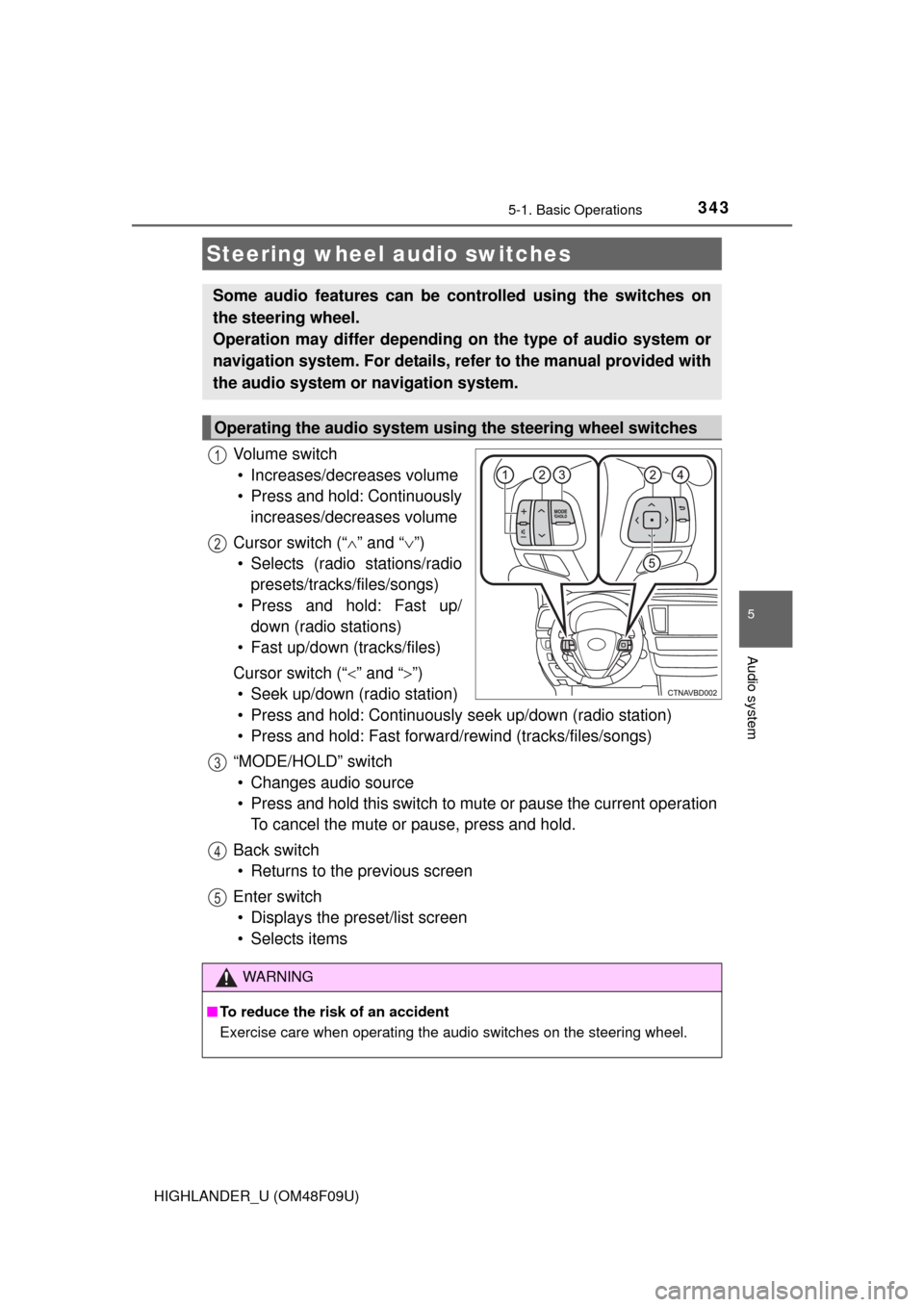
Vo l u m e s w i t c h• Increases/decreases volume
• Press and hold: Continuously increases/decreases volume
Cursor switch (“ ” and “ ”)
• Selects (radio stations/radio presets/tracks/files/songs)
• Press and hold: Fast up/ down (radio stations)
• Fast up/down (tracks/files)
Cursor switch (“ ” and “”)
• Seek up/down (radio station)
• Press and hold: Continuously seek up/down (radio station)
• Press and hold: Fast forwar d/rewind (tracks/files/songs)
“MODE/HOLD” switch • Changes audio source
• Press and hold this switch to mute or pause the current operation To cancel the mute or pause, press and hold.
Back switch • Returns to the previous screen
Enter switch • Displays the preset/list screen
• Selects items
Steering wheel audio switches
Some audio features can be c ontrolled using the switches on
the steering wheel.
Operation may differ depending on the type of audio system or
navigation system. For details, refer to the manual provided with
the audio system or navigation system.
Operating the audio system using the steering wheel switches
1
12
3
4
5
WARNING
■ To reduce the risk of an accident
Exercise care when operating the audio switches on the steering wheel.
Page 345 of 716
3455-1. Basic Operations
5
Audio system
HIGHLANDER_U (OM48F09U)
Basic audio operations
Basic audio operations and functions common to each mode are
explained in this section.
Operating the audio system
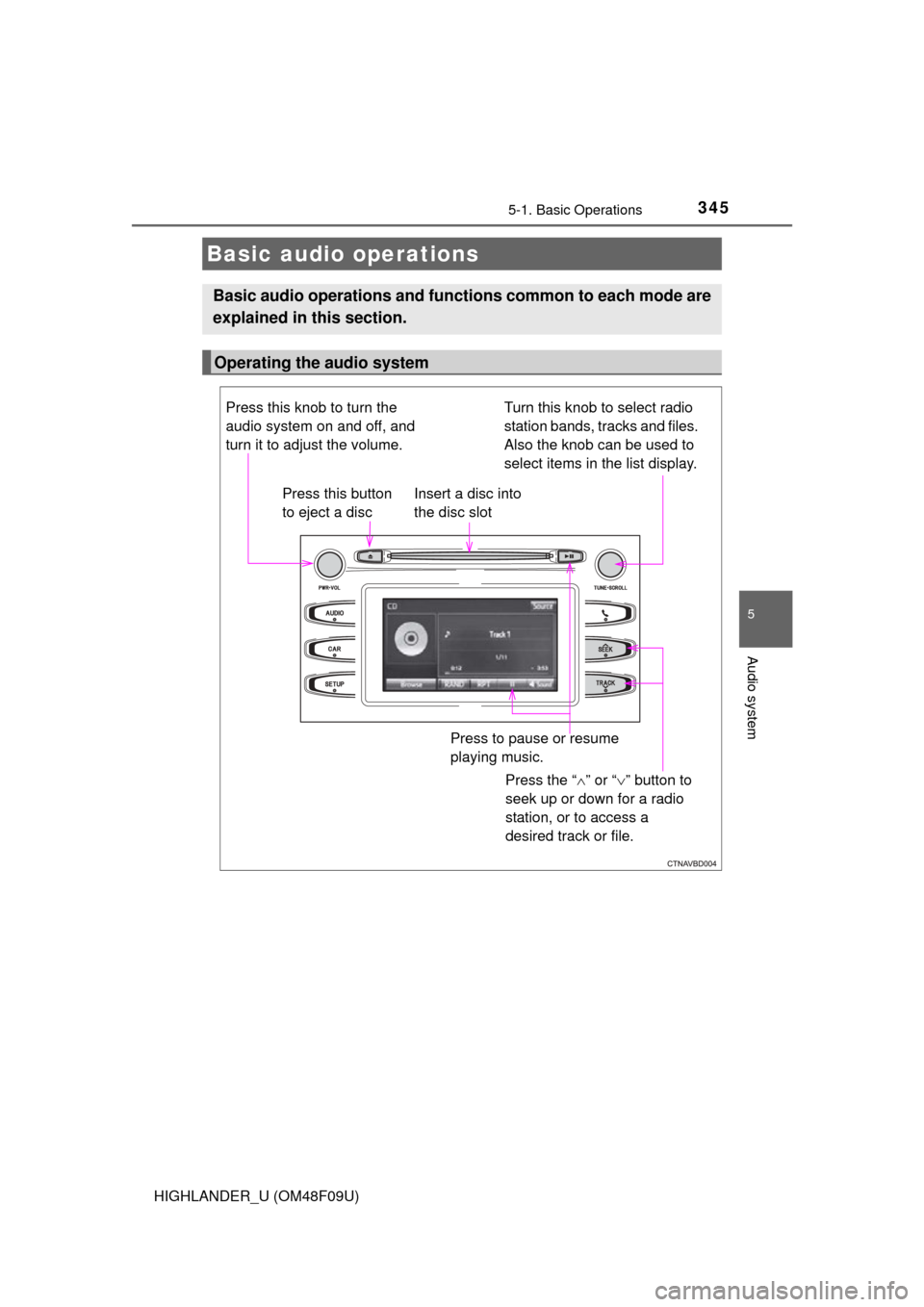
Press the “ ” or “ ” button to
seek up or down for a radio
station, or to access a
desired track or file.
Press this knob to turn the
audio system on and off, and
turn it to adjust the volume.
Press this button
to eject a disc
Press to pause or resume
playing music.
Insert a disc into
the disc slot
Turn this knob to select radio
station bands, tracks and files.
Also the knob can be used to
select items in the list display.
Page 349 of 716
3495-2. Setup
5
Audio system
HIGHLANDER_U (OM48F09U)
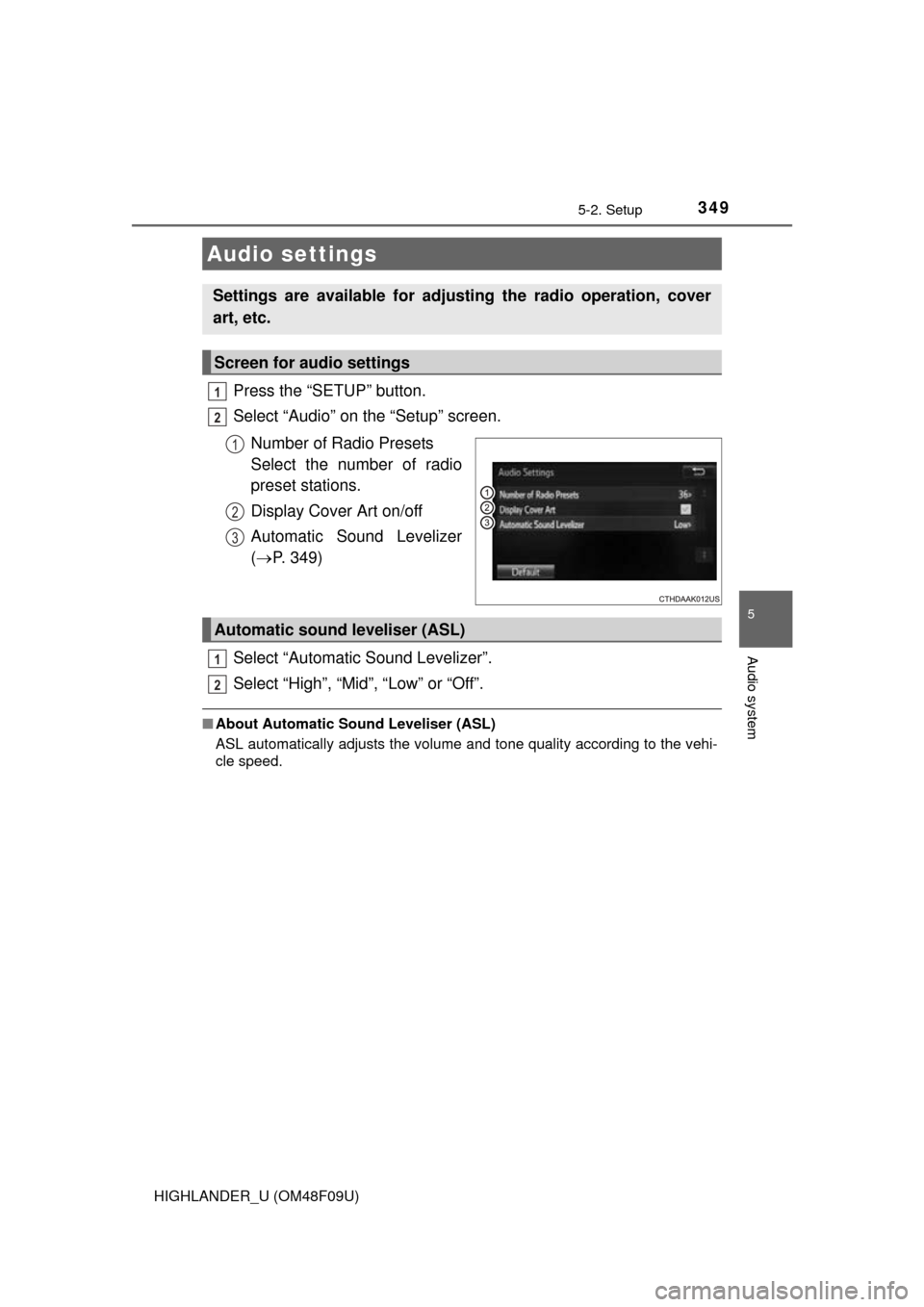
Press the “SETUP” button.
Select “Audio” on the “Setup” screen.Number of Radio Presets
Select the number of radio
preset stations.
Display Cover Art on/off
Automatic Sound Levelizer
( P. 349)
Select “Automatic Sound Levelizer”.
Select “High”, “Mid”, “Low” or “Off”.
■ About Automatic Sou nd Leveliser (ASL)
ASL automatically adjusts the volume and tone quality according to the vehi-
cle speed.
Audio settings
Settings are available for adjusting the radio operation, cover
art, etc.
Screen for audio settings
1
2
1
2
3
Automatic sound leveliser (ASL)
1
2