instrument cluster TOYOTA HIGHLANDER 2016 XU50 / 3.G Owner's Manual
[x] Cancel search | Manufacturer: TOYOTA, Model Year: 2016, Model line: HIGHLANDER, Model: TOYOTA HIGHLANDER 2016 XU50 / 3.GPages: 716, PDF Size: 11.4 MB
Page 103 of 716

1032. Instrument cluster
2
Instrument cluster
HIGHLANDER_U (OM48F09U)
●Speed limit display*
Select to set the display of speed limit information stored in the
navigation system to on with the speed limit caution indicator
(yellow) enabled, on with the sp eed limit caution not enabled, or
off. If enabled, the s peed limit caution indicator will come on if the
vehicle speed exceeds th e displayed speed limit.
● Initialization
Registered or changed meter settings will be deleted or returned
to their default setting.
Settings can be changed. (Customizable features: P. 669)
*: Speed limit display may not be available for some regions.
■Pop-up display
In some situations, such as when a switch operation is performed, a pop-up
display, such as the operating cruise control switch, will be temporarily dis-
played on the multi-information display.
The pop-up display function can be set on/off.
■ Setting display automatic cancelation
In the following situations, setting display in which the settings can b\
e
changed through the meter control switch will automatically be turned off.
●When a warning message appears while the setting display is displayed
● When the vehicle begins to move while the setting display is displayed
■ Liquid crystal display
Small spots or light spots may appear on the display. This phenomenon is
characteristic of liquid crystal displays, and there is no problem continuing to
use the display.
Page 104 of 716
1042. Instrument cluster
HIGHLANDER_U (OM48F09U)
WARNING
■The information display at low temperatures
Allow the interior of the vehicle to warm up before using the liquid crystal
information display. At extremely low temperatures, the display monitor may
respond slowly, and display changes may be delayed.
For example, there is a lag between the driver’s shifting and the new gear
number appearing on the display. This lag could cause the driver to down-
shift again, causing rapid and excessive engine braking and possibly an
accident resulting in death or injury.
■ Cautions during setting up the display
As the engine needs to be running during setting up the display, ensure that
the vehicle is parked in a place with adequate ventilation. In a closed area
such as a garage, exhaust gases including harmful carbon monoxide (CO)
may collect and enter the vehicle. This may lead to death or a serious
health hazard.
NOTICE
■During setting up the display
To prevent battery discharge, ensure that the engine is running while setting
up the display features.
Page 105 of 716
1052. Instrument cluster
2
Instrument cluster
HIGHLANDER_U (OM48F09U)
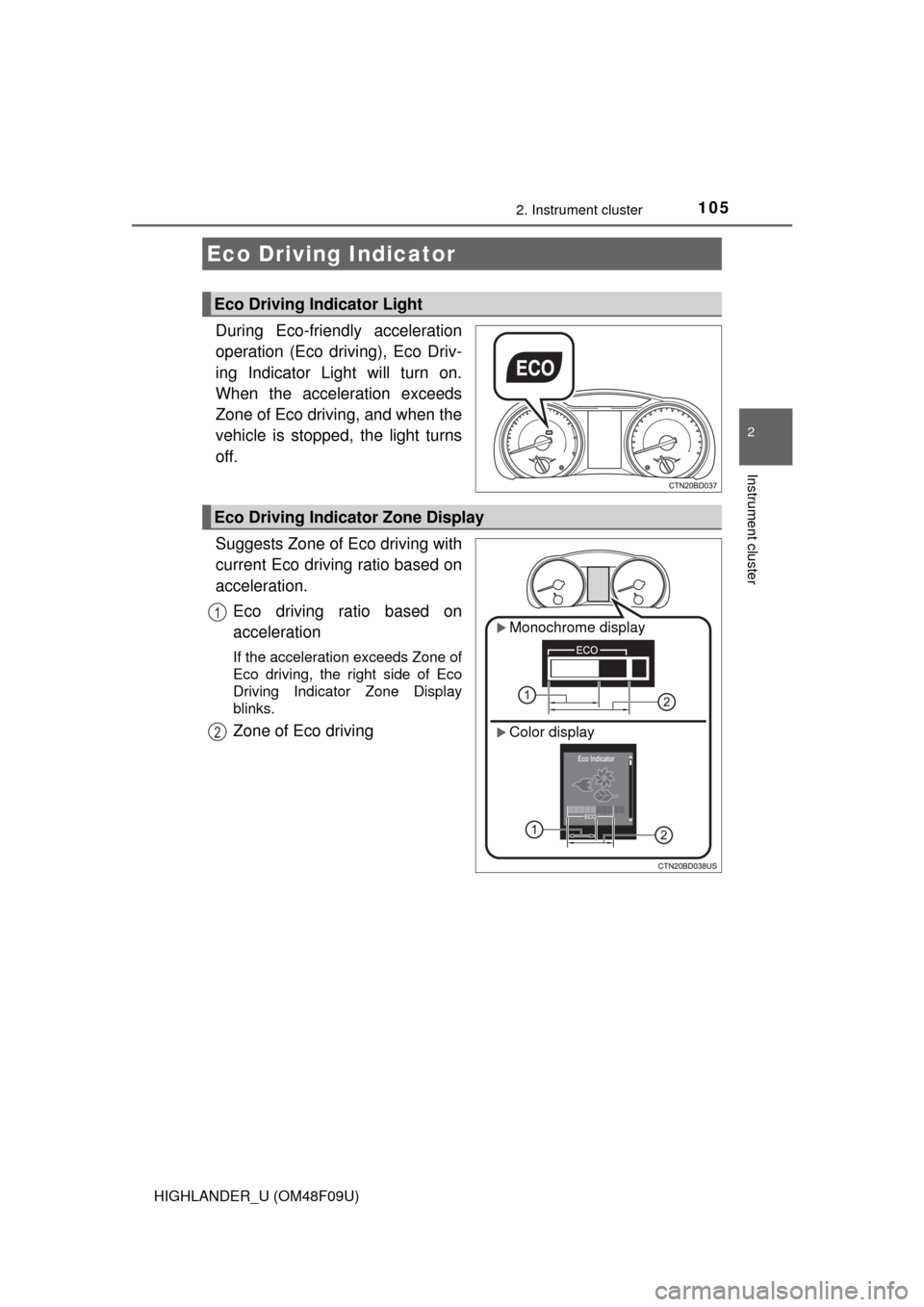
During Eco-friendly acceleration
operation (Eco driving), Eco Driv-
ing Indicator Light will turn on.
When the acceleration exceeds
Zone of Eco driving, and when the
vehicle is stopped, the light turns
off.
Suggests Zone of Eco driving with
current Eco driving ratio based on
acceleration.Eco driving ratio based on
acceleration
If the acceleration exceeds Zone of
Eco driving, the right side of Eco
Driving Indicator Zone Display
blinks.
Zone of Eco driving
Eco Driving Indicator
Eco Driving Indicator Light
Eco Driving Indicator Zone Display
Monochrome display
Color display
1
2
Page 106 of 716

1062. Instrument cluster
HIGHLANDER_U (OM48F09U)
■Operation of Eco Driving Indicator
Eco Driving Indicator will not operate in the following conditions:
●The shift lever is anything other than D.
● The vehicle speed is approximately 80 mph (130 km/h) or higher.
■ Eco Driving Indicator Light customization
Monochrome display
P. 9 7
Color display
P. 102
Page 107 of 716
1072. Instrument cluster
2
Instrument cluster
HIGHLANDER_U (OM48F09U)
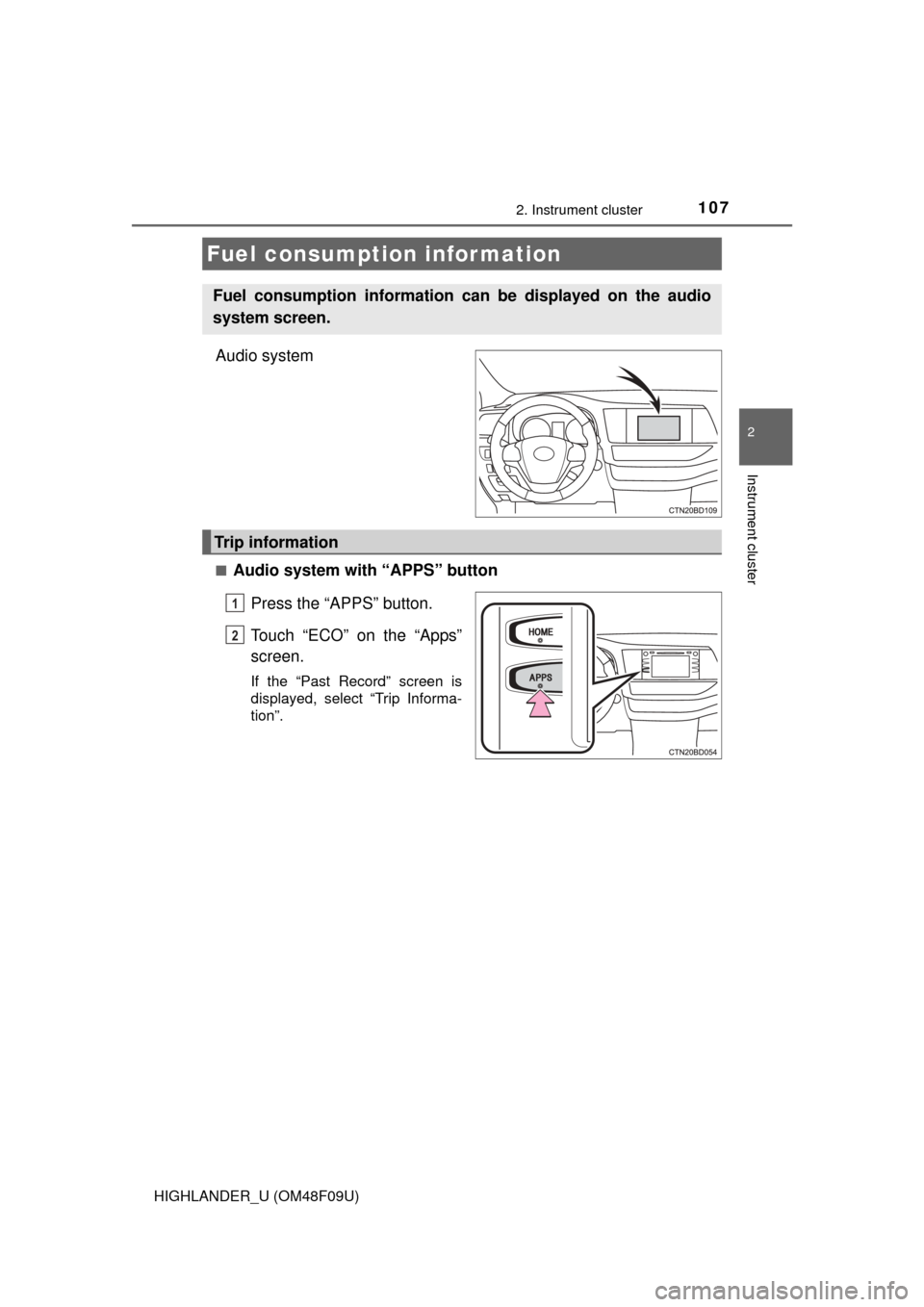
Audio system
■Audio system with “APPS” buttonPress the “APPS” button.
Touch “ECO” on the “Apps”
screen.
If the “Past Record” screen is
displayed, select “Trip Informa-
tion”.
Fuel consumption information
Fuel consumption information can be displayed on the audio
system screen.
Trip information
1
2
Page 108 of 716
1082. Instrument cluster
HIGHLANDER_U (OM48F09U)■
Audio system with “CAR” button
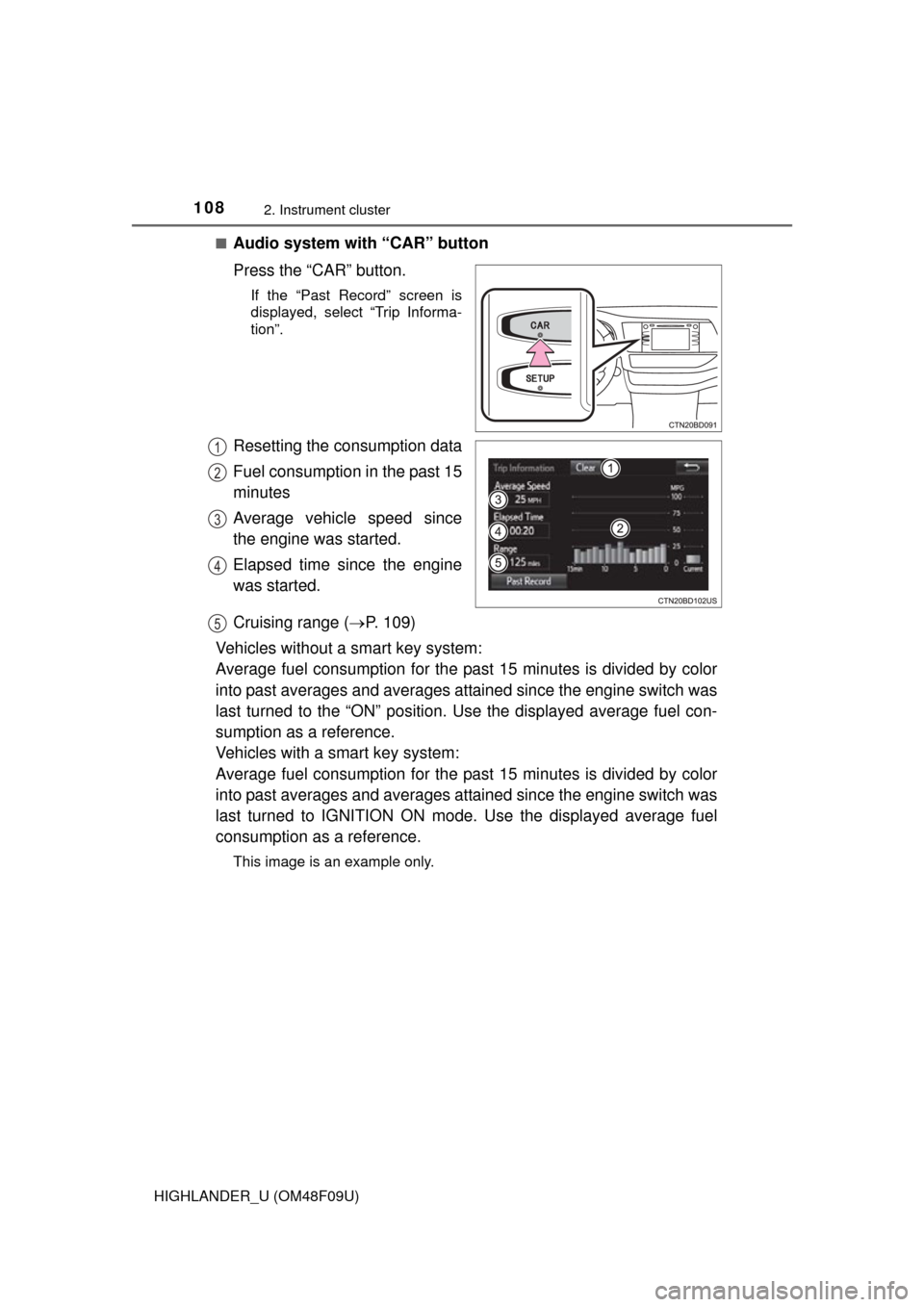
Press the “CAR” button.
If the “Past Record” screen is
displayed, select “Trip Informa-
tion”.
Resetting the consumption data
Fuel consumption in the past 15
minutes
Average vehicle speed since
the engine was started.
Elapsed time since the engine
was started.
Cruising range (
P. 109)
Vehicles without a smart key system:
Average fuel consumption for the past 15 minutes is divided by color
into past averages and averages attained since the engine switch was
last turned to the “ON” position. Use the displayed average fuel con-
sumption as a reference.
Vehicles with a smart key system:
Average fuel consumption for the past 15 minutes is divided by color
into past averages and averages attained since the engine switch was
last turned to IGNITION ON mode. Use the displayed average fuel
consumption as a reference.
This image is an example only.
1
2
3
4
5
Page 109 of 716
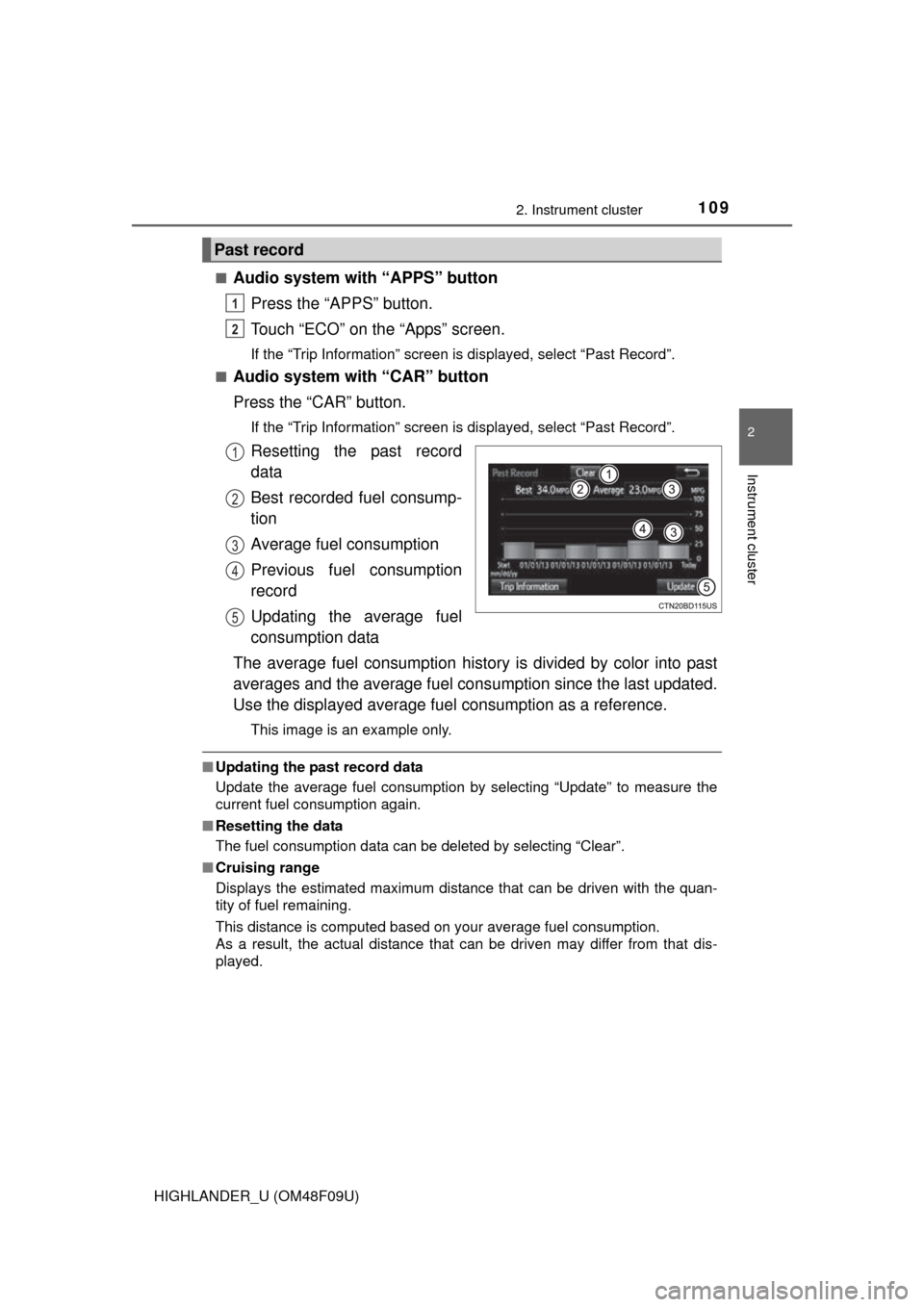
1092. Instrument cluster
2
Instrument cluster
HIGHLANDER_U (OM48F09U)■
Audio system with “APPS” button
Press the “APPS” button.
Touch “ECO” on the “Apps” screen.
If the “Trip Information” screen is displayed, select “Past Record”.
■
Audio system with “CAR” button
Press the “CAR” button.
If the “Trip Information” screen is displayed, select “Past Record”.
Resetting the past record
data
Best recorded fuel consump-
tion
Average fuel consumption
Previous fuel consumption
record
Updating the average fuel
consumption data
The average fuel consumption history is divided by color into past
averages and the average fuel cons umption since the last updated.
Use the displayed average fuel consumption as a reference.
This image is an example only.
■Updating the past record data
Update the average fuel consumption by selecting “Update” to measure the
current fuel consumption again.
■ Resetting the data
The fuel consumption data can be deleted by selecting “Clear”.
■ Cruising range
Displays the estimated maximum distance that can be driven with the quan-
tity of fuel remaining.
This distance is computed based on your average fuel consumption.
As a result, the actual distance that can be driven may differ from that dis-
played.
Past record
1
2
1
2
3
4
5
Page 110 of 716

1102. Instrument cluster
HIGHLANDER_U (OM48F09U)
Page 184 of 716

1843-5. Opening and closing the windows
HIGHLANDER_U (OM48F09U)■
Moon roof open warning buzzer
The buzzer sounds and a message is shown on the multi-information display
in the instrument cluster when the engine switch is turned off and the driver’s
door is opened with the moon roof open.
■ Customization
Settings (e.g. linked door lock operation) can be changed.
(Customizable features: P. 668)
WARNING
Observe the following precautions.
Failure to do so may cause death or serious injury.
■Opening the moon roof
●Do not allow any passengers to put their hands or heads outside the vehi-
cle while it is moving.
● Do not sit on top of the moon roof.
■ Closing the moon roof
●The driver is responsible for moon roof opening and closing operations.
In order to prevent accidental operation, especially by a child, do not let a
child operate the moon roof. It is possible for children and other passen-
gers to have body parts caught in the moon roof.
● Check to make sure that all passengers do not have any part of their bod-
ies in a position where they could be caught when the moon roof is being
operated.
● When using the wireless remote control, key or mechanical key and oper-
ating the moon roof, operate the moon roof after checking to make sure
that there is no possibility of any passenger having any of their body parts
caught in the moon roof. Also, do not let a child operate moon roof by the
wireless remote control, key or mechanical key. It is possible for children
and other passengers to get caught in the moon roof.
● When exiting the vehicle, turn the engine switch off, carry the key and exit
the vehicle along with the child. There may be accidental operation, due to
mischief, etc., that may possibly lead to an accident.
■ Jam protection function
●Never use any part of your body to intentionally activate the jam protection
function.
● The jam protection function may not work if something gets caught just
before the moon roof fully closes.
Page 188 of 716

1883-5. Opening and closing the windows
HIGHLANDER_U (OM48F09U)■
When the shade does not close normally
Perform the following procedure:
Stop the vehicle.
Close the moon roof.
Slide the shade switch forward and hold it.
*
The shade will close then reopen and pause for approximately10 seconds.
Then it will close.
Check to make sure that the shade is completely closed and then release
the switch.
*: If the switch is released at the incorrect time, the procedure will have to beperformed again from the beginning.
If the shade continues to close but then reopens slightly even after perform-
ing the above procedure correctly, have the vehicle inspected by your Toyota
dealer.
■ Moon roof open warning buzzer
The buzzer sounds and a message is shown on the multi-information display
in the instrument cluster when the engine switch is turned off and the driver’s
door is opened with the moon roof open.
1
2
3
4