audio TOYOTA HIGHLANDER 2016 XU50 / 3.G Owners Manual
[x] Cancel search | Manufacturer: TOYOTA, Model Year: 2016, Model line: HIGHLANDER, Model: TOYOTA HIGHLANDER 2016 XU50 / 3.GPages: 716, PDF Size: 11.4 MB
Page 1 of 716
HIGHLANDER_U (OM48F09U)
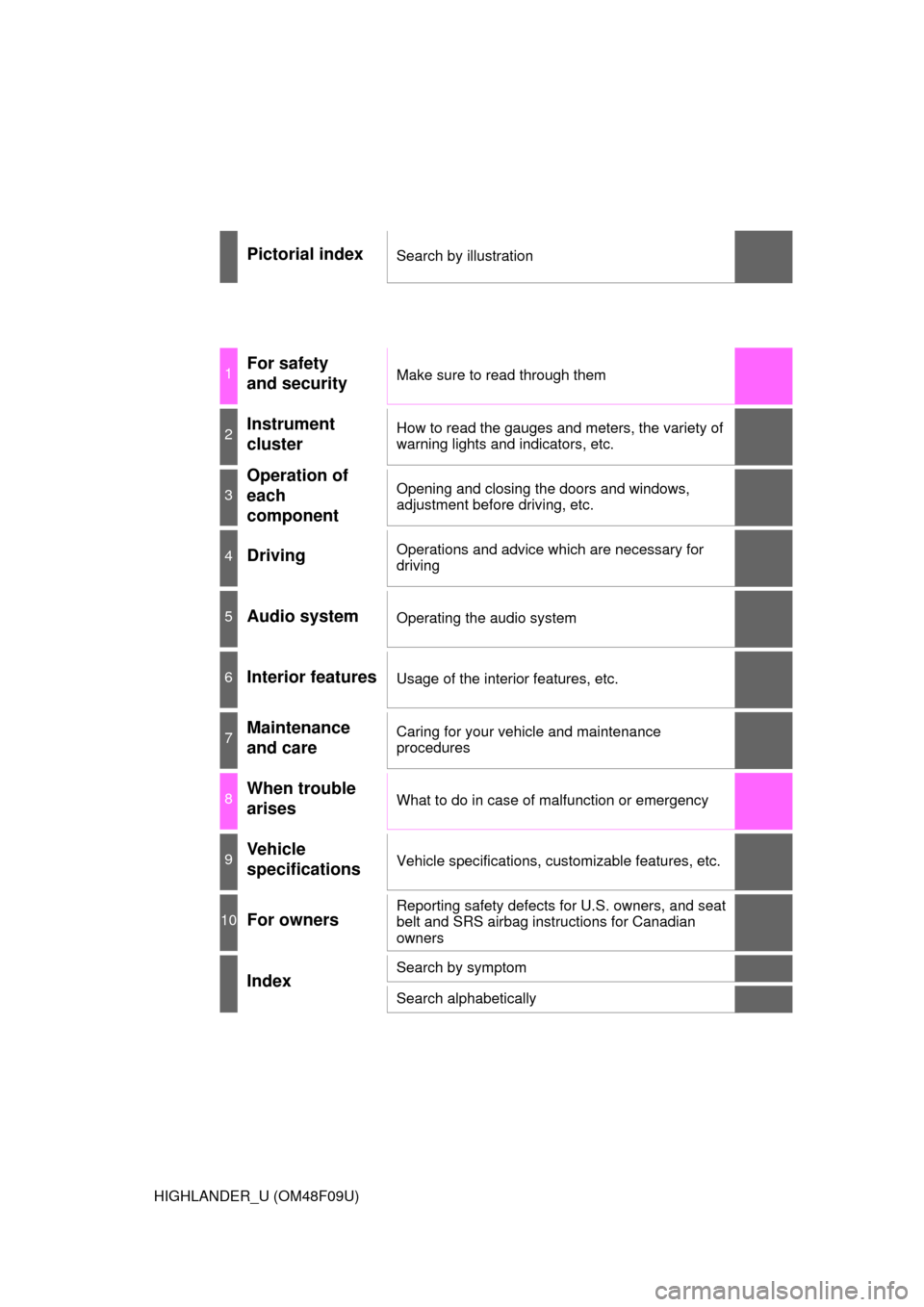
Pictorial indexSearch by illustration
1For safety
and securityMake sure to read through them
2Instrument
clusterHow to read the gauges and meters, the variety of
warning lights and indicators, etc.
3
Operation of
each
componentOpening and closing the doors and windows,
adjustment before driving, etc.
4DrivingOperations and advice which are necessary for
driving
5Audio systemOperating the audio system
6Interior featuresUsage of the interior features, etc.
7Maintenance
and careCaring for your vehicle and maintenance
procedures
8When trouble
arisesWhat to do in case of malfunction or emergency
9Vehicle
specificationsVehicle specifications, customizable features, etc.
10For ownersReporting safety defects for U.S. owners, and seat
belt and SRS airbag instructions for Canadian
owners
IndexSearch by symptom
Search alphabetically
Page 4 of 716

TABLE OF CONTENTS4
HIGHLANDER_U (OM48F09U)5-1. Basic Operations
Audio system types ........... 336
Audio system..................... 340
Steering wheel audio switches .......................... 343
AUX Port/USB Port ........... 344
Basic audio operations ...... 345
5-2. Setup Setup menu ....................... 347
General settings ................ 348
Audio settings.................... 349
Display settings ................. 350
Voice settings .................... 351
5-3. Using the Multimedia system
Selecting the audio source ............................. 352
List screen operation ......... 353
Optimal use of the audio system............................. 355
5-4. Using the radio Radio operation ................. 356
5-5. Playing an audio CD and MP3/WMA/AAC discs
CD player operation .......... 358
5-6. Using an external device
Listening to an iPod........... 364
Listening to a USB memory device................ 368
Using the AUX port ........... 372 5-7. Connecting Bluetooth
®
Preparations to
use wireless
communication ................ 373
Registering a Bluetooth
®
audio player for
the first time ..................... 377
Registering a Bluetooth
®
phone for the first time..... 378
Registering a Bluetooth
®
device .............................. 379
Connecting a Bluetooth
®
device .............................. 381
Displaying a Bluetooth
®
device details................... 383
Detailed Bluetooth
®
system settings................ 384
5-8. Bluetooth
® Audio
Listening to Bluetooth®
Audio ............................... 385
5-9. Bluetooth
® phone
Using a Bluetooth®
Phone .............................. 386
Making a call...................... 388
Receiving a call ................. 391
Speaking on the phone...... 392
Bluetooth
® phone
message function ............ 395
Using the steering wheel switches ................ 399
Bluetooth
® phone
settings ............................ 400
Contact/Call History Settings ........................... 401
What to do if... (Troubleshooting) ............ 410
5Audio system
Page 17 of 716
17Pictorial index
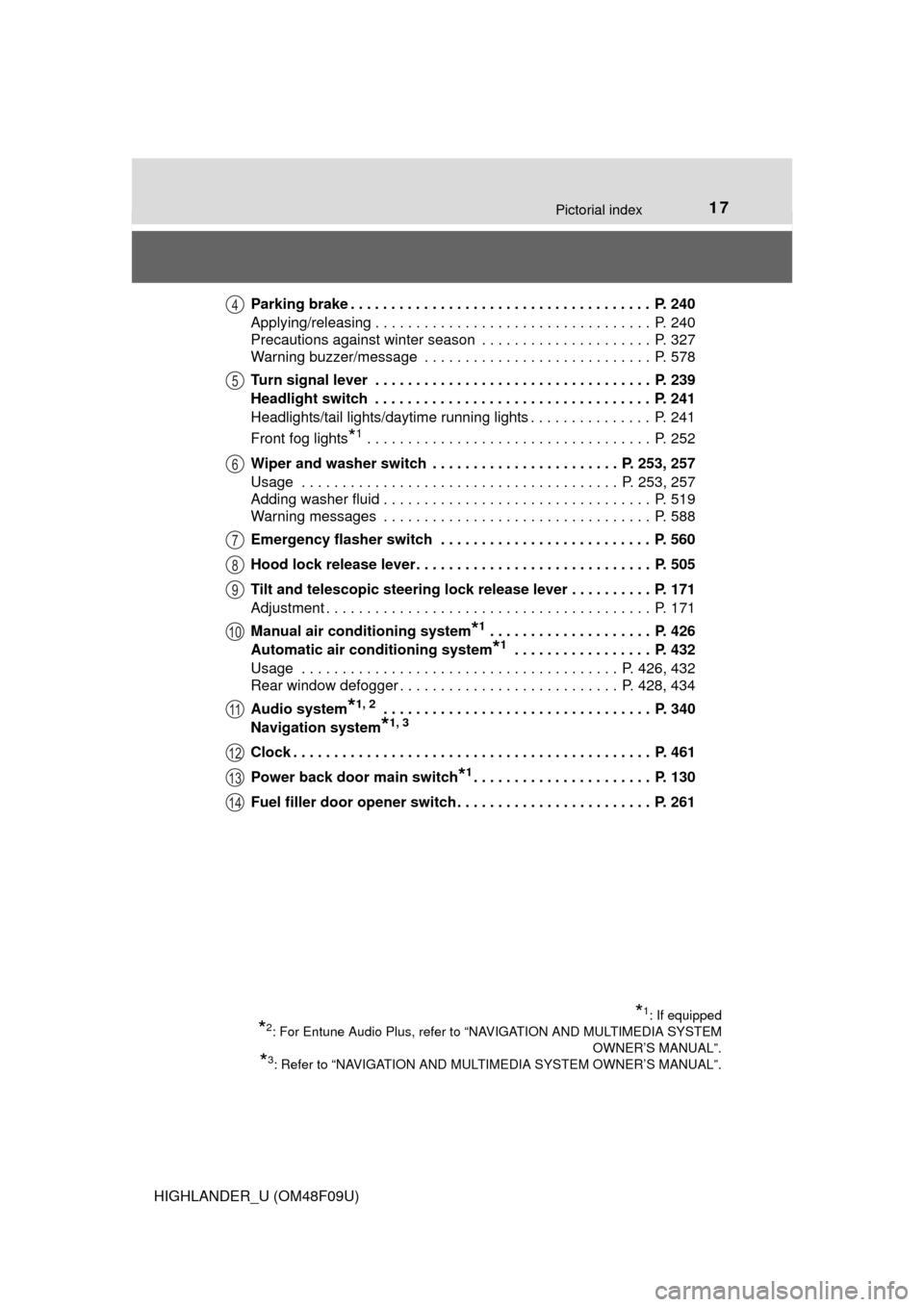
HIGHLANDER_U (OM48F09U)Parking brake . . . . . . . . . . . . . . . . . . . . . . . . . . . . . . . . . . . . . P. 240
Applying/releasing . . . . . . . . . . . . . . . . . . . . . . . . . . . . . . . . . . P. 240
Precautions against winter season . . . . . . . . . . . . . . . . . . . . . P. 327
Warning buzzer/message . . . . . . . . . . . . . . . . . . . . . . . . . . . . P. 578
Turn signal lever . . . . . . . . . . . . . . . . . . . . . . . . . . . . . . . . . . P. 239
Headlight switch . . . . . . . . . . . . . . . . . . . . . . . . . . . . . . . . . . P. 241
Headlights/tail lights/daytime running lights . . . . . . . . . . . . . . . P. 241
Front fog lights
*1 . . . . . . . . . . . . . . . . . . . . . . . . . . . . . . . . . . . P. 252
Wiper and washer switch . . . . . . . . . . . . . . . . . . . . . . . P. 253, 257
Usage . . . . . . . . . . . . . . . . . . . . . . . . . . . . . . . . . . . . . . . P. 253, 257
Adding washer fluid . . . . . . . . . . . . . . . . . . . . . . . . . . . . . . . . . P. 519
Warning messages . . . . . . . . . . . . . . . . . . . . . . . . . . . . . . . . . P. 588
Emergency flasher switch . . . . . . . . . . . . . . . . . . . . . . . . . . P. 560
Hood lock release lever. . . . . . . . . . . . . . . . . . . . . . . . . . . . . P. 505
Tilt and telescopic steering lock release lever . . . . . . . . . . P. 171
Adjustment . . . . . . . . . . . . . . . . . . . . . . . . . . . . . . . . . . . . . . . . P. 171
Manual air conditioning system
*1 . . . . . . . . . . . . . . . . . . . . P. 426
Automatic air conditioning system
*1 . . . . . . . . . . . . . . . . . P. 432
Usage . . . . . . . . . . . . . . . . . . . . . . . . . . . . . . . . . . . . . . . P. 426, 432
Rear window defogger . . . . . . . . . . . . . . . . . . . . . . . . . . . P. 428, 434
Audio system
*1, 2 . . . . . . . . . . . . . . . . . . . . . . . . . . . . . . . . . P. 340
Navigation system
*1, 3
Clock . . . . . . . . . . . . . . . . . . . . . . . . . . . . . . . . . . . . . . . . . . . . P. 461
Power back door main switch
*1. . . . . . . . . . . . . . . . . . . . . . P. 130
Fuel filler door opener switch . . . . . . . . . . . . . . . . . . . . . . . . P. 261
*1: If equipped
*2: For Entune Audio Plus, refer to “NAVIGATION AND MULTIMEDIA SYSTEM OWNER’S MANUAL”.
*3: Refer to “NAVIGATION AND MULTIMEDIA SYSTEM OWNER’S MANUAL”.
4
5
6
7
8
9
10
11
12
13
14
Page 20 of 716
20Pictorial index
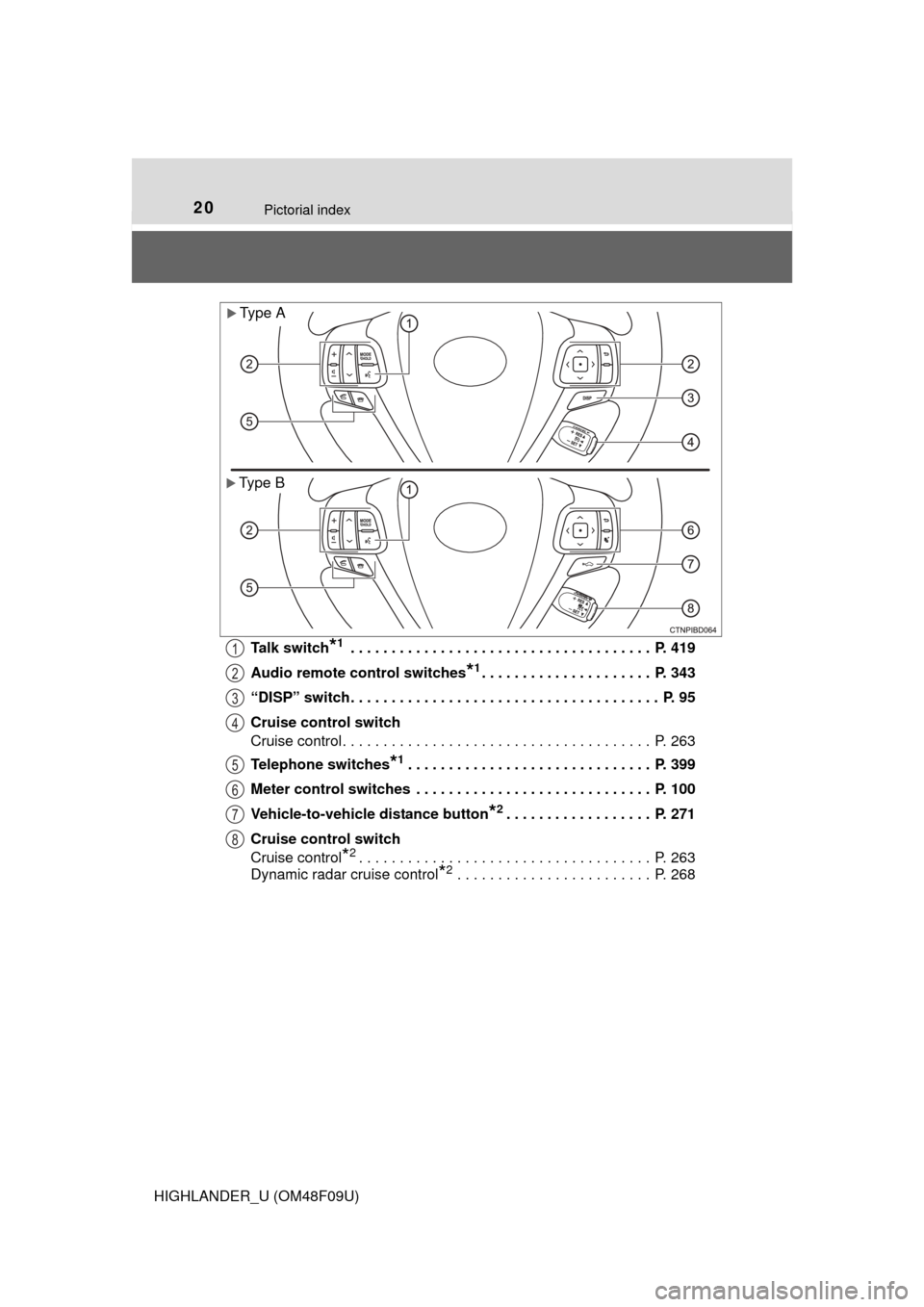
HIGHLANDER_U (OM48F09U)Talk switch
*1 . . . . . . . . . . . . . . . . . . . . . . . . . . . . . . . . . . . . . P. 419
Audio remote control switches
*1. . . . . . . . . . . . . . . . . . . . . P. 343
“DISP” switch. . . . . . . . . . . . . . . . . . . . . . . . . . . . . . . . . . . . . . P. 95
Cruise control switch
Cruise control. . . . . . . . . . . . . . . . . . . . . . . . . . . . . . . . . . . . . . P. 263
Telephone switches
*1. . . . . . . . . . . . . . . . . . . . . . . . . . . . . . P. 399
Meter control switches . . . . . . . . . . . . . . . . . . . . . . . . . . . . . P. 100
Vehicle-to-vehicle distance button
*2. . . . . . . . . . . . . . . . . . P. 271
Cruise control switch
Cruise control
*2. . . . . . . . . . . . . . . . . . . . . . . . . . . . . . . . . . . . P. 263
Dynamic radar cruise control
*2 . . . . . . . . . . . . . . . . . . . . . . . . P. 268
Type A
Type B
1
2
3
4
5
6
7
8
Page 21 of 716
21Pictorial index
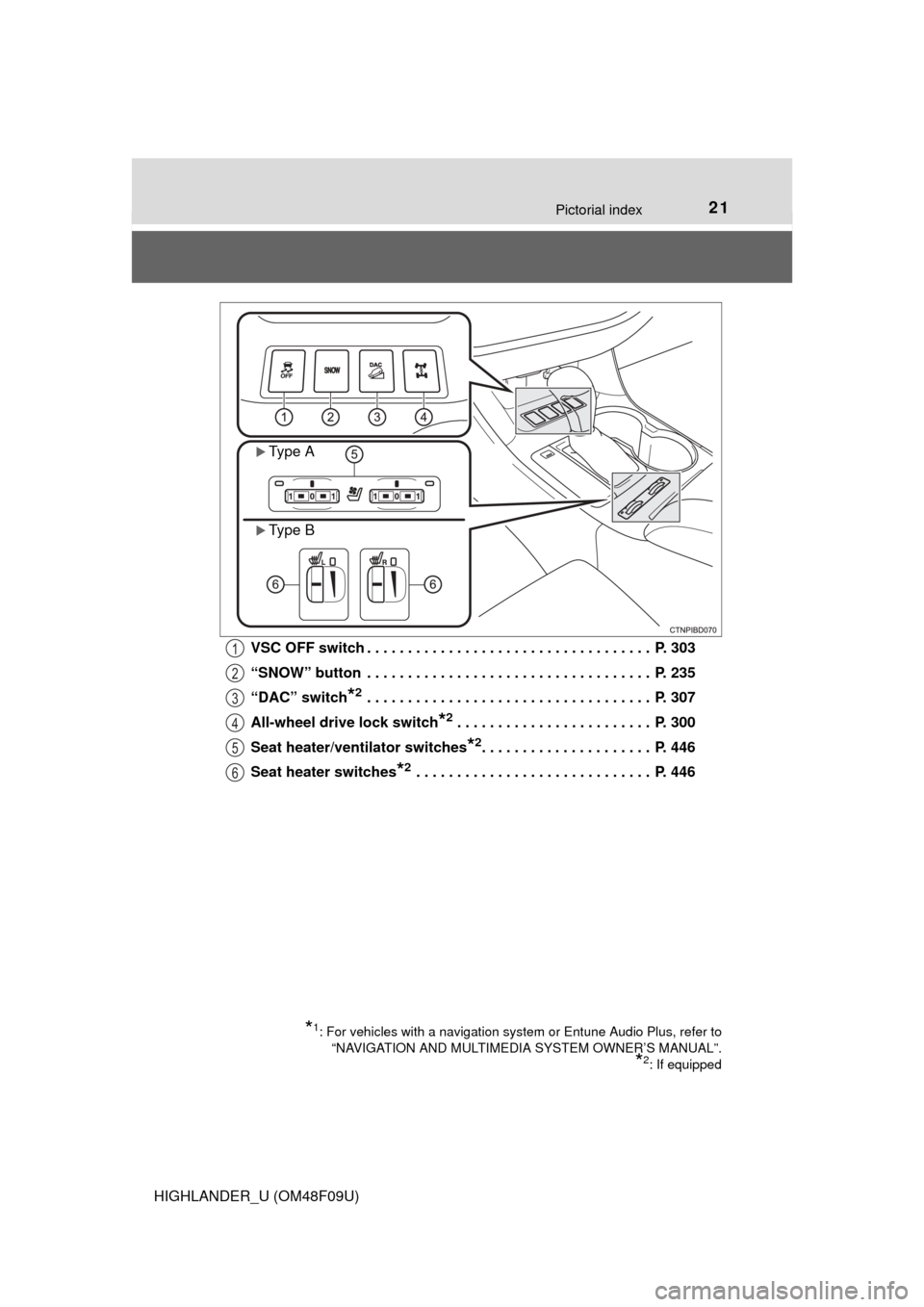
HIGHLANDER_U (OM48F09U)VSC OFF switch . . . . . . . . . . . . . . . . . . . . . . . . . . . . . . . . . . . P. 303
“SNOW” button . . . . . . . . . . . . . . . . . . . . . . . . . . . . . . . . . . . P. 235
“DAC” switch
*2 . . . . . . . . . . . . . . . . . . . . . . . . . . . . . . . . . . . P. 307
All-wheel drive lock switch
*2 . . . . . . . . . . . . . . . . . . . . . . . . P. 300
Seat heater/ven tilator switches
*2. . . . . . . . . . . . . . . . . . . . . P. 446
Seat heater switches
*2 . . . . . . . . . . . . . . . . . . . . . . . . . . . . . P. 446
*1: For vehicles with a navigation system or Entune Audio Plus, refer to “NAVIGATION AND MULTIMEDIA SYSTEM OWNER’S MANUAL”.
*2: If equipped
Type A
Type B
1
2
3
4
5
6
Page 99 of 716
992. Instrument cluster
2
Instrument cluster
HIGHLANDER_U (OM48F09U)
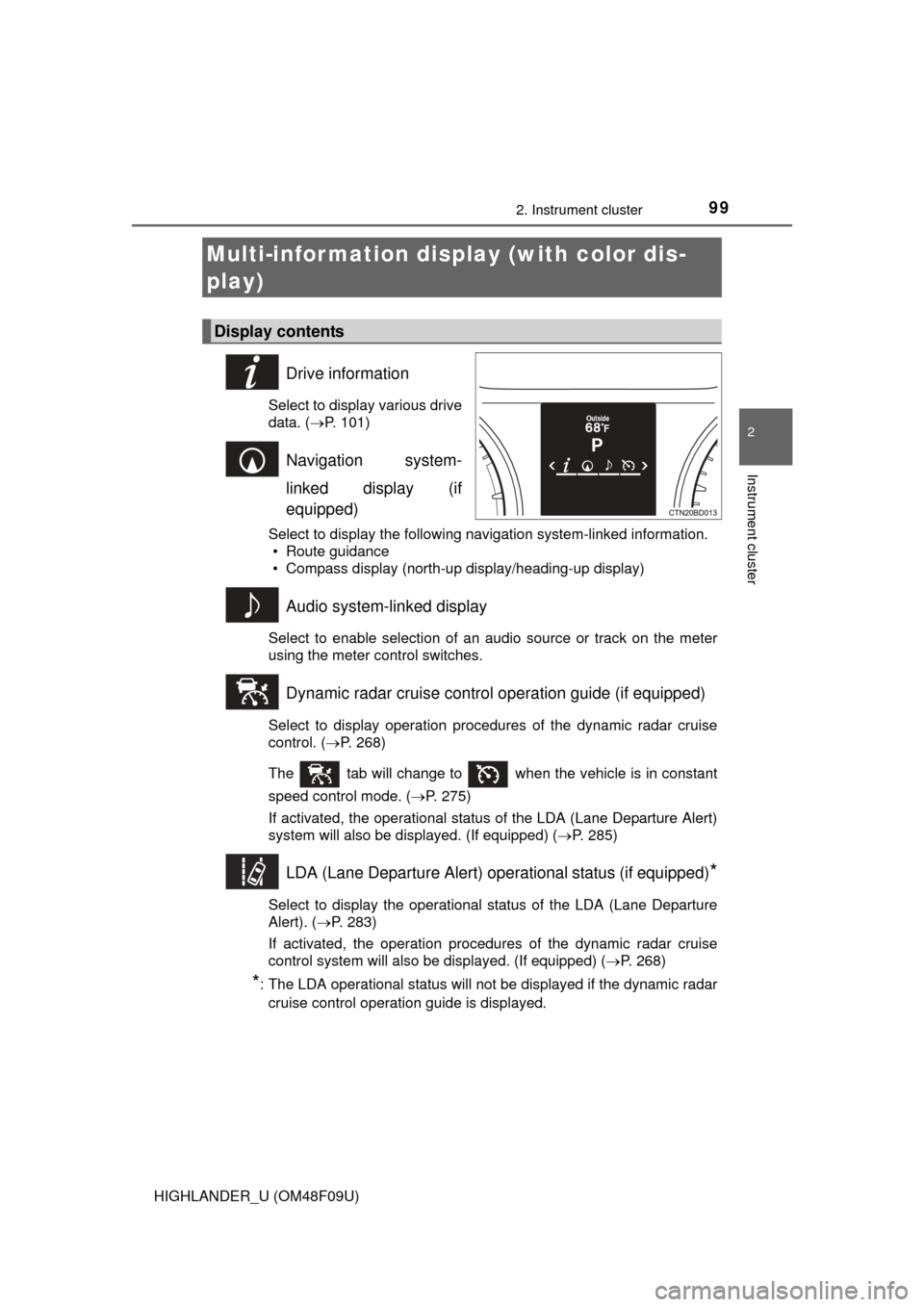
Drive information
Select to display various drive
data. (P. 101)
Navigation system-
linked display (if
equipped)
Select to display the following navigation system-linked information.
• Route guidance
• Compass display (north-up display/heading-up display)
Audio system-linked display
Select to enable selection of an audio source or track on the meter
using the meter control switches.
Dynamic radar cruise control operation guide (if equipped)
Select to display operation procedures of the dynamic radar cruise
control. ( P. 268)
The tab will change to when the vehicle is in constant
speed control mode. ( P. 275)
If activated, the operational status of the LDA (Lane Departure Alert)
system will also be displayed. (If equipped) ( P. 285)
LDA (Lane Departure Alert) operational status (if equipped)*
Select to display the operational status of the LDA (Lane Departure
Alert). (P. 283)
If activated, the operation procedures of the dynamic radar cruise
control system will also be displayed. (If equipped) (P. 268)
*: The LDA operational status will not be displayed if the dynamic radar cruise control operation guide is displayed.
Multi-infor mation disp lay (with color dis-
play)
Display contents
Page 107 of 716
1072. Instrument cluster
2
Instrument cluster
HIGHLANDER_U (OM48F09U)
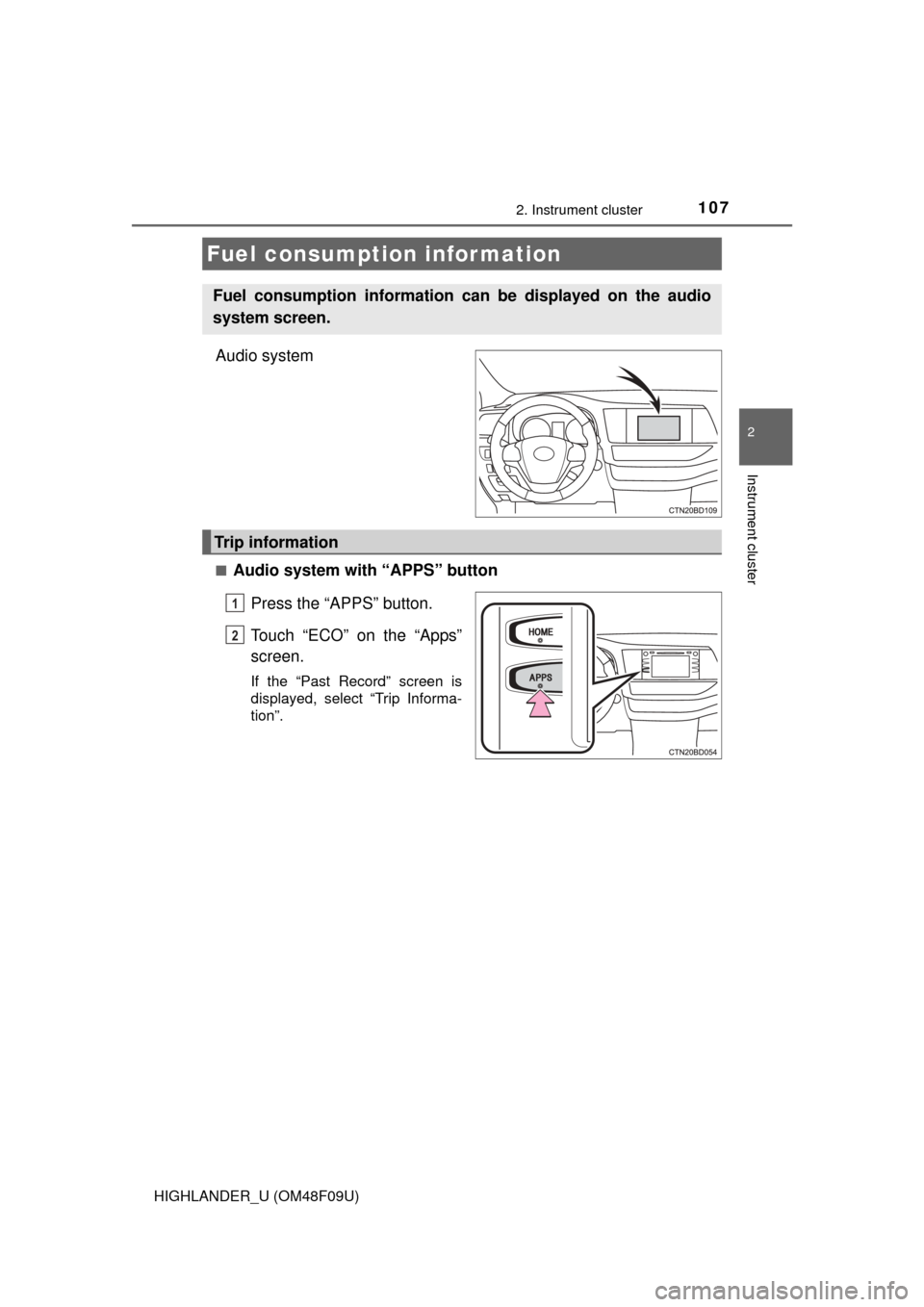
Audio system
■Audio system with “APPS” buttonPress the “APPS” button.
Touch “ECO” on the “Apps”
screen.
If the “Past Record” screen is
displayed, select “Trip Informa-
tion”.
Fuel consumption information
Fuel consumption information can be displayed on the audio
system screen.
Trip information
1
2
Page 108 of 716
1082. Instrument cluster
HIGHLANDER_U (OM48F09U)■
Audio system with “CAR” button
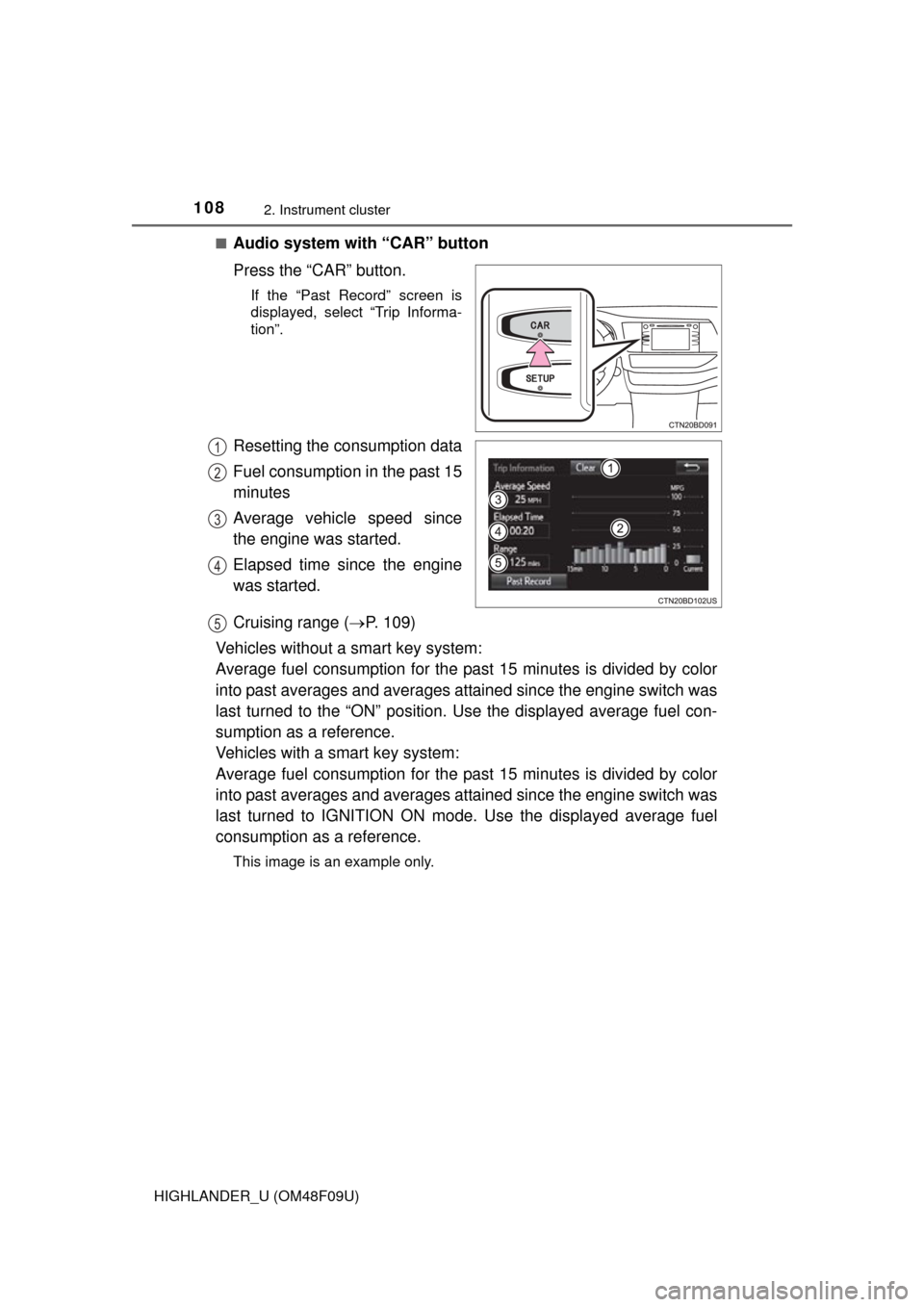
Press the “CAR” button.
If the “Past Record” screen is
displayed, select “Trip Informa-
tion”.
Resetting the consumption data
Fuel consumption in the past 15
minutes
Average vehicle speed since
the engine was started.
Elapsed time since the engine
was started.
Cruising range (
P. 109)
Vehicles without a smart key system:
Average fuel consumption for the past 15 minutes is divided by color
into past averages and averages attained since the engine switch was
last turned to the “ON” position. Use the displayed average fuel con-
sumption as a reference.
Vehicles with a smart key system:
Average fuel consumption for the past 15 minutes is divided by color
into past averages and averages attained since the engine switch was
last turned to IGNITION ON mode. Use the displayed average fuel
consumption as a reference.
This image is an example only.
1
2
3
4
5
Page 109 of 716
1092. Instrument cluster
2
Instrument cluster
HIGHLANDER_U (OM48F09U)■
Audio system with “APPS” button
Press the “APPS” button.
Touch “ECO” on the “Apps” screen.
If the “Trip Information” screen is displayed, select “Past Record”.
■
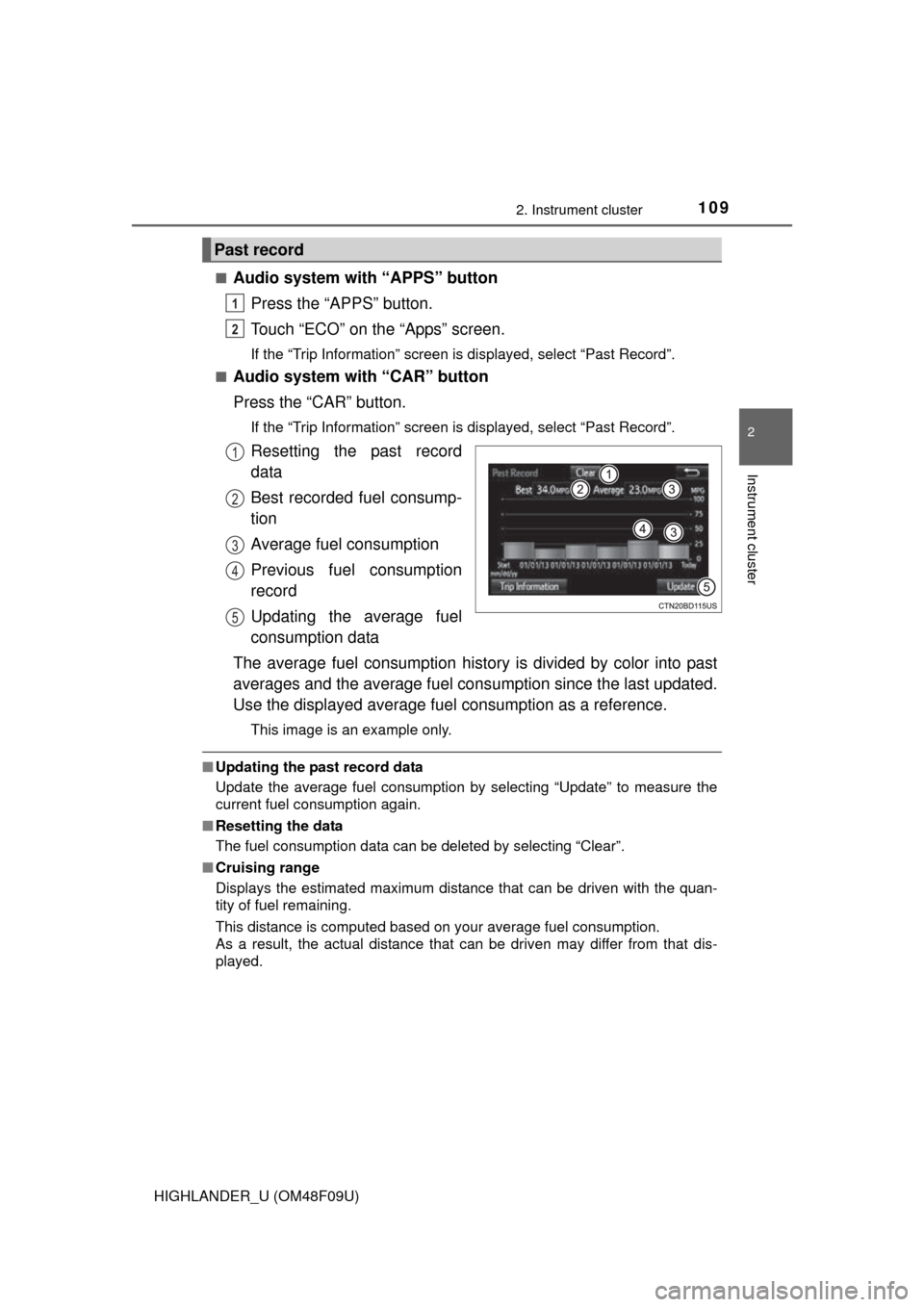
Audio system with “CAR” button
Press the “CAR” button.
If the “Trip Information” screen is displayed, select “Past Record”.
Resetting the past record
data
Best recorded fuel consump-
tion
Average fuel consumption
Previous fuel consumption
record
Updating the average fuel
consumption data
The average fuel consumption history is divided by color into past
averages and the average fuel cons umption since the last updated.
Use the displayed average fuel consumption as a reference.
This image is an example only.
■Updating the past record data
Update the average fuel consumption by selecting “Update” to measure the
current fuel consumption again.
■ Resetting the data
The fuel consumption data can be deleted by selecting “Clear”.
■ Cruising range
Displays the estimated maximum distance that can be driven with the quan-
tity of fuel remaining.
This distance is computed based on your average fuel consumption.
As a result, the actual distance that can be driven may differ from that dis-
played.
Past record
1
2
1
2
3
4
5
Page 118 of 716
1183-1. Key information
HIGHLANDER_U (OM48F09U)
NOTICE
■To prevent key damage
●Do not drop the keys, subject them to strong shocks or bend them.
● Do not expose the keys to high temperatures for long periods of time.
● Do not get the keys wet or wash them in an ultrasonic washer etc.
● Do not attach metallic or magnetic materials to the keys or place the keys
close to such materials.
● Do not disassemble the keys.
● Do not attach a sticker or anything else to the surface of the key with a
wireless remote control function.
● Vehicles with a smart key system: Do not place the keys near objects that
produce magnetic fields, such as TVs, audio systems and induction cook-
ers, or medical electrical equipment, such as low-frequency therapy equip-
ment.
■ Carrying the electronic key on your person (vehicles with a smart key
system)
Carry the electronic key 3.9 in. (10 cm) or more away from electric appli-
ances that are turned on. Radio waves emitted from electric appliances
within 3.9 in. (10 cm) of the electronic key may interfere with the key, caus-
ing the key to not function properly.
■ In case of a smart key system malfunction or other key-related prob-
lems (vehicles with a smart key system)
Take your vehicle with all the electronic keys provided with your vehicle to
your Toyota dealer.
■ When an electronic key is lost (vehicles with a smart key system)
If the electronic key remains lost, the risk of vehicle theft increases signifi-
cantly. Visit your Toyota dealer imm ediately with all remaining electronic
keys that was provided with your vehicle.