start stop button TOYOTA HIGHLANDER 2021 Owners Manual (in English)
[x] Cancel search | Manufacturer: TOYOTA, Model Year: 2021, Model line: HIGHLANDER, Model: TOYOTA HIGHLANDER 2021Pages: 568, PDF Size: 15.96 MB
Page 135 of 568
1353-2. Opening, closing and locking the doors
3
Before driving
HIGHLANDER_Uwireless remote control or the
mechanical key, to unlock the
doors.
■Turning an electronic key to
battery-saving mode
When battery-saving mode is set,
battery depletion is minimized by
stopping the electronic key from
receiving radio waves.
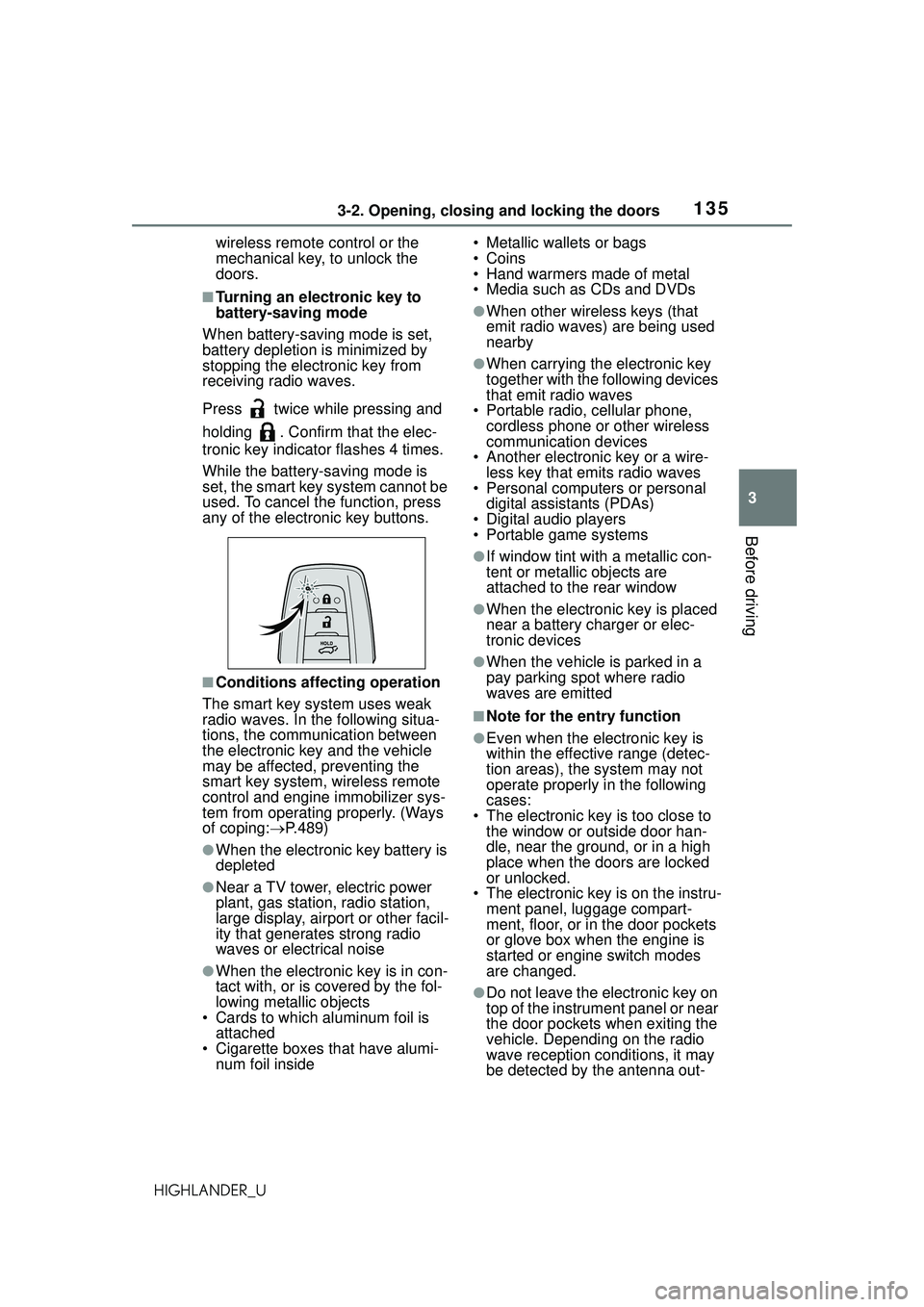
Press twice while pressing and
holding . Confirm that the elec-
tronic key indicator flashes 4 times.
While the battery-saving mode is
set, the smart key system cannot be
used. To cancel t he function, press
any of the electronic key buttons.
■Conditions affecting operation
The smart key system uses weak
radio waves. In the following situa-
tions, the communication between
the electronic key and the vehicle
may be affected, preventing the
smart key system, wireless remote
control and engine immobilizer sys-
tem from operating properly. (Ways
of coping: P.489)
●When the electronic key battery is
depleted
●Near a TV tower, electric power
plant, gas station, radio station,
large display, airport or other facil-
ity that generates strong radio
waves or electrical noise
●When the electronic key is in con-
tact with, or is covered by the fol-
lowing metallic objects
• Cards to which aluminum foil is attached
• Cigarette boxes that have alumi- num foil inside • Metallic wallets or bags
•Coins
• Hand warmers made of metal
• Media such as CDs and DVDs
●When other wireless keys (that
emit radio waves) are being used
nearby
●When carrying the electronic key
together with the following devices
that emit radio waves
• Portable radio, cellular phone, cordless phone or other wireless
communication devices
• Another electronic key or a wire- less key that emits radio waves
• Personal computers or personal
digital assistants (PDAs)
• Digital audio players
• Portable game systems
●If window tint with a metallic con-
tent or metallic objects are
attached to the rear window
●When the electronic key is placed
near a battery charger or elec-
tronic devices
●When the vehicle is parked in a
pay parking spot where radio
waves are emitted
■Note for the entry function
●Even when the electronic key is
within the effective range (detec-
tion areas), the system may not
operate properly in the following
cases:
• The electronic key is too close to the window or outside door han-
dle, near the ground, or in a high
place when the doors are locked
or unlocked.
• The electronic key is on the instru-
ment panel, luggage compart-
ment, floor, or in the door pockets
or glove box when the engine is
started or engine switch modes
are changed.
●Do not leave the electronic key on
top of the instrument panel or near
the door pockets when exiting the
vehicle. Depending on the radio
wave reception conditions, it may
be detected by the antenna out-
Page 207 of 568
2074-2. Driving procedures
4
Driving
HIGHLANDER_U
■When driving with dynamic
radar cruise control with
full-speed range activated
Even when switching the driving
mode to sport mode with the intent
of enabling engine braking, engine
braking will not activate because
dynamic radar cruise control with
full-speed range will not be can-
celed.
■Restraining sudden start
(Drive-Start Control)
P. 1 8 0
■AI-SHIFT
●The AI-SHIFT automatically
selects the suitab le gear accord-
ing to driver performance and driv-
ing conditions.
The AI-SHIFT automatically oper-
ates when the shift lever is in D.
(Shifting the shift lever to the M posi-
tion cancels the function.)
●G AI-SHIFT automatically selects
a suitable gear for sporty driving
according to driv er’s input and
driving conditions. G AI-SHIFT
operates automatically when the
shift lever is in D and sport mode
is selected for the driving mode.
(Selecting normal mode with the
driving mode select switch or shift-
ing the shift lever to the M position
cancels this function.)
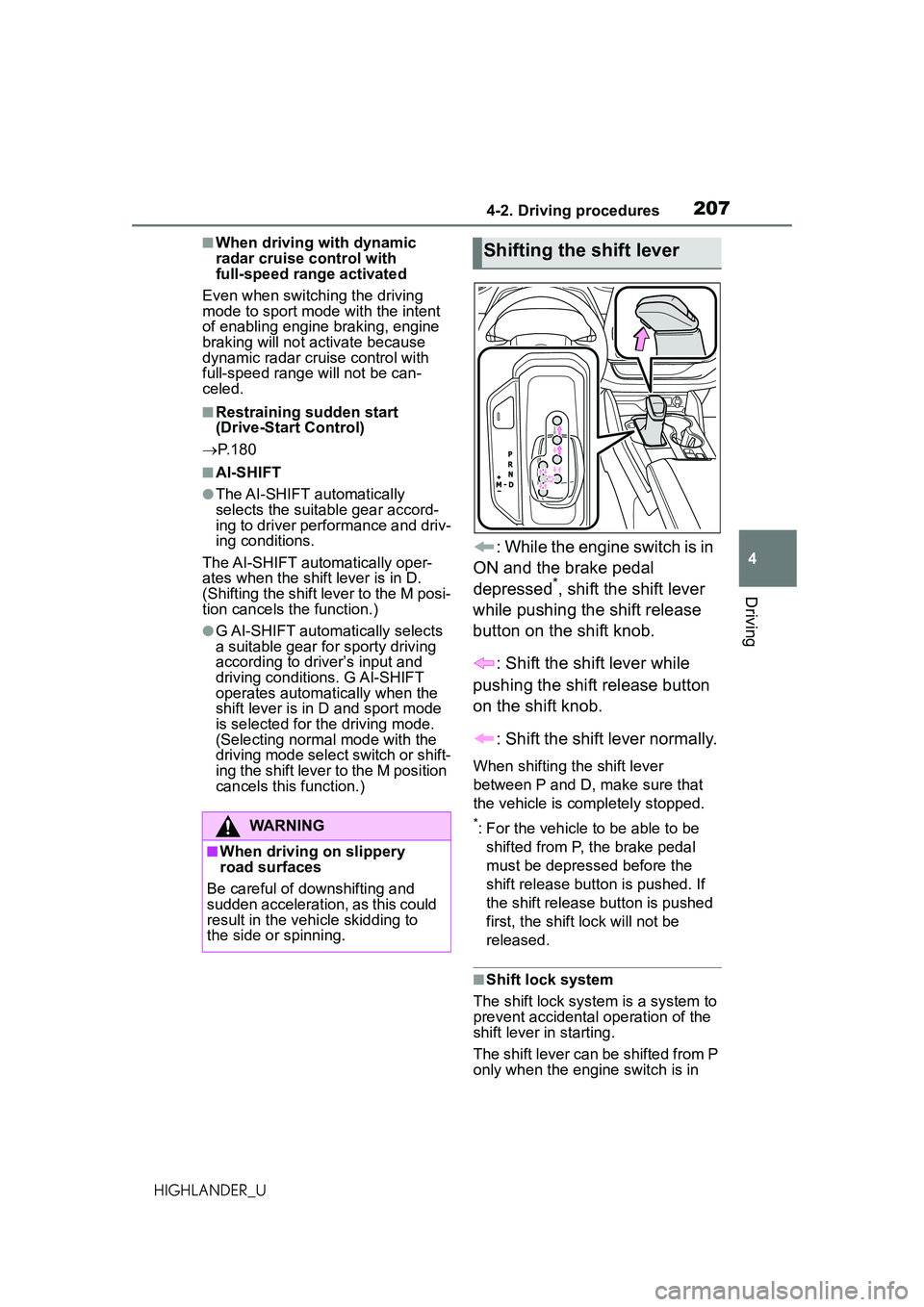
: While the engine switch is in
ON and the brake pedal
depressed
*, shift the shift lever
while pushing the shift release
button on the shift knob.
: Shift the shift lever while
pushing the shift release button
on the shift knob.
: Shift the shift lever normally.
When shifting the shift lever
between P and D, make sure that
the vehicle is completely stopped.
*: For the vehicle to be able to be shifted from P, the brake pedal
must be depressed before the
shift release button is pushed. If
the shift release button is pushed
first, the shift lock will not be
released.
■Shift lock system
The shift lock system is a system to
prevent accidental operation of the
shift lever in starting.
The shift lever can be shifted from P
only when the engine switch is in
WARNING
■When driving on slippery
road surfaces
Be careful of downshifting and
sudden acceleration, as this could
result in the vehicle skidding to
the side or spinning.
Shifting the shift lever
Page 214 of 568
2144-2. Driving procedures
HIGHLANDER_U
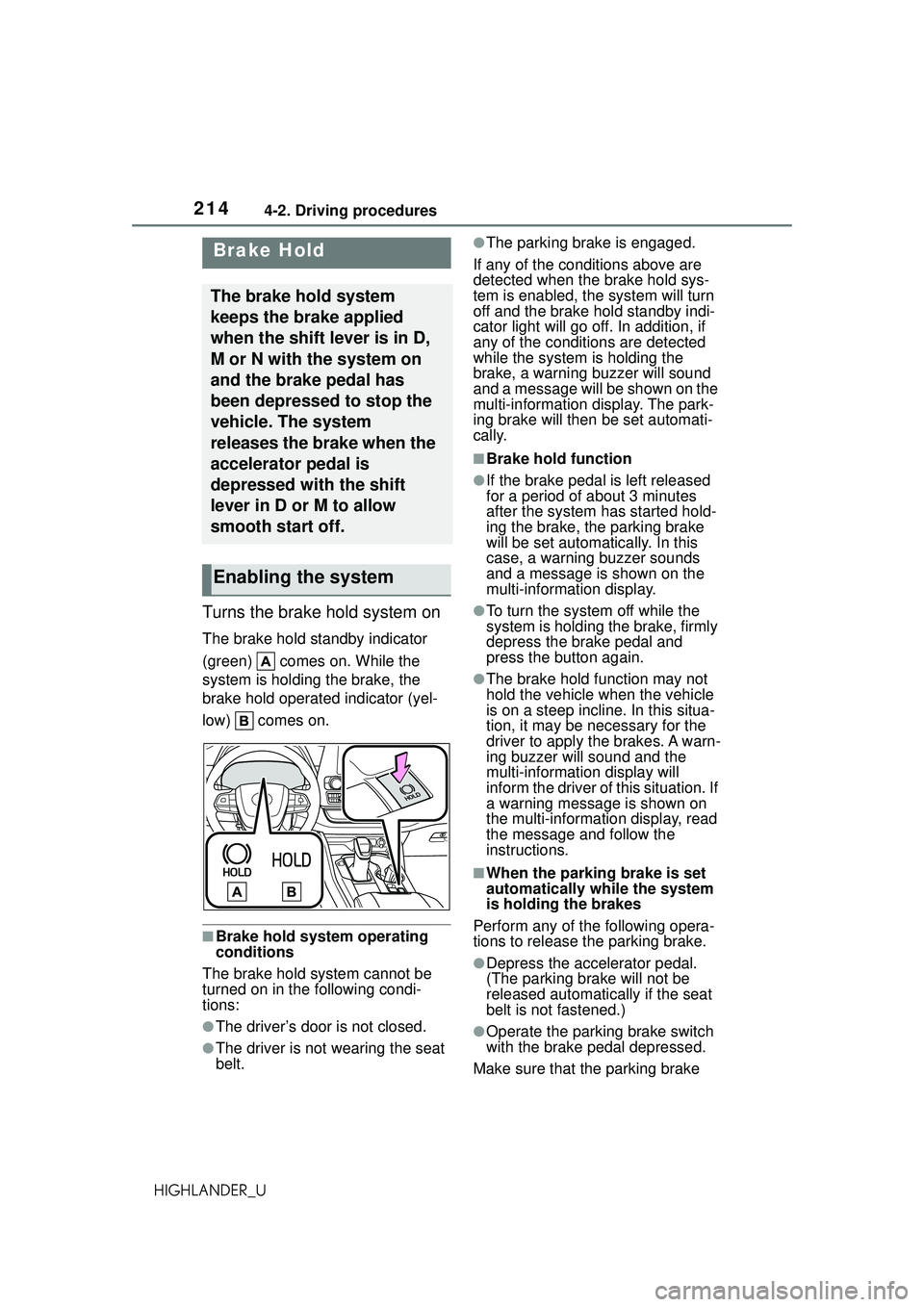
Turns the brake hold system on
The brake hold standby indicator
(green) comes on. While the
system is holding the brake, the
brake hold operated indicator (yel-
low) comes on.
■Brake hold system operating
conditions
The brake hold system cannot be
turned on in th e following condi-
tions:
●The driver’s door is not closed.
●The driver is not wearing the seat
belt.
●The parking brake is engaged.
If any of the conditions above are
detected when the brake hold sys-
tem is enabled, the system will turn
off and the brake hold standby indi-
cator light will go off. In addition, if
any of the condit ions are detected
while the system is holding the
brake, a warning buzzer will sound
and a message will be shown on the
multi-information display. The park-
ing brake will then be set automati-
cally.
■Brake hold function
●If the brake pedal is left released
for a period of about 3 minutes
after the system has started hold-
ing the brake, the parking brake
will be set automatically. In this
case, a warning buzzer sounds
and a message is shown on the
multi-information display.
●To turn the system off while the
system is holding the brake, firmly
depress the brake pedal and
press the button again.
●The brake hold function may not
hold the vehicle when the vehicle
is on a steep incline. In this situa-
tion, it may be necessary for the
driver to apply the brakes. A warn-
ing buzzer will sound and the
multi-information display will
inform the driver of this situation. If
a warning message is shown on
the multi-information display, read
the message and follow the
instructions.
■When the parking brake is set
automatically while the system
is holding the brakes
Perform any of the following opera-
tions to release the parking brake.
●Depress the accelerator pedal.
(The parking brake will not be
released automatically if the seat
belt is not fastened.)
●Operate the parking brake switch
with the brake pedal depressed.
Make sure that the parking brake
Brake Hold
The brake hold system
keeps the brake applied
when the shift lever is in D,
M or N with the system on
and the brake pedal has
been depressed to stop the
vehicle. The system
releases the brake when the
accelerator pedal is
depressed with the shift
lever in D or M to allow
smooth start off.
Enabling the system
Page 392 of 568
3925-5. Using the other interior features
HIGHLANDER_U
ble device. (To check device
compatibility, refer to
www.homelink.com.)
1Within 5 seconds after pro-
gramming the garage door
opener has been completed,
if the garage door opener
motor is trained to Home-
Link
®, both garage door
operation indicators will flash
rapidly (green) and the light
on the garage door opener
motor will blink twice, indicat-
ing that 2-way communica-
tion is enabled.
If the indicators do not flash, per-
form 2 and 3 within the first 10
presses of the HomeLink
® button
after programming has been com-
pleted.
2 Press a programmed Home-
Link
® button to operate a
garage door.
3 Within 1 minute of pressing
the HomeLink
® button, after
the garage door operation
has stopped, press the
“Learn” or “Smart” button on
the garage door opener
motor. Within 5 seconds of
the establishment of 2-way
communication with the
garage door opener, both
garage door operation indica-
tors in the vehicle will flash
rapidly (green) and the light
on the garage door opener
motor will blink twice, indicat- ing that 2-way communica-
tion is enabled.
■Reprogramming a single
HomeLink
® button
When the following procedure is
performed, buttons which
already have devices registered
to them can be overwritten:
1 Press and hold the desired
HomeLink
® button.
2 When the HomeLink
® indica-
tor starts flashing orange,
release the HomeLink
® but-
ton and perform “Program-
ming HomeLink
®” 1 (it takes
20 seconds for the Home-
Link
® indicator to start flash-
ing).
■Before programming
●Install a new battery in the trans-
mitter.
●The battery side of the transmitter
must be pointed away from the
HomeLink
® buttons.
Press the appropriate Home-
Link
® button. The HomeLink®
indicator light should turn on.
The status of the opening and
closing of a garage door is
shown by the garage door
opener indicators.
Operating HomeLink®
Page 561 of 568

561Alphabetical Index
HIGHLANDER_UStorage features ..................... 366
Stuck
If the vehicle becomes stuck 497
Suggestion function......... 92, 102
Sun visors ............................... 385
Sunshade Roof...................................... 170
Switches Activating the Automatic High Beam .................................. 219
Automatic High Beam system ........................................... 219
Brake Hold switch ................ 214
Digital Rearview Mirror control switches ............................. 155
Door lock switches ............... 120
Driving mode select switch... 314
Driving position memory switches ............................. 147
Dynamic radar cruise control with full-speed range switch257
Electronic roof sunshade switches ............................. 173
Emergency flashers switch .. 450
Engine switch ....................... 202
Fog light switch .................... 222
Garage door opener switches ........................................... 387
Heated steering wheel switch ........................................... 360
Ignition switch....................... 202
Instrument panel light control switches ............................... 83
Intuitive parking assist switch285
Light switches....................... 216
LTA (Lane Tracing Assist) switch ........................................... 252
Meter control switches ..... 85, 94
Moon roof switches .............. 170
“ODO TRIP” switch ................ 83
Outside rear view mirror switches ............................. 165 Panoramic moon roof switches
...........................................173
Parking brake switch ............ 211
PCS OFF switch ...................238
PKSB (Parking Support Brake) switch .................................298
Power door lock switch.........120
Power window switches .......167
RCTA switch .........................292
Rear window and outside rear view mirror defoggers switch...........................337, 343, 347
Seat heater switches ............360
Seat ventilator switches........360
Snow mode switch ...............318
“SOS” button ..........................65
Stop & Start cancel switch ....273
Tilt and telescopic steering con- trol switch ...........................153
Tire pressure warning reset switch .................................426
Vehicle-to-vehicle distance switch .................................257
VSC OFF switch ...................322
Window lock switch ..............169
Windshield defogger switch 337, 343, 346
Windshield wiper and washer switch .........................222, 225
Windshield wiper de-icer switch ...........................338, 343, 351
T
Tachometer ...............................81
Tail lights Light switch...........................216
Replacing light bulbs ............441
The Secondary Collision Brake ...............................................322
Theft deterrent system Alarm ......................................73
Engine immobilizer system .....71