ECU TOYOTA HIGHLANDER HYBRID 2009 XU40 / 2.G Service Manual
[x] Cancel search | Manufacturer: TOYOTA, Model Year: 2009, Model line: HIGHLANDER HYBRID, Model: TOYOTA HIGHLANDER HYBRID 2009 XU40 / 2.GPages: 592, PDF Size: 11.8 MB
Page 399 of 592
399
3-7. Other interior features
3
Interior features
■
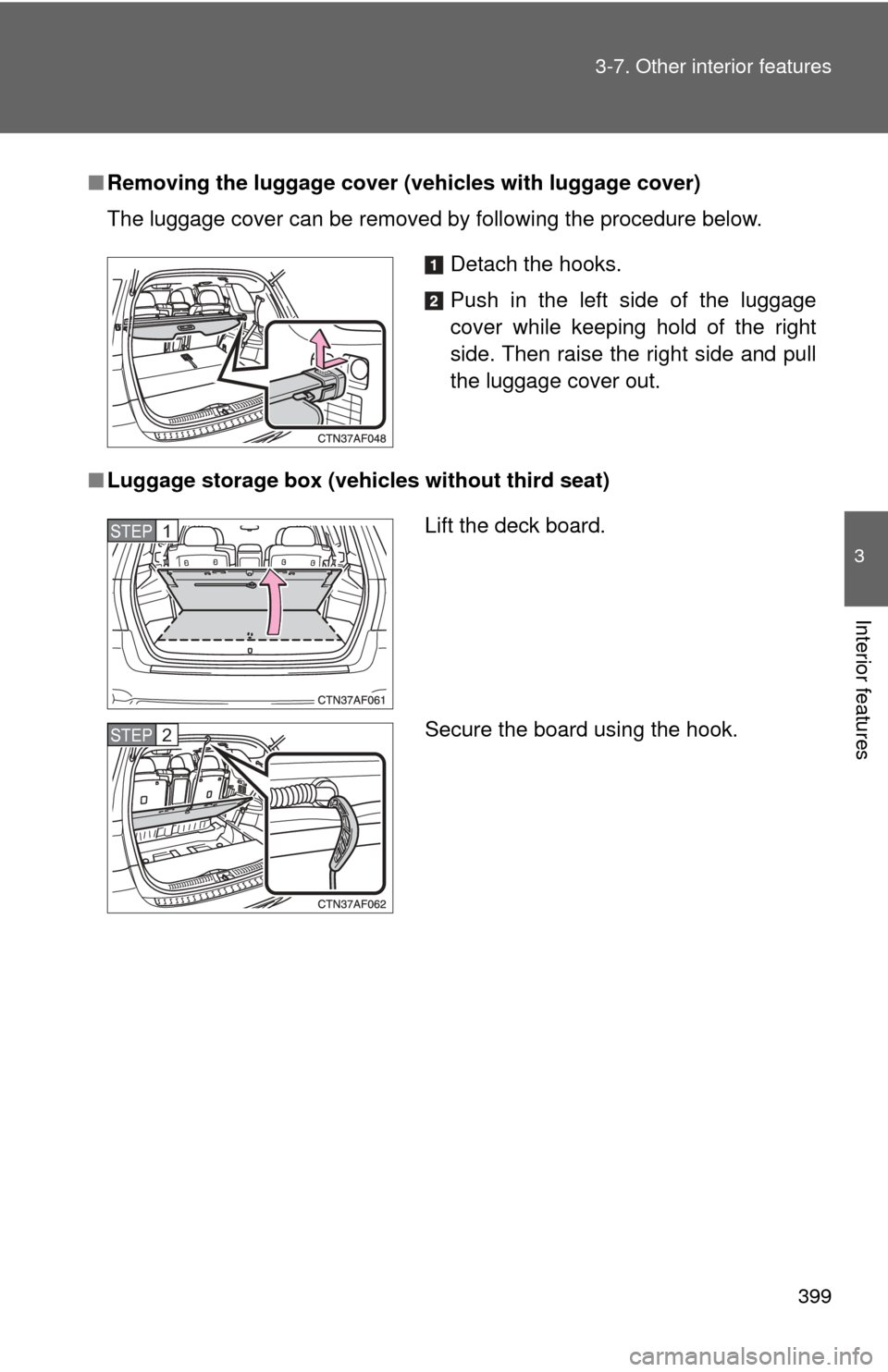
Removing the luggage cover ( vehicles with luggage cover)
The luggage cover can be removed by following the procedure below.
■ Luggage storage box (vehicles without third seat)
Detach the hooks.
Push in the left side of the luggage
cover while keeping hold of the right
side. Then raise the right side and pull
the luggage cover out.
Lift the deck board.
Secure the board using the hook.STEP1
STEP2
Page 402 of 592
402
3-7. Other interior features
Garage door opener∗
The garage door opener (HomeLink® Universal Transceiver) is manufac-
tured under license from HomeLink®.
Programming the HomeLink® (for U.S.A. owners)
The HomeLink
® compatible transceiver in your vehicle has 3 buttons
which can be programmed to operate 3 different devices. Refer to the
programming method below appropriate for the device.
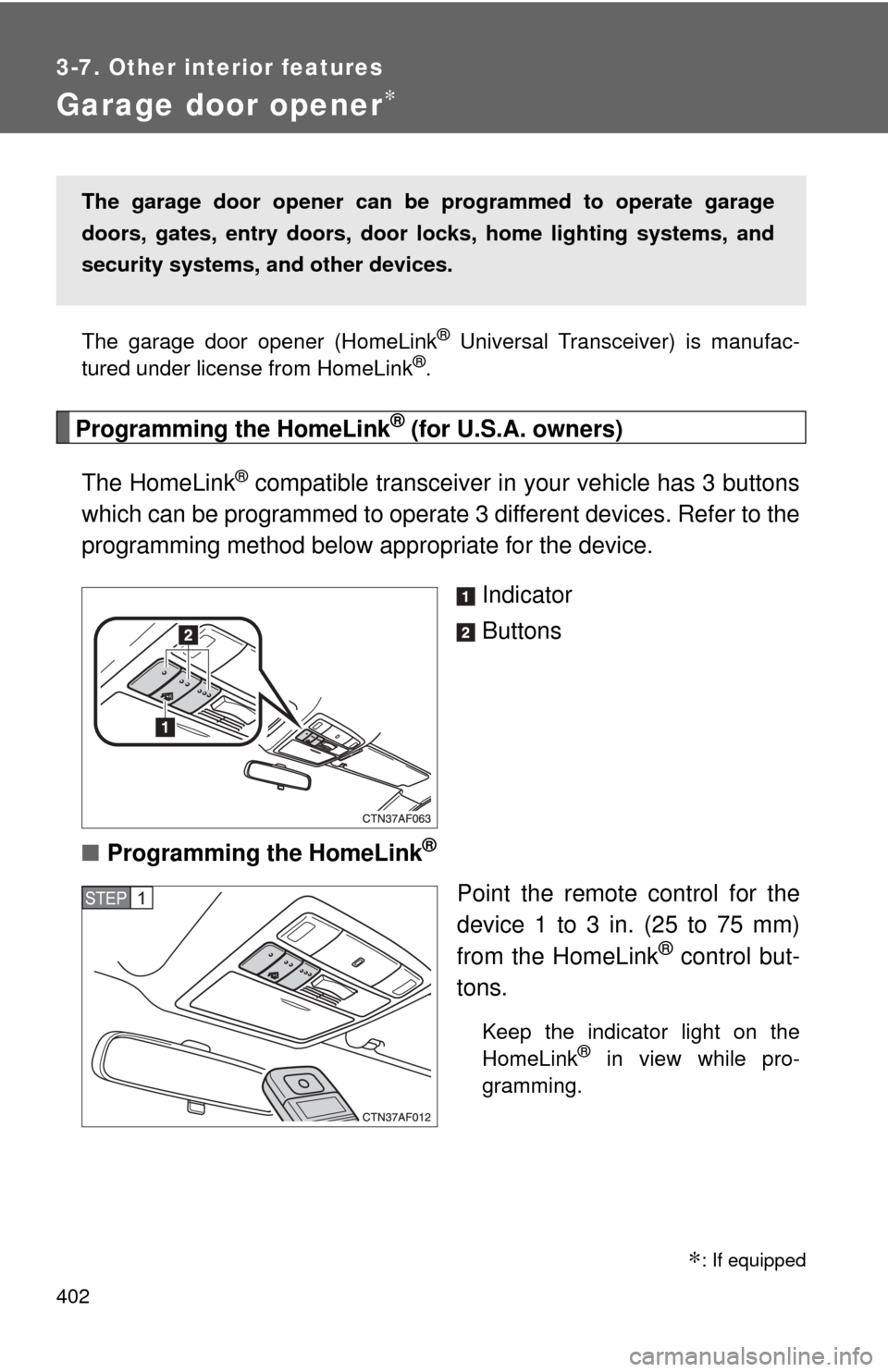
Indicator
Buttons
■ Programming the HomeLink
®
Point the remote control for the
device 1 to 3 in. (25 to 75 mm)
from the HomeLink
® control but-
tons.
Keep the indicator light on the
HomeLink® in view while pro-
gramming.
The garage door opener can be programmed to operate garage
doors, gates, entry doors, door locks, hom e lighting systems, and
security systems, and other devices.
STEP1
∗: If equipped
Page 405 of 592
405
3-7. Other interior features
3
Interior features
Test the operation of the HomeLink® by pressing the newly
programmed button. Check to see if the gate/device operates
correctly.
Repeat the steps above to program another device for each of
the remaining HomeLink
® buttons.
■ Programming other devices
To program other devices such as home security systems, home
door locks or lighting, contact your authorized Toyota dealer for
assistance.
■ Reprogramming a button
The individual HomeLink
® buttons cannot be erased but can be
reprogrammed. To reprogram a button, follow the programming
instructions.
Operating the HomeLink®
Press the appropriate HomeLink® button. The HomeLink® indicator
light on the HomeLink® transceiver should turn on.
The HomeLink® continues to send a signal for up to 20 seconds as long
as the button is pressed.
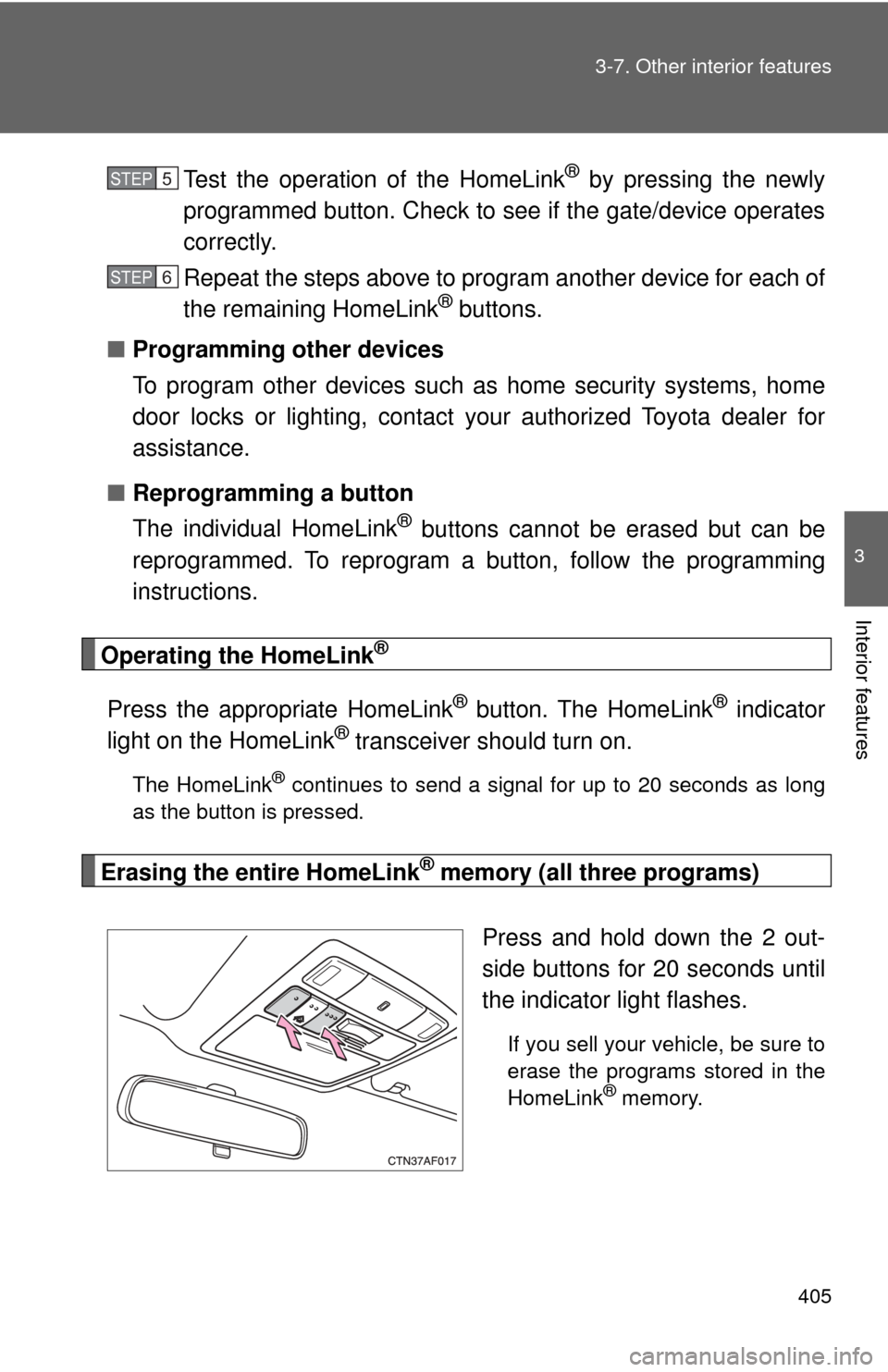
Erasing the entire HomeLink® memory (all three programs)
Press and hold down the 2 out-
side buttons for 20 seconds until
the indicator light flashes.
If you sell your vehicle, be sure to
erase the programs stored in the
HomeLink
® memory.
STEP5
STEP6
Page 409 of 592
409
3-7. Other interior features
3
Interior features
■
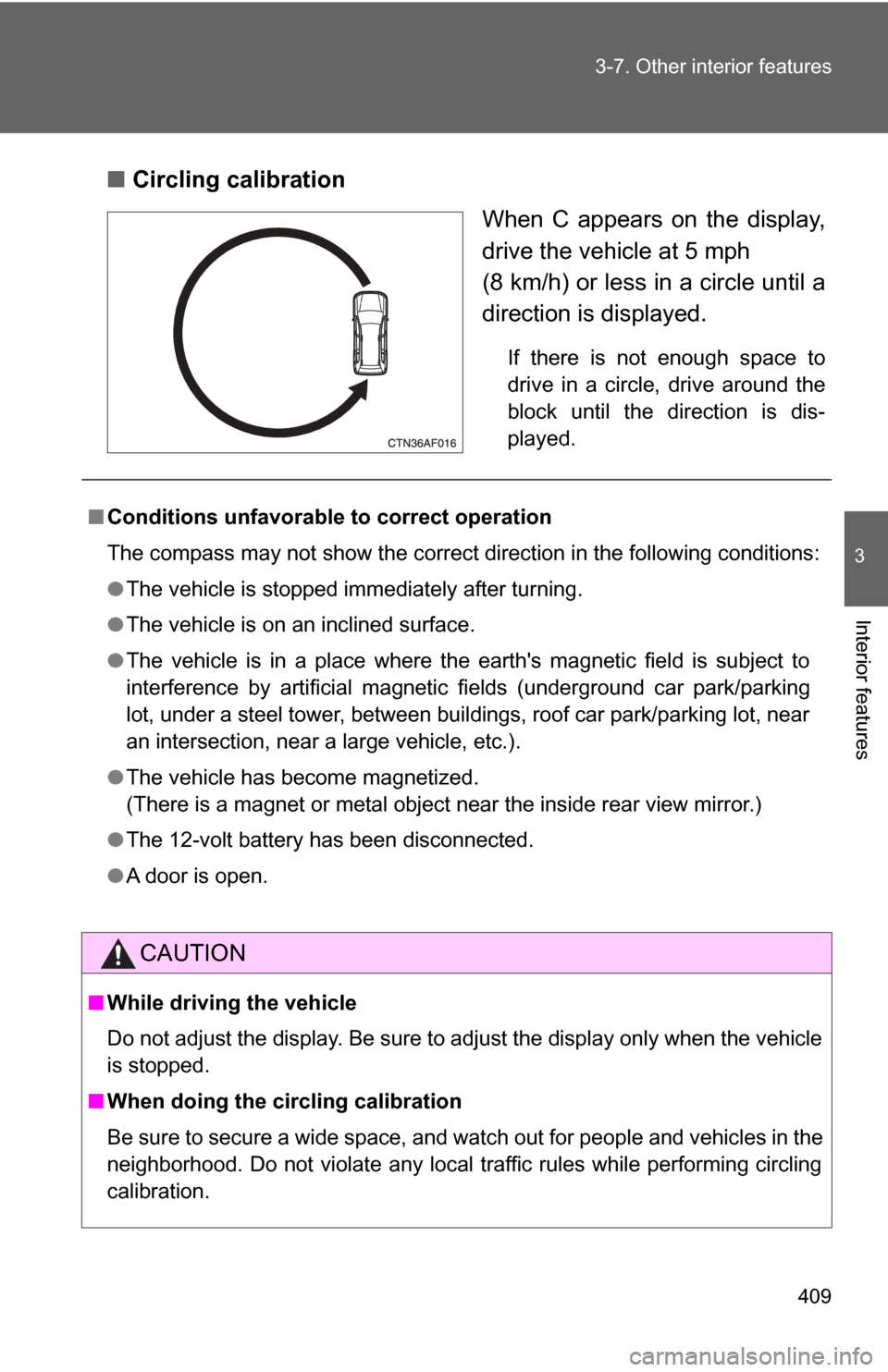
Circling calibration
When C appears on the display,
drive the vehicle at 5 mph
(8 km/h) or less in a circle until a
direction is displayed.
If there is not enough space to
drive in a circle, drive around the
block until the direction is dis-
played.
■Conditions unfavorable to correct operation
The compass may not show the correct direction in the following conditions:
●The vehicle is stopped immediately after turning.
● The vehicle is on an inclined surface.
● The vehicle is in a place where the earth's magnetic field is subject to
interference by artificial magnetic fields (underground car park/parking
lot, under a steel tower, between buildings, roof car park/parking lot, near
an intersection, near a large vehicle, etc.).
● The vehicle has become magnetized.
(There is a magnet or metal object near the inside rear view mirror.)
● The 12-volt battery has been disconnected.
● A door is open.
CAUTION
■While driving the vehicle
Do not adjust the display. Be sure to adjust the display only when the vehicle
is stopped.
■ When doing the circling calibration
Be sure to secure a wide space, and watch out for people and vehicles in the
neighborhood. Do not violate any local traffic rules while performing circling
calibration.
Page 421 of 592
421
4-2. Maintenance
4
Maintenance and care
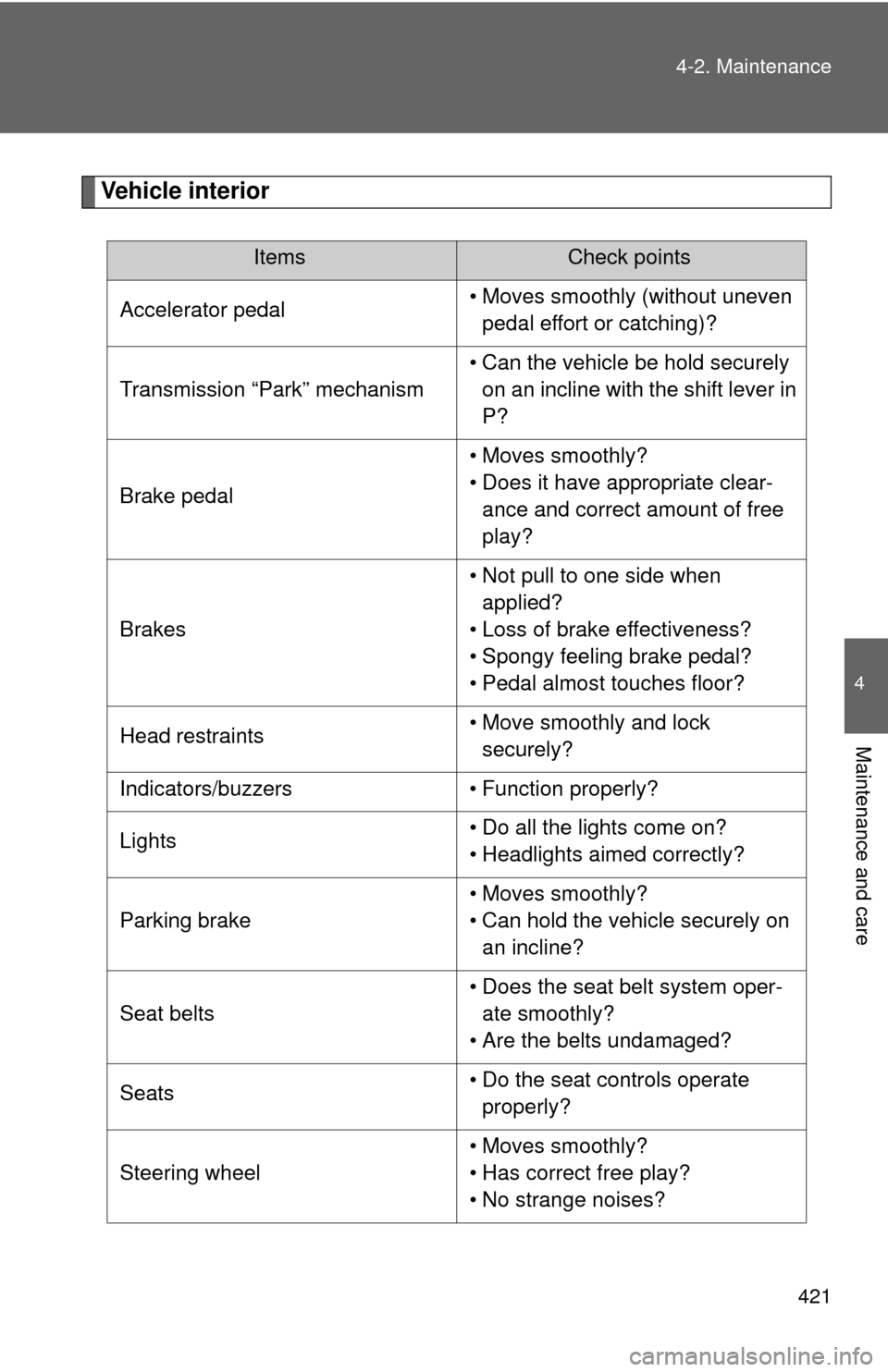
Vehicle interior
ItemsCheck points
Accelerator pedal • Moves smoothly (without uneven
pedal effort or catching)?
Transmission “Park” mechanism • Can the vehicle be hold securely
on an incline with the shift lever in
P?
Brake pedal • Moves smoothly?
• Does it have appropriate clear-
ance and correct amount of free
play?
Brakes • Not pull to one side when
applied?
• Loss of brake effectiveness?
• Spongy feeling brake pedal?
• Pedal almost touches floor?
Head restraints • Move smoothly and lock
securely?
Indicators/buzzers • Function properly?
Lights • Do all the lights come on?
• Headlights aimed correctly?
Parking brake • Moves smoothly?
• Can hold the vehicle securely on
an incline?
Seat belts • Does the seat belt system oper-
ate smoothly?
• Are the belts undamaged?
Seats • Do the seat controls operate
properly?
Steering wheel • Moves smoothly?
• Has correct free play?
• No strange noises?
Page 429 of 592
429
4-3. Do-it-yourself maintenance
4
Maintenance and care
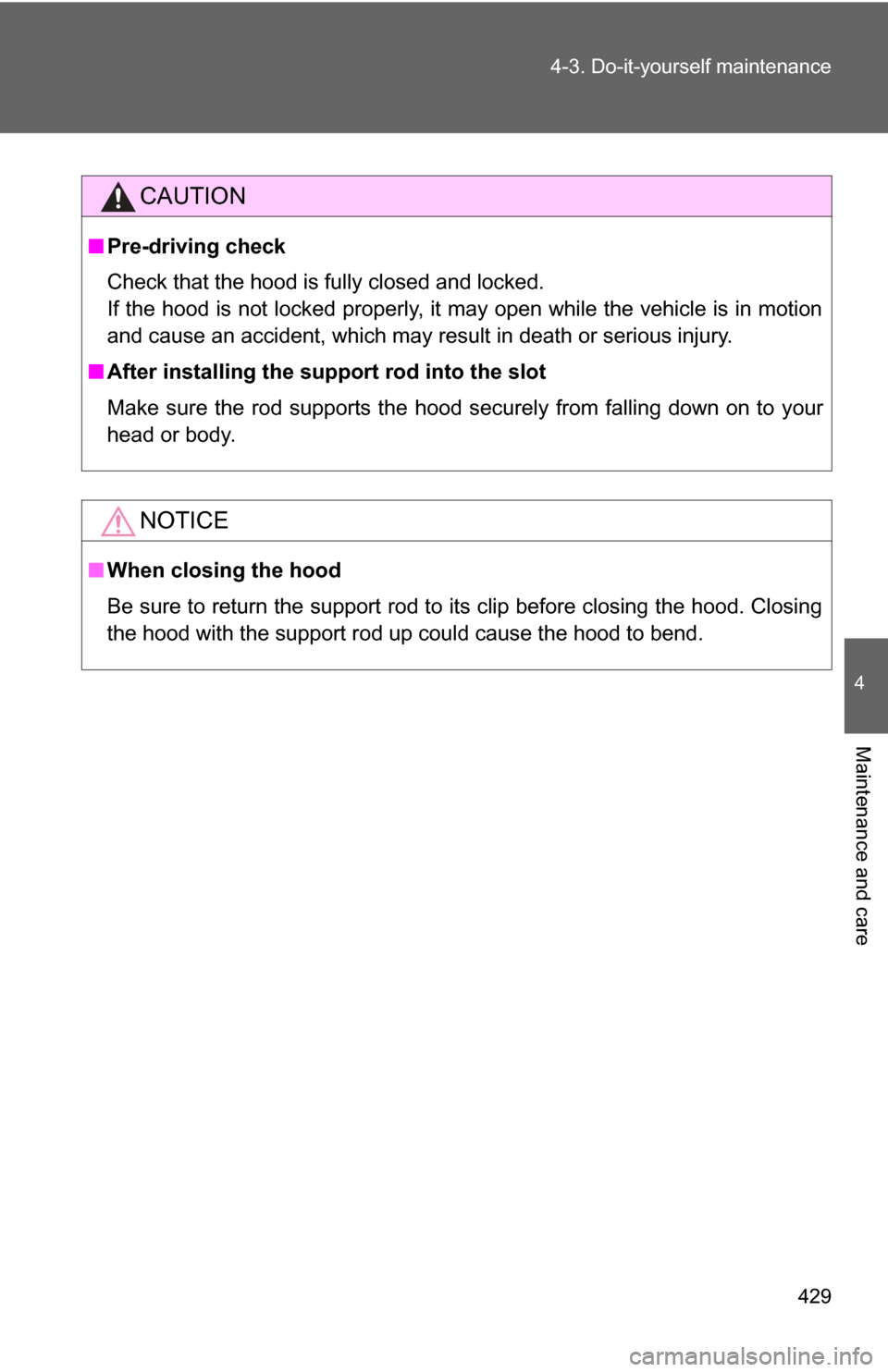
CAUTION
■
Pre-driving check
Check that the hood is fully closed and locked.
If the hood is not locked properly, it may open while the vehicle is in motion
and cause an accident, which may result in death or serious injury.
■ After installing the support rod into the slot
Make sure the rod supports the hood securely from falling down on to your
head or body.
NOTICE
■When closing the hood
Be sure to return the support rod to its clip before closing the hood. Closing
the hood with the support rod up could cause the hood to bend.
Page 472 of 592
472 4-3. Do-it-yourself maintenance
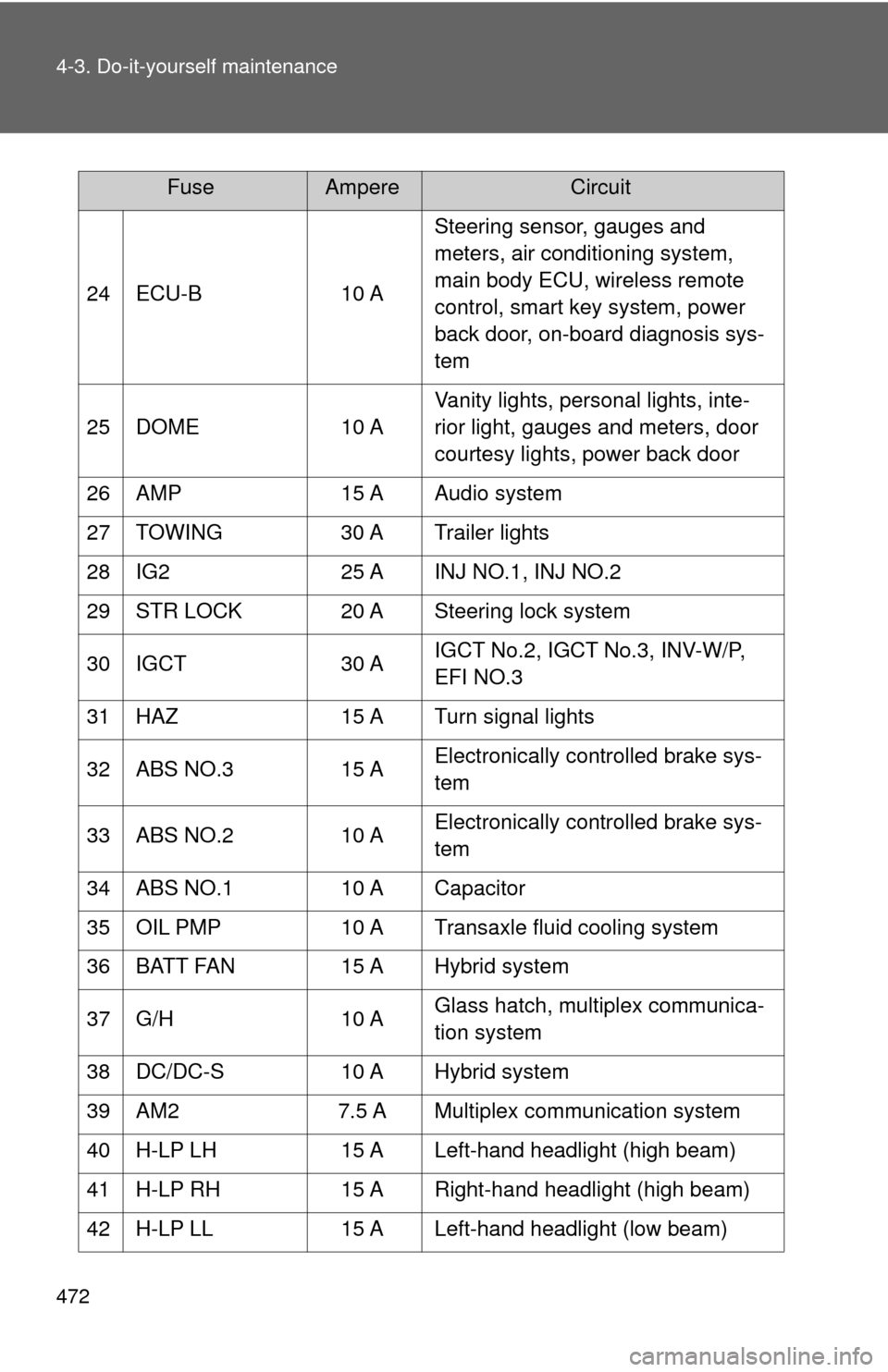
24 ECU-B10 ASteering sensor, gauges and
meters, air conditioning system,
main body ECU, wireless remote
control, smart key system, power
back door, on-board diagnosis sys-
tem
25 DOME 10 AVanity lights, personal lights, inte-
rior light, gauges and meters, door
courtesy lights, power back door
26 AMP 15 A Audio system
27 TOWING 30 A Trailer lights
28 IG2 25 A INJ NO.1, INJ NO.2
29 STR LOCK 20 A Steering lock system
30 IGCT 30 AIGCT No.2, IGCT No.3, INV-W/P,
EFI NO.3
31 HAZ 15 A Turn signal lights
32 ABS NO.3 15 AElectronically controlled brake sys-
tem
33 ABS NO.2 10 AElectronically controlled brake sys-
tem
34 ABS NO.1 10 A Capacitor
35 OIL PMP 10 A Transaxle fluid cooling system
36 BATT FAN 15 A Hybrid system
37 G/H 10 AGlass hatch, multiplex communica-
tion system
38 DC/DC-S 10 A Hybrid system
39 AM2 7.5 A Multiplex communication system
40 H-LP LH 15 A Left-hand headlight (high beam)
41 H-LP RH 15 A Right-hand headlight (high beam)
42 H-LP LL 15 A Left-hand headlight (low beam)
FuseAmpereCircuit
Page 475 of 592
475
4-3. Do-it-yourself maintenance
4
Maintenance and care
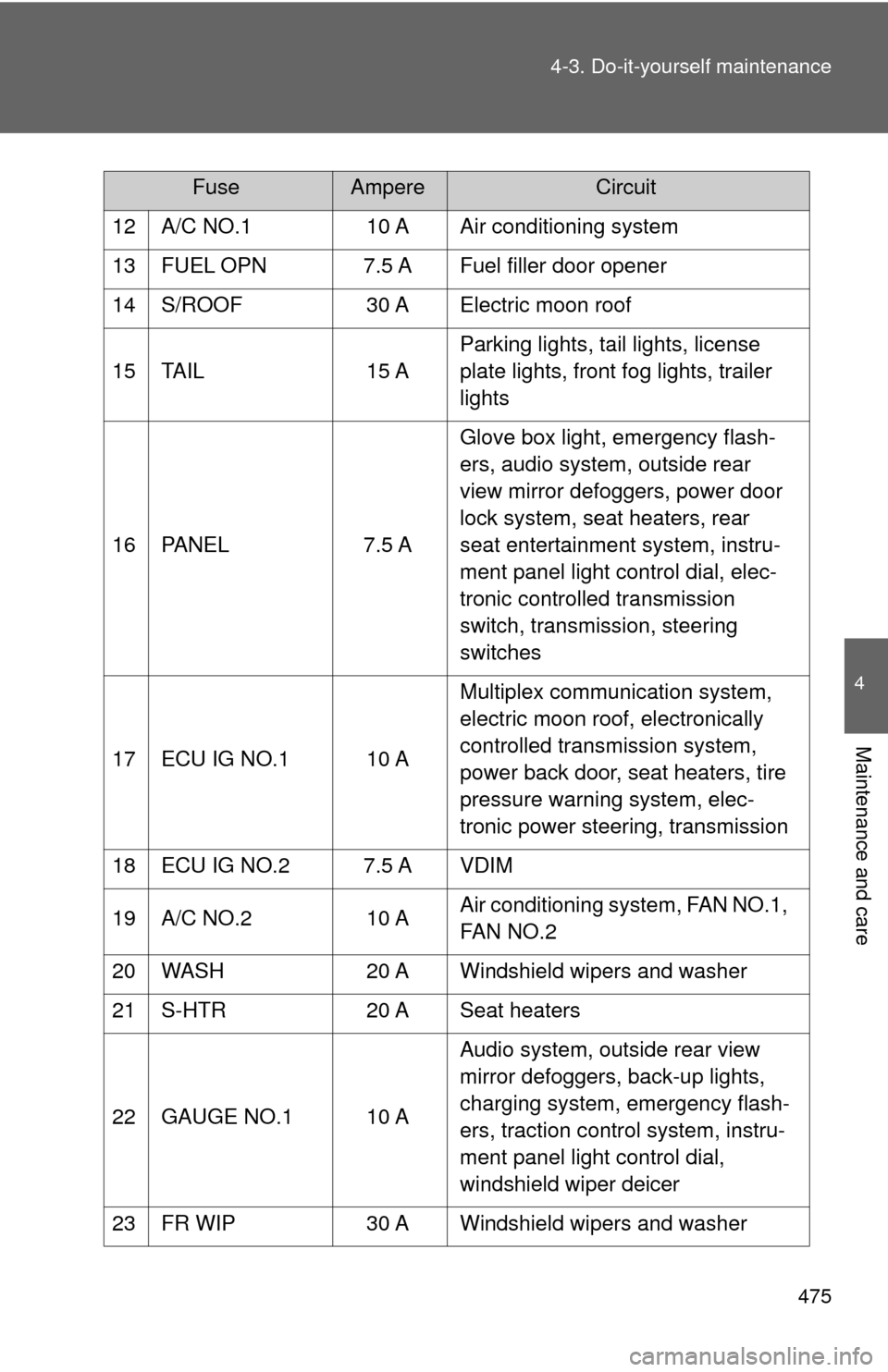
12 A/C NO.1
10 A Air conditioning system
13 FUEL OPN 7.5 A Fuel filler door opener
14 S/ROOF 30 A Electric moon roof
15 TAIL 15 AParking lights, tail lights, license
plate lights, front fog lights, trailer
lights
16 PANEL 7.5 AGlove box light, emergency flash-
ers, audio system, outside rear
view mirror defoggers, power door
lock system, seat heaters, rear
seat entertainment system, instru-
ment panel light control dial, elec-
tronic controlled transmission
switch, transmission, steering
switches
17 ECU IG NO.1 10 A Multiplex communication system,
electric moon roof, electronically
controlled transmission system,
power back door, seat heaters, tire
pressure warning system, elec-
tronic power steering, transmission
18 ECU IG NO.2 7.5 A VDIM
19 A/C NO.2 10 AAir conditioning system, FAN NO.1,
FAN NO.2
20 WASH 20 A Windshield wipers and washer
21 S-HTR 20 A Seat heaters
22 GAUGE NO.1 10 A Audio system, outside rear view
mirror defoggers, back-up lights,
charging system, emergency flash-
ers, traction control system, instru-
ment panel light control dial,
windshield wiper deicer
23 FR WIP 30 A Windshield wipers and washer
FuseAmpereCircuit
Page 476 of 592
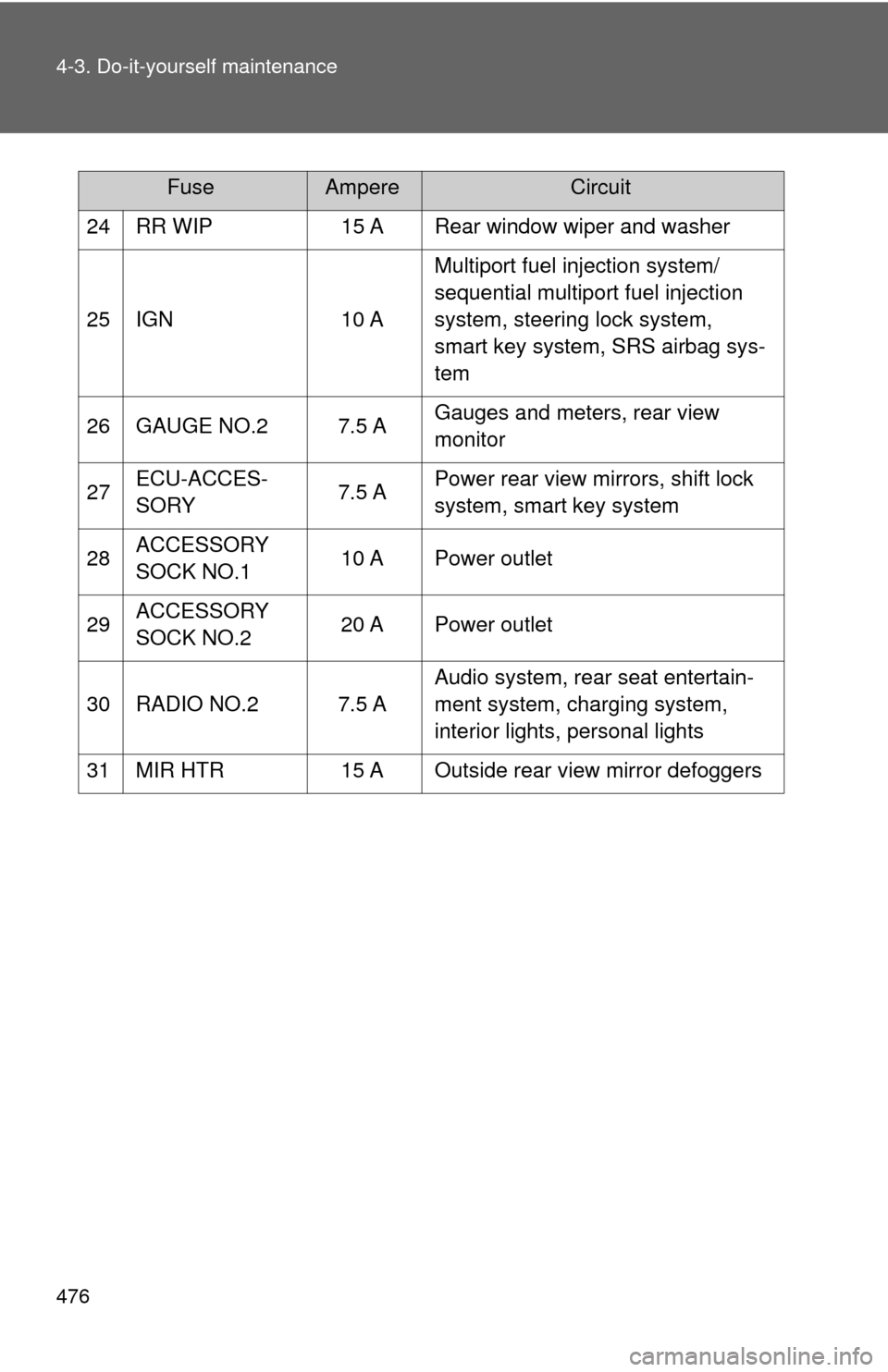
476 4-3. Do-it-yourself maintenance
24 RR WIP15 A Rear window wiper and washer
25 IGN 10 AMultiport fuel injection system/
sequential multiport fuel injection
system, steering lock system,
smart key system, SRS airbag sys-
tem
26 GAUGE NO.2 7.5 A Gauges and meters, rear view
monitor
27 ECU-ACCES-
SORY 7.5 APower rear view mirrors, shift lock
system, smart key system
28 ACCESSORY
SOCK NO.1 10 A Power outlet
29 ACCESSORY
SOCK NO.2 20 A Power outlet
30 RADIO NO.2 7.5 A Audio system, rear seat entertain-
ment system, charging system,
interior lights, personal lights
31 MIR HTR 15 A Outside rear view mirror defoggers
FuseAmpereCircuit
Page 488 of 592

488 4-3. Do-it-yourself maintenance
CAUTION
■Replacing light bulbs
●Turn off the headlights. Do not attempt to replace the bulb immediately
after turning off the headlights.
The bulbs become very hot and may cause burns.
● Do not touch the glass portion of the light bulb with bare hands. Hold the
bulb by the plastic or metal portion.
If the bulb is scratched or dropped it may blow out or crack.
● Fully install light bulbs and any parts used to secure them. Failing to do so
may result in heat damage, fire, or water entering the headlight unit. This
may damage the headlights or cause condensation to build up on the lens.
■ To prevent damage or fire
Make sure bulbs are fully seated and locked.