heater TOYOTA HIGHLANDER HYBRID 2009 XU40 / 2.G Owners Manual
[x] Cancel search | Manufacturer: TOYOTA, Model Year: 2009, Model line: HIGHLANDER HYBRID, Model: TOYOTA HIGHLANDER HYBRID 2009 XU40 / 2.GPages: 592, PDF Size: 11.8 MB
Page 4 of 592

TABLE OF CONTENTSIndex
4
3-3. Using the rear audio system
Rear seat entertainment system features ................ 309
Using the DVD player (DVD video)...................... 316
Using the DVD player (video CD) ........................ 324
Using the DVD player (audio CD/CD text) ........... 326
Using the DVD player (MP3 discs) ...................... 327
Using the video mode ........ 329
Changing the initial setting .............................. 331
3-4. Using the hands-free phone system
(for cellular phone)
Hands-free phone system (for cellular phone)
features ............................ 338
Using the hands-free phone system .............................. 342
Making a phone call ........... 350
Setting a cellular phone...... 354
Security and system setup ................................ 359
Using the phone book ........ 362 3-5. Using the interior lights
Interior lights list.................. 369
• Personal/interior light main switch ....................... 370
• Personal/interior lights ...... 370
• Interior light ....................... 371
3-6. Using the storage features
List of storage features ....... 372
• Glove box ......................... 373
• Console box ..................... 374
• Overhead console ............ 375
• Cup holders ...................... 376
• Bottle holders ................... 380
• Auxiliary boxes ................. 381
• Side table ......................... 384
3-7. Other interior features Sun visors ........................... 386
Vanity mirrors ..................... 387
Conversation mirror ............ 388
Power outlet........................ 389
Seat heaters ....................... 392
Armrests ............................. 394
Floor mat ............................ 395
Luggage compartment features ............................ 396
Garage door opener ........... 402
Compass ............................ 407
Page 21 of 592
21
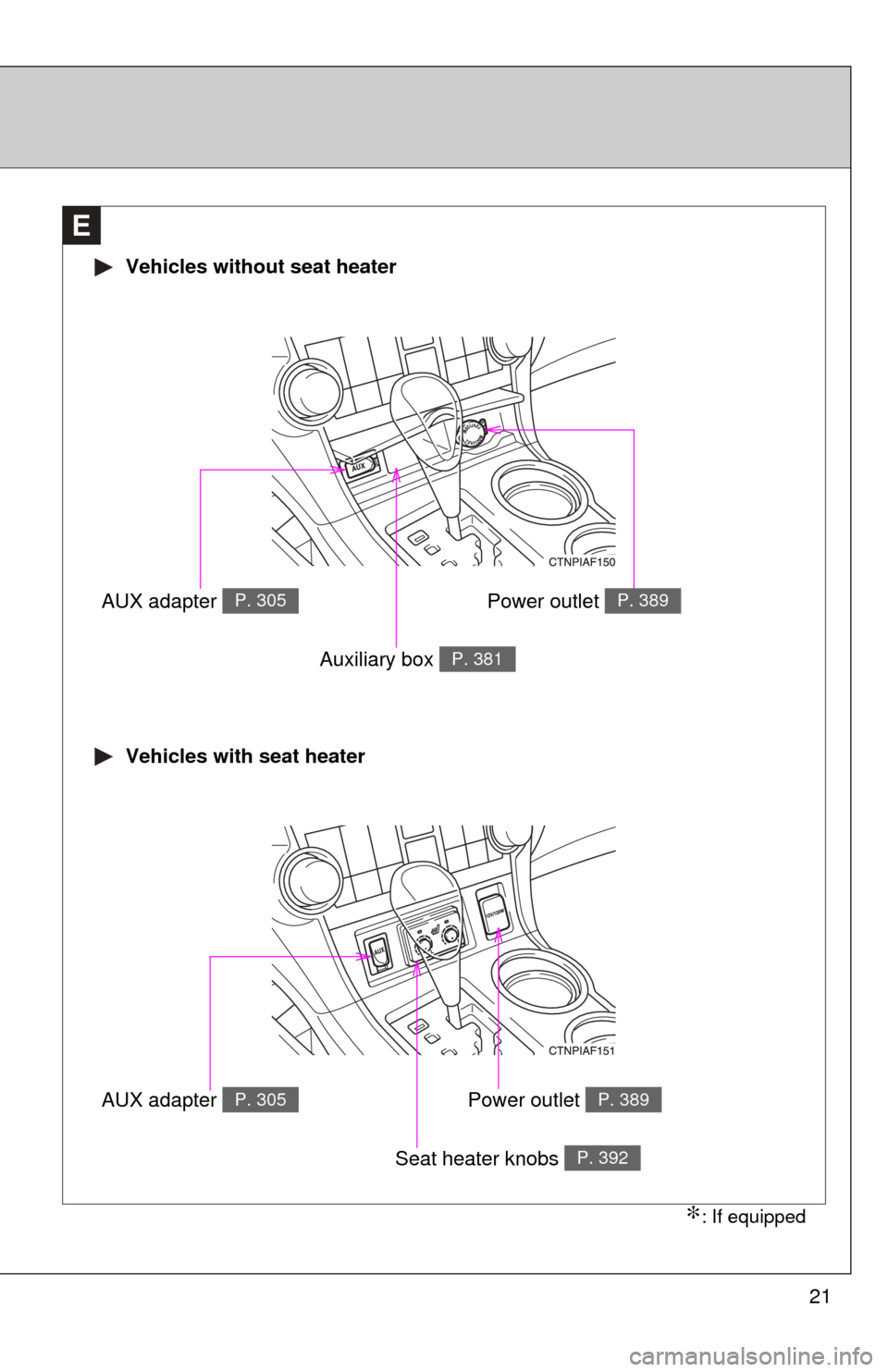
E
Vehicles without seat heater
Vehicles with seat heater
AUX adapter P. 305
Auxiliary box P. 381
AUX adapter P. 305
Seat heater knobs P. 392
Power outlet P. 389
Power outlet P. 389
∗: If equipped
Page 253 of 592
Interior features3
253
3-4. Using the hands-free phone system
(for cellular phone)
Hands-free phone system (for cellular phone)
features .......................... 338
Using the hands-free phone system ................ 342
Making a phone call ......... 350
Setting a cellular phone ............................. 354
Security and system setup .............................. 359
Using the phone book ...... 362
3-5. Using the interior lights Interior lights list ............... 369
• Personal/interior light main switch ..................... 370
• Personal/interior lights .... 370
• Interior light ..................... 371 3-6. Using the storage features
List of storage features .......................... 372
• Glove box........................ 373
• Console box .................... 374
• Overhead console ........... 375
• Cup holders .................... 376
• Bottle holders .................. 380
• Auxiliary boxes................ 381
• Side table ........................ 384
3-7. Other interior features Sun visors ........................ 386
Vanity mirrors ................... 387
Conversation mirror ......... 388
Power outlet ..................... 389
Seat heaters..................... 392
Armrests........................... 394
Floor mat .......................... 395
Luggage compartment features .......................... 396
Garage door opener......... 402
Compass .......................... 407
Page 267 of 592
267
3-1. Using the air conditioning system
and defogger
3
Interior features
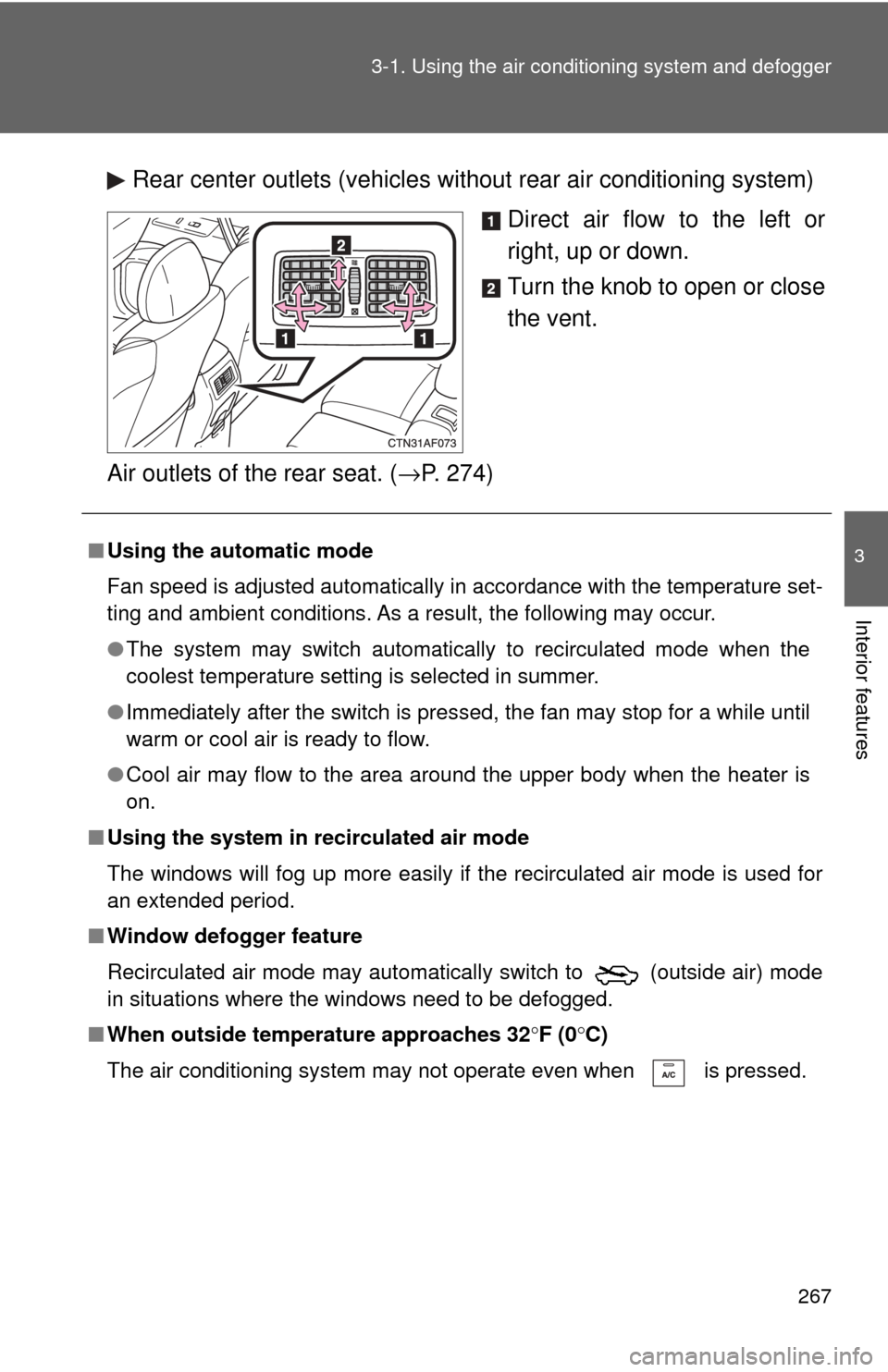
Rear center outlets (vehicles without rear air conditioning system)
Direct air flow to the left or
right, up or down.
Turn the knob to open or close
the vent.
Air outlets of the rear seat. ( →P. 274)
■Using the automatic mode
Fan speed is adjusted automatically in accordance with the temperature set-
ting and ambient conditions. As a result, the following may occur.
●The system may switch automatically to recirculated mode when the
coolest temperature setting is selected in summer.
● Immediately after the switch is pressed, the fan may stop for a while until
warm or cool air is ready to flow.
● Cool air may flow to the area around the upper body when the heater is
on.
■ Using the system in recirculated air mode
The windows will fog up more easily if the recirculated air mode is used for
an extended period.
■ Window defogger feature
Recirculated air mode may automatically switch to
(outside air) mode
in situations where the windows need to be defogged.
■ When outside temperature approaches 32 °F (0 °C)
The air conditioning system may not operate even when is pressed.
Page 305 of 592
305
3-2. Using the audio system
3
Interior features
Using the AUX adapter
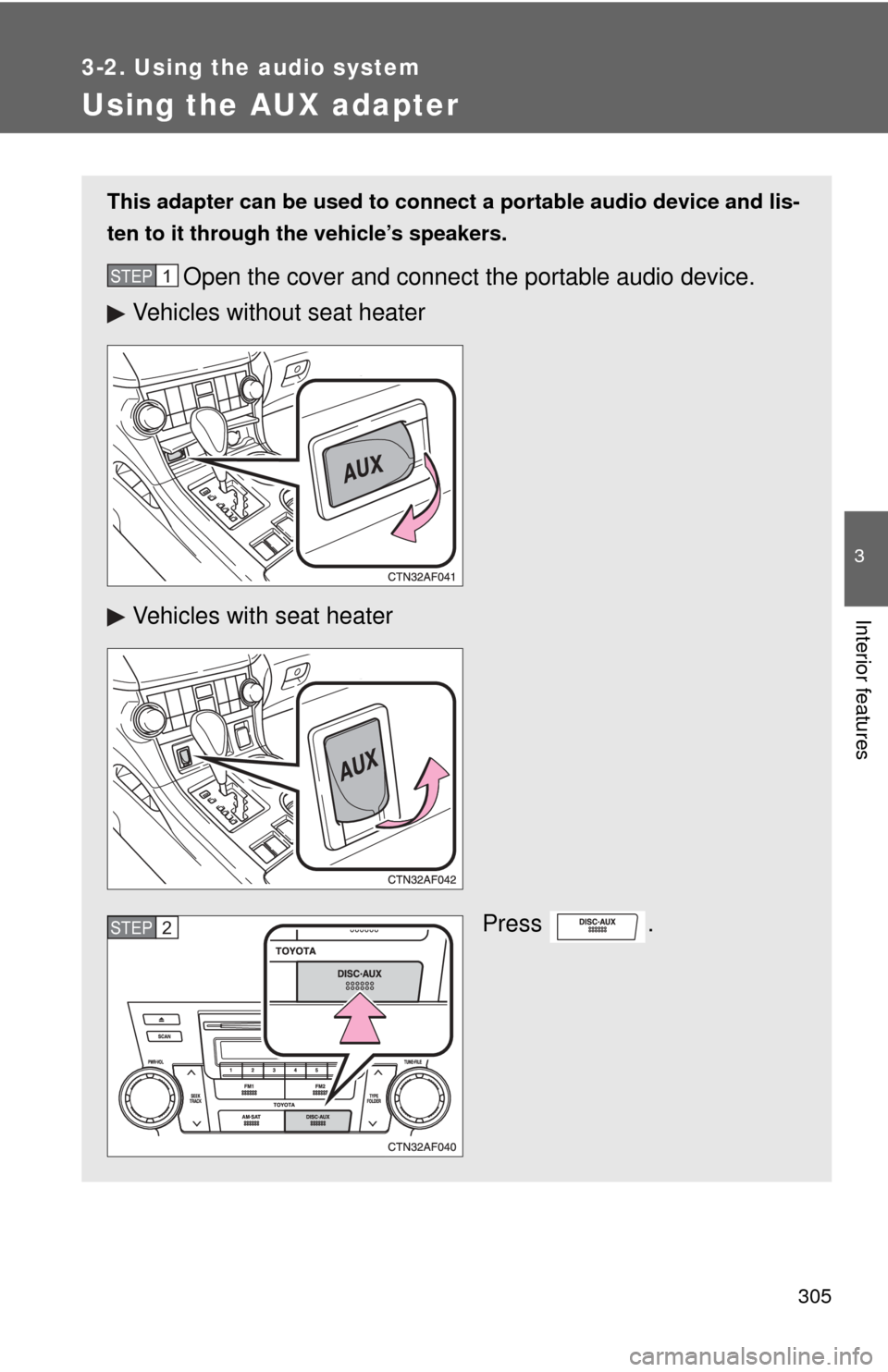
This adapter can be used to connect a portable audio device and lis-
ten to it through the vehicle’s speakers.
Open the cover and connect the portable audio device.
Vehicles without seat heater
Vehicles with seat heater
Press .STEP1
STEP2
Page 323 of 592
323
3-3. Using the rear audio system
3
Interior features
■
Audio
Manufactured under license from Dolby
Laboratories. “Dolby”, “Pro Logic”,
and are trademarks of Dolby Laboratories. Confidential unpublished
works.
1992-1997 Dolby
Laboratories. All rights reserved.
“dts” is a trademark of Digital Theater Systems, Inc.
Page 390 of 592
390 3-7. Other interior features
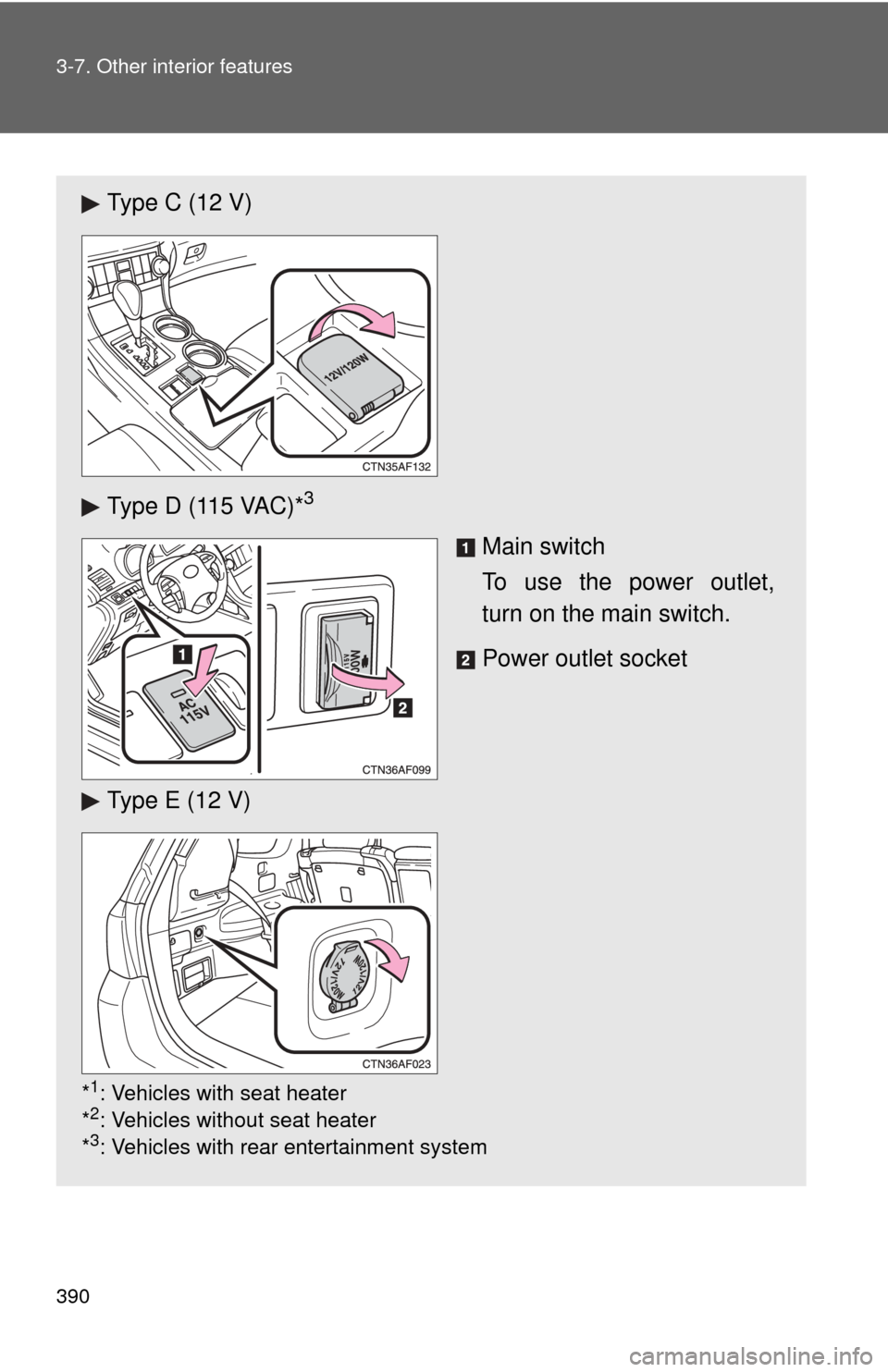
Type C (12 V)
Type D (115 VAC)*
3
Main switch
To use the power outlet,
turn on the main switch.
Power outlet socket
Type E (12 V)
*1: Vehicles with seat heater
*2: Vehicles without seat heater
*3: Vehicles with rear entertainment system
Page 392 of 592
392
3-7. Other interior features
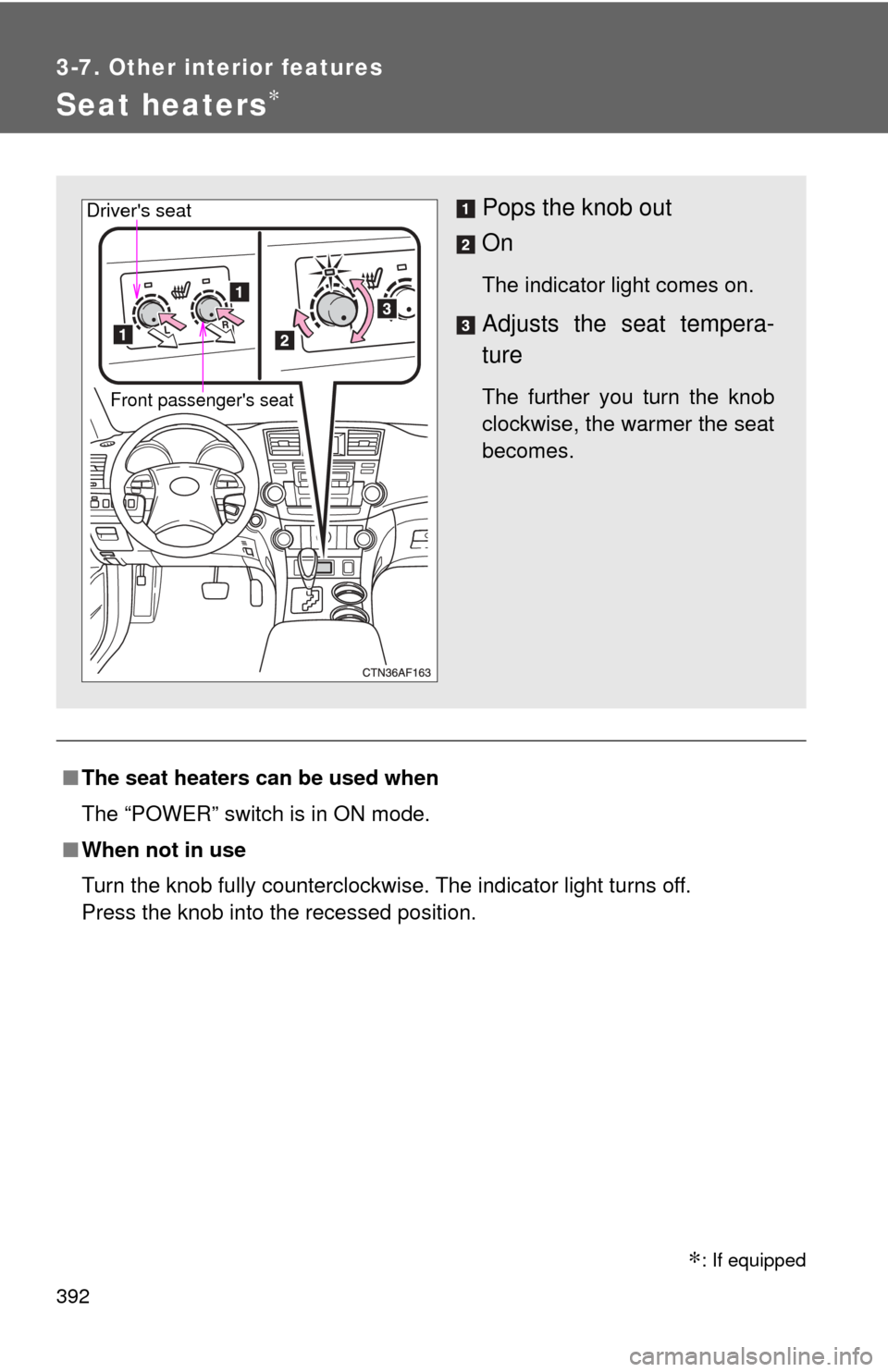
Seat heaters∗
■The seat heaters can be used when
The “POWER” switch is in ON mode.
■ When not in use
Turn the knob fully counterclockwise. The indicator light turns off.
Press the knob into the recessed position.
Pops the knob out
On
The indicator light comes on.
Adjusts the seat tempera-
ture
The further you turn the knob
clockwise, the warmer the seat
becomes.Front passenger's seat
Driver's seat
∗: If equipped
Page 393 of 592

393
3-7. Other interior features
3
Interior features
CAUTION
■
Burns
●Use caution when seating the following persons in a seat with the seat
heater on to avoid the possibility of burns:
• Babies, small children, the elderly, the sick and the disabled
• Persons with sensitive skin
• Persons who are fatigued
• Persons who have taken alcohol or drugs that induce sleep (sleeping
drugs, cold remedies, etc.)
● Do not cover the seat with anything when using the seat heater.
Using the seat heater with a blanket or cushion increases the temperature
of the seat and may lead to overheating.
NOTICE
■To prevent seat heater damage
Do not put unevenly weighted objects on the seat and do not stick sharp
objects (needles, nails, etc.) into the seat.
■ To prevent 12-volt battery from being discharged
Turn the switches off when the hybrid system is off.
Page 416 of 592

416 4-1. Maintenance and care
■Cleaning the inside of the rear windo w or left-side rear quarter window
Do not use glass cleaner to clean the rear window or left-side rear quarter
window, as this may cause damage to the rear window defogger heater
wires or antenna. Use a cloth dampened with lukewarm water to gently wipe
the windows clean. Wipe the windows in strokes running parallel to the
heater wires or antenna.
■ Caring for leather areas
Toyota recommends cleaning the interior of the vehicle at least twice a year
to maintain the quality of the vehicle's interior.
■ Shampooing the carpets
There are several commercial foaming-type cleaners available. Use a
sponge or brush to apply the foam. Rub in overlapping circles. Do not apply
water. Excellent results are obtained by keeping the carpet as dry as possi-
ble.
■ Seat belts
Clean with mild soap and lukewarm water using a cloth or sponge. Also
check the belts periodically for excessive wear, fraying or cuts.
CAUTION
■Water in the vehicle
●Do not splash or spill liquid on the floor, hybrid battery (traction battery) air
vents.
Doing so may cause the hybrid battery, electrical components, etc. to mal-
function or catch fire.
● Do not get any of the SRS components or wiring in the vehicle interior wet.
(→ P. 133)
Electrical malfunction may cause the airbags to deploy or not function
properly, resulting in death or severe injury.