sport mode TOYOTA HIGHLANDER HYBRID 2021 Owners Manual (in English)
[x] Cancel search | Manufacturer: TOYOTA, Model Year: 2021, Model line: HIGHLANDER HYBRID, Model: TOYOTA HIGHLANDER HYBRID 2021Pages: 576, PDF Size: 30.36 MB
Page 87 of 576
872-1. Instrument cluster
2
Vehicle status information and indicators
HIGHLANDER HV_U
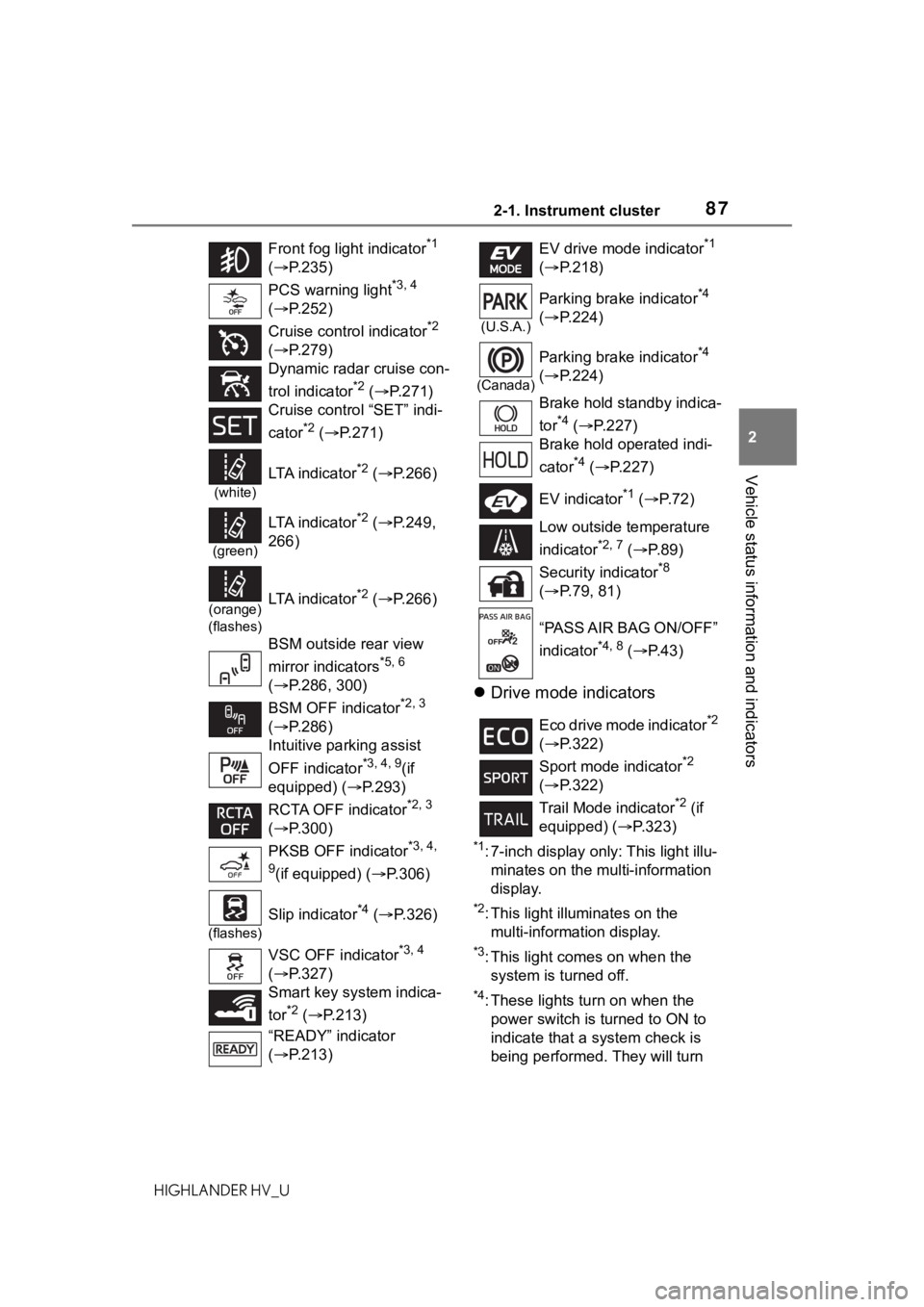
Drive mode indicators
*1: 7-inch display only: This light illu-
minates on the multi-information
display.
*2: This light illuminates on the multi-information display.
*3: This light comes on when the system is turned off.
*4: These lights tu rn on when the
power switch is turned to ON to
indicate that a system check is
being performed. They will turn
Front fog light indicator
*1
( P.235)
PCS warning light
*3, 4
( P.252)
Cruise control indicator
*2
( P.279)
Dynamic radar cruise con-
trol indicator
*2 ( P.271)
Cruise control “SET” indi-
cator
*2 ( P.271)
(white)
LTA i n d i c a t o r*2 ( P.266)
(green)
LTA i n d i c a t o r*2 ( P.249,
266)
(orange)
(flashes)LTA i n d i c a t o r*2 ( P.266)
BSM outside rear view
mirror indicators
*5, 6
( P.286, 300)
BSM OFF indicator
*2, 3
( P.286)
Intuitive parking assist
OFF indicator
*3, 4, 9(if
equipped) (P.293)
RCTA OFF indicator
*2, 3
( P.300)
PKSB OFF indicator
*3, 4,
9
(if equipped) ( P.306)
(flashes)
Slip indicator*4 ( P.326)
VSC OFF indicator
*3, 4
( P.327)
Smart key system indica-
tor
*2 ( P.213)
“READY” indicator
( P.213)
EV drive mode indicator*1
( P.218)
(U.S.A.)
Parking brake indicator*4
( P.224)
(Canada)
Parking brake indicator*4
( P.224)
Brake hold standby indica-
tor
*4 ( P.227)
Brake hold operated indi-
cator
*4 ( P.227)
EV indicator
*1 ( P. 7 2 )
Low outside temperature
indicator
*2, 7 ( P. 8 9 )
Security indicator
*8
( P.79, 81)
“PASS AIR BAG ON/OFF”
indicator
*4, 8 ( P. 4 3 )
Eco drive mode indicator
*2
( P.322)
Sport mode indicator
*2
( P.322)
Trail Mode indicator
*2 (if
equipped) ( P.323)
Page 97 of 576
972-1. Instrument cluster
2
Vehicle status information and indicators
HIGHLANDER HV_Uthe engine stops.
“Total”
• “Average Speed”: Displays the
average vehicle speed since the
display was reset
*
• “Distance”: Displ ays the distance
driven since the display was
reset
*
• “Total Time”: Displays the elapsed
time since the display was reset
*
*
: To reset, display the desired item
and press and hold .
■Energy monitor
P. 1 1 7
■Tire pressure
P. 4 2 6
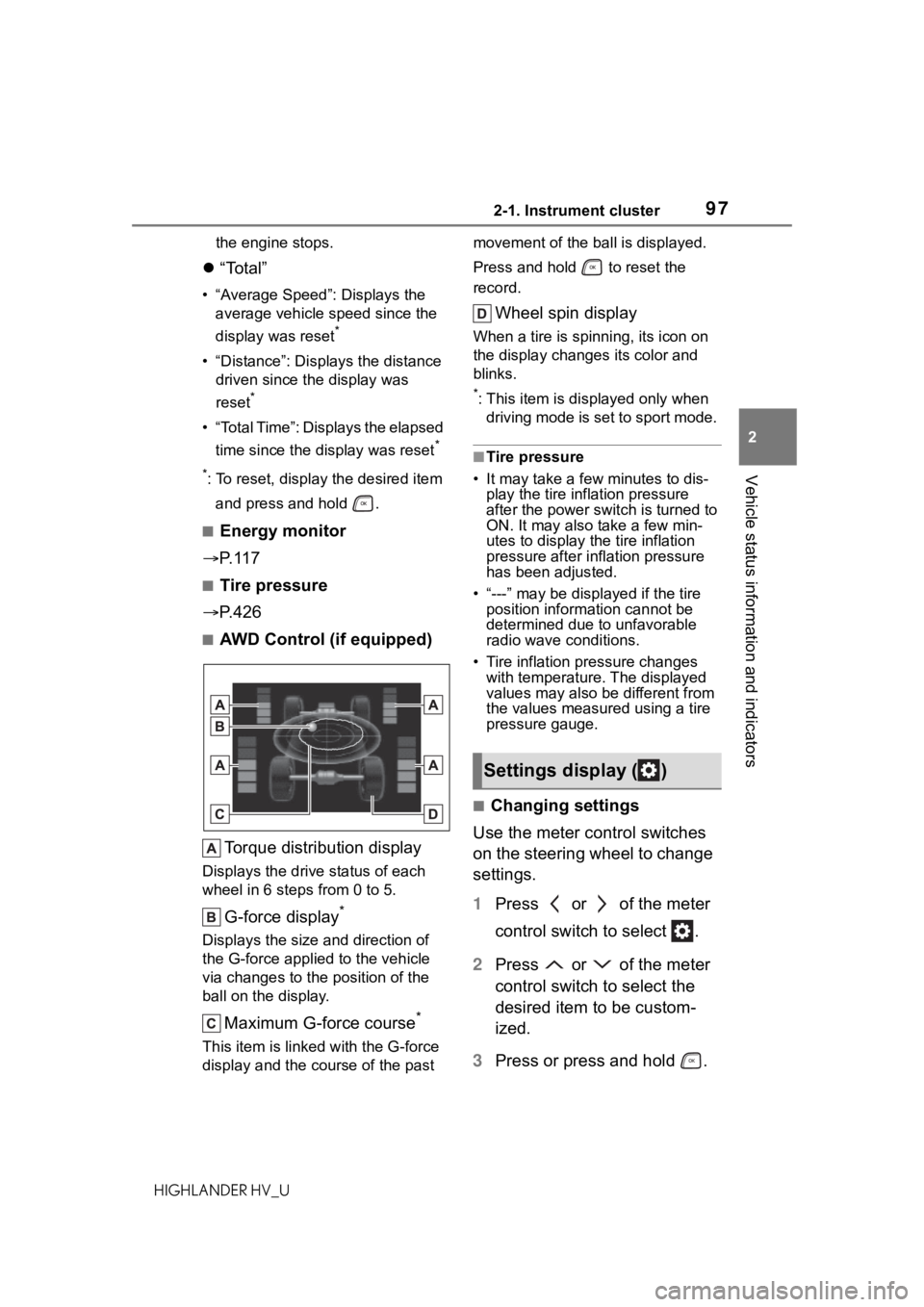
■AWD Control (if equipped)
Torque distribution display
Displays the drive status of each
wheel in 6 steps from 0 to 5.
G-force display*
Displays the size and direction of
the G-force applie d to the vehicle
via changes to the position of the
ball on the display.
Maximum G-force course*
This item is linke d with the G-force
display and the course of the past movement of the ball is displayed.
Press and hold to reset the
record.
Wheel spin display
When a tire is spi
nning, its icon on
the display changes its color and
blinks.
*: This item is displayed only when driving mode is set to sport mode.
■Tire pressure
• It may take a few minutes to dis-
play the tire inflation pressure
after the power switch is turned to
ON. It may also take a few min-
utes to display the tire inflation
pressure after infl ation pressure
has been adjusted.
• “---” may be displayed if the tire position information cannot be
determined due to unfavorable
radio wave conditions.
• Tire inflation pressure changes with temperature. The displayed
values may also be different from
the values measured using a tire
pressure gauge.
■Changing settings
Use the meter control switches
on the steering wheel to change
settings.
1 Press or of the meter
control switch to select .
2 Press or of the meter
control switch to select the
desired item to be custom-
ized.
3 Press or press and hold .
Settings display ( )
Page 106 of 576
1062-1. Instrument cluster
HIGHLANDER HV_Uplayed on the multi-information dis-
play. (
P.114)
Select to enable selection of an
audio source or track on the
meter using the meter control
switches.
This menu icon can be set to be
displayed/not displayed in .
■Energy monitor
P. 1 1 7
■Tire pressure
P. 4 2 6
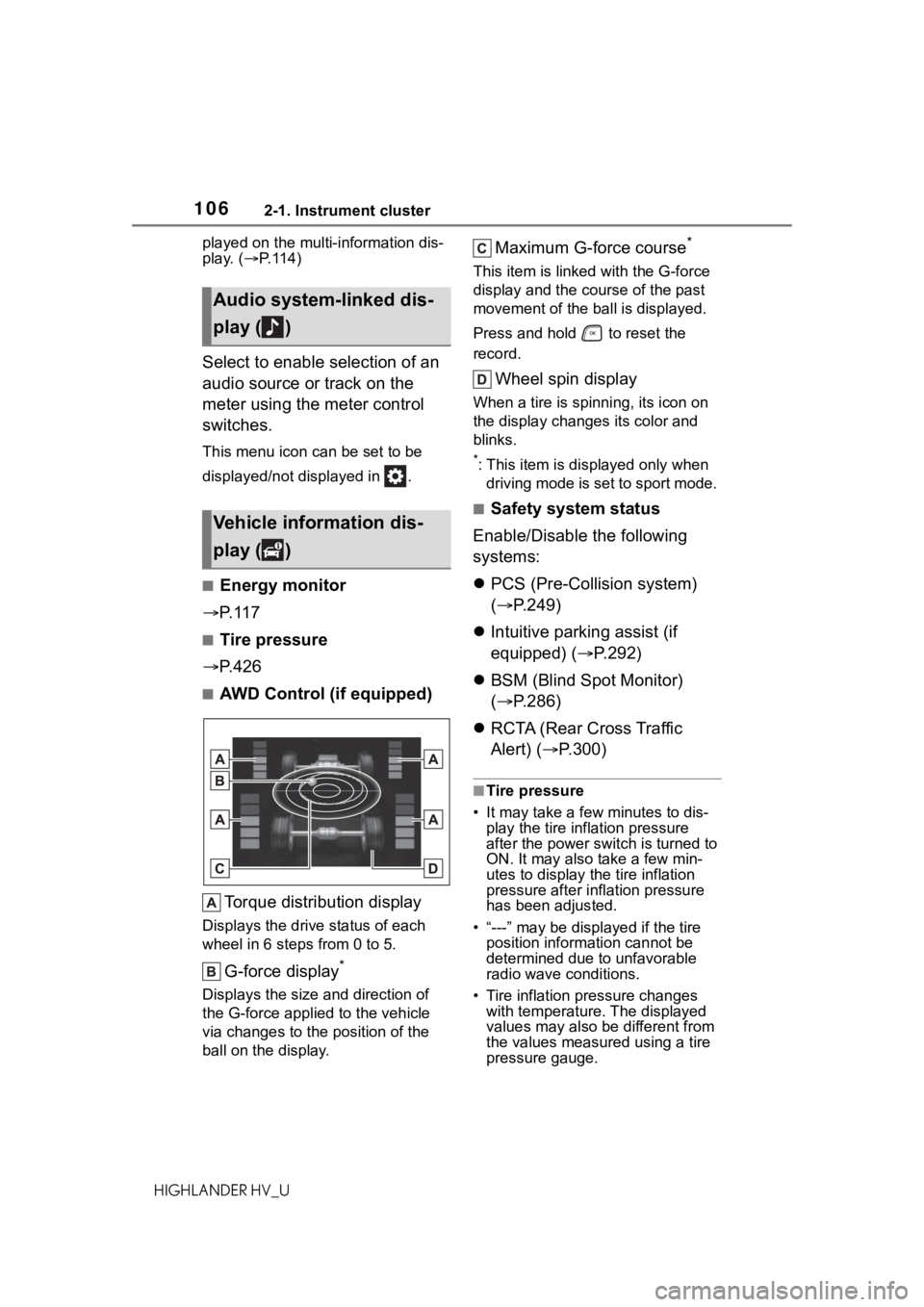
■AWD Control (if equipped)
Torque distribution display
Displays the drive status of each
wheel in 6 steps from 0 to 5.
G-force display*
Displays the size and direction of
the G-force applie d to the vehicle
via changes to the position of the
ball on the display.
Maximum G-force course*
This item is linke d with the G-force
display and the co urse of the past
movement of the ball is displayed.
Press and hold to reset the
record.
Wheel spin display
When a tire is spi nning, its icon on
the display changes its color and
blinks.
*: This item is displayed only when driving mode is set to sport mode.
■Safety system status
Enable/Disable the following
systems:
PCS (Pre-Colli sion system)
( P.249)
Intuitive parking assist (if
equipped) ( P.292)
BSM (Blind Spot Monitor)
( P.286)
RCTA (Rear Cross Traffic
Alert) ( P.300)
■Tire pressure
• It may take a few minutes to dis-
play the tire inflation pressure
after the power switch is turned to
ON. It may also take a few min-
utes to display the tire inflation
pressure after infl ation pressure
has been adjusted.
• “---” may be displayed if the tire position information cannot be
determined due to unfavorable
radio wave conditions.
• Tire inflation pressure changes with temperature. The displayed
values may also be different from
the values measured using a tire
pressure gauge.
Audio system-linked dis-
play ( )
Vehicle information dis-
play ( )
Page 110 of 576
1102-1. Instrument cluster
HIGHLANDER HV_Usettings to the default setting.
■Vehicle functions and set-
tings that can be changed
P.530
■Background color of the indica-
tor/shift position display area
The background color of the indica-
tor/shift position display area is
changed according to the driving
mode as follows ( P.322):
●Eco drive mode: Blue
●Sport mode: Red
■Suspension of the settings dis-
play
●Some settings cannot be changed
while driving. When changing set-
tings, park the vehicle in a safe
place.
●If a warning message is displayed,
operation of the settings display
will be suspended.
■Pop-up displays
Depending on the pop-up display,
the currently disp layed item in the
message display area may be tem-
porarily not displayed. The item will
be displayed after the pop-up dis-
play is no longer displayed.
Select to display warning mes-
sages and measures to be
taken if a malfunction is
detected. ( P.476)
Displays suggestions to the
driver in the following situations.
To select a response to a dis-
played suggestion, use the
meter control switches.
■Suggestion to turn off the
headlights
If the headlights are left on for a
certain amount of time after the
power switch has been turned
off, if the headlight switch is in
the “AUTO” position, a sugges-
tion message will be displayed
asking if you wish to turn the
headlights off.
To turn the headlights off, select
“Yes”.
If the driver's door is opened after
the power switch is turned off, this
suggestion message will not be dis-
played.
WARNING
■Cautions during setting up
the display
As the hybrid system needs to be
operating during setting up the
display, ensure that the vehicle is
parked in a place with adequate
ventilation. In a closed area such
as a garage, exhaust gases
including harmful carbon monox-
ide (CO) may collect and enter
the vehicle. This may lead to
death or a seri ous health hazard.
NOTICE
■During setting up the display
To prevent 12-volt battery dis-
charge, ensure that the hybrid
system is operating while setting
up the display features.
Warning message display
()
Suggestion function
Page 220 of 576
2204-2. Driving procedures
HIGHLANDER HV_U
*1: To improve fuel efficiency and reduce noise, shift the shift lever
to D for normal driving.
*2: By selecting shift ranges using S mode, you can control accelerat-
ing force and engine braking
force.
■When driving with dynamic
radar cruise control with
full-speed range activated
Even when switching the driving
mode to sport mode with the intent
of enabling engine braking, engine
braking will not act ivate because
dynamic radar cruise control with
full-speed range will not be can-
celed.
■Restraining sudden start
(Drive-Start Control)
P. 1 9 1
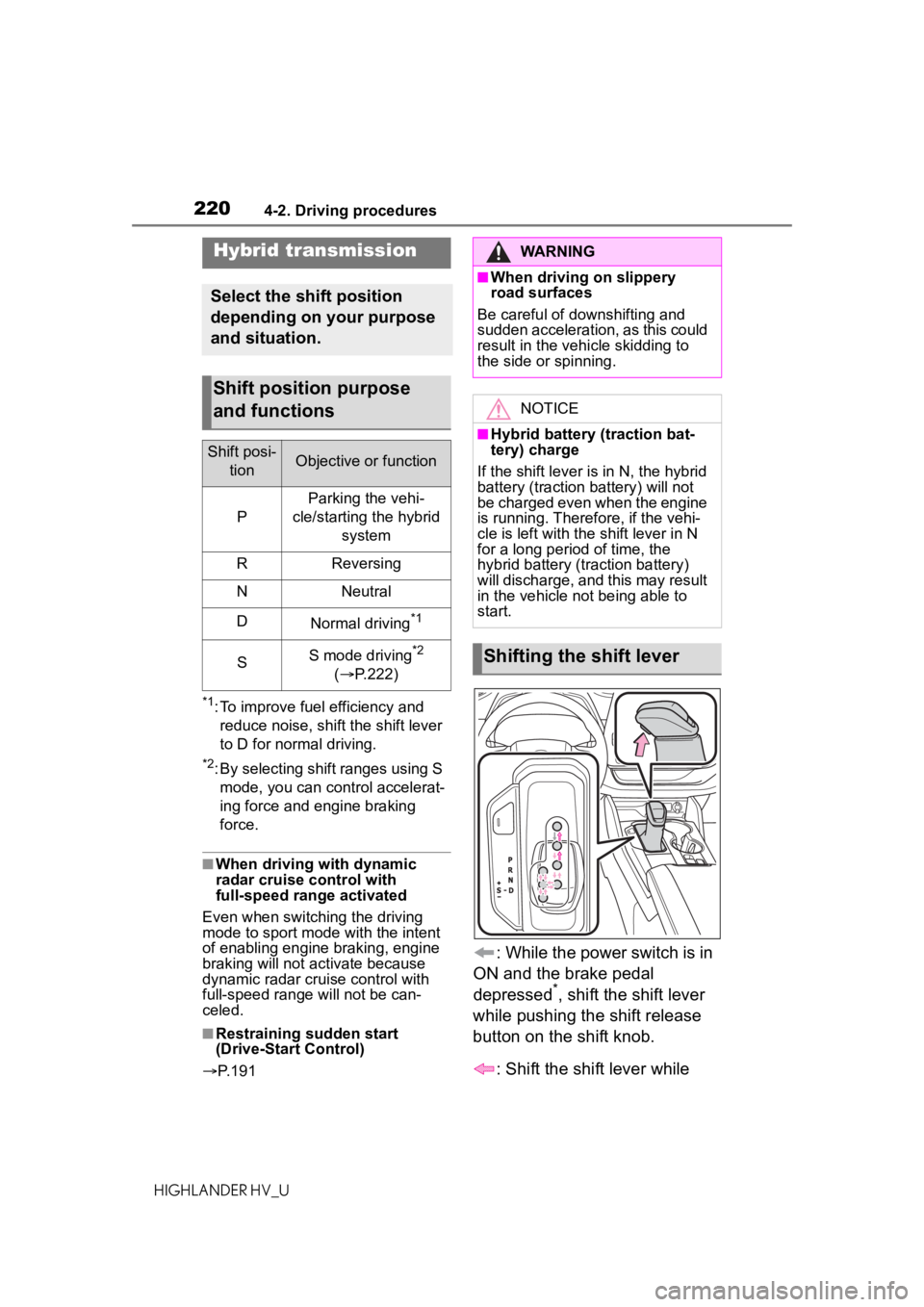
: While the power switch is in
ON and the brake pedal
depressed
*, shift the shift lever
while pushing the shift release
button on the shift knob.
: Shift the shift lever while
Hybrid transmission
Select the shift position
depending on your purpose
and situation.
Shift position purpose
and functions
Shift posi- tionObjective or function
P
Parking the vehi-
cle/starting the hybrid system
RReversing
NNeutral
DNormal driving*1
SS mode driving*2
( P.222)
WARNING
■When driving on slippery
road surfaces
Be careful of downshifting and
sudden acceleration, as this could
result in the vehicle skidding to
the side or spinning.
NOTICE
■Hybrid battery (traction bat-
tery) charge
If the shift lever is in N, the hybrid
battery (traction battery) will not
be charged even when the engine
is running. Therefore, if the vehi-
cle is left with the shift lever in N
for a long period of time, the
hybrid battery (traction battery)
will discharge, and this may result
in the vehicle not being able to
start.
Shifting the shift lever
Page 322 of 576
3224-5. Using the driving support systems
HIGHLANDER HV_U• When a vehicle turns into the
detection area
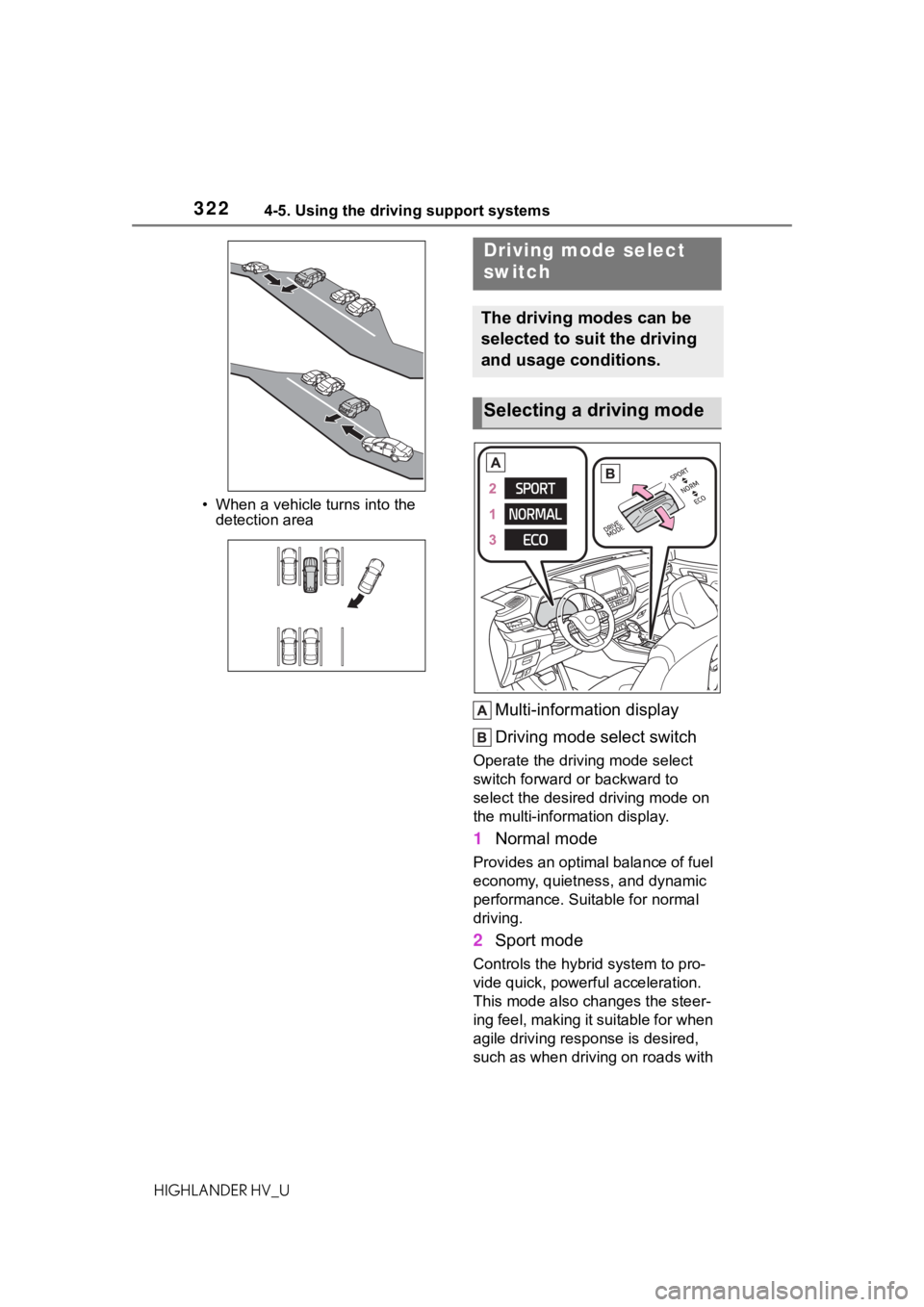
Multi-information display
Driving mode select switch
Operate the driv ing mode select
switch forward or backward to
select the desired driving mode on
the multi-information display.
1 Normal mode
Provides an optimal balance of fuel
economy, quietness, and dynamic
performance. Suitable for normal
driving.
2Sport mode
Controls the hybrid system to pro-
vide quick, powerful acceleration.
This mode also changes the steer-
ing feel, making it suitable for when
agile driving response is desired,
such as when driving on roads with
Driving mode select
switch
The driving modes can be
selected to suit the driving
and usage conditions.
Selecting a driving mode
Page 323 of 576
3234-5. Using the driving support systems
4
Driving
HIGHLANDER HV_Umany curves.
When Sport mode is selected,
Sport mode indicator comes on.
3
Eco drive mode
Helps the driver a ccelerate in an
eco-friendly manner and improve
fuel economy through moderate
throttle characteri stics and by con-
trolling the operation of the air con-
ditioning system (heating/cooling).
When Eco drive mode is selected,
Eco drive mode indicator comes
on.
■Air conditioning system opera-
tion in Eco drive mode
In Eco drive mode, heating/cooling
operations and the fan speed is con-
trolled to improve fuel efficiency.
Perform the following procedures to
increase the air conditioning perfor-
mance.
●Vehicle with a 12.3-inch display:
Turn eco air conditioning mode off
( P.350)
●Adjust the fan speed ( P.343)
●Cancel Eco drive mode
■Canceling a driving mode
●Sport mode is automatically can-
celed and the driving mode
returns to normal mode when the
power switch is off.
●Normal mode and Eco drive mode
are not canceled until another
driving mode is sel ected. (Even if
the power switch is off, normal
mode and Eco drive mode will not
be automatically canceled.)
Press the Trail Mode switch
When the switch is pressed, Trail
Mode turns on and the Trail Mode
indicator illuminates on the
multi-information display.
When the switch is pressed again,
the Trail Mode indicator turns off.
Trail Mode (AWD vehi-
cles)
Trail Mode is a system that
performs integrated control
for the AWD, brake and
drive force control systems
to assist the drive power on
bumpy roads, etc.
WARNING
■Before using Trail Mode
Make sure to observe the follow-
ing precautions. Failure to
observe these precautions may
result in an unexp ected accident.
●Check that the Trail Mode indi-
cator is illuminated before driv-
ing. Trail Mode will not operate
when the indicator is off.
●Trail Mode is not intended to
expand the limits of the vehicle.
Thoroughly check the road con-
ditions and drive with caution.
●Thoroughly check the road con-
ditions before driving. As Trail
Mode is suitable for driving on
bumpy roads, there is a chance
that Trail Mode may not be the
most appropriate in terms of
other road conditions.
Turning Trail Mode on
Page 463 of 576
4637-2. Steps to take in an emergency
7
When trouble arises
HIGHLANDER HV_U
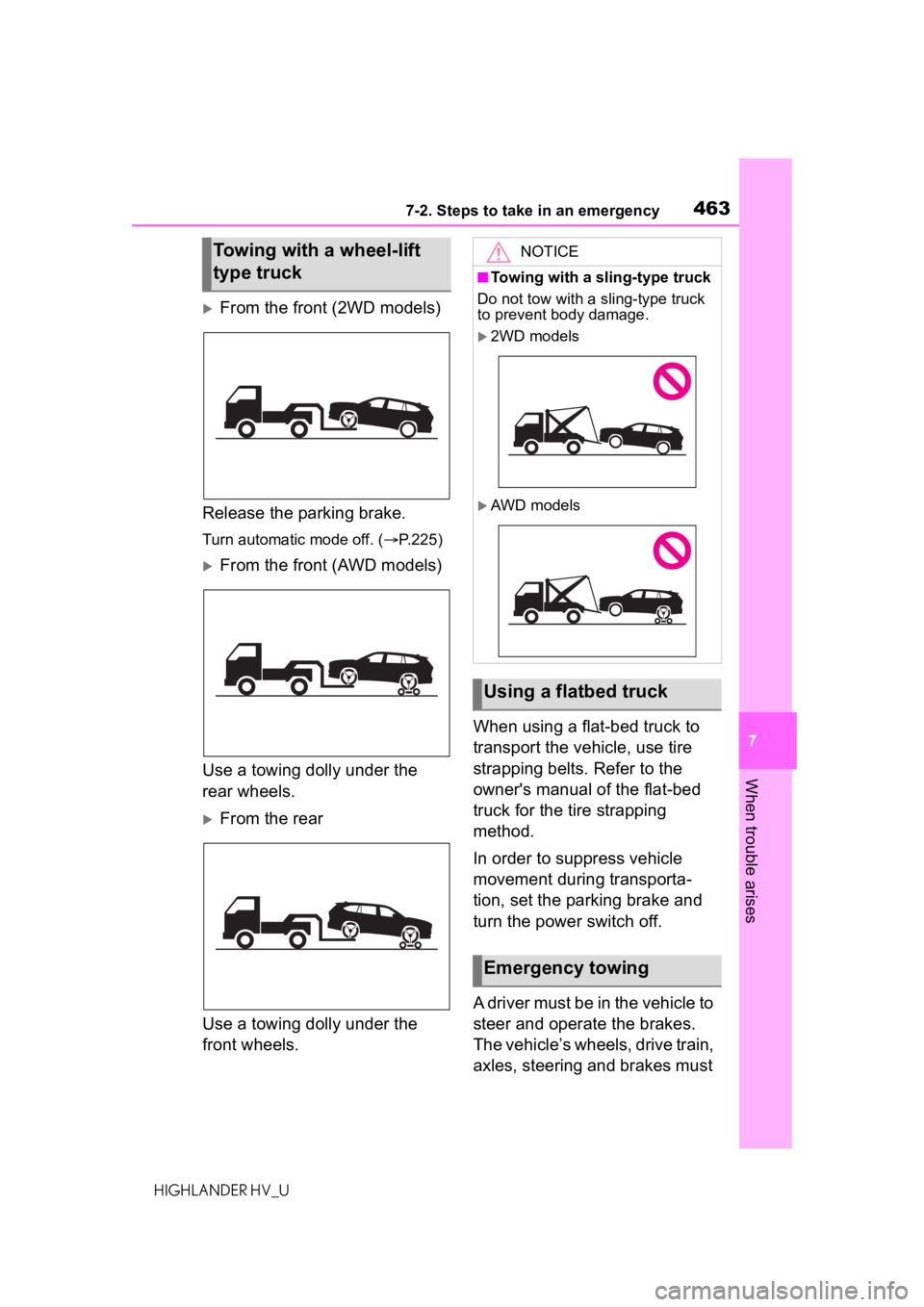
From the front (2WD models)
Release the parking brake.
Turn automatic mode off. ( P.225)
From the front (AWD models)
Use a towing dolly under the
rear wheels.
From the rear
Use a towing dolly under the
front wheels. When using a flat-bed truck to
transport the vehicle, use tire
strapping belts. Refer to the
owner's manual of the flat-bed
truck for the tire strapping
method.
In order to suppress vehicle
movement during transporta-
tion, set the parking brake and
turn the power switch off.
A driver must be in the vehicle to
steer and operate the brakes.
The vehicle’s wheels, drive train,
axles, steering and brakes must
Towing with a wheel-lift
type truckNOTICE
■Towing with a sling-type truck
Do not tow with a sling-type truck
to prevent body damage.
2WD models
AWD models
Using a flatbed truck
Emergency towing
Page 566 of 576

566Alphabetical Index
HIGHLANDER HV_UOutside rear view mirrors ..... 177
Vanity mirrors ....................... 388
Moon roof Door lock linked moon roof oper-ation ................................... 182
Jam protection function ........ 182
Operation ............................. 182
Multi-information display. 92, 101 Audio system-linked display . 96, 106
AWD Control .................. 97, 106
Driving information display ... 93, 102
Driving support system......... 106
Driving support system informa- tion display ................... 96, 105
Dynamic radar cruise control with full-speed range .......... 271
ECO Accelerator Guidance .. 94, 103
Eco score ....................... 94, 103
Energy monitor ....... 97, 106, 117
Fuel economy................. 94, 102
LTA (Lane Tracing Assist) ..... 266
Menu icons ..................... 92, 101
Meter control switches ... 93, 102
Navigation system-linked display ..................................... 96, 105
Pop-up display ............... 92, 101
Settings .......................... 97, 107
Suggestion function...... 101, 110
Tire pressure .......... 97, 106, 426
Vehicle information display... 96, 106
Warning message 101, 110, 476
N
Navigation system-linked display ................................. 96, 105, 115
Noise from under vehicle .......... 5
Normal mode .......................... 322
O
“ODO TRIP” switch ..................91
Odometer...................................91
Odometer and trip meter display Display items ..........................91
“ODO TRIP” switch .................91
Oil Engine oil..............................512
Rear differential oil................514
Opener Back door .............................137
Fuel filler door.......................240
Hood .....................................414
Outer foot lights Replacing light bulbs ............449
Outside rear view mirrors Adjustment ...........................177
BSM (Blind Sport Monitor) ....286
Linked mirror function when reversing.............................177
Mirror position me mory.........159
Outside rear view mirror defog- gers ............................344, 348
RCTA function.......................300
Outside temperature ................89
Overheating.............................504
P
Panic mode .............................130
Panoramic moon roof Jam protection function ........186
Operation..............................185
Parking assist sens ors (intuitive
parking assist) ......................292
Parking brake Operation..............................224
Parking brake engaged warning buzzer.................................226
Warning light.........................473
Warning message.................226
Page 569 of 576

569Alphabetical Index
HIGHLANDER HV_ULinked mirror function when
reversing ............................ 177
Mirror position memory ........ 159
RCTA function ...................... 300
Side turn signal lights Replacing light bulbs ............ 449
Turn signal lever ................... 223
Side windows ...... ................... 179
Smart key system Antenna location .................. 146
Entry functions ............. 131, 136
Starting the hybrid system.... 213
Snow tires ............................... 333
Spare tire ................................. 481 Storage location ................... 482
Spark plug ............................... 514
Specifications ......................... 510
Speedometer ............................ 89
Sport mode ............................. 322
Steering lock Column lock release............. 214
Steering lock system warning message............................. 214
Steering wheel Adjustment ........................... 165
Heated steering wheel ......... 358
Meter control switches ... 93, 102
Stop lights Replacing light bulbs ............ 449
Storage features ..................... 365
Stuck If the vehicle becomes stuck 507
Suggestion function....... 101, 110
Sun visors ............................... 388
Sunshade Roof...................................... 182
Switches Activating the Automatic High Beam .................................. 232
Automatic High Beam system ........................................... 232
Brake Hold switch ................ 227 Digital Rearview M
irror control
switches..............................167
Door lock switches ...............134
Driving mode select switch ...322
Driving position memory switches..............................159
Dynamic radar cruise control with full-speed range switch271
Electronic roof sunshade switches..............................185
Emergency flashers switch...458
EV drive mode switch ...........218
Fog light switch .....................235
Garage door opener switches ...........................................390
Heated steering wheel switch ...........................................358
Ignition switch .......................213
Instrument panel light control switches................................92
Intuitive parking assist switch293
Light switches .......................229
LTA (Lane Tracing Assist) switch ...........................................266
Meter control switches....93, 102
Moon roof switches ..............182
“ODO TRIP” switch .................91
Outside rear v iew mirror
switches..............................177
Panoramic moon roof switches ...........................................185
Parking brake switch ............224
PCS OFF switch ...................252
PKSB (Parking Support Brake) switch .................................306
Power door lock switch.........134
Power switch ........................213
Power window switches .......179
RCTA switch .........................300
Rear window and outside rear view mirror defoggers switch...................................344, 348