lane assist TOYOTA HIGHLANDER HYBRID 2021 Owners Manual (in English)
[x] Cancel search | Manufacturer: TOYOTA, Model Year: 2021, Model line: HIGHLANDER HYBRID, Model: TOYOTA HIGHLANDER HYBRID 2021Pages: 578, PDF Size: 16.92 MB
Page 3 of 578
3TABLE OF CONTENTS
1
2
3
4
5
6
7
8
9
10
HIGHLANDER HV_U
Parking brake ..................... 224
Brake Hold ......................... 227
4-3. Operating the lights and wip- ers
Headlight switch ................. 229
Automatic High Beam ........ 232
Fog light switch .................. 235
Windshield wipers and washer ......................................... 235
Rear windshield wiper and washer ............................. 238
4-4. Refueling Opening the fuel tank cap .. 240
4-5. Using the driving support sys- tems
Toyota Safety Sense 2.5 +......................................... 243
PCS (Pre-Collision System) ......................................... 249
LTA (Lane Tracing Assist)... 260
Dynamic radar cruise control with full-speed range ........ 271
RSA (Road Sign Assist) ..... 283
BSM (Blind Spot Monitor)... 286
Intuitive parking assist ........ 292
RCTA (Rear Cross Traffic Alert) function ............................ 300
PKSB (Parking Support Brake) ......................................... 305
Parking Support Brake function (static objects) .................. 312
Parking Support Brake function (rear-crossing vehicles).... 318
Driving mode select switch ......................................... 322
Trail Mode .......................... 323
Driving assist systems........ 325
4-6. Driving tips Hybrid vehicle driving tips .. 331
Winter driving tips............... 333
Utility vehicle precautions... 3365-1. Toyota multi-operation touch
Toyota multi-operation touch......................................... 340
5-2. Using the air conditioning system and defogger
Front automatic air conditioning
system ............................. 342
Rear automatic air conditioning system ............................. 354
Heated steering wheel/seat heaters/seat ventilators.... 358
5-3. Using the interior lights Interior lights list ................. 362
5-4. Using the storage features List of storage features ...... 365
Luggage compartment features ......................................... 370
5-5. Using the other interior fea- tures
Other interior features ........ 374
Garage door opener........... 390
6-1. Maintenance and care Cleaning and protecting the vehicle exterior................. 400
Cleaning and protecting the vehicle interior.................. 40
3
6-2. Maintenance Maintenance requirements......................................... 406
General maintenance......... 408
Emission inspection and mainte- nance (I/M) programs ...... 410
6-3. Do-it-yourself maintenance Do-it-yourself service precau-tions ................................. 412
5Interior features
6Maintenance and care
Page 18 of 578
18Pictorial index
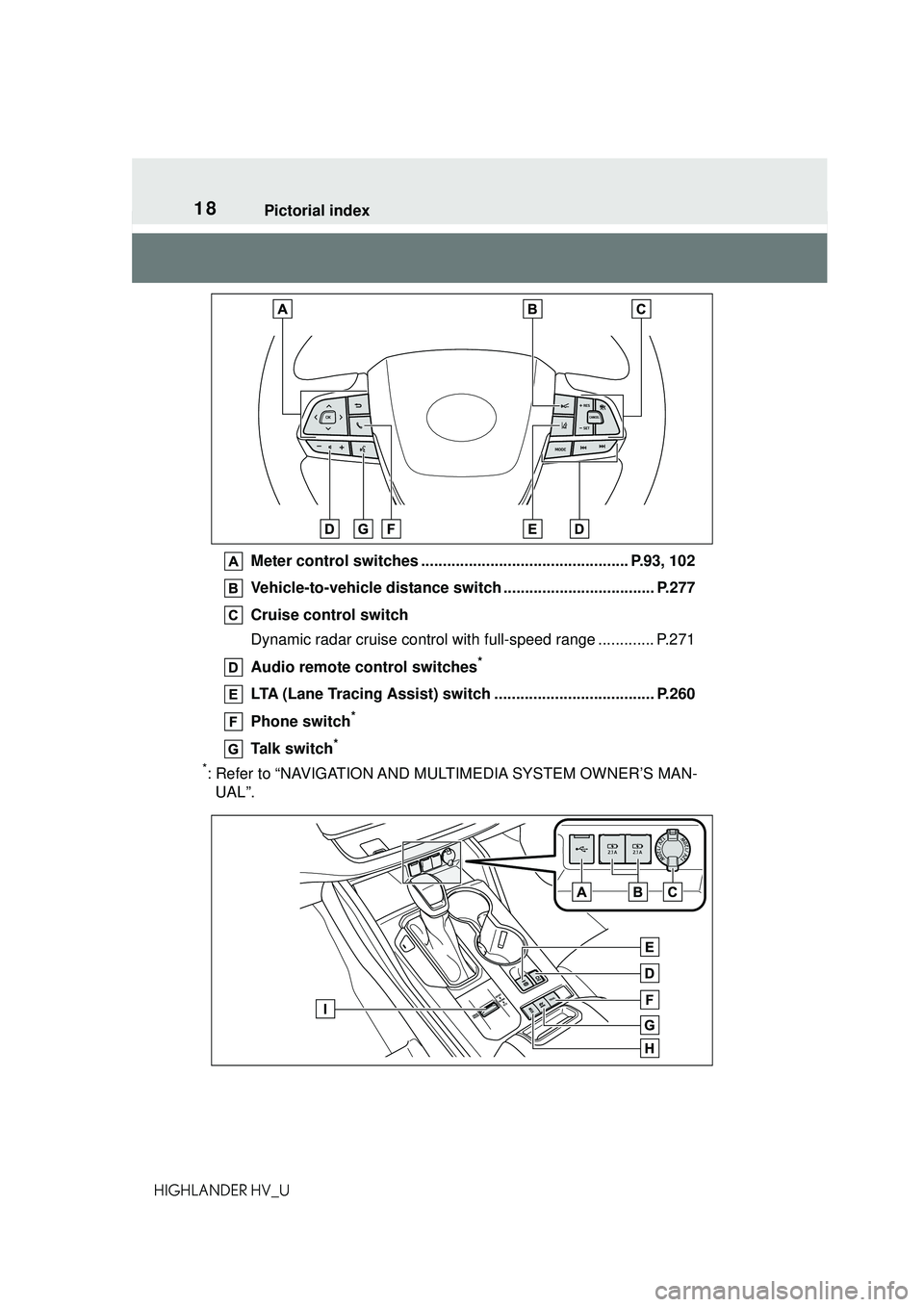
HIGHLANDER HV_UMeter control switches ................................................ P.93, 102
Vehicle-to-vehicle distance swit
ch ................................... P.277
Cruise control switch
Dynamic radar cruise control wit h full-speed range ............. P.271
Audio remote control switches
*
LTA (Lane Tracing Assist) switch ..................................... P.260
Phone switch
*
Talk switch*
*
: Refer to “NAVIGATION AND MULTIMEDIA SYSTEM OWNER’S MAN- UAL”.
Page 96 of 578
962-1. Instrument cluster
HIGHLANDER HV_U
High
• After the hybrid system is started, the Eco score will not be dis-
played until the vehicle speed
exceeds approximately 12 mph
(20 km/h).
• The Eco score will be reset each time the hybrid system is started.
• When the hybrid system is stopped, the total score of the
current trip will be displayed.
■The ECO Accelerator Guid-
ance/Eco score will not operate
when
The ECO Accelerator Guidance/Eco
score will not operate in the follow-
ing situations:
●The Hybrid System Indicator is not
operating.
●The vehicle is being driven using
the dynamic radar cruise control
with full-speed range.
■Driving support system
information
Select to display the operational
status of the following systems:
LTA (Lane Tracing Assist)
( P.260)
RSA (Road Sign Assist) (if
equipped) ( P.283)
Dynamic radar cruise control
with full-speed range
( P.271) Select to enable selection of an
audio source or track on the
meter using the meter control
switches.
This menu icon can be set to be
displayed/not displayed in .
■Drive information
2 items that are selected using
the “Drive Info Items” setting
(average speed, distance and
total time) can be displayed ver-
tically.
The displayed information
changes according to the “Drive
Info Type” setting (since the sys-
tem was started or between
resets). ( P. 9 7 )
Use the displayed information
as a reference only.
Following items will be dis-
played.
“Trip”
• “Average Speed”: Displays the
average vehicle speed since
hybrid system start
*
• “Distance”: Displays the distance
driven since hybrid system start
*
• “Total Time”: Displays the elapsed
time since hybrid system start
*
*
: These items are reset each time
Driving support system
information display ( )
Audio system-linked dis-
play ( )
Vehicle information dis-
play ( )
Page 98 of 578
982-1. Instrument cluster
HIGHLANDER HV_UThe available settings will differ
depending on if is pressed or
pressed and held. Follow the
instructions on the display.
■Setting items
LTA (Lane Tracing Assist)
( P.260)
Press and hold to change the
settings of the following items:
• “Lane Center”
Select to enable/disable the lane
centering function.
• “Sensitivity”
Select to set the warning sensitivity.
•“Sway Warning”
Select to enable/disable the vehicle
sway warning.
• “Sway Sensitivity”
Select to set the vehicle sway warn-
ing sensitivity.
PCS (Pre-Collision Sys-
tem) ( P.249)
Press to enable/disable the
pre-collision system.
• PCS (Pre-Collision System)
on/off
Select to enable/disable the
pre-collision system.
Press and hold to change the
settings of the following item:
• “Sensitivity”
Select to change the pre-collision
warning timing.
DRCC (Dynamic Radar
Cruise Control with full-speed
range) ( P.271)
Press and hold to change the
settings of the following items:
• “Curve Speed Reduction”
( P.278)
Select to set the curve speed
reduction function strength.
BSM (Blind Spot Monitor)
( P.286)
Press to enable/disable the
Blind Spot Monitor function.
• BSM (Blind Spot Monitor) on/off
Select to enable/d isable the Blind
Spot Monitor function.
Press and hold to change the
settings of the following items:
• “Brightness”
Select to switch the brightness of
the outside rear view mirror indica-
tors. ( P.286)
• “Sensitivity”
Select to change the alert timing for
an approaching vehicle.
RCTA (Rear Cross Traffic
Alert) ( P.300)
Press to enable/disable the
Rear Cross Traffic Alert function.
• RCTA (Rear Cross Traffic Alert)
on/off
Select to enable/d isable the Rear
Cross Traffic Alert function.
Press and hold to change the
settings of the following item:
•“Volume”
Select to change the volume of the
RCTA buzzer.
Page 105 of 578
1052-1. Instrument cluster
2
Vehicle status information and indicators
HIGHLANDER HV_U
Low
High
• After the hybrid system is started, the Eco score will not be dis-
played until the vehicle speed
exceeds approximately 12 mph
(20 km/h).
• The Eco score will be reset each time the hybrid system is started.
• When the hybrid system is stopped, the total score of the
current trip will be displayed.
■Speedometer display (digi-
tal speed)/Driving range
Speedometer display (digital
speed)
P. 1 0 9
Driving range
Displays driving range with remain-
ing fuel. Use the displayed values
as a reference only.
This distance is computed based
on your average fuel consumption.
As a result, the actual distance that
can be driven may differ from that
displayed.
When only a small amount of fuel is
added to the tank, the display may
not be updated.
When refueling, turn the power
switch off. If the vehicle is refueled
without turning the power switch off,
the display may not be updated.
When “Refuel” is displayed, the
remaining fuel amount is low and
the distance that can be driven with
the remaining fuel cannot be calcu-
lated.
Refuel immediately.
■The ECO Accelerator Guid-
ance/Eco score will not operate
when
The ECO Accelerator Guidance/Eco
score will not operate in the follow-
ing situations:
●The Hybrid System Indicator is not
operating.
●The vehicle is being driven using
the dynamic radar cruise control
with full-speed range.
■Driving support system
information
Select to display the operational
status of the following systems:
LTA (Lane Tracing Assist)
( P.260)
RSA (Road Sign Assist) (if
equipped) ( P.283)
Dynamic radar cruise control
with full-speed range
( P.271)
■Navigation system-linked
display (if equipped)
Select to display the following
navigation system-linked infor-
mation:
Route guidance to destination
Compass display (head-
ing-up display)
■Route guidance to destination
display
When the route guidance to destina-
tion display is enabled on the
head-up display, it will not be dis-
Driving support system
information display ( )
Page 107 of 578
1072-1. Instrument cluster
2
Vehicle status information and indicators
HIGHLANDER HV_U
■Changing settings
Use the meter control switches
on the steering wheel to change
settings.
1 Press or of the meter
control switch to select .
2 Press or of the meter
control switch to select the
desired item to be custom-
ized.
3 Press or press and hold .
The available settings will differ
depending on if is pressed or
pressed and held. Follow the
instructions on the display.
■Setting items
LTA (Lane Tracing Assist)
( P.260)
Press and hold to change the
settings of the following items:
• “Lane Center”
Select to enable/disable the lane
centering function.
• “Sensitivity”
Select to set the warning sensitivity.
•“Sway Warning”
Select to enable/disable the vehicle
sway warning.
• “Sway Sensitivity”
Select to set the vehicle sway warn-
ing sensitivity.
PCS (Pre-Collision Sys-
tem) ( P.249)
Press to enable/disable the
pre-collision system.
• PCS (Pre-Collision System)
on/off
Select to enable/disable the
pre-collision system.
Press and hold to change the
settings of the following item:
• “Sensitivity”
Select to change the pre-collision
warning timing.
DRCC (Dynamic Radar
Cruise Control with full-speed
range) ( P.271)
Press and hold to change the
settings of the following items:
• “Curve Speed Reduction”
( P.278)
Select to set the curve speed
reduction function strength.
BSM (Blind Spot Monitor)
( P.286)
Press to enable/disable the
Blind Spot Monitor function.
• BSM (Blind Spot Monitor) on/off
Select to enable/d isable the Blind
Spot Monitor function.
Press and hold to change the
settings of the following items:
• “Brightness”
Select to switch the brightness of
the outside rear view mirror indica-
tors. ( P.286)
• “Sensitivity”
Select to change the alert timing for
an approaching vehicle.
Settings display ( )
Page 116 of 578
1162-1. Instrument cluster
HIGHLANDER HV_U
■Street name display (vehicles
with a navigation system)
Depending on the situation, such as
when no information is available in
map data, etc., the street names of
an intersection may not be dis-
played.
Displays the operational status
of the following systems:
LTA (Lane Tracing Assist)
( P.260)
Dynamic radar cruise control
with full-speed range
( P.271)
PCS (Pre-Collision System)
( P.249)
Parking Support Brake func-
tion (for static objects) (if
equipped) ( P.312)
Intuitive parking assist (if
equipped) ( P.292)
Drive-Start Control ( P.191)
Brake Override System
( P.191)
Displayed content is the same as
that displayed on the multi-informa-
tion display. For details, refer to the
explanations of each system.
Displays the following
multi-information display linked
icons and a message: : Master warning icon
Displayed when a warning mes-
sage is displayed
on the multi-infor-
mation display. ( P.476)
: Information icon
Displayed when a sugges-
tion/advice pop-up display is dis-
played on the multi-information
display. ( P.101, 110)
Depending on the situation, the
following will be displayed:
■Warning/Message
Depending on the situation, a
warning message or other mes-
sage will be displayed.
Warning messages
Certain warning messages can be
displayed.
Pop-up displays
When the driving assist system
operates, some of the information
displayed on the multi-information
display will be displayed on the
head-up display as a pop-up dis-
play.
■Hands-free system status
Displayed when the hands-free
system is operated.
(Refer to “NAVIGATION AND
MULTIMEDIA SYSTEM
OWNER’S MANUAL”.)
■Audio system operation
status
Displayed when the audio sys-
Driving assist system sta-
tus display area
/ icons
Message display area
Page 189 of 578
189
4
4
Driving
HIGHLANDER HV_U
Driving
.4-1. Before drivingDriving the vehicle....... 190
Cargo and luggage ..... 197
Vehicle load limits ....... 200
Trailer towing............... 201
Dinghy towing ............. 212
4-2. Driving procedures Power (ignition) switch.................................. 213
EV drive mode ............ 218
Hybrid transmission .... 220
Turn signal lever.......... 223
Parking brake .............. 224
Brake Hold .................. 227
4-3. Operating the lights and wipers
Headlight switch .......... 229
Automatic High Beam . 232
Fog light switch ........... 235
Windshield wipers and washer....................... 235
Rear windshield wiper and washer....................... 238
4-4. Refueling Opening the fuel tank cap.................................. 240
4-5. Using the driving support systems
Toyota Safety Sense 2.5 + .................................. 243PCS (Pre-Collision System)
.................................. 249
LTA (Lane Tracing Assist) .................................. 260
Dynamic radar cruise con- trol with full-speed range
.................................. 271
RSA (Road Sign Assist) .................................. 283
BSM (Blind Spot Monitor) .................................. 286
Intuitive parking assist . 292
RCTA (Rear Cross Traffic Alert) function ............ 300
PKSB (Parking Support Brake) ........................ 305
Parking Support Brake func- tion (static objects) .... 312
Parking Support Brake func- tion (rear-crossing vehi-
cles) ........................... 318
Driving mode select switch .................................. 322
Trail Mode ................... 323
Driving assist systems .................................. 325
4-6. Driving tips Hybrid vehicle driving tips.................................. 331
Winter driving tips........ 333
Utility vehicle precautions .................................. 336
Page 203 of 578
2034-1. Before driving
4
Driving
HIGHLANDER HV_U
WARNING
■Trailer towing precautions
To tow a trailer safely, use
extreme care and drive the vehi-
cle in accordance with the trailer’s
characteristics and operating con-
ditions. Failure to do so could
cause an accident resulting in
death or serious injury. Vehicle
stability and braking performance
are affected by trailer stability,
brake setting and performance,
and the hitch. Your vehicle will
handle differently when towing a
trailer.
■To avoid accident or injury
●Do not exceed the TWR,
unbraked TWR, GCWR, GVWR
or GAWR.
●If the gross trailer weight is over
2000 lb. (900 kg), a sway con-
trol device with sufficient capac-
ity is required.
●Adjust the tongue weight within
the appropriate range. Place
heavier loads as close to the
trailer axle as possible.
●Do not exceed 65 mph (104
km/h), the posted towing speed
limit or the speed limit for your
trailer as set forth in your trailer
owner’s manual, whichever is
lowest. Slow down sufficiently
before making a turn, in cross
winds, on wet or slippery sur-
face, etc. to help avoid an acci-
dent. If you experience a
vehicle-trailer instability from
reducing a certain speed, slow
down and make sure you keep
your vehicle speed under the
speed of which you experience
the instability.
●Do not make jerky, abrupt or
sharp turns.
●Do not apply the brakes sud-
denly as you may skid, resulting
in jackknifing and loss of vehicle
control. This is especially true
on wet or slippery surfaces.
●Do not exceed the trailer hitch
assembly weight, gross vehicle
weight, gross axle weight and
trailer tongue weight capacities.
●Do not use the following sys-
tems when trailer towing.
• Dynamic radar cruise control with full-speed range
• LTA (Lane Tracing Assist)
• PCS (Pre-Collision System)
• BSM (Blind Spot Monitor)
●Slow down and downshift
before descending steep or long
downhill grades. Do not make
sudden downshifts while
descending steep or long down-
hill grades.
●Vehicle-trailer in stability is more
likely on steep long downhills.
Before descending steep or
long downhill grades, slow
down and downshift. Do not
make sudden downshifts when
descending steep or long down-
hill grades. Avoid holding the
brake pedal down too long or
applying the brakes too fre-
quently. This could cause the
brakes to overheat and result in
reduced braking efficiency.
●Do not tow a trailer when the
compact spare tire is installed
on your vehicle.
■When towing a trailer
Toyota recommends trailers with
brakes that conform to any appli-
cable federal and state/provincial
regulations.
Page 243 of 578
2434-5. Using the driving support systems
4
Driving
HIGHLANDER HV_U
4-5.Using the driving support systems
■PCS (Pre-Collision System)
P.249
■LTA (Lane Tracing Assist)
P.260
■AHB (Automatic High
Beam)
P.232
■RSA (Road Sign Assist)*
P.283
*: If equipped
■Dynamic radar cruise con-
trol with full-speed range
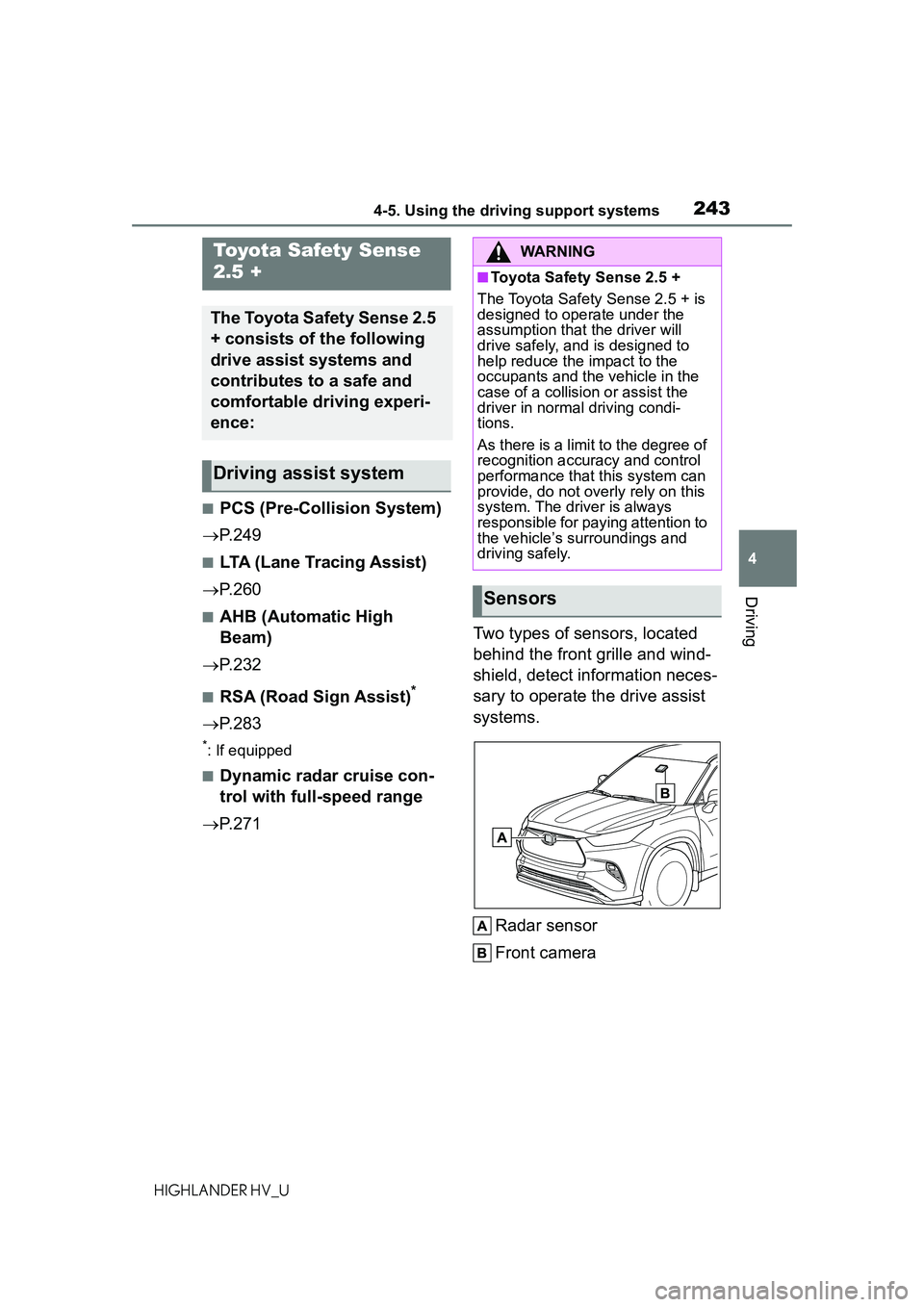
P.271 Two types of sensors, located
behind the front grille and wind-
shield, detect information neces-
sary to operate the drive assist
systems.
Radar sensor
Front camera
Toyota Safety Sense
2.5 +
The Toyota Safety Sense 2.5
+ consists of the following
drive assist systems and
contributes to a safe and
comfortable driving experi-
ence:
Driving assist system
WARNING
■Toyota Safety Sense 2.5 +
The Toyota Safety Sense 2.5 + is
designed to operate under the
assumption that the driver will
drive safely, and is designed to
help reduce the impact to the
occupants and the vehicle in the
case of a collision or assist the
driver in normal driving condi-
tions.
As there is a limit to the degree of
recognition accuracy and control
performance that this system can
provide, do not overly rely on this
system. The driver is always
responsible for paying attention to
the vehicle’s surroundings and
driving safely.
Sensors