tire pressure reset TOYOTA HIGHLANDER HYBRID 2021 Owners Manual (in English)
[x] Cancel search | Manufacturer: TOYOTA, Model Year: 2021, Model line: HIGHLANDER HYBRID, Model: TOYOTA HIGHLANDER HYBRID 2021Pages: 578, PDF Size: 16.92 MB
Page 97 of 578
972-1. Instrument cluster
2
Vehicle status information and indicators
HIGHLANDER HV_Uthe engine stops.
“Total”
• “Average Speed”: Displays the
average vehicle speed since the
display was reset
*
• “Distance”: Displays the distance driven since the display was
reset
*
• “Total Time”: Displays the elapsed
time since the display was reset
*
*
: To reset, display the desired item and press and hold .
■Energy monitor
P. 1 1 7
■Tire pressure
P. 4 2 6
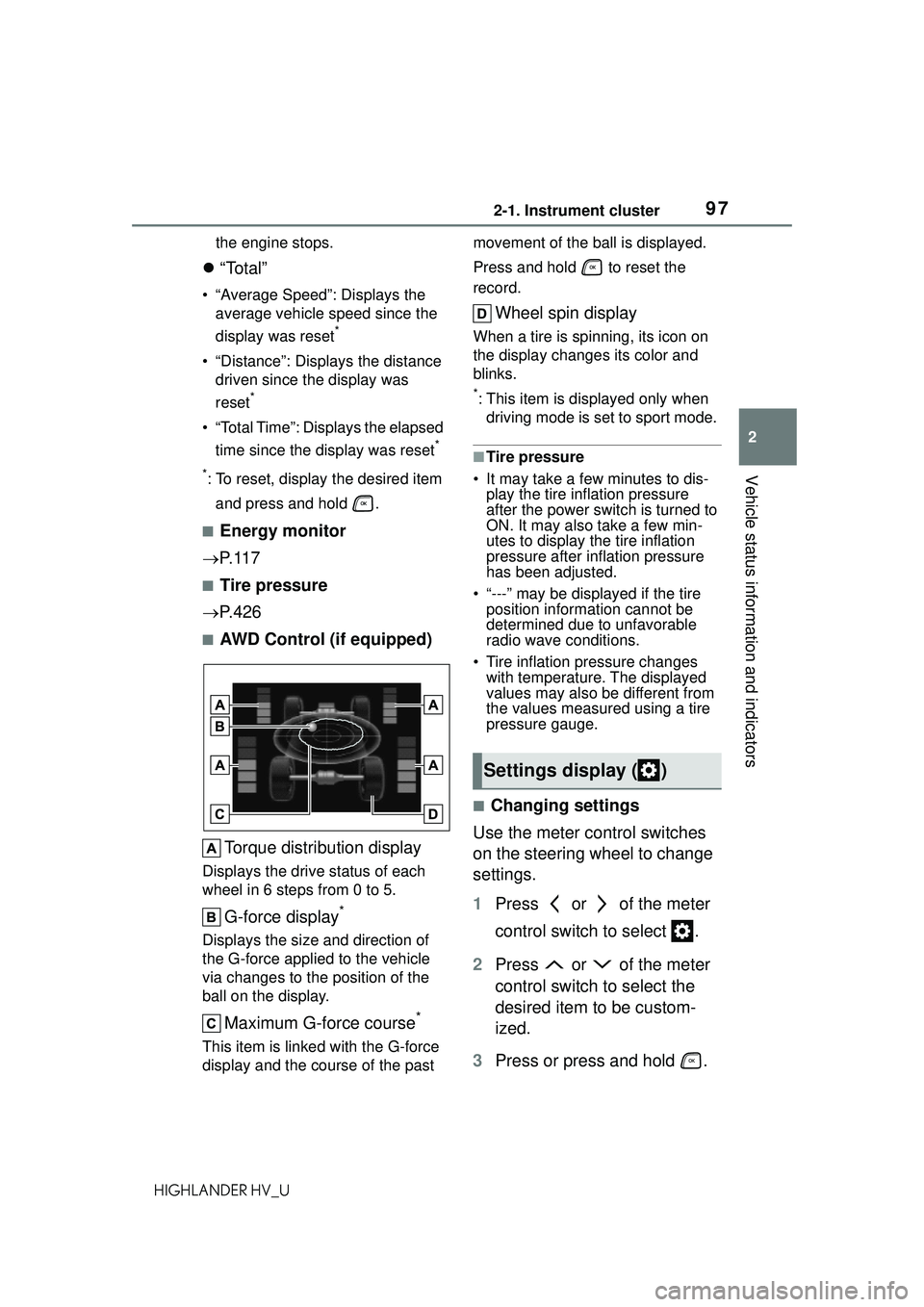
■AWD Control (if equipped)
Torque distribution display
Displays the drive status of each
wheel in 6 steps from 0 to 5.
G-force display*
Displays the size and direction of
the G-force applied to the vehicle
via changes to the position of the
ball on the display.
Maximum G-force course*
This item is linke d with the G-force
display and the course of the past movement of the ball is displayed.
Press and hold to reset the
record.
Wheel spin display
When a tire is spinning, its icon on
the display changes its color and
blinks.
*: This item is displayed only when
driving mode is set to sport mode.
■Tire pressure
• It may take a few minutes to dis- play the tire inflation pressure
after the power switch is turned to
ON. It may also take a few min-
utes to display the tire inflation
pressure after inflation pressure
has been adjusted.
• “---” may be displayed if the tire position information cannot be
determined due to unfavorable
radio wave conditions.
• Tire inflation pressure changes with temperature. The displayed
values may also be different from
the values measured using a tire
pressure gauge.
■Changing settings
Use the meter control switches
on the steering wheel to change
settings.
1 Press or of the meter
control switch to select .
2 Press or of the meter
control switch to select the
desired item to be custom-
ized.
3 Press or press and hold .
Settings display ( )
Page 99 of 578
992-1. Instrument cluster
2
Vehicle status information and indicators
HIGHLANDER HV_U
RSA (Road Sign Assist) (if
equipped) ( P.283)
Press to enable/disable the
Road Sign Assist.
• RSA (Road Sign Assist) on/off
Select to enable/disable the Road
Sign Assist.
Press and hold to change the
settings of the following items:
• “Notification Method”
Select to change each notification
method used to notify the driver
when the system recognizes
excess speed and no-entry sign.
• “Notification Level”
Select to change each notification
level used to notify the driver when
the system recognizes a speed limit
sign.
■ Vehicle settings
Press and hold to change
the settings of the following
items:
PBD (Power Back Door)
( P.135)
• “System Settings”
Select to enable/disable the power
back door system.
• “Opening Adjustment”
Select the open position when
power back door is fully open.
•“Volume”
Select to set the volume of the
buzzer which sounds when the
power back door system operates.
“TPWS” (Tire Pressure Warn- ing System) (
P.426)
• “Set Pressure” (tire pressure
warning system initialization)
Select to initialize the tire pressure
warning system.
• “Change Wheel” (register tire pressure warnin g system sensor
ID codes)
Select to register the ID codes of
the tire pressure sensors to the tire
pressure warning system.
“Rear Seat Reminder”
( P.133)
Select to enable/disable the rear
seat reminder.
“Scheduled Maintenance”
( P.407)
Select to reset the scheduled main-
tenance information (maintenance
required message and distance
until maintenance necessary) after
all maintenance is performed.
■ Meter settings
Press and hold to change
the settings of the following
items:
Language
Select to change the language dis-
played.
Units
Select to change the units of mea-
sure displayed.
EV indicator ( P.218)
Select to enable/disable the EV
indicator.
Page 106 of 578
1062-1. Instrument cluster
HIGHLANDER HV_Uplayed on the multi-information dis-
play. (
P.114)
Select to enable selection of an
audio source or track on the
meter using the meter control
switches.
This menu icon can be set to be
displayed/not displayed in .
■Energy monitor
P. 1 1 7
■Tire pressure
P. 4 2 6
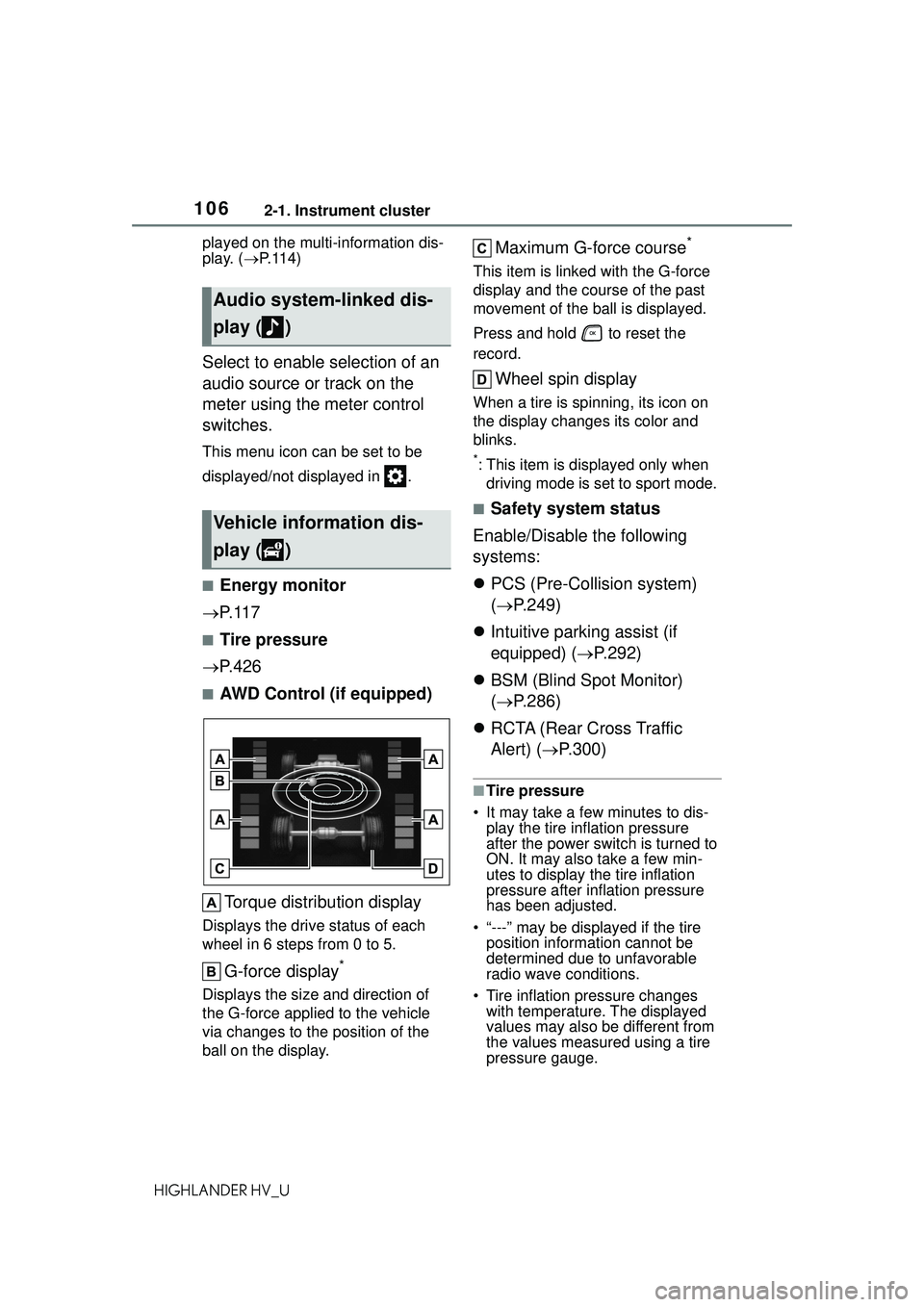
■AWD Control (if equipped)
Torque distribution display
Displays the drive status of each
wheel in 6 steps from 0 to 5.
G-force display*
Displays the size and direction of
the G-force applied to the vehicle
via changes to the position of the
ball on the display.
Maximum G-force course*
This item is linke d with the G-force
display and the course of the past
movement of the ball is displayed.
Press and hold to reset the
record.
Wheel spin display
When a tire is spinning, its icon on
the display changes its color and
blinks.
*: This item is displayed only when driving mode is set to sport mode.
■Safety system status
Enable/Disable the following
systems:
PCS (Pre-Collision system)
( P.249)
Intuitive parking assist (if
equipped) ( P.292)
BSM (Blind Spot Monitor)
( P.286)
RCTA (Rear Cross Traffic
Alert) ( P.300)
■Tire pressure
• It may take a few minutes to dis- play the tire inflation pressure
after the power switch is turned to
ON. It may also take a few min-
utes to display the tire inflation
pressure after inflation pressure
has been adjusted.
• “---” may be displayed if the tire position information cannot be
determined due to unfavorable
radio wave conditions.
• Tire inflation pressure changes with temperature. The displayed
values may also be different from
the values measured using a tire
pressure gauge.
Audio system-linked dis-
play ( )
Vehicle information dis-
play ( )
Page 109 of 578
1092-1. Instrument cluster
2
Vehicle status information and indicators
HIGHLANDER HV_U
the settings of the following
items:
PBD (Power Back Door)
( P.135)
• “System Settings”
Select to enable/disable the power
back door system.
• “Kick Sensor”
*
Select to enable/disable the kick
sensor.
• “Opening Adjustment”
Select the open position when
power back door is fully open.
•“Volume”
Select to set the volume of the
buzzer which sounds when the
power back door system operates.
*: Vehicles with a hands free power
back door
“TPWS” (Tire Pressure Warn-
ing System) ( P.426)
• “Set Pressure” (tire pressure
warning system initialization)
Select to initialize the tire pressure
warning system.
• “Change Wheel” (register tire pressure warning system sensor
ID codes)
Select to register the ID codes of
the tire pressure sensors to the tire
pressure warning system.
“Rear Seat Reminder”
( P.133)
Select to enable/disable the rear
seat reminder.
“Scheduled Maintenance”
( P.407)
Select to reset the scheduled main-
tenance information (maintenance
required message and distance
until maintenance necessary) after
all maintenance is performed.
■ Meter settings
Press and hold to change
the settings of the following
items:
Language
Select to change the language dis-
played.
Units
Select to change the units of mea-
sure displayed.
EV indicator ( P.218)
Select to enable/disable the EV
indicator.
Speedometer display (digital
speed)
Select to enable/disable the speed-
ometer display.
Gadget content
Select to turn the display of a gad-
get.
Fuel economy type
Select to change the average fuel
consumption display and an item to
be displayed as gadget.
Pop-up display
Select to enable/disable pop-up
displays for each relevant system.
Multi-information display off
Displays a blank screen.
Default setting
Select to reset the meter display
Page 432 of 578
4326-3. Do-it-yourself maintenance
HIGHLANDER HV_U
Drive the vehicle at approxi-
mately 25 mph (40 km/h) or
more for approximately 10 to 30
minutes until the inflation pres-
sure of each tire is displayed on
the multi-information display.
When initialization is complete,
the inflation pressure of each
tire will be displayed on the
multi-information display.
Even if the vehicle is not driven
at approximately 25 mph (40
km/h) or more, initialization can
be completed by driving for a
long time. However, if initializa-
tion does not complete after
driving for 1 hour or more, park
the vehicle in a safe place for
approximately 20 minutes and
then drive the vehicle again.
■Initializing the tire pressure
warning system
Initialize the syst em with the tire
inflation pressure adjusted to the
specified level.
■Initialization procedure
●Make sure to carry out initializa-
tion after adjusting the tire inflation
pressure.
Also, make sure the tires are cold
before carrying ou t initialization or
tire inflation pressure adjustment.
●If you have accidentally turned the
power switch off during initializa-
tion, it is not necessary to restart
the initialization again as initializa-
tion will restart aut omatically when
the power switch has been turned
to ON for the next time.
●If you accidentally restart the ini-
tialization when in itialization is not
necessary, adjust the tire inflation
pressure to the specified level when the tires are cold, and con-
duct initialization again.
●While the position of each tire is
being determined and the inflation
pressures are not being displayed
on the multi-inform
ation display, if
the inflation pressure of a tire
drops, the tire pressure warning
light will come on.
■When initialization of the tire
pressure warning system has
failed
Initialization may take longer to
complete if the ve hicle is driven on
an unpaved road. When performing
initialization, drive on a paved road if
possible. Depending on the driving
environment and condition of the
tires, initialization will be completed
in approximately 10 to 30 minutes. If
initialization is no t complete after
driving approximately 10 to 30 min-
utes, continue driving for a while.
If the inflation pressure of each tire
is not displayed after driving for
approximately 1 hour, perform the
following procedure.
●Park the vehicle in a safe place for
approximately 20 minutes. Then
drive straight (with occasional left
and right turns) at approximately
25 mph (40 km/h) or more for
approximately 10 to 30 minutes.
However, in the following situations,
the tire inflation pressure will not be
recorded and the system will not
operate properly. Perform initializa-
tion again.
●If the vehicle is reversed during
initialization, the data up to that
point is reset, so perform the ini-
tialization procedure again from
the beginning.
●When operating the tire pressure
warning reset switch, the tire pres-
sure warning light does not blink 3
times.
●After performing initialization, the
tire pressure warning light blinks
for 1 minute then stays on while
Page 435 of 578
4356-3. Do-it-yourself maintenance
6
Maintenance and care
HIGHLANDER HV_Uenvironment, registration may
take some time to complete.
■Canceling ID code registration
●To cancel ID code registration
after it has been started, turn the
power switch off before driving the
vehicle. If the vehicle is driven
after ID code registration is
started, to cancel registration, per-
form the ID code registration start
procedure again and turn the
power switch off before driving.
●If ID code registration has been
canceled, the tire pressure warn-
ing light will blink for approxi-
mately 1 minute
when the power
switch is turned to ON and then
illuminate. The tire pressure warn-
ing system will be operational
when the tire pressure warning
light turns off.
●If the warning light does not turn
off even after several minutes
have elapsed, ID code registration
may not have been canceled cor-
rectly. To cancel registration, per-
form the ID code registration start
procedure again and then turn the
power switch off before driving.
■If ID codes are not registered
properly
In the following situations, ID code
registration may take longer than
usual to be completed or may not be
possible. Normally, registration com-
pletes within approximately 30 min-
utes.
●Vehicle is not parked for approxi-
mately 20 minutes or more before
driving
●Vehicle is not driven at approxi-
mately 25 mph (40 km/h) or more
●Vehicle is driven on unpaved
roads
●Vehicle is driven near other vehi-
cles and system cannot recog-
nize tire pressure warning valve
and transmitters of your vehicle
over those of other vehicles Wheel with tire
pressure warning
valve and transmitter installed is
inside or near the vehicle
If registration does not complete
after driving for 1 hour or more, per-
form the ID code registration proce-
dure again from the beginning.
●If the vehicle is reversed during
registration, the data up to that
point is reset, so perform the reg-
istration procedure again from the
beginning.
●In the following situations, ID code
registration will not be started or
was not completed properly and
the system will not operate prop-
erly. Perform the ID code registra-
tion procedure again.
• If, when attempting to start ID code registration, the tire pressure
warning light does not blink slowly
3 times.
• If, when the vehicle has been driven for about 20 minutes after
performing ID code registration,
the tire pressure warning light
blinks for approximately 1 minute
and then illuminates.
If the ID codes cannot be registered
even when performing the above
procedure, contact your Toyota
dealer.
Page 572 of 578
570Alphabetical Index
HIGHLANDER HV_USeat heater switches ............ 358
Seat ventilator switches ....... 358
“SOS” button .......................... 65
Tilt and telescopic steering con-
trol switch ........................... 165
Tire pressure warning reset switch ................................. 431
Vehicle-to-vehicle distance switch ................................. 271
VSC OFF switch................... 326
Window lock switch .............. 181
Windshield defogger switch 344, 347
Windshield wiper and washer switch ......................... 235, 238
Windshield wiper de-icer switch ................................... 344, 352
T
Tachometer ............................... 89
Tail lights Light switch .......................... 229
Replacing light bulbs ............ 449
The Secondary Collision Brake ............................................... 326
Theft deterrent system Alarm ...................................... 81
Immobilizer system ................ 79
Tire inflation pressure Maintenance data................. 515
Tire inflation pr essure display
function............................... 426
Warning light ........................ 470
Tire information ...................... 520 Glossary ............................... 524
Size ...................................... 522
Tire identification number ..... 521
Uniform Tire Quality Grading 523
Tire pressure display ............. 426
Tire pressure warning system Function ............................... 426
Initializing ............................. 430 Installing tire pressure warning
valves and transmitters ......429
Registering ID codes ............433
Warning light.........................470
Tires Chains ..................................334
Checking ..............................424
If you have a flat tire .............481
Inflation pressure ..................436
Information ......... ..................520
Replacing .............................481
Rotating tires ........................426
Size ......................................515
Snow tires.............................333
Spare tire ..............................481
Tire inflation pressure display function ...............................426
Tire pressure warning system ...........................................426
Warning light.........................470
Tools ........................................482
Top tether strap ........................62
Total load capacity .................510
To w i n g Dinghy towing .......................212
Emergency towing ................461
Trailer towing ........................201
Toyota Multi-operation touch 340
Toyota Safety Sense 2.5 + Automatic High Be am ...........232
Dynamic radar cruise control with full-speed range ..........271
LTA (Lane Tracing Assist) .....260
PCS (Pre-Collisio n System) .249
RSA (Road Sign Assist) ........283
TRAC (Traction Control) ........325
Traction battery (hybrid battery) Hybrid battery (traction battery) air vents ................................77
Location ..................................75
Specification .........................512
Warning message...................78