light TOYOTA HIGHLANDER HYBRID 2023 Workshop Manual
[x] Cancel search | Manufacturer: TOYOTA, Model Year: 2023, Model line: HIGHLANDER HYBRID, Model: TOYOTA HIGHLANDER HYBRID 2023Pages: 572, PDF Size: 14.07 MB
Page 132 of 572

1323-2. Opening, closing and locking the doors
■Smart key system
Carry the electronic key to
enable this function.
WARNING
●Do not allow a child to open or
close the back door.
Doing so may cause the back
door to move unexpectedly, or
cause the child’s hands, arms,
head, or neck to be caught by the
closing back door.
■Operating the back door
Observe the following precau-
tions. Failure to do so may cause
parts of the body to be caught,
resulting in death or serious injury.
●Remove any heavy loads, such
as snow and ice, from the back
door before opening it. Failure
to do so may cause the back
door to suddenly shut again
after it is opened.
●When opening or closing the
back door, thoroughly check to
make sure the surrounding area
is safe.
●If anyone is in the vicinity, make
sure they are safe and let them
know that the back door is
about to open or close.
●Use caution when opening or
closing the back door in windy
weather as it may move
abruptly in strong wind.
●The back door may suddenly
shut if it is not opened fully while
on a steep incline. Make sure
that the back door is secured
before using the luggage com-
partment.
●When closing the back door,
take extra care to prevent your
fingers, etc., from being caught.
●When closing the back door,
make sure to press it lightly on
its outer surface. If the back
door handle is used to fully
close the back door, it may
result in hands or arms being
caught.
●Do not pull on the back door
spindle (
P.139) to close the
power back door, and do not
hang on the back door spindle.
Doing so may cause hands to be
caught or the back door spindle to
break, causing an accident.
●If a heavy objec t is attached to
the back door, it may suddenly
shut again after being opened,
causing someone’s hands,
arms, head or neck to be caught
and injured. Do not attach any
accessories other than genuine
Toyota parts to the back door.
Unlocking and locking the
back door from the out-
side
Page 135 of 572
1353-2. Opening, closing and locking the doors
3
Before driving
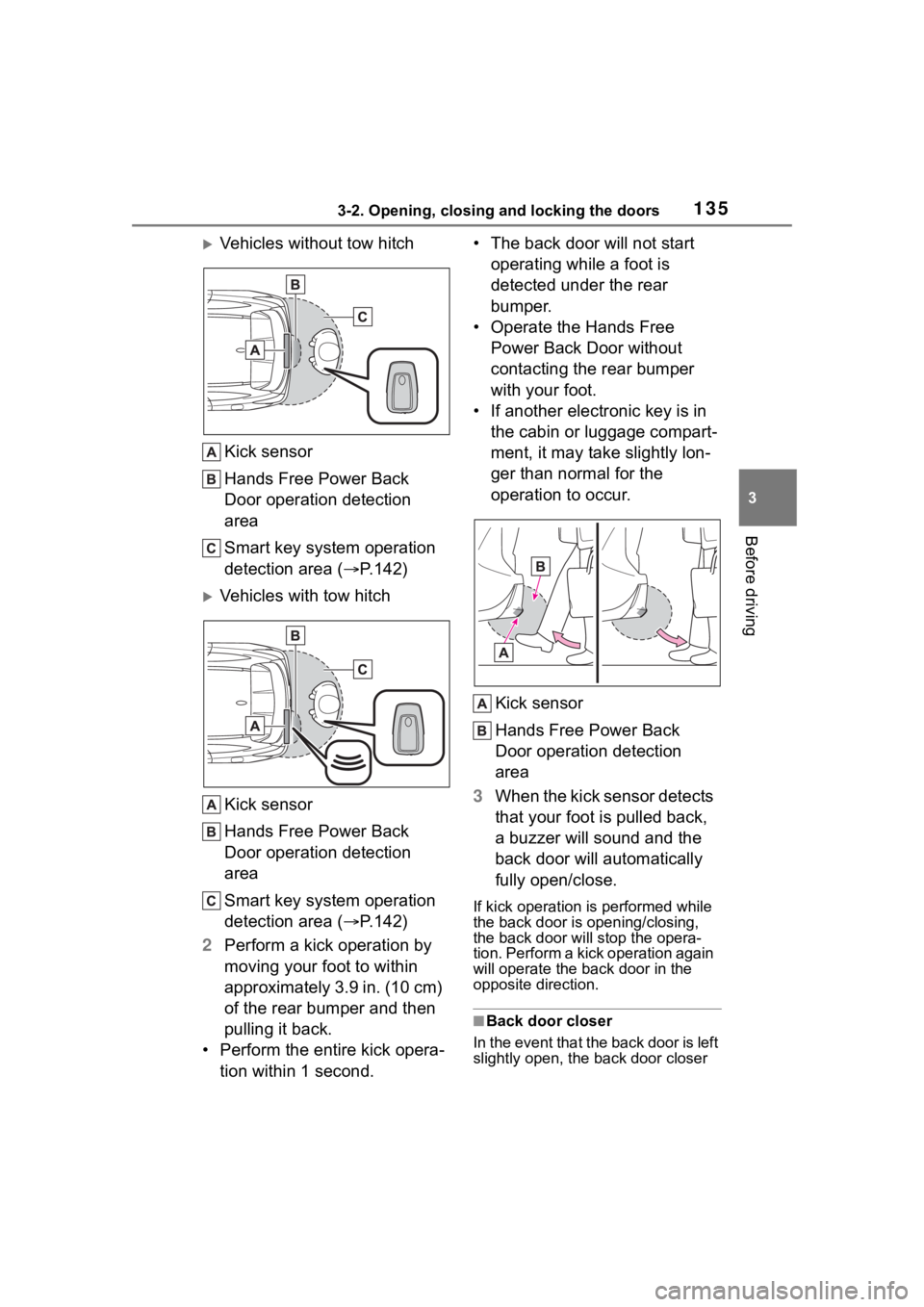
Vehicles without tow hitch
Kick sensor
Hands Free Power Back
Door operation detection
area
Smart key system operation
detection area ( P.142)
Vehicles with tow hitch
Kick sensor
Hands Free Power Back
Door operation detection
area
Smart key system operation
detection area ( P.142)
2 Perform a kick operation by
moving your foot to within
approximately 3.9 in. (10 cm)
of the rear bumper and then
pulling it back.
• Perform the entire kick opera- tion within 1 second. • The back door will not start
operating while a foot is
detected under the rear
bumper.
• Operate the Hands Free Power Back Door without
contacting the rear bumper
with your foot.
• If another electronic key is in the cabin or luggage compart-
ment, it may take slightly lon-
ger than normal for the
operation to occur.
Kick sensor
Hands Free Power Back
Door operation detection
area
3 When the kick sensor detects
that your foot is pulled back,
a buzzer will sound and the
back door will automatically
fully open/close.
If kick operation is performed while
the back door is opening/closing,
the back door will stop the opera-
tion. Perform a kick operation again
will operate the back door in the
opposite direction.
■Back door closer
In the event that the back door is left
slightly open, the back door closer
Page 137 of 572
1373-2. Opening, closing and locking the doors
3
Before driving
■Kick sensor operating condi-
tions (vehicles with a Hands
Free Power Back Door)
●When the kick sensor operation
setting is turned on ( P.510) and
the power switch is turned off.
●When an electronic key is carried
within the operation detection
area.
■Situations in which the Hands
Free Power Back Door may not
operate properly (if equipped)
In the following situations, the
Hands Free Power Back Door may
not operate properly:
●When a foot remains under the
rear bumper.
●If the rear bumper is strongly hit
with a foot or is touched for a
while.
If the rear bumper has been touched
for a while, wait for a short time
before attempting to operate the
Hands Free Power Back Door
again.
●When standing excessively close
to the rear bumper.
●When an external radio wave
source interferes with the commu-
nication between the electronic
key and the vehicle. ( P.143)
●When the vehicle is parked near
an electrical noise source which
affects the sensitivity of the Hands
Free Power Back Door, such as a
pay parking spot , gas station,
electrically heated road, or fluo-
rescent light.
●When the vehicle is near a TV
tower, electric po wer plant, radio
station, large display, airport or
other facility that generates strong
radio waves or electrical noise.
●When a large amount of water is
applied to the rear bumper, such
as when the vehicle is being
washed or in heavy rain.
●When mud, snow, ice, etc. is
attached to the rear bumper.
●When the vehicle has been
parked for a while near objects
that may move and contact the
rear bumper, such as plants.
●When an accessory i s installed to
the rear bumper.
If an accessory has been installed,
turn the kick sensor operation set-
ting off. ( P.510)
■Preventing unintentional opera-
tion of the Hands Free Power
Back Door (if equipped)
When an electronic key is in the
operation detection area, the Hands
Free Power Back Door may operate
unintentionally, so be careful in the
following situations:
●When a large amount of water is
applied to the rea r bumper, such
as when the vehicle is being
washed or in heavy rain.
●When dirt is wip ed off the rear
bumper.
●When a small animal or small
object, such as a ball, moves
under the rear bumper.
●When an object is moved from
under the rear bumper.
●If someone is swinging their legs
while sitting on the rear bumper.
●If the legs or another part of some-
one’s body contacts the rear
bumper while passing by the vehi-
cle.
●When the vehicle is parked near
an electrical noise source which
affects the sensitivity of the Hands
Free Power Back Door, such as a
pay parking spot, gas station,
electrically heated road, or fluo-
rescent light.
●When the vehicle is near a TV
tower, electric pow er plant, radio
station, large display, airport or
other facility that generates strong
radio waves or electrical noise.
●When the vehicle is parked in a
place where objects such as
plants are near the rear bumper.
Page 138 of 572
1383-2. Opening, closing and locking the doors
●When luggage, etc. is set in or
removed from the luggage com-
partment from outside of the vehi-
cle.
●If accessories or a vehicle cover is
installed/removed near the rear
bumper.
●When snow attached to the inner
side of the rear bumper melts.
To prevent unintentional operation,
turn the kick sensor operation set-
ting off. ( P.510)
■When reconnecting the 12-volt
battery
To enable the power back door to
operate properly, close the back
door manually.
■Customization
Some functions can be customized.
( P.510)
WARNING
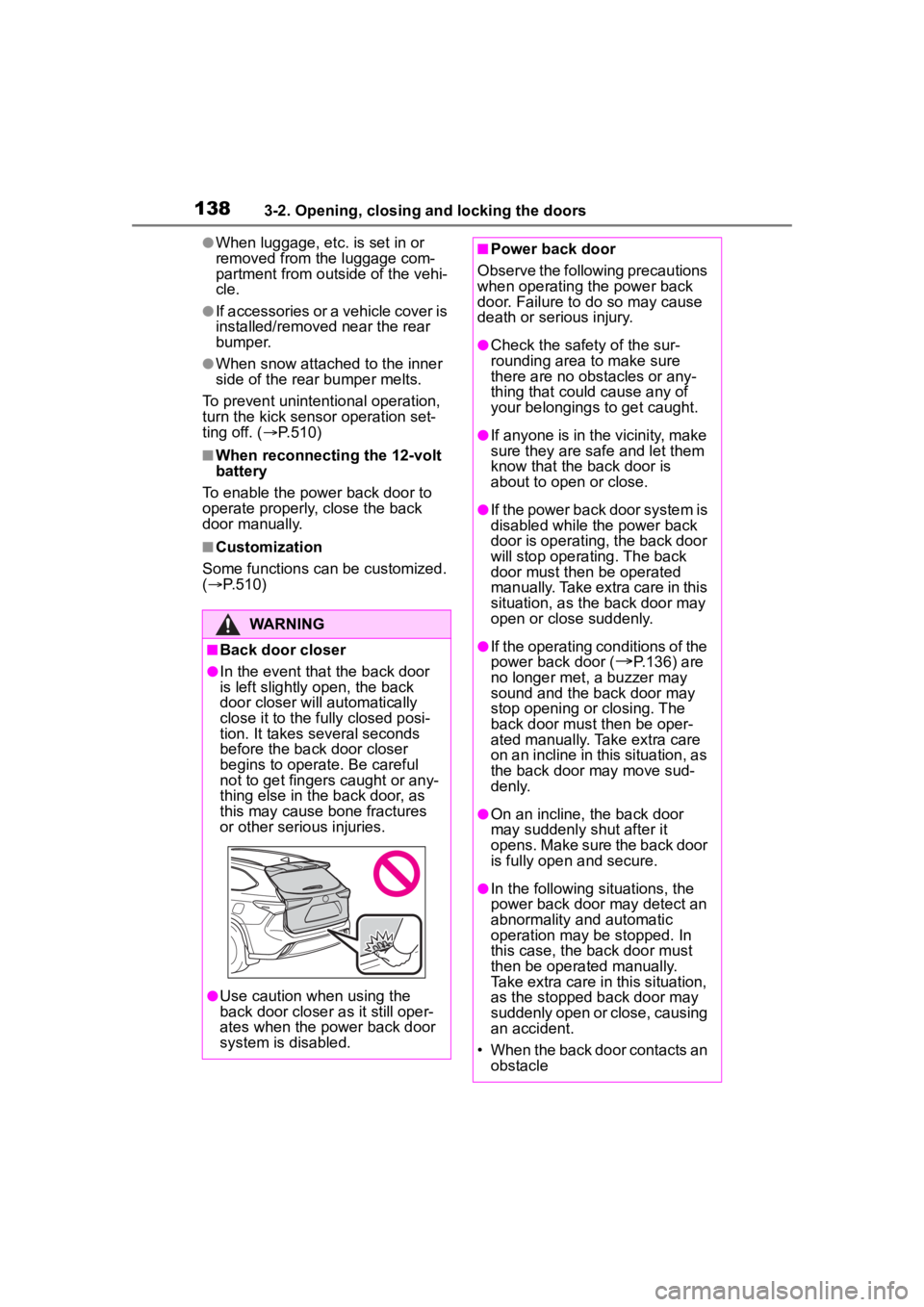
■Back door closer
●In the event that the back door
is left slightly open, the back
door closer will automatically
close it to the fully closed posi-
tion. It takes several seconds
before the back door closer
begins to operate. Be careful
not to get fingers caught or any-
thing else in the back door, as
this may cause bone fractures
or other serious injuries.
●Use caution when using the
back door closer as it still oper-
ates when the power back door
system is disabled.
■Power back door
Observe the following precautions
when operating the power back
door. Failure to do so may cause
death or serious injury.
●Check the safety of the sur-
rounding area to make sure
there are no obs tacles or any-
thing that could cause any of
your belongings to get caught.
●If anyone is in the vicinity, make
sure they are safe and let them
know that the back door is
about to open or close.
●If the power back door system is
disabled while the power back
door is operating, the back door
will stop operating. The back
door must then be operated
manually. Take extra care in this
situation, as the back door may
open or close suddenly.
●If the operating conditions of the
power back door (
P.136) are
no longer met, a buzzer may
sound and the back door may
stop opening or closing. The
back door must then be oper-
ated manually. Take extra care
on an incline in this situation, as
the back door may move sud-
denly.
●On an incline, the back door
may suddenly shut after it
opens. Make sure the back door
is fully open and secure.
●In the following si tuations, the
power back door may detect an
abnormality and automatic
operation may be stopped. In
this case, the back door must
then be operated manually.
Take extra care in this situation,
as the stopped back door may
suddenly open or close, causing
an accident.
• When the back door contacts an obstacle
Page 145 of 572
1453-2. Opening, closing and locking the doors
3
Before driving
tery-saving mode to disable the
smart key system. (P.143)
●If the electronic key is inside the
vehicle and a door handle
becomes wet during a car wash, a
message may be shown on the
multi-information display and a
buzzer will sound outside the vehi-
cle. To turn off the alarm, lock all
the doors.
●The lock sensor may not work
properly if it com es into contact
with ice, snow, mud, etc. Clean
the lock sensor and attempt to
operate it again, or use the lock
sensor on the lower part of the
door handle.
●A sudden handle operation or a
handle operation immediately
after entering the effective range
may prevent the doors from being
unlocked. Touch the door unlock
sensor and check that the doors
are unlocked bef ore pulling the
door handle again.
●If there is another electronic key in
the detection area, it may take
slightly longer to unlock the doors
after the door handle is gripped.
■When the vehicle is not driven
for extended periods
●To prevent theft of the vehicle, do
not leave the electronic key within
6 ft. (2 m) of the vehicle.
●The smart key system can be
deactivated in advance. ( P.510)
●Setting the electronic key to bat-
tery-saving mode helps to reduce
key battery depletion. ( P.143)
■To operate the system properly
Make sure to carry the electronic
key when operating the system. Do
not get the electronic key too close
to the vehicle when operating the
system from the ou tside of the vehi-
cle.
Depending on the position and hold-
ing condition of the electronic key,
the key may not be detected cor- rectly and the system may not oper-
ate properly. (The alarm may go off
accidentally, or the door lock pre-
vention may not operate.)
■If the smart key
system does
not operate properly
If the doors cannot be
locked/unlocked using the smart key
system, lock/unlock the doors by
performing any of the following:
●Bring the electronic key close to
either front door handle and oper-
ate the entry function.
●Operate the wireless remote con-
trol.
If the doors cannot be
locked/unlocked using the above
methods, use the mechanical key.
( P.477)
If the hybrid system cannot be
started using the smart key system,
refer to P.478.
■Customization
Some functions can be customized.
( P.510)
■If the smart key system has
been deactivated in a custom-
ized setting
●Locking and unlocking the doors:
Use the wireless remote control or
mechanical key. ( P.127, 477)
●Starting the hybr id system and
changing power switch modes:
P. 4 7 8
●Stopping the hybrid system:
P. 2 0 8
Page 148 of 572

1483-3. Adjusting the seats
WARNING
●Manual seat only: After adjust-
ing the seat, make sure that the
seat is locked in position.
Rear seats
The seat position and seat-
back angle can be adjusted,
and the seatback can be
folded by operating a seat-
back angle adjustment
lever.
WARNING
■Seat adjustment
●To reduce the risk of sliding
under the lap belt during a colli-
sion, do not recline the seat
more than necessary.
If the seat is too reclined, the lap
belt may slide past the hips and
apply restraint for ces directly to
the abdomen, or your neck may
contact the shoulder belt, increas-
ing the risk of death or serious
injury in the event of an accident.
Adjustments should not be made
while driving as the seat may
unexpectedly move and cause
the driver to lose control of the
vehicle.
●Be careful that the seat does
not hit passengers or luggage.
●Be careful not to get your hands
or feet caught in the seat.
■After adjusting or returning
the seats
Observe the following precau-
tions. Failure to do so may result
in death or serious injury.
●Make sure that the seat and
seatback are securely locked in
position by lightly rocking them
back and forth.
●Check that the seat belts are
not twisted or caught in the
seatback.
Page 154 of 572
1543-3. Adjusting the seats
ten.
■Seat positions that can be
memorized
The adjusted positions other than
the position adjusted by lumbar sup-
port switch can be recorded.
■In order to correctly use the
driving position memory func-
tion
If a seat position is already in the
furthest possible position and the
seat is operated in the same direc-
tion, the recorded position may be
slightly different w hen it is recalled.
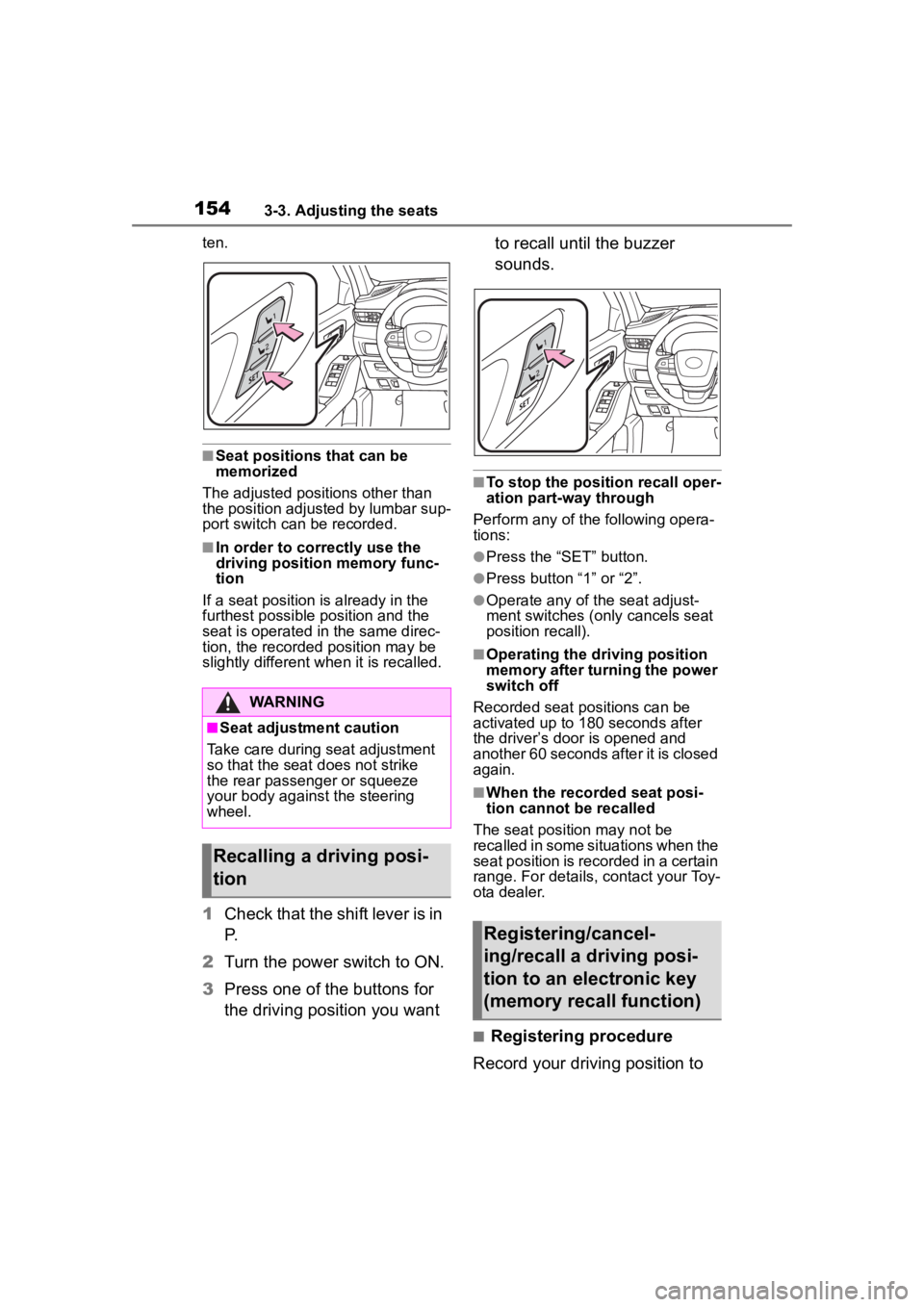
1Check that the shift lever is in
P.
2 Turn the power switch to ON.
3 Press one of the buttons for
the driving position you want to recall until the buzzer
sounds.
■To stop the position recall oper-
ation part-way through
Perform any of the following opera-
tions:
●Press the “SET” button.
●Press button “1” or “2”.
●Operate any of t he seat adjust-
ment switches (only cancels seat
position recall).
■Operating the driving position
memory after turning the power
switch off
Recorded seat positions can be
activated up to 180 seconds after
the driver’s door is opened and
another 60 seconds after it is closed
again.
■When the recorded seat posi-
tion cannot be recalled
The seat position may not be
recalled in some situations when the
seat position is recorded in a certain
range. For details, contact your Toy-
ota dealer.
■Registering procedure
Record your driving position to
WARNING
■Seat adjustment caution
Take care during seat adjustment
so that the seat d oes not strike
the rear passenger or squeeze
your body again st the steering
wheel.
Recalling a driving posi-
tion
Registering/cancel-
ing/recall a driving posi-
tion to an electronic key
(memory recall function)
Page 160 of 572
1603-4. Adjusting the steering wheel and mirrors
*: If equipped
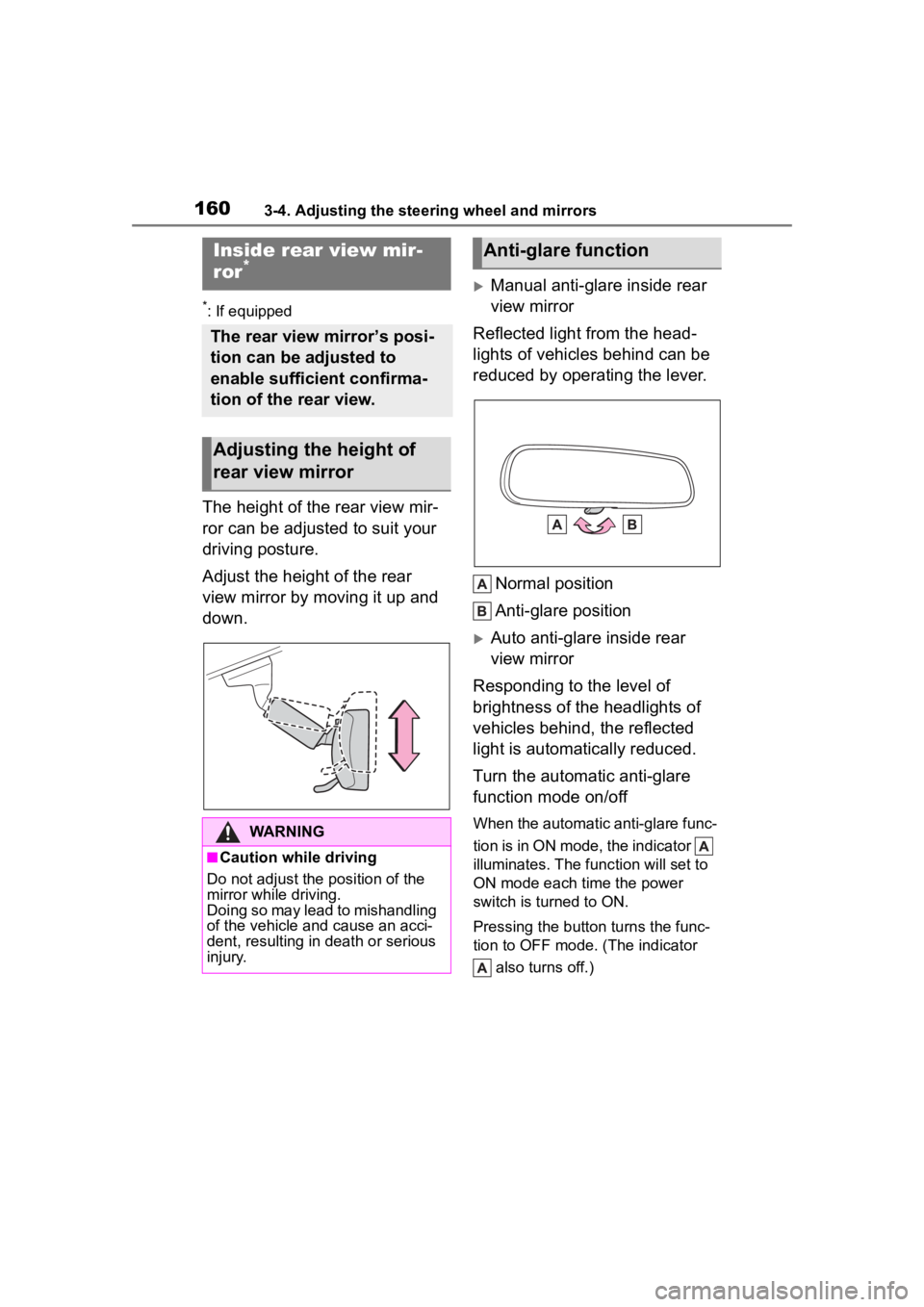
The height of the rear view mir-
ror can be adjusted to suit your
driving posture.
Adjust the height of the rear
view mirror by moving it up and
down.
Manual anti-glare inside rear
view mirror
Reflected light from the head-
lights of vehicles behind can be
reduced by operating the lever.
Normal position
Anti-glare position
Auto anti-glare inside rear
view mirror
Responding to the level of
brightness of the headlights of
vehicles behind, the reflected
light is automatically reduced.
Turn the automatic anti-glare
function mode on/off
When the automatic anti-glare func-
tion is in ON mode, the indicator
illuminates. The func tion will set to
ON mode each time the power
switch is turned to ON.
Pressing the button turns the func-
tion to OFF mode. (The indicator
also turns off.)
Inside rear view mir-
ror*
The rear view mirror’s posi-
tion can be adjusted to
enable sufficient confirma-
tion of the rear view.
Adjusting the height of
rear view mirror
WARNING
■Caution while driving
Do not adjust the position of the
mirror while driving.
Doing so may lead to mishandling
of the vehicle and cause an acci-
dent, resulting in death or serious
injury.
Anti-glare function
Page 162 of 572
1623-4. Adjusting the steering wheel and mirrors
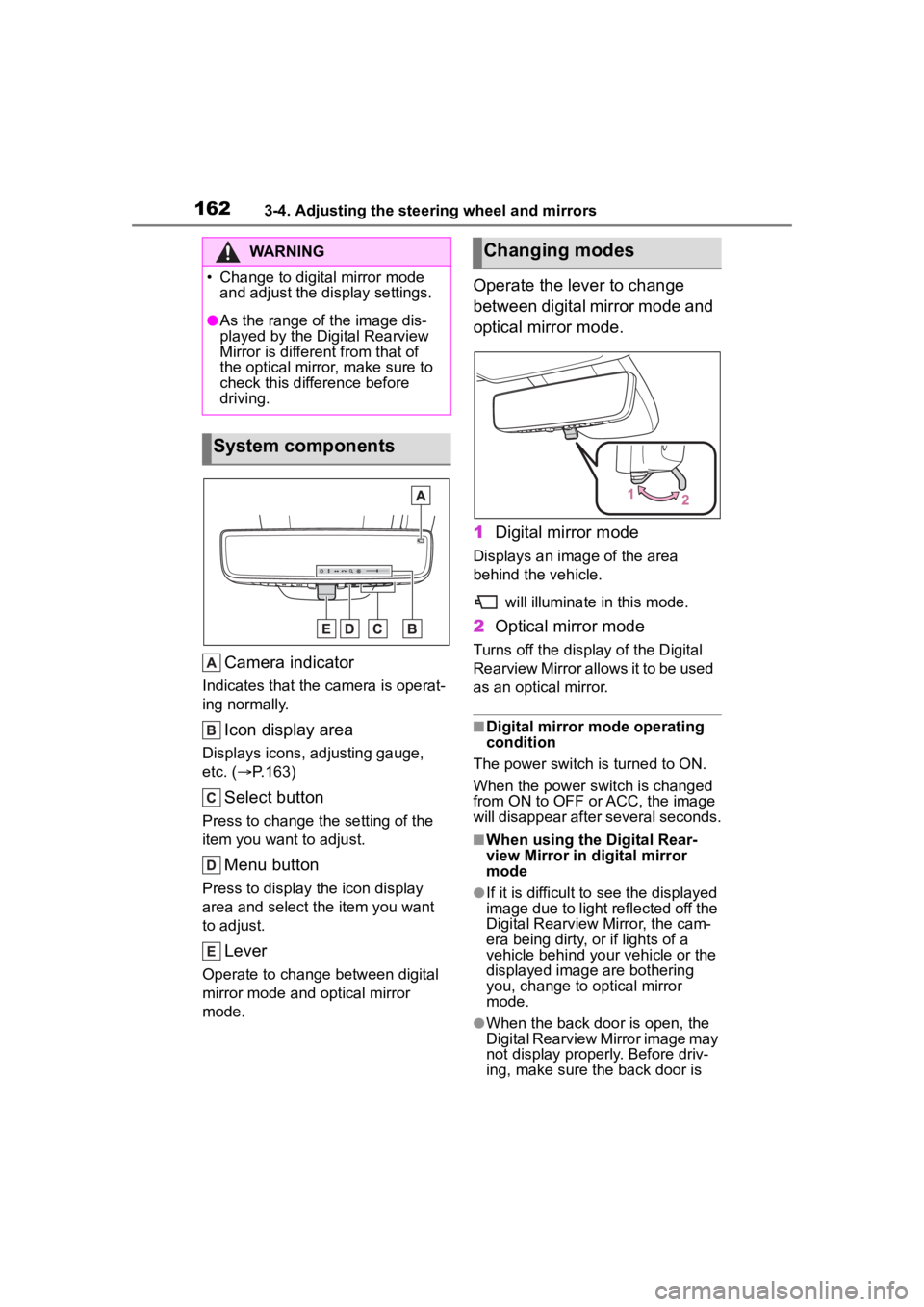
Camera indicator
Indicates that the camera is operat-
ing normally.
Icon display area
Displays icons, adjusting gauge,
etc. ( P.163)
Select button
Press to change the setting of the
item you want to adjust.
Menu button
Press to display the icon display
area and select the item you want
to adjust.
Lever
Operate to change between digital
mirror mode and optical mirror
mode.
Operate the lever to change
between digital mirror mode and
optical mirror mode.
1 Digital mirror mode
Displays an ima ge of the area
behind the vehicle.
will illuminate in this mode.
2Optical mirror mode
Turns off the display of the Digital
Rearview Mirror allows it to be used
as an optical mirror.
■Digital mirror mode operating
condition
The power switch is turned to ON.
When the power switch is changed
from ON to OFF o r ACC, the image
will disappear after several seconds.
■When using the Digital Rear-
view Mirror in d igital mirror
mode
●If it is difficult to see the displayed
image due to light reflected off the
Digital Rearview Mirror, the cam-
era being dirty, or if lights of a
vehicle behind your vehicle or the
displayed image are bothering
you, change to optical mirror
mode.
●When the back door is open, the
Digital Rearview Mirror image may
not display properly. Before driv-
ing, make sure the back door is
WARNING
Page 163 of 572
1633-4. Adjusting the steering wheel and mirrors
3
Before driving
closed.
●If the display is difficult to see due
to reflected light, close the sun-
shade for the moon roof or the
electronic sunshade for the pan-
oramic moon roof.
●Any of the following conditions
may occur when d riving in the
dark, such as at night. None of
them indicates that a malfunction
has occurred.
• Colors of objects in the displayed image may differ f rom their actual
color.
• Depending on the height of the lights of the vehicle behind, the
area around the vehicle may
appear white and blurry.
• Automatic image adjustment for
brighter surrounding image may
cause flickering.
If it is difficult to see the displayed
image or flickering bothers you,
change to optical mirror mode.
●The Digital Rearview Mirror may
become hot while it is in digital
mirror mode.
This is not a malfunction.
●Depending on your physical con-
dition or age, it may take longer
than usual to focus on the dis-
played image. In this case,
change to optical mirror mode.
●Do not let passengers stare at the
displayed image when the vehicle
is being driven, as doing so may
cause motion sickness.
■When the system malfunctions
If the symbol show n in the illustra-
tion is displayed when using the
Digital Rearview Mirror in digital mir-
ror mode, the system may be mal-
functioning. The symbol will
disappear in a few seconds. Oper-
ate the lever, chang e to optical mir-
ror mode and have the vehicle
inspected by your Toyota dealer.
■Adjusting the mirror height
The height of the rear view mir-
ror can be adjusted to suit your
driving posture.
Change to optical mirror mode,
adjusting the height of the rear
view mirror by moving it up and
down.
■Display settings (digital mir-
ror mode)
Settings of the display in the dig-
ital mirror mode, on/off operation
of the automatic anti-glare func-
tion, etc. can be changed.
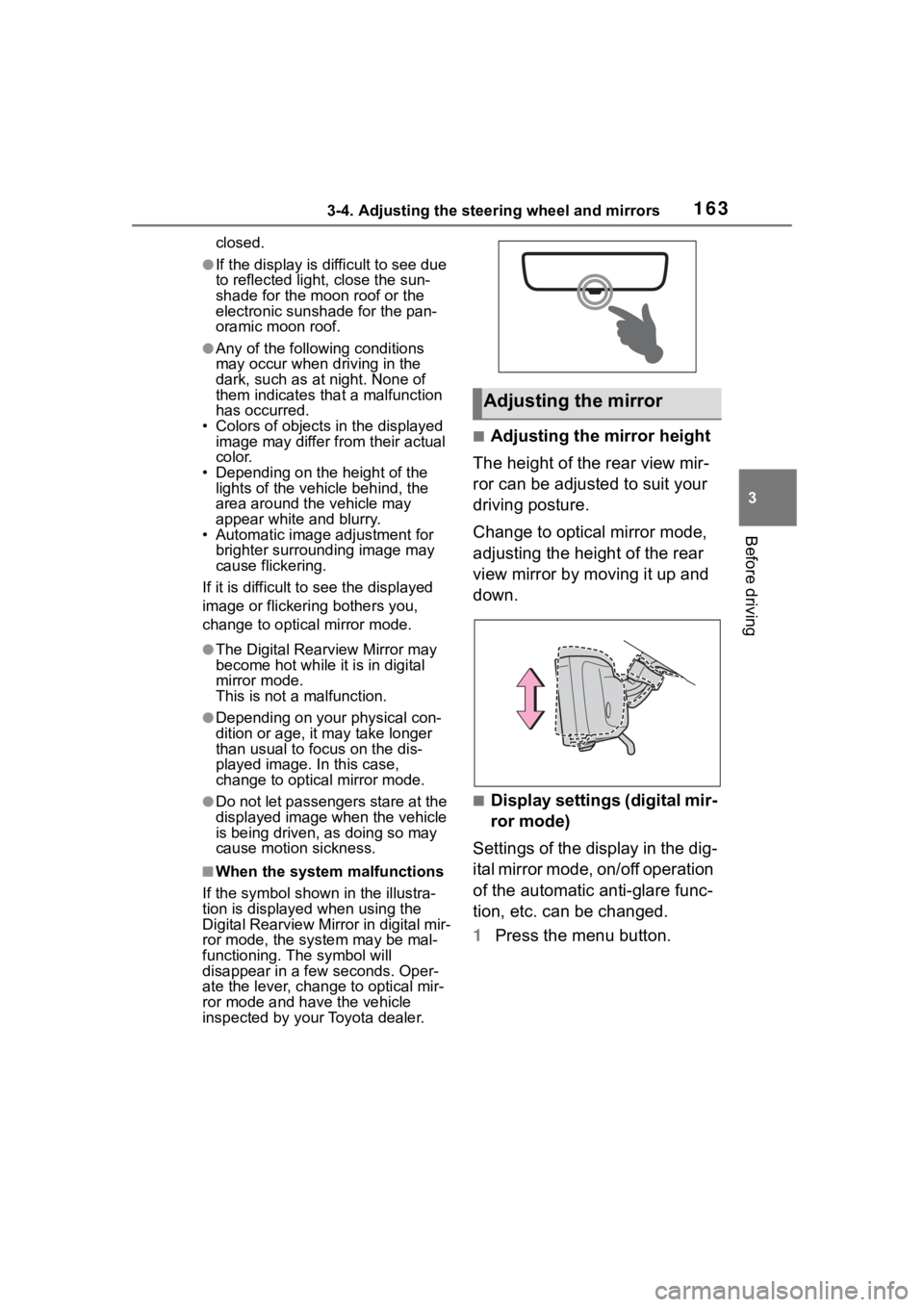
1 Press the menu button.
Adjusting the mirror