clock TOYOTA HILUX 2013 (in English) User Guide
[x] Cancel search | Manufacturer: TOYOTA, Model Year: 2013, Model line: HILUX, Model: TOYOTA HILUX 2013Pages: 644, PDF Size: 34.35 MB
Page 251 of 644
3Interior features
251
HILUX_OM_OM0K189E_(EE)
3-3. Using the “touch screen”
Touch screen .................... 317
Setup menu ...................... 319
Audio system .................... 327
Using the radio ................. 331
Using the CD player ......... 336
Playing an audio CD and
MP3/WMA discs ............. 337
Listening to an iPod .......... 350
Listening to a USB
memory........................... 360
Using the AUX port ........... 369
Listening to Bluetooth
®
audio ............................... 370
Using the steering wheel
audio switches ................ 384
Hands-free system
(for cellular phone).......... 387
Using the Bluetooth
®
phone ............................. 395
Setting the hands-free
system ............................ 411
Bluetooth
® settings ........... 4283-4. Using the interior lights
Interior lights list ................ 438
• Personal lights ................ 439
• Interior light ..................... 439
3-5. Using the storage features
List of storage features ..... 440
• Glove box ....................... 442
• Console box.................... 443
• Cup holders .................... 444
• Bottle holders.................. 446
• Auxiliary boxes ............... 447
3-6. Other interior features
Sun visors ......................... 449
Vanity mirror ..................... 450
Clock ................................. 451
Ashtray.............................. 452
Cigarette lighter ................ 453
Power outlet ...................... 454
Seat heaters ..................... 455
Floor mat........................... 457
Compass........................... 459
Deck hooks ....................... 465
Page 253 of 644
253 3-1. Using the air conditioning system and defogger
3
Interior features
HILUX_OM_OM0K189E_(EE)
Adjusting the settings
To adjust the fan speed, turn the fan speed control dial the
clockwise (increase) or the counterclockwise (decrease).
Set the dial to “OFF” turns off the fan.
To adjust the temperature setting, turn the temperature control
dial clockwise (warm) or counterclockwise (cool).
If the “A/C” button is not pressed, the system will blow ambient tem-
perature air or heated air. (if equipped)
To select the air outlets, set the air outlet selection dial to the
desired position.
The positions between the air outlet selections shown below can
also be selected for more delicate adjustment.
Defogging the windshield
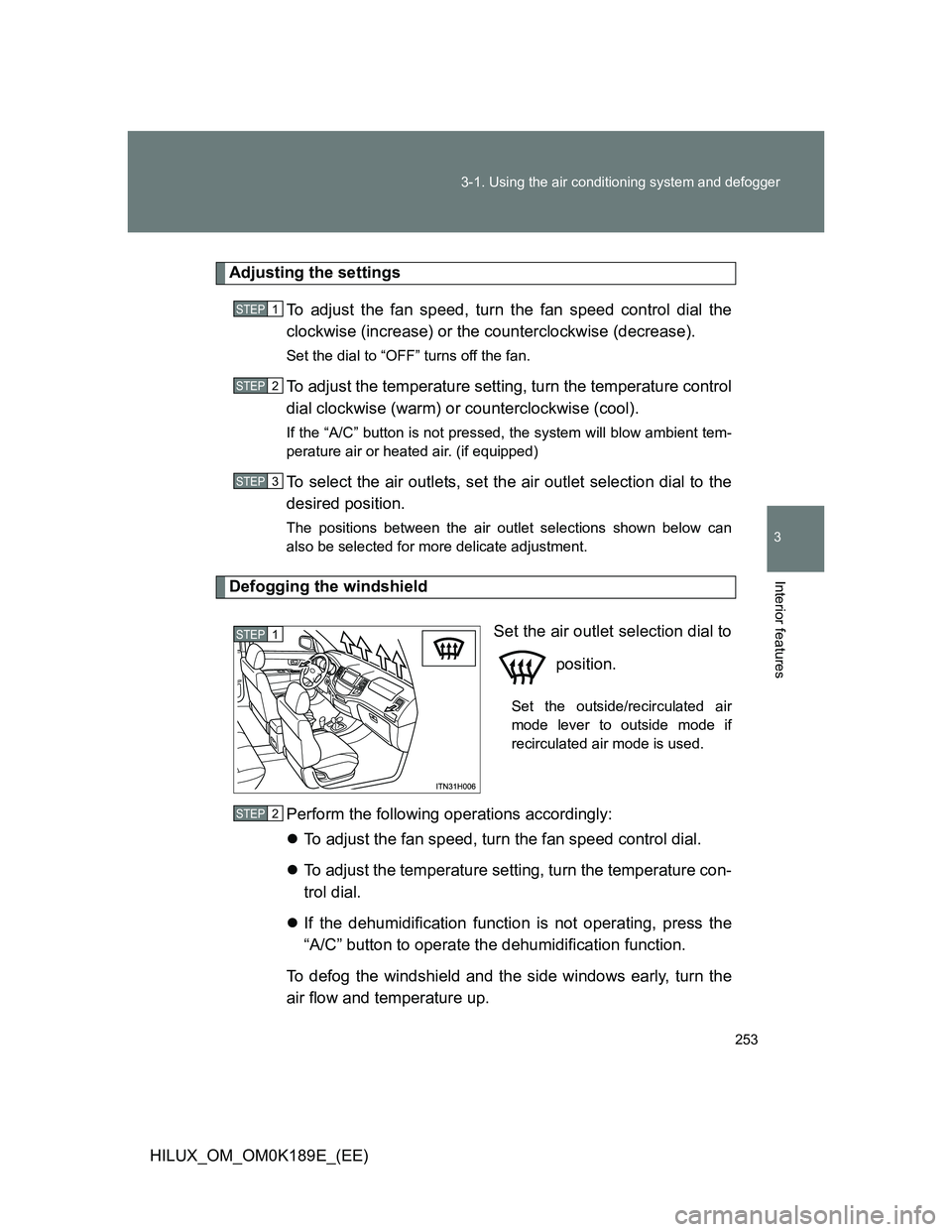
Set the air outlet selection dial to
position.
Set the outside/recirculated air
mode lever to outside mode if
recirculated air mode is used.
Perform the following operations accordingly:
To adjust the fan speed, turn the fan speed control dial.
To adjust the temperature setting, turn the temperature con-
trol dial.
If the dehumidification function is not operating, press the
“A/C” button to operate the dehumidification function.
To defog the windshield and the side windows early, turn the
air flow and temperature up.
STEP1
STEP2
STEP3
STEP1
STEP2
Page 311 of 644
311 3-2. Using the audio system
3
Interior features
HILUX_OM_OM0K189E_(EE)Adjusting sound quality
Turning adjusts the level.
*1: The sound quality level is adjusted individually in each audio mode.
*2: For vehicles equipped with two speakers, no sound will be emitted if
R7 is selected.
Mode
displayedSound
quality modeLevelTurn coun-
terclockwiseTurn
clockwise
“BAS”*1Bass-5 to 5LowHigh“TRE”*1Treble-5 to 5
“FAD”*2Front/rear
volume
balance
F7 to R7Shifts to rearShifts to
front
“BAL”
Left/right
volume
balance
L7 to R7Shifts to leftShifts to
right
Page 312 of 644
312 3-2. Using the audio system
HILUX_OM_OM0K189E_(EE)Adjusting the Automatic Sound Levelizer (ASL)
When ASL is selected, turning clockwise changes the amount
of ASL in the order of LOW, MID, HIGH and OFF.
ASL automatically adjusts the volume and tone quality according to vehi-
cle speed.
Trademark owned by SRS Labs, Inc. (type A)
The audio systems utilize SRS FOCUS
and SRS TruBass audio
enhancement technologies, under license from SRS Labs, Inc., in all mode
except AM radio mode.
FOCUS, TruBass, SRS and
symbol are trademarks of SRS
Labs, Inc.
FOCUS and TruBass technologies are incorporated under license from
SRS Labs, Inc.
SRS FOCUS
raises the audio image from non-optimally placed speak-
ers up to the natural listening height at ear level.
SRS TruBass
enhances the perception of bass frequencies to provide
deep, rich bass response from any size speaker.
Page 451 of 644
451
3-6. Other interior features
3
Interior features
HILUX_OM_OM0K189E_(EE)
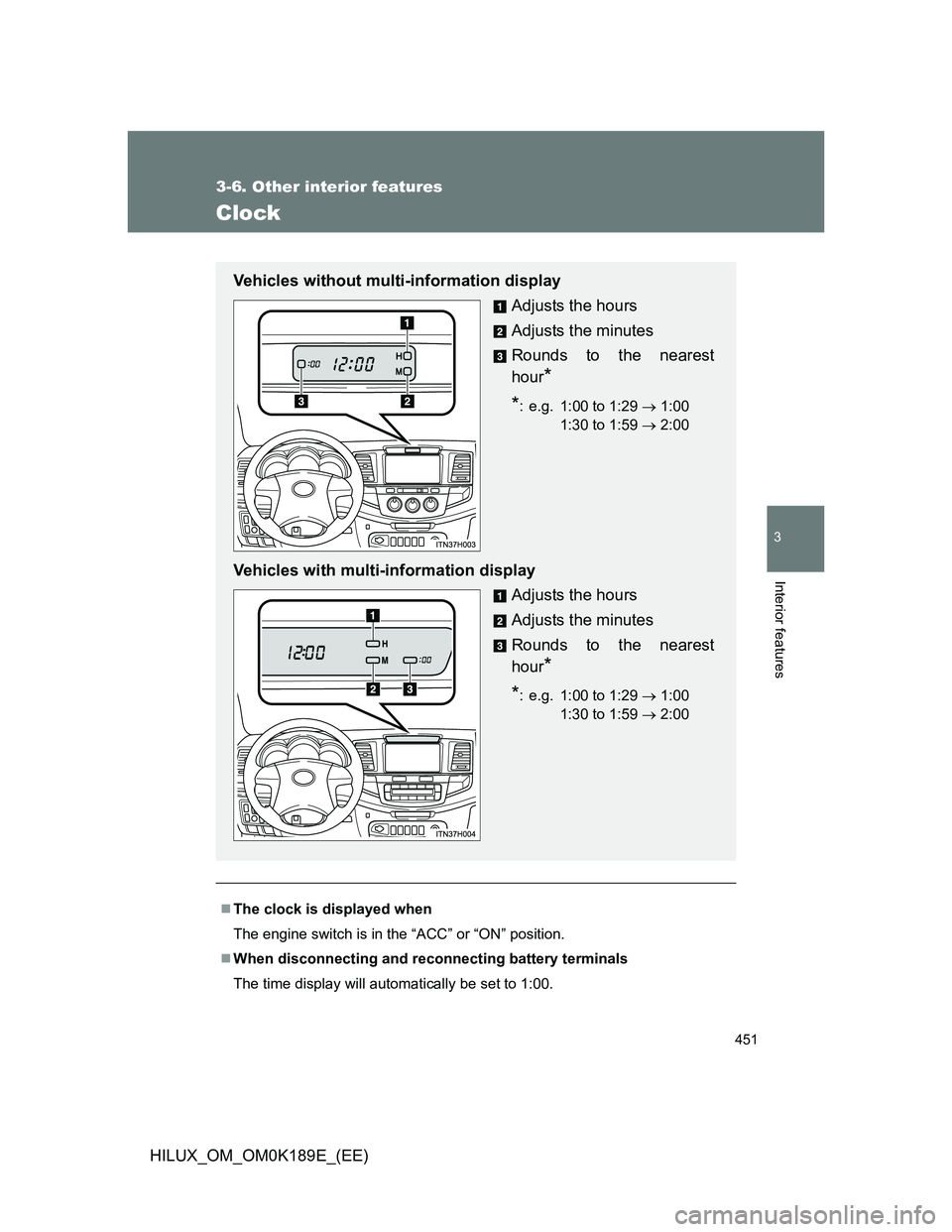
Clock
The clock is displayed when
The engine switch is in the “ACC” or “ON” position.
When disconnecting and reconnecting battery terminals
The time display will automatically be set to 1:00.
Vehicles without multi-information display
Adjusts the hours
Adjusts the minutes
Rounds to the nearest
hour
*
*
: e.g. 1:00 to 1:29 1:00
1:30 to 1:59 2:00
Vehicles with multi-information display
Adjusts the hours
Adjusts the minutes
Rounds to the nearest
hour
*
*
: e.g. 1:00 to 1:29 1:00
1:30 to 1:59 2:00
Page 461 of 644
461 3-6. Other interior features
3
Interior features
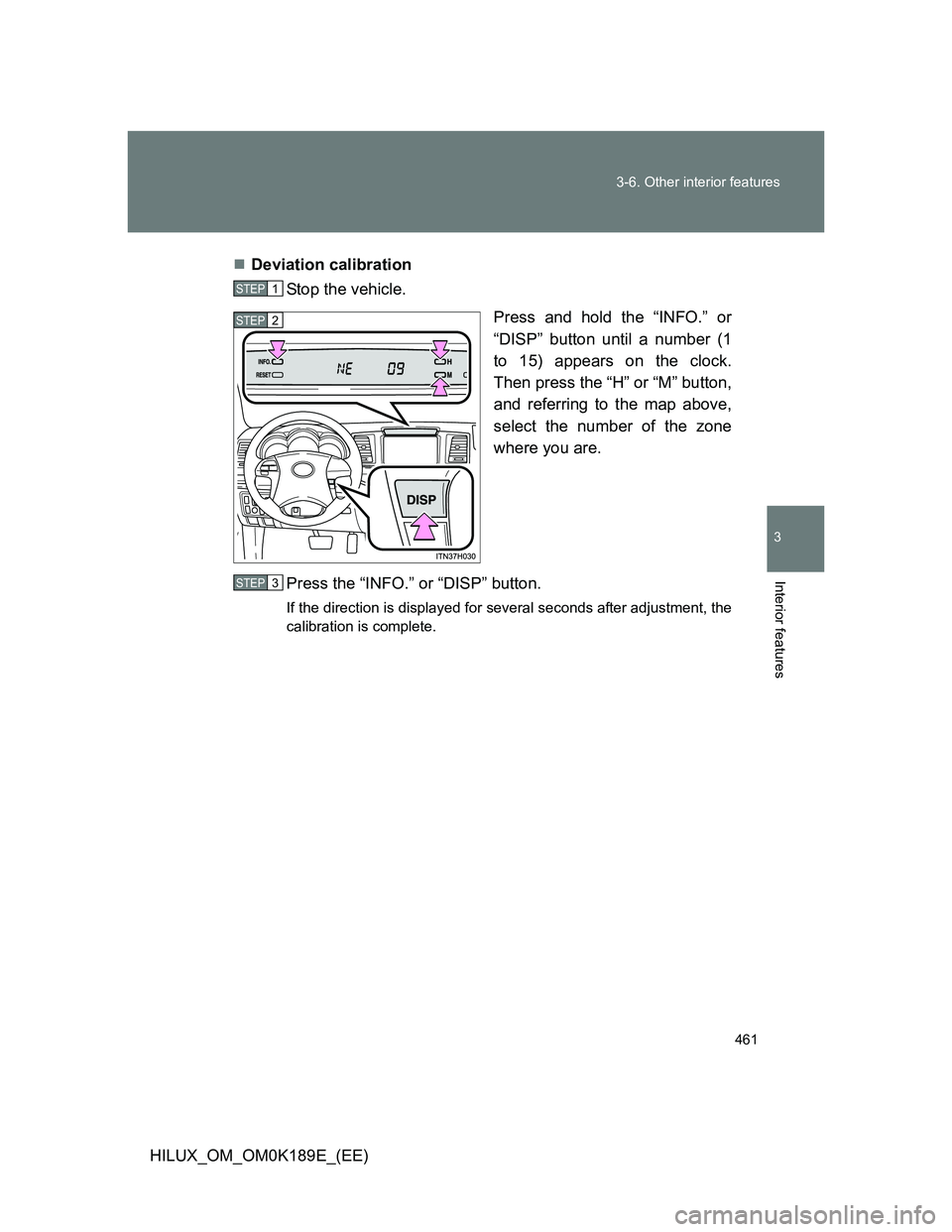
HILUX_OM_OM0K189E_(EE)Deviation calibration
Stop the vehicle.
Press and hold the “INFO.” or
“DISP” button until a number (1
to 15) appears on the clock.
Then press the “H” or “M” button,
and referring to the map above,
select the number of the zone
where you are.
Press the “INFO.” or “DISP” button.
If the direction is displayed for several seconds after adjustment, the
calibration is complete.
STEP1
STEP2
STEP3
Page 462 of 644
462 3-6. Other interior features
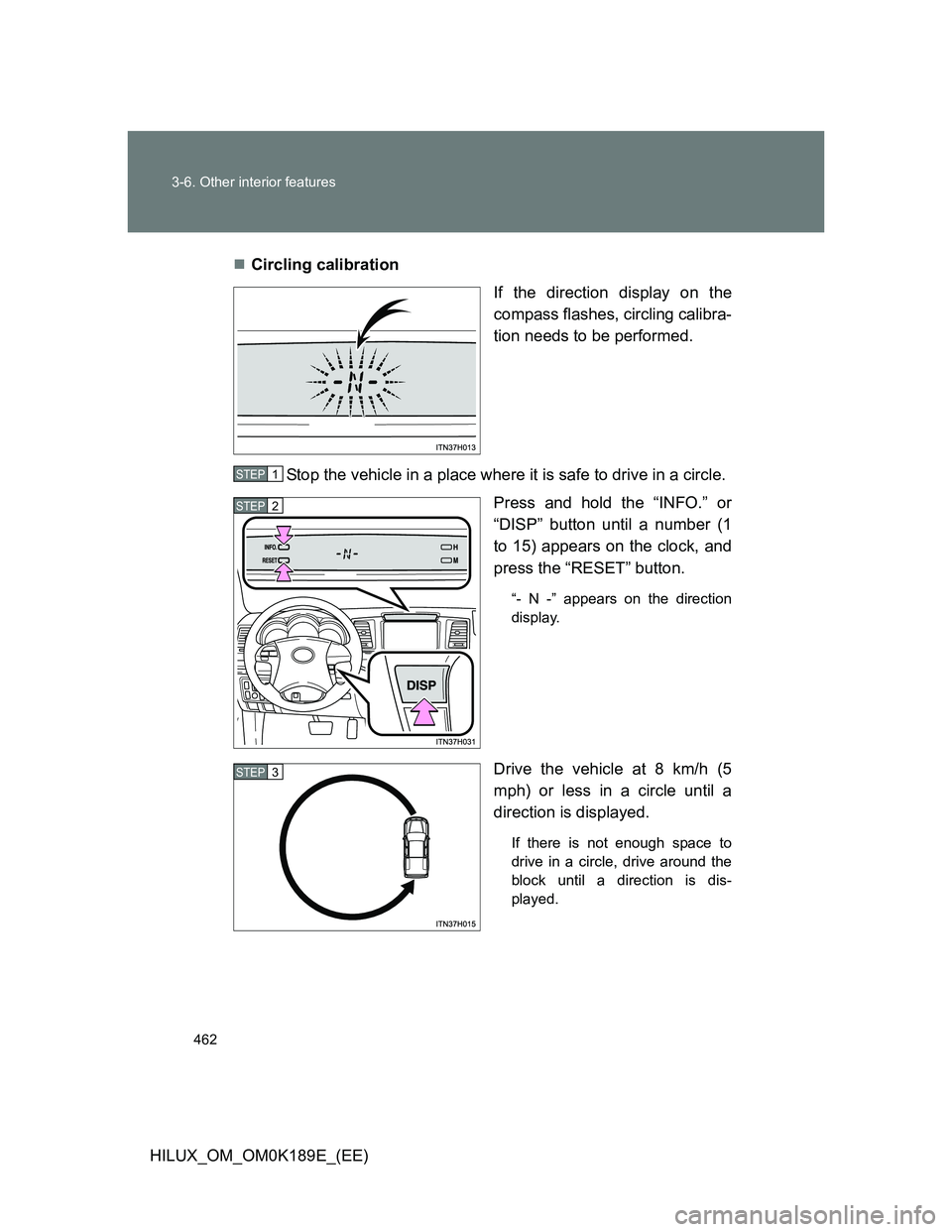
HILUX_OM_OM0K189E_(EE)Circling calibration
If the direction display on the
compass flashes, circling calibra-
tion needs to be performed.
Stop the vehicle in a place where it is safe to drive in a circle.
Press and hold the “INFO.” or
“DISP” button until a number (1
to 15) appears on the clock, and
press the “RESET” button.
“- N -” appears on the direction
display.
Drive the vehicle at 8 km/h (5
mph) or less in a circle until a
direction is displayed.
If there is not enough space to
drive in a circle, drive around the
block until a direction is dis-
played.
STEP1
STEP2
STEP3
Page 490 of 644
490 4-3. Do-it-yourself maintenance
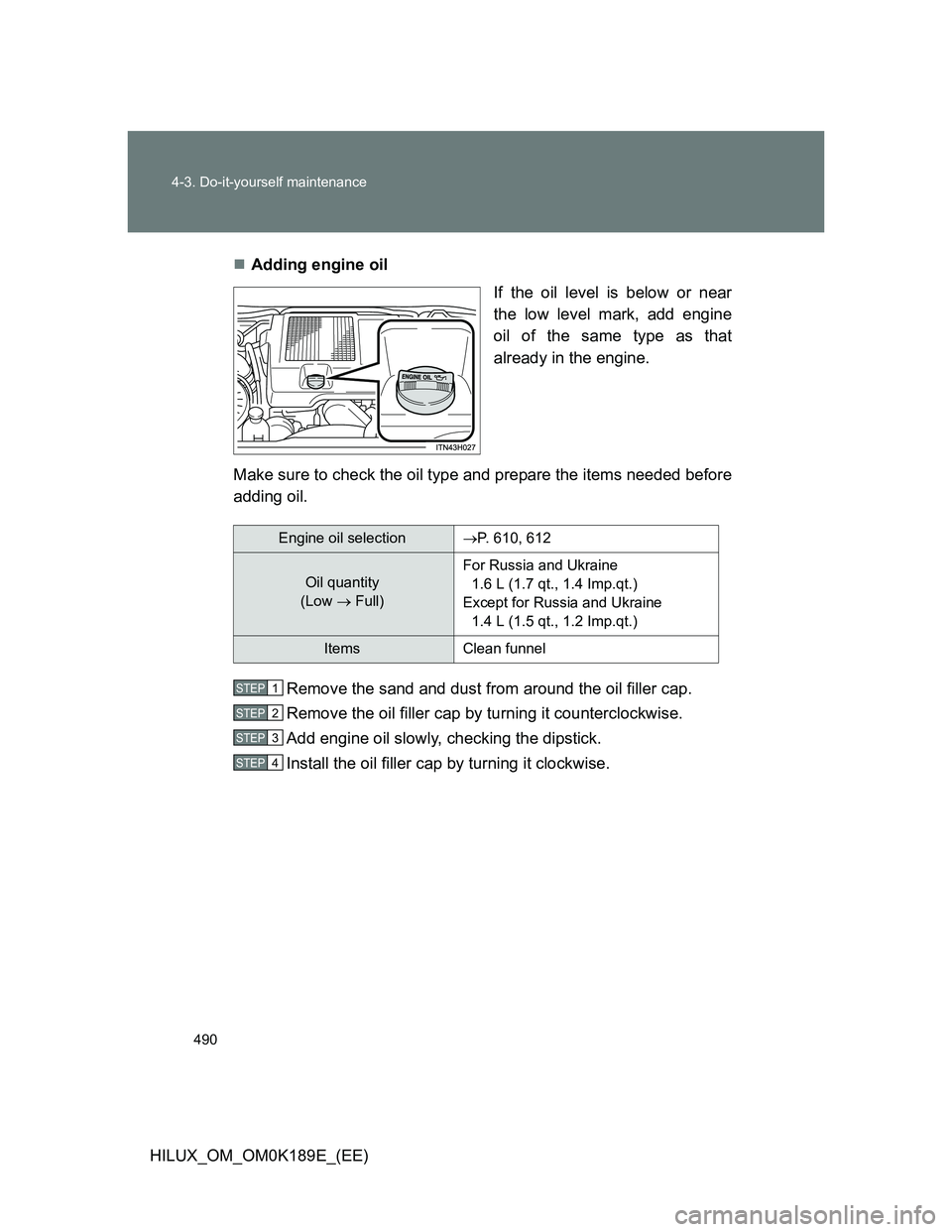
HILUX_OM_OM0K189E_(EE)Adding engine oil
If the oil level is below or near
the low level mark, add engine
oil of the same type as that
already in the engine.
Make sure to check the oil type and prepare the items needed before
adding oil.
Remove the sand and dust from around the oil filler cap.
Remove the oil filler cap by turning it counterclockwise.
Add engine oil slowly, checking the dipstick.
Install the oil filler cap by turning it clockwise.
Engine oil selectionP. 610, 612
Oil quantity
(Low Full)For Russia and Ukraine
1.6 L (1.7 qt., 1.4 Imp.qt.)
Except for Russia and Ukraine
1.4 L (1.5 qt., 1.2 Imp.qt.)
Items Clean funnel
STEP1
STEP2
STEP3
STEP4
Page 502 of 644
502 4-3. Do-it-yourself maintenance
HILUX_OM_OM0K189E_(EE)
Fuel filter
You may drain the fuel filter yourself. However, as the operation is dif-
ficult, we recommend having it drained by any authorized Toyota
dealer or repairer, or another duly qualified and equipped profes-
sional. Even if you decide to drain it yourself, contact any authorized
Toyota dealer or repairer, or another duly qualified and equipped pro-
fessional.
The water in the fuel filter needs to be drained if the fuel system
warning light flashes. (P. 560)
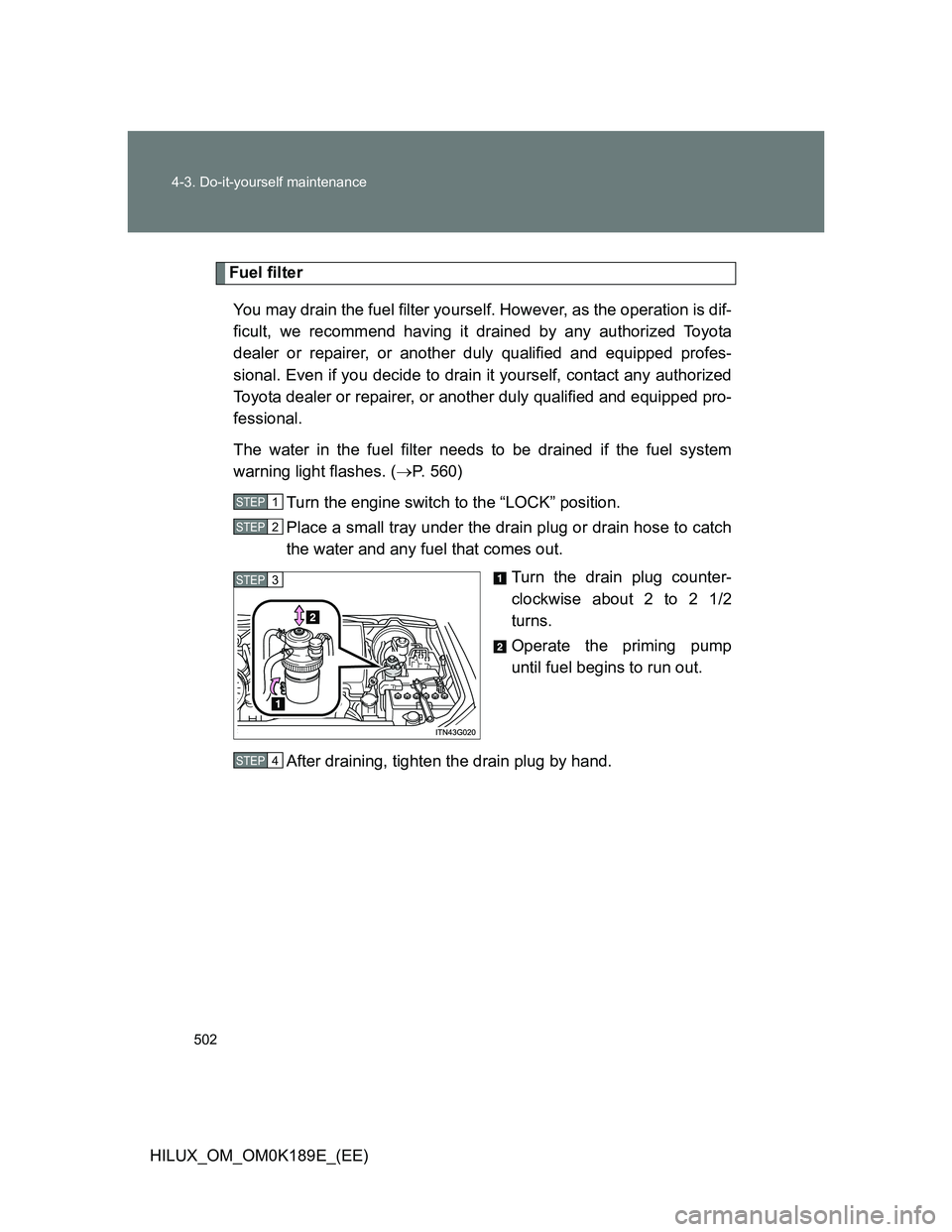
Turn the engine switch to the “LOCK” position.
Place a small tray under the drain plug or drain hose to catch
the water and any fuel that comes out.
Turn the drain plug counter-
clockwise about 2 to 2 1/2
turns.
Operate the priming pump
until fuel begins to run out.
After draining, tighten the drain plug by hand.
STEP1
STEP2
STEP3
STEP4
Page 525 of 644
525 4-3. Do-it-yourself maintenance
4
Maintenance and care
HILUX_OM_OM0K189E_(EE)
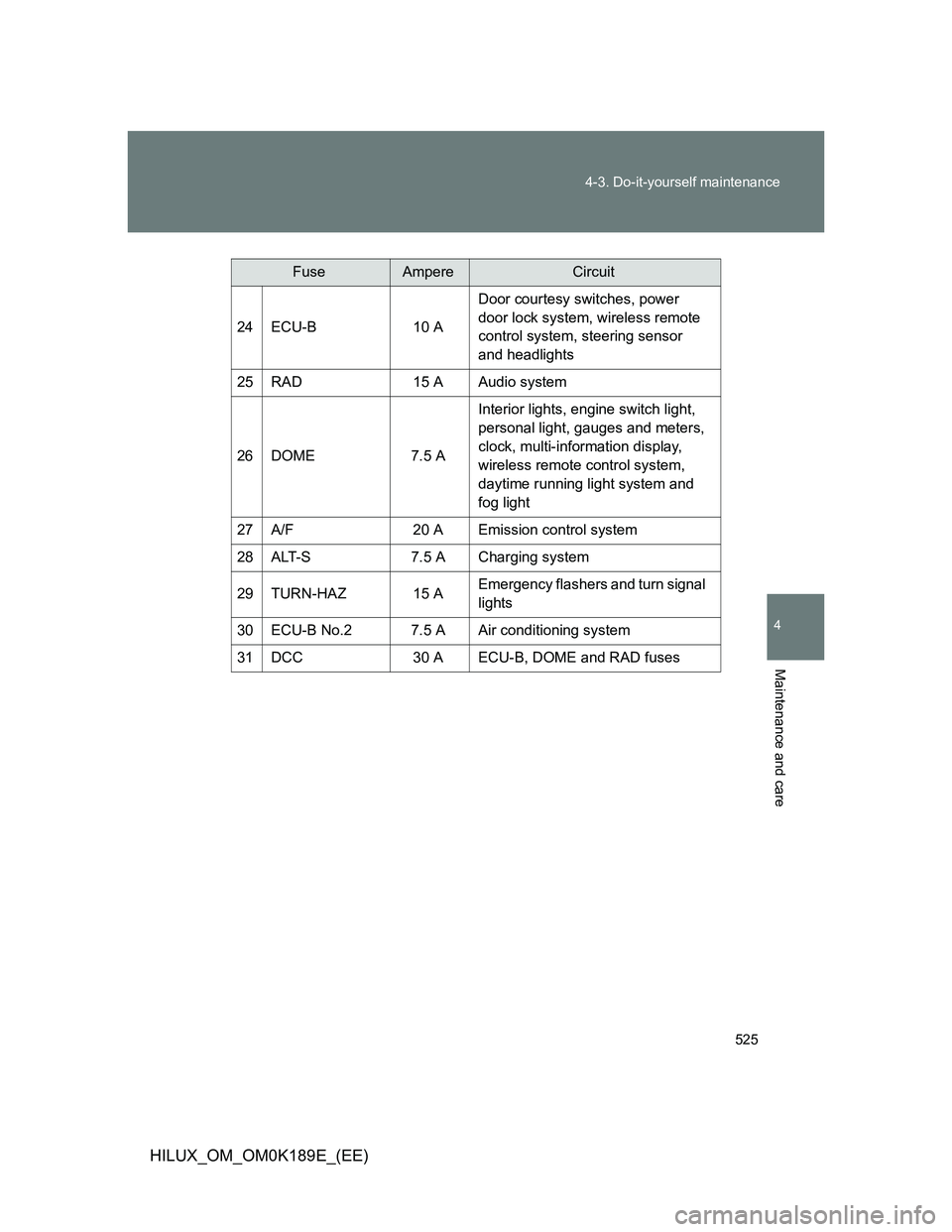
FuseAmpereCircuit
24ECU-B10 A
Door courtesy switches, power
door lock system, wireless remote
control system, steering sensor
and headlights
25RAD15 AAudio system
26DOME7.5 A
Interior lights, engine switch light,
personal light, gauges and meters,
clock, multi-information display,
wireless remote control system,
daytime running light system and
fog light
27A/F20 AEmission control system
28ALT-S7.5 ACharging system
29TURN-HAZ15 AEmergency flashers and turn signal
lights
30ECU-B No.27.5 AAir conditioning system
31DCC30 AECU-B, DOME and RAD fuses