ECO mode TOYOTA HILUX 2013 Owners Manual (in English)
[x] Cancel search | Manufacturer: TOYOTA, Model Year: 2013, Model line: HILUX, Model: TOYOTA HILUX 2013Pages: 644, PDF Size: 34.35 MB
Page 36 of 644
36
HILUX_OM_OM0K189E_(EE)
For your information
Main Owner’s Manual
Please note that this manual applies to all models and all equipment, includ-
ing options. Therefore, you may find some explanations for equipment not
installed on your vehicle.
All specifications provided in this manual are current at the time of printing.
However, because of the Toyota policy of continual product improvement, we
reserve the right to make changes at any time without notice.
Depending on specifications, the vehicle shown in the illustrations may differ
from your vehicle in terms of equipment.
Accessories, spare parts and modification of your Toyota
Both genuine Toyota and a wide variety of other spare parts and accessories
for Toyota vehicles are currently available on the market. Should it be deter-
mined that any of the genuine Toyota parts or accessories supplied with the
vehicle need to be replaced, Toyota recommends that genuine Toyota parts
or accessories, be used to replace them. Other parts or accessories of
matching quality can also be used. Toyota cannot accept any liability or guar-
antee spare parts and accessories which are not genuine Toyota products,
nor for replacement or installation involving such parts. In addition, damage
or performance problems resulting from the use of non-genuine Toyota spare
parts or accessories may not be covered under warranty.
Page 183 of 644
183 2-2. Instrument cluster
2
When driving
HILUX_OM_OM0K189E_(EE)
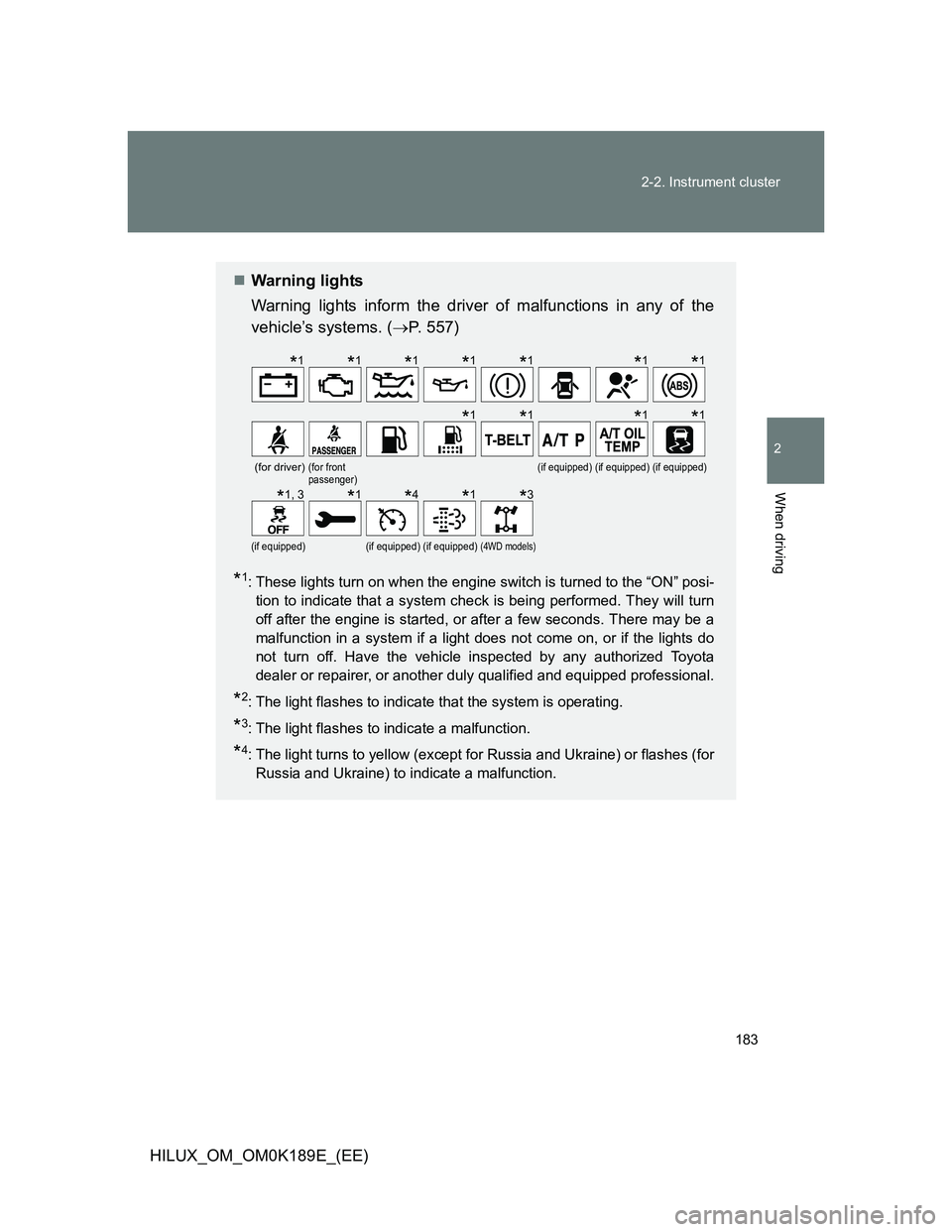
Warning lights
Warning lights inform the driver of malfunctions in any of the
vehicle’s systems. (P. 557)
*1: These lights turn on when the engine switch is turned to the “ON” posi-
tion to indicate that a system check is being performed. They will turn
off after the engine is started, or after a few seconds. There may be a
malfunction in a system if a light does not come on, or if the lights do
not turn off. Have the vehicle inspected by any authorized Toyota
dealer or repairer, or another duly qualified and equipped professional.
*2: The light flashes to indicate that the system is operating.
*3: The light flashes to indicate a malfunction.
*4: The light turns to yellow (except for Russia and Ukraine) or flashes (for
Russia and Ukraine) to indicate a malfunction.
(for driver)(for front
passenger)(if equipped)(if equipped)(if equipped)
(if equipped)(if equipped)(if equipped)(4WD models)
*1*1*1*1*1*1*1
*1*1*1*1
*1, 3*1*4*1*3
Page 212 of 644
212
2-4. Using other driving systems
HILUX_OM_OM0K189E_(EE)
Four-wheel drive system
: If equipped
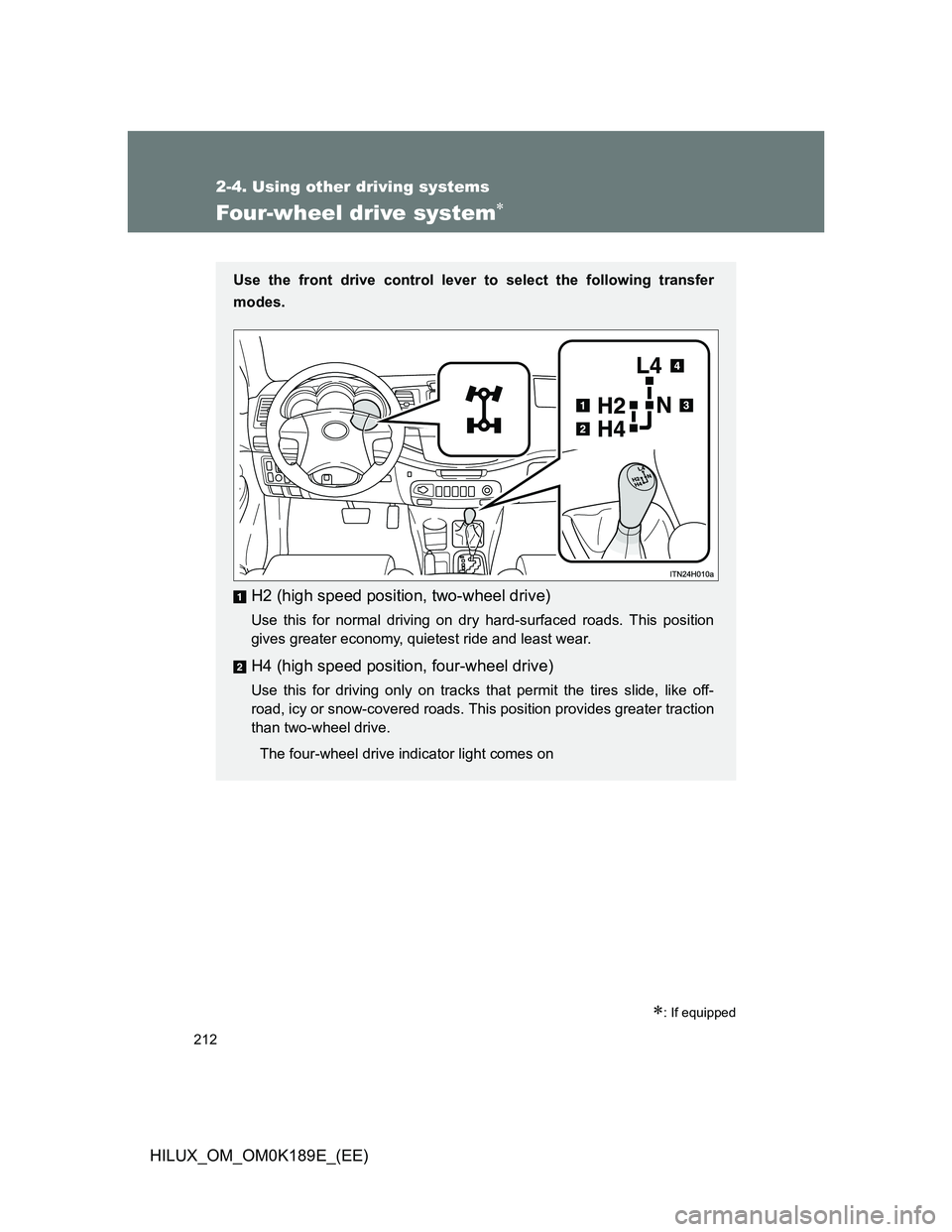
Use the front drive control lever to select the following transfer
modes.
H2 (high speed position, two-wheel drive)
Use this for normal driving on dry hard-surfaced roads. This position
gives greater economy, quietest ride and least wear.
H4 (high speed position, four-wheel drive)
Use this for driving only on tracks that permit the tires slide, like off-
road, icy or snow-covered roads. This position provides greater traction
than two-wheel drive.
The four-wheel drive indicator light comes on
Page 256 of 644
256 3-1. Using the air conditioning system and defogger
HILUX_OM_OM0K189E_(EE)
Fogging up of the windows
The windows will easily fog up when the humidity in the vehicle is high.
Turning the “A/C” button on will dehumidify the air from the outlets and
defog the windshield effectively.
If you turn the “A/C” button off, the windows may fog up more easily.
The windows may fog up if the recirculated air mode is used.
Outside/recirculated air mode
When driving on dusty roads such as tunnels or in heavy traffic, set the out-
side/recirculated air mode lever to the recirculated air mode. This is effective
in preventing outside air from entering the vehicle interior. During cooling
operation, setting the recirculated air mode will also cool the vehicle interior
effectively.
When the outside temperature falls to nearly 0°C (32°F)
The dehumidification function may not operate even when the “A/C” button
is pressed.
Air conditioning odors
During use, various odors from inside and outside the vehicle may enter
into and accumulate in the air conditioning system. This may then cause
odor to be emitted from the vents.
To reduce potential odors from occurring:
It is recommended that the air conditioning system be set to outside air
mode prior to turning the vehicle off.
Air conditioning filter
P. 5 1 1
Page 264 of 644
264 3-1. Using the air conditioning system and defogger
HILUX_OM_OM0K189E_(EE)
Air conditioning odors
During use, various odors from inside and outside the vehicle may enter
into and accumulate in the air conditioning system. This may then cause
odor to be emitted from the vents.
To reduce potential odors from occurring:
• It is recommended that the air conditioning system be set to outside air
mode prior to turning the vehicle off.
• The start timing of the blower may be delayed for a short period of time
immediately after the air conditioning system is started in AUTO mode.
Air conditioning filter
P. 5 1 1
CAUTION
To prevent the windshield from fogging up
Do not use during cool air operation in extremely humid weather.
The difference between the temperature of the outside air and that of the
windshield can cause the outer surface of the windshield to fog up, blocking
your vision.
NOTICE
To prevent battery discharge
Do not leave the air conditioning system on longer than necessary when the
engine is stopped.
Page 286 of 644
286 3-2. Using the audio system
HILUX_OM_OM0K189E_(EE)
Discs that can be used
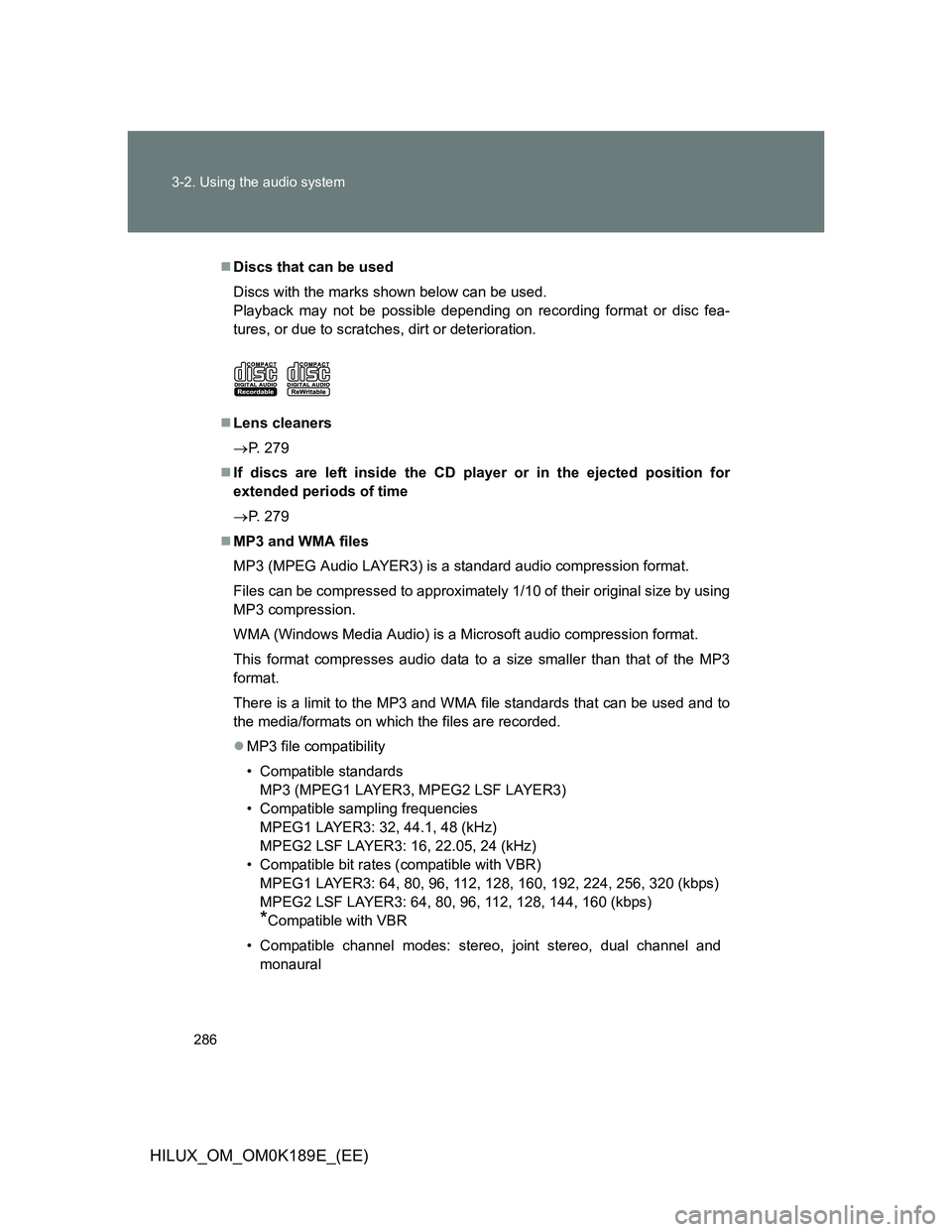
Discs with the marks shown below can be used.
Playback may not be possible depending on recording format or disc fea-
tures, or due to scratches, dirt or deterioration.
Lens cleaners
P. 279
If discs are left inside the CD player or in the ejected position for
extended periods of time
P. 279
MP3 and WMA files
MP3 (MPEG Audio LAYER3) is a standard audio compression format.
Files can be compressed to approximately 1/10 of their original size by using
MP3 compression.
WMA (Windows Media Audio) is a Microsoft audio compression format.
This format compresses audio data to a size smaller than that of the MP3
format.
There is a limit to the MP3 and WMA file standards that can be used and to
the media/formats on which the files are recorded.
MP3 file compatibility
• Compatible standards
MP3 (MPEG1 LAYER3, MPEG2 LSF LAYER3)
• Compatible sampling frequencies
MPEG1 LAYER3: 32, 44.1, 48 (kHz)
MPEG2 LSF LAYER3: 16, 22.05, 24 (kHz)
• Compatible bit rates (compatible with VBR)
MPEG1 LAYER3: 64, 80, 96, 112, 128, 160, 192, 224, 256, 320 (kbps)
MPEG2 LSF LAYER3: 64, 80, 96, 112, 128, 144, 160 (kbps)
*Compatible with VBR
• Compatible channel modes: stereo, joint stereo, dual channel and
monaural
Page 293 of 644
293 3-2. Using the audio system
3
Interior features
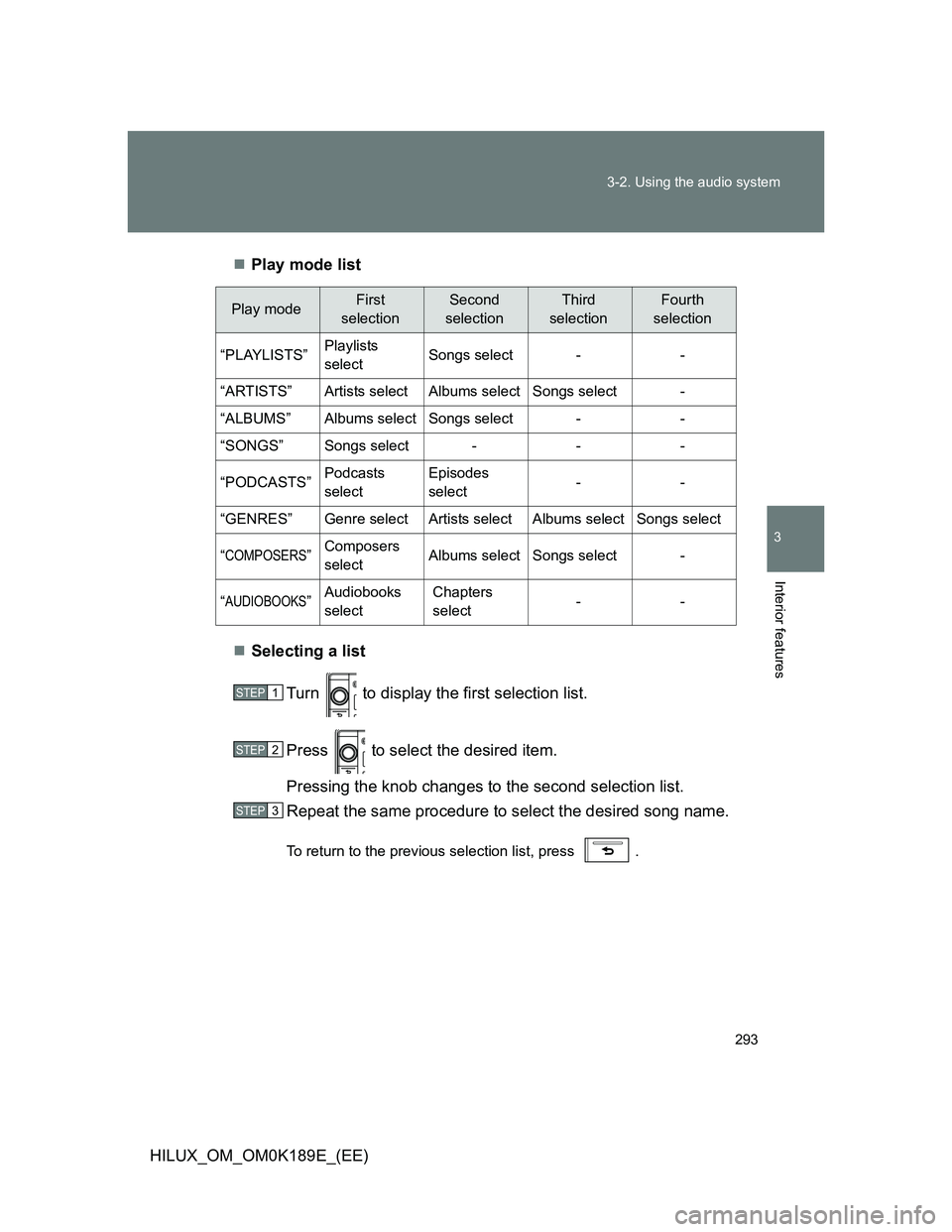
HILUX_OM_OM0K189E_(EE)Play mode list
Selecting a list
Turn to display the first selection list.
Press to select the desired item.
Pressing the knob changes to the second selection list.
Repeat the same procedure to select the desired song name.
To return to the previous selection list, press .
Play modeFirst
selectionSecond
selectionThird
selectionFourth
selection
“PLAYLISTS”Playlists
selectSongs select--
“ARTISTS”Artists selectAlbums selectSongs select-
“ALBUMS”Albums selectSongs select--
“SONGS”Songs select---
“PODCASTS”Podcasts
selectEpisodes
select--
“GENRES”Genre selectArtists selectAlbums selectSongs select
“COMPOSERS”Composers
selectAlbums selectSongs select-
“AUDIOBOOKS”Audiobooks
selectChapters
select--
STEP1
STEP2
STEP3
Page 296 of 644
296 3-2. Using the audio system
HILUX_OM_OM0K189E_(EE)
About iPod
“Made for iPod” and “Made for iPhone” mean that an electronic acces-
sory has been designed to connect specifically to iPod, or iPhone,
respectively, and has been certified by the developer to meet Apple per-
formance standards.
Apple is not responsible for the operation of this device or its compliance
with safety and regulatory standards. Please note that the use of this
accessory with iPod or iPhone may affect wireless performance.
iPhone, iPod, iPod classic, iPod nano and iPod touch are trademarks of
Apple Inc., registered in the U.S. and other countries.
iPod functions
When an iPod is connected and the audio source is changed to iPod
mode, the iPod will resume play from the same point in which it was last
used.
Depending on the iPod that is connected to the system, certain functions
may not be available. Disconnecting the device and reconnecting it once
again may resolve some malfunctions.
While connected to the system, the iPod cannot be operated with its own
controls. It is necessary to use the controls of the vehicle’s audio system
instead.
iPod problems
To resolve most problems encountered when using your iPod, disconnect
your iPod from the vehicle iPod connection and reset it.
For instructions on how to reset your iPod, refer to your iPod Owner’s Man-
ual.
Page 304 of 644
304 3-2. Using the audio system
HILUX_OM_OM0K189E_(EE)
Repeat play
Pressing the 1 (RPT) button changes modes in the following order:
File repeat
Folder repeat* Off.
*: Available except when RDM (random playback) is selected
Switching the display
Press the “TEXT” button.
Each time the button is pressed, the display changes in the following
order: Track no./Elapsed time Folder name File name
Album title (MP3 only) Track title Artist name
USB memory functions
Depending on the USB memory that is connected to the system, the
device itself may not be operable and certain functions may not be avail-
able. If the device is inoperable or a function is unavailable due to a mal-
function (as opposed to a system specification), disconnecting the device
and reconnecting it once again may resolve the problem.
If the USB memory still does not begin operation after being discon-
nected and reconnected, format the memory.
Display
P. 278
Page 306 of 644
306 3-2. Using the audio system
HILUX_OM_OM0K189E_(EE)
MP3 file compatibility
• Compatible standards
MP3 (MPEG1 AUDIO LAYERII, III, MPEG2 AUDIO LAYERII, III,
MPEG2.5)
• Compatible sampling frequencies
MPEG1 AUDIO LAYERII, III: 32, 44.1, 48 (kHz)
MPEG2 AUDIO LAYERII, III: 16, 22.05, 24 (kHz)
MPEG2.5: 8, 11.025, 12 (kHz)
• Compatible bit rates (compatible with VBR)
MPEG1 AUDIO LAYERII, III: 32-320 (kbps)
MPEG2 AUDIO LAYERII, III: 32-160 (kbps)
MPEG2.5: 32-160 (kbps)
• Compatible channel modes: stereo, joint stereo, dual channel and
monaural
WMA file compatibility
• Compatible standards
WMA Ver. 7, 8, 9
• Compatible sampling frequencies
HIGH PROFILE 32, 44.1, 48 (kHz)
• Compatible bit rates
HIGH PROFILE 32-320 (kbps, VBR)
File names
The only files that can be recognized as MP3/WMA and played are those
with the extension .mp3 or .wma.