phone TOYOTA HILUX 2013 (in English) User Guide
[x] Cancel search | Manufacturer: TOYOTA, Model Year: 2013, Model line: HILUX, Model: TOYOTA HILUX 2013Pages: 644, PDF Size: 34.35 MB
Page 322 of 644
322 3-3. Using the “touch screen”
HILUX_OM_OM0K134E_(EE)A confirmation screen will be displayed. Touch “Yes”.
The following personal data can be deleted or turned to their default
settings.
• Phonebook data
• Call history data
• Speed dial data
• Bluetooth
devices data
• Phone sound settings
• Detailed Bluetooth
settings
• Audio settings
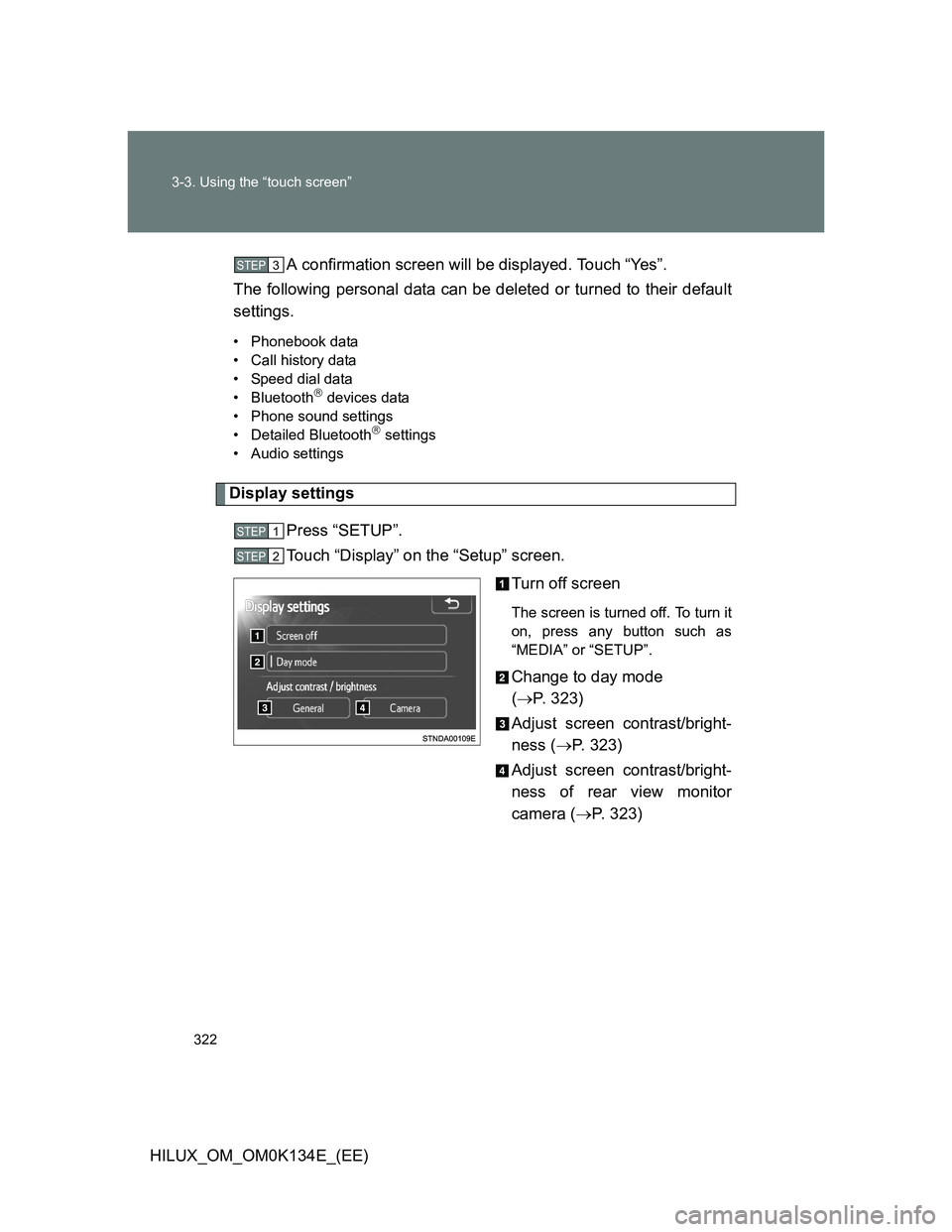
Display settings
Press “SETUP”.
Touch “Display” on the “Setup” screen.
Turn off screen
The screen is turned off. To turn it
on, press any button such as
“MEDIA” or “SETUP”.
Change to day mode
(P. 323)
Adjust screen contrast/bright-
ness (P. 323)
Adjust screen contrast/bright-
ness of rear view monitor
camera (P. 323)
STEP3
STEP1
STEP2
Page 329 of 644
329 3-3. Using the “touch screen”
3
Interior features
HILUX_OM_OM0K134E_(EE)
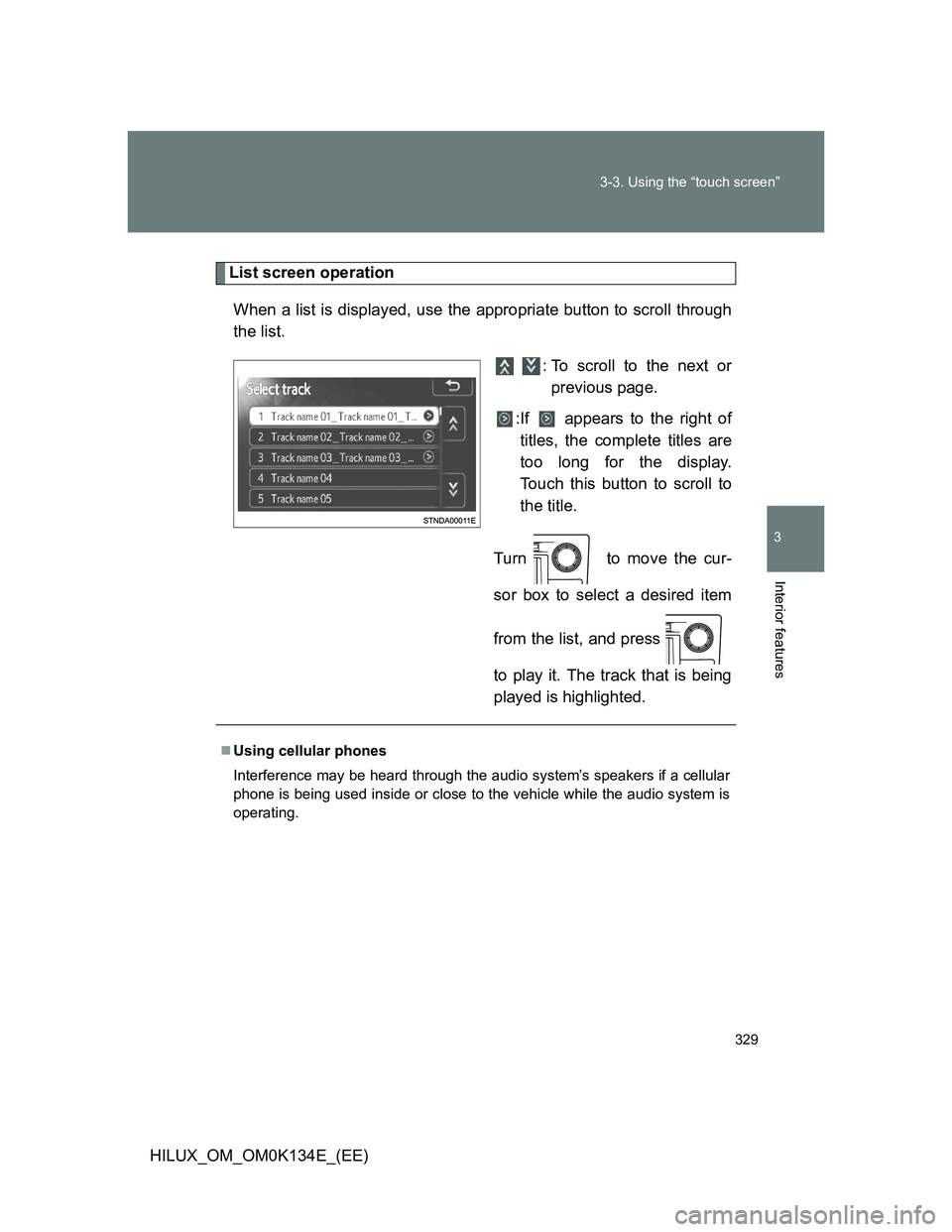
List screen operation
When a list is displayed, use the appropriate button to scroll through
the list.
: To scroll to the next or
previous page.
:If appears to the right of
titles, the complete titles are
too long for the display.
Touch this button to scroll to
the title.
Turn to move the cur-
sor box to select a desired item
from the list, and press
to play it. The track that is being
played is highlighted.
Using cellular phones
Interference may be heard through the audio system’s speakers if a cellular
phone is being used inside or close to the vehicle while the audio system is
operating.
Page 355 of 644
355 3-3. Using the “touch screen”
3
Interior features
HILUX_OM_OM0K134E_(EE)
About iPod
“Made for iPod” and “Made for iPhone” mean that an electronic acces-
sory has been designed to connect specifically to iPod, or iPhone,
respectively, and has been certified by the developer to meet Apple per-
formance standards.
Apple is not responsible for the operation of this device or its compliance
with safety and regulatory standards. Please note that the use of this
accessory with iPod or iPhone may affect wireless performance.
iPhone, iPod, iPod classic, iPod nano and iPod touch are trademarks of
Apple Inc., registered in the U.S. and other countries.
iPod cover art
Depending on the iPod and songs in the iPod, iPod cover art may be dis-
played.
This function can be changed to “On” or “Off”. (P. 320)
It may take time to display iPod cover art, and the iPod may not be oper-
ated while the cover art display is in process.
Only iPod cover art that is saved in a JPEG format can be displayed.
Page 358 of 644
358 3-3. Using the “touch screen”
HILUX_OM_OM0K134E_(EE)
Compatible models
The following iPod
®, iPod nano®, iPod classic®, iPod touch® and iPhone®
devices can be used with this system.
Made for
• iPod touch (4th generation)
• iPod touch (3rd generation)
• iPod touch (2nd generation)
• iPod touch (1st generation)
• iPod classic
• iPod with video
• iPod nano (6th generation)
• iPod nano (5th generation)
• iPod nano (4th generation)
• iPod nano (3rd generation)
• iPod nano (2nd generation)
• iPod nano (1st generation)
• iPhone 4
• iPhone 3GS
• iPhone 3G
• iPhone
Depending on differences between models or software versions etc., some
models might be incompatible with this system.
Page 381 of 644
381 3-3. Using the “touch screen”
3
Interior features
HILUX_OM_OM0K134E_(EE)
When using the Bluetooth® audio system
In the following conditions, the system may not function.
• If the portable audio player is turned off
• If the portable audio player is not connected
• If the portable audio player’s battery is low
There may be a delay if phone connection is carried out during Blue-
tooth
® audio play.
Depending on the type of portable audio player that is connected to the
system, operation may differ slightly and certain functions may not be
available.
Bluetooth
® antenna
The antenna is built into the display. If the portable audio player is behind the
seat or in the glove box or console box, or is touching or covered by metal
objects, connection status may deteriorate.
Battery charge/signal status
This display may not correspond exactly with the portable audio player, and
this system does not have a charging function.
About Bluetooth
®
Bluetooth is a registered trademark of
Bluetooth SIG. Inc.
The Bluetooth word mark and logos are
owned by the Bluetooth SIG, Inc. and any
use of such marks by Panasonic Corpo-
ration is under license. Other trademarks
and trade names are those of their
respective owners.
Page 382 of 644
382 3-3. Using the “touch screen”
HILUX_OM_OM0K134E_(EE)
Compatible models
Portable audio players must correspond to the specifications.
Bluetooth
® specifications:
Ver. 1.1, or higher (Recommended: Ver. 2.1 + EDR or higher)
Profiles:
• A2DP (Advanced Audio Distribution Profile) Ver. 1.0, or higher
(Recommended: Ver. 1.2 or higher)
This is a profile to transmit stereo audio or high quality sounds to the
headphone.
• AVRCP (Audio/Video Remote Control Profile) Ver. 1.0 or higher
(Recommended: Ver. 1.4 or higher)
This is a profile to remote control the A/V equipment.
However, please note that some functions may be limited depending on the
type of portable audio player.
Certification
P. 393
Reconnecting the portable audio player
If the portable audio player is disconnected due to a poor reception when the
engine switch is in the “ACC” or “ON” position, the system automatically
reconnects the portable audio player when possible.
If you have switched off the portable audio player yourself, follow the instruc-
tions below to reconnect:
Select the portable audio player again
Enter the portable audio player
When you release your car
Be sure to initialize your data. (P. 321)
Page 387 of 644
387
3-3. Using the “touch screen”
3
Interior features
HILUX_OM_OM0K134E_(EE)
Hands-free system (for cellular phone)
Then hands-free system is a function that allows you to use your cel-
lular phone without touching it.
This system supports Bluetooth
®. Bluetooth® is a wireless data sys-
tem that allows the cellular phone to wirelessly connect to the
hands-free system and make/receive calls.
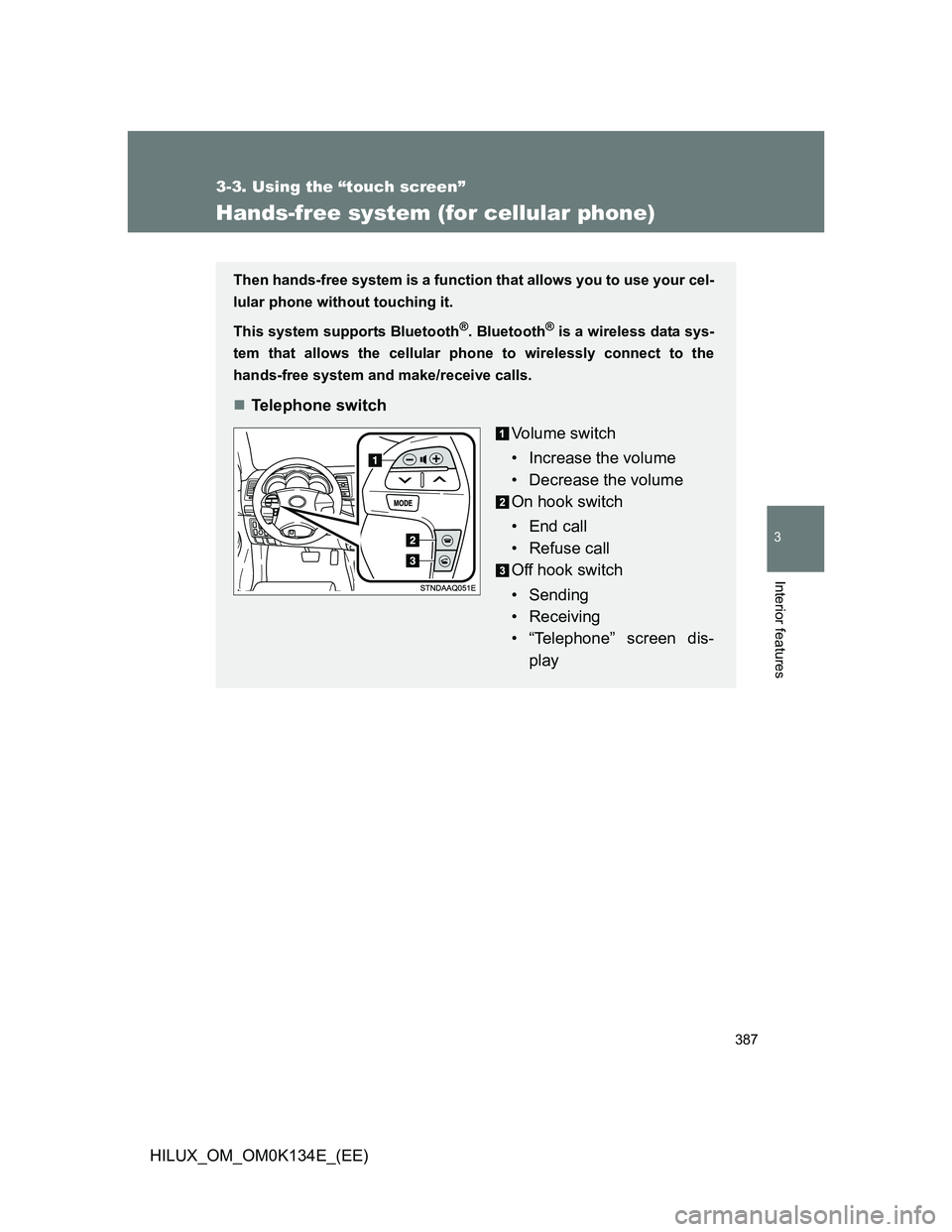
Telephone switch
Vo l u m e s w i t c h
• Increase the volume
• Decrease the volume
On hook switch
• End call
• Refuse call
Off hook switch
• Sending
• Receiving
• “Telephone” screen dis-
play
Page 388 of 644
388 3-3. Using the “touch screen”
HILUX_OM_OM0K134E_(EE)
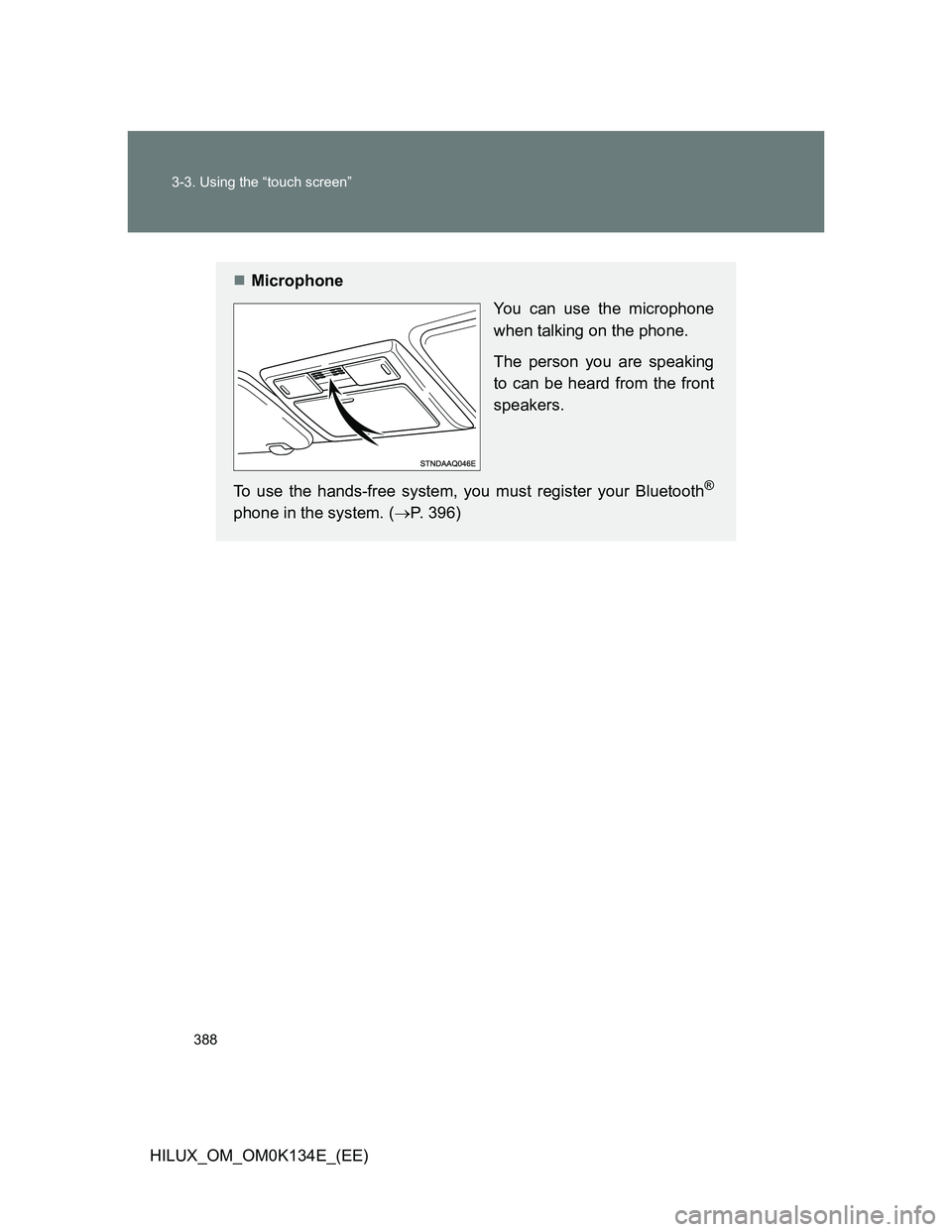
Microphone
You can use the microphone
when talking on the phone.
The person you are speaking
to can be heard from the front
speakers.
To use the hands-free system, you must register your Bluetooth
®
phone in the system. (P. 396)
Page 389 of 644
389 3-3. Using the “touch screen”
3
Interior features
HILUX_OM_OM0K134E_(EE)
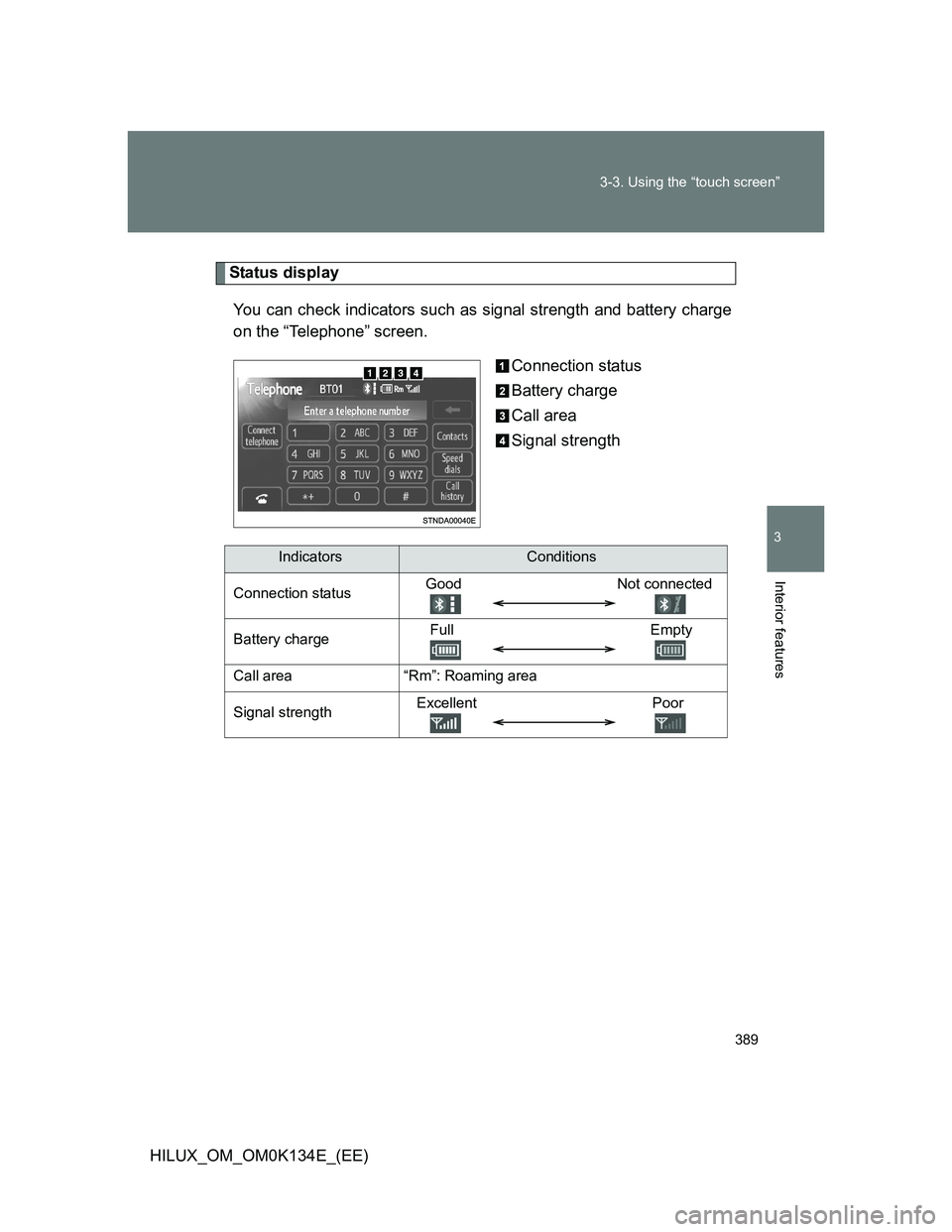
Status display
You can check indicators such as signal strength and battery charge
on the “Telephone” screen.
Connection status
Battery charge
Call area
Signal strength
IndicatorsConditions
Connection statusGood Not connected
Battery chargeFull Empty
Call area“Rm”: Roaming area
Signal strengthExcellent Poor
Page 390 of 644
390 3-3. Using the “touch screen”
HILUX_OM_OM0K134E_(EE)
When using the hands-free system
The audio system is muted when making a call.
If both parties speak at the same time, it may be difficult to hear.
If the received call volume is overly loud, an echo may be heard.
If the Bluetooth
® phone is too close to the system, quality of the sound
may deteriorate and connecting condition may go down.
In the following circumstances, it may be difficult to hear the other party:
• When driving on unpaved roads
• When driving at high speeds
• If a window is open
• If the air conditioning is blowing directly on the microphone
• There is an effect from the network of the cellular phone
Conditions under which the system will not operate
If using a cellular phone that does not support Bluetooth
®
If the cellular phone is turned off
If you are outside service range
If the cellular phone is not connected
If the cellular phone’s battery is low
When outgoing is controlled, due to heavy traffic on telephone lines, etc.
When the cellular phone itself cannot be used
When transferring the phonebook data from the cellular phone