CD player TOYOTA HILUX 2013 (in English) Owner's Manual
[x] Cancel search | Manufacturer: TOYOTA, Model Year: 2013, Model line: HILUX, Model: TOYOTA HILUX 2013Pages: 644, PDF Size: 34.35 MB
Page 344 of 644
344 3-3. Using the “touch screen”
HILUX_OM_OM0K134E_(EE)
CD player protection feature
To protect the internal components, playback is automatically stopped when
a problem is detected.
If disc is left inside the CD player or in the ejected position for
extended periods
Disc may be damaged and may not play properly.
Lens cleaners
Do not use lens cleaners. Doing so may damage the CD player.
MP3 and WMA files
MP3 (MPEG Audio LAYER 3) is a standard audio compression format.
Files can be compressed to approximately 1/10 of their original size by using
MP3 compression.
WMA (Windows Media Audio) is a Microsoft audio compression format.
This format compresses audio data to a size smaller than that of the MP3
format.
There is a limit to the MP3 and WMA file standards that can be used and to
the media/formats on which the files are recorded.
MP3 file compatibility
• Compatible standards
MP3 (MPEG1 LAYER3, MPEG2 LSF LAYER3)
• Compatible sampling frequencies
MPEG1 LAYER3: 32, 44.1, 48 (kHz)
MPEG2 LSF LAYER3: 16, 22.05, 24 (kHz)
• Compatible bit rates (compatible with VBR)
MPEG1 LAYER3: 32—320 (kbps)
MPEG2 LSF LAYER3: 8—160 (kbps)
• Compatible channel modes: stereo, joint stereo, dual channel and mon-
aural
Page 348 of 644
348 3-3. Using the “touch screen”
HILUX_OM_OM0K134E_(EE)
NOTICE
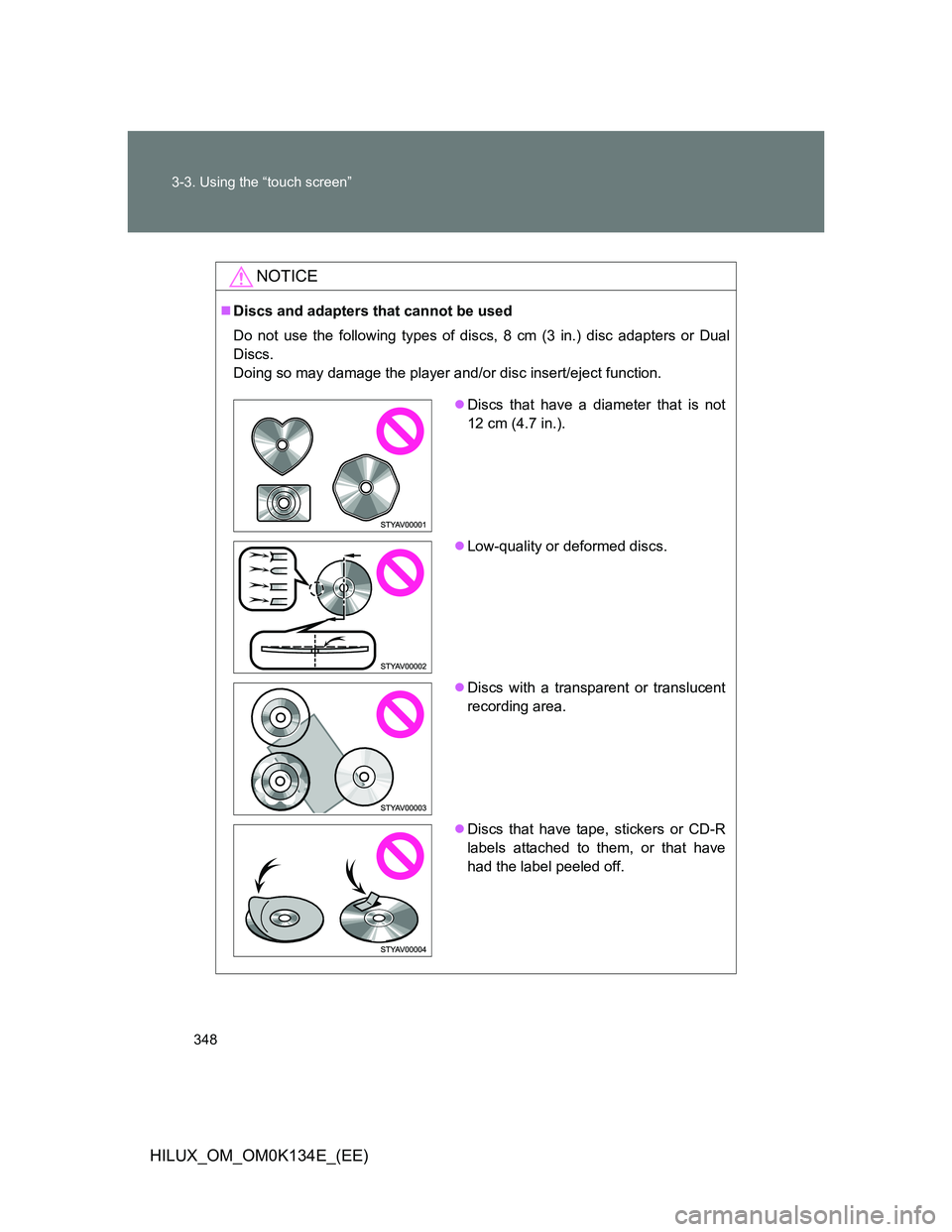
Discs and adapters that cannot be used
Do not use the following types of discs, 8 cm (3 in.) disc adapters or Dual
Discs.
Doing so may damage the player and/or disc insert/eject function.
Discs that have a diameter that is not
12 cm (4.7 in.).
Low-quality or deformed discs.
Discs with a transparent or translucent
recording area.
Discs that have tape, stickers or CD-R
labels attached to them, or that have
had the label peeled off.
Page 349 of 644
349 3-3. Using the “touch screen”
3
Interior features
HILUX_OM_OM0K134E_(EE)
NOTICE
Player precautions
Failure to follow the precautions below may result in damage to the discs or
the player itself.
Do not insert anything other than discs into the disc slot.
Do not apply oil to the player.
Store discs away from direct sunlight.
Never try to disassemble any part of the player.
Page 370 of 644
370
3-3. Using the “touch screen”
HILUX_OM_OM0K134E_(EE)
Listening to Bluetooth® audio
The Bluetooth® audio system enables users to enjoy music played
on a portable player from the vehicle speaker via wireless communi-
cation. This audio system supports Bluetooth
®, a wireless data sys-
tem capable of playing portable audio music without cables. If your
portable player does not support Bluetooth
®, the Bluetooth® audio
system will not function.
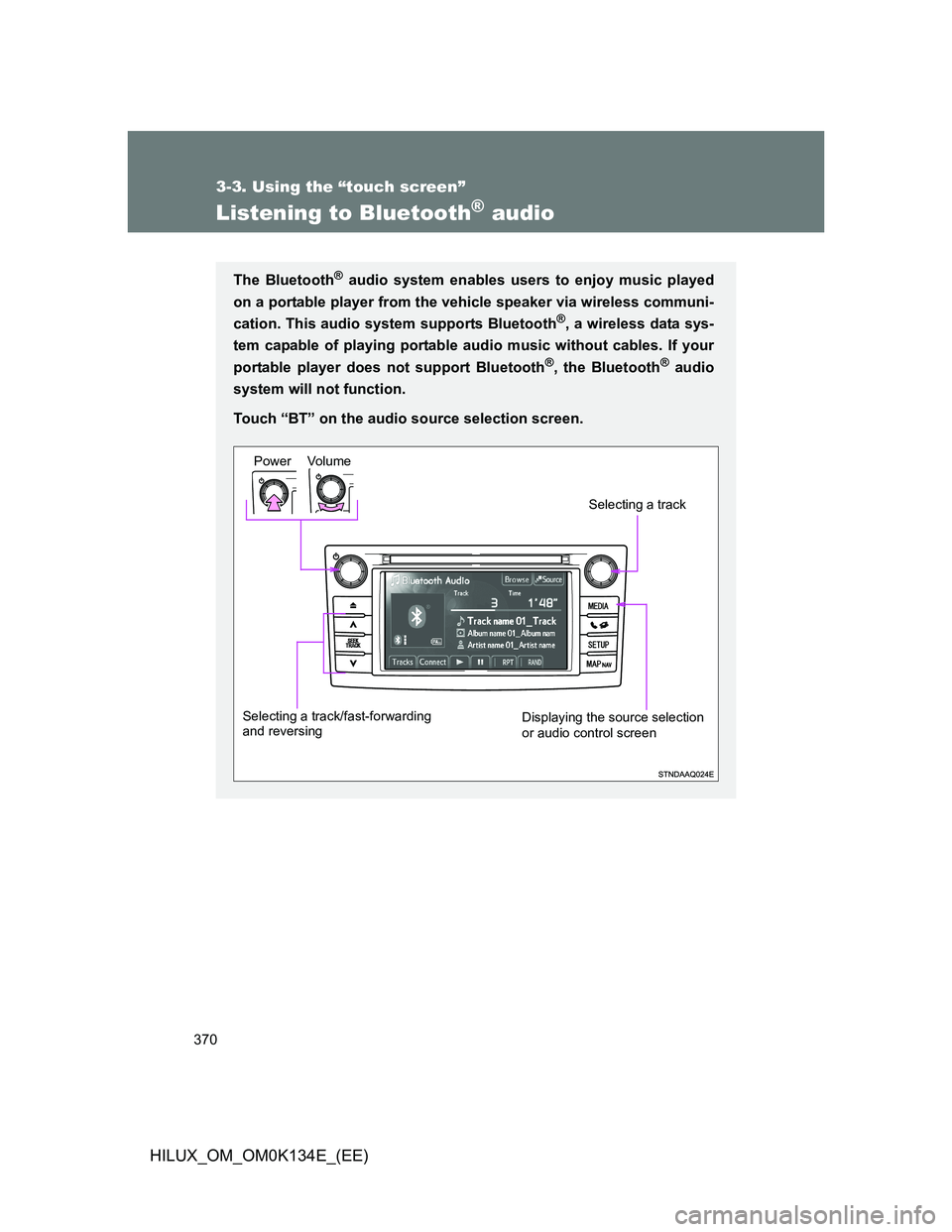
Touch “BT” on the audio source selection screen.
Vo lu m e Power
Selecting a track/fast-forwarding
and reversingDisplaying the source selection
or audio control screen
Selecting a track
Page 371 of 644
371 3-3. Using the “touch screen”
3
Interior features
HILUX_OM_OM0K134E_(EE)
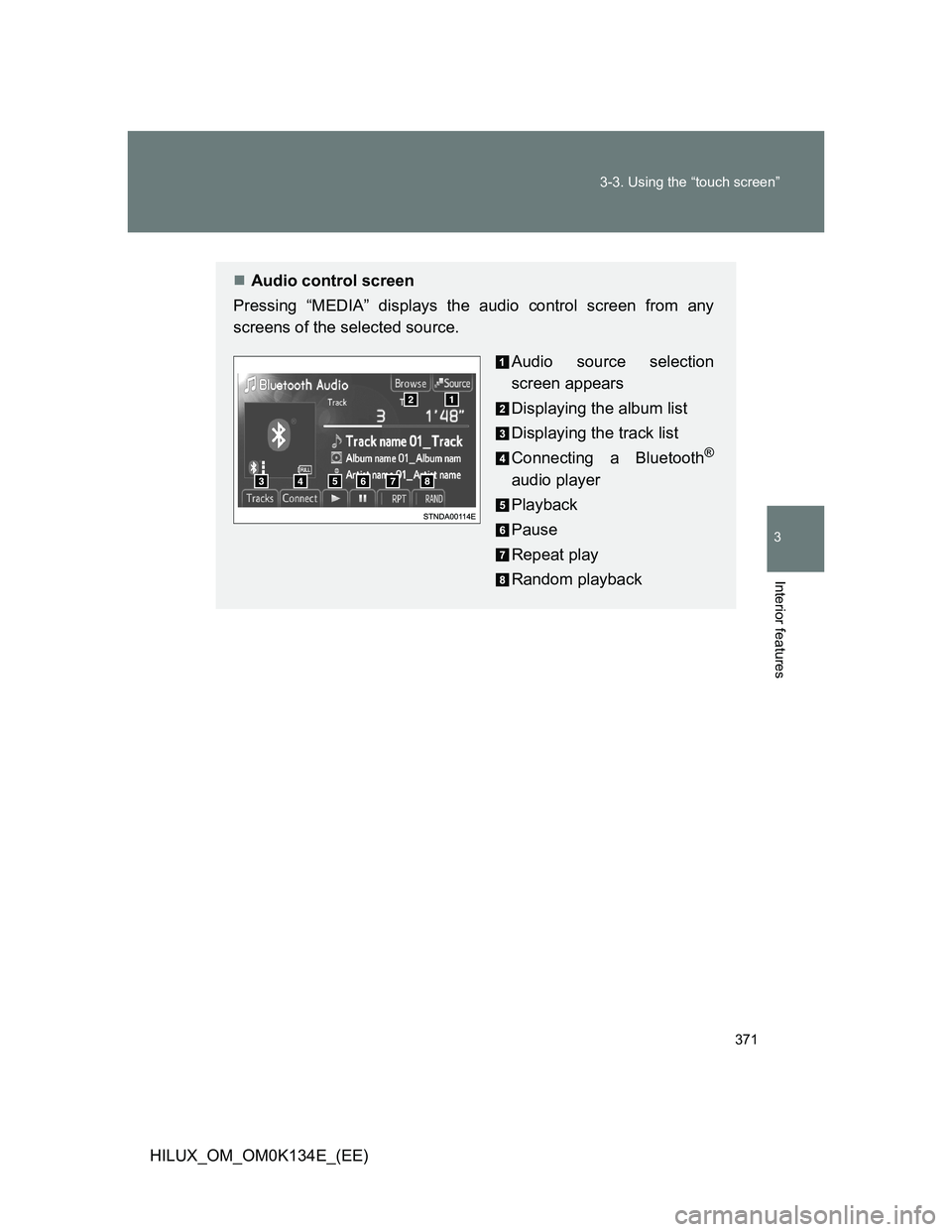
Audio control screen
Pressing “MEDIA” displays the audio control screen from any
screens of the selected source.
Audio source selection
screen appears
Displaying the album list
Displaying the track list
Connecting a Bluetooth
®
audio player
Playback
Pause
Repeat play
Random playback
Page 373 of 644
373 3-3. Using the “touch screen”
3
Interior features
HILUX_OM_OM0K134E_(EE)
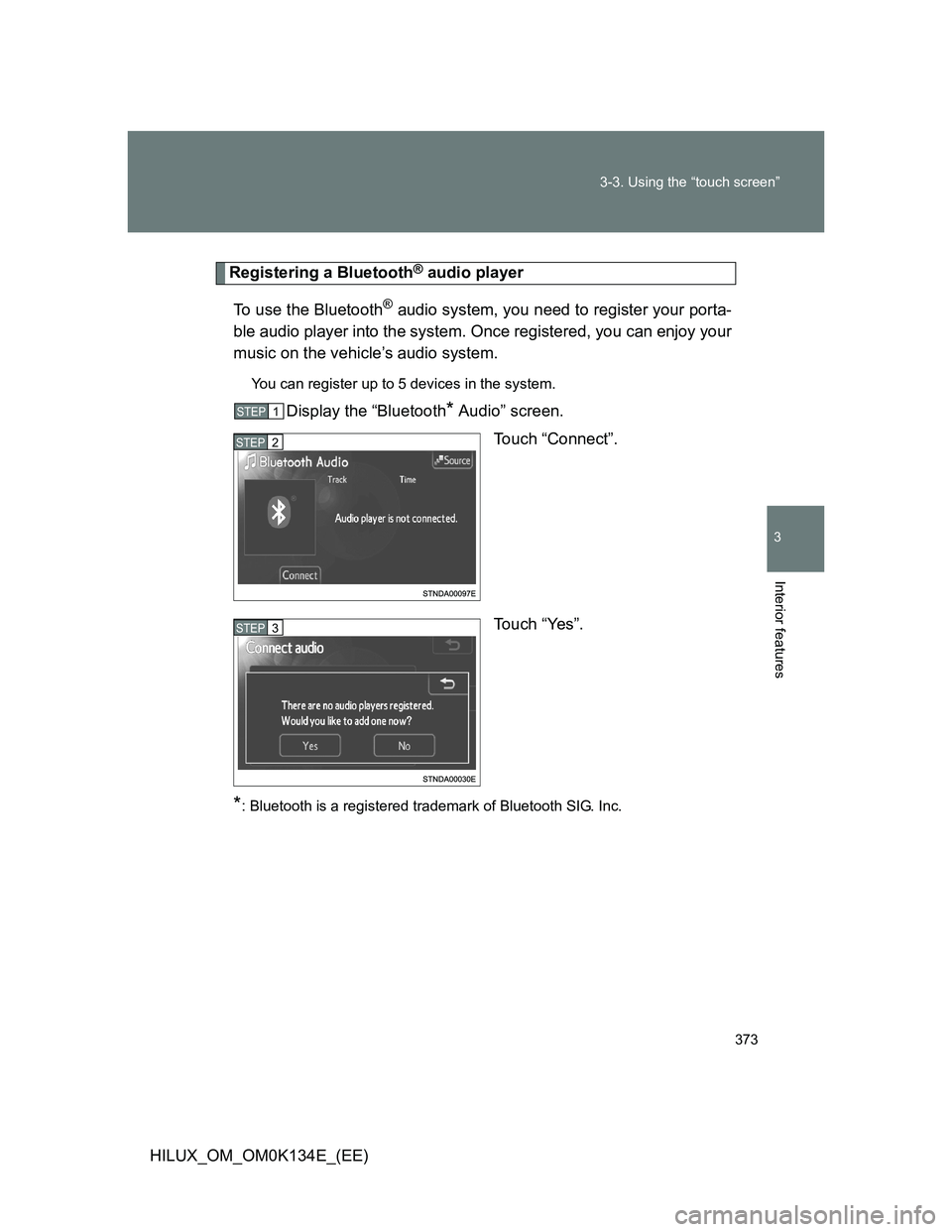
Registering a Bluetooth® audio player
To use the Bluetooth
® audio system, you need to register your porta-
ble audio player into the system. Once registered, you can enjoy your
music on the vehicle’s audio system.
You can register up to 5 devices in the system.
Display the “Bluetooth* Audio” screen.
Touch “Connect”.
Touch “Yes”.
*: Bluetooth is a registered trademark of Bluetooth SIG. Inc.
STEP1
STEP2
STEP3
Page 374 of 644
374 3-3. Using the “touch screen”
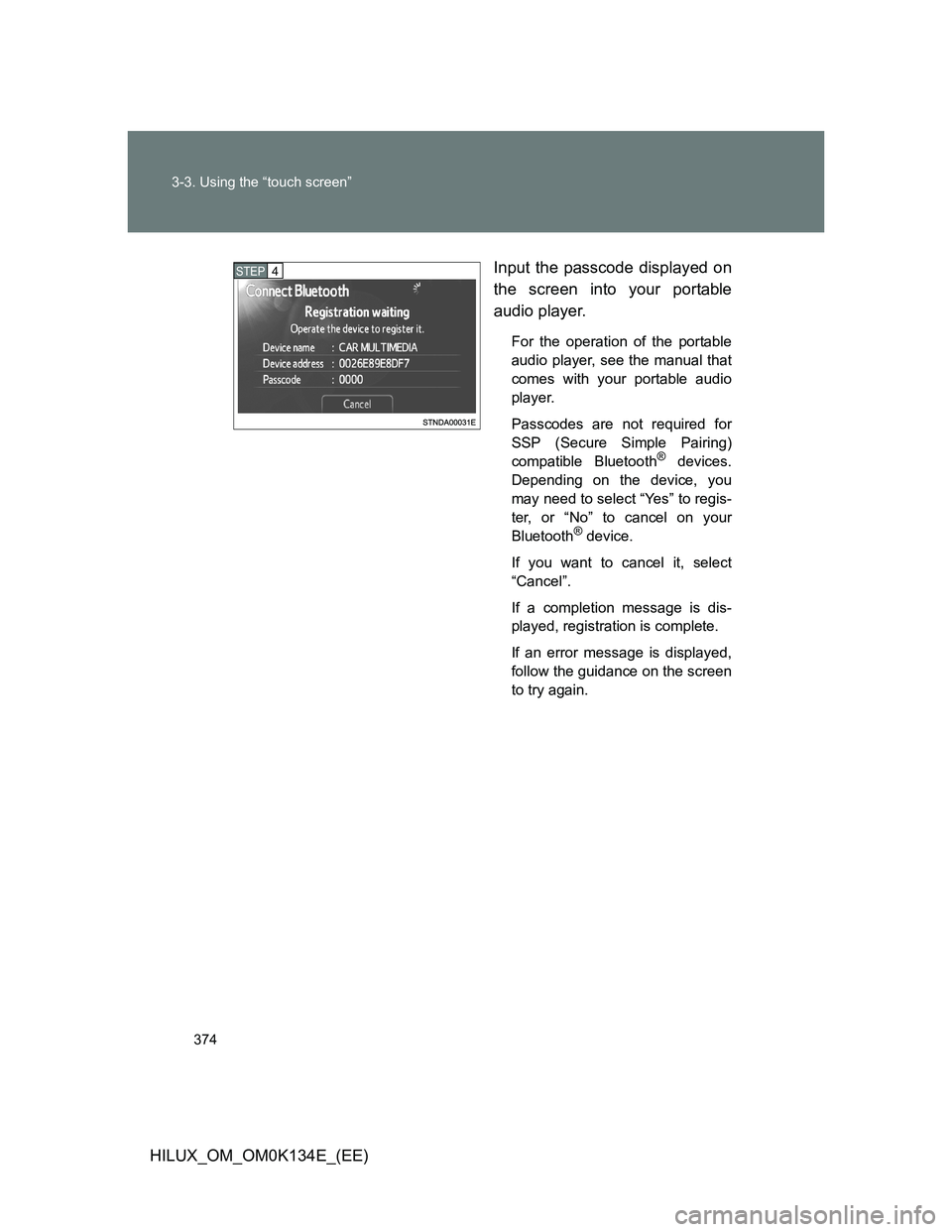
HILUX_OM_OM0K134E_(EE)Input the passcode displayed on
the screen into your portable
audio player.
For the operation of the portable
audio player, see the manual that
comes with your portable audio
player.
Passcodes are not required for
SSP (Secure Simple Pairing)
compatible Bluetooth
® devices.
Depending on the device, you
may need to select “Yes” to regis-
ter, or “No” to cancel on your
Bluetooth
® device.
If you want to cancel it, select
“Cancel”.
If a completion message is dis-
played, registration is complete.
If an error message is displayed,
follow the guidance on the screen
to try again.
STEP4
Page 375 of 644
375 3-3. Using the “touch screen”
3
Interior features
HILUX_OM_OM0K134E_(EE)
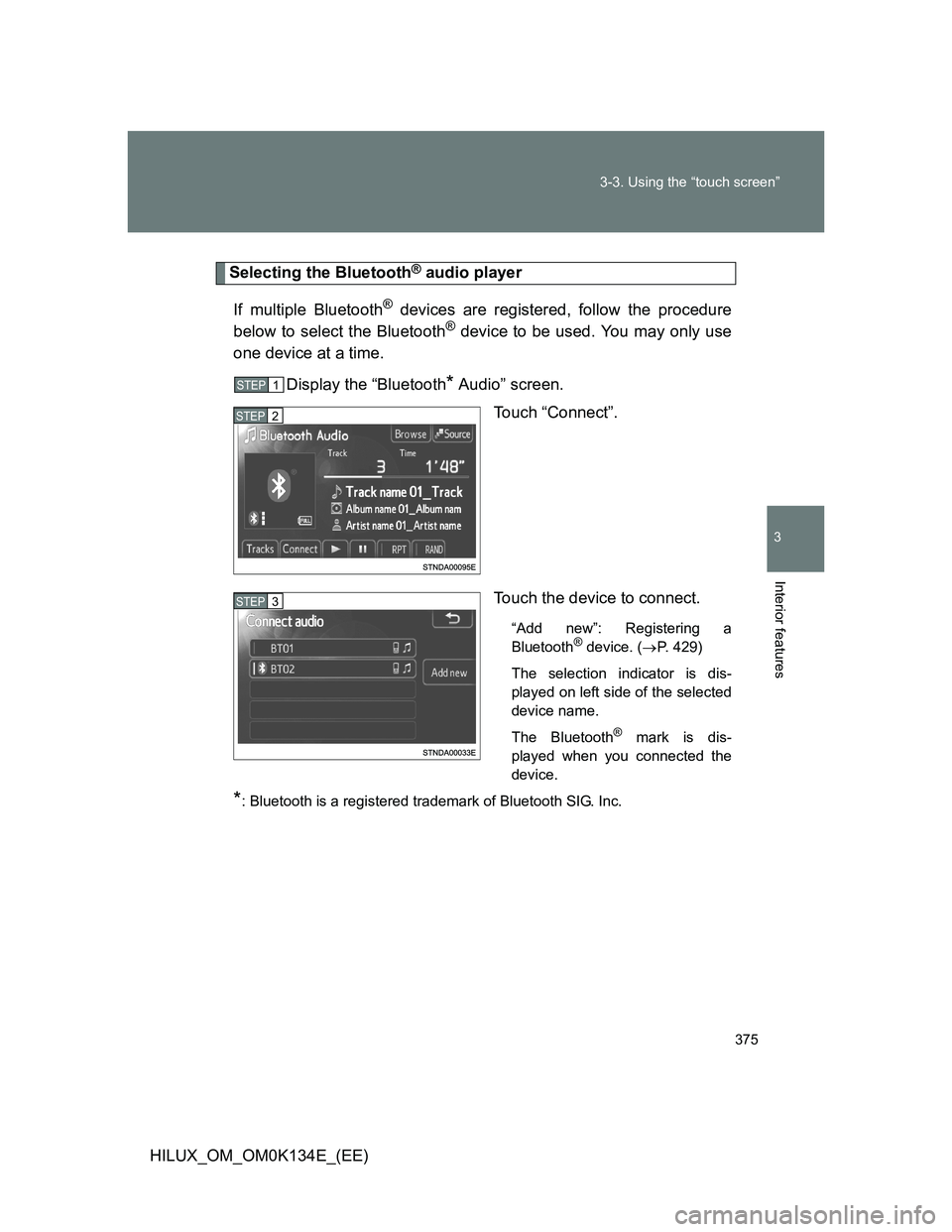
Selecting the Bluetooth® audio player
If multiple Bluetooth
® devices are registered, follow the procedure
below to select the Bluetooth® device to be used. You may only use
one device at a time.
Display the “Bluetooth
* Audio” screen.
Touch “Connect”.
Touch the device to connect.
“Add new”: Registering a
Bluetooth® device. (P. 429)
The selection indicator is dis-
played on left side of the selected
device name.
The Bluetooth
® mark is dis-
played when you connected the
device.
*: Bluetooth is a registered trademark of Bluetooth SIG. Inc.
STEP1
STEP2
STEP3
Page 376 of 644
376 3-3. Using the “touch screen”
HILUX_OM_OM0K134E_(EE)
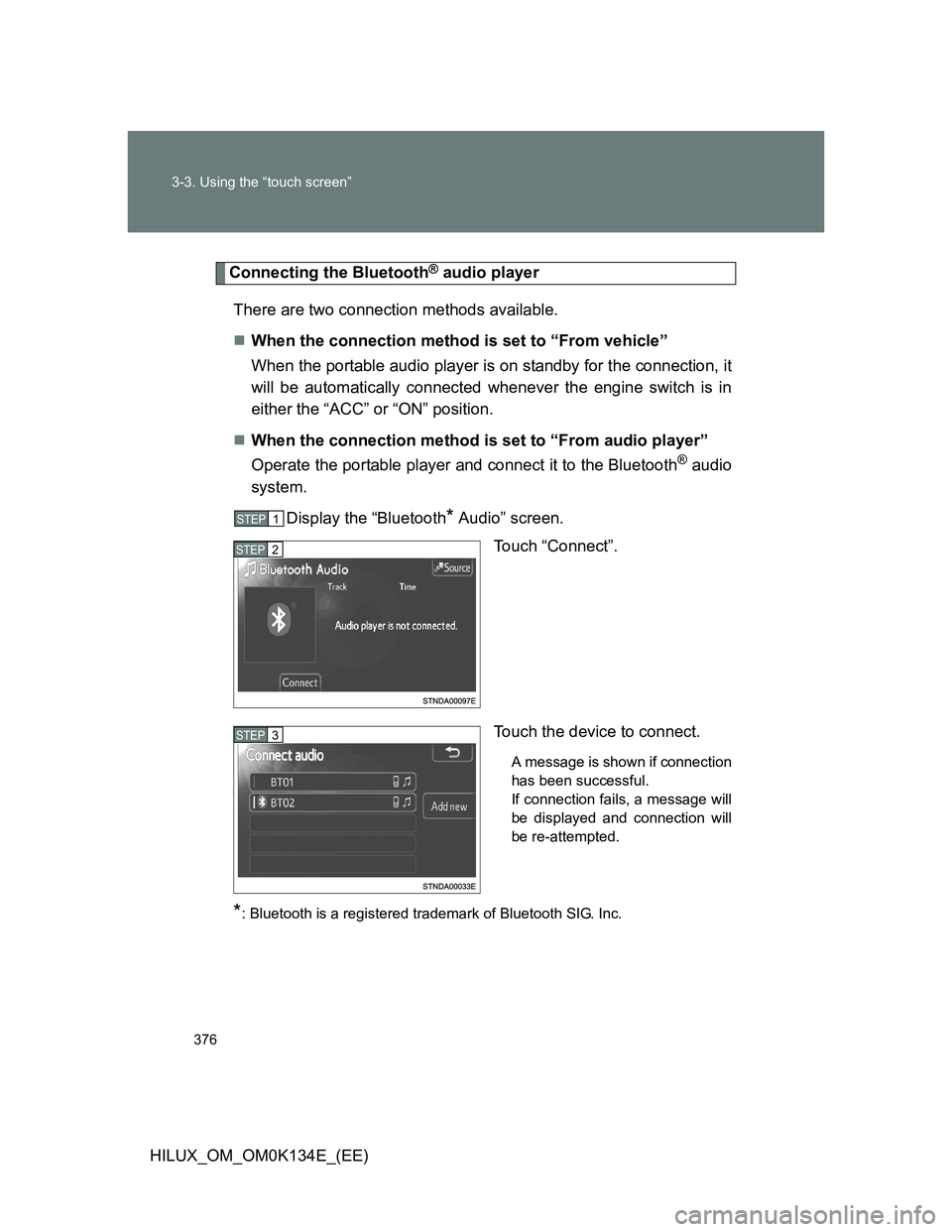
Connecting the Bluetooth® audio player
There are two connection methods available.
When the connection method is set to “From vehicle”
When the portable audio player is on standby for the connection, it
will be automatically connected whenever the engine switch is in
either the “ACC” or “ON” position.
When the connection method is set to “From audio player”
Operate the portable player and connect it to the Bluetooth
® audio
system.
Display the “Bluetooth
* Audio” screen.
Touch “Connect”.
Touch the device to connect.
A message is shown if connection
has been successful.
If connection fails, a message will
be displayed and connection will
be re-attempted.
*: Bluetooth is a registered trademark of Bluetooth SIG. Inc.
STEP1
STEP2
STEP3
Page 377 of 644
377 3-3. Using the “touch screen”
3
Interior features
HILUX_OM_OM0K134E_(EE)
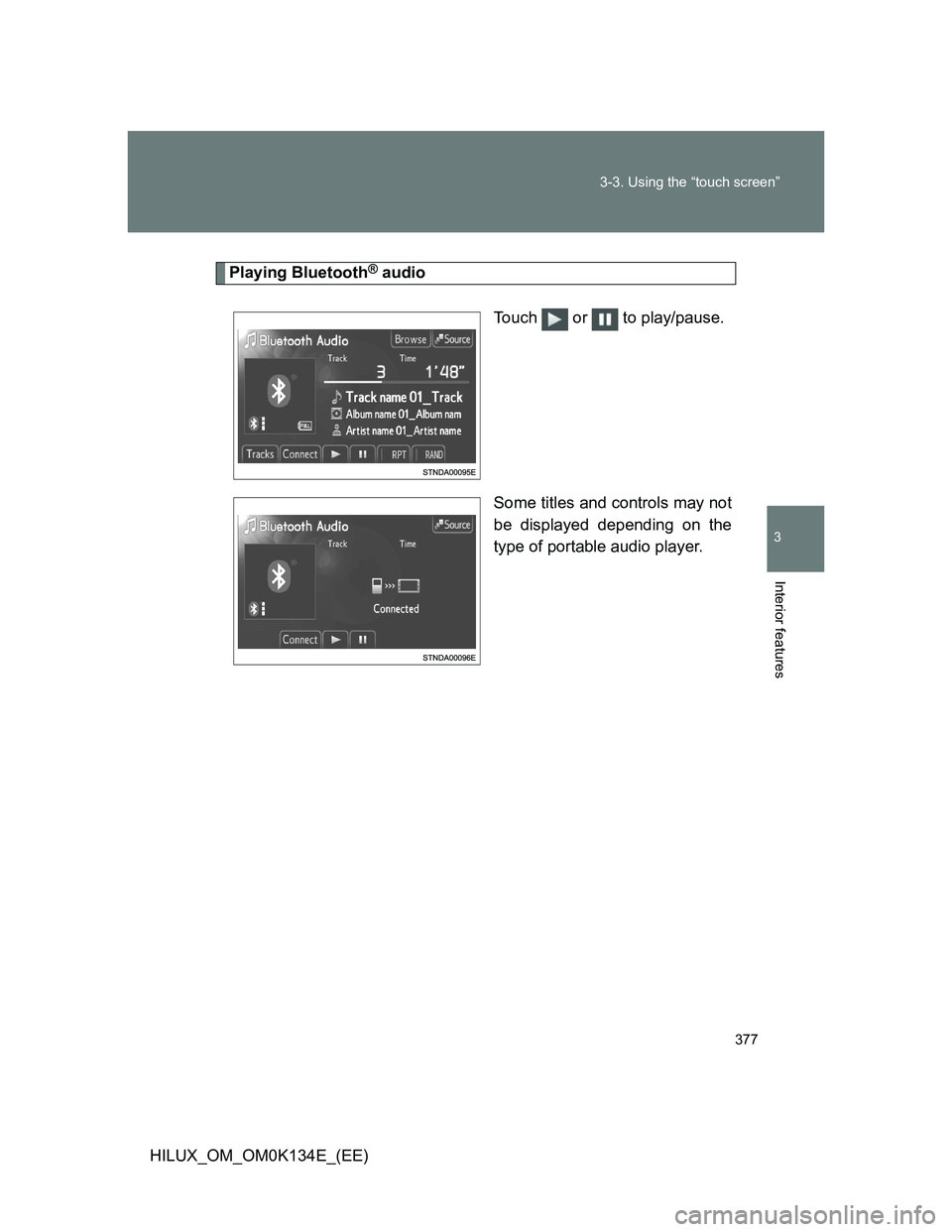
Playing Bluetooth® audio
Touch or to play/pause.
Some titles and controls may not
be displayed depending on the
type of portable audio player.