change time TOYOTA HILUX 2018 User Guide
[x] Cancel search | Manufacturer: TOYOTA, Model Year: 2018, Model line: HILUX, Model: TOYOTA HILUX 2018Pages: 708, PDF Size: 95.31 MB
Page 347 of 708
3474-5. Using the driving support systems
4
Driving
HILUX_OM_OM0K375E_(EE)
● The sign is only visible to the camera sensor for a short amount of time.
● The driving scene (turning, lane change, etc.) is judged incorrectly.
● Even if it is a sign not appropriate for the currently traveled lane, such a sign
exists directly after a freeway branches, or in an adjacent lane just before
merging.
● Stickers are attached to the rear of the preceding vehicle.
● A sign resembling a system compatible sign is recognized.
● The vehicle is driven in a country with a different direction of traffic.
● Side road speed signs may be detected and displayed (if positioned in sight
of the camera sensor) while the vehicle is traveling on the main road.
● Roundabout exit road speed signs may be detected and displayed (if posi-
tioned in sight of the camera sensor) while traveling on a roundabout.
● The speed information displayed on the meter and that displayed on the
navigation system (if equipped) may be different due to the multimedia sys-
tem using map data.
■ When driving vehicle in country with different speed unit
Since RSA recognizes signs based on the set unit of the meter, it is neces-
sary to change the set unit of the meter. Adjust the set unit of the meter to the
speed unit of signs in the current location. ( P. 684)
■ Turning the system on/off
Use the meter control switches to select while the vehicle is stopped and
press , and select and press . ( P. 141)
■ Speed limit sign display
If the engine switch was last turned to the “LOCK” position (vehicles without
smart entry & start system) or off (vehicles with smart entry & start system)
while a speed limit sign was displayed on the multi-information display, the
same sign displays again when the engine switch is turned to the “ON” posi-
tion (vehicles without smart entry & start system) or IGNITION ON mode
(vehicles with smart entry & start system).
■ Customization
Setting (e.g. speeding warning threshold) can be changed.
(Customizable feature: P. 683)
Page 349 of 708
3494-5. Using the driving support systems
4
Driving
HILUX_OM_OM0K375E_(EE)
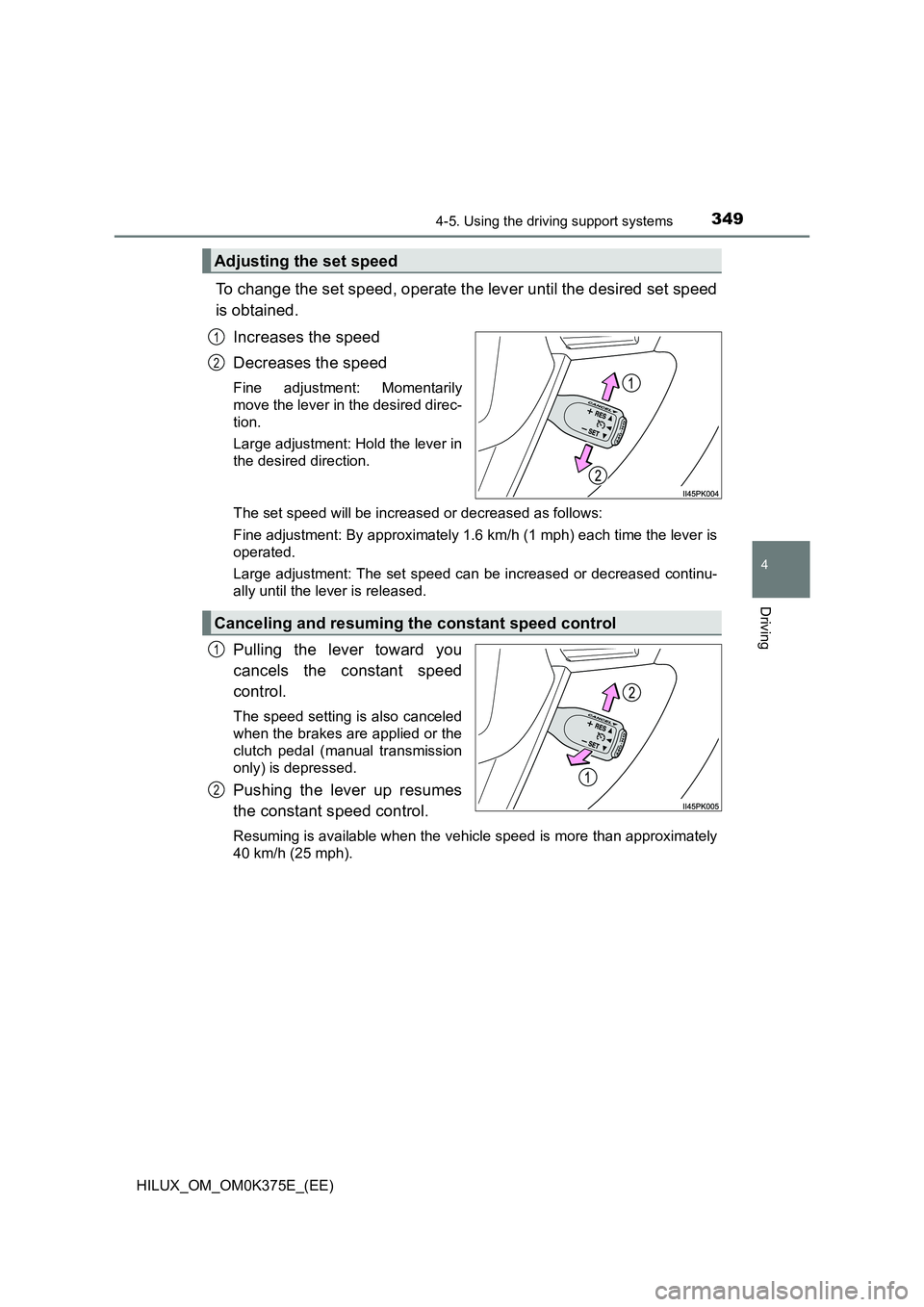
To change the set speed, operate the lever until the desired set speed
is obtained.
Increases the speed
Decreases the speed
Fine adjustment: Momentarily
move the lever in the desired direc-
tion.
Large adjustment: Hold the lever in
the desired direction.
The set speed will be increased or decreased as follows:
Fine adjustment: By approximately 1.6 km/h (1 mph) each time the lever is
operated.
Large adjustment: The set speed can be increased or decreased continu-
ally until the lever is released.
Pulling the lever toward you
cancels the constant speed
control.
The speed setting is also canceled
when the brakes are applied or the
clutch pedal (manual transmission
only) is depressed.
Pushing the lever up resumes
the constant speed control.
Resuming is available when the vehicle speed is more than approximately
40 km/h (25 mph).
Adjusting the set speed
1
2
Canceling and resuming the constant speed control
1
2
Page 378 of 708
3784-5. Using the driving support systems
HILUX_OM_OM0K375E_(EE)
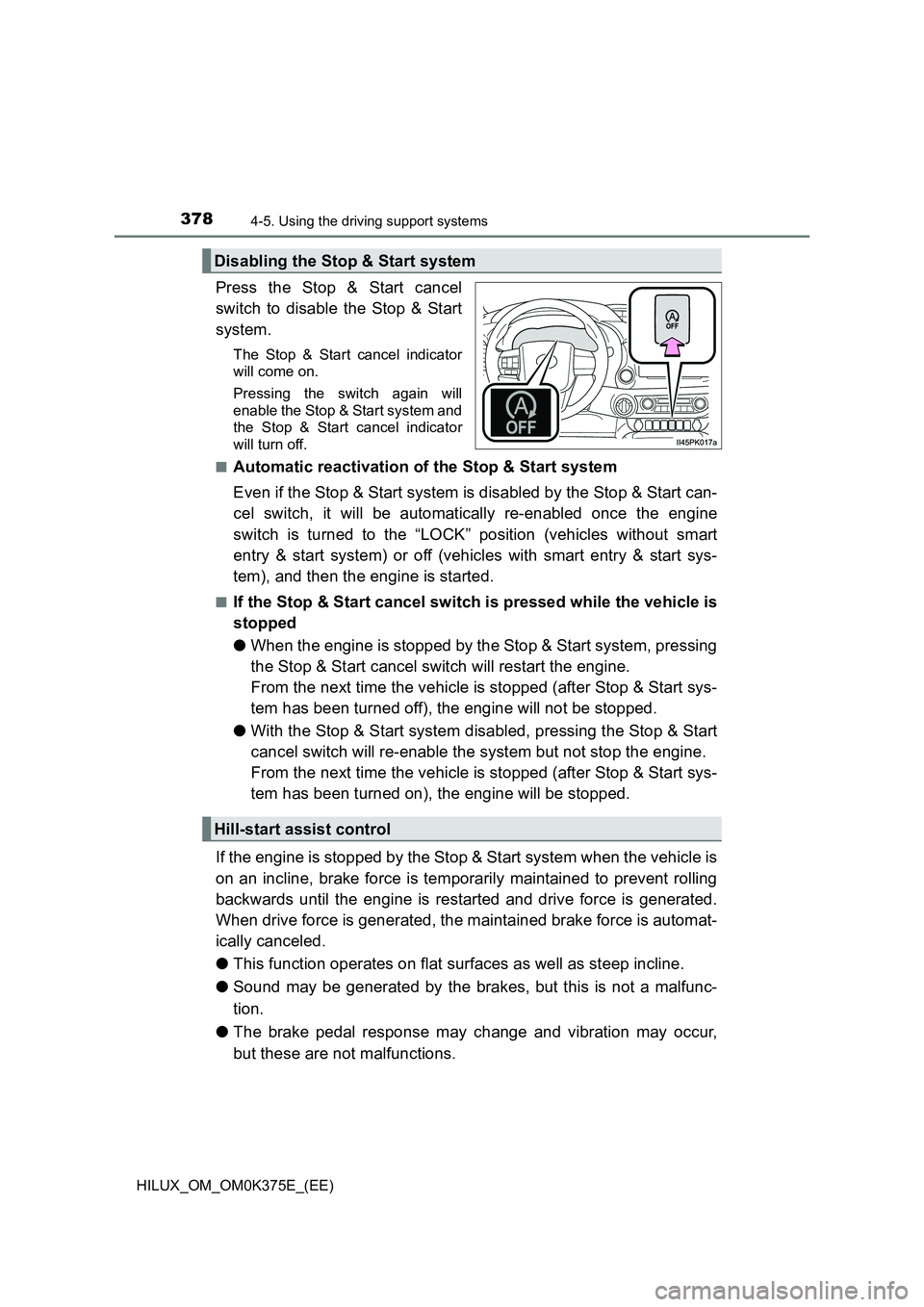
Press the Stop & Start cancel
switch to disable the Stop & Start
system.
The Stop & Start cancel indicator
will come on.
Pressing the switch again will
enable the Stop & Start system and
the Stop & Start cancel indicator
will turn off.
■Automatic reactivation of the Stop & Start system
Even if the Stop & Start system is disabled by the Stop & Start can-
cel switch, it will be automatically re-enabled once the engine
switch is turned to the “LOCK” position (vehicles without smart
entry & start system) or off (vehicles with smart entry & start sys-
tem), and then the engine is started.
■If the Stop & Start cancel switch is pressed while the vehicle is
stopped
● When the engine is stopped by the Stop & Start system, pressing
the Stop & Start cancel switch will restart the engine.
From the next time the vehicle is stopped (after Stop & Start sys-
tem has been turned off), the engine will not be stopped.
● With the Stop & Start system disabled, pressing the Stop & Start
cancel switch will re-enable the system but not stop the engine.
From the next time the vehicle is stopped (after Stop & Start sys-
tem has been turned on), the engine will be stopped.
If the engine is stopped by the Stop & Start system when the vehicle is
on an incline, brake force is temporarily maintained to prevent rolling
backwards until the engine is restarted and drive force is generated.
When drive force is generated, the maintained brake force is automat-
ically canceled.
● This function operates on flat surfaces as well as steep incline.
● Sound may be generated by the brakes, but this is not a malfunc-
tion.
● The brake pedal response may change and vibration may occur,
but these are not malfunctions.
Disabling the Stop & Start system
Hill-start assist control
Page 381 of 708
3814-5. Using the driving support systems
4
Driving
HILUX_OM_OM0K375E_(EE)
■ When to use the Stop & Start system
● When stopping the vehicle for a longer period of time, stop the engine com-
pletely.
● When the system cannot operate, is canceled, or is malfunctioning, warning
messages and a warning buzzer are used to inform the driver. ( P. 383)
● If the engine switch is pressed when the engine is stopped by the Stop &
Start system, the engine will stall and will not be able to be restarted by the
automatic engine start function. In this case, restart the engine using the
normal engine starting procedure. ( P. 266, 269)
● When the engine is restarted by the Stop & Start system, the power outlets
may be temporarily unusable, but this is not a malfunction.
● Installation and removal of electrical components and wireless devices may
affect the Stop & Start system. Contact any authorized Toyota retailer or
Toyota authorized repairer, or any reliable repairer for details.
■ If the windshield is fogged up while the engine is stopped by the Stop &
Start system
Vehicles with manual air conditioning system:
Restart the engine by pressing the Stop & Start cancel switch, and then set
the air outlet selection dial to . ( P. 485)
Vehicles with automatic air conditioning system:
Turn on. (The engine will start due to the automatic engine start func-
tion.) ( P. 494)
If the windshield fogs up frequently, press the Stop & Start cancel switch to
disable the system.
■ Air conditioning system operation while the engine is stopped by the
Stop & Start system
● If the air conditioning system is being used in automatic mode, the fan
speed may be reduced or the fan may be stopped while the engine is
stopped by the Stop & Start system in order to reduce changes in the cabin
temperature.
● To ensure air conditioning system performance when the vehicle is stopped,
disable the Stop & Start system by pressing the Stop & Start cancel switch.
Page 382 of 708
3824-5. Using the driving support systems
HILUX_OM_OM0K375E_(EE)
■ If an odor comes from the air conditioning system while the engine is
stopped by the Stop & Start system
Vehicles with manual air conditioning system:
If the idling stop time is set to “Long”, change the setting to “Normal”. If an
odor occurs even when “Normal” is selected, press the Stop & Start cancel
switch to deactivate the Stop & Start system.
Vehicles with automatic air conditioning system:
Press the Stop & Start cancel switch to deactivate the Stop & Start system.
■ Changing the idling stop time with the air conditioning system on
The length of time the Stop & Start system will operate when the air condition-
ing system is on can be changed by performing the following operation. (The
length of time the Stop & Start system will operate when the air conditioning
system is off cannot be changed.)
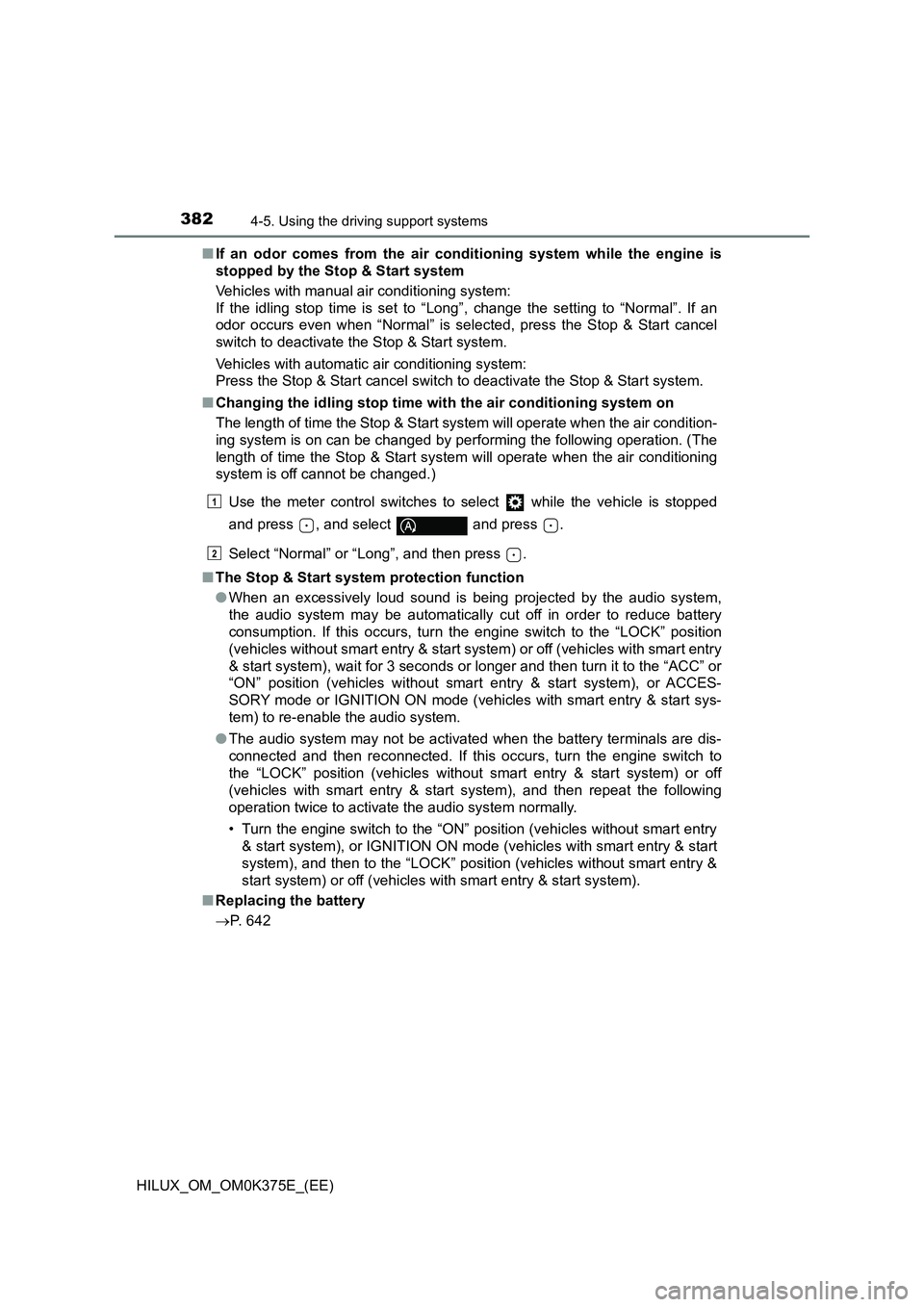
Use the meter control switches to select while the vehicle is stopped
and press , and select and press .
Select “Normal” or “Long”, and then press .
■ The Stop & Start system protection function
● When an excessively loud sound is being projected by the audio system,
the audio system may be automatically cut off in order to reduce battery
consumption. If this occurs, turn the engine switch to the “LOCK” position
(vehicles without smart entry & start sy stem) or off (vehicles with smart entry
& start system), wait for 3 seconds or longer and then turn it to the “ACC” or
“ON” position (vehicles without smart entry & start system), or ACCES-
SORY mode or IGNITION ON mode (vehicles with smart entry & start sys-
tem) to re-enable the audio system.
● The audio system may not be activated when the battery terminals are dis-
connected and then reconnected. If this occurs, turn the engine switch to
the “LOCK” position (vehicles without smart entry & start system) or off
(vehicles with smart entry & start system), and then repeat the following
operation twice to activate the audio system normally.
• Turn the engine switch to the “ON” position (vehicles without smart entry
& start system), or IGNITION ON mode (vehicles with smart entry & start
system), and then to the “LOCK” position (vehicles without smart entry &
start system) or off (vehicles with smart entry & start system).
■ Replacing the battery
P. 642
1
2
Page 399 of 708
3994-5. Using the driving support systems
4
Driving
HILUX_OM_OM0K375E_(EE)
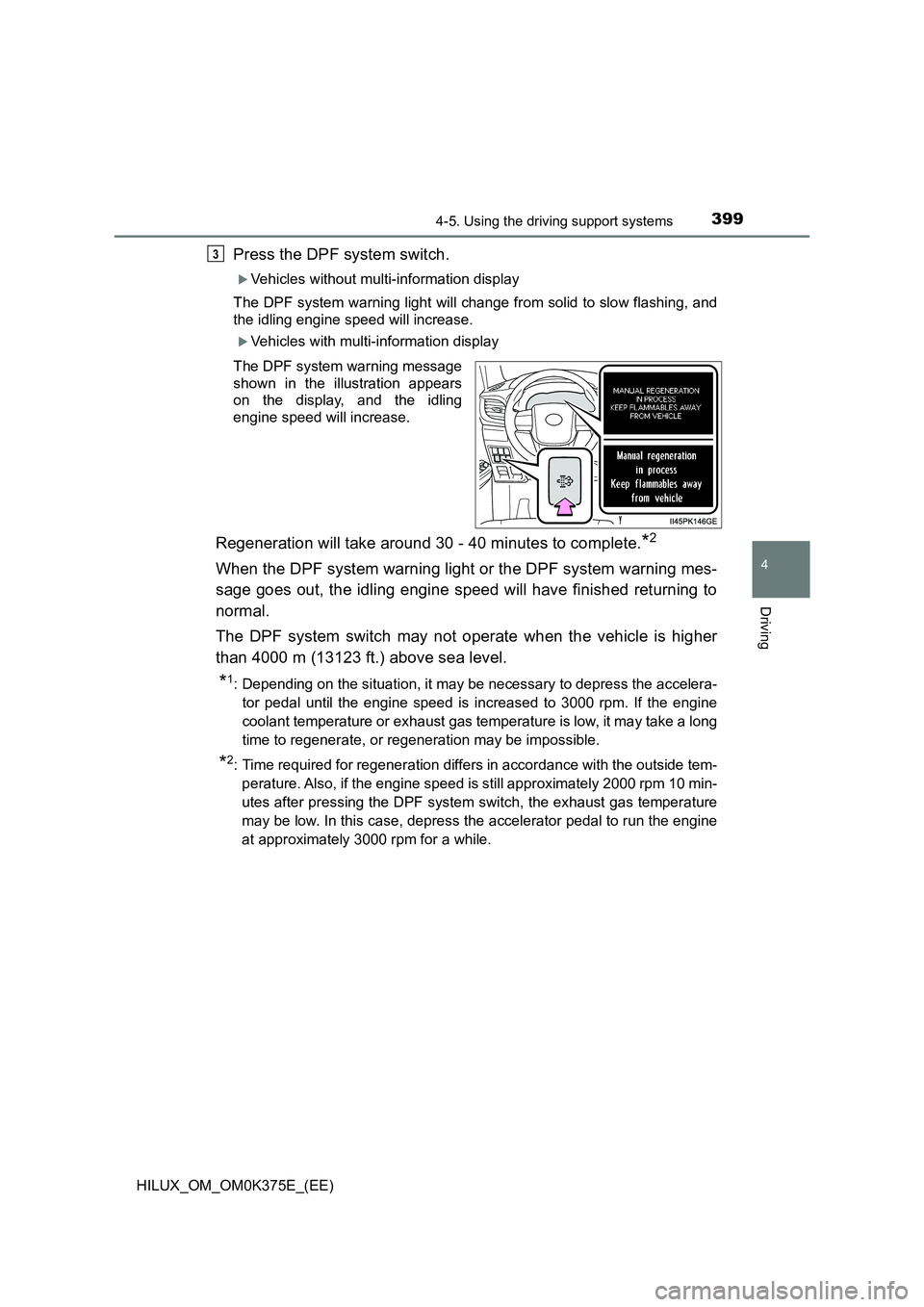
Press the DPF system switch.
Vehicles without multi-information display
The DPF system warning light will change from solid to slow flashing, and
the idling engine speed will increase.
Vehicles with multi-information display
The DPF system warning message
shown in the illustration appears
on the display, and the idling
engine speed will increase.
Regeneration will take around 30 - 40 minutes to complete.*2
When the DPF system warning light or the DPF system warning mes-
sage goes out, the idling engine speed will have finished returning to
normal.
The DPF system switch may not operate when the vehicle is higher
than 4000 m (13123 ft.) above sea level.
*1: Depending on the situation, it may be necessary to depress the accelera-
tor pedal until the engine speed is increased to 3000 rpm. If the engine
coolant temperature or exhaust gas tem perature is low, it may take a long
time to regenerate, or regeneration may be impossible.
*2: Time required for regeneration differs in accordance with the outside tem-
perature. Also, if the engine speed is still approximately 2000 rpm 10 min-
utes after pressing the DPF system switch, the exhaust gas temperature
may be low. In this case, depress the accelerator pedal to run the engine
at approximately 3000 rpm for a while.
3
Page 411 of 708
4115-1. Basic Operations
5
Audio system
HILUX_OM_OM0K375E_(EE)
Press the “MODE” switch when the audio system is turned off.
Press the “MODE” switch when the audio system is turned on. The
audio source changes as follows each time the button is pressed. If a
mode cannot be used, it will be skipped.
AM FM1FM2*CD modeiPod or USB memory
Bluetooth® audio* AUX
*: If equipped
Press the “+” switch to increase the volume and the “-” switch to
decrease the volume.
Hold down the switch to continue increasing or decreasing the volume.
Press and hold the “MODE” switch.
To cancel, press and hold the switch again.
Press the “MODE” switch to select the radio mode.
Press the “ ” or “” switch to select a preset station.
To scan for receivable stations, press and hold the switch until you hear a
beep.
Turning on the power
Changing the audio source
Adjusting the volume
Silencing a sound
Selecting a radio station
1
2
Page 424 of 708
4245-4. Playing an audio CD and MP3/WMA discs
HILUX_OM_OM0K375E_(EE)
■Selecting folders one at a time
Press (
folder.
■Selecting a folder and file from folder list
Press (LIST).
The folder list will be displayed.
Press the “TUNE >” or “< SELECT” button to select a folder and
file, and press the “SETUP ENTER” button.
To return to the previous display, press (BACK).
■Returning to the first folder
Press and hold (
Press the “SEEK >” or “< TRACK” button to select the desired file.
■Fast-forwarding and rewinding files
Press and hold the “SEEK >” or “< TRACK” button.
■Random play
Pressing (RDM) changes modes in the following order:
Folder random Disc randomOff
■Repeat play
Pressing (RPT) changes modes in the following order:
File repeat Folder repeat*Off
*: Available except when RDM (random play) is selected
■Switching the display
Press (TEXT) to display or hide the album title.
If there are continuing texts, is displayed.
Press and hold (TEXT) to display the remaining texts.
Playing back MP3 and WMA discs
1
2
Page 441 of 708
4415-5. Using an external device
5
Audio system
HILUX_OM_OM0K375E_(EE)
■Selecting folders one at a time
Press (
folder.
■Selecting a folder and file from folder list
Press (LIST).
The folder list will be displayed.
Press the “TUNE >” or “< SELECT” button to select a folder and
file, and press the “SETUP ENTER” button.
To return to the previous display, press (BACK).
■Returning to the first folder
Press and hold (
Press and hold the “SEEK >” or “< TRACK” button.
Pressing (RDM) changes modes in the following order:
Folder random All folder randomOff
Pressing (RPT) changes modes in the following order:
File repeat Folder repeat*Off
*: Available except when RDM (random play) is selected
Press (TEXT) to display or hide the album title.
If there are continuing texts, is displayed.
Press and hold (TEXT) to display the remaining texts.
Selecting a folder
Selecting a file
Fast-forwarding and rewinding files
Random play
Repeat play
Switching the display
1
2
Page 493 of 708
4936-1. Using the air conditioning system and defogger
6
Interior features
HILUX_OM_OM0K375E_(EE)
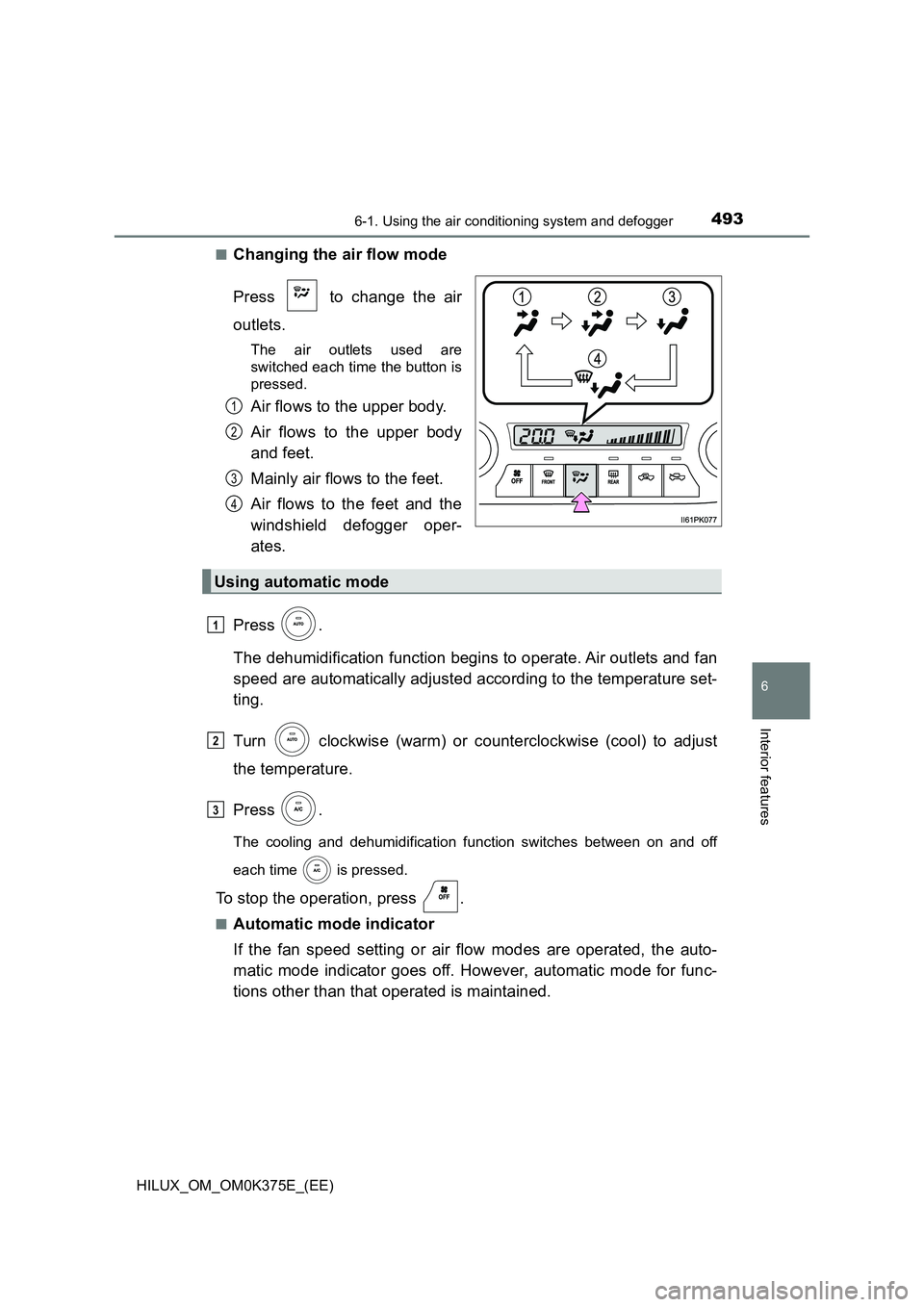
■Changing the air flow mode
Press to change the air
outlets.
The air outlets used are
switched each time the button is
pressed.
Air flows to the upper body.
Air flows to the upper body
and feet.
Mainly air flows to the feet.
Air flows to the feet and the
windshield defogger oper-
ates.
Press .
The dehumidification function begins to operate. Air outlets and fan
speed are automatically adjusted according to the temperature set-
ting.
Turn clockwise (warm) or counterclockwise (cool) to adjust
the temperature.
Press .
The cooling and dehumidification function switches between on and off
each time is pressed.
To stop the operation, press .
■Automatic mode indicator
If the fan speed setting or air flow modes are operated, the auto-
matic mode indicator goes off. However, automatic mode for func-
tions other than that operated is maintained.
1
2
3
4
Using automatic mode
1
2
3