display TOYOTA HILUX 2018 Workshop Manual
[x] Cancel search | Manufacturer: TOYOTA, Model Year: 2018, Model line: HILUX, Model: TOYOTA HILUX 2018Pages: 708, PDF Size: 95.31 MB
Page 333 of 708
3334-5. Using the driving support systems
4
Driving
HILUX_OM_OM0K375E_(EE)
■ If the PCS warning light flashes or illuminates and a warning message is
displayed on the multi-information display
The pre-collision system may be tem porarily unavailable or there may be a
malfunction in the system.
● In the following situations, the warning light will turn off, the message will
disappear and the system will beco me operational when normal operating
conditions return:
• When the radar sensor or camera s ensor or the area around either sen-
sor is hot, such as in the sun
• When the radar sensor or camera s ensor or the area around either sen-
sor is cold, such as in an extremely cold environment
• When a front sensor is dirty or covered with snow, etc.
• When the part of the windshield in front of the camera sensor is fogged
up or covered with condensation or ice.
(Defogging the windshield: P. 485, 494)
• If the camera sensor is obstructed, such as when the hood is open or a
sticker is attached to the windshield near the camera sensor
● If the PCS warning light continues to flash or remains illuminated or the
warning message does not disappear even though the vehicle has returned
to normal, the system may be malfunctioning. Have the vehicle inspected by
any authorized Toyota retailer or Toyota authorized repairer, or any reliable
repairer immediately.
■ If VSC is disabled
● If VSC is disabled (P. 389), the pre-collision brake assist and pre-collision
braking functions are also disabled.
● The PCS warning light will turn on and “VSC TURNED OFF PRE-COLLI-
SION BRAKE SYSTEM UNAVAILABLE”/“VSC Turned Off Pre-Collision
Brake System Unavailable” will be di splayed on the multi-information dis-
play.
Page 334 of 708
3344-5. Using the driving support systems
HILUX_OM_OM0K375E_(EE)
LDA (Lane Departure Alert)
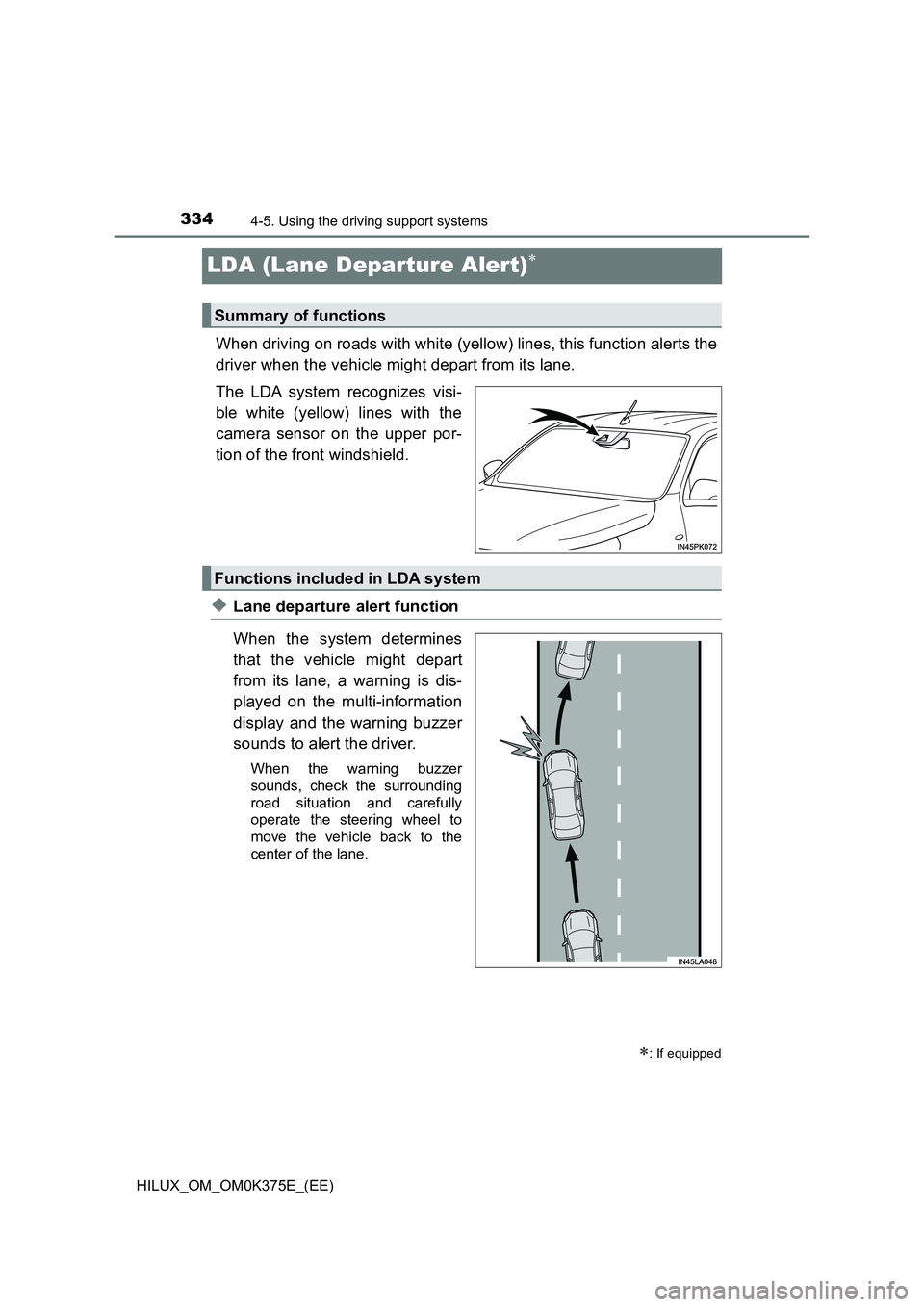
When driving on roads with white (yellow) lines, this function alerts the
driver when the vehicle might depart from its lane.
The LDA system recognizes visi-
ble white (yellow) lines with the
camera sensor on the upper por-
tion of the front windshield.
◆Lane departure alert function
When the system determines
that the vehicle might depart
from its lane, a warning is dis-
played on the multi-information
display and the warning buzzer
sounds to alert the driver.
When the warning buzzer
sounds, check the surrounding
road situation and carefully
operate the steering wheel to
move the vehicle back to the
center of the lane.
: If equipped
Summary of functions
Functions included in LDA system
Page 335 of 708
3354-5. Using the driving support systems
4
Driving
HILUX_OM_OM0K375E_(EE)
◆Vehicle sway warning function
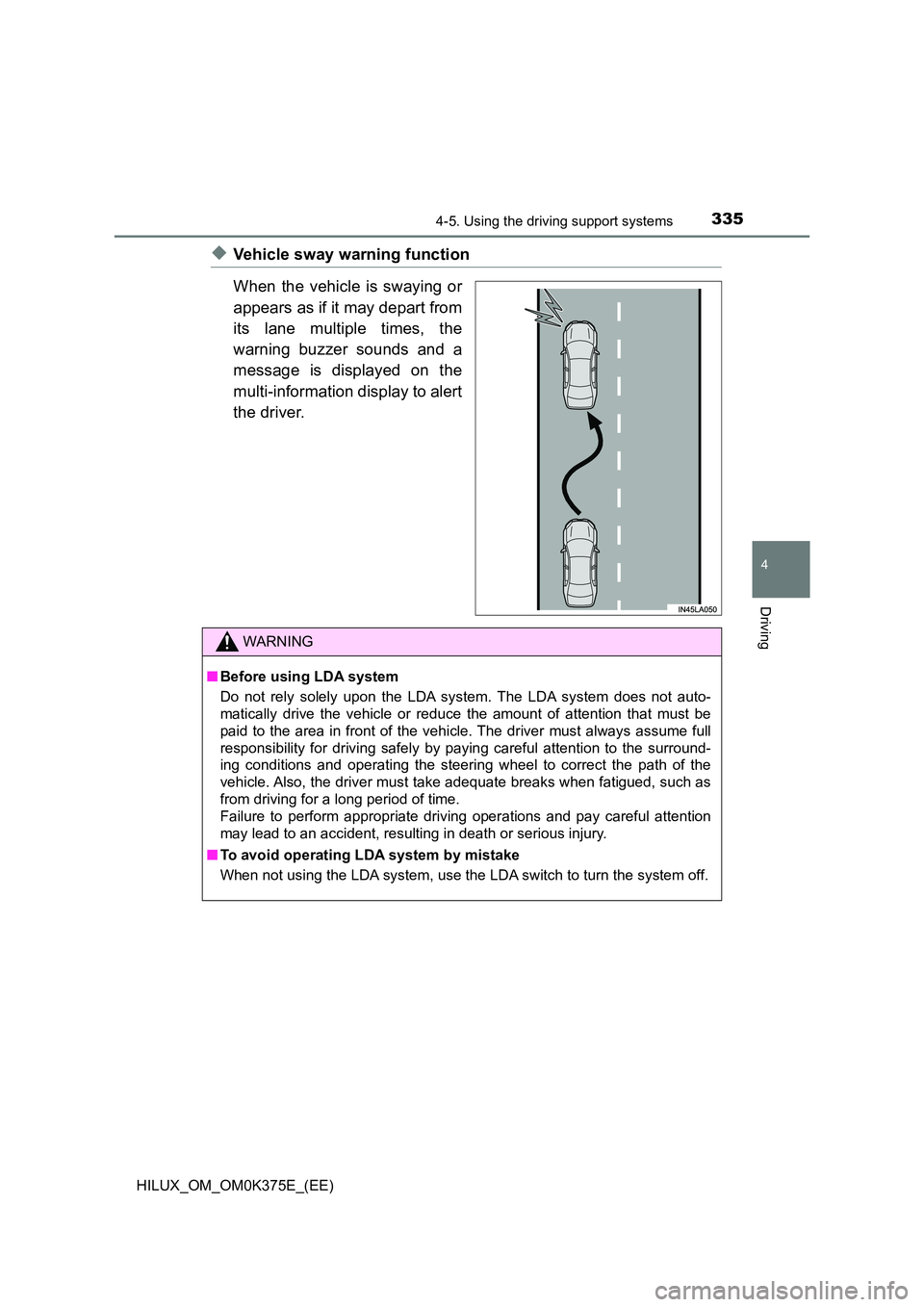
When the vehicle is swaying or
appears as if it may depart from
its lane multiple times, the
warning buzzer sounds and a
message is displayed on the
multi-information display to alert
the driver.
WARNING
■ Before using LDA system
Do not rely solely upon the LDA system. The LDA system does not auto-
matically drive the vehicle or reduce the amount of attention that must be
paid to the area in front of the vehicle. The driver must always assume full
responsibility for driving safely by paying careful attention to the surround-
ing conditions and operating the steering wheel to correct the path of the
vehicle. Also, the driver must take adequate breaks when fatigued, such as
from driving for a long period of time.
Failure to perform appropriate driving operations and pay careful attention
may lead to an accident, resulting in death or serious injury.
■ To avoid operating LDA system by mistake
When not using the LDA system, use the LDA switch to turn the system off.
Page 337 of 708
3374-5. Using the driving support systems
4
Driving
HILUX_OM_OM0K375E_(EE)
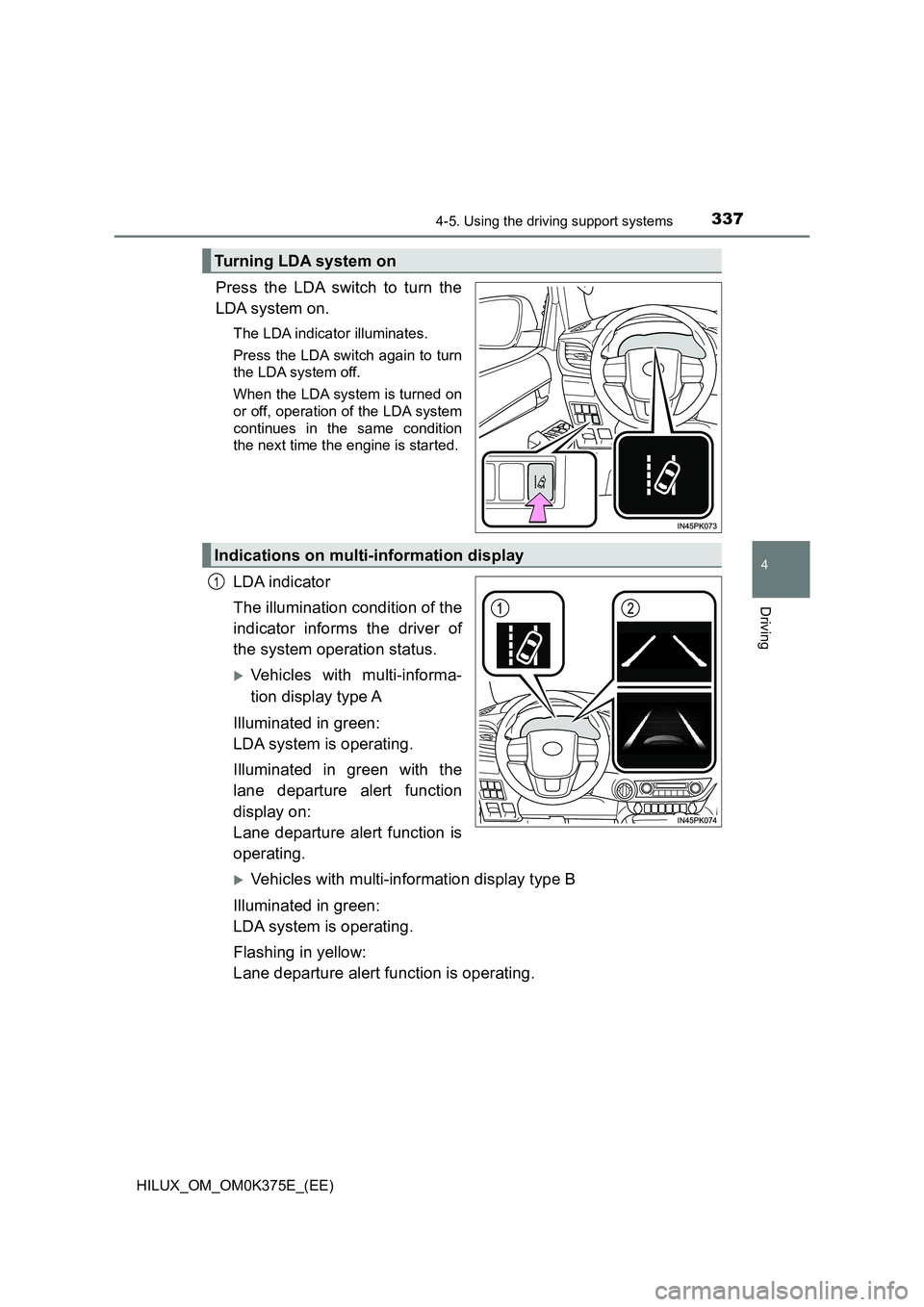
Press the LDA switch to turn the
LDA system on.
The LDA indicator illuminates.
Press the LDA switch again to turn
the LDA system off.
When the LDA system is turned on
or off, operation of the LDA system
continues in the same condition
the next time the engine is started.
LDA indicator
The illumination condition of the
indicator informs the driver of
the system operation status.
Vehicles with multi-informa-
tion display type A
Illuminated in green:
LDA system is operating.
Illuminated in green with the
lane departure alert function
display on:
Lane departure alert function is
operating.
Vehicles with multi-information display type B
Illuminated in green:
LDA system is operating.
Flashing in yellow:
Lane departure alert function is operating.
Turning LDA system on
Indications on multi-information display
1
Page 338 of 708
3384-5. Using the driving support systems
HILUX_OM_OM0K375E_(EE)
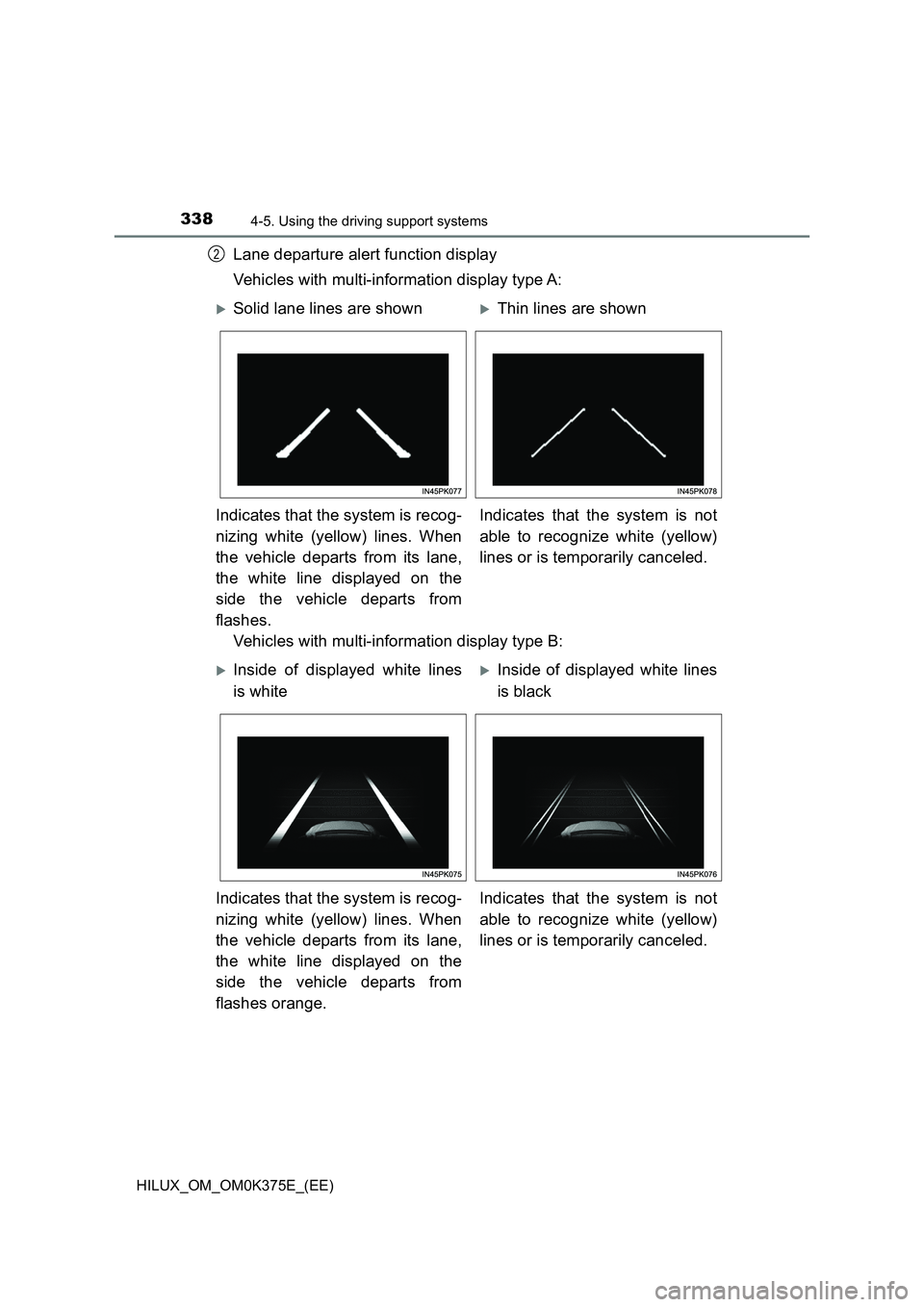
Lane departure alert function display
Vehicles with multi-information display type A:
Vehicles with multi-information display type B:
2
Solid lane lines are shownThin lines are shown
Indicates that the system is recog-
nizing white (yellow) lines. When
the vehicle departs from its lane,
the white line displayed on the
side the vehicle departs from
flashes.
Indicates that the system is not
able to recognize white (yellow)
lines or is temporarily canceled.
Inside of displayed white lines
is white
Inside of displayed white lines
is black
Indicates that the system is recog-
nizing white (yellow) lines. When
the vehicle departs from its lane,
the white line displayed on the
side the vehicle departs from
flashes orange.
Indicates that the system is not
able to recognize white (yellow)
lines or is temporarily canceled.
Page 341 of 708
3414-5. Using the driving support systems
4
Driving
HILUX_OM_OM0K375E_(EE)
■ Warning message
If the following warning message is displayed on the multi-information dis-
play, follow the appropriate troubleshooting procedure.
Warning messageDetails/Actions
“LDA MALFUNCTION
VISIT YOUR DEALER”/
“LDA malfunction
Visit your dealer”
The system may not be operating
properly.
Have the vehicle inspected at any
authorized Toyota retailer or Toyota
authorized repairer, or any reliable
repairer.
“FRONT CAMERA
VISION BLOCKED
CLEAN AND DEMIST
WINDSHIELD”/
“Front Camera
Vision Blocked
Clean and Demist
Windshield”
Dirt, rain, condensation, ice, snow,
etc. are present on the windshield in
front of the camera sensor.
Turn the LDA system off, remove
any dirt, rain, condensation, ice,
snow, etc. from the windshield, and
then turn the LDA system back on.
“FRONT CAMERA
U N AVA I L A B L E ” /
“Front Camera
Unavailable”
The operation conditions of the cam-
era sensor (temperature, etc.) are not
met.
When the operation conditions of
the camera sensor (temperature,
etc.) are met, the LDA system will
become available. Turn the LDA
system off, wait for a little while,
and then turn the LDA system back
on.
Page 342 of 708
3424-5. Using the driving support systems
HILUX_OM_OM0K375E_(EE)
If a different warning message is displayed, follow the instructions displayed
on the screen.
“LDA UNAVAILABLE”/
“LDA unavailable”
The LDA system is temporarily can-
celed due to a malfunction in a sensor
other than the camera sensor.
Turn the LDA system off and follow
the appropriate troubleshooting
procedures for the warning mes-
sage. Afterward, drive the vehicle
for a short time, and then turn the
LDA system back on.
“LDA UNAVAILABLE
BELOW APPROX
50km/h”/
“LDA unavailable
Below approx
50km/h”
The LDA system cannot be used as
the vehicle speed is less than approxi-
mately 50 km/h (32 mph).
Drive the vehicle at approximately
50 km/h (32 mph) or more.
“LDA UNAVAILABLE
BELOW APPROX
32MPH”/
“LDA unavailable
Below approx
32MPH”
“LDA UNAVAILABLE
AT CURRENT SPEED”/
“LDA unavailable
at current speed”
The LDA system cannot be used as
the vehicle speed is too high.
Reduce the vehicle speed.
Warning messageDetails/Actions
Page 343 of 708
343
4
4-5. Using the driving support systems
Driving
HILUX_OM_OM0K375E_(EE)
RSA (Road Sign Assist)
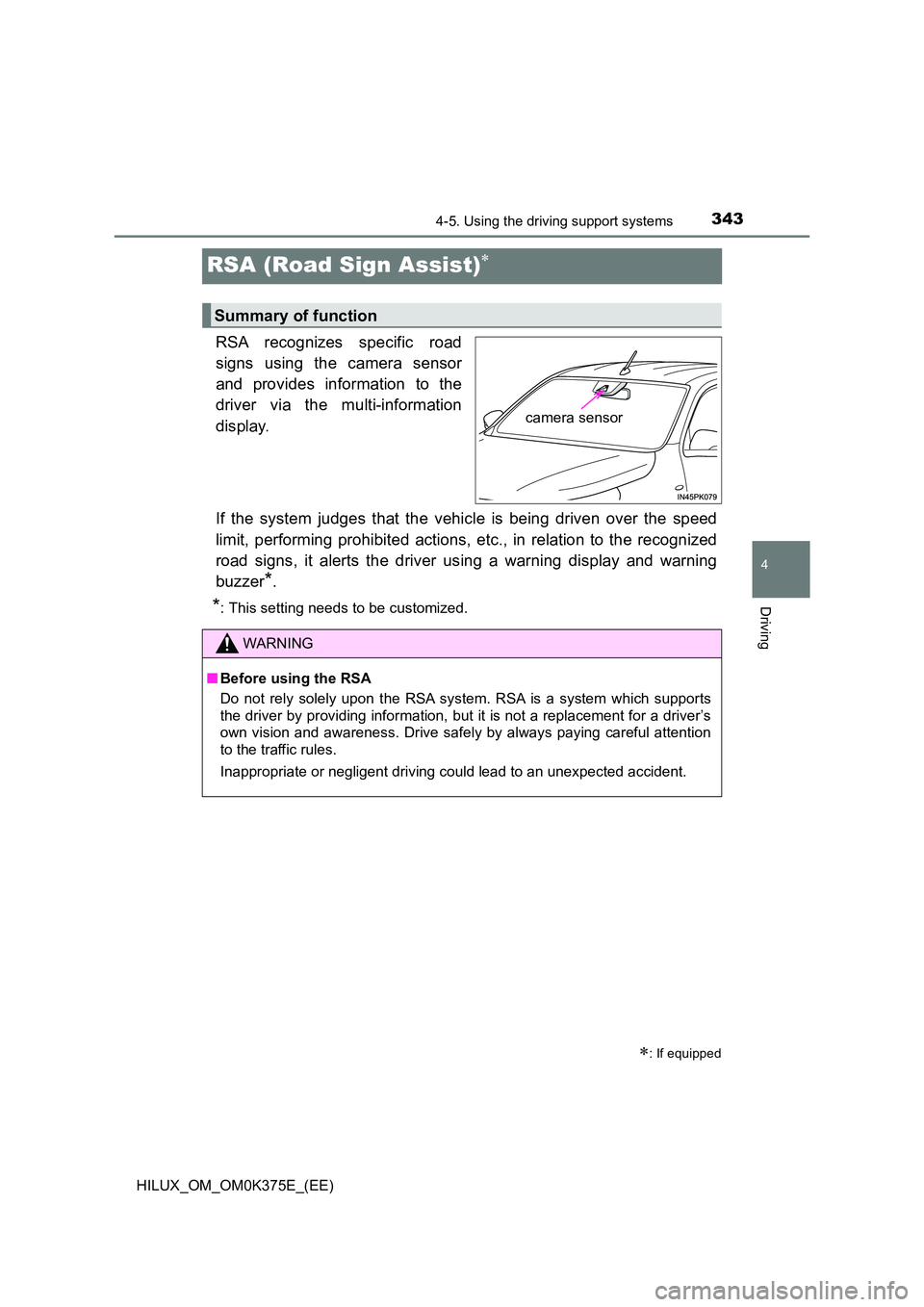
RSA recognizes specific road
signs using the camera sensor
and provides information to the
driver via the multi-information
display.
If the system judges that the vehicle is being driven over the speed
limit, performing prohibited actions, etc., in relation to the recognized
road signs, it alerts the driver using a warning display and warning
buzzer*.
*: This setting needs to be customized.
: If equipped
Summary of function
camera sensor
WARNING
■ Before using the RSA
Do not rely solely upon the RSA system. RSA is a system which supports
the driver by providing information, but it is not a replacement for a driver’s
own vision and awareness. Drive safely by always paying careful attention
to the traffic rules.
Inappropriate or negligent driving could lead to an unexpected accident.
Page 344 of 708
3444-5. Using the driving support systems
HILUX_OM_OM0K375E_(EE)
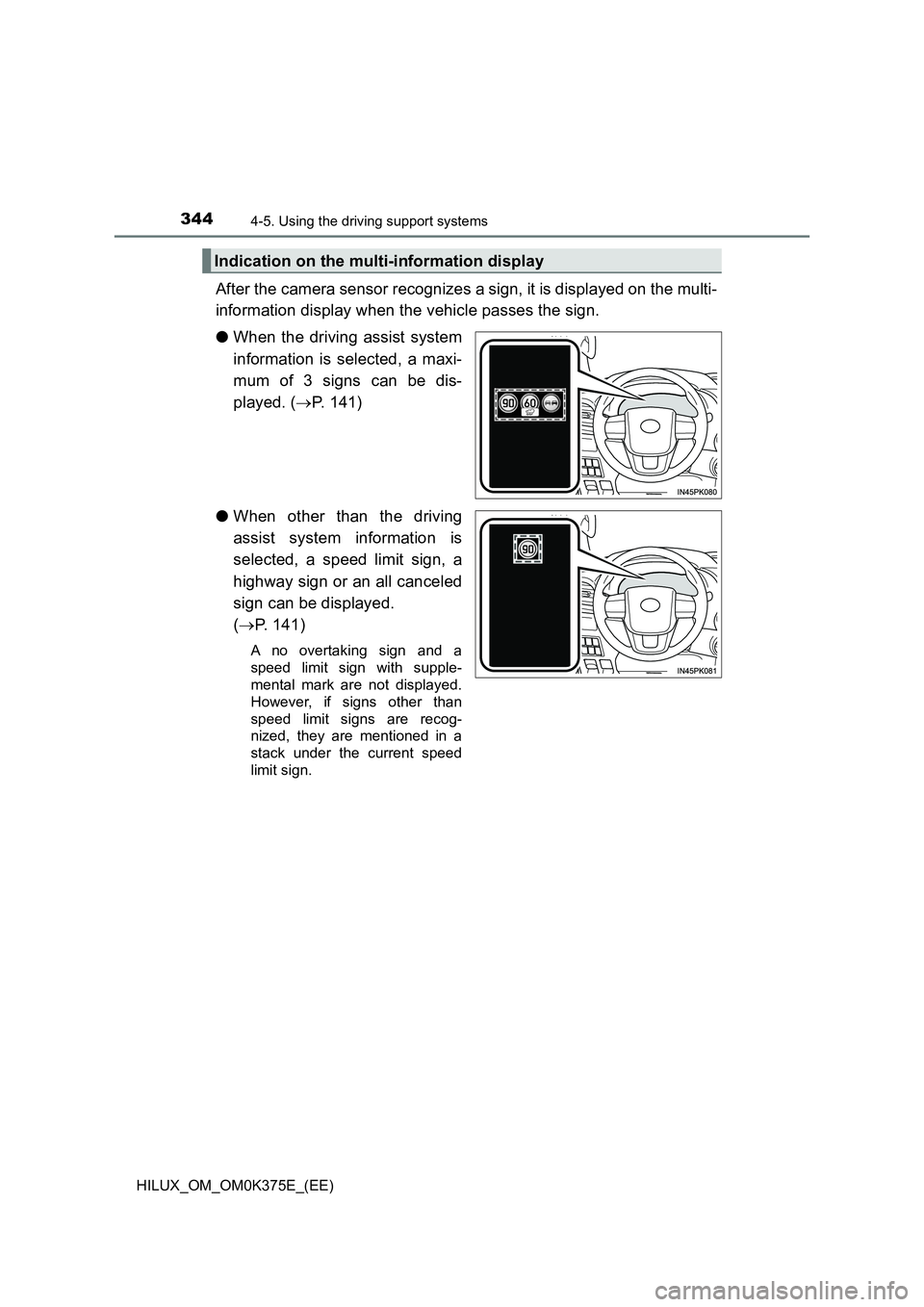
After the camera sensor recognizes a sign, it is displayed on the multi-
information display when the vehicle passes the sign.
● When the driving assist system
information is selected, a maxi-
mum of 3 signs can be dis-
played. ( P. 141)
● When other than the driving
assist system information is
selected, a speed limit sign, a
highway sign or an all canceled
sign can be displayed.
( P. 141)
A no overtaking sign and a
speed limit sign with supple-
mental mark are not displayed.
However, if signs other than
speed limit signs are recog-
nized, they are mentioned in a
stack under the current speed
limit sign.
Indication on the multi-information display
Page 345 of 708
3454-5. Using the driving support systems
4
Driving
HILUX_OM_OM0K375E_(EE)
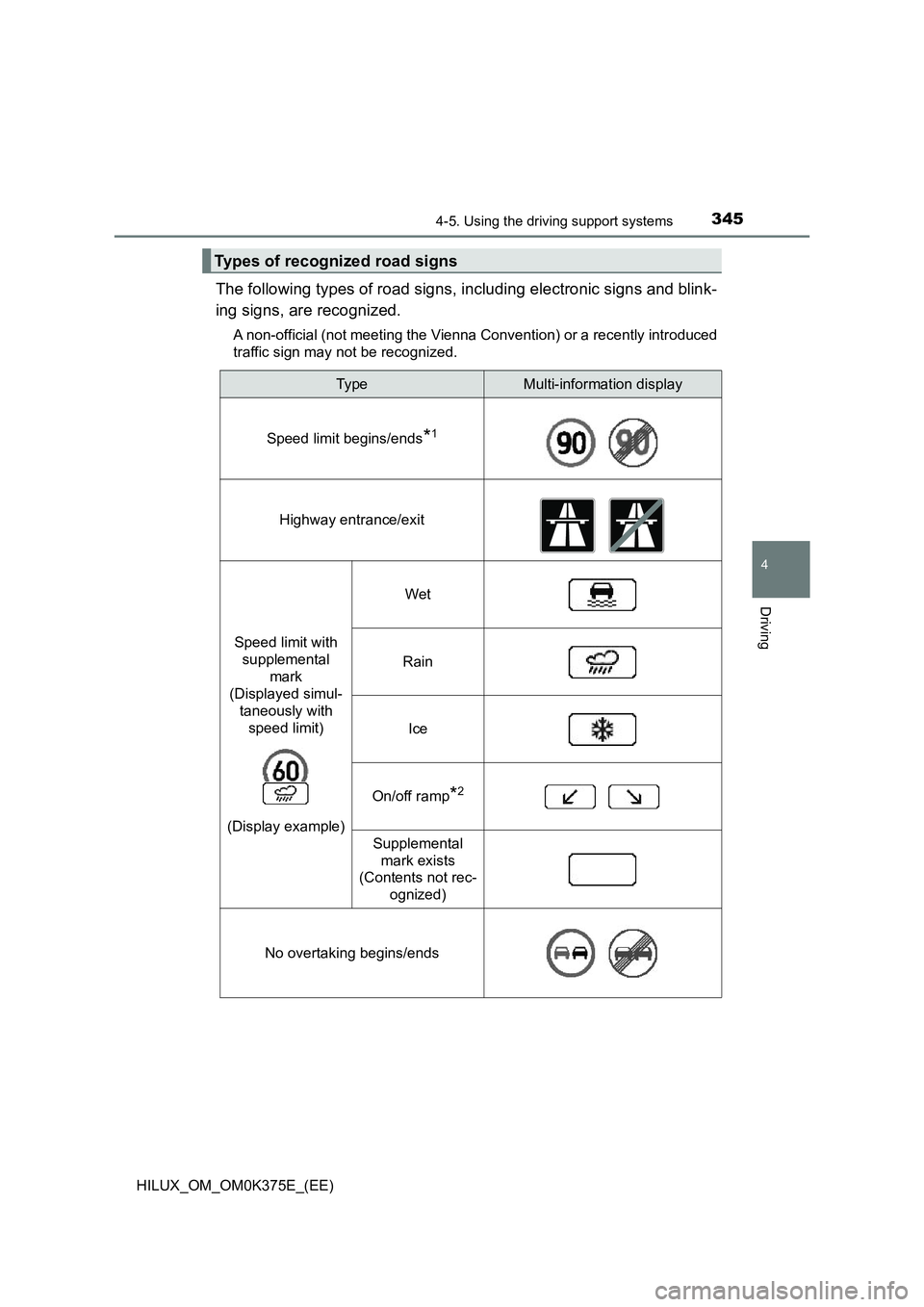
The following types of road signs, including electronic signs and blink-
ing signs, are recognized.
A non-official (not meeting the Vienna Convention) or a recently introduced
traffic sign may not be recognized.
Types of recognized road signs
Typ eMulti-information display
Speed limit begins/ends*1
Highway entrance/exit
Speed limit with
supplemental
mark
(Displayed simul-
taneously with
speed limit)
(Display example)
Wet
Rain
Ice
On/off ramp*2
Supplemental
mark exists
(Contents not rec-
ognized)
No overtaking begins/ends