cruise control TOYOTA HILUX 2018 Owners Manual
[x] Cancel search | Manufacturer: TOYOTA, Model Year: 2018, Model line: HILUX, Model: TOYOTA HILUX 2018Pages: 708, PDF Size: 95.31 MB
Page 3 of 708
3
1
9
8
6
5
4
3
2
HILUX_OM_OM0K375E_(EE)
7
3-5. Opening and closing
the windows
Power windows ..................232
Quarter windows
(smart-cab models)..........236
4-1. Before driving
Driving the vehicle .............238
Cargo and luggage ............251
Trailer towing (except
models for model code
destination W)..................252
Trailer towing (models for
model code destination
W) ....................................253
4-2. Driving procedures
Engine (ignition) switch
(vehicles without smart
entry & start system)........266
Engine (ignition) switch
(vehicles with smart
entry & start system)........269
Automatic transmission......277
Manual transmission ..........284
Turn signal lever ................290
Parking brake.....................291
4-3. Operating the lights
and wipers
Headlight switch.................292
Fog light switch ..................299
Windshield wipers and
washer .............................302
4-4. Refueling
Opening the fuel tank
cap .................................. 304
4-5. Using the driving support
systems
Toyota Safety Sense ......... 309
PCS (Pre-Collision
System) ........................... 321
LDA (Lane Departure
Alert) ............................... 334
RSA (Road Sign Assist) .... 343
Cruise control .................... 348
Rear view monitor
system............................. 352
Four-wheel drive
system............................. 363
Rear differential
lock system ..................... 373
Stop & Start system
(Smart Stop).................... 377
Driving assist systems....... 387
Downhill assist control
system............................. 395
DPF (Diesel Particulate
Filter) system .................. 398
4-6. Driving tips
Winter driving tips.............. 403
5-1. Basic Operations
Audio system types ........... 408
Steering wheel audio
switches .......................... 410
AUX port/USB port ............ 413
5-2. Using the audio system
Optimal use of the audio
system............................. 414
4Driving
5Audio system
Page 9 of 708
9
HILUX_OM_OM0K375E_(EE)
The installation of an RF-transmitter system in your vehicle could affect elec-
tronic systems such as:
● Multiport fuel injection system/sequential multiport fuel injection system
● Toyota Safety Sense
● Cruise control system
● Anti-lock brake system
● SRS airbag system
● Seat belt pretensioner system
Be sure to check with any authorized Toyota retailer or Toyota authorized
repairer, or any reliable repairer for precautionary measures or special
instructions regarding installation of an RF-transmitter system.
Further information regarding frequency bands, power levels, antenna posi-
tions and installation provisions for the installation of RF-transmitters, is avail-
able on request at any authorized Toyota retailer or Toyota authorized
repairer, or any reliable repairer.
The SRS airbag and seat belt pretensioner devices in your Toyota contain
explosive chemicals. If the vehicle is scrapped with the airbags and seat belt
pretensioners left as they are, this may cause an accident such as fire. Be
sure to have the systems of the SRS airbag and seat belt pretensioner
removed and disposed of by a qualified service shop or by any authorized
Toyota retailer or Toyota authorized repairer, or any reliable repairer before
you scrap your vehicle.
Installation of an RF-transmitter system
Scrapping of your Toyota
Page 21 of 708
21Pictorial index
HILUX_OM_OM0K375E_(EE)
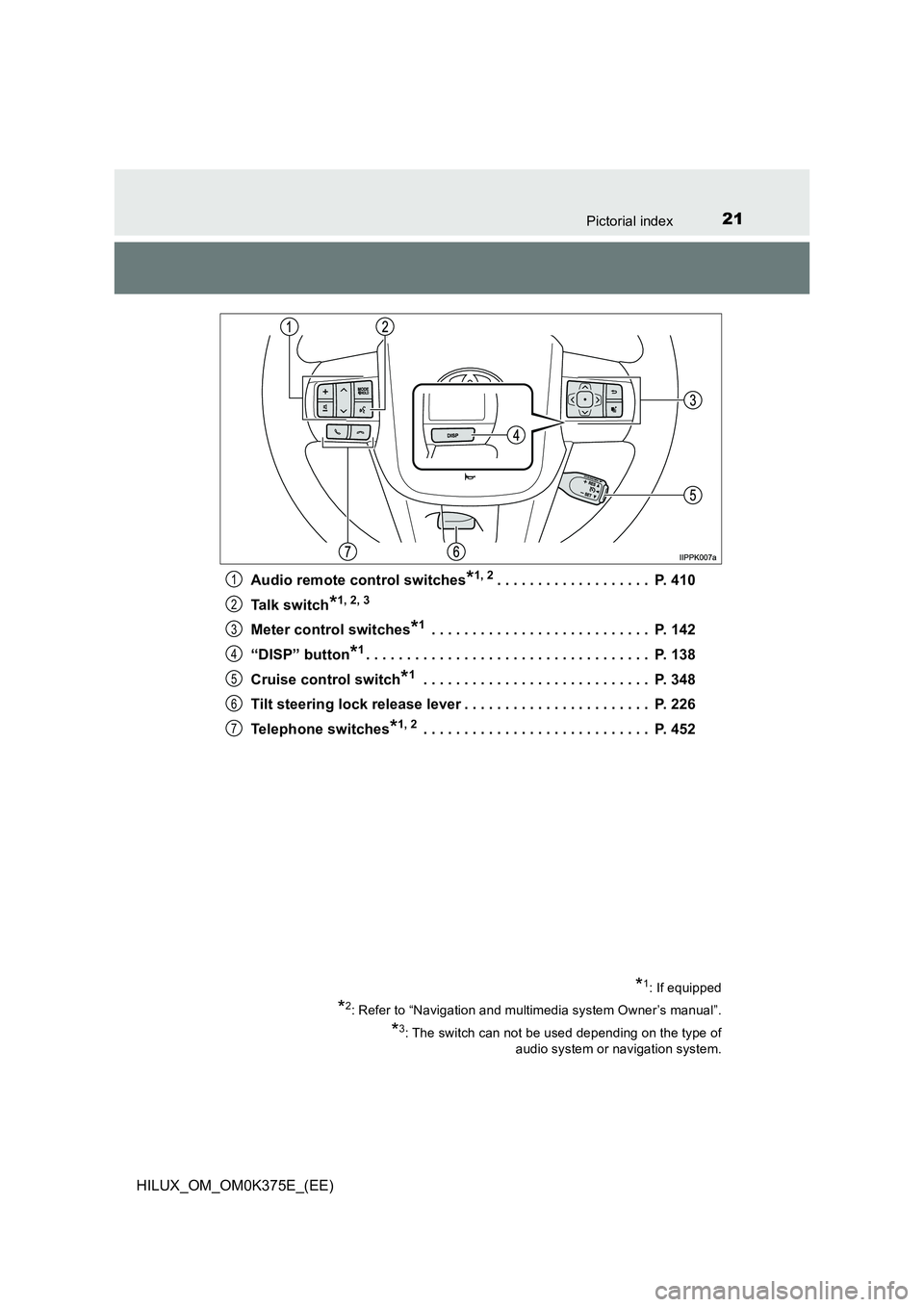
Audio remote control switches*1, 2. . . . . . . . . . . . . . . . . . . P. 410
Talk switch*1, 2, 3
Meter control switches*1 . . . . . . . . . . . . . . . . . . . . . . . . . . . P. 142
“DISP” button*1. . . . . . . . . . . . . . . . . . . . . . . . . . . . . . . . . . . P. 138
Cruise control switch*1 . . . . . . . . . . . . . . . . . . . . . . . . . . . . P. 348
Tilt steering lock release lever . . . . . . . . . . . . . . . . . . . . . . . P. 226
Telephone switches*1, 2 . . . . . . . . . . . . . . . . . . . . . . . . . . . . P. 452
*1: If equipped
*2: Refer to “Navigation and multimedia system Owner’s manual”.
*3: The switch can not be used depending on the type of
audio system or navigation system.
1
2
3
4
5
6
7
Page 29 of 708
29Pictorial index
HILUX_OM_OM0K375E_(EE)
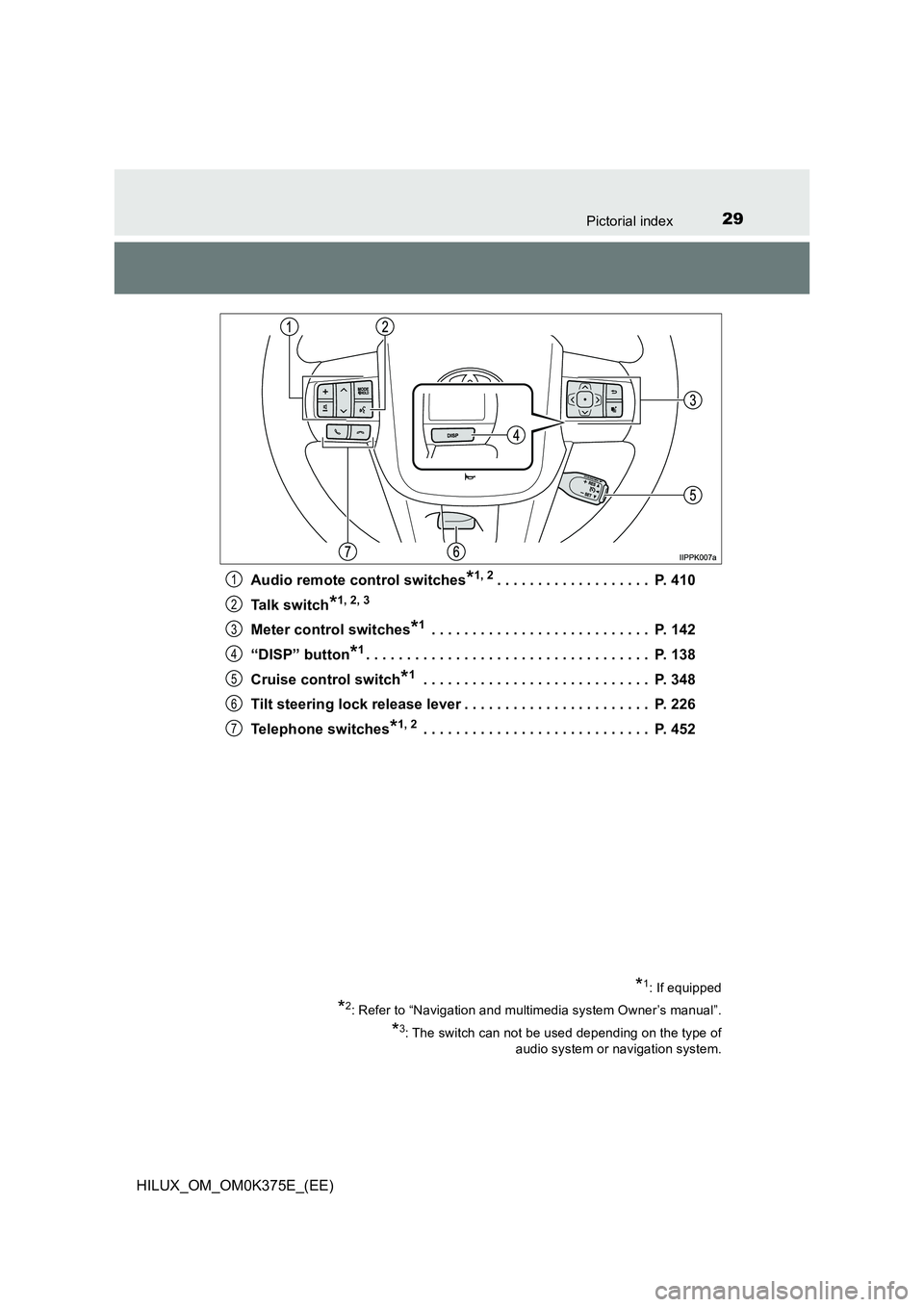
Audio remote control switches*1, 2. . . . . . . . . . . . . . . . . . . P. 410
Talk switch*1, 2, 3
Meter control switches*1 . . . . . . . . . . . . . . . . . . . . . . . . . . . P. 142
“DISP” button*1. . . . . . . . . . . . . . . . . . . . . . . . . . . . . . . . . . . P. 138
Cruise control switch*1 . . . . . . . . . . . . . . . . . . . . . . . . . . . . P. 348
Tilt steering lock release lever . . . . . . . . . . . . . . . . . . . . . . . P. 226
Telephone switches*1, 2 . . . . . . . . . . . . . . . . . . . . . . . . . . . . P. 452
*1: If equipped
*2: Refer to “Navigation and multimedia system Owner’s manual”.
*3: The switch can not be used depending on the type of
audio system or navigation system.
1
2
3
4
5
6
7
Page 128 of 708
1282. Instrument cluster
HILUX_OM_OM0K375E_(EE)
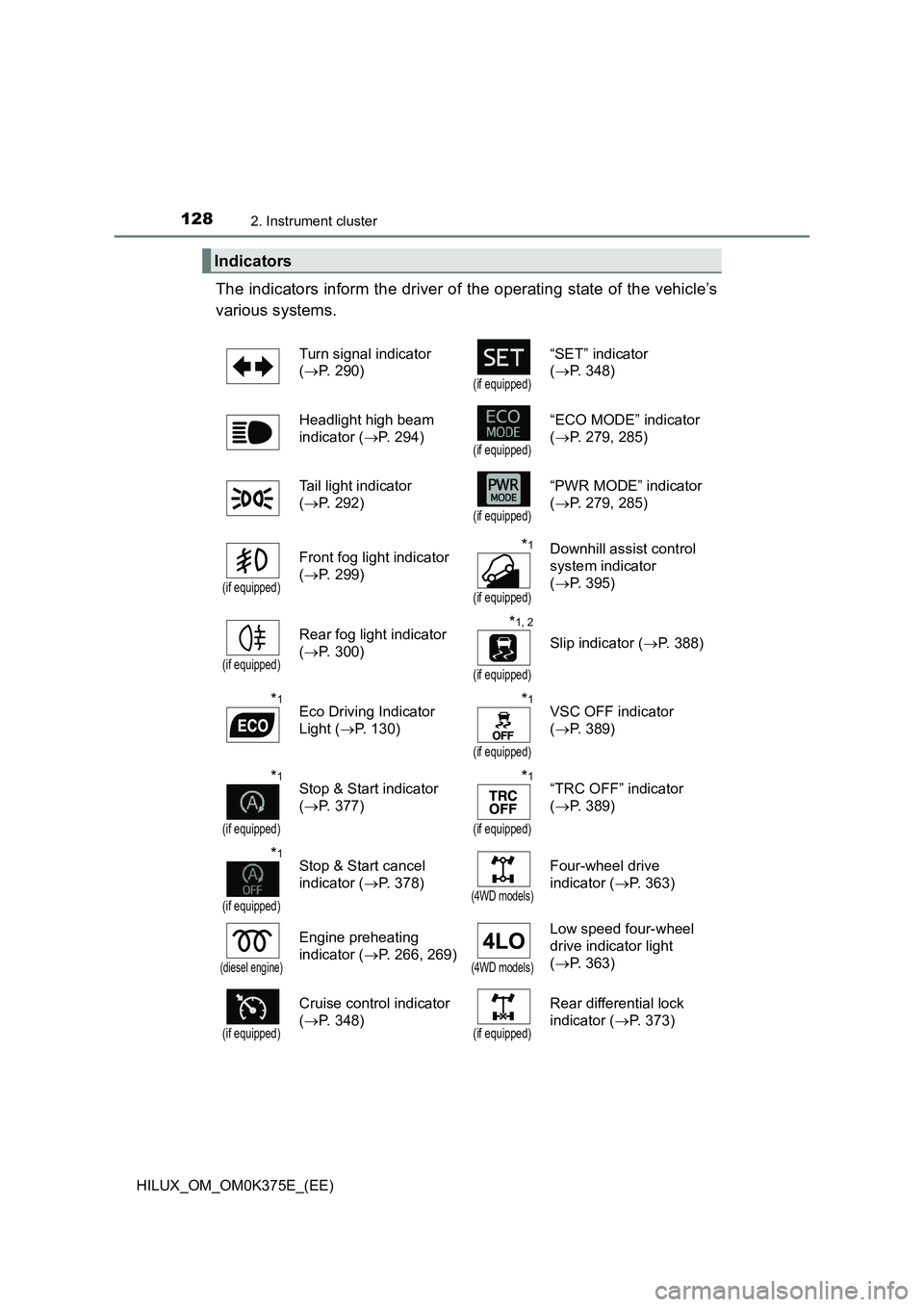
The indicators inform the driver of the operating state of the vehicle’s
various systems.
Indicators
Turn signal indicator
( P. 290)(if equipped)
“SET” indicator
( P. 348)
Headlight high beam
indicator ( P. 294)(if equipped)
“ECO MODE” indicator
( P. 279, 285)
Tail light indicator
( P. 292)(if equipped)
“PWR MODE” indicator
( P. 279, 285)
(if equipped)
Front fog light indicator
( P. 299)
*1
(if equipped)
Downhill assist control
system indicator
( P. 395)
(if equipped)
Rear fog light indicator
( P. 300)
*1, 2
(if equipped)
Slip indicator (P. 388)
*1Eco Driving Indicator
Light ( P. 130)
*1
(if equipped)
VSC OFF indicator
( P. 389)
*1
(if equipped)
Stop & Start indicator
( P. 377)
*1
(if equipped)
“TRC OFF” indicator
( P. 389)
*1
(if equipped)
Stop & Start cancel
indicator ( P. 378)(4WD models)
Four-wheel drive
indicator ( P. 363)
(diesel engine)
Engine preheating
indicator ( P. 266, 269)(4WD models)
Low speed four-wheel
drive indicator light
( P. 363)
(if equipped)
Cruise control indicator
( P. 348)(if equipped)
Rear differential lock
indicator ( P. 373)
Page 147 of 708
1472. Instrument cluster
2
Instrument cluster
HILUX_OM_OM0K375E_(EE)
If the accelerator pedal is not depressed, such as when the vehicle is driven
using cruise control (if equipped), the driven distance is not included in the
Eco Score.
The Eco Score evaluation differs depending on the driving conditions and
environmental factors. The Eco Score may not be linked to fuel consumption.
The Eco Score will not operate in the following conditions:
● The vehicle speed is approximately 130 km/h (80 mph) or higher.
● The shift lever is in a position other than D. (vehicles with automatic trans-
mission)
● Front-wheel drive control switch is in L4. (if equipped)
● Downhill assist control system is operating. (if equipped)
● The vehicle is in the power mode. (if equipped)
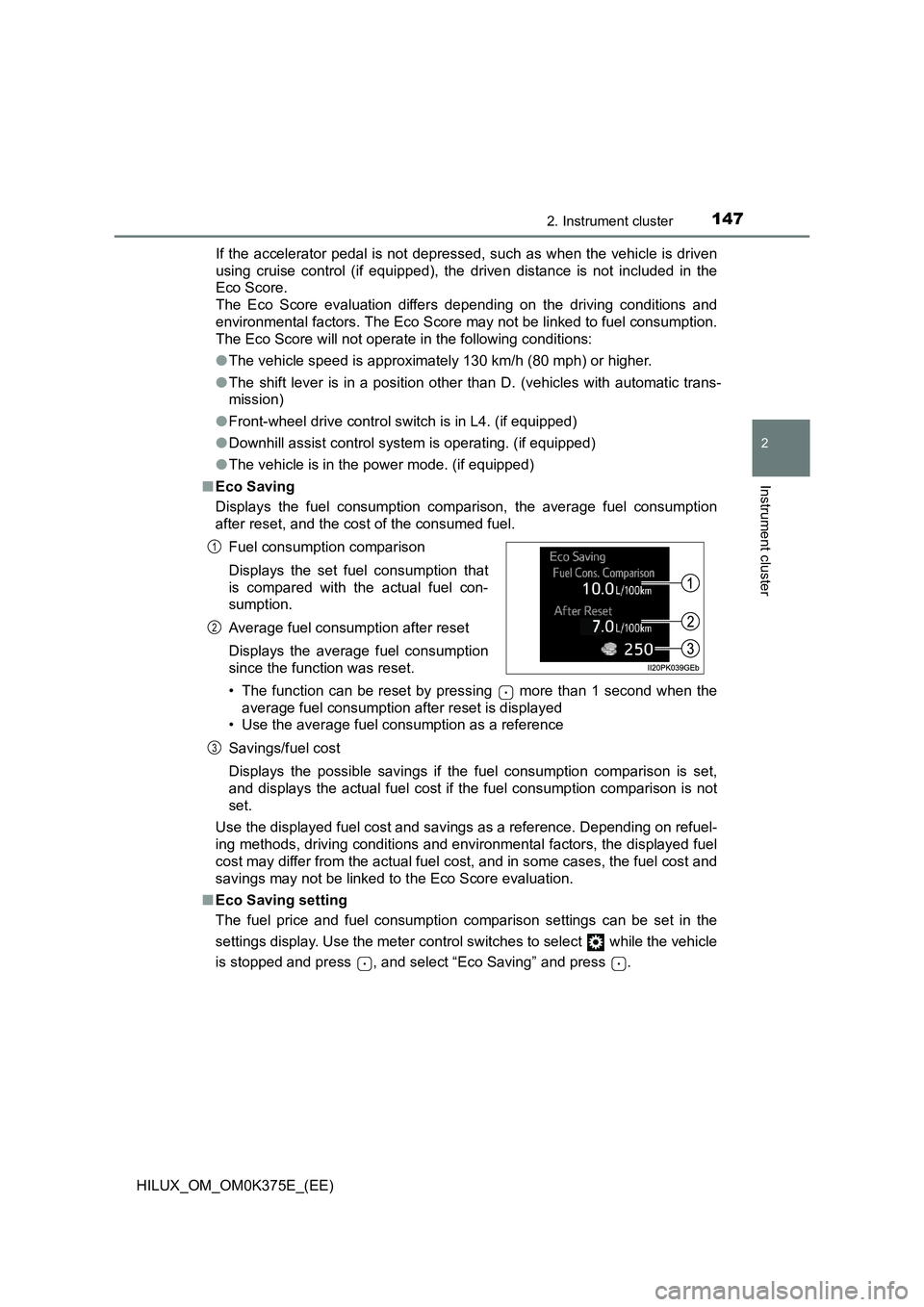
■ Eco Saving
Displays the fuel consumption comparison, the average fuel consumption
after reset, and the cost of the consumed fuel.
• The function can be reset by pressing more than 1 second when the
average fuel consumption after reset is displayed
• Use the average fuel consumption as a reference
Savings/fuel cost
Displays the possible savings if the fuel consumption comparison is set,
and displays the actual fuel cost if the fuel consumption comparison is not
set.
Use the displayed fuel cost and savings as a reference. Depending on refuel-
ing methods, driving conditions and environmental factors, the displayed fuel
cost may differ from the actual fuel cost, and in some cases, the fuel cost and
savings may not be linked to the Eco Score evaluation.
■ Eco Saving setting
The fuel price and fuel consumption comparison settings can be set in the
settings display. Use the meter control switches to select while the vehicle
is stopped and press , and select “Eco Saving” and press .
Fuel consumption comparison
Displays the set fuel consumption that
is compared with the actual fuel con-
sumption.
Average fuel consumption after reset
Displays the average fuel consumption
since the function was reset.
1
2
3
Page 237 of 708
237
4Driving
HILUX_OM_OM0K375E_(EE)
4-1. Before driving
Driving the vehicle ............. 238
Cargo and luggage ............ 251
Trailer towing (except
models for model code
destination W).................. 252
Trailer towing (models for
model code destination
W) .................................... 253
4-2. Driving procedures
Engine (ignition) switch
(vehicles without smart
entry & start system)........ 266
Engine (ignition) switch
(vehicles with smart
entry & start system)........ 269
Automatic transmission ..... 277
Manual transmission.......... 284
Turn signal lever ................ 290
Parking brake .................... 291
4-3. Operating the lights
and wipers
Headlight switch ................ 292
Fog light switch .................. 299
Windshield wipers and
washer ............................. 302
4-4. Refueling
Opening the fuel tank
cap ................................... 304
4-5. Using the driving support
systems
Toyota Safety Sense ......... 309
PCS (Pre-Collision
System) ........................... 321
LDA (Lane Departure
Alert) ................................ 334
RSA (Road Sign Assist)..... 343
Cruise control..................... 348
Rear view monitor
system ............................. 352
Four-wheel drive
system ............................. 363
Rear differential
lock system ...................... 373
Stop & Start system
(Smart Stop) .................... 377
Driving assist systems ....... 387
Downhill assist control
system ............................. 395
DPF (Diesel Particulate
Filter) system ................... 398
4-6. Driving tips
Winter driving tips .............. 403
Page 257 of 708
2574-1. Before driving
4
Driving
HILUX_OM_OM0K375E_(EE)
WARNING
Follow all the instructions described in this section. Failure to do so could
cause an accident resulting in death or serious injury.
■ Trailer towing precautions
When towing, make sure that none of the weight limits are exceeded.
( P. 2 5 8 )
■ Vehicle speed in towing
Observe the legal maximum speeds for trailer towing.
■ Before descending hills or long declines
Reduce speed and downshift. However, never downshift suddenly while
descending steep or long down hill grades.
■ Operation of the brake pedal
Do not hold the brake pedal depressed often or for long periods of time.
Doing so may result in the brake overheating or reduce braking effects.
■ To avoid accident or injury
● The gross combination mass (sum of your vehicle mass plus its load and
the total trailer mass) must not exceed the following:
Single-cab models
5530 kg (12192 lb.): Pre Runner
5850 kg (12897 lb.): 4WD models
Smart-cab models
5850 kg (12897 lb.)
Double-cab models
5850 kg (12897 lb.): Except Pre Runner for EURO VI model* for Israel
and Turkey
*: EURO VI is emission standard. If it is not clear that your vehicle meets rel-
evant standards, contact any authorized Toyota retailer or Toyota autho-
rized repairer, or any reliable repairer.
● Do not use cruise control (if equipped) when trailer towing.
Page 281 of 708
2814-2. Driving procedures
4
Driving
HILUX_OM_OM0K375E_(EE)
■S mode
When the shift range is 4 or lower, holding the shift lever toward “+” sets the
shift range to 6.
■ Downshifting restrictions warning buzzer
To help ensure safety and driving per formance, downshifting operation may
sometimes be restricted. In some circumstances, downshifting may not be
possible even when the shift lever is operated. (A buzzer will sound twice.)
■ Operation of the air conditioning system in Eco drive mode (vehicles
with automatic air conditioning system)
Eco drive mode controls the heating/cooling operations and fan speed of the
air conditioning system to enhance fuel efficiency ( P. 497). To improve air
conditioning performance, adjust the fan speed or turn off Eco drive mode.
■ Deactivation of the driving mode
● Eco drive mode will not be canceled until the “ECO MODE” switch is
pressed, even if the engine is turned off after driving in Eco drive mode.
● Power mode will be canceled if the engine is turned off after driving in power
mode.
■ When driving with cruise control activated (if equipped)
Even when performing the following actions with the intent of enabling engine
braking, engine braking will not activate because cruise control will not be
canceled.
● While driving in S mode, downshifting to 5 or 4. (P. 280)
● When switching the driving mode to power mode while driving in D.
( P. 279)
■ Shift lock system
The shift lock system is a system to prevent accidental operation of the shift
lever in starting.
The shift lever can be shifted from P only when the engine switch is in the
“ON” position (vehicles without smart entry & start system) or IGNITION ON
mode (vehicles with smart entry & start system) and the brake pedal is being
depressed.
Page 348 of 708
3484-5. Using the driving support systems
HILUX_OM_OM0K375E_(EE)
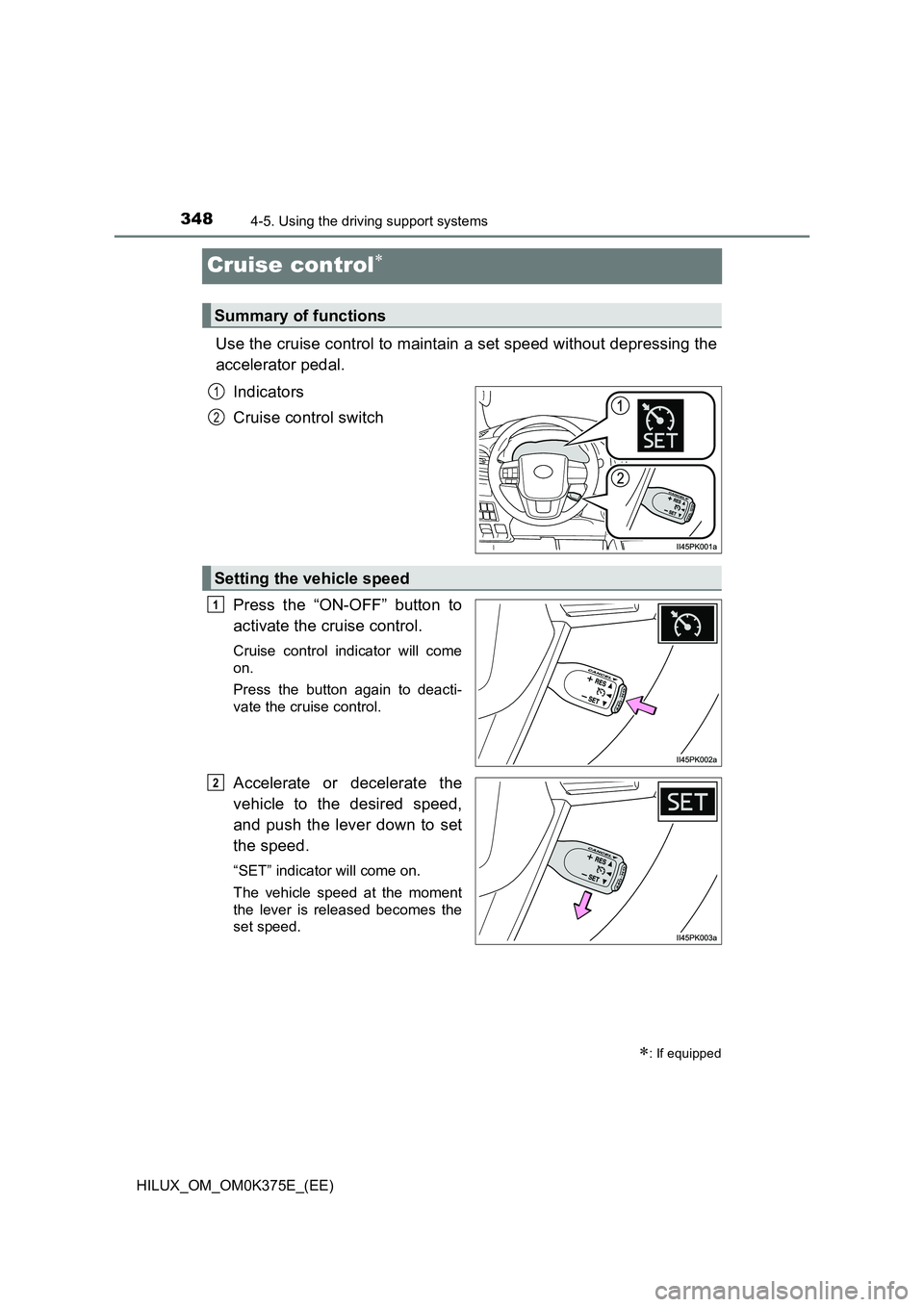
Cruise control
Use the cruise control to maintain a set speed without depressing the
accelerator pedal.
Indicators
Cruise control switch
Press the “ON-OFF” button to
activate the cruise control.
Cruise control indicator will come
on.
Press the button again to deacti-
vate the cruise control.
Accelerate or decelerate the
vehicle to the desired speed,
and push the lever down to set
the speed.
“SET” indicator will come on.
The vehicle speed at the moment
the lever is released becomes the
set speed.
: If equipped
Summary of functions
1
2
Setting the vehicle speed
1
2