phone TOYOTA HILUX 2019 User Guide
[x] Cancel search | Manufacturer: TOYOTA, Model Year: 2019, Model line: HILUX, Model: TOYOTA HILUX 2019Pages: 708, PDF Size: 95.31 MB
Page 409 of 708
4095-1. Basic Operations
5
Audio system
HILUX_OM_OM0K375E_(EE)
■Using cellular phones
Interference may be heard through the audio system’s speakers if a cellular
phone is being used inside or close to the vehicle while the audio system is
operating.
NOTICE
■ To prevent battery discharge
Do not leave the audio system on longer than necessary with the engine
stopped.
■ To avoid damaging the audio system
Take care not to spill drinks or other fluids over the audio system.
Page 435 of 708
4355-5. Using an external device
5
Audio system
HILUX_OM_OM0K375E_(EE)
Press (TEXT) to display or hide the album title.
If there are continuing texts, is displayed.
Press and hold (TEXT) to display the remaining texts.
■ About iPod
● “Made for iPod” and “Made for iPhone” mean that an electronic accessory
has been designed to connect specifically to iPod, or iPhone, respectively,
and has been certified by the developer to meet Apple performance
standards.
● Apple is not responsible for the operation of this device or its compliance
with safety and regulatory standards. Please note that the use of this
accessory with iPod or iPhone may affect wireless performance.
● iPhone, iPod, iPod classic, iPod nano, iPod shuffle, and iPod touch are
trademarks of Apple Inc., registered in the U.S. and other countries.
■ iPod functions
● When an iPod is connected and the audio source is changed to iPod mode,
the iPod will resume play from the same point in which it was last used.
● Depending on the iPod that is connected to the system, certain functions
may not be available. Disconnecting the device and reconnecting it once
again may resolve some malfunctions.
● While connected to the system, the iPod cannot be operated with its own
controls. It is necessary to use the controls of the vehicle’s audio system
instead.
Switching the display
Page 437 of 708
4375-5. Using an external device
5
Audio system
HILUX_OM_OM0K375E_(EE)
■ Compatible models
The following iPod®, iPod nano®, iPod classic®, iPod touch® and iPhone®
devices can be used with this system.
● Made for
• iPod touch (5th generation)
• iPod touch (4th generation)
• iPod touch (3rd generation)
• iPod touch (2nd generation)
• iPod touch (1st generation)
• iPod classic
• iPod with video
• iPod nano (7th generation)
• iPod nano (6th generation)
• iPod nano (5th generation)
• iPod nano (4th generation)
• iPod nano (3rd generation)
• iPod nano (2nd generation)
• iPod nano (1st generation)
• iPhone 5s
• iPhone 5c
• iPhone 5
• iPhone 4S
• iPhone 4
• iPhone 3GS
• iPhone 3G
• iPhone
Depending on differences between models or software versions etc., some
models might be incompatible with this system.
Items related to standards and limitations are as follows:
● Maximum number of lists in device: 9999
● Maximum number of songs in device: 65535
● Maximum number of songs per list: 65535
WARNING
■While driving
Do not connect iPod or operate the controls. Doing so may cause an acci-
dent, resulting in death or serious injury.
Page 447 of 708
447
5
5-6. Using Bluetooth® devices
Audio system
HILUX_OM_OM0K375E_(EE)
Bluetooth® audio/phone
◆Bluetooth® audio
The Bluetooth® audio system enables you to enjoy music played on
a portable digital audio player (portable player) from the vehicle
speakers via wireless communication.
This audio system supports Bluetooth®, a wireless data system
capable of playing portable audio music without cables. If your por-
table player does not support Bluetooth®, the Bluetooth® audio sys-
tem will not function.
◆Bluetooth® phone (hands-free phone system)
This system supports Bluetooth®, which allows you to make or
receive calls without using cables to connect a cellular phone and
the system, and without operating the cellular phone.
The following can be performed using Bluetooth® wireless com-
munication:
Page 448 of 708
4485-6. Using Bluetooth® devices
HILUX_OM_OM0K375E_(EE)
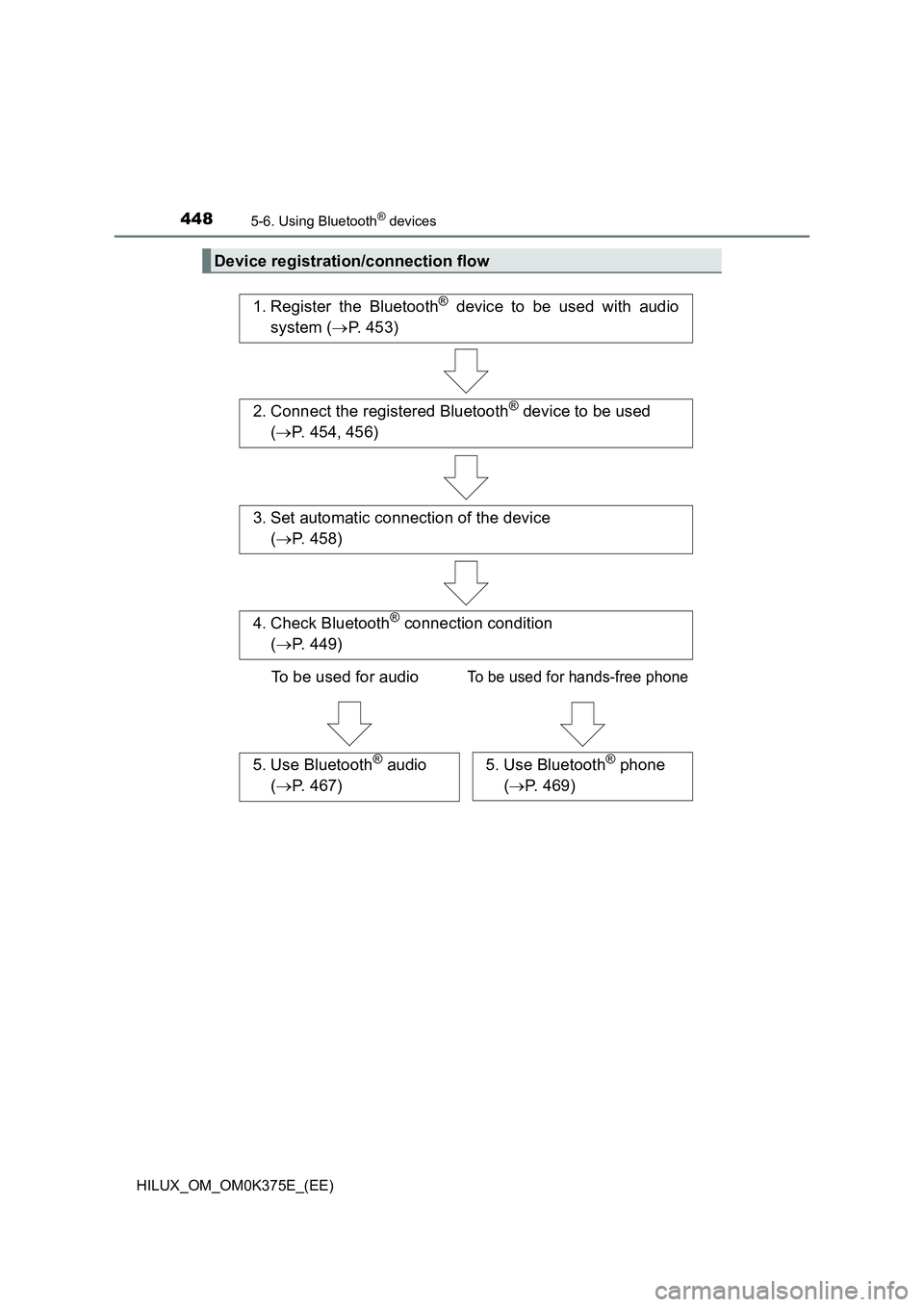
Device registration/connection flow
1. Register the Bluetooth® device to be used with audio
system ( P. 453)
2. Connect the registered Bluetooth® device to be used
( P. 454, 456)
5. Use Bluetooth® audio
( P. 467)
5. Use Bluetooth® phone
( P. 469)
3. Set automatic connection of the device
( P. 458)
4. Check Bluetooth® connection condition
( P. 449)
To be used for audioTo be used for hands-free phone
Page 449 of 708
4495-6. Using Bluetooth® devices
5
Audio system
HILUX_OM_OM0K375E_(EE)
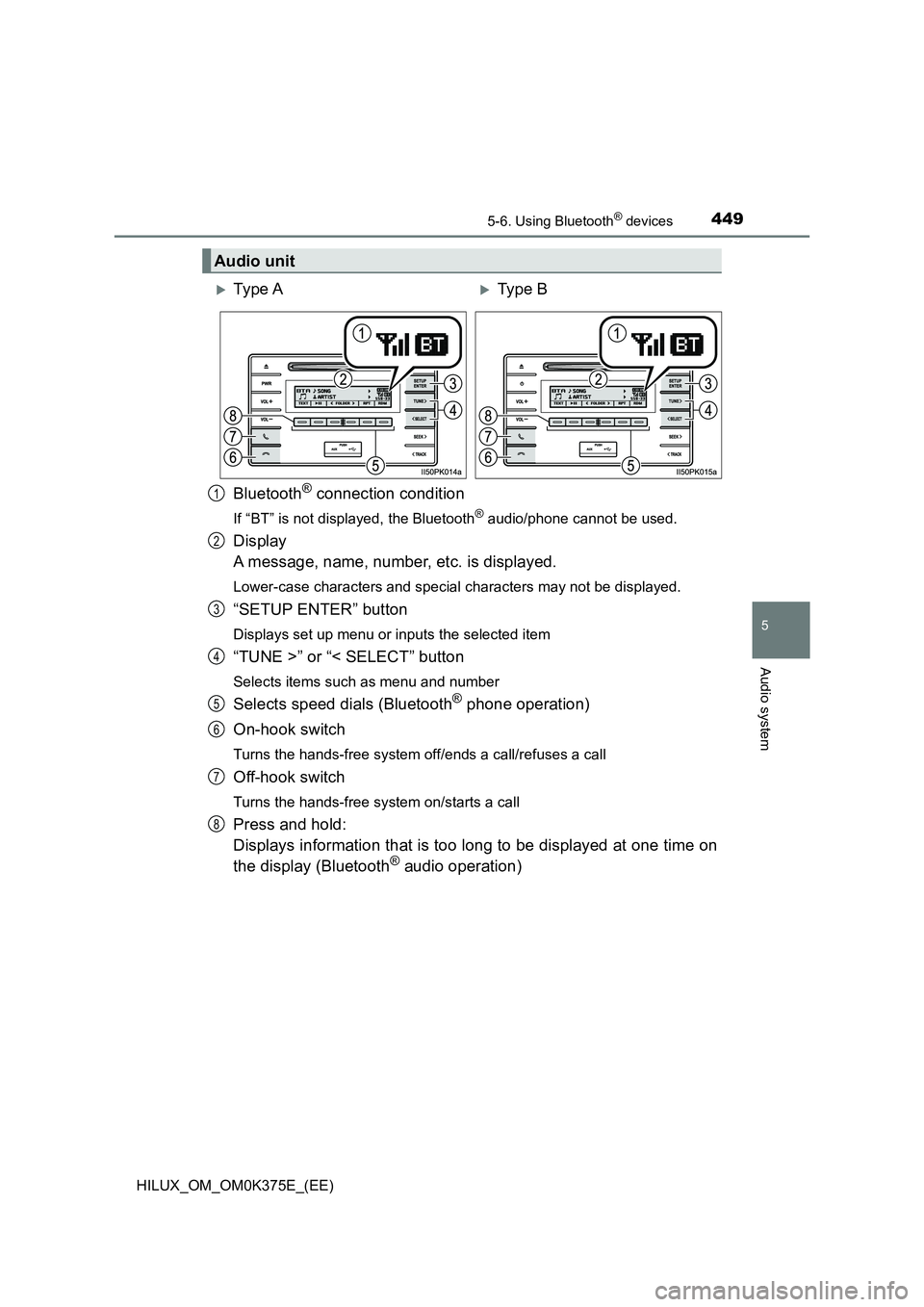
Bluetooth® connection condition
If “BT” is not displayed, the Bluetooth® audio/phone cannot be used.
Display
A message, name, number, etc. is displayed.
Lower-case characters and special characters may not be displayed.
“SETUP ENTER” button
Displays set up menu or inputs the selected item
“TUNE >” or “< SELECT” button
Selects items such as menu and number
Selects speed dials (Bluetooth® phone operation)
On-hook switch
Turns the hands-free system off/ends a call/refuses a call
Off-hook switch
Turns the hands-free system on/starts a call
Press and hold:
Displays information that is too long to be displayed at one time on
the display (Bluetooth® audio operation)
Audio unit
Ty pe AType B
1
2
3
4
5
6
7
8
Page 450 of 708
4505-6. Using Bluetooth® devices
HILUX_OM_OM0K375E_(EE)
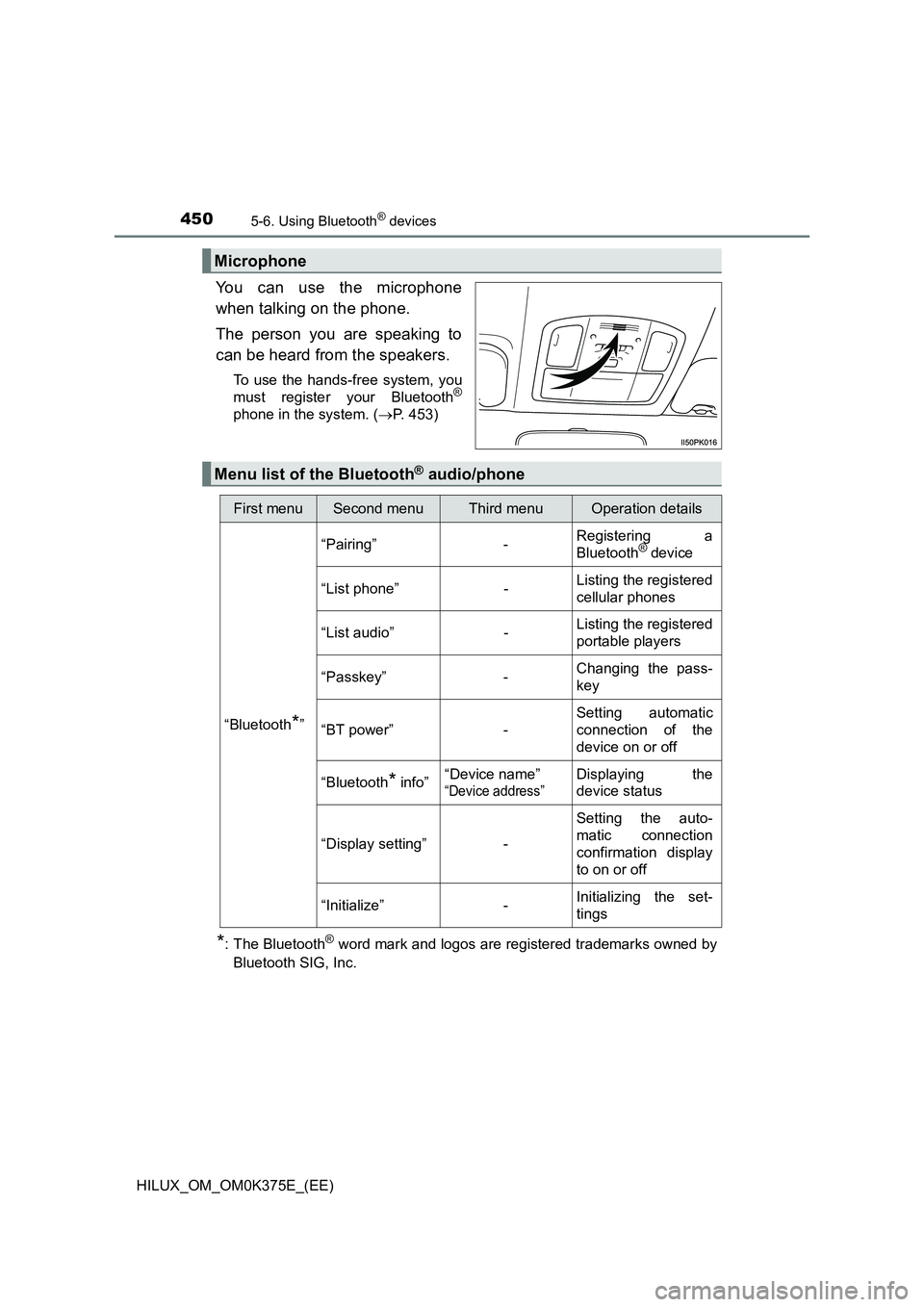
You can use the microphone
when talking on the phone.
The person you are speaking to
can be heard from the speakers.
To use the hands-free system, you
must register your Bluetooth®
phone in the system. ( P. 453)
*: The Bluetooth® word mark and logos are registered trademarks owned by
Bluetooth SIG, Inc.
Microphone
Menu list of the Bluetooth® audio/phone
First menuSecond menuThird menuOperation details
“Bluetooth*”
“Pairing” - Registering a
Bluetooth® device
“List phone” - Listing the registered
cellular phones
“List audio” - Listing the registered
portable players
“Passkey” - Changing the pass-
key
“BT power” -
Setting automatic
connection of the
device on or off
“Bluetooth* info” “Device name”
“Device address”
Displaying the
device status
“Display setting” -
Setting the auto-
matic connection
confirmation display
to on or off
“Initialize” - Initializing the set-
tings
Page 451 of 708
4515-6. Using Bluetooth® devices
5
Audio system
HILUX_OM_OM0K375E_(EE)
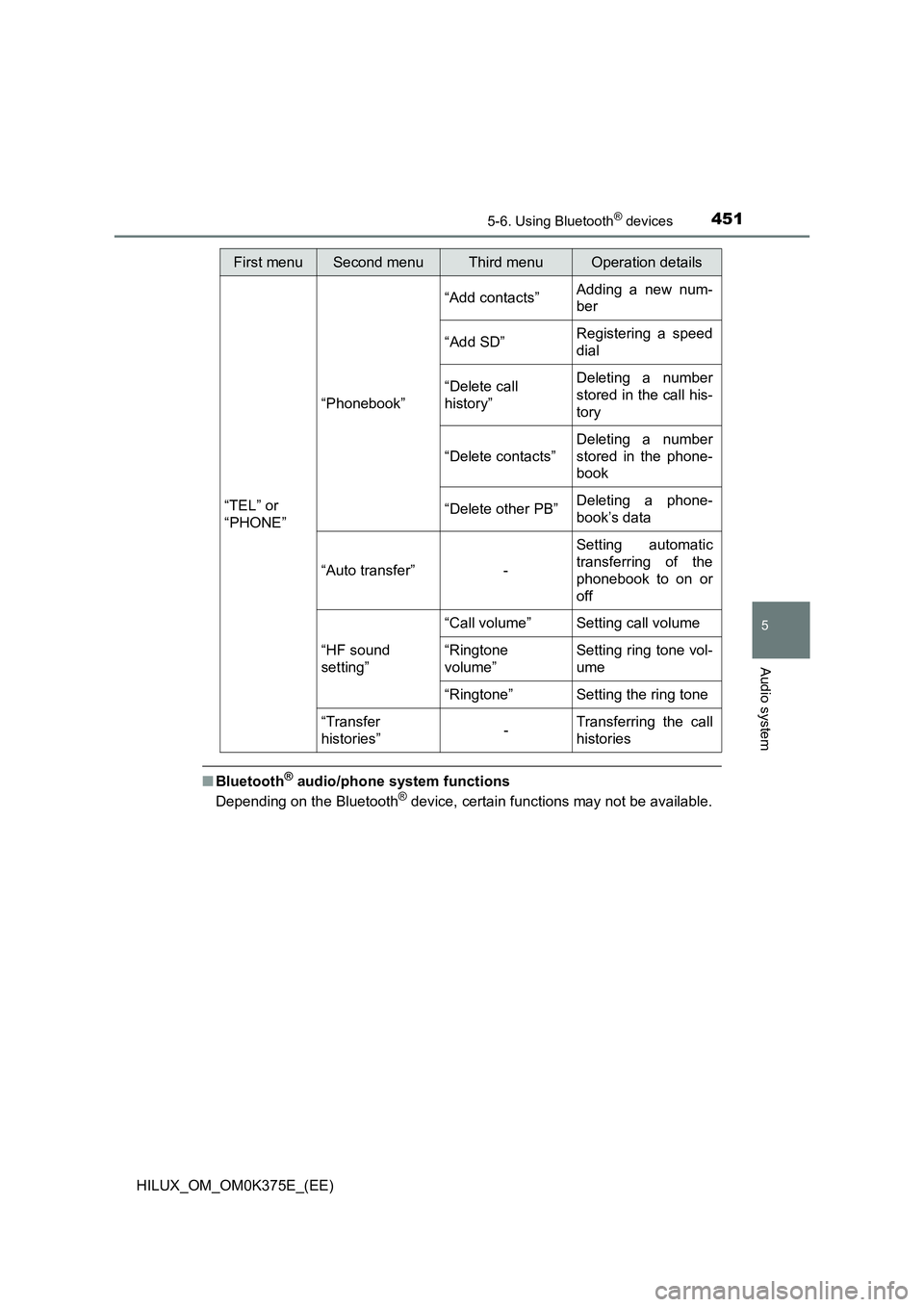
■Bluetooth® audio/phone system functions
Depending on the Bluetooth® device, certain functions may not be available.
First menuSecond menuThird menuOperation details
“TEL” or
“PHONE”
“Phonebook”
“Add contacts” Adding a new num-
ber
“Add SD” Registering a speed
dial
“Delete call
history”
Deleting a number
stored in the call his-
tory
“Delete contacts”
Deleting a number
stored in the phone-
book
“Delete other PB” Deleting a phone-
book’s data
“Auto transfer” -
Setting automatic
transferring of the
phonebook to on or
off
“HF sound
setting”
“Call volume” Setting call volume
“Ringtone
volume”
Setting ring tone vol-
ume
“Ringtone” Setting the ring tone
“Transfer
histories” - Transferring the call
histories
Page 452 of 708
4525-6. Using Bluetooth® devices
HILUX_OM_OM0K375E_(EE)
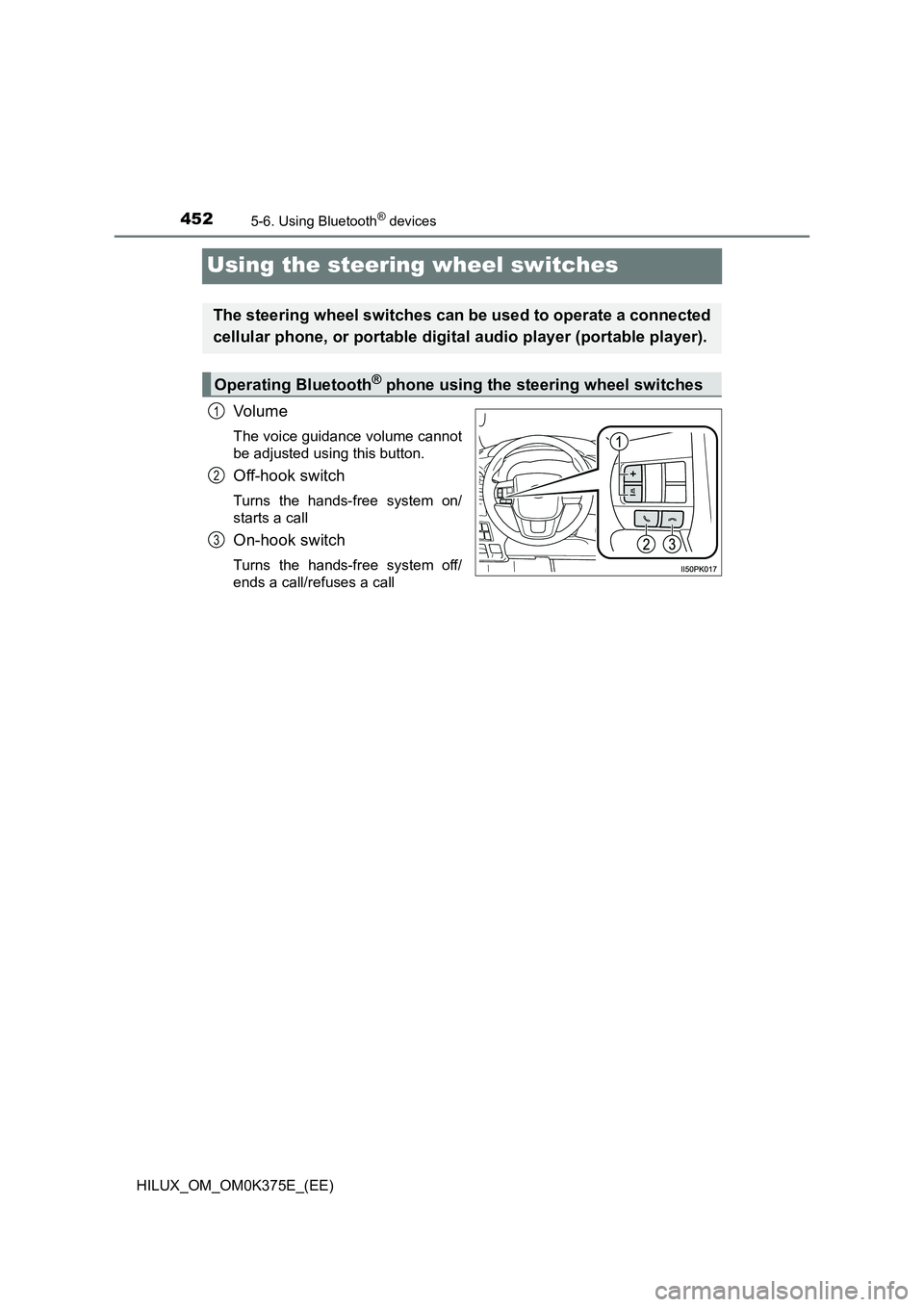
Using the steering wheel switches
Vo lu m e
The voice guidance volume cannot
be adjusted using this button.
Off-hook switch
Turns the hands-free system on/
starts a call
On-hook switch
Turns the hands-free system off/
ends a call/refuses a call
The steering wheel switches can be used to operate a connected
cellular phone, or portable digital audio player (portable player).
Operating Bluetooth® phone using the steering wheel switches
1
2
3
Page 453 of 708
453
5
5-6. Using Bluetooth® devices
Audio system
HILUX_OM_OM0K375E_(EE)
Registering a Bluetooth® device
Press the “SETUP ENTER” button.
Select “Bluetooth*” using the “TUNE >” or “< SELECT” button, and
press the “SETUP ENTER” button.
Select “Pairing” using the “TUNE >” or “< SELECT” button, and
press the “SETUP ENTER” button.
A passkey will be displayed.
SSP (Secure Simple Pairing) incompatible Bluetooth® devices:
Input the passkey into the device.
SSP (Secure Simple Pairing) compatible Bluetooth® devices:
Select “YES” to register the device. Depending on the type of
device, it may register automatically.
If a Bluetooth® device has both music player and cellular phone func-
tions, both functions will be registered at the same time. When delet-
ing the device, both functions will be deleted at the same time.
If the off-hook switch is pressed and the “TEL” or “PHONE” mode is
entered when no phones have been registered, the registration
screen will be automatically displayed.
*: The Bluetooth® word mark and logos are registered trademarks owned by
Bluetooth SIG, Inc.
Before using the Bluetooth® audio/phone, it is necessary to reg-
ister a Bluetooth® device in the system. Follow the procedure
below to register (pair) a device:
How to register a Bluetooth® device
1
2
3
4