alarm TOYOTA IQ 2012 User Guide
[x] Cancel search | Manufacturer: TOYOTA, Model Year: 2012, Model line: IQ, Model: TOYOTA IQ 2012Pages: 476, PDF Size: 23.52 MB
Page 263 of 476
263 3-2. Using the audio system
3
Interior features
iQ_WE_74014E
RDS (Radio Data System)
This feature allows your radio to receive data from radio stations that
broadcast this information.
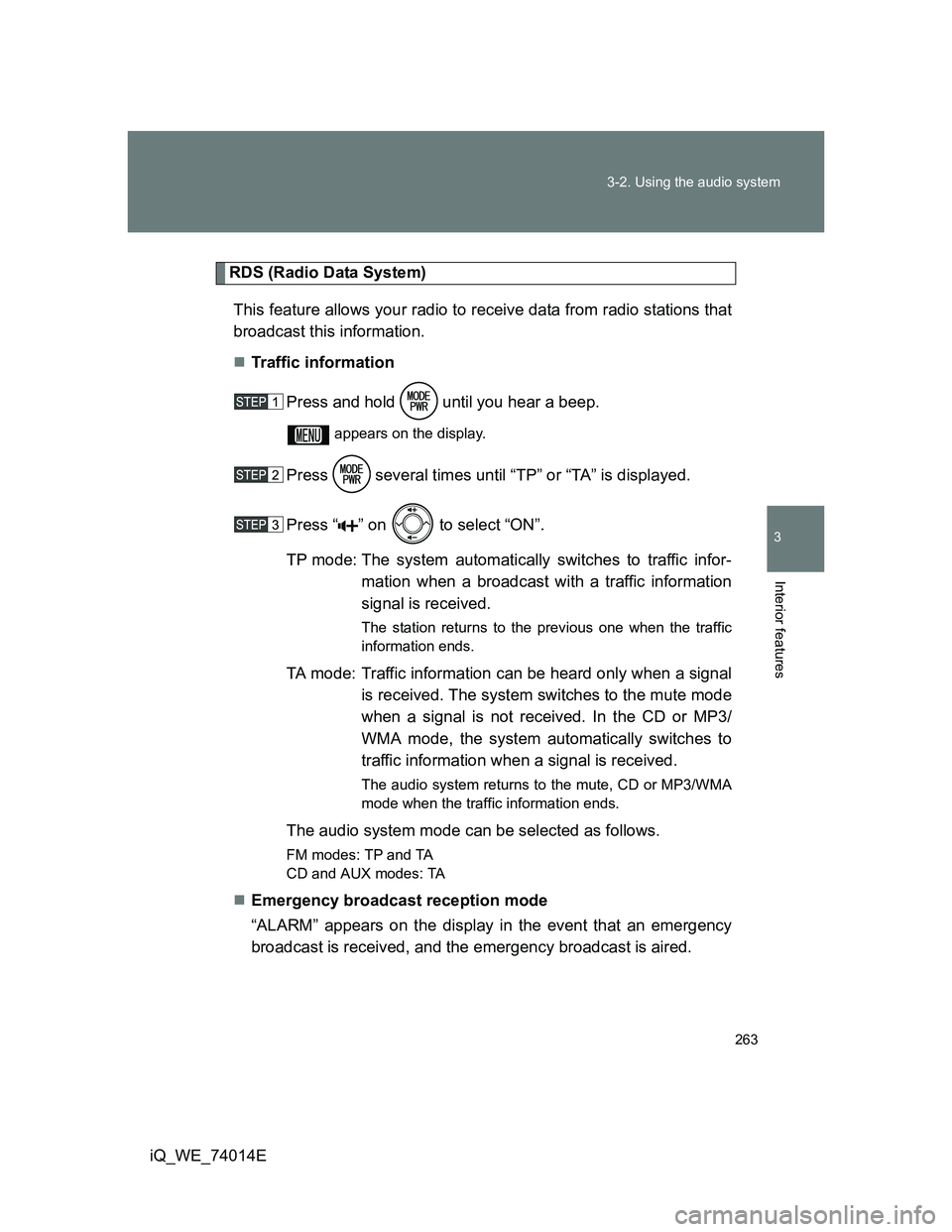
Traffic information
Press and hold until you hear a beep.
appears on the display.
Press several times until “TP” or “TA” is displayed.
Press “ ” on to select “ON”.
TP mode: The system automatically switches to traffic infor-
mation when a broadcast with a traffic information
signal is received.
The station returns to the previous one when the traffic
information ends.
TA mode: Traffic information can be heard only when a signal
is received. The system switches to the mute mode
when a signal is not received. In the CD or MP3/
WMA mode, the system automatically switches to
traffic information when a signal is received.
The audio system returns to the mute, CD or MP3/WMA
mode when the traffic information ends.
The audio system mode can be selected as follows.
FM modes: TPand TA
CD and AUX modes: TA
Emergency broadcast reception mode
“ALARM” appears on the display in the event that an emergency
broadcast is received, and the emergency broadcast is aired.
Page 427 of 476
5
427
5-2. Steps to take in an emergency
When trouble arises
iQ_WE_74014E
If the electronic key does not operate properly (vehicles with smart entr y & start system)
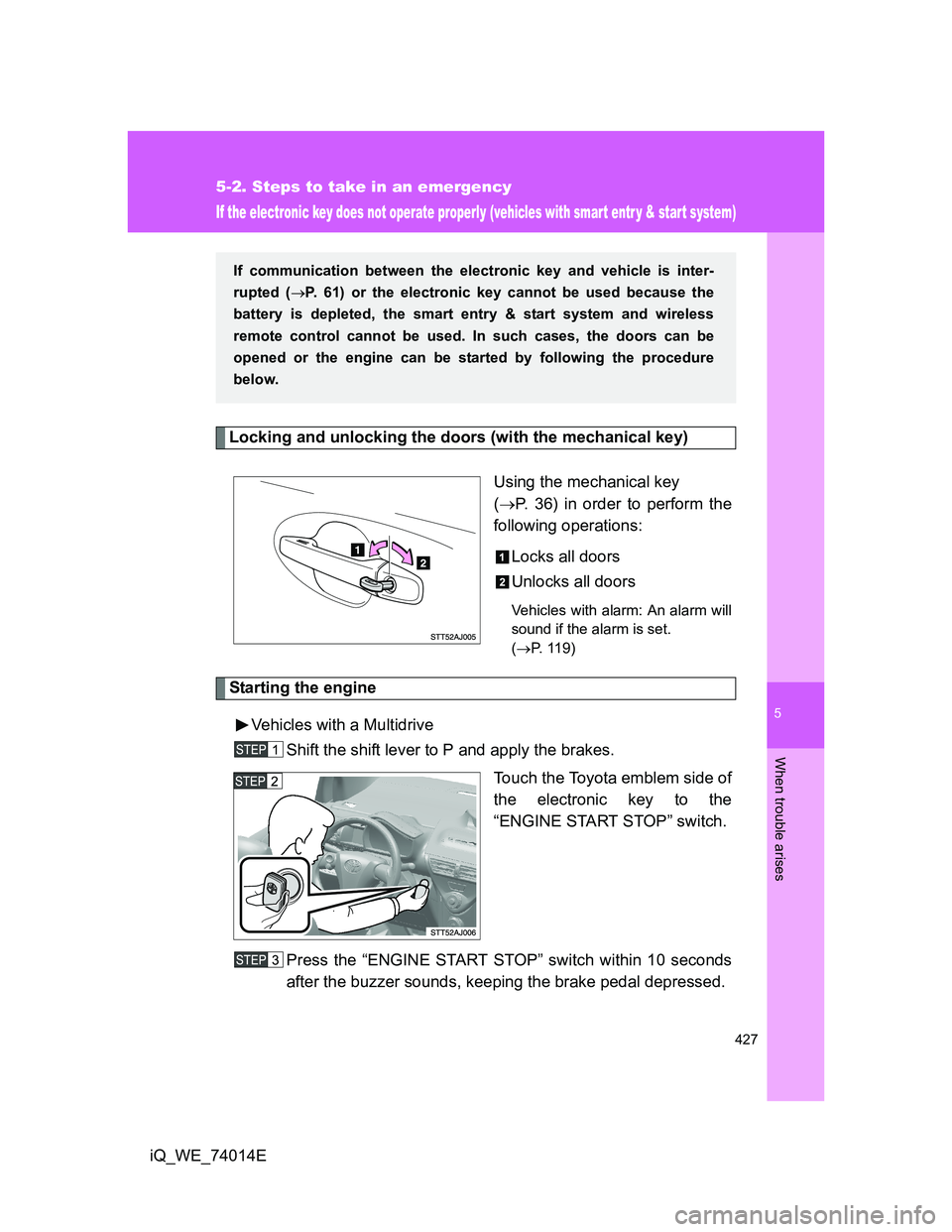
Locking and unlocking the doors (with the mechanical key)
Using the mechanical key
(P. 36) in order to perform the
following operations:
Locks all doors
Unlocks all doors
Vehicles with alarm: An alarm will
sound if the alarm is set.
(P. 119)
Starting the engine
Vehicles with a Multidrive
Shift the shift lever to P and apply the brakes.
Touch the Toyota emblem side of
the electronic key to the
“ENGINE START STOP” switch.
Press the “ENGINE START STOP” switch within 10 seconds
after the buzzer sounds, keeping the brake pedal depressed.
If communication between the electronic key and vehicle is inter-
rupted (P. 61) or the electronic key cannot be used because the
battery is depleted, the smart entry & start system and wireless
remote control cannot be used. In such cases, the doors can be
opened or the engine can be started by following the procedure
below.
Page 432 of 476
432 5-2. Steps to take in an emergency
iQ_WE_74014E
Starting the engine when the battery is discharged (vehicles with a
Multidrive)
The engine cannot be started by push-starting.
Avoiding a discharged battery
Turn off the headlights and the audio system while the engine is turned
off.
Turn off any unnecessary electrical components when the vehicle is run-
ning at a low speed for an extended period, such as in heavy traffic, etc.
When the vehicle battery is removed or discharged
Any data stored in the computer will be erased. When the vehicle battery
is discharged, have the vehicle checked at any authorized Toyota dealer
or repairer, or another duly qualified and equipped professional.
Vehicles with alarm: Make sure that the key is not inside the vehicle
when recharging or replacing the battery. The key may be locked in the
vehicle if the alarm is activated. (P. 120)
Reminders when the vehicle battery is discharged (vehicles with smart
entry & start system)
When the doors are attempted to be unlocked via the smart entry & start
system just after the vehicle battery has been discharged, it may fail. If
the doors cannot be unlocked, unlock the doors using a wireless remote
controller or a mechanical key.
The first engine start after the battery has been discharged may fail.
However, the engine should start after the second attempt, so it is not a
malfunction.
Once the engine starts, have the vehicle checked at any autho-
rized Toyota dealer or repairer, or another duly qualified and
equipped professional, as soon as possible.
Page 463 of 476
463
iQ_WE_74014E
Alphabetical index
Alphabetical index
A/C..................................... 238, 244
ABS ........................................... 224
Air conditioning filter .............. 354
Air conditioning system
Air conditioning filter.............. 354
Automatic air conditioning
system ................................ 244
Manual air conditioning
system ................................ 238
Airbags
Airbag manual on-off
system ................................ 159
Airbag operating
conditions ........................... 127
Airbag precautions for
your child ............................ 132
Airbag warning light .............. 398
Curtain shield airbag
precautions ......................... 132
Knee airbag precautions ....... 132
Locations of airbags .............. 124
Modification and disposal
of airbags ............................ 136
Proper driving
posture........................ 122, 132
Rear window curtain shield
airbag precautions .............. 132
Seat cushion airbag
precautions ......................... 132
Side airbag precautions ........ 132
SRS airbag precautions ........ 132
SRS airbags .......................... 124
Alarm......................................... 119
Antenna ...................... 41, 264, 306
Anti-lock brake system ........... 224
Assist grips .............................. 298
Audio input ............................... 282Audio system
Antenna ................................ 264
Audio input ............................ 282
AUX port ............................... 282
CD player .............................. 265
MP3/WMA disc ..................... 272
Optimal use........................... 280
Portable music player ........... 282
Radio .................................... 260
Steering wheel audio
switch ................................. 284
Type ...................................... 257
Automatic air conditioning
system .................................... 244
Automatic light control
system .................................... 211
AUX port ................................... 282
Auxiliary box ............................ 290
Back-up lights
Replacing light bulbs............. 373
Wattage ................................ 456
Back door
Back door................................ 75
Smart entry & start system ..... 39
Wireless remote control .......... 62
Battery
Checking ............................... 342
If the vehicle battery
is discharged ...................... 430
Preparing and checking
before winter....................... 231
Bottle holder ............................ 289
Brakes
Parking brake........................ 194
Brake assist ............................. 224
Break-in tips ............................. 167A
B
Page 469 of 476
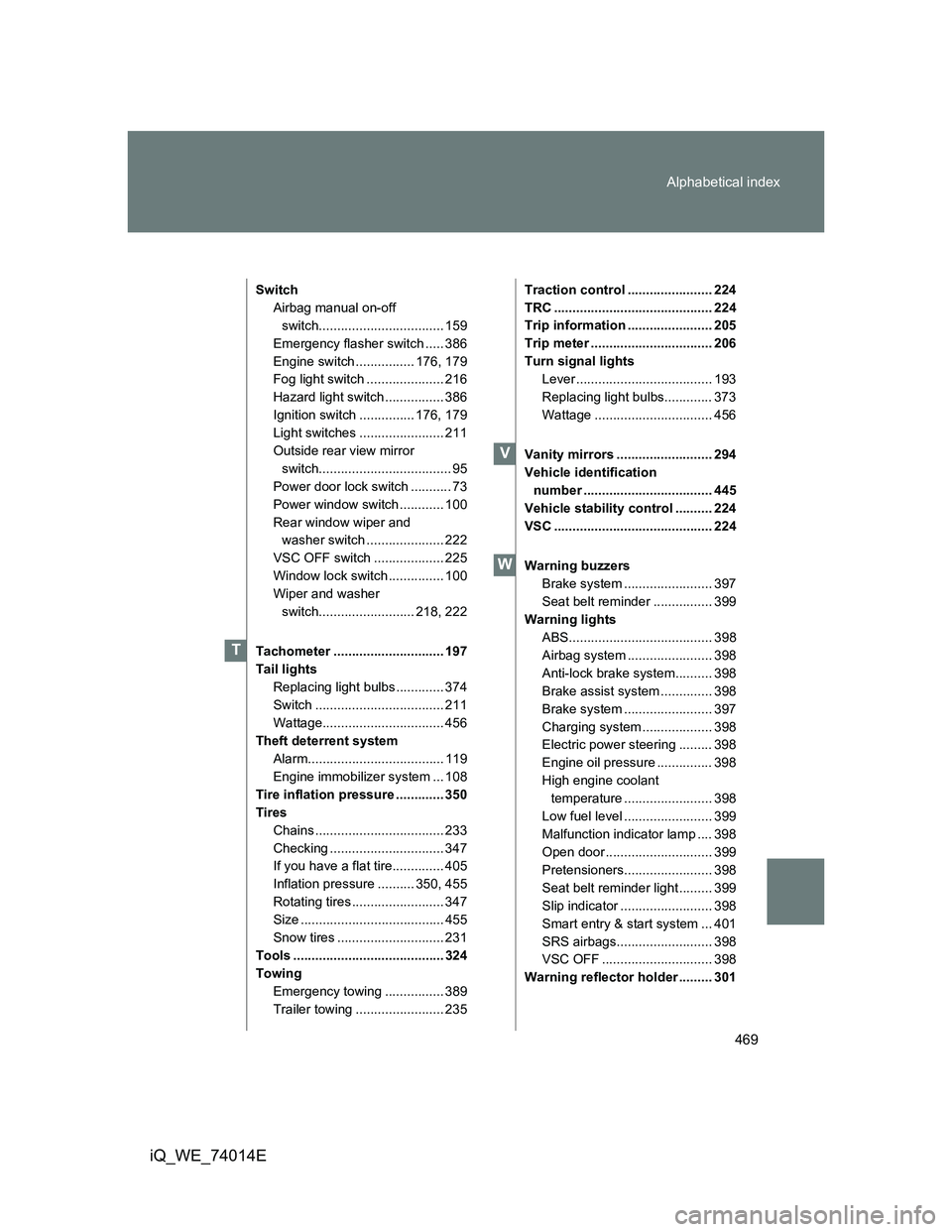
469 Alphabetical index
iQ_WE_74014E
Switch
Airbag manual on-off
switch.................................. 159
Emergency flasher switch ..... 386
Engine switch ................ 176, 179
Fog light switch ..................... 216
Hazard light switch ................ 386
Ignition switch ............... 176, 179
Light switches ....................... 211
Outside rear view mirror
switch.................................... 95
Power door lock switch ........... 73
Power window switch ............ 100
Rear window wiper and
washer switch ..................... 222
VSC OFF switch ................... 225
Window lock switch ............... 100
Wiper and washer
switch.......................... 218, 222
Tachometer .............................. 197
Tail lights
Replacing light bulbs ............. 374
Switch ................................... 211
Wattage................................. 456
Theft deterrent system
Alarm..................................... 119
Engine immobilizer system ... 108
Tire inflation pressure ............. 350
Tires
Chains ................................... 233
Checking ............................... 347
If you have a flat tire.............. 405
Inflation pressure .......... 350, 455
Rotating tires ......................... 347
Size ....................................... 455
Snow tires ............................. 231
Tools ......................................... 324
Towing
Emergency towing ................ 389
Trailer towing ........................ 235Traction control ....................... 224
TRC ........................................... 224
Trip information ....................... 205
Trip meter ................................. 206
Turn signal lights
Lever ..................................... 193
Replacing light bulbs............. 373
Wattage ................................ 456
Vanity mirrors .......................... 294
Vehicle identification
number ................................... 445
Vehicle stability control .......... 224
VSC ........................................... 224
Warning buzzers
Brake system ........................ 397
Seat belt reminder ................ 399
Warning lights
ABS....................................... 398
Airbag system ....................... 398
Anti-lock brake system.......... 398
Brake assist system .............. 398
Brake system ........................ 397
Charging system ................... 398
Electric power steering ......... 398
Engine oil pressure ............... 398
High engine coolant
temperature ........................ 398
Low fuel level ........................ 399
Malfunction indicator lamp .... 398
Open door ............................. 399
Pretensioners........................ 398
Seat belt reminder light ......... 399
Slip indicator ......................... 398
Smart entry & start system ... 401
SRS airbags.......................... 398
VSC OFF .............................. 398
Warning reflector holder ......... 301
T
V
W
Page 471 of 476
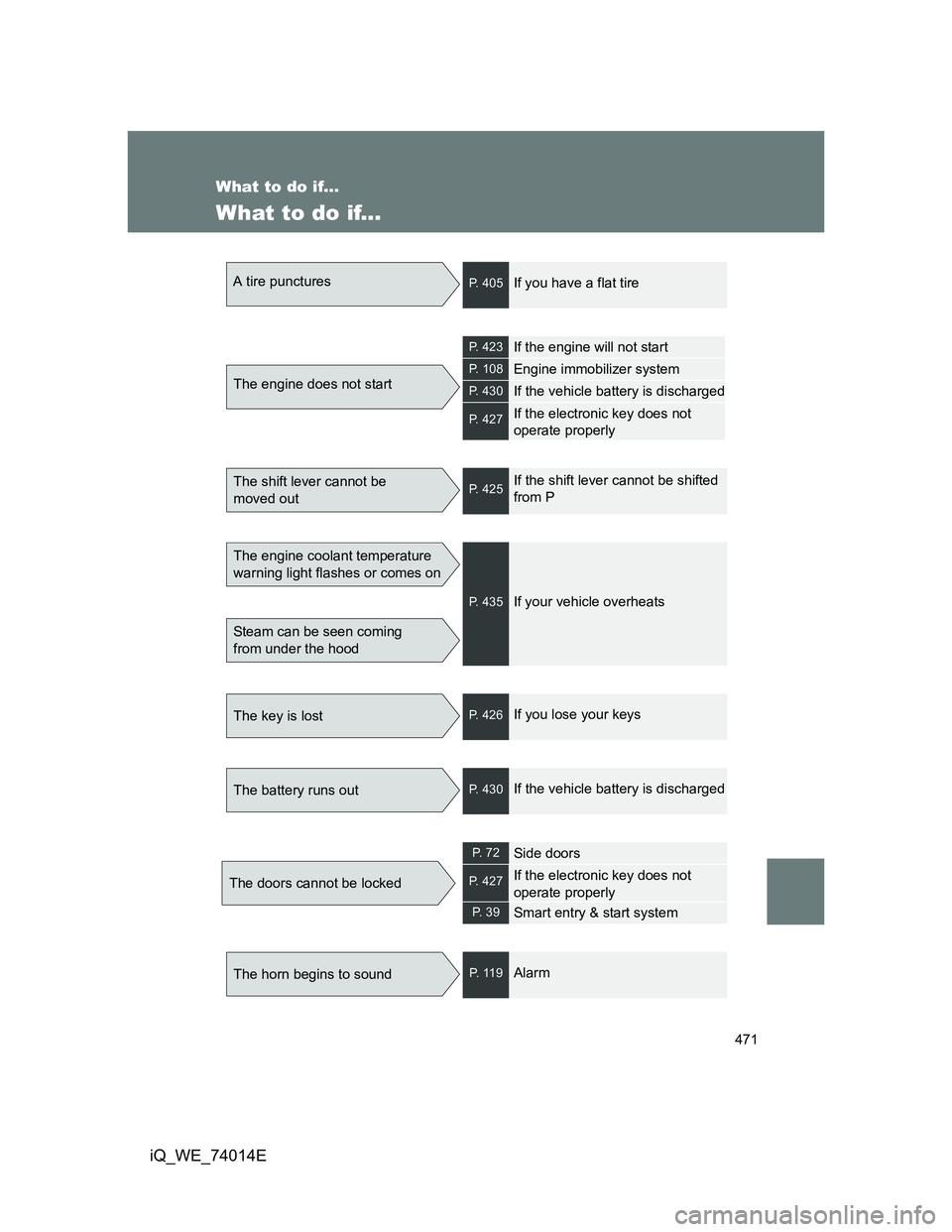
471
iQ_WE_74014E
What to do if...
What to do if...
A tire puncturesP. 405If you have a flat tire
The engine does not start
P. 423If the engine will not start
P. 108Engine immobilizer system
P. 430If the vehicle battery is discharged
P. 427If the electronic key does not
operate properly
The shift lever cannot be
moved outP. 425If the shift lever cannot be shifted
from P
The engine coolant temperature
warning light flashes or comes on
Steam can be seen coming
from under the hood
P. 435If your vehicle overheats
The key is lostP. 426If you lose your keys
The battery runs outP. 430If the vehicle battery is discharged
The doors cannot be locked
P. 7 2Side doors
P. 427If the electronic key does not
operate properly
P. 3 9Smart entry & start system
The horn begins to soundP. 1 1 9Alarm