fog light TOYOTA IQ 2012 User Guide
[x] Cancel search | Manufacturer: TOYOTA, Model Year: 2012, Model line: IQ, Model: TOYOTA IQ 2012Pages: 476, PDF Size: 23.52 MB
Page 237 of 476
3Interior features
237
iQ_WE_74014E
3-1. Using the air conditioning
system and defogger
Manual air conditioning
system ............................ 238
Automatic air conditioning
system ............................ 244
Rear window defogger...... 252
Rear window and outside
rear view mirror
defoggers ....................... 254
3-2. Using the audio system
Audio system type ............ 257
Using the radio ................. 260
Using the CD player ......... 265
Playing back MP3 and
WMA discs...................... 272
Optimal use of the audio
system ............................ 280
Using the AUX port ........... 282
Using the steering wheel
audio switches ................ 284
3-3. Using the interior lights
Interior lights list................ 286
• Interior light ..................... 2873-4. Using the storage features
List of storage features ..... 288
• Cup holder ...................... 289
• Bottle holders.................. 289
• Auxiliary box ................... 290
3-5. Other interior features
Sun visors ......................... 293
Vanity mirrors.................... 294
Power outlet ...................... 295
Seat heaters ..................... 296
Assist grips ....................... 298
Floor mat........................... 299
Luggage compartment
features........................... 301
Page 244 of 476
244
3-1. Using the air conditioning system and defogger
iQ_WE_74014E
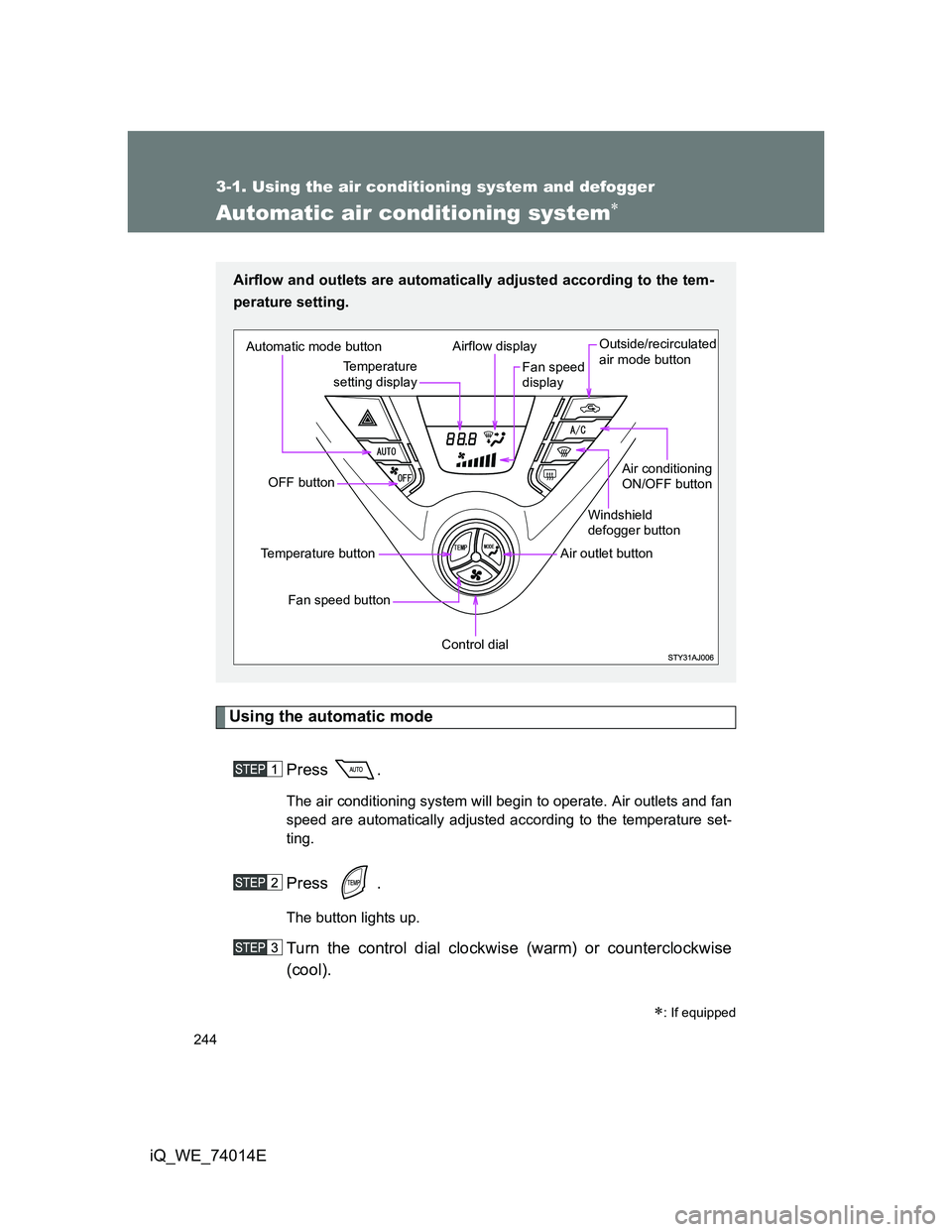
Automatic air conditioning system
Using the automatic mode
Press .
The air conditioning system will begin to operate. Air outlets and fan
speed are automatically adjusted according to the temperature set-
ting.
Press .
The button lights up.
Turn the control dial clockwise (warm) or counterclockwise
(cool).
: If equipped
Airflow and outlets are automatically adjusted according to the tem-
perature setting.
Automatic mode button
OFF button
Fan speed button
Temperature button
Control dial
Air outlet buttonWindshield
defogger button
Air conditioning
ON/OFF button Outside/recirculated
air mode button
Fan speed
display Airflow display
Temperature
setting display
Page 245 of 476
245 3-1. Using the air conditioning system and defogger
3
Interior features
iQ_WE_74014E
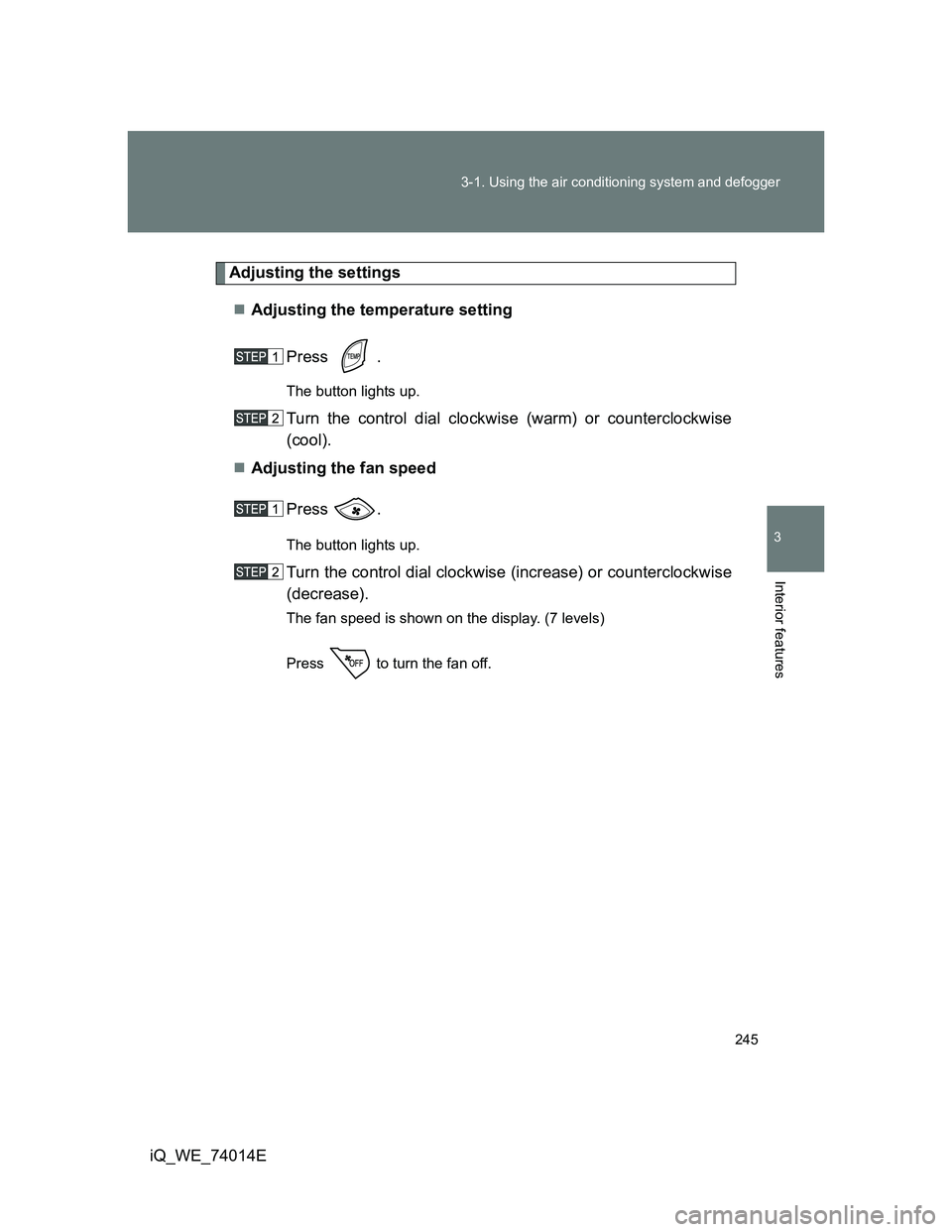
Adjusting the settings
Adjusting the temperature setting
Press .
The button lights up.
Turn the control dial clockwise (warm) or counterclockwise
(cool).
Adjusting the fan speed
Press .
The button lights up.
Turn the control dial clockwise (increase) or counterclockwise
(decrease).
The fan speed is shown on the display. (7 levels)
Press to turn the fan off.
Page 246 of 476
246 3-1. Using the air conditioning system and defogger
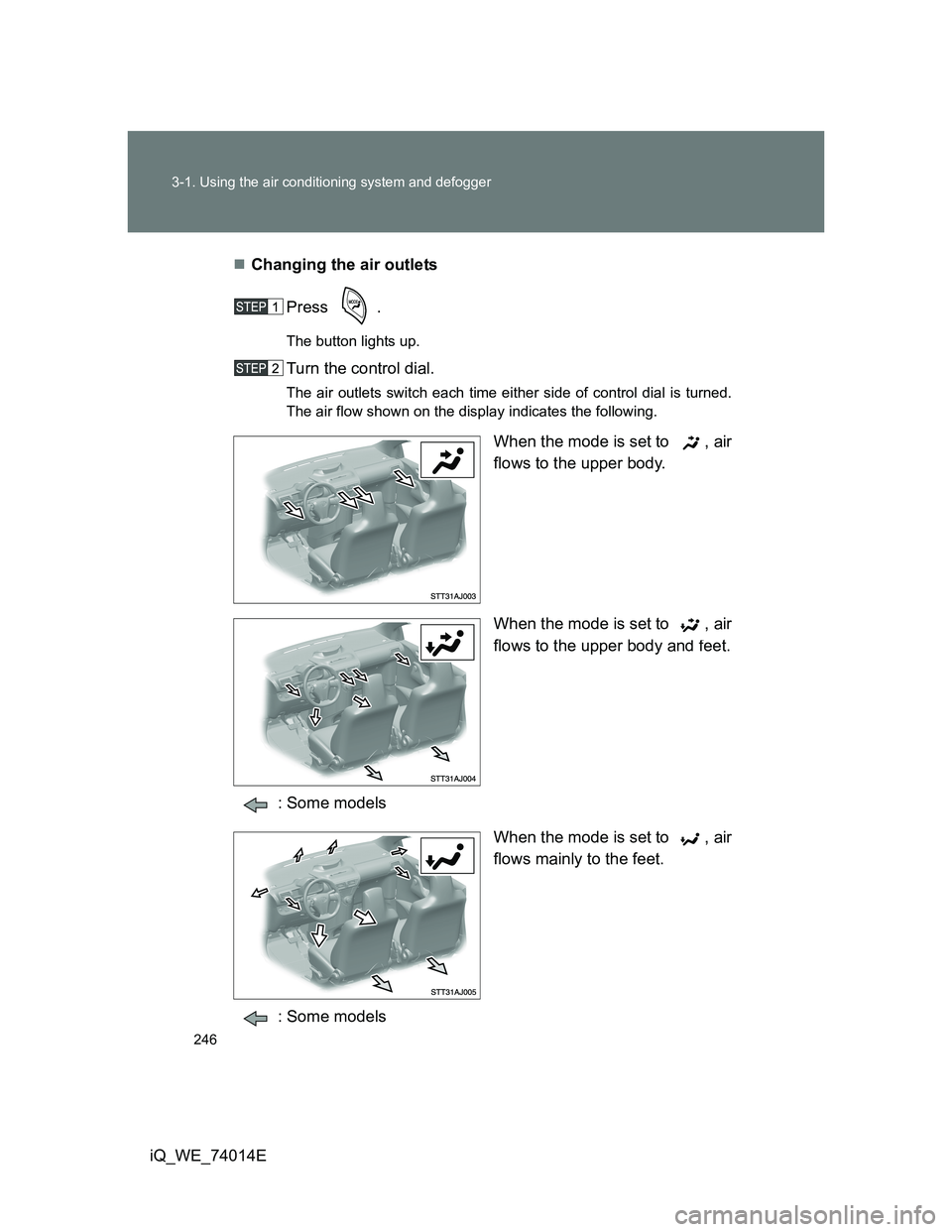
iQ_WE_74014EChanging the air outlets
Press .
The button lights up.
Turn the control dial.
The air outlets switch each time either side of control dial is turned.
The air flow shown on the display indicates the following.
When the mode is set to , air
flows to the upper body.
When the mode is set to , air
flows to the upper body and feet.
: Some models
When the mode is set to , air
flows mainly to the feet.
: Some models
Page 312 of 476
312 4-1. Maintenance and care
iQ_WE_74014E
NOTICE
Cleaning detergents
Do not use organic substances such as benzene or gasoline, acidic or
alkaline solutions, dye, bleach or other detergent. Doing so may discolor
the vehicle interior or cause streaks or damage to painted surfaces.
Do not use polish wax or polish cleaner. The instrument panel’s or other
interior part’s painted surface may be damaged.
Preventing damage to leather surfaces
Observe the following precautions to avoid damage to and deterioration of
leather surfaces.
Remove any dust or dirt on leather surfaces immediately.
Do not expose the vehicle to direct sunlight for extended periods of time.
Park the vehicle in the shade, especially during summer.
Do not place items made of vinyl, plastic, or that contain wax on the uphol-
stery, as they may stick to the leather surface if the vehicle interior heats
up significantly.
Water on the floor
Do not wash the vehicle floor with water.
Vehicle systems such as the audio system may be damaged if water comes
into contact with electrical components under the floor of the vehicle, and
may also cause the body to rust.
Cleaning the inside of the rear window
Do not use glass cleaner to clean the rear window, as this may cause
damage to the rear window defogger heater wires. Use a cloth dampened
with lukewarm water to gently wipe the window clean. Wipe the window in
strokes running parallel to the heater wires.
Be careful not to scratch or damage the heater wires.
Page 368 of 476
368 4-3. Do-it-yourself maintenance
iQ_WE_74014E
*1: Vehicles without daytime running light system and automatic light off sys-
tem
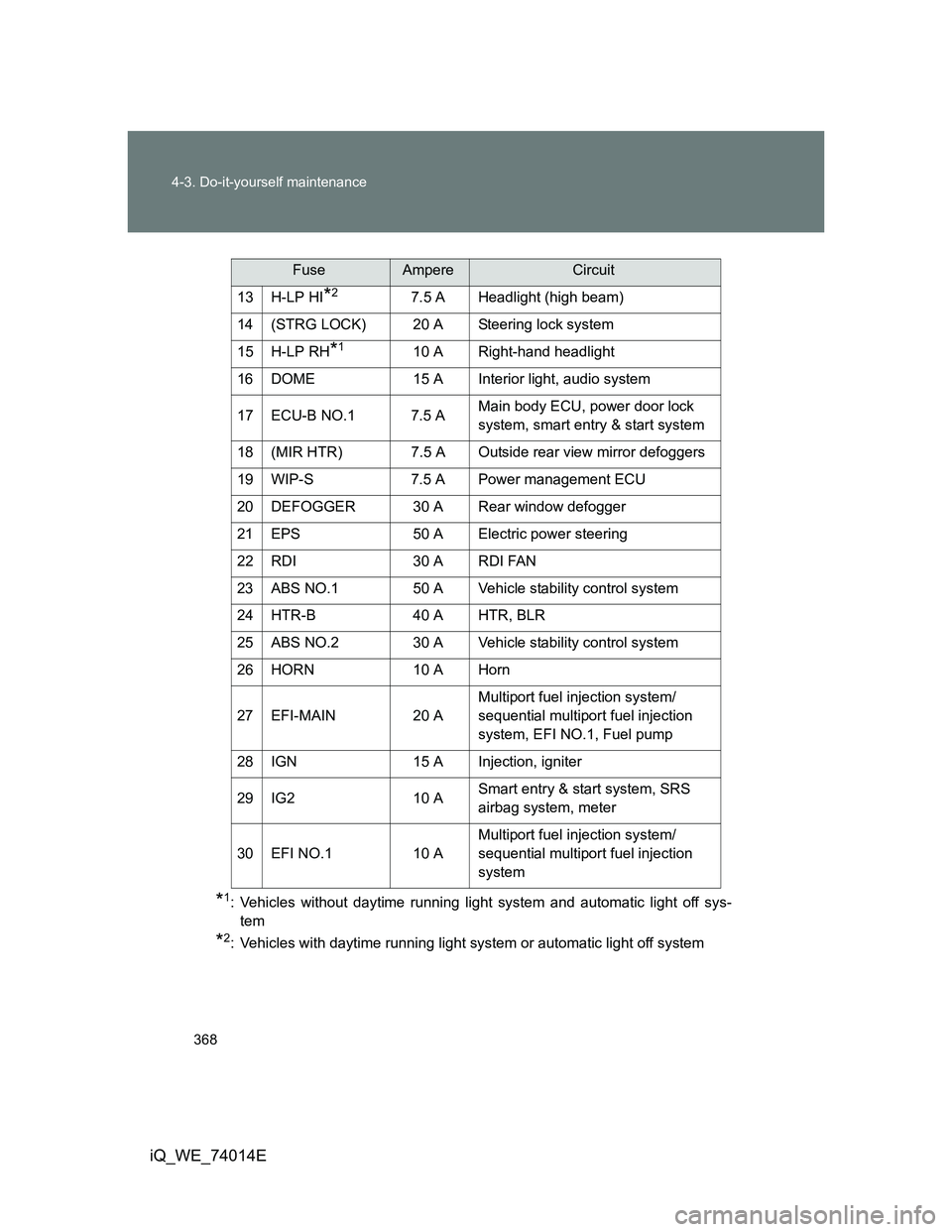
*2: Vehicles with daytime running light system or automatic light off system13 H-LP HI
*27.5 A Headlight (high beam)
14 (STRG LOCK) 20 A Steering lock system
15 H-LP RH
*110 A Right-hand headlight
16 DOME 15 A Interior light, audio system
17 ECU-B NO.1 7.5 AMain body ECU, power door lock
system, smart entry & start system
18 (MIR HTR) 7.5 A Outside rear view mirror defoggers
19 WIP-S 7.5 A Power management ECU
20 DEFOGGER 30 A Rear window defogger
21 EPS 50 A Electric power steering
22 RDI 30 A RDI FAN
23 ABS NO.1 50 A Vehicle stability control system
24 HTR-B 40 A HTR, BLR
25 ABS NO.2 30 A Vehicle stability control system
26 HORN 10 A Horn
27 EFI-MAIN 20 AMultiport fuel injection system/
sequential multiport fuel injection
system, EFI NO.1, Fuel pump
28 IGN 15 A Injection, igniter
29 IG2 10 ASmart entry & start system, SRS
airbag system, meter
30 EFI NO.1 10 AMultiport fuel injection system/
sequential multiport fuel injection
system
FuseAmpereCircuit
Page 370 of 476
370 4-3. Do-it-yourself maintenance
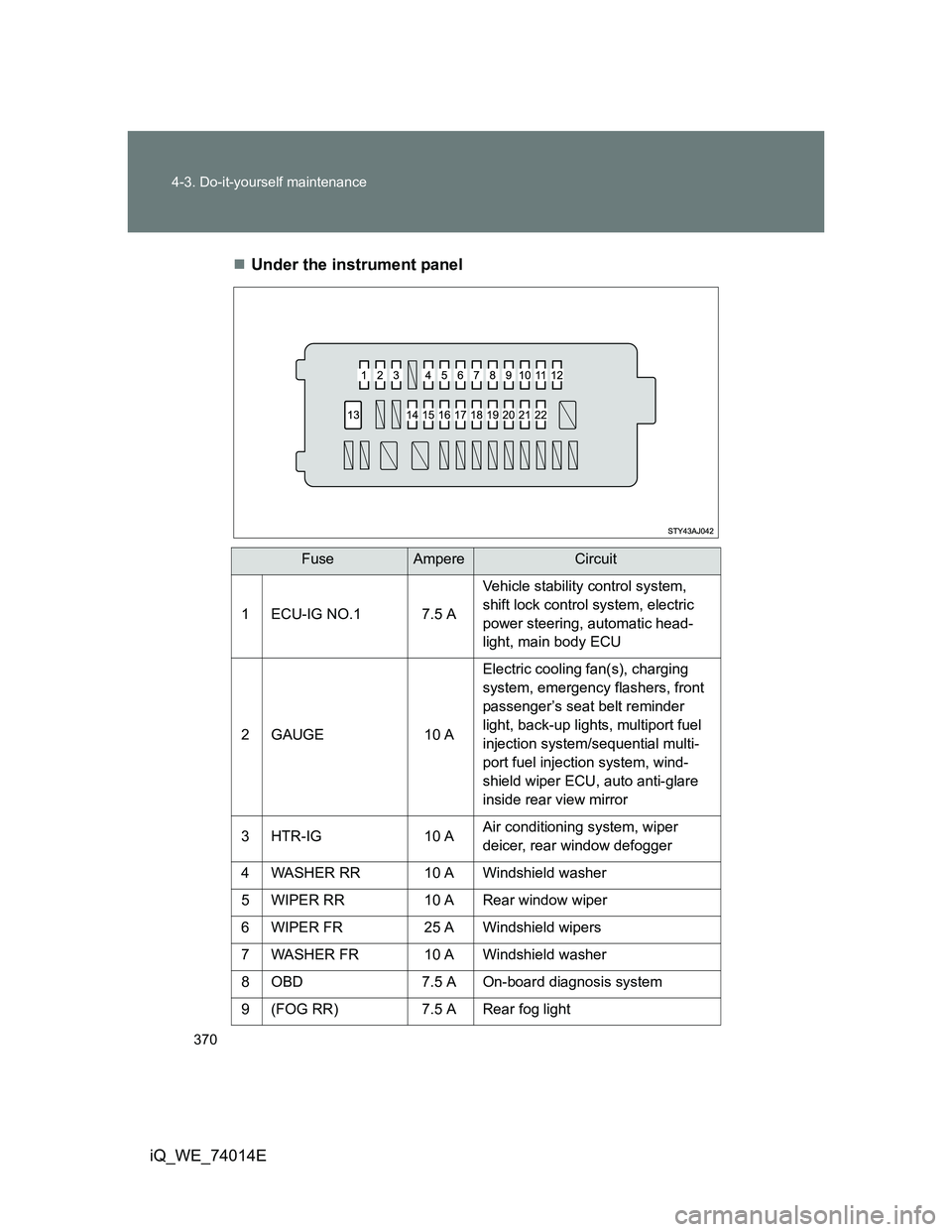
iQ_WE_74014EUnder the instrument panel
FuseAmpereCircuit
1 ECU-IG NO.1 7.5 AVehicle stability control system,
shift lock control system, electric
power steering, automatic head-
light, main body ECU
2 GAUGE 10 AElectric cooling fan(s), charging
system, emergency flashers, front
passenger’s seat belt reminder
light, back-up lights, multiport fuel
injection system/sequential multi-
port fuel injection system, wind-
shield wiper ECU, auto anti-glare
inside rear view mirror
3 HTR-IG 10 AAir conditioning system, wiper
deicer, rear window defogger
4 WASHER RR 10 A Windshield washer
5 WIPER RR 10 A Rear window wiper
6 WIPER FR 25 A Windshield wipers
7 WASHER FR 10 A Windshield washer
8 OBD 7.5 A On-board diagnosis system
9 (FOG RR) 7.5 A Rear fog light
Page 371 of 476
371 4-3. Do-it-yourself maintenance
4
Maintenance and care
iQ_WE_74014E
*1: Vehicles without daytime running light system and automatic light off system
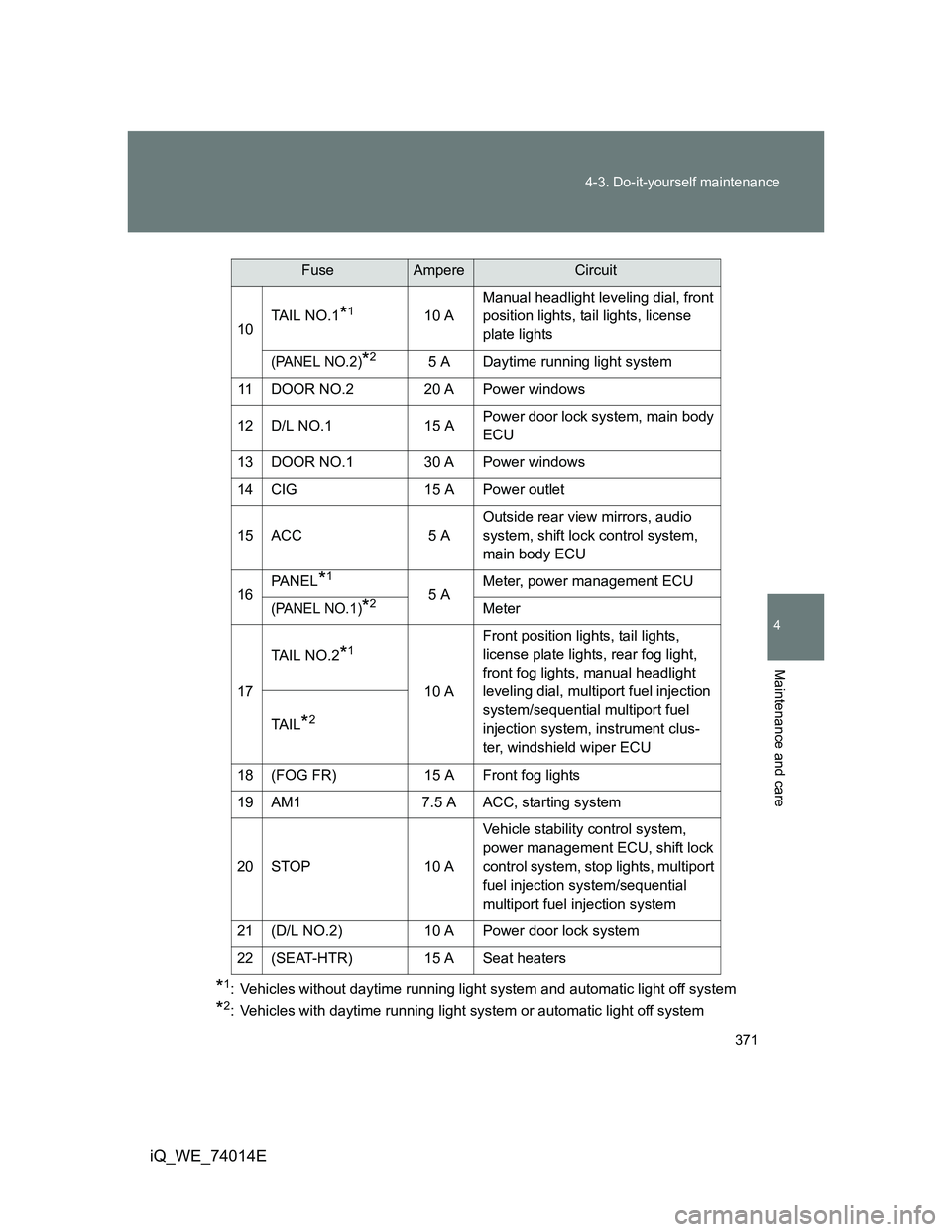
*2: Vehicles with daytime running light system or automatic light off system10TAIL NO.1
*110 AManual headlight leveling dial, front
position lights, tail lights, license
plate lights
(PANEL NO.2)*25 A Daytime running light system
11 DOOR NO.2 20 A Power windows
12 D/L NO.1 15 APower door lock system, main body
ECU
13 DOOR NO.1 30 A Power windows
14 CIG 15 A Power outlet
15 ACC 5 AOutside rear view mirrors, audio
system, shift lock control system,
main body ECU
16PA N E L
*1
5 AMeter, power management ECU(PANEL NO.1)*2Meter
17TAIL NO.2
*1
10 AFront position lights, tail lights,
license plate lights, rear fog light,
front fog lights, manual headlight
leveling dial, multiport fuel injection
system/sequential multiport fuel
injection system, instrument clus-
ter, windshield wiper ECU TA I L
*2
18 (FOG FR) 15 A Front fog lights
19 AM1 7.5 A ACC, starting system
20 STOP 10 AVehicle stability control system,
power management ECU, shift lock
control system, stop lights, multiport
fuel injection system/sequential
multiport fuel injection system
21 (D/L NO.2) 10 A Power door lock system
22 (SEAT-HTR) 15 A Seat heaters
FuseAmpereCircuit
Page 373 of 476
373
4-3. Do-it-yourself maintenance
4
Maintenance and care
iQ_WE_74014E
Light bulbs
You may replace the following bulbs by yourself. The difficulty level
of replacement varies depending on the bulb. As there is a danger
that components may be damaged, we recommend that replacement
is carried out by any authorized Toyota dealer or repairer, or another
duly qualified and equipped professional.
Preparing for light bulb replacement
Check the wattage of the light bulb to be replaced. (P. 456)
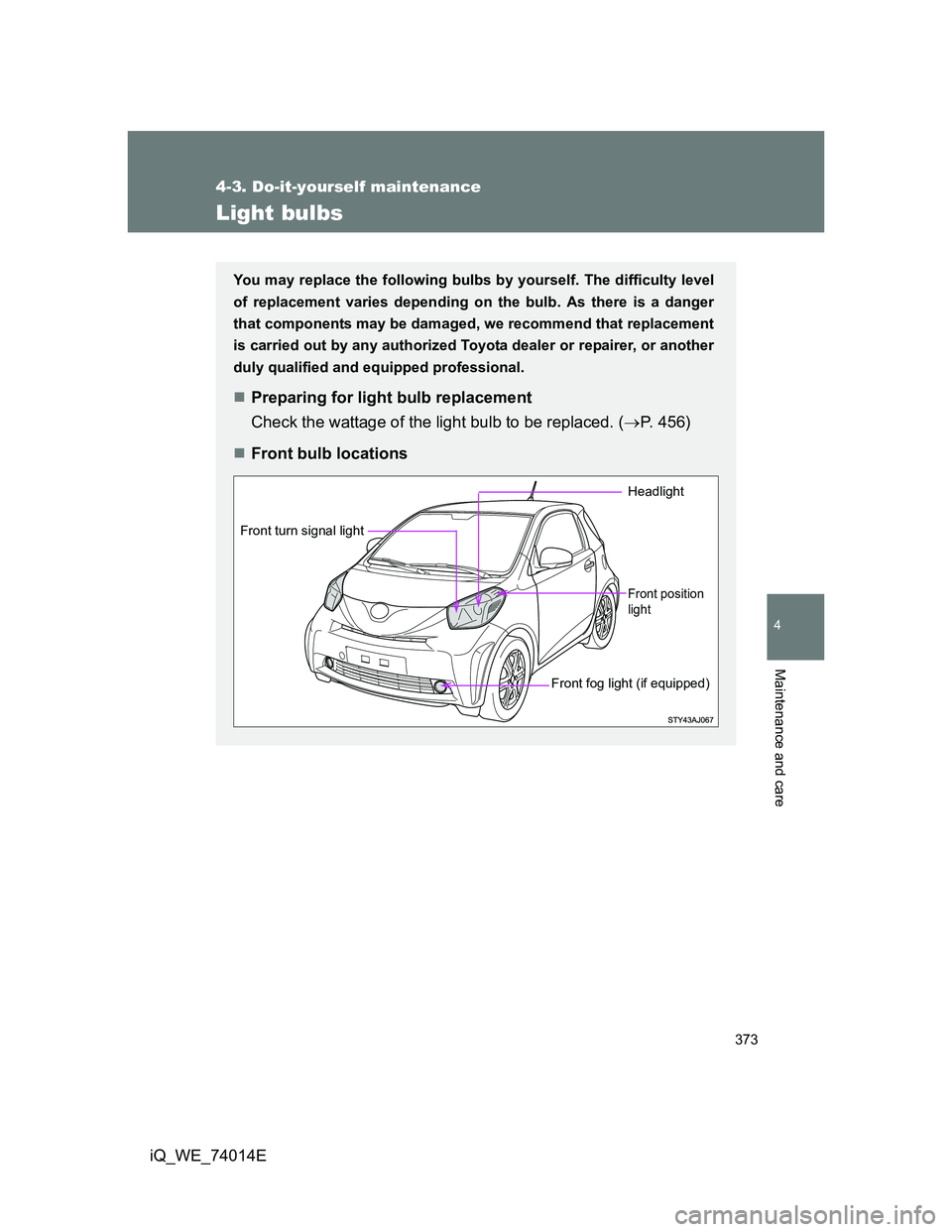
Front bulb locations
Headlight
Front position
light
Front fog light (if equipped)
Front turn signal light
Page 374 of 476
374 4-3. Do-it-yourself maintenance
iQ_WE_74014E
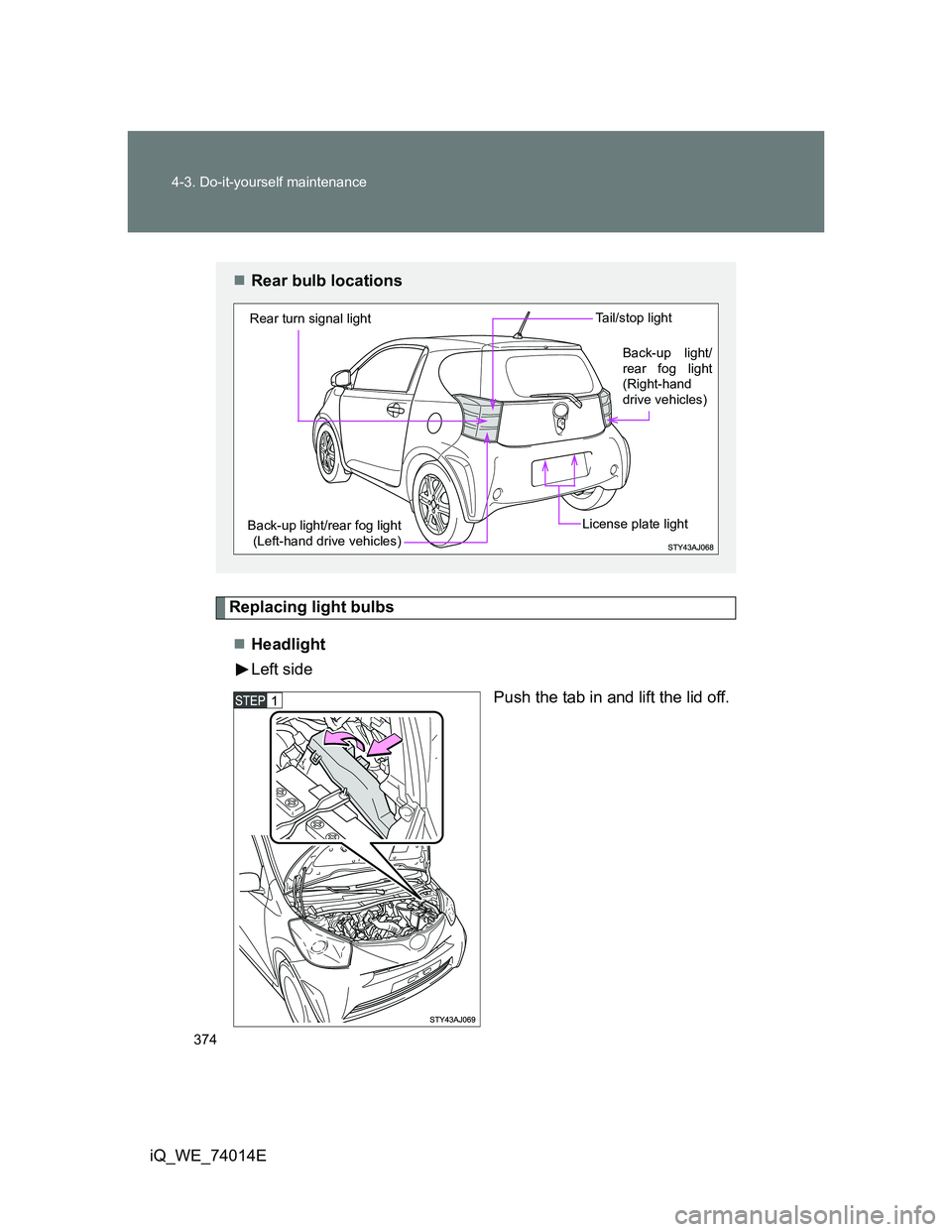
Replacing light bulbs
Headlight
Left side
Push the tab in and lift the lid off.
Rear bulb locations
Back-up light/rear fog light
(Left-hand drive vehicles) Rear turn signal lightTa i l / s t o p l i g h tLicense plate light
Back-up light/
rear fog light
(Right-hand
drive vehicles)