lights TOYOTA IQ 2013 Owner's Guide
[x] Cancel search | Manufacturer: TOYOTA, Model Year: 2013, Model line: IQ, Model: TOYOTA IQ 2013Pages: 372, PDF Size: 7.77 MB
Page 249 of 372
249
4-3. Do-it-yourself maintenance
4
Maintenance and care
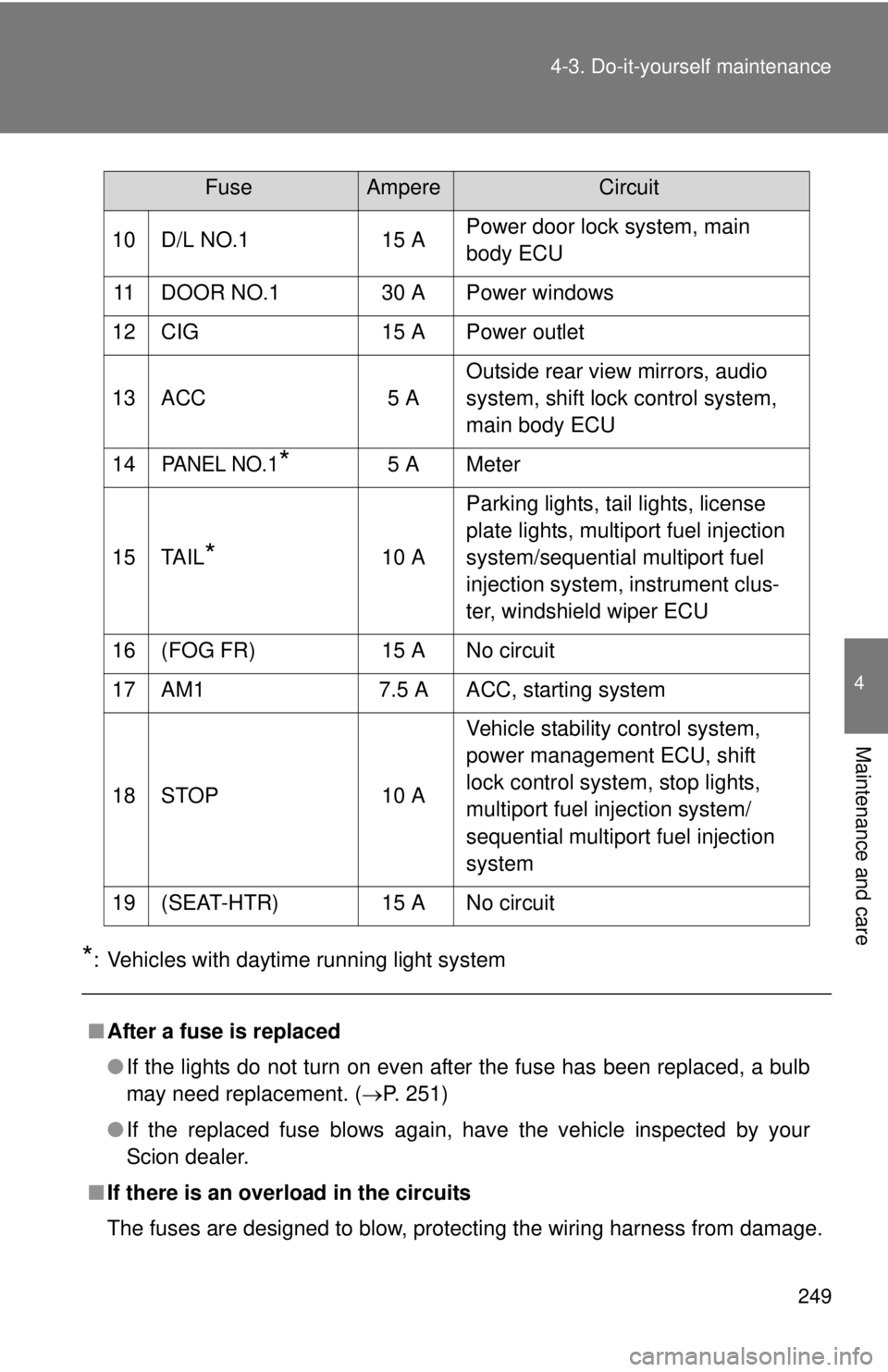
*: Vehicles with daytime running light system
10 D/L NO.1
15 APower door lock system, main
body ECU
11 DOOR NO.1 30 A Power windows
12 CIG 15 A Power outlet
13 ACC 5 AOutside rear view mirrors, audio
system, shift lock control system,
main body ECU
14
PANEL NO.1*5 A Meter
15 TAIL
*10 A Parking lights, tail lights, license
plate lights, multiport fuel injection
system/sequential multiport fuel
injection system, instrument clus-
ter, windshield wiper ECU
16 (FOG FR) 15 A No circuit
17 AM1 7.5 A ACC, starting system
18 STOP 10 A Vehicle stability control system,
power management ECU, shift
lock control system, stop lights,
multiport fuel injection system/
sequential multiport fuel injection
system
19 (SEAT-HTR) 15 A No circuit
■ After a fuse is replaced
●If the lights do not turn on even after the fuse has been replaced, a bulb
may need replacement. ( P. 251)
● If the replaced fuse blows again, have the vehicle inspected by your
Scion dealer.
■ If there is an overload in the circuits
The fuses are designed to blow, protecting the wiring harness from damage.
FuseAmpereCircuit
Page 251 of 372
251
4-3. Do-it-yourself maintenance
4
Maintenance and care
Light bulbs
You may replace the following bulbs yourself. The difficulty level of
replacement varies depending on the bulb. If necessary bulb
replacement seems difficult to perf orm, contact your Scion dealer.
For more information about replacing other light bulbs, contact your
Scion dealer.
■ Prepare a replacement light bulb.
Check the wattage of the light bulb being replaced. ( P. 324)
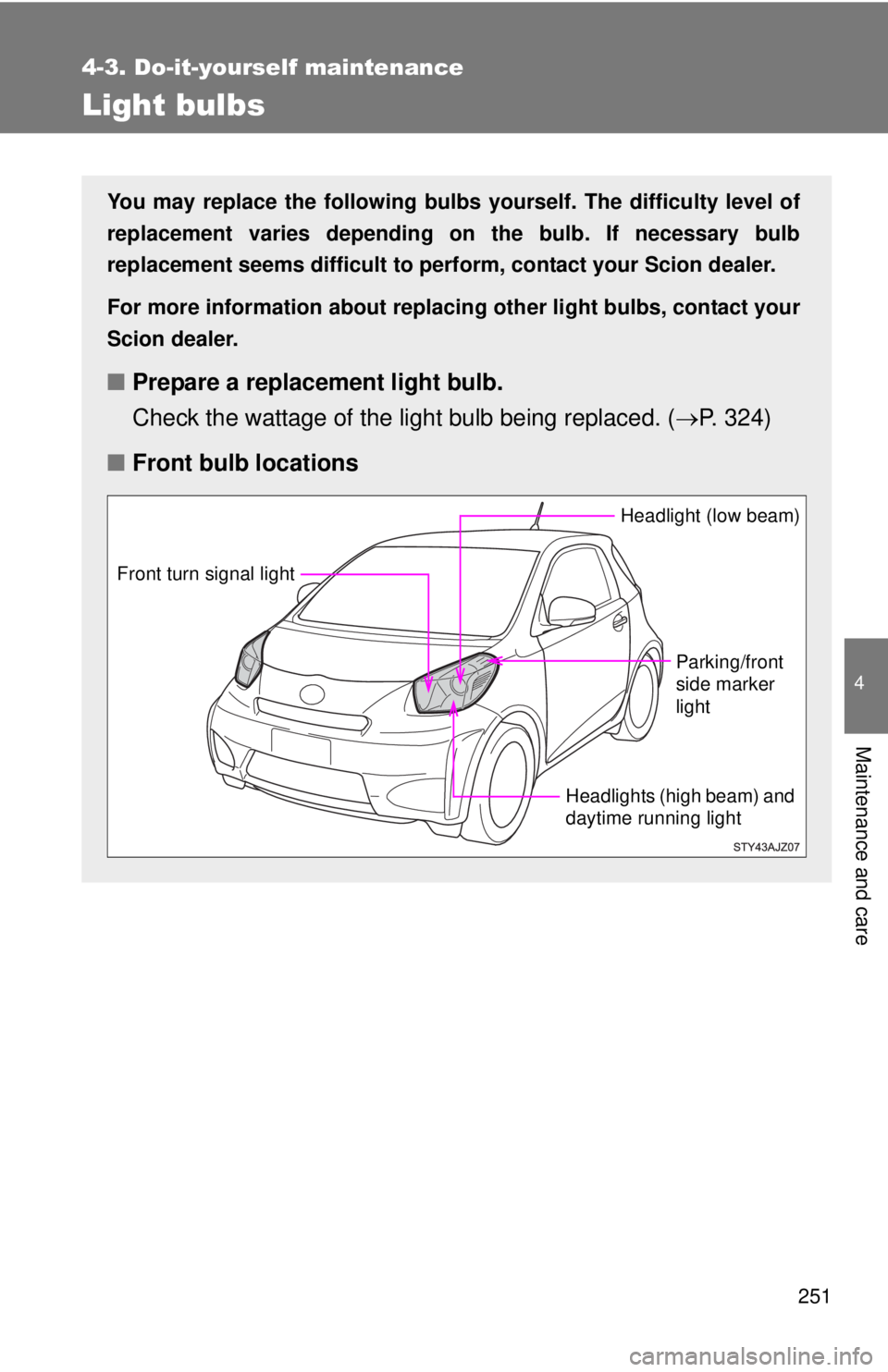
■ Front bulb locations
Headlight (low beam)
Parking/front
side marker
light
Headlights (high beam) and
daytime running light
Front turn signal light
Page 255 of 372
255
4-3. Do-it-yourself maintenance
4
Maintenance and care
■
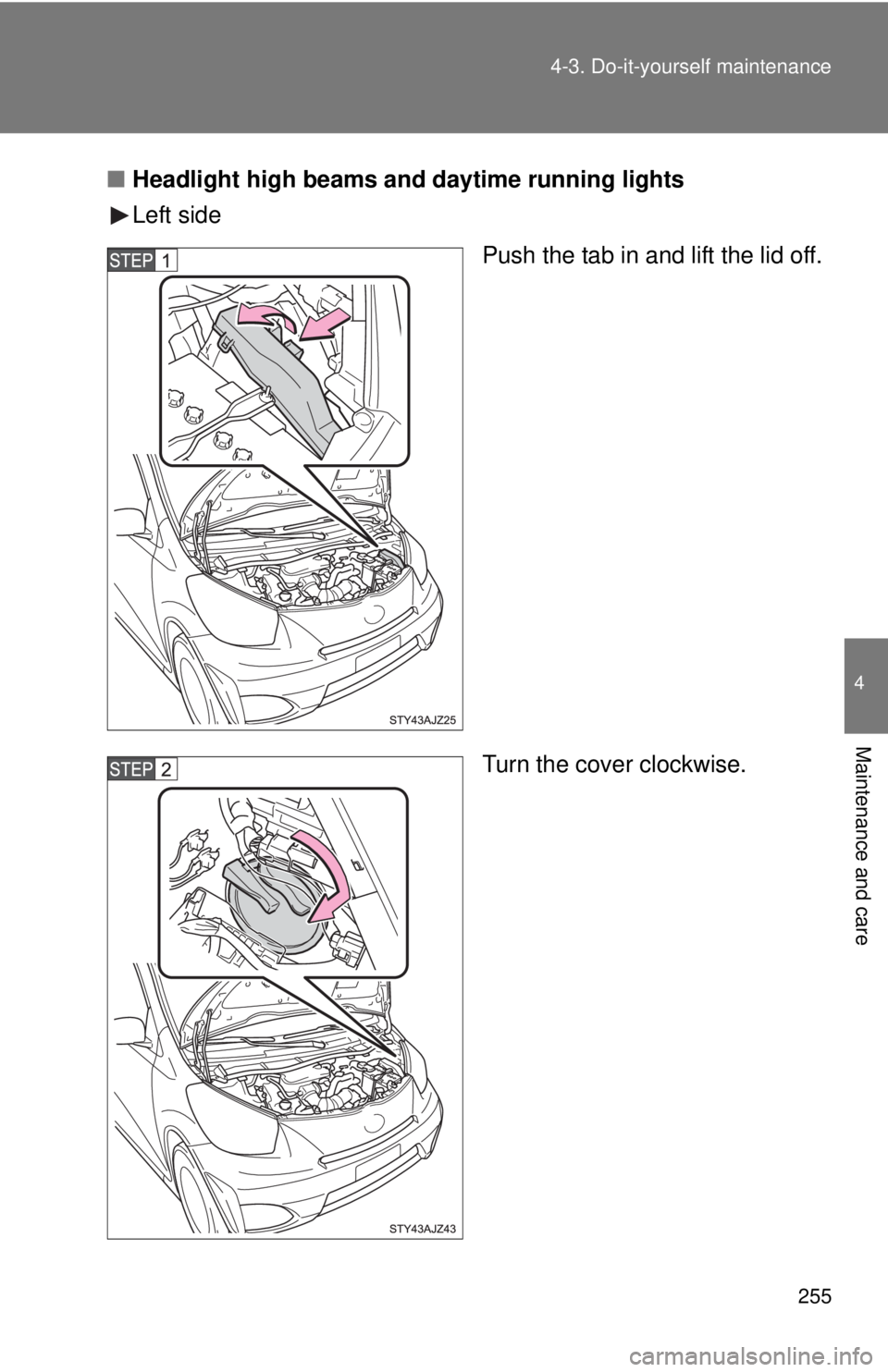
Headlight high beams and daytime running lights
Left side
Push the tab in and lift the lid off.
Turn the cover clockwise.
Page 257 of 372
257
4-3. Do-it-yourself maintenance
4
Maintenance and care
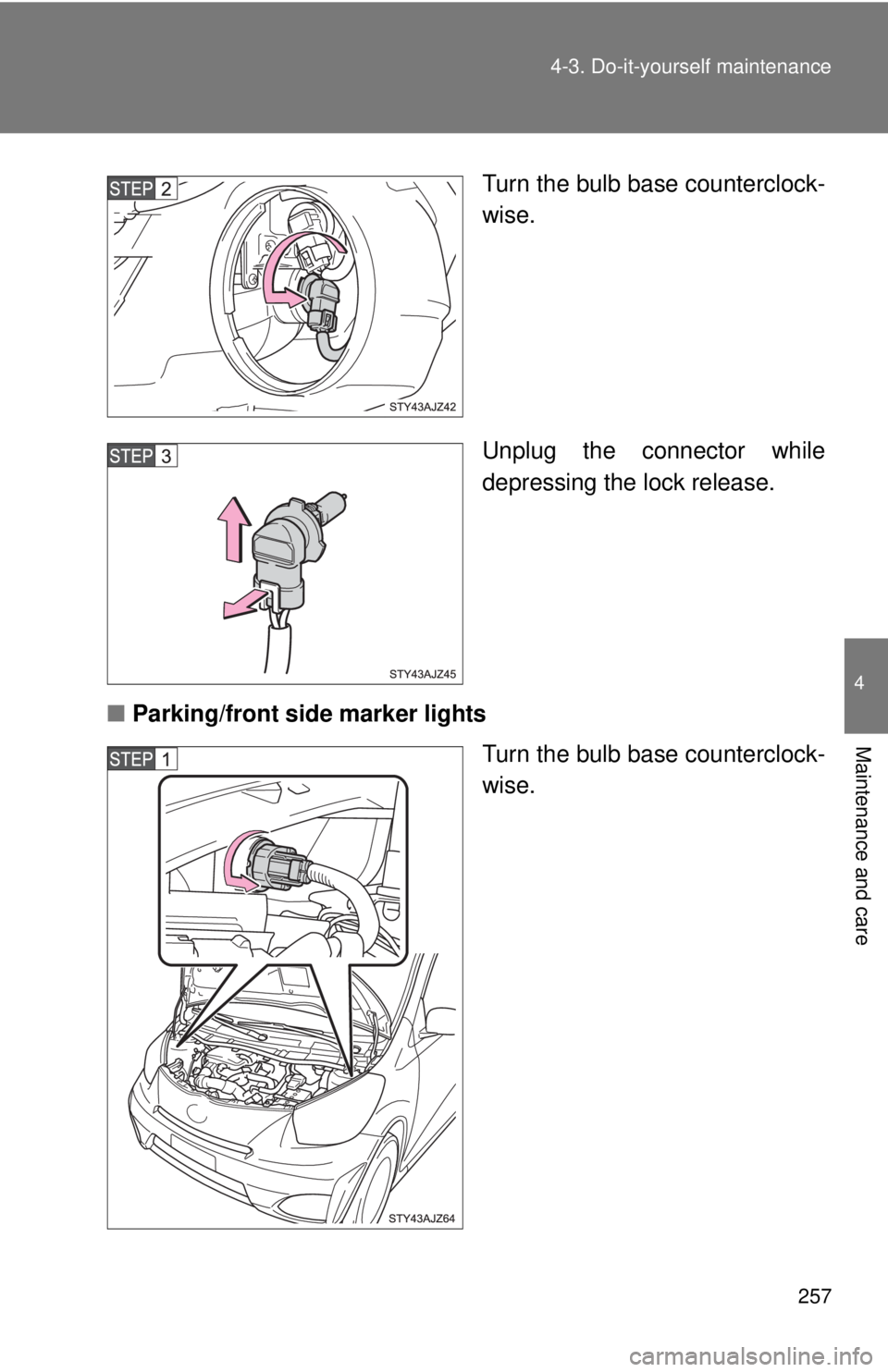
Turn the bulb base counterclock-
wise.
Unplug the connector while
depressing the lock release.
■ Parking/front side marker lights
Turn the bulb base counterclock-
wise.
Page 258 of 372
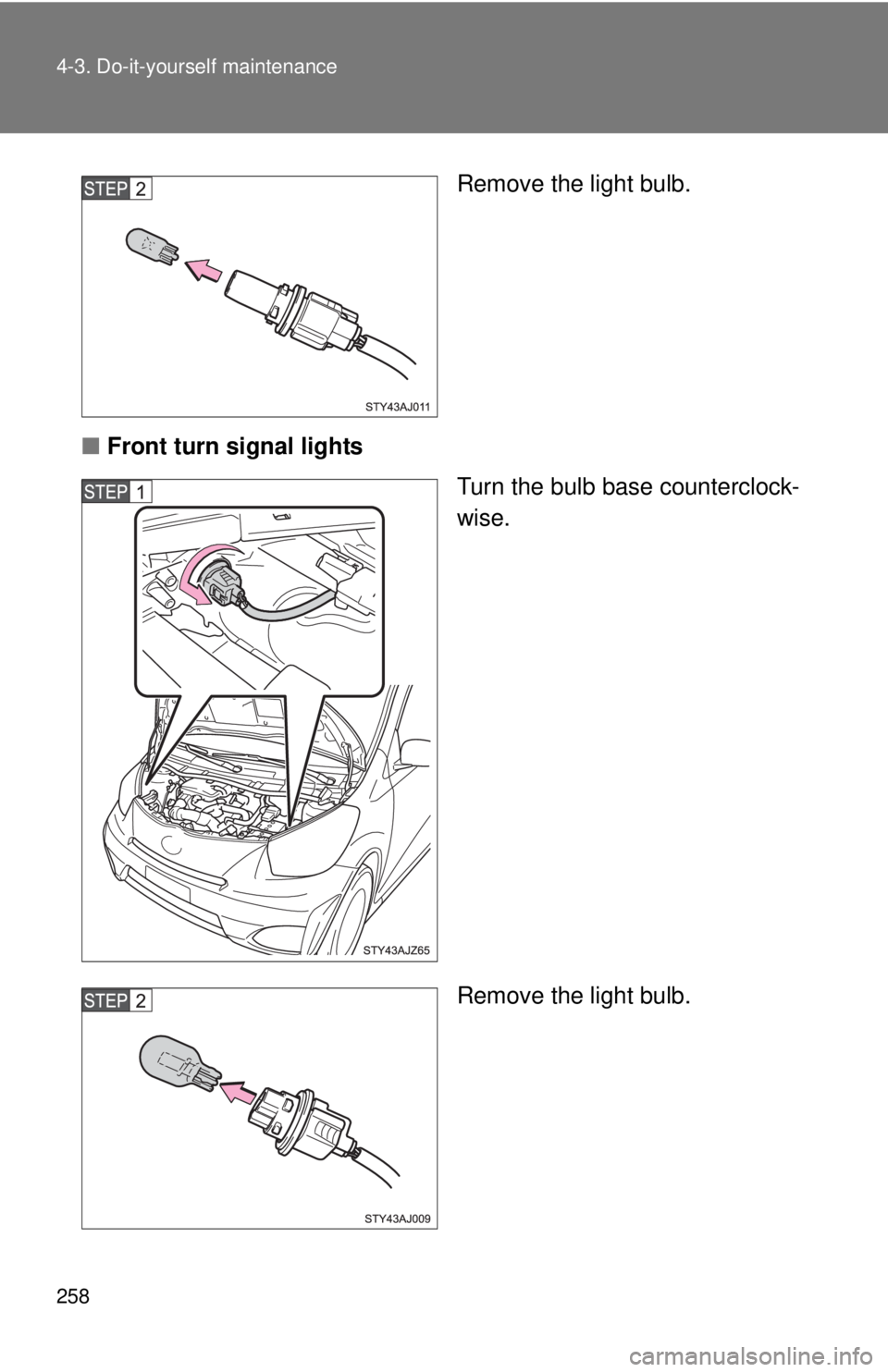
258 4-3. Do-it-yourself maintenance
Remove the light bulb.
■ Front turn signal lights
Turn the bulb base counterclock-
wise.
Remove the light bulb.
Page 259 of 372
259
4-3. Do-it-yourself maintenance
4
Maintenance and care
■
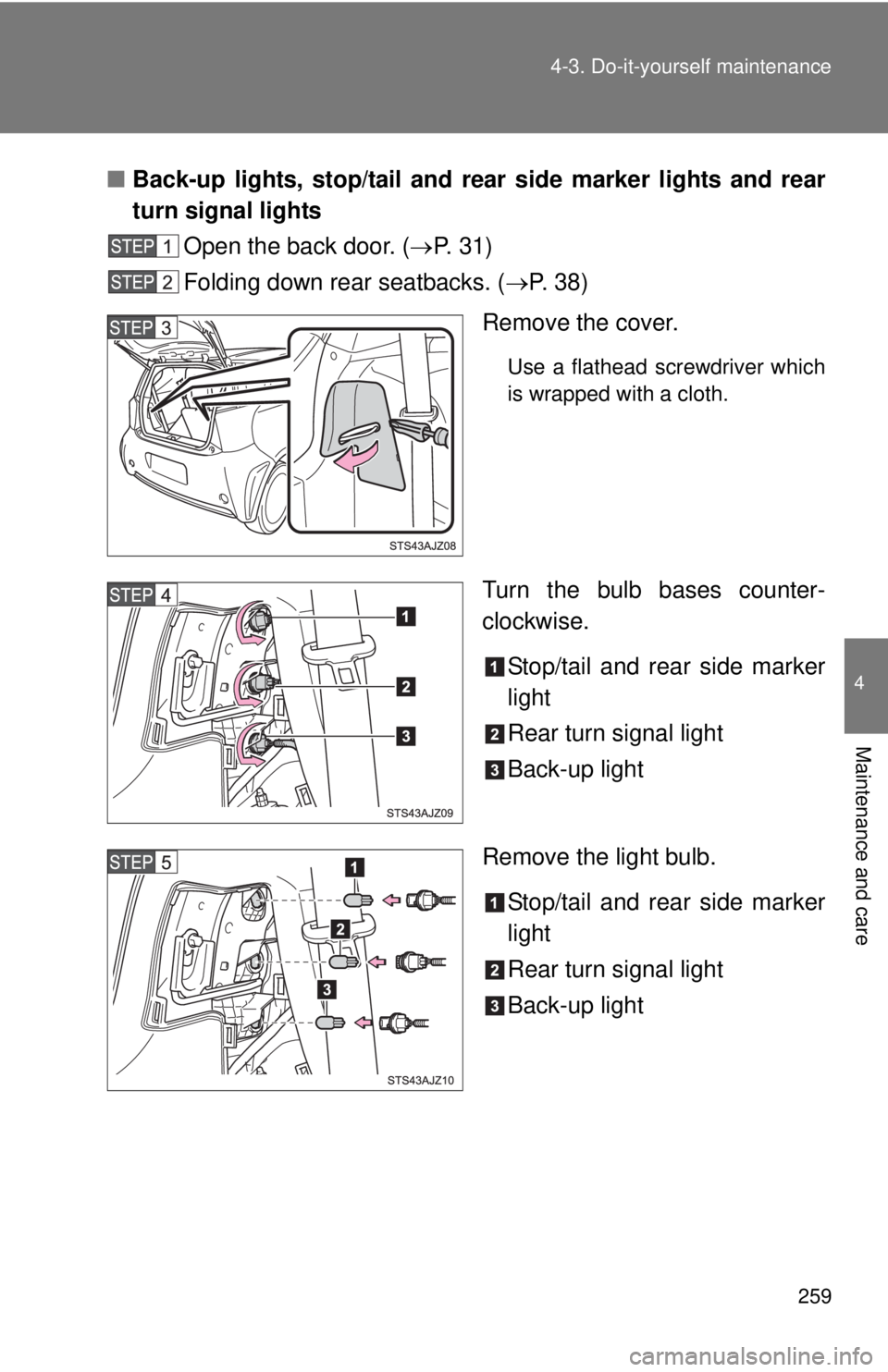
Back-up lights, stop/tail and rear side marker lights and rear
turn signal lights
Open the back door. ( P. 31)
Folding down rear seatbacks. ( P. 3 8 )
Remove the cover.
Use a flathead screwdriver which
is wrapped with a cloth.
Turn the bulb bases counter-
clockwise.
Stop/tail and rear side marker
light
Rear turn signal light
Back-up light
Remove the light bulb. Stop/tail and rear side marker
light
Rear turn signal light
Back-up light
Page 260 of 372
260 4-3. Do-it-yourself maintenance
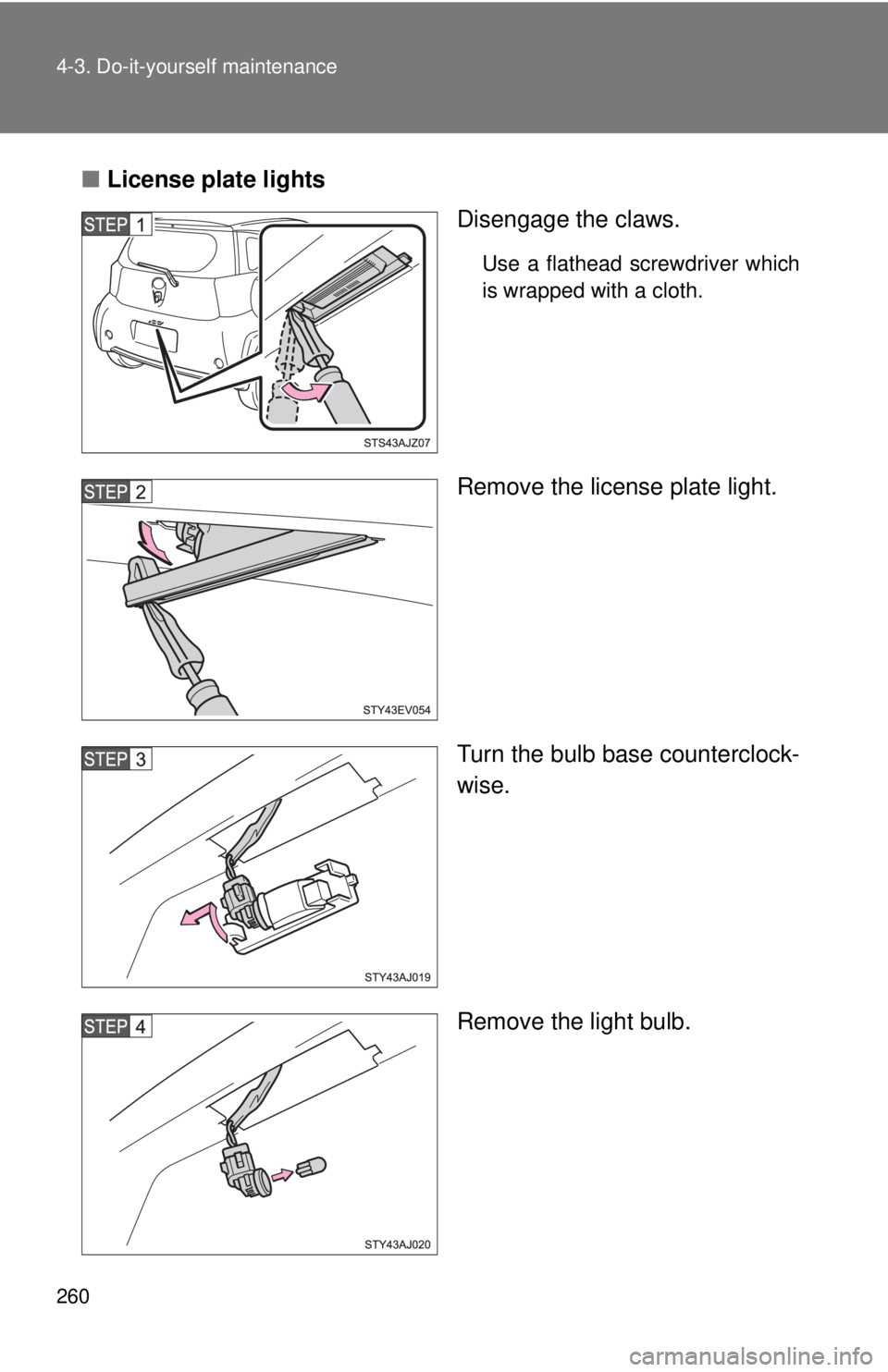
■License plate lights
Disengage the claws.
Use a flathead screwdriver which
is wrapped with a cloth.
Remove the license plate light.
Turn the bulb base counterclock-
wise.
Remove the light bulb.
Page 261 of 372
261
4-3. Do-it-yourself maintenance
4
Maintenance and care
■
Lights other than the above
If any of the lights listed below has burned out, have it replaced by
your Scion dealer.
● Side turn signal lights
● High mounted stoplight
■When replacing the left side headlight
Be sure to install the fuse cover properly.
■ Condensation build-up on th e inside of the lens
Contact your Scion dealer for more information in the following situations.
● Large drops of water are built up on the inside of the lens.
● Water has built up inside the headlight.
Temporary condensation build-up on the inside of the headlight lens does
not indicate a malfunction.
■ LED high mounted stoplight
The high mounted stoplight consists of a number of LEDs. If any of the LEDs
burn out, take your vehicle to your Scion dealer to have the light replaced.
CAUTION
■Replacing light bulbs
●Turn off the headlights. Do not attempt to replace the bulb immediately
after turning off the headlights.
The bulbs become very hot and may cause burns.
● Do not touch the glass portion of the light bulb with bare hands. Hold the
bulb by the plastic or metal portion.
If the bulb is scratched or dropped it may blow out or crack.
● Fully install light bulbs and any parts used to secure them. Failing to do so
may result in heat damage, fire, or water entering the headlight unit. This
may damage the headlights or cause condensation to build up on the lens.
■ To prevent damage or fire
Make sure bulbs are fully seated and locked.
Page 264 of 372
264
5-1. Essential information
Emergency flashers
NOTICE
■To prevent battery discharge
Do not leave the emergency flashers on longer than necessary when the
engine is not running.
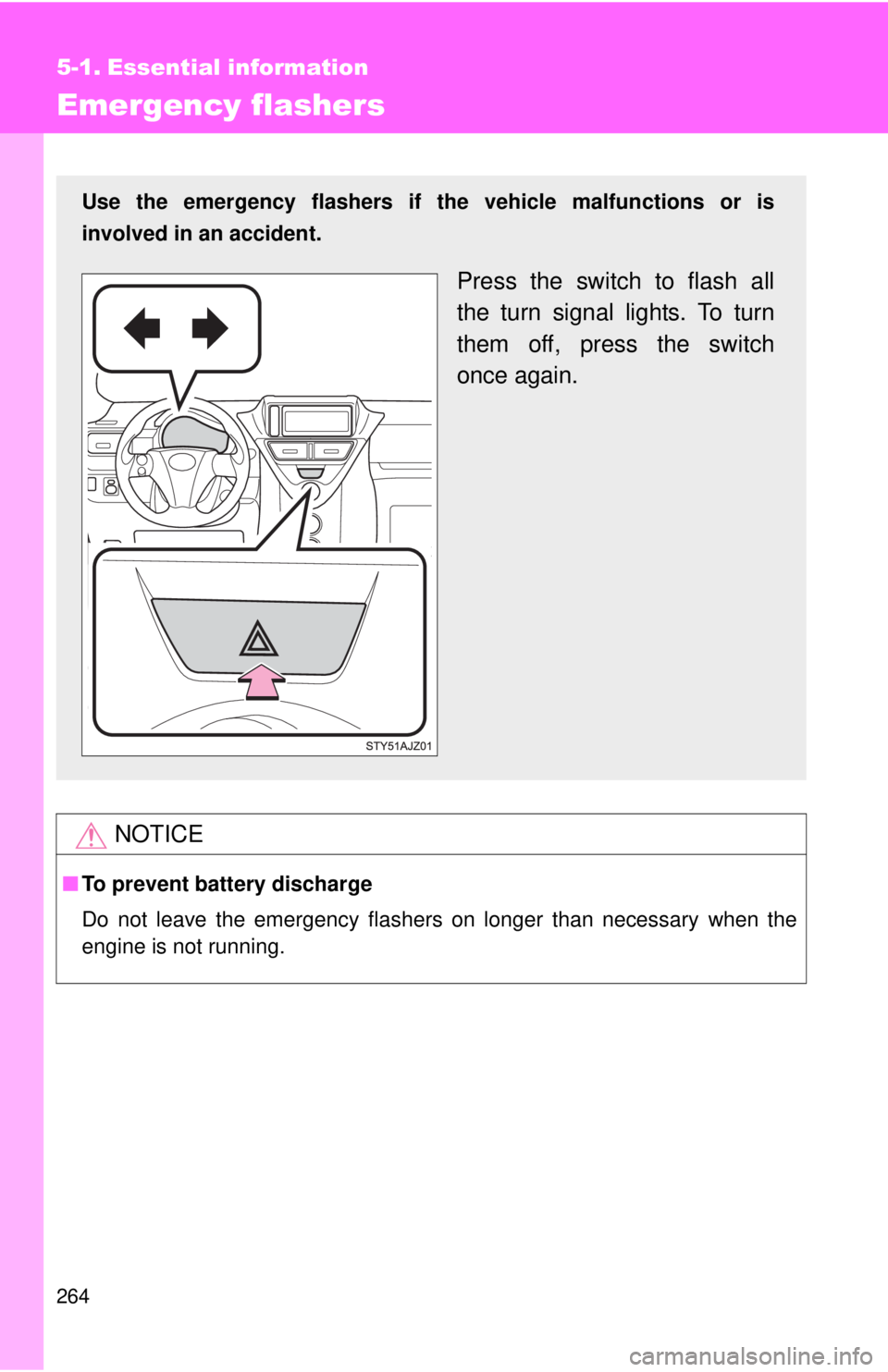
Use the emergency flashers if th e vehicle malfunctions or is
involved in an accident.
Press the switch to flash all
the turn signal lights. To turn
them off, press the switch
once again.
Page 273 of 372
5
When trouble arises
273
5-2. Steps to take in an emergency
If a war ning light turns on or a war ning buzzer sounds...
Stop the vehicle immediately. Continuing to drive the vehicle may be dangerous.
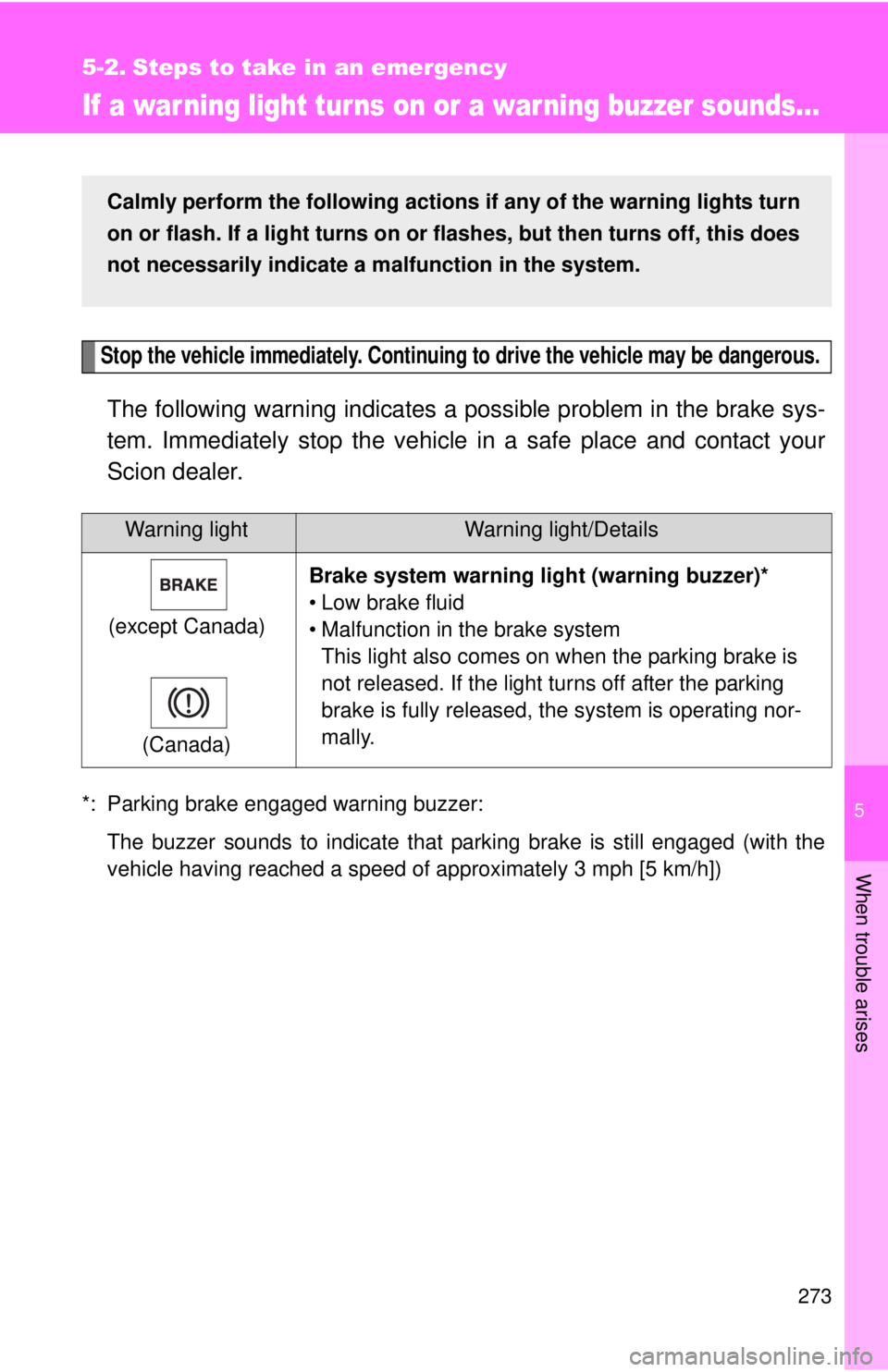
The following warning indicates a possible problem in the brake sys-
tem. Immediately stop the vehicle in a safe place and contact your
Scion dealer.
*: Parking brake engaged warning buzzer:
The buzzer sounds to indicate that parking brake is still engaged (with the
vehicle having reached a speed of approximately 3 mph [5 km/h])
Warning lightWarning light/Details
(except Canada)
(Canada) Brake system warning li
ght (warning buzzer)*
• Low brake fluid
• Malfunction in the brake system This light also comes on when the parking brake is
not released. If the light turns off after the parking
brake is fully released, the system is operating nor-
mally.
Calmly perform the following actions if any of the warning lights turn
on or flash. If a light turns on or flashes, but then turns off, this does
not necessarily indicate a malfunction in the system.