fuel TOYOTA IQ 2014 User Guide
[x] Cancel search | Manufacturer: TOYOTA, Model Year: 2014, Model line: IQ, Model: TOYOTA IQ 2014Pages: 376, PDF Size: 7.76 MB
Page 61 of 376

61
1-5. Refueling
1
Before driving
NOTICE
■
Refueling
Do not spill fuel during refueling.
Doing so may damage the vehicle, such as causing the exhaust systems to
operate abnormally or damaging fuel system components or the vehicle's
painted surface.
Page 106 of 376
106 2-1. Driving procedures
■Breaking in your new Scion
To extend the life of the vehicle, the following precautions are recommended
to observe:
●For the first 186 miles (300 km):
Avoid sudden stops.
● For the first 1000 miles (1600 km):
• Do not drive at extremely high speeds.
• Avoid sudden acceleration.
• Do not drive continuously in the low gears.
• Do not drive at a constant speed for extended periods.
■ Operating your vehicle in a foreign country
Comply with the relevant vehicle registration laws and confirm the availability
of the correct fuel. ( P. 323)
CAUTION
■When starting the vehicle
Always keep your foot on the brake pedal while stopped with the engine run-
ning. This prevents the vehicle from creeping.
■ When driving the vehicle
●Do not drive if you are unfamiliar with the location of the brake and accel-
erator pedals to avoid depressing the wrong pedal.
• Accidentally depressing the accelerator pedal instead of the brake
pedal will result in sudden acceleration that may lead to an accident
that could result in death or serious injury.
• When backing up, you may twist your body around, leading to a diffi- culty in operating the pedals. Make sure to operate the pedals properly.
• Make sure to keep a correct driving posture even when moving the vehicle only slightly, allowing you to depress the brake and accelerator
pedals properly.
• Depress the brake pedal using your right foot. Depressing the brake pedal using your left foot may delay response in an emergency, result-
ing in an accident.
● Do not drive the vehicle over or stop the vehicle near flammable materials.
The exhaust system and exhaust gases can be extremely hot. This may
cause a fire if there is any flammable material nearby.
Page 116 of 376
116
2-1. Driving procedures
Automatic transmission
■If the shift lever cannot be shifted from P (P. 307)
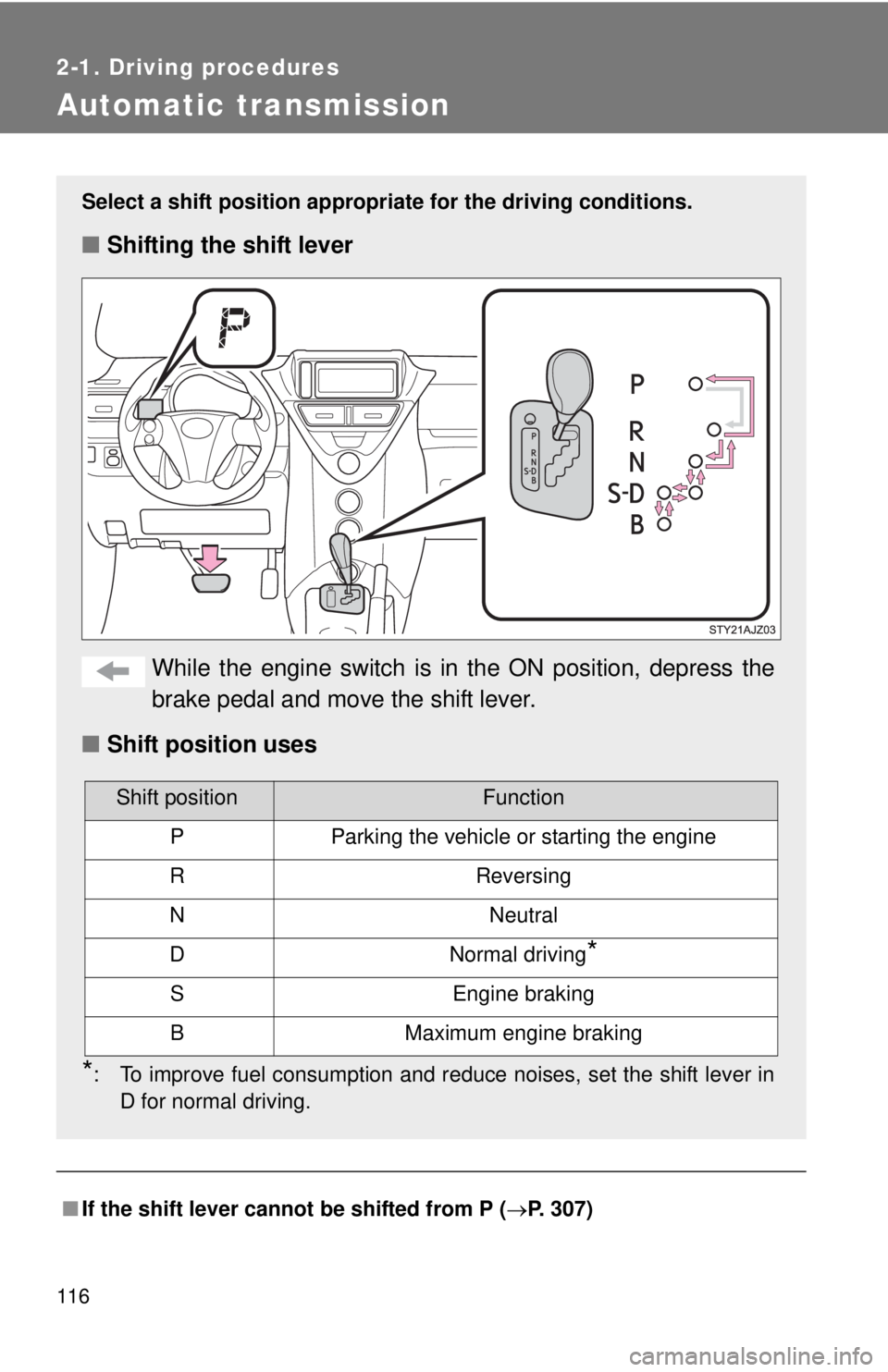
Select a shift position appropri ate for the driving conditions.
■Shifting the shift lever
While the engine switch is in the ON position, depress the
brake pedal and move the shift lever.
■ Shift position uses
*: To improve fuel consumption and reduce noises, set the shift lever in
D for normal driving.
Shift positionFunction
PParking the vehicle or starting the engine
RReversing
NNeutral
DNormal driving*
SEngine braking
BMaximum engine braking
Page 126 of 376
126
2-2. Instrument cluster
Multi-information display
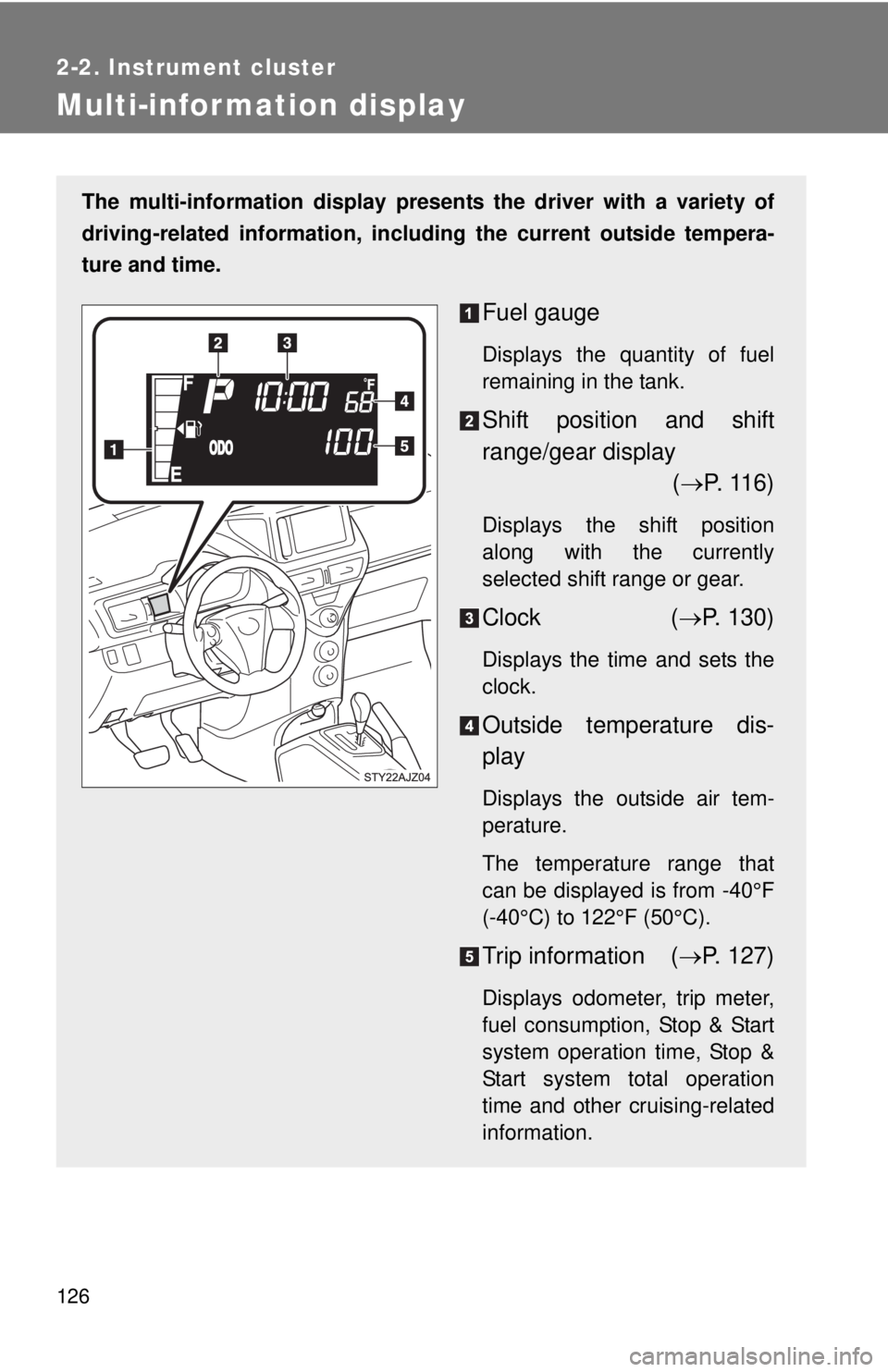
The multi-information display presents the driver with a variety of
driving-related information, including the current outside tempera-
ture and time.
Fuel gauge
Displays the quantity of fuel
remaining in the tank.
Shift position and shift
range/gear display ( P. 116)
Displays the shift position
along with the currently
selected shift range or gear.
Clock ( P. 130)
Displays the time and sets the
clock.
Outside temperature dis-
play
Displays the outside air tem-
perature.
The temperature range that
can be displayed is from -40°F
(-40°C) to 122°F (50°C).
Trip information ( P. 127)
Displays odometer, trip meter,
fuel consumption, Stop & Start
system operation time, Stop &
Start system total operation
time and other cruising-related
information.
Page 128 of 376
128 2-2. Instrument cluster
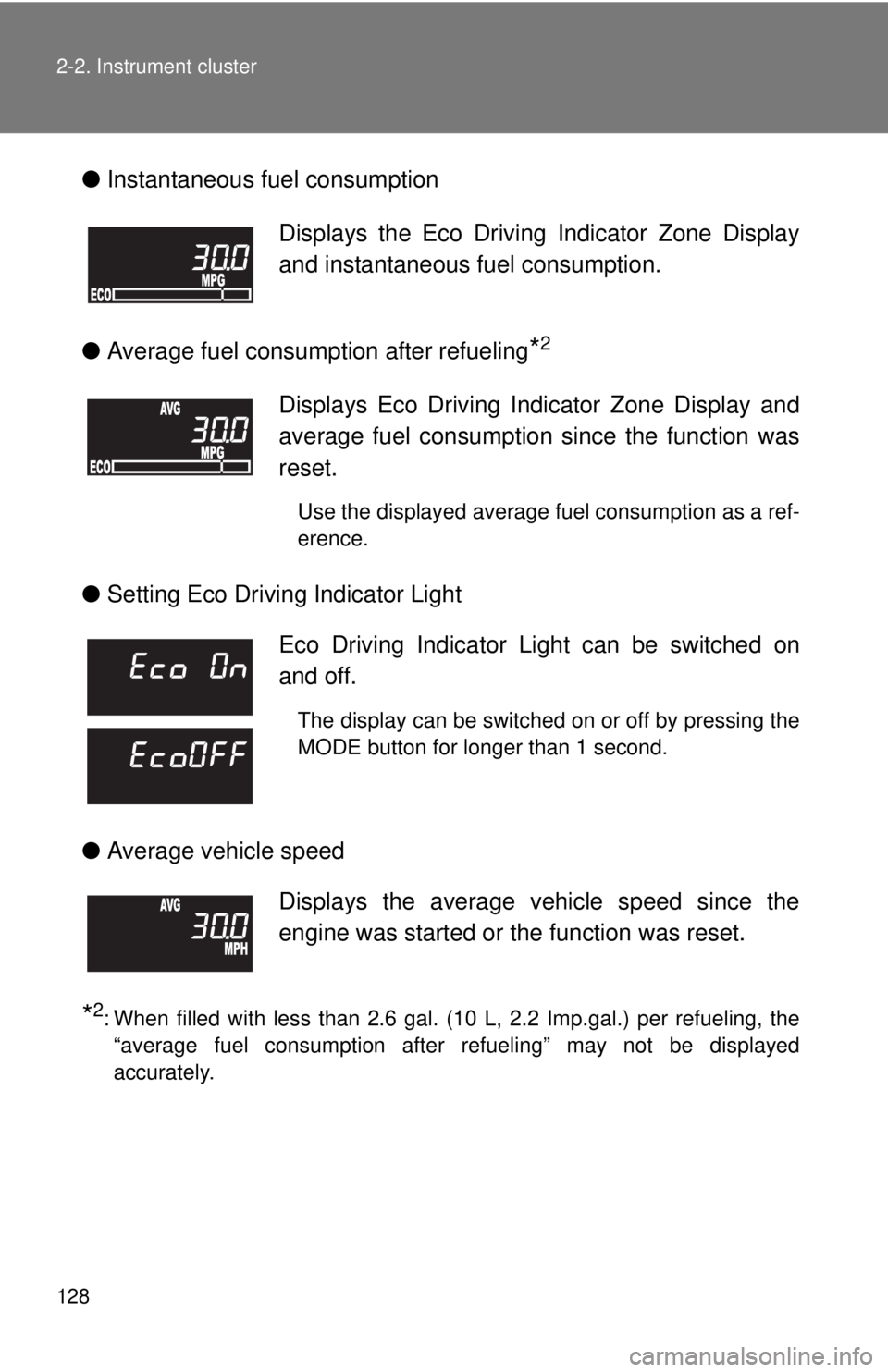
●Instantaneous fuel consumption
● Average fuel consumption after refueling
*2
●Setting Eco Driving Indicator Light
● Average vehicle speed
*2: When filled with less than 2.6 gal. (10 L, 2.2 Imp.gal.) per refueling, the
“average fuel consumption after refueling” may not be displayed
accurately.
Displays the Eco Driving Indicator Zone Display
and instantaneous fuel consumption.
Displays Eco Driving Indicator Zone Display and
average fuel consumption since the function was
reset.
Use the displayed average fuel consumption as a ref-
erence.
Eco Driving Indicator Light can be switched on
and off.
The display can be switched on or off by pressing the
MODE button for longer than 1 second.
Displays the average vehicle speed since the
engine was started or the function was reset.
Page 131 of 376

131
2-2. Instrument cluster
2
When driving
■
The multi-information disp lay can be operated when
The engine switch is in the ON position.
■ When disconnecting and reco nnecting battery terminals
The following information will be reset.
● Clock
● Trip meter
● Average fuel consumption after refueling
● Average vehicle speed
■ Adjusting to a full hour
If you press the clock reset button, the minute values will be rounded to the
nearest hour. So, minute values from “:00” to “:29” are rounded down, and
values from “:30” to “:59” are rounded up.
*
*
: e.g.
1:00 to 1:29 1:00
1:30 to 1:59 2:00
Page 134 of 376
134 2-3. Operating the lights and wipers
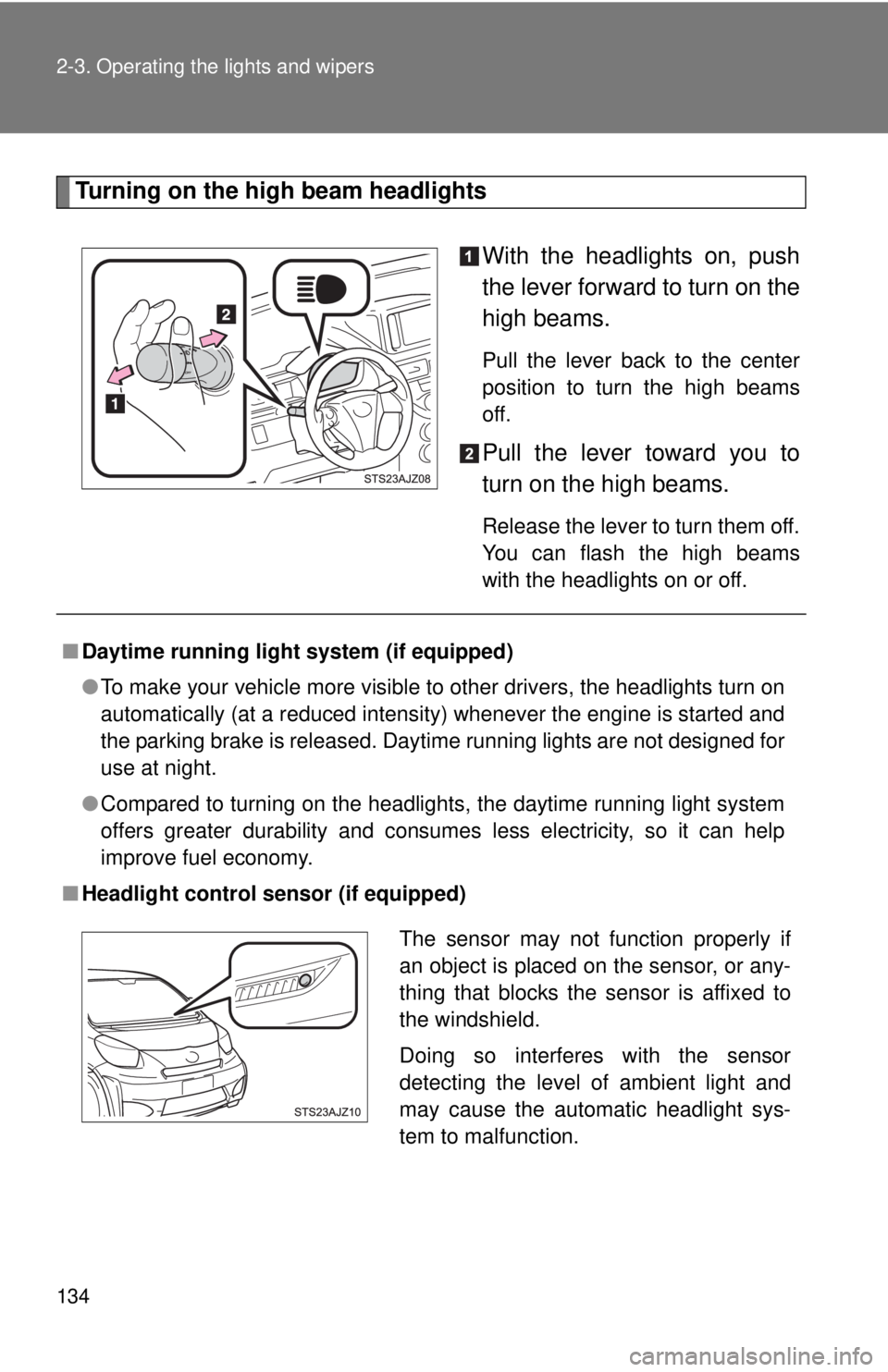
Turning on the high beam headlightsWith the headlights on, push
the lever forward to turn on the
high beams.
Pull the lever back to the center
position to turn the high beams
off.
Pull the lever toward you to
turn on the high beams.
Release the lever to turn them off.
You can flash the high beams
with the headlights on or off.
■Daytime running light system (if equipped)
●To make your vehicle more visible to other drivers, the headlights turn on
automatically (at a reduced intensity) whenever the engine is started and
the parking brake is released. Daytime running lights are not designed for
use at night.
● Compared to turning on the headlights, the daytime running light system
offers greater durability and consumes less electricity, so it can help
improve fuel economy.
■ Headlight control sensor (if equipped)
The sensor may not function properly if
an object is placed on the sensor, or any-
thing that blocks the sensor is affixed to
the windshield.
Doing so interferes with the sensor
detecting the level of ambient light and
may cause the automatic headlight sys-
tem to malfunction.
Page 146 of 376
146
2-5. Driving information
Cargo and luggage
Capacity and distributionCargo capacity depends on the total weight of the occupants.
(Cargo capacity) = (Total load capacity) (Total weight of occupants)
Steps for Determining Correct Load Limit—
(1) Locate the statement “The co mbined weight of occupants and
cargo should never exceed XXX kg or XXX lbs.” on your vehicle’s
placard.
(2) Determine the combined weight of the driver and passengers that
will be riding in your vehicle.
(3)Subtract the combined weight of the driver and passengers from XXX kg or XXX lbs.
(4) The resulting figure equals the av ailable amount of cargo and lug-
gage load capacity.
For example, if the “XXX” amount equals 1400 lbs. and there will
be five 150 lb passengers in your vehicle, the amount of available
cargo and luggage load capacity is 650 lbs. (1400 750 (5 150)
= 650 lbs.)
(5) Determine the combined weight of luggage and cargo being loaded on the vehicle. That weight may not safely exceed the
available cargo and luggage load capacity calculated in Step 4.
Take notice of the following information about storage precau-
tions, cargo capacity and load.
●Stow cargo and luggage in the luggage compartment whenever
possible.
● Be sure all items are secured in place.
● Be careful to keep the vehicle level. Placing the weight as far for-
ward as possible helps maintain vehicle balance.
● For better fuel economy, do no t carry unnecessary weight.
Page 184 of 376
184
4-1. Maintenance and care
Cleaning and protecting the vehicle exterior
■Automatic car washes
●Fold the mirrors and remove the antenna before washing the vehicle.
Start washing from the front of the vehicle. Make sure to re-install the
antenna and extend the mirrors before driving.
● Brushes used in automatic car washes may scratch the vehicle surface
and harm your vehicle’s paint.
■ High pressure car washes
●Do not allow the nozzles of the car wash to come within close proximity
of the windows.
● Before car wash, check that the fuel filler door on your vehicle is closed
properly.
■ Bumpers and side moldings
Do not scrub with abrasive cleaners.
Perform the following to protect the vehicle and maintain it in prime
condition.
● Working from top to bottom, liber ally apply water to the vehicle
body, wheel wells and underside of the vehicle to remove any
dirt and dust.
Wash the vehicle body using a sponge or soft cloth, such as a
car wash mitt.
● For hard-to-remove marks, use car wash soap and rinse thor-
oughly with water.
● Wipe away any water.
● Wax the vehicle when the waterproof coating deteriorates.
If water does not bead on a clean surface, apply wax when the vehicle
body is cool.
Page 191 of 376
191
4-2. Maintenance
4
Maintenance and care
Turn the engine switch to the LOCK position.
While pressing the MODE button, turn the engine switch to the ON
position (but do not start the engine because otherwise the reset
mode will be cancelled). Continue to press and hold the button until
the trip meter displays “000000”.
■ Allow inspection and repairs to be performed by a Scion dealer
● Scion technicians are well-trained specialists and are kept up to date with
the latest service information. They are well informed about the opera-
tions of all systems on your vehicle.
● Keep a copy of the repair order. It proves that the maintenance that has
been performed is under warranty coverage. If any problem should arise
while your vehicle is under warranty, your Scion dealer will promptly take
care of it.
CAUTION
■ If your vehicle is not properly maintained
It could result in serious damage to the vehicle and possible serious in\
jury or
death.
■ Warning in handling of battery
●Engine exhaust, some of its constituents, and a wide variety of automobile
components contain or emit chemicals known to the State of California to
cause cancer and birth defects and other reproductive harm. Work in a
well ventilated area.
● Oils, fuels and fluids contained in vehicles as well as waste produced by
component wear contain or emit chemicals known to the State of
California to cause cancer and birth defects or other reproductive harm.
Avoid exposure and wash any affected area immediately.
● Battery posts, terminals and related accessories contain lead and lead
compounds which are known to cause brain damage. Wash your hands
after handling. ( P. 218)