lock TOYOTA IQ 2014 Service Manual
[x] Cancel search | Manufacturer: TOYOTA, Model Year: 2014, Model line: IQ, Model: TOYOTA IQ 2014Pages: 376, PDF Size: 7.76 MB
Page 120 of 376
120
2-1. Driving procedures
Hor n
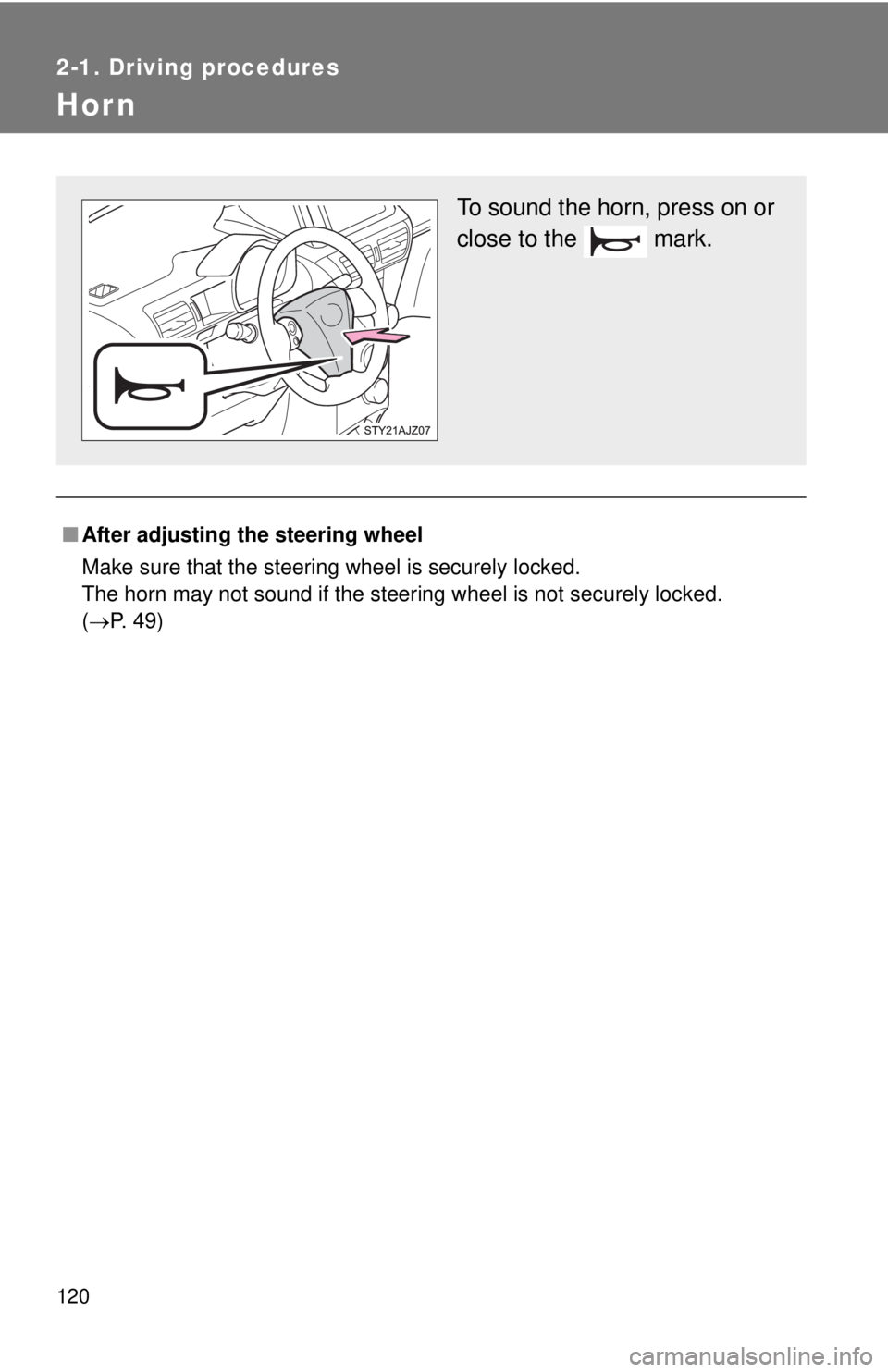
■After adjusting the steering wheel
Make sure that the steering wheel is securely locked.
The horn may not sound if the steering wheel is not securely locked.
(P. 49)
To sound the horn, press on or
close to the mark.
Page 121 of 376
121
2
When driving
2-2. Instrument cluster
Gauges and meters
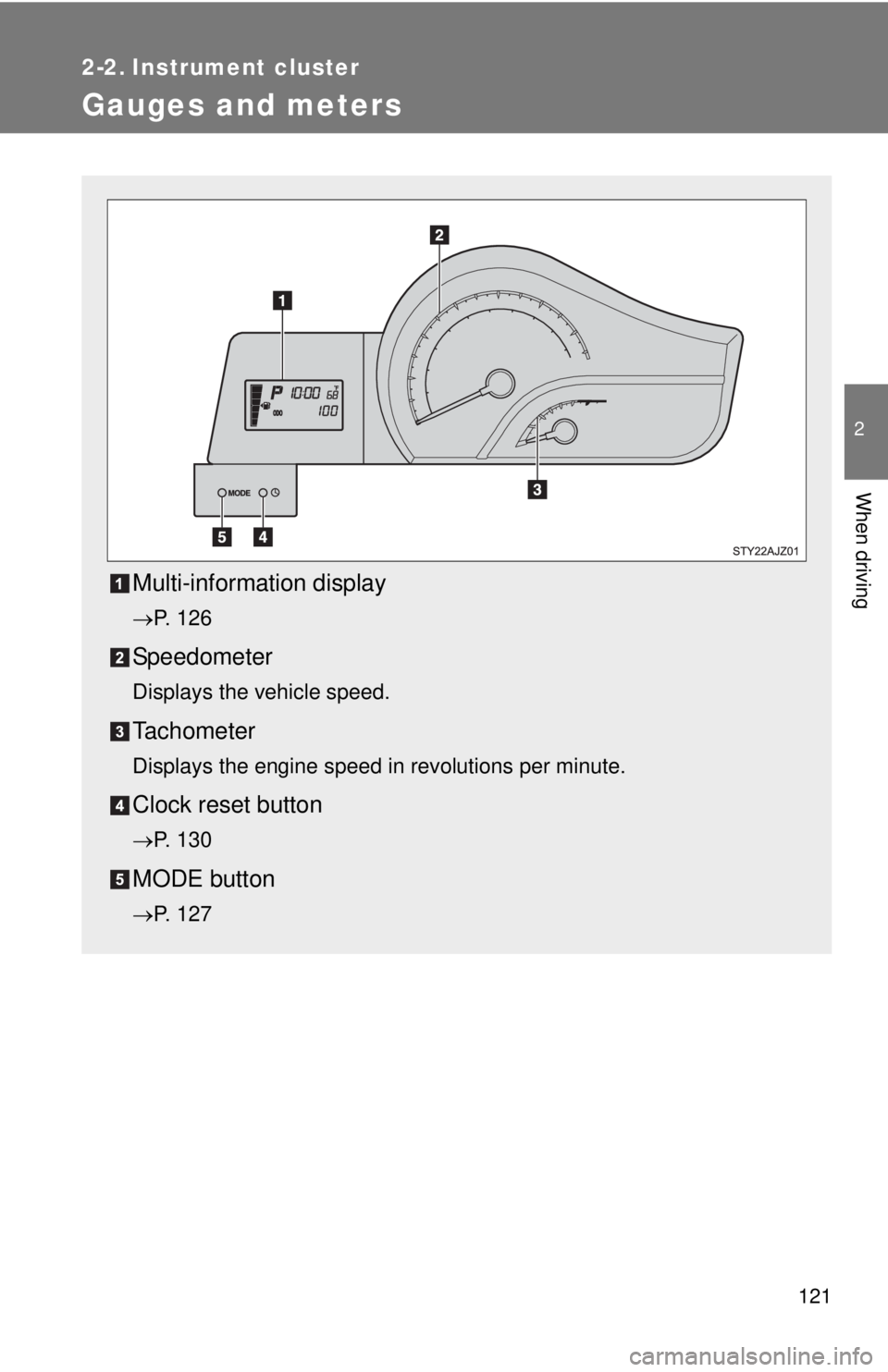
Multi-information display
P. 126
Speedometer
Displays the vehicle speed.
Tachometer
Displays the engine speed in revolutions per minute.
Clock reset button
P. 130
MODE button
P. 127
Page 126 of 376
126
2-2. Instrument cluster
Multi-information display
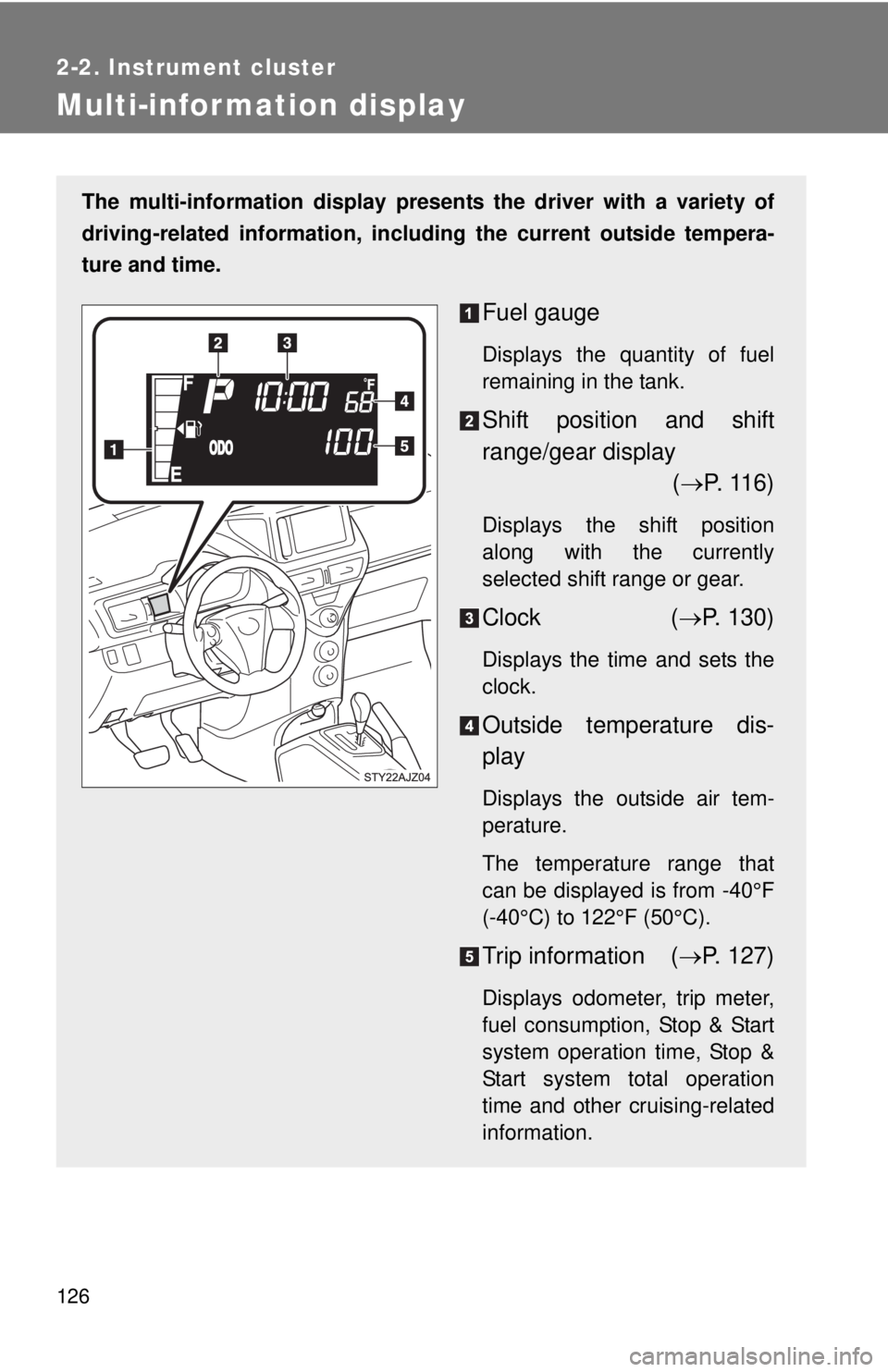
The multi-information display presents the driver with a variety of
driving-related information, including the current outside tempera-
ture and time.
Fuel gauge
Displays the quantity of fuel
remaining in the tank.
Shift position and shift
range/gear display ( P. 116)
Displays the shift position
along with the currently
selected shift range or gear.
Clock ( P. 130)
Displays the time and sets the
clock.
Outside temperature dis-
play
Displays the outside air tem-
perature.
The temperature range that
can be displayed is from -40°F
(-40°C) to 122°F (50°C).
Trip information ( P. 127)
Displays odometer, trip meter,
fuel consumption, Stop & Start
system operation time, Stop &
Start system total operation
time and other cruising-related
information.
Page 130 of 376
130 2-2. Instrument cluster
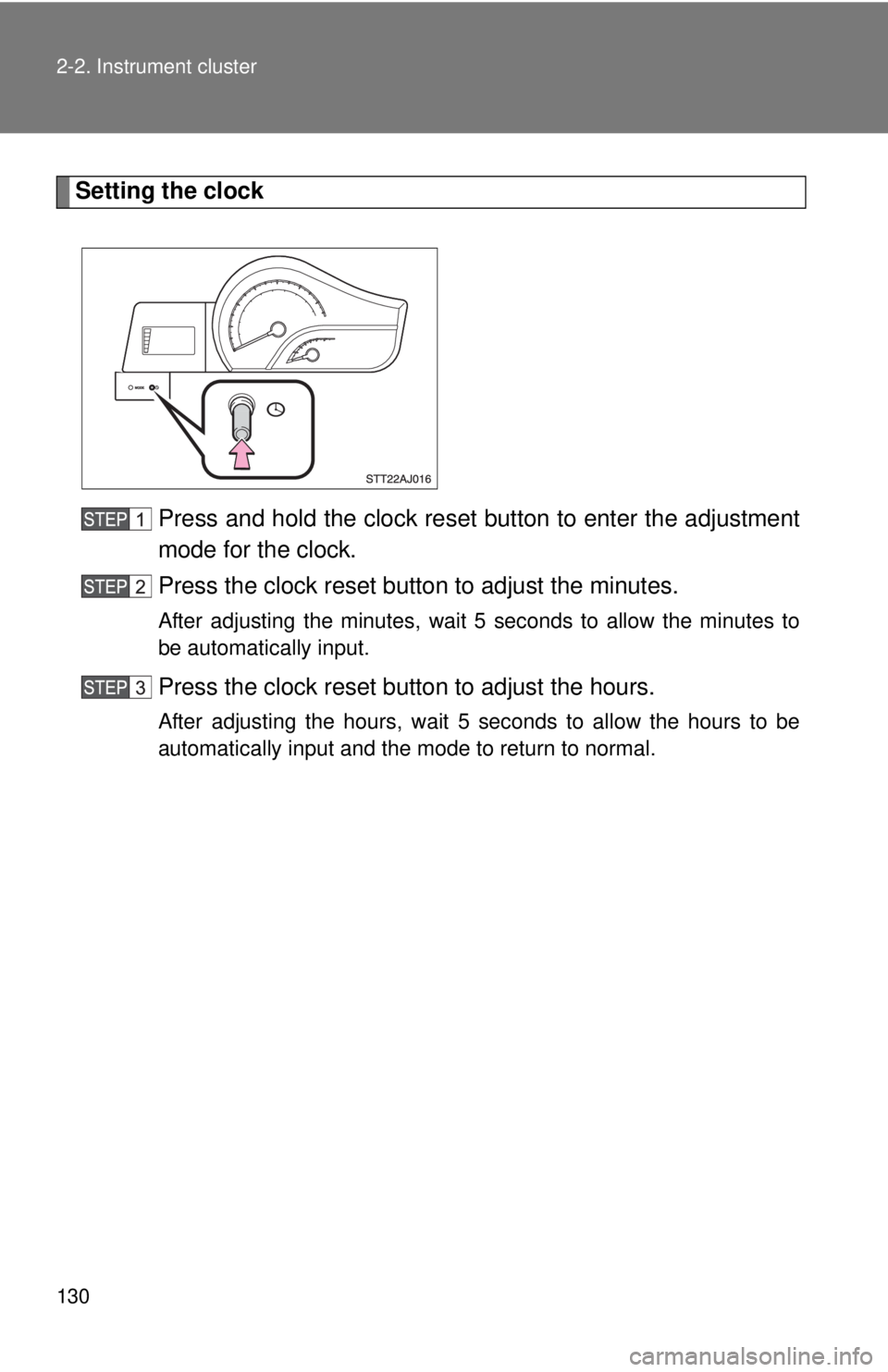
Setting the clockPress and hold the clock reset button to enter the adjustment
mode for the clock.
Press the clock reset button to adjust the minutes.
After adjusting the minutes, wait 5 seconds to allow the minutes to
be automatically input.
Press the clock reset button to adjust the hours.
After adjusting the hours, wait 5 seconds to allow the hours to be
automatically input and the mode to return to normal.
Page 131 of 376

131
2-2. Instrument cluster
2
When driving
■
The multi-information disp lay can be operated when
The engine switch is in the ON position.
■ When disconnecting and reco nnecting battery terminals
The following information will be reset.
● Clock
● Trip meter
● Average fuel consumption after refueling
● Average vehicle speed
■ Adjusting to a full hour
If you press the clock reset button, the minute values will be rounded to the
nearest hour. So, minute values from “:00” to “:29” are rounded down, and
values from “:30” to “:59” are rounded up.
*
*
: e.g.
1:00 to 1:29 1:00
1:30 to 1:59 2:00
Page 134 of 376
134 2-3. Operating the lights and wipers
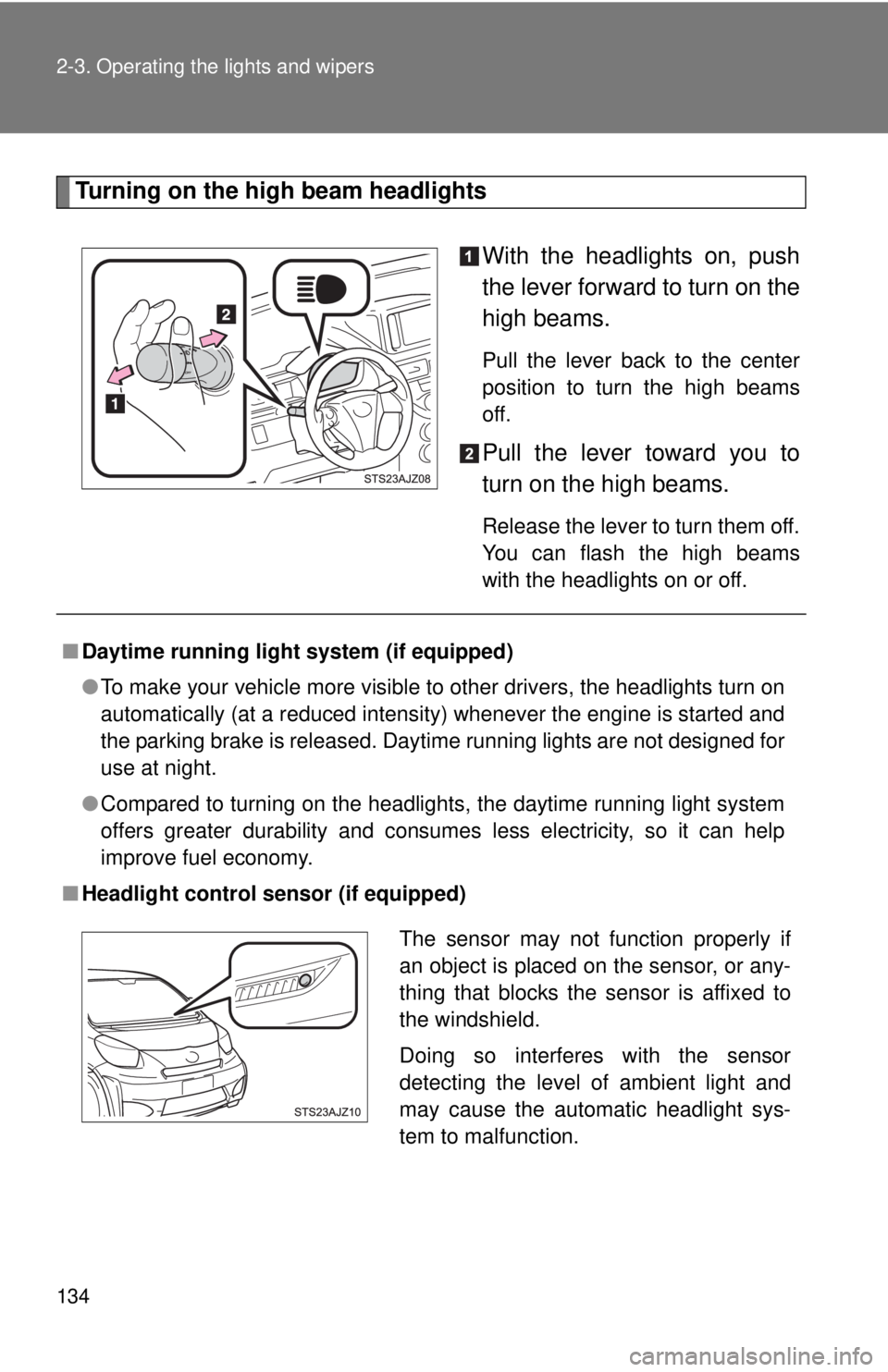
Turning on the high beam headlightsWith the headlights on, push
the lever forward to turn on the
high beams.
Pull the lever back to the center
position to turn the high beams
off.
Pull the lever toward you to
turn on the high beams.
Release the lever to turn them off.
You can flash the high beams
with the headlights on or off.
■Daytime running light system (if equipped)
●To make your vehicle more visible to other drivers, the headlights turn on
automatically (at a reduced intensity) whenever the engine is started and
the parking brake is released. Daytime running lights are not designed for
use at night.
● Compared to turning on the headlights, the daytime running light system
offers greater durability and consumes less electricity, so it can help
improve fuel economy.
■ Headlight control sensor (if equipped)
The sensor may not function properly if
an object is placed on the sensor, or any-
thing that blocks the sensor is affixed to
the windshield.
Doing so interferes with the sensor
detecting the level of ambient light and
may cause the automatic headlight sys-
tem to malfunction.
Page 135 of 376

135
2-3. Operating the lights and wipers
2
When driving
■
Automatic light off system (if equipped)
●When the headlights come on: The headlights and tail lights automati-
cally turn off after 30 seconds when a door is opened and closed with the
engine switch turned to the ACC or LOCK position. (The lights turn off
immediately if the button on the wireless remote control is pressed
after all doors are locked.)
● When only the tail lights come on: The tail lights turn off automatically
with the engine switch turned to the ACC or LOCK position and the
driver’s door is opened.
■ Customization that can be configured at Scion dealer
Settings of the light sensor sensitivity can be changed.
(Customizable features P. 343)
NOTICE
■To prevent battery discharge
Do not leave the lights on longer than necessary when the engine is not run-
ning.
Page 137 of 376
137
2-3. Operating the lights and wipers
2
When driving
■
The windshield wiper and washer can be operated when
The engine switch must be in the ON position.
■ If no windshield washer fluid sprays
Check that the washer nozzles are not blocked and if there is washer fluid in
the windshield washer fluid reservoir.
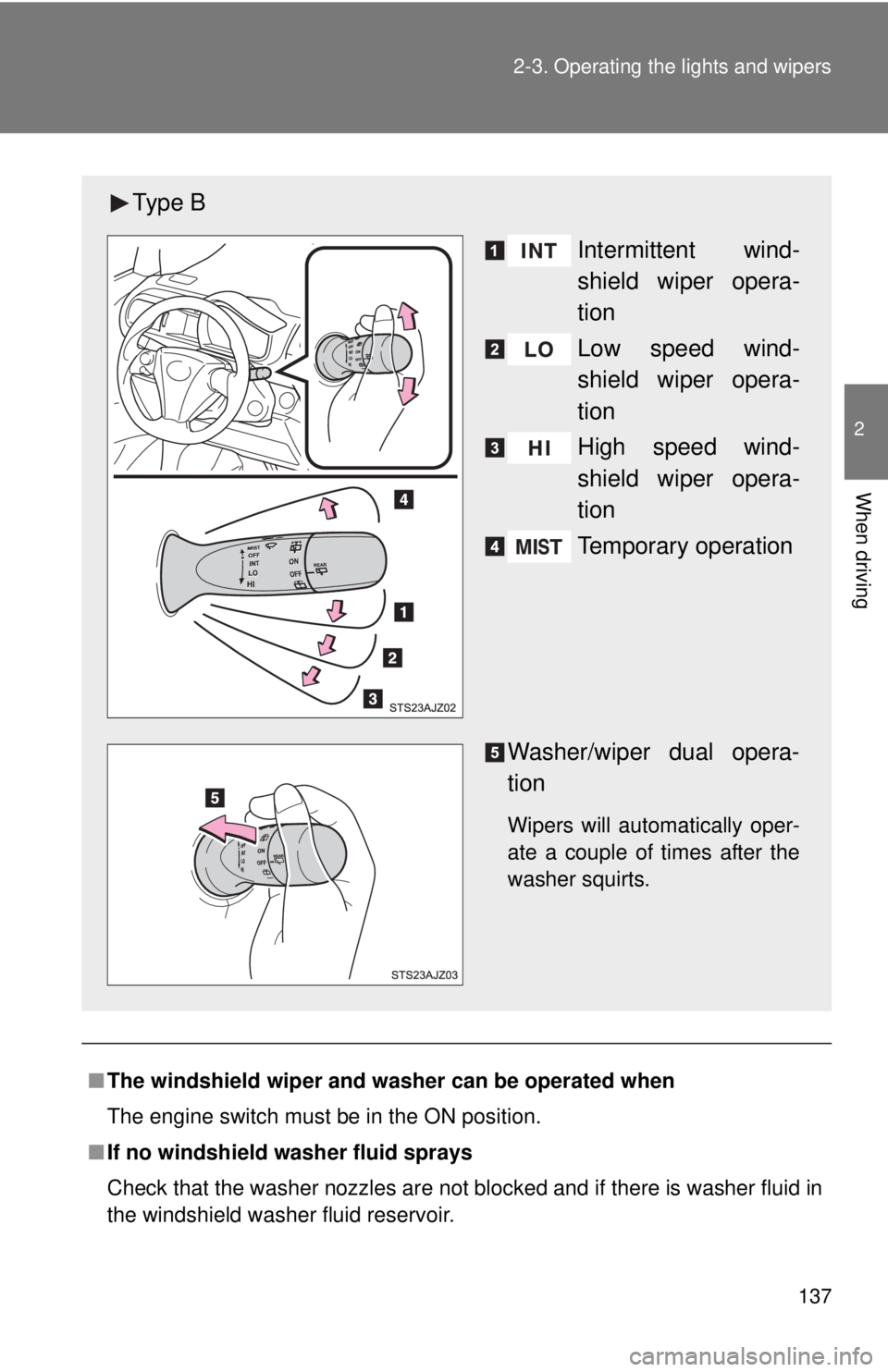
Ty p e B
Intermittent wind-
shield wiper opera-
tion
Low speed wind-
shield wiper opera-
tion
High speed wind-
shield wiper opera-
tion
Temporary operation
Washer/wiper dual opera-
tion
Wipers will automatically oper-
ate a couple of times after the
washer squirts.
Page 138 of 376

138 2-3. Operating the lights and wipers
NOTICE
■When the windshield is dry
Do not use the wipers, as they may damage the windshield.
■ When there is no washer fluid spray from the nozzle
Damage to the washer fluid pump may be caused if the lever is pulled
toward you and held continually.
■ When a nozzle becomes blocked
Do not try to clear it with a pin or other object. The nozzle will be damaged.
Page 141 of 376
141
2
When driving
2-4. Using other driving systems
Driving assist systems
To help enhance driving safety and performance, the following sys-
tems operate automatically in res ponse to various driving situations.
Be aware, however, that these systems are supplementary and
should not be relied upon too heavi ly when operating the vehicle.
■ABS (Anti-lock Brake System)
Helps to prevent wheel lock when the brakes are applied suddenly, or if
the brakes are applied while driving on a slippery road surface.
■Brake Assist
Generates an increased level of braking force after the brake pedal is
depressed, when the system detects a panic stop situation.
■VSC (Vehicle Stability Control)
Helps the driver to control skidding when swerving suddenly or turning
on slippery road surfaces.
■TRAC (Traction Control)
Maintains drive power and prevents the front wheels from spinning
when starting the vehicle or accelerating on slippery roads.
■EPS (Electric Power Steering)
Employs an electric motor to reduce the amount of effort needed to turn
the steering wheel.
■Enhanced VSC (Enhanced vehicle stability control)
Provides cooperative control of the ABS, TRAC, VSC and EPS.
Helps to maintain directional stability when swerving on slippery road
surfaces by controlling steering performance.