tow TOYOTA IQ 2014 Owners Manual
[x] Cancel search | Manufacturer: TOYOTA, Model Year: 2014, Model line: IQ, Model: TOYOTA IQ 2014Pages: 376, PDF Size: 7.76 MB
Page 1 of 376

TABLE OF CONTENTS
1
1Before drivingAdjusting and operating features such as door locks,
mirrors, and steering column.
2When drivingDriving, stopping and safe-driving information.
3Interior
featuresAir conditioning and audio systems, as well as other in-
terior features for a comfortable driving experience.
4Maintenance
and careCleaning and protecting your vehicle, performing do-it-
yourself maintenance, and maintenance information.
5When trouble
arisesWhat to do if the vehicle needs to be towed, gets a flat
tire, or is involved in an accident.
6Vehicle
specificationsDetailed vehicle information.
7For ownersReporting safety defects for U.S. owners, and seat belt
and SRS airbag instructions for Canadian owners
IndexAlphabetical listing of information contained in this
manual.
Page 3 of 376

1
2
3
4
5
6
7
3
2-5. Driving informationCargo and luggage ............. 146
Vehicle load limits ............... 150
Winter driving tips ............... 151
Trailer towing ...................... 155
Dinghy towing ..................... 156
3-1. Using the air conditioning system and defogger
Air conditioning system ....... 158
Rear window defogger ........ 164
Rear window and outside rear view mirror
defoggers .......................... 165
3-2. Using the audio system Using the AUX port/USB port ........................... 167
Using the steering wheel audio switches .................. 168
3-3. Using the interior lights Interior lights list .................. 169
• Interior light ....................... 170
3-4. Using the storage features List of storage features ....... 171
• Cup holder ........................ 172
• Bottle holders .................... 173
• Auxiliary box ..................... 174 3-5. Other interior features
Sun visors........................... 175
Vanity mirrors ..................... 176
Power outlet ....................... 177
Assist grips ......................... 178
Floor mat ............................ 179
Luggage compartment features ............................ 181
4-1. Maintenance and care Cleaning and protecting the vehicle exterior ........... 184
Cleaning and protecting the vehicle interior ............ 187
4-2. Maintenance Maintenance requirements .................... 190
General maintenance ......... 192
Emission inspection and maintenance (I/M)
programs .......................... 195
4-3. Do-it-yourself maintenance Do-it-yourself service precautions....................... 196
Hood ................................... 199
Positioning a floor jack ....... 201
Replacing the tire ............... 204
Engine compartment .......... 210
Tires ................................... 222
Tire inflation pressure ......... 230
Wheels ............................... 234
Air conditioning filter ........... 236
3Interior features
4Maintenance and care
Page 4 of 376

TABLE OF CONTENTSIndex
4
Key battery ......................... 240
Checking and replacing fuses ................................ 244
Light bulbs .......................... 255
5-1. Essential information Emergency flashers ........... 268
If your vehicle needs to be towed .......................... 269
If you think something is wrong ............................ 275
Fuel pump shut off system .............................. 276
5-2. Steps to take in an emergency If a warning light turns on or a warning buzzer
sounds... .......................... 277
If you have a flat tire ........... 288
If the engine will not start ... 305
If the shift lever cannot be shifted from P .............. 307
If you lose your keys .......... 308
If the vehicle battery is discharged .................... 309
If your vehicle overheats .... 312
If the vehicle becomes stuck................................. 315
If your vehicle has to be stopped in
an emergency .................. 317 6-1. Specifications
Maintenance data (fuel, oil level, etc.) ........... 320
Fuel information .................. 329
Tire information................... 332
6-2. Customization Customizable features ........ 343
Items to initialize ................. 345
Reporting safety defects for U.S. owners ................. 348
Seat belt instructions for Canadian owners
(in French) ........................ 349
SRS airbag instructions for Canadian owners
(in French) ........................ 351
Abbreviation list ........................ 362
Alphabetical index .................... 363
What to do if... .......................... 372
5When trouble arises
6Vehicle specifications
7For owners
Index
Page 25 of 376
25
1-1. Key information
1
Before driving
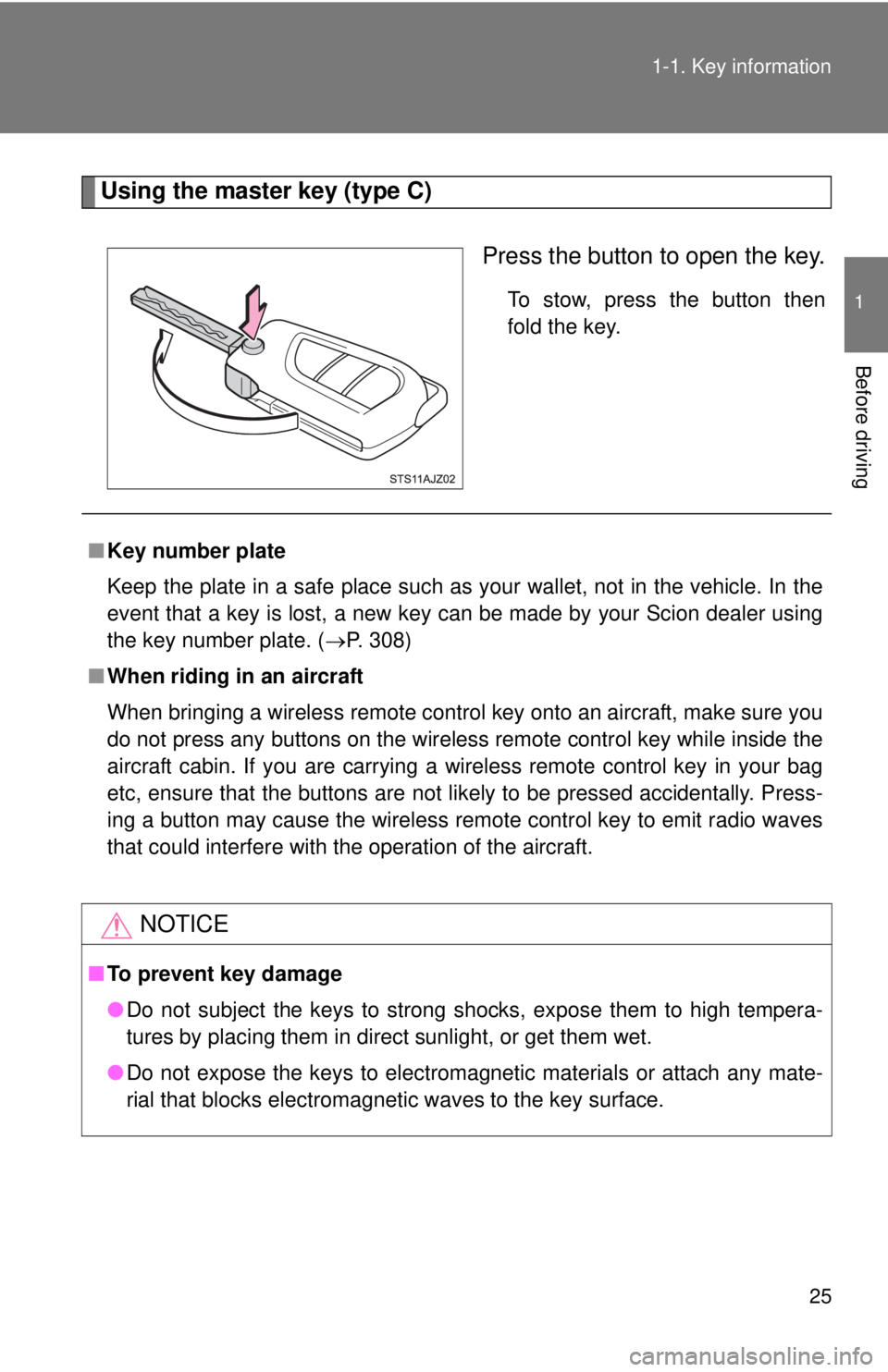
Using the master key (type C)
Press the button to open the key.
To stow, press the button then
fold the key.
■Key number plate
Keep the plate in a safe place such as your wallet, not in the vehicle. In the
event that a key is lost, a new key can be made by your Scion dealer using
the key number plate. ( P. 308)
■ When riding in an aircraft
When bringing a wireless remote control key onto an aircraft, make sure you
do not press any buttons on the wireless remote control key while inside the
aircraft cabin. If you are carrying a wireless remote control key in your bag
etc, ensure that the buttons are not likely to be pressed accidentally. Press-
ing a button may cause the wireless remote control key to emit radio waves
that could interfere with the operation of the aircraft.
NOTICE
■To prevent key damage
●Do not subject the keys to strong shocks, expose them to high tempera-
tures by placing them in direct sunlight, or get them wet.
● Do not expose the keys to electromagnetic materials or attach any mate-
rial that blocks electromagnetic waves to the key surface.
Page 27 of 376
27
1-2. Opening, closing and locking the doors
1
Before driving
■
Operation signals
The emergency flashers flash to indicate that the doors have been locked/
unlocked. (Locked: Once; Unlocked: Twice)
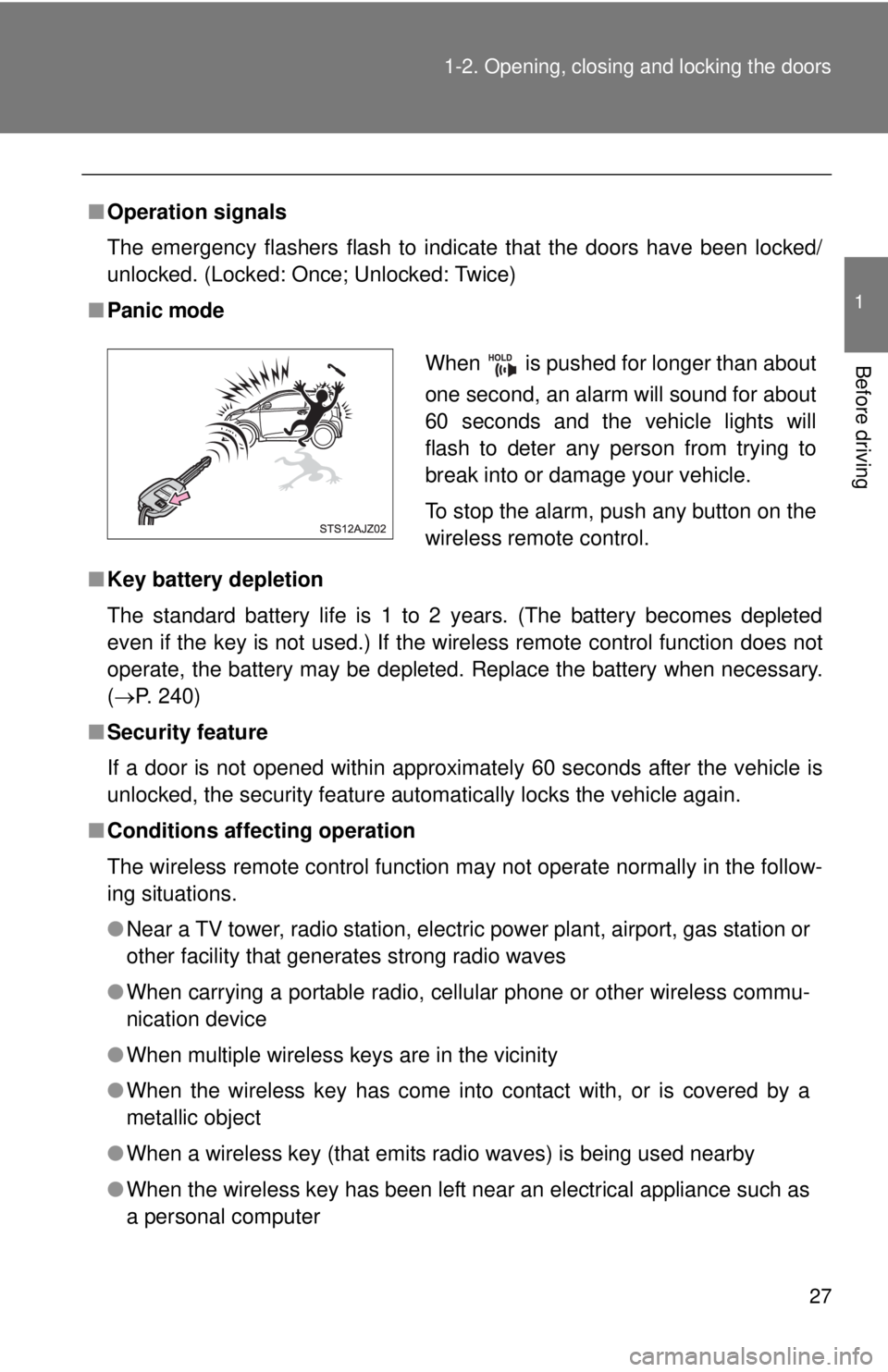
■Panic mode
■Key battery depletion
The standard battery life is 1 to 2 years. (The battery becomes depleted
even if the key is not used.) If the wireless remote control function does not
operate, the battery may be depleted. Replace the battery when necessary.
(P. 240)
■ Security feature
If a door is not opened within approximately 60 seconds after the vehicle is
unlocked, the security feature automatically locks the vehicle again.
■ Conditions affecting operation
The wireless remote control function may not operate normally in the follow-
ing situations.
●Near a TV tower, radio station, elec tric power plant, airport, gas station or
other facility that generates strong radio waves
● When carrying a portable radio, cell ular phone or other wireless commu-
nication device
● When multiple wireless keys are in the vicinity
● When the wireless key has come into contact with, or is covered by a
metallic object
● When a wireless key (that emits radio waves) is being used nearby
● When the wireless key has been left near an electrical appliance such as
a personal computer
When is pushed for longer than about
one second, an alarm will sound for about
60 seconds and the vehicle lights will
flash to deter any person from trying to
break into or damage your vehicle.
To stop the alarm, push any button on the
wireless remote control.
Page 40 of 376
40
1-3. Adjustable components (seats, mirrors, steering wheel)
Rear seats
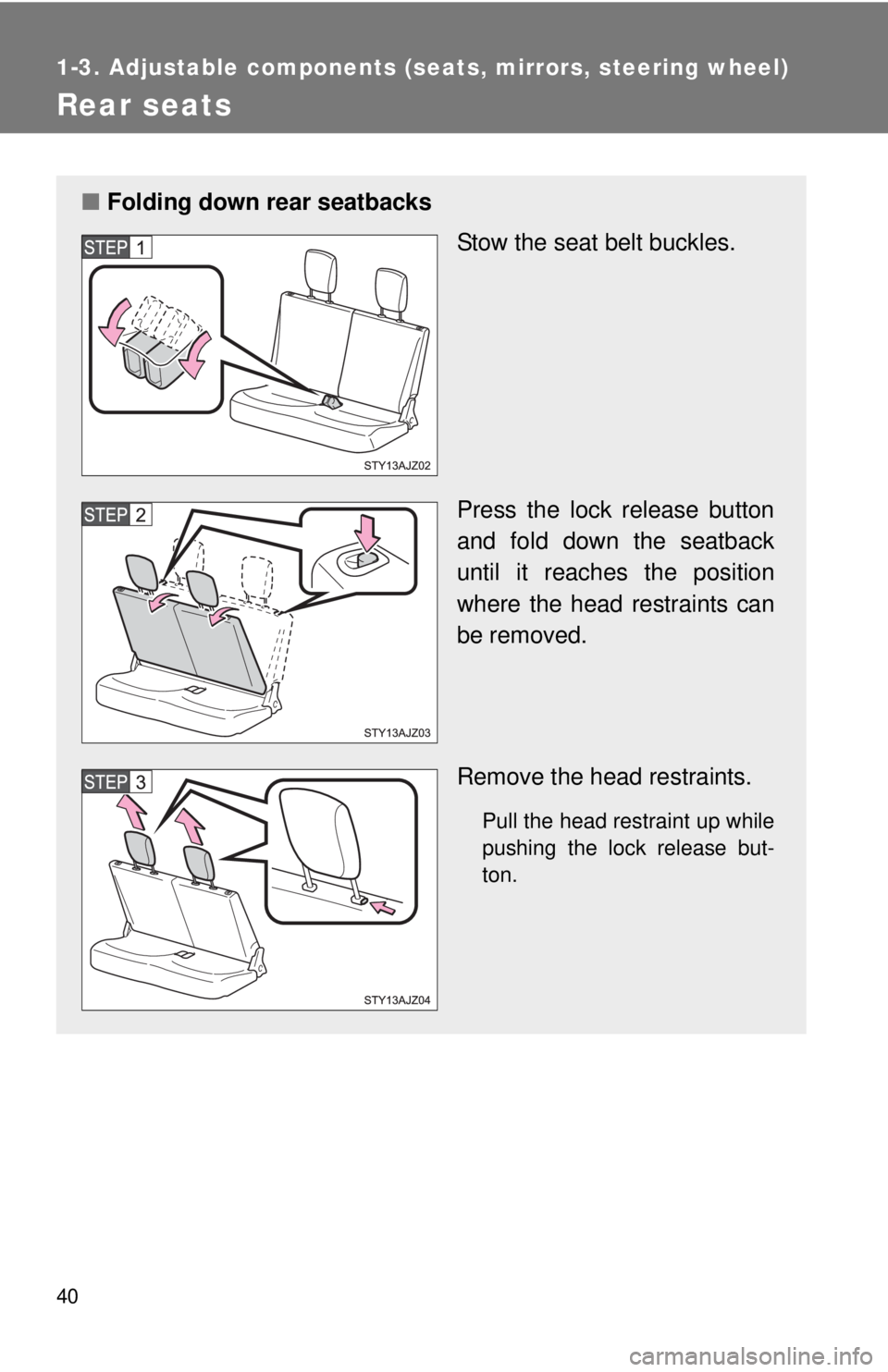
■Folding down rear seatbacks
Stow the seat belt buckles.
Press the lock release button
and fold down the seatback
until it reaches the position
where the head restraints can
be removed.
Remove the head restraints.
Pull the head restraint up while
pushing the lock release but-
ton.
Page 41 of 376
41
1-3. Adjustable components (s
eats, mirrors, steering wheel)
1
Before driving
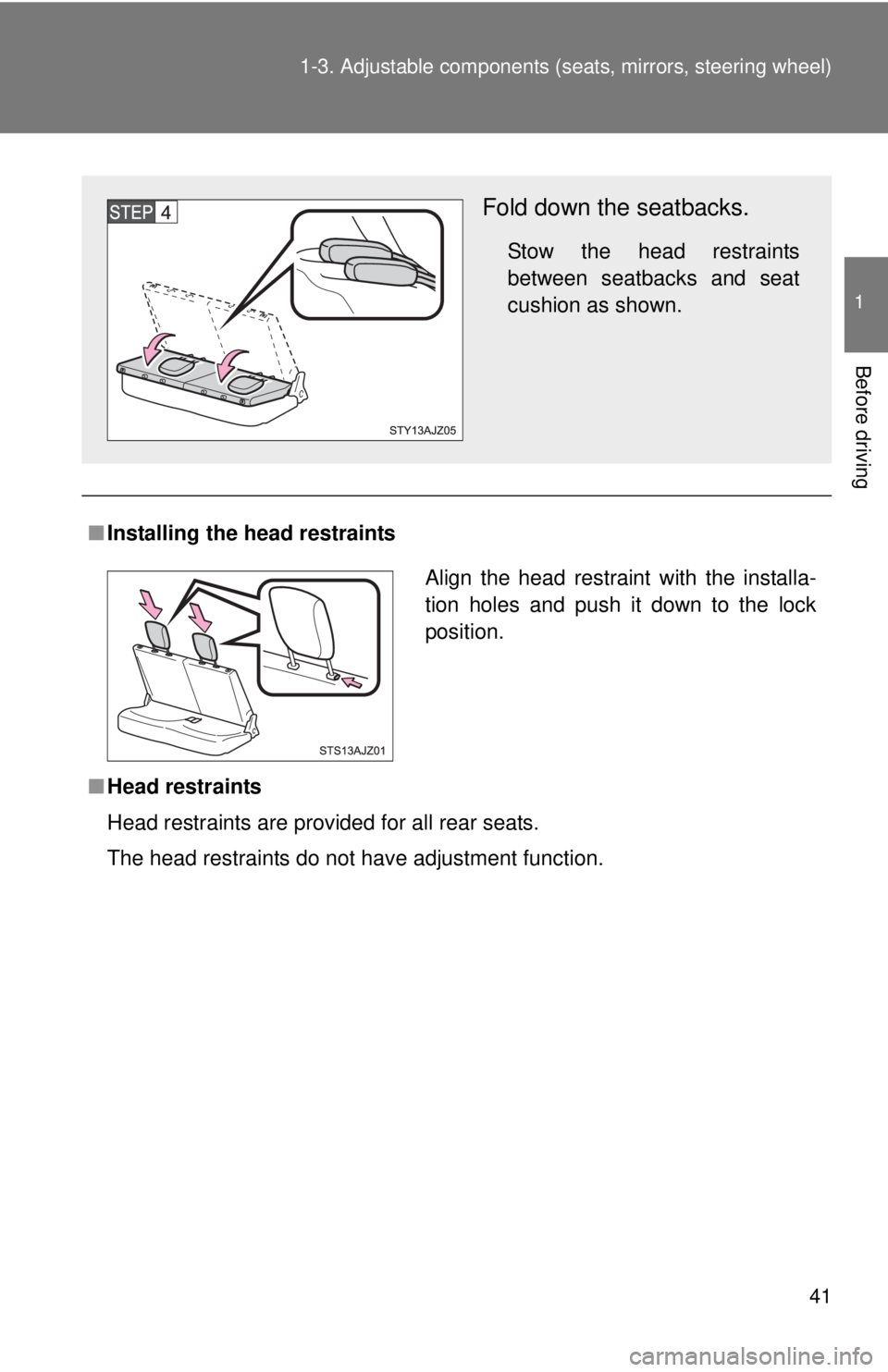
■Installing the head restraints
■ Head restraints
Head restraints are provided for all rear seats.
The head restraints do not have adjustment function.
Fold down the seatbacks.
Stow the head restraints
between seatbacks and seat
cushion as shown.
Align the head restraint with the installa-
tion holes and push it down to the lock
position.
Page 42 of 376

42 1-3. Adjustable components (seats, mirrors, steering wheel)
CAUTION
Observe the following precautions.
Failure to do so may result in death or serious injury.
■When operating the rear seat
●Do not operate the seat while driving.
● Stop the vehicle on level ground, set the parking brake and shift the shift
lever to P.
● Be careful not to get your hands or feet pinched in the seat.
● Do not allow anyone to sit on a folded seatback or in the luggage compart-
ment while driving.
● Do not allow children to enter the luggage compartment.
■ After returning the rear seats to their original position
●Make sure the seatbacks are securely locked.
● Check that the seat belts are not twisted or caught under the seats.
■ Head restraint precautions
Observe the following precautions regarding the head restraints.
Failure to do so may result in death or serious injury.
●Use the head restraints designed for each respective seat.
● Do not drive with the head restraints removed.
NOTICE
■Before folding the seatbacks
●The seat belts buckles must be stowed.
● The head restraints must be removed.
■ When operating the rear seat
Make sure that the rear seat does not come into contact with the front seat.
Do not forcibly operate the rear seat. Otherwise, the seat cover may be dam-
aged or the seat may be broken.
Page 44 of 376
44 1-3. Adjustable components (seats, mirrors, steering wheel)
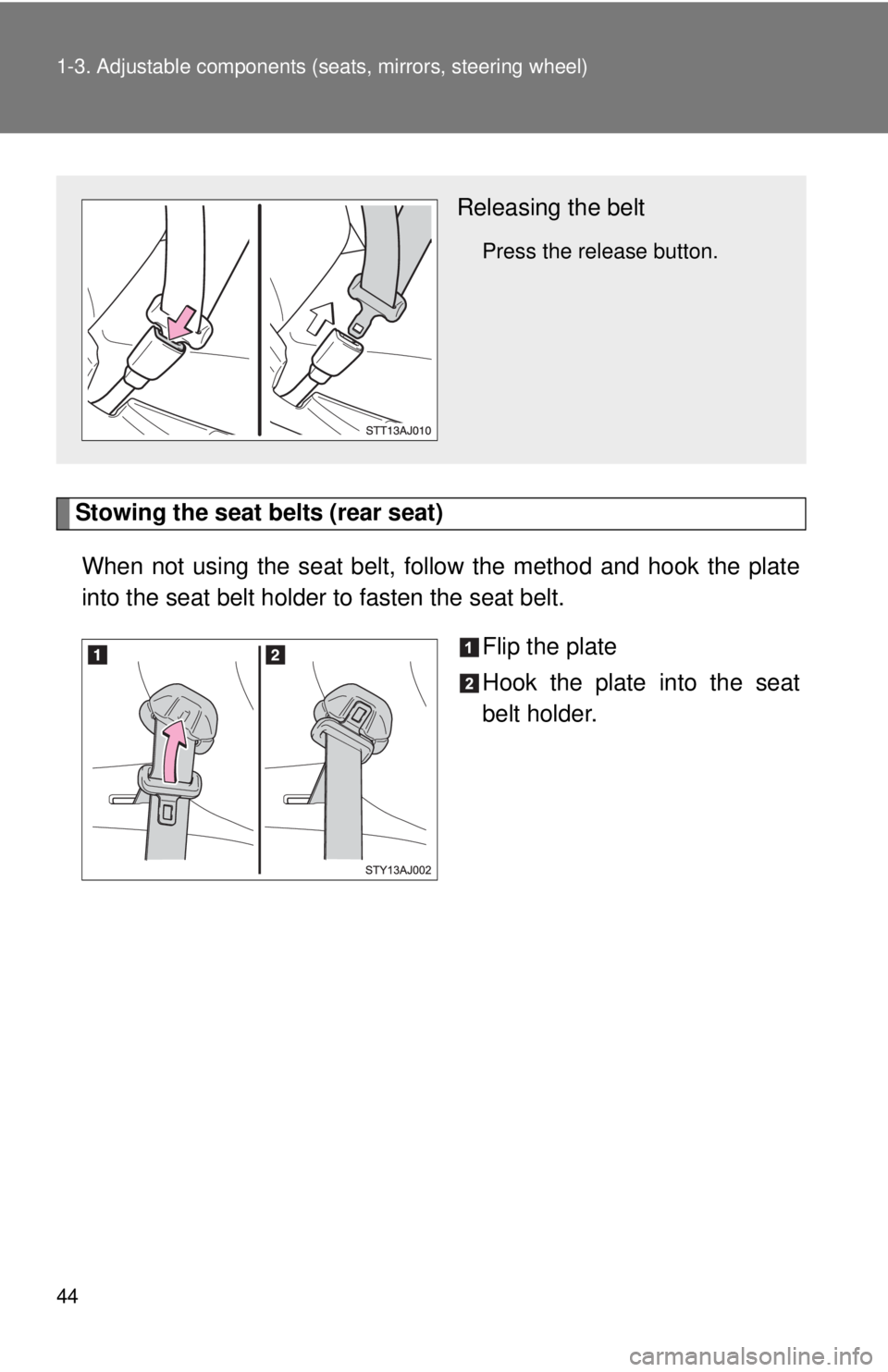
Stowing the seat belts (rear seat)
When not using the seat belt, follow the method and hook the plate
into the seat belt holder to fasten the seat belt. Flip the plate
Hook the plate into the seat
belt holder.
Releasing the belt
Press the release button.
Page 76 of 376

76 1-7. Safety information
CAUTION
■SRS airbag precautions
Observe the following precautions regarding the airbags.
Failure to do so may cause death or serious injury.
●The driver and all passengers in the vehicle must wear their seat belts
properly.
The SRS airbags are supplemental devices to be used with the seat belts.
● The SRS driver airbag deploys with considerable force, and can cause
death or serious injury especially if the driver is very close to the airbag.
The National Highway Traffic Safety Administration (“NHTSA”) advises:
Since the risk zone for the driver’s airbag is the first 2 - 3 in. (50 - 75 mm) of
inflation, placing yourself 10 in. (250 mm) from your driver airbag provides
you with a clear margin of safety. This distance is measured from the center
of the steering wheel to your breastbone. If you sit less than 10 in. (250 mm)
away now, you can change your driving position in several ways:
• Move your seat to the rear as far as you can while still reaching thepedals comfortably.
• Slightly recline the back of the seat. Although vehicle designs vary, many drivers can achieve the 10 in.
(250 mm) distance, even with the driver seat all the way forward, sim-
ply by reclining the back of the seat somewhat. If reclining the back of
your seat makes it hard to see the road, raise yourself by using a firm,
non-slippery cushion, or raise the seat if your vehicle has that feature\
.
• If your steering wheel is adjustable, tilt it downward. This points the air- bag toward your chest instead of your head and neck.
The seat should be adjusted as recommended by NHTSA above, while still
maintaining control of the foot pedals, steering wheel, and your view of the
instrument panel controls.