engine TOYOTA LAND CRUISER 1997 User Guide
[x] Cancel search | Manufacturer: TOYOTA, Model Year: 1997, Model line: LAND CRUISER, Model: TOYOTA LAND CRUISER 1997Pages: 159, PDF Size: 2.04 MB
Page 43 of 159

68Automatic transmission
When the cruise control is being used, even if you downshift the transmission by turning off the overdrive switch, engine braki
ng
will not be applied because the cruise control is not cancelled. For ways to decrease the vehicle speed, see Cruise controlº i n
this chapter.
Page 44 of 159
69
Your automatic transmission has a shift
lock system to minimize the possibility of
incorrect operation. This means you can
only shift out of Pº position when the brake
pedal is depressed (with the ignition
switch in ONº position and the lock re-
lease button depressed). (a) Normal driving
1. Start the engine as instructed in How to start the engineº in Part 3. The trans- mission must be in Pº or Nº.
2. With your foot holding down the brake pedal, shift the selector lever to Dº.
In Dº position, the automatic transmis-
sion system will select the most suitable
gear for running conditions such as nor-
mal cruising, hill climbing, hard towing, etc.
Always turn the overdrive switch on for
better fuel economy and quieter driving. If
the engine coolant temperature is low, thetransmission will not shift into overdrive
gear even with the overdrive switch on.
Never put your foot on the accelerator pedal while shifting. CAUTION
!
3. Release the parking brake and brake pedal. Depress the accelerator pedal
slowly for smooth starting.
(b) Using engine braking
To use engine braking, you can downshift the transmission as follows: Turn off the overdrive switch. The O/D
OFFº indicator light will come on and the transmission will downshift to the
third gear.
Shift into the 2º position. The trans-
mission will downshift to the second
gear when the vehicle speed drops down to or lower than the following speed, and more powerful engine
braking will be obtained.
Four-wheel drive control lever
in Hº 116 km/h (72 mph) . . . . . . . . .
Four-wheel drive control lever
in Lº 40 km/h (25 mph) . . . . . . . . . . .
Shift into the Lº position. The trans-
mission will downshift to the first gear.
When the vehicle speed drops down to
or lower than the following speed, and
maximum engine braking will be ap- plied.
Four-wheel drive control lever
in Hº 56 km/h (34 mph) . . . . . . . . . .
Four-wheel drive control lever
in Lº 13 km/h (8 mph) . . . . . . . . . . . .
When the cruise control is being used, even if you downshift the transmission by
turning off the overdrive switch, engine
braking will not be applied because the
cruise control is not cancelled. For ways
to decrease the vehicle speed, see
Cruise controlº in this chapter.
Be careful when downshifting on a
slippery surface. Abrupt shifting
could cause the vehicle to spin orskid. CAUTION
!
Page 45 of 159
70(c) Using the 2º and Lº positions
The 2º and Lº positions are used for
strong engine braking as described pre-
viously. With the selector lever in 2º or Lº, you
can start the vehicle in motion as with the
lever in Dº. With the selector lever in 2º, the vehicle
will
start in the first gear and automatically
shift to the second gear.
With the selector lever in Lº, the trans-
mission is engaged in the first gear.
NOTICE
Be careful not to overrev the en- gine. Watch the tachometer to
keep engine rpm from going intothe red zone. The approximate
maximum allowable speed foreach position is given below for
your reference:MAXIMUM ALLOWABLE SPEEDS
km/h (mph)
Transmission Transfer
L H2 44 (27) 109 (67)
L 22 (13) 56 (34)
Do not continue hill climbing orhard towing for a long time in the
2º or Lº position. This maycause severe automatic transmis-
sion damage from overheating.To prevent such damage, use Dº
position for hill climbing or hardtowing.
(d) Backing up
1. Bring the vehicle to a complete stop.
2. With the brake pedal held down with
your foot, shift the selector lever to the
Rº position.
NOTICE
Never shift into reverse while the vehicle is moving.
(e) Parking
1. Bring the vehicle to a complete stop.
2. Pull the parking brake lever up fully to securely apply the parking brake.
3. With the brake pedal pressed down, shift the selector lever to the Pº posi- tion. If the four-wheel drive control is in the Nº
position while the selector lever is in the
Pº position, the transmission will damage
and the wheels will not lock.
While the vehicle is moving, never
attempt to move the selector lever
into Pº position under any circum-
stances. Serious mechanical dam-
age and loss of vehicle control may result.
CAUTION
!
(f) Good driving practice If the transmission is repeatedly up-
shifted and downshifted between third
gear and overdrive when climbing a
gentle slope, the overdrive switch
should be turned off. Be sure to turn the switch on immediately afterward.
When towing a trailer, in order to main-
tain engine braking efficiency, do not use overdrive.
Page 46 of 159
71
Always keep your foot on the brake
pedal while stopped with the engine
running. This prevents the vehicle
from creeping.CAUTION
!
NOTICE
Do not hold the vehicle on an upgrade with the accelerator pedal.
It can cause the transmission tooverheat. Always use the brake
pedal or parking brake.
(g) Rocking your vehicle if stuck
If you rock your vehicle to make it
out when it becomes stuck in snow,
mud, sand, etc., first check that there are no objects or people
around the vehicle. During opera-
tion, the vehicle may suddenly move forward or backward as it be-
comes unstuck, causing injury or
damage to nearby people or ob- jects. CAUTION
!
NOTICE
If you rock your vehicle, observe the following precautions to prevent
damage to the transmission andother parts.
Do not depress the acceleratorpedal while shifting the selector
lever or before the transmission is
completely shifted to forward or
reverse gear.
Do not race the engine and avoidspinning the wheels.
If your vehicle remains stuck after
rocking the vehicle several times,consider other ways such as tow-ing.
(h) Driving in PWRº (Power) mode
In the PWRº mode, the transmission is shifted up and down at a higher vehicle
speed than in the Normal mode and a
more powerful acceleration is achieved.
To set the PWRº mode, push in the driv-
ing pattern selector button. The PWRº mode indicator light comes on.
For ordinary driving, Toyota recommends
using the Normal mode to improve fuel
economy. (i) If you cannot shift the selector lever
out of Pº position
If you cannot shift the selector lever fromPº position even though the brake pedal
is depressed, use the shift lock override
button. For instructions, see If you can- not shift automatic transmission selector leverº in Part 4.
(j) If the O/D OFFº indicator light flasher
Contact your Toyota dealer as soon as
possible. There may be trouble in the transmission system.
(k) Driving in 2nd STRTº (second start) mode.
In the 2nd STRTº (Second start) mode, the transmission system shifts up from
second gear. Use this mode when starting
your vehicle in sand, mud, ice or snow.
To set the 2nd STRTº mode, push the
2nd button. In the 2nd STRTº mode, the
2nd STRTº indicator light comes on.
The PWRº mode is automatically can-
celled when you push the 2ndº button.
Page 48 of 159
73
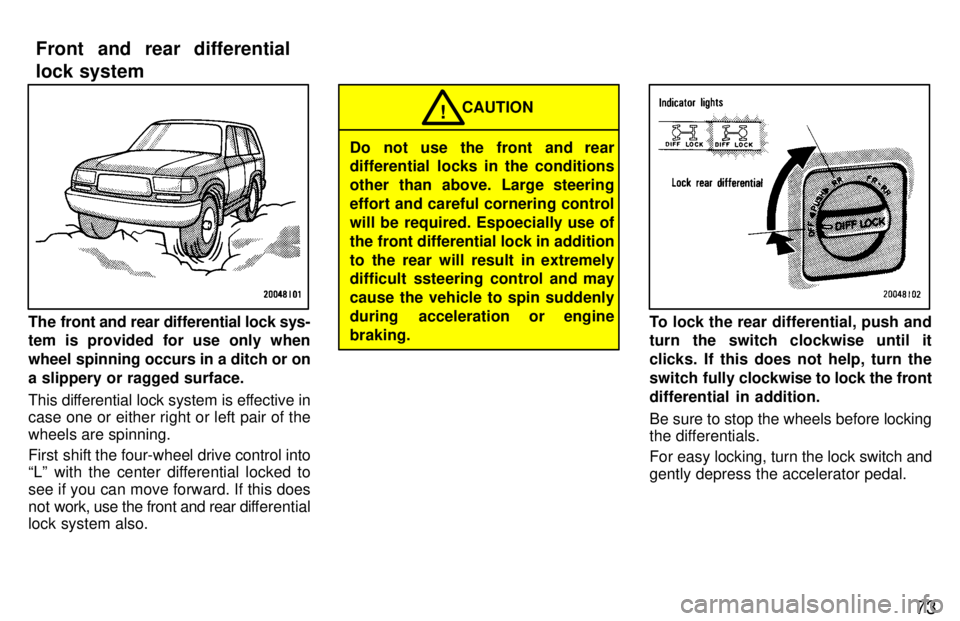
The front and rear differential lock sys- tem is provided for use only when
wheel spinning occurs in a ditch or ona slippery or ragged surface.
This differential lock system is effective in
case one or either right or left pair of the wheels are spinning.
First shift the four-wheel drive control into
Lº with the center differential locked to see if you can move forward. If this does
not work, use the front and rear differential
lock system also.
Do not use the front and rear
differential locks in the conditions
other than above. Large steering
effort and careful cornering control
will be required. Espoecially use of
the front differential lock in addition
to the rear will result in extremely
difficult ssteering control and may cause the vehicle to spin suddenly
during acceleration or enginebraking. CAUTION
!
To lock the rear differential, push and
turn the switch clockwise until it
clicks. If this does not help, turn the
switch fully
clockwise to lock the front
differential in addition.
Be sure to stop the wheels before locking
the differentials.
For easy locking, turn the lock switch and gently depress the accelerator pedal.
Front and rear differential
lock system
Page 49 of 159
74
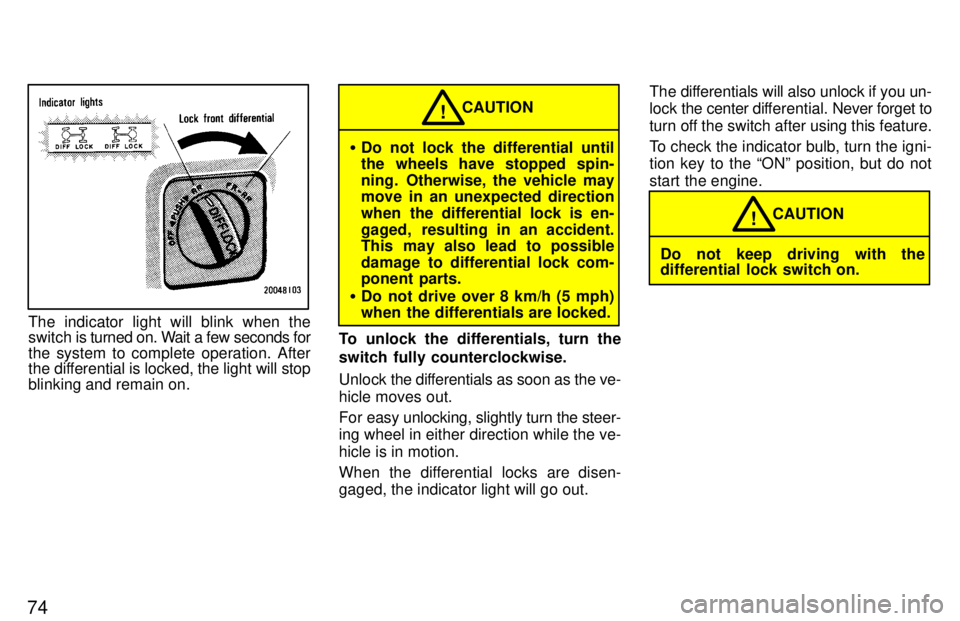
The indicator light will blink when the
switch is turned on. Wait a few seconds for
the system to complete operation. After
the differential is locked, the light will stop
blinking and remain on.
Do not lock the differential until
the wheels have stopped spin-
ning. Otherwise, the vehicle may
move in an unexpected direction
when the differential lock is en-
gaged, resulting in an accident.
This may also lead to possible
damage to differential lock com-
ponent parts.
Do not drive over 8 km/h (5 mph)
when the differentials are locked. CAUTION
!
To unlock the differentials, turn the
switch fully counterclockwise.
Unlock the dif ferentials as soon as the ve-
hicle moves out.
For easy unlocking, slightly turn the steer-
ing wheel in either direction while the ve- hicle is in motion.
When the differential locks are disen-
gaged, the indicator light will go out. The differentials will also unlock if you un-lock
the center dif ferential. Never forget to
turn off the switch after using this feature.
To check the indicator bulb, turn the igni-
tion key to the ONº position, but do not
start the engine.
Do not keep driving with the
differential lock switch on. CAUTION
!
Page 50 of 159
75
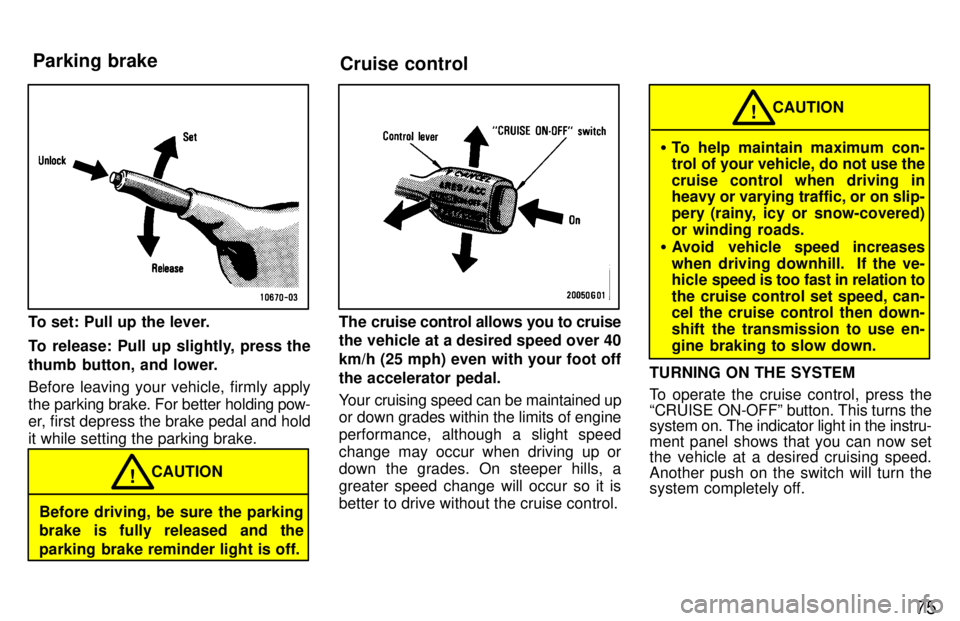
To set: Pull up the lever.
To release: Pull up slightly, press the
thumb button, and lower.
Before leaving your vehicle, firmly apply
the parking brake. For better holding pow-
er, first depress the brake pedal and holdit while setting the parking brake.
Before driving, be sure the parking
brake is fully released and the
parking brake reminder light is off. CAUTION
!
The cruise control allows you to cruise
the vehicle at a desired speed over 40 km/h (25 mph) even with your foot offthe accelerator pedal.
Your cruising speed can be maintained up
or down grades within the limits of engine
performance, although a slight speed
change may occur when driving up or
down the grades. On steeper hills, a greater speed change will occur so it is
better to drive without the cruise control.
To help maintain maximum con-
trol of your vehicle, do not use the
cruise control when driving in heavy or varying traffic, or on slip-
pery (rainy, icy or snow-covered)
or winding roads.
Avoid vehicle speed increases
when driving downhill. If the ve-
hicle speed is too fast in relation to
the cruise control set speed, can-
cel the cruise control then down-
shift the transmission to use en-
gine braking to slow down. CAUTION
!
TURNING ON THE SYSTEM
To operate the cruise control, press the
CRUISE ON-OFFº button. This turns the system on. The indicator light in the instru-
ment panel shows that you can now set
the vehicle at a desired cruising speed. Another push on the switch will turn the
system completely off.
Parking brake
Cruise control
Page 51 of 159

76
To avoid accidental cruise control
engagement, keep the CRUISE
ON-OFFº switch off when not using
the cruise control. CAUTION
!
SETTING AT A DESIRED SPEED
On vehicles with automatic transmission,
the transmission must be in Dº beforeyou set the cruise control speed.
Bring your vehicle to the desired speed, push the lever down in the SET/COASTº
direction and release it. This sets the ve-
hicle at that speed. If the speed is not sat-
isfactory, tap the lever up for a faster
speed, or tap it down for a slower speed.
Each tap changes the set speed by 1.6
km/h (1.0 mph). You can now take your
foot off the accelerator pedal.
If you need acceleration Ð for example,
when passingÐdepress the accelerator
pedal enough for the vehicle to exceed the
set speed. When you release it, the ve-
hicle will return to the speed set prior to the
acceleration. CANCELLING THE PRESET SPEED
You can cancel the preset speed by:
a. Pulling the lever in the CANCELº di-
rection and releasing it.
b. Depressing the brake pedal.
If the vehicle speed falls below about 40
km/h (25 mph), the preset speed will auto-
matically cancel out.
If the vehicle speed drops 16 km/h (10 mph) below the preset speed, the preset speed will also automatically cancel out.
If the preset speed automatically cancels
out other than for the above cases have your vehicle checked by your Toyota deal-
er at the earliest opportunity.
RESETTING AT A FASTER SPEED
Press the control lever upward in the
RES/ACCº direction and hold it. Release
the lever when the desired speed is at- tained. While the lever is held upward, the
vehicle will gradually gain speed.
However, a faster way to reset is to accel-
erate the vehicle and then press the con- trol lever downward in the SET/COASTºdirection. RESETTING AT A SLOWER SPEED
Press the control lever downward in the SET/COASTº direction and hold it. Re-
lease the lever
when the desired speed is
attained. While the lever is held down-
ward, the vehicle speed will gradually de-crease.
However, a faster way to reset is to de- press the brake pedal and then push the
control lever downward in the SET/
COASTº direction.
On vehicles with automatic transmission, even if you downshift the transmission by
turning off the overdrive switch with the
cruise control on, engine braking will not
be applied because the cruise control is
not cancelled. To decrease the vehicle
speed, reset to a slower speed with the
cruise control lever or depress the brake
pedal. If you use the brake pedal, cruise control is cancelled. RESUMING THE PRESET SPEED
If the preset speed is cancelled by pulling
the control lever or by depressing the
brake pedal or clutch pedal, pushing the
lever up in the RES/ACCº direction will
restore the speed set prior to cancellation.
Page 88 of 159

Part 1Clock Cigarette lighter and ashtray
11 3
OPERATION OF INSTRUMENTS ANDCONTROLSÐ
Chapter 1-8 Other equipment
Clock
Cigarette lighter and ashtray
Glovebox
Luggage cover
Tie-down hooks
Floor mat
The digital clock indicates the time
with the ignition key at the ACCº or
ONº position. To reset the hour, de-
press the
Hº button. To reset the min-
utes, depress the Mº button. To ad-
just the time to a full hour, depress the
:00º button.
For example, if the :00 button is de-
pressed when the time is between
1:01-1:29, the time will change to 1:00.
If the time is between 1:30-1:59, the time
will change to 2:00. When the instrument panel lights are turned on, the brightness of the time indi-
cation will be reduced.
Once the electrical power source has
been disconnected from the clock, the
time is automatically set to 1:00 (one o'clock).To operate the cigarette lighter, press it in. When it becomes heated, it au- tomatically pops out ready for use.
If the engine is not running, the key must be in the ACCº position.
Do not hold the cigarette lighter pressed in. When finished with your cigarette, thor-
oughly extinguish it in the ashtray to pre-
vent other cigarette butts from catching
fire. After using the ashtray, push it back
in completely.
To remove the ashtray, press down on the lock spring plate and pull out.
Use a Toyota genuine cigarette lighter or equivalent for replacement.
Page 92 of 159
Part 2Off-road vehicle precautions
11 7
INFORMATION
BEFORE DRIVING
YOUR TOYOTA
Off-road vehicle precautions
Break-in period
Fuel
Operation in foreign countries
Three-way catalytic converter
Engine exhaust cautions
Facts about engine oil consumption
Brake system
Brake pad wear limit indicators
Luggage stowage precautions
Rear step bumper
Your Toyota's idenitification
Theft prevention labels
Types of tires
Suspension and chassis
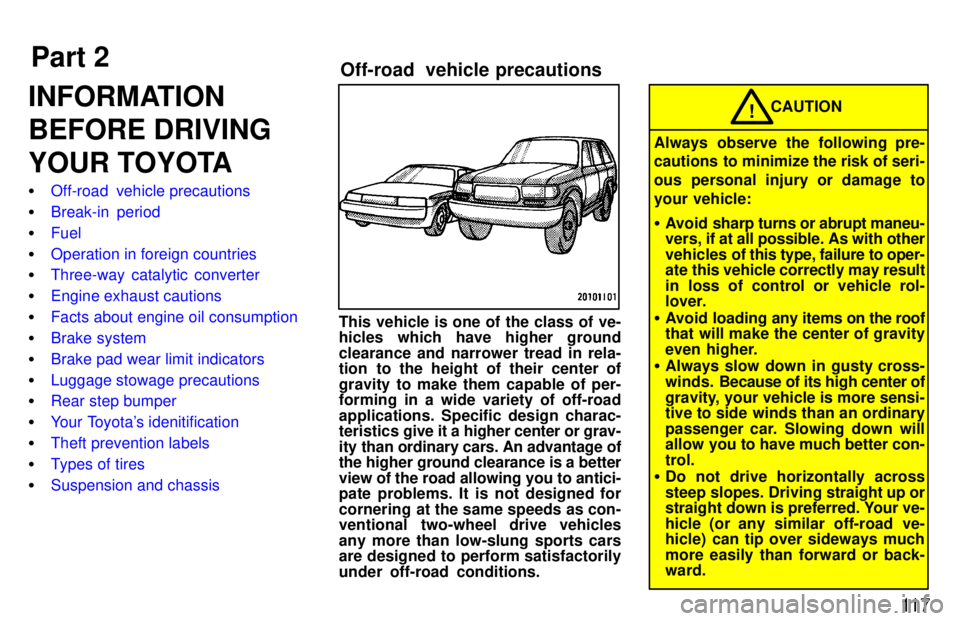
This vehicle is one of the class of ve-
hicles which have higher ground
clearance and narrower tread in rela-
tion to the height of their center of
gravity to make them capable of per- forming in a wide variety of off-road applications. Specific design charac-
teristics give it a hi
gher center or grav-
ity than ordinary cars. An advantage ofthe higher ground clearance is a better view of the road allowing you to antici-
pate problems. It is not designed for
cornering at the same speeds as con-
ventional two-wheel drive vehicles
any more than low-slung sports cars
are designed to perform satisfactorily under off-road conditions.
CAUTION!
Always observe the following pre-
cautions to minimize the risk of seri-
ous personal injury or damage to
your vehicle: Avoid sharp turns or abrupt maneu-
vers, if at all possible. As with other
vehicles of this type, failure to oper-
ate this vehicle correctly may result
in loss of control or vehicle rol-
lover.
Avoid l oading any items on the roof
that will make the center of gravity
even higher.
Always slow down in gusty cross-
winds. Because of its high center of
gravity, your vehicle is more sensi-
tive to side winds than an ordinary
passenger car. Slowing down will
allow you to have much better con- trol.
Do not drive horizontally across
steep slopes. Driving straight up or
straight down is preferred. Your ve-
hicle (or any similar off-road ve-
hicle) can tip over sideways much
more easily than forward or back- ward.