ESP TOYOTA LAND CRUISER 1997 Owners Manual
[x] Cancel search | Manufacturer: TOYOTA, Model Year: 1997, Model line: LAND CRUISER, Model: TOYOTA LAND CRUISER 1997Pages: 159, PDF Size: 2.04 MB
Page 2 of 159

New vehicle warranty
Your new vehicle is covered by the following Toyota limited warranties: For further information, please refer to the separate
Owner 's Guideº, Owner's Manual Supplementº or
Warranty Bookletº.
New vehicle warranty
Emission control systems warranty
Others
Your responsiblity for maintenance
It is the owner's responsibility to make sure that the
specified maintenance is performed. Part 6 gives de-
tails of these maintenance requirements. Also in-
cluded in Part 6 is general maintenance. For sched-
uled maintenance information, please refer to the
separate Owner's Manual Supplement/Mainte-
nance Scheduleº.
Accessories, spare parts and modification of your Toyota
A wide variety of non genuine spare parts and acces-
sories for Toyota vehicles are currently available in
the market. You should know that Toyota does not
warrant these products and is not responsible either
for their performance, repair or replacement, or for
any damage they may cause to, or adverse effect
they may have on, your Toyota vehicle.
This vehicle should not be modified with non genuine
Toyota pr oducts. Modification with non genuine Toyo-
ta products could affect its performance, safety or du-
rability, and may even violate governmental regula-
tions. In addition, damage or performance problems
resulting from the modification may not be covered
under warranty.
Page 25 of 159
29
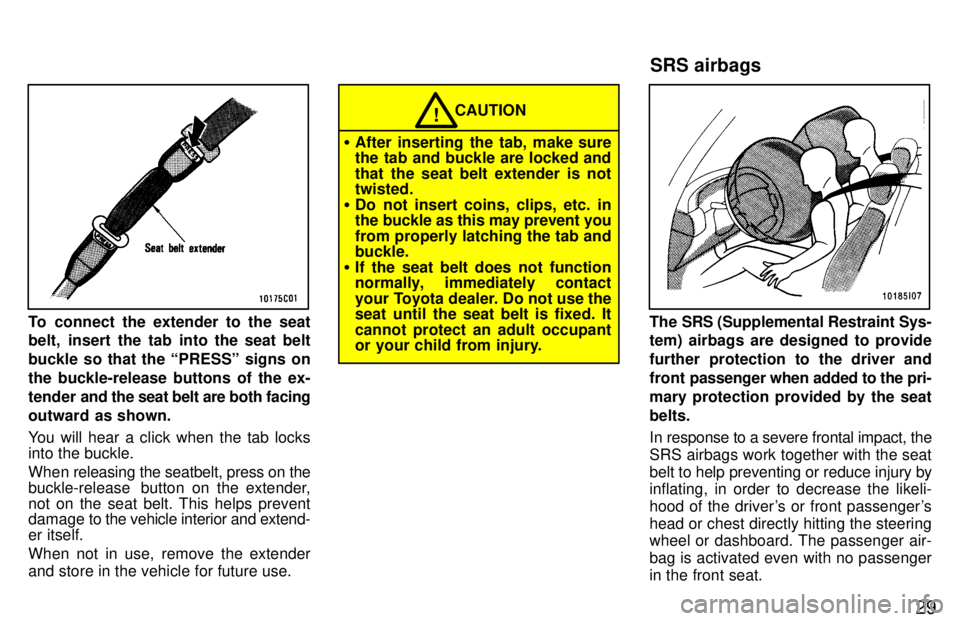
To connect the extender to the seat
belt, insert the tab into the seat belt
buckle so that the PRESSº signs onthe buckle-release buttons of the ex-
tender and the seat belt are both facing
outward as shown.
You will hear a click when the tab locks into the buckle.
When releasing the seatbelt, press on the
buckle-release button on the extender,not on the seat belt. This helps prevent
damage to the vehicle interior and extend- er itself.
When not in use, remove the extender
and store in the vehicle for future use.
CAUTION!
After inserting the tab, make sure
the tab and buckle are locked and
that the seat belt extender is not twisted.
Do not insert coins, clips, etc. in
the buckle as this may prevent you
from properly latching the tab and buckle.
If the seat belt does not function
normally, immediately contact
your Toyota dealer. Do not use the
seat until the seat belt is fixed. It cannot protect an adult occupant
or your child from injury.
The SRS (Supplemental Restraint Sys-
tem) airbags are designed to provide
further protection to the driver and
front passenger when added to the pri-
mary protection provided by the seatbelts.
In response to a severe frontal impact, the
SRS airbags work together with the seat
belt to help preventing or reduce injury by inflating, in order to decrease the likeli-
hood of the driver's or front passenger's
head or chest directly hitting the steering
wheel or dashboard. The passenger air-
bag is activated even with no passenger
in the front seat. SRS airbags
Page 26 of 159

30
This indicator comes on when the
ignition key is turned to the ACCº or
ONº position. It goes off after about 6
seconds. This means the SRS airbag
is operating properly.
The SRS airbag warning light system
monitors the airbag sensor assembly, in-
flators, warning light, interconnecting wir-
ing and power sources.The SRS airbag system is designed to
activate in response to a severe frontal
impact within the shaded area be-
tween the arrows in the illustration.
The SRS airbags will deploy if the severity
of the impact is above the designed
threshold level, comparable to an approxi-
mate 20 km/h (14 mph) collision when im-
pacting straight into a fixed barrier that
does not move or deform.
If the severity of the impact is below the
above threshold level, the SRS airbags
may not deploy. However, this threshold velocity will be
considerably higher if the vehicle strikes
an object, such as a parked vehicle or sign
pole, which can move or deform on im-
pact, or if it is
involved in an underride col-
lision (e.g. a collision in which the noise of
the vehicle underridesº, or goes under, the bed of a truck). It is possible with collision severity at the marginal level of airbag sensor detection
and activation that only one of your ve-
hicle's two airbags will deploy.
For the safety of all occupants, be sure to
always wear seat belts.
Page 48 of 159
73
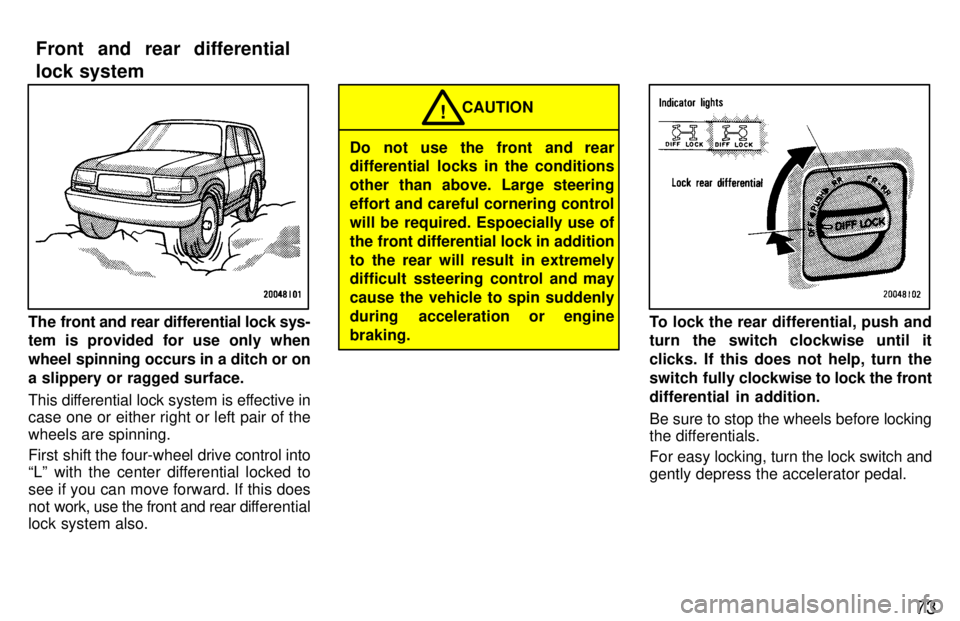
The front and rear differential lock sys- tem is provided for use only when
wheel spinning occurs in a ditch or ona slippery or ragged surface.
This differential lock system is effective in
case one or either right or left pair of the wheels are spinning.
First shift the four-wheel drive control into
Lº with the center differential locked to see if you can move forward. If this does
not work, use the front and rear differential
lock system also.
Do not use the front and rear
differential locks in the conditions
other than above. Large steering
effort and careful cornering control
will be required. Espoecially use of
the front differential lock in addition
to the rear will result in extremely
difficult ssteering control and may cause the vehicle to spin suddenly
during acceleration or enginebraking. CAUTION
!
To lock the rear differential, push and
turn the switch clockwise until it
clicks. If this does not help, turn the
switch fully
clockwise to lock the front
differential in addition.
Be sure to stop the wheels before locking
the differentials.
For easy locking, turn the lock switch and gently depress the accelerator pedal.
Front and rear differential
lock system
Page 62 of 159

87
Push R
VM.º again to turn off the RM fea-
ture. RPT (Repeat)
The repeat feature automatically replays the current cassette. Push RPTº while the track is playing.
RPTº will appear on the display. When
the track ends, it will automatically be re-
wound and replayed. This process will be continued until you push the button again
to turn off the repeat feature.
There must be at least 3 seconds of blank
space between tracks in order for the re-
peat feature to work correctly. SCAN
You can either scan all the frequencies on a band or scan only the preset stations for
that band.
To scan the preset stations: Quickly push
and release SCANº. If you hear a beep,
you held the button too long, and the radiowill scan all the frequencies. The radio will tune in the next preset station up the
band, stay there for a few seconds, and
then move to the next preset station. To
select a station, push SCANº a second time. To scan all the frequencies: Push SCANº
until you hear a beep. The radio will find
the next station up the station band, stay there for a few seconds, and then scan
again. To select a station, push SCANº a
second time. Cassette Player
The cassette player scan feature is similar
to the radio scan feature and uses the same button.
Push SCANº. SCANº will appear on the
display. The player will fast forward to the
next cassette track,
play it for 12 seconds,
and then scan again. To select a track,
push SCANº a second time. If the player reaches the end of one side of a cassette
tape, it will continue scanning on the other
side. SKIP
The skip feature allows you to fast forward
past long stretches of blank tape. This is
especially useful at the end of cassettes. Push SKIPº. SKIPº will appear on the
display. The cassette player will keep
track of how much blank space it plays.
Any time it has played about 1- seconds of blank tape, it will automatically fast for-
ward to the next track and begin to play.
Push the button a second time to turn off the skip feature. ST (Stereo reception) display
Your radio automatically changes to ste- reo reception when a stereo broadcast is
received. STº appears on the display. If the signal becomes weak, the radio re-
duces the amount of channel separationto prevent the weak signal from creating
noise. If the signal becomes extremely weak, the radio switches from stereo to mono reception.
TAPE
Push TAPEº to switch from radio opera-
tion to cassette operation. If the audio
system is off,
you can turn on the cassette
player by pushing TAPEº. In both cases, a cassette must already be loaded in the
player.
Page 69 of 159

94Scan Radio
You can either scan all the frequencies on a band or scan only the preset stations for
that band.
To scan the preset stations: Quickly push
and release SCANº. If you hear a beep,
you held the button too long, and the radio will scan all the frequencies. The radio willtune in the next preset station up the
band, stay there for a few second, and
then move to the next preset station. To
select a station, push SCANº a second time.
To scan all the frequencies: Push SCANº
until you hear a beep. The radio will find
the next station up the station band, Stay there for a few seconds, and then scan
again. To select a station, push SCANº a
second time. Cassette player
The cassette player scan feature is similar
to the radio scan feature and uses the same button.
Push SCANº. SCANº will appear on the
display. The player will fast forward to the
next cassette track,
play it for 12 seconds,
and then scan again. To select a track,
push SCANº a second time. If the player reaches the end of one side of a cassette
tape, it will continue scanning on the other
side.
Compact disc player
The compact disc player scan feature is
similar to the radio scan feature.
Push SCANº. SCANº will appear on the
display. The compact disc player will play the next track for 10 seconds, then scan
again. To select a track, push SCANº a
second time. If the player r eaches the end
of the disc, it will continue scanning at
track 1. SKIP
The skip feature allows you to fast forward
past long stretches off blank tape. This is
especially useful at the end of cassettes. Push SKIPº. SKIPº will appear on the
display. The cassette player will keep
track of how much blank space it plays.
Any time it has played about 10 seconds
of blank tape, it will automatically fast for-
ward to the next track and begin to play.
Push the button a second time to turn off the skip feature. ST (Stereo reception) display
Your radio automatically changes to ste- reo reception when a stereo broadcast is
received. STº appears on the display. Ifthe signal becomes weak, the radio re-
duces the amount of channel separation to prevent the weak signal from creating
noise. If the signal becomes extremely weak, the radio switches from stereo to mono reception.
TAPE
Push T
APEº to switch from radio or com-
pact disc operation to cassette operation.
If the audio system is off, you can turn on
the cassette player by pushing TAPEº. In both cases, a cassette must already be
loaded in the player.
Page 78 of 159

103
Here are some common reception prob-
lems that probably do not indicate a prob- lem with your radio: FM
Fading and driving stationsÐGenerally,
the effective range of FM is about 40 km
(25 miles). Once outside this range, you
may notice fading and drifting, which in- crease with the distance from the radio
transmitter. They are often accompanied by distortion.
Multi-pathÐFM signals are reflective,
making it
possible for two signals to reach
your antenna at the same time. If this hap-
pens, the signals will cancel each other
out, causing a momentary flutter or loss of
reception.
Static and flutteringÐThese occur when
signals are blocked by buildings, trees, or other large objects. Increasing the bass
level may reduce static and fluttering.
Station swappingÐIf the FM signal you are listening to is interrupted or weak-
ened, and there is another strong station
nearby on the FM band, your radio may
tune in the second station until the original
signal can be picked up again. AM FadingÐAM broadcasts are reflected by the upper atmosphere-especially atnight. These reflected signals can inter-
fere with those received directly from the radio station, causing the radio station tosound alternately strong and weak.
Station interferenceÐWhen a reflected
signal and a signal received directly from a radio station are very nearly the same
frequency, they can interfere with each
other,
making it difficult to hear the broad-
cast.
StaticÐAM is easily affected by external sources of electrical noise, such as high
tension power lines, lightening, or electri-cal motors. This results in static.
CARING FOR YOUR CASSETTE PLAY-
ER AND TAPES
For high performance from your cassette
player and tapes:
Clean the tape head and other parts regu-
larly. A dirty tape head or tape path can de-
crease sound quality and tangle your
cassette tapes. The easiest way to
clean them is by using a cleaning tape.
(A wet type is recommended.) Use high-quality cassettes.
Low-quality cassette tapes can cause
many problems, including poor sound, inconsistent playing speed, and
constant auto-reversing. They can
also get stuck or tangled in the cas-
sette player.
Do not use a cassette if it has been
damaged or tangled or if its label is
peeling off.
Do not leave a cassette in the player if
you are not listening to it, especially if it is hot outside.
Store cassettes in their cases and out
of direct sunlight.
Avoid using cassettes with a total play-
ing time longer than 100 minutes (50
minutes per side). The tape used in
these cassettes is thin and could get
stuck or tangled in the cassette player.
Page 79 of 159

104
CARING FOR YOUR COMPACT DISC
PLAYER AND DISCS Use only compact discs labeled as shown.
Extremely high temperatures can
keep your compact disc player from working. On hot days, use the air con-
dition to the vehicle interior before you
listen to a disc.
Bumpy road or other vibrations maymake your compact disc player skip.
If moisture gets into your compact disc
player, you may not hear any sound even though your compact disc player appears to be working. Remove the disc from the player and wait until it dries.
Handle compact discs carefully, espe-
cially when you are inserting them
Hold them on the edge and do not
bend them. Avoid getting fingerprints
on them, particularly on the shiny side.
Dirt, scrapes, warping, pin holes, or
other disc damage could cause the
player to skip or to repeat a section of
a track. (To see a pin hole, hold the disc
up to the light.)
Remove discs from the compact disc
player when you are not listening to
them. S tore them in their plastic cases
away from moisture, heat, and direct sunlight.
To clean a compact disc: Wipe it with a
soft, lint-free cloth that has been damp-
ened with water. Wipe in a straight line
from the center to the edge of the disc (not
in circles). Dry it with another soft, lint-
free cloth. Do not use a conventional re- cord cleaner or anti-static device.A new disc may have rough edges on
its inner and outer perimeter. Remove
the rough edges by pressing the side
of a ball-point pen or pencil against
the inner and outer perimeter of the
disc as shown.
If you continue to play a disc with rough edges, flakes will fall on to the signal side
of the disc and cause sound skipping or other problems.
Page 106 of 159
131
CAUTION
Before driving off, make sure the
parking brake is fully released and the parking brake reminder light is off.
Do not leave your vehicle unat-
tended while the engine is running.
Do not rest your foot on the brake
pedal while driving. It can cause
dangerous overheating, needless
wear, and poor fuel economy.
To drive down a long or steep hill,reduce your speed and downshift.
Remember, if you ride the brakes
excessively, they may overheat and
not work properly.
Be careful when accelerating, up-
shifting, downshifting or braking
on a slippery surface. Sudden ac-
celeration or engine braking, could cause the vehicle to spin or skid.!
Do not drive in excess of the speed
limit. Even if the legal speed limit
permits it, do not drive over 140
km/h (85 mph) unless your vehicle
has high-speed capability tires.
Driving over 140 km/h (85 mph) may
result in tire failure, loss of control
and possible injury. Be sure to con-
sult a tire dealer to determine
whether the tires on your vehicle
are high-speed capability tires or
not before driving at such speeds.
Do not continue normal driving
when the brakes are wet. If they are
wet, your vehicle will require a lon-ger stopping distance, and it may
pull to one side when the brakes are
applied. Also, the parking brake
will not hold the vehicle securely. When driving your vehicle off-road,
please observe the following precautions
to ensure your driving enjoyment and to
help prevent the closure of areas to off-
road vehicles.
a. Drive your vehicle only in areas where
off- road vehicles are permitted to travel.
b. Respect private property. Get owner 's permission before entering private prop-
erty.
c. Do not enter areas that are closed. Hon- or gates, barriers and signs that restrict
travel.
d. Stay on established roads. When condi- tions are wet, driving techniques should
be changed or travel delayed to prevent
damage to roads.
For owners in U.S. mainland, Hawaii and Puerto Rico:
To obtain additional information pertaining
to driving your vehicle off-road, consult the following organizations. State and Local Parks and Recreation Departments
State Motor Vehicle Bureau
Recreational Vehicle Clubs
U.S. Forest Service and Bureau of
Land Management
Off-road driving precautions
Page 107 of 159
132
CAUTION
Always observe the following
precautions to minimize the risk of
serious per sonal injury or damage to
your vehicle: Drive carefully when off the road.
Do not take unnecessary risks by
driving in dangerous places.
Do not grip the steering wheel
spokes when driving off-road. A
bad bump could jerk the wheel and
injure your hands. Keep both
hands and especially your thumbson the outside of the rim.
Always check your brakes for effec-
tiveness immediately after driving
in sand, mud, water or snow.
After driving through tall grass,
mud, rock, sand, rivers, etc., check
that there is no grass, bush, paper,
rags, stone, sand etc. adhering or
trapped on the underbody. If the ve-
hicle is used with these materials
trapped or adhered to the under-
body, a breakdown or fire could oc-
cur.!
The driver and all passengers
should fasten their seat belts
whenever the vehicle is moving.
If driving through water, such as when crossing shallow streams,
first check the depth of the waterand the bottom of the river bed for
firmness. Drive slowly and avoiddeep water.
Take all necessary safety mea-sures to ensure that water dam-
age to the engine or other compo-nents does not occur.
Water entering the engine air in-take will cause severe enginedamage.
Water can wash the grease fromwheel bearings, causing rustingand premature failure, and may
also enter the differential,transmission and transfer case,
reducing the gear oil's lubricatingqualities.
NOTICE
Sand and mud that has accumu-lated in brake drums and around
brake discs may affect braking ef-ficiency and may damage brake
system components.
Always perform a maintenance in-
spection after each day of off-road driving that has taken you
through sand, mud, or water. Forscheduled maintenance informa-
tion, refer to the separate Own-er's Manual Supplement/Mainte-
nance Scheduleº.