Drive TOYOTA LAND CRUISER 2008 J200 User Guide
[x] Cancel search | Manufacturer: TOYOTA, Model Year: 2008, Model line: LAND CRUISER, Model: TOYOTA LAND CRUISER 2008 J200Pages: 531, PDF Size: 5.6 MB
Page 43 of 531
44 1−2. Opening, closing and locking the doors
Locking the driver ’s doors from the outside without a key
Move the inside lock button to the lock position.
Close the door.
The door cannot be locked if the “ENGINE START STOP” switch is in
ACCESSORY or IGNITION ON mode, or the electronic key is left
inside the vehicle.
The key may not be detected correctly and the door may be locked.
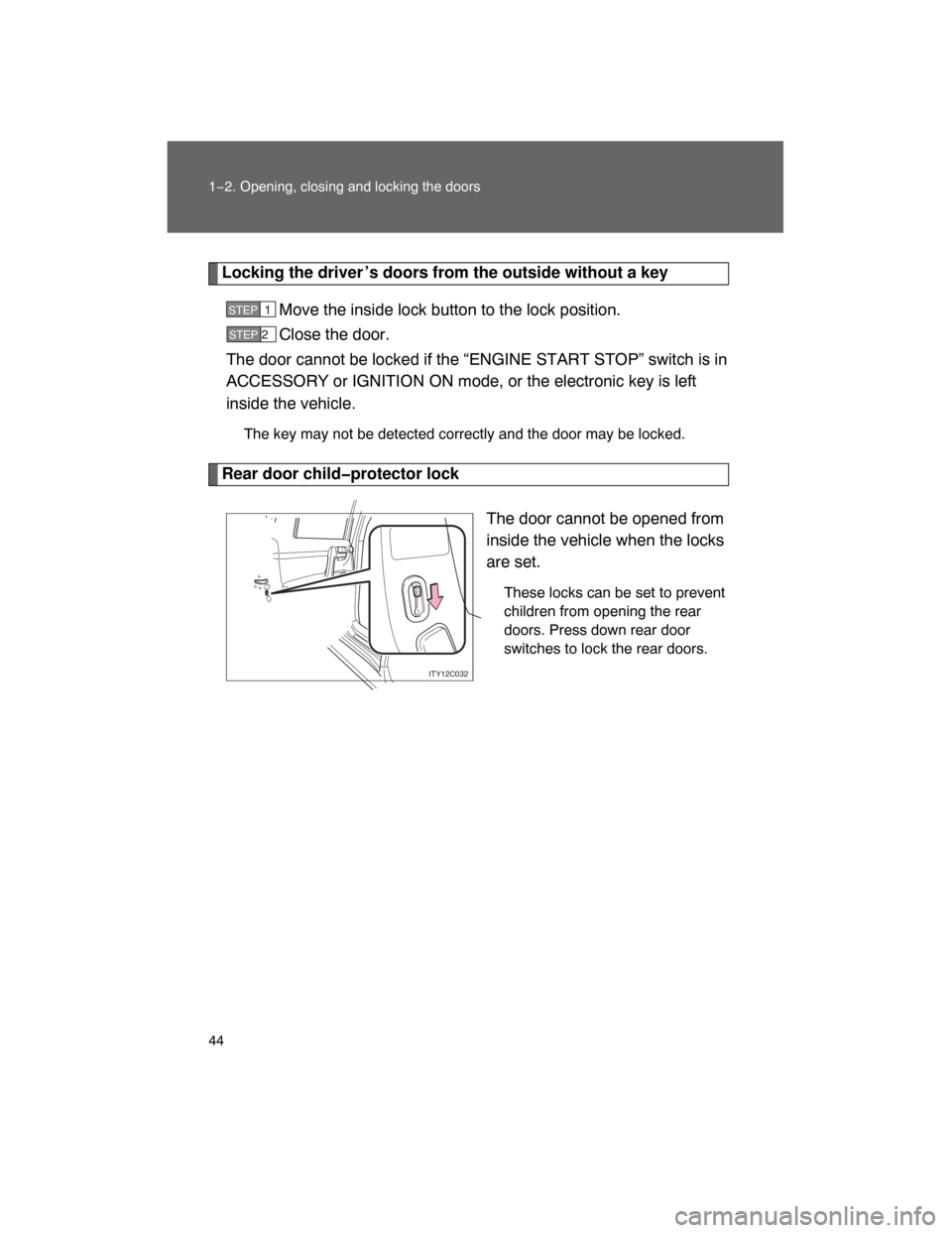
Rear door childprotector lock
The door cannot be opened from
inside the vehicle when the locks
are set.
These locks can be set to prevent
children from opening the rear
doors. Press down rear door
switches to lock the rear doors.
STEP1
STEP 2
ITY12C032
Page 44 of 531
45
1−2. Opening, closing and locking the doors
1
Before driving
Automatic door locking and unlocking systems
The following functions can be set or canceled:
nSetting and canceling the functions
To switch between setting and canceling, follow the procedure
below:
Close all the doors and switch the “ENGINE START STOP”
switch IGNITION ON mode. (Perform step 2 within 20 sec−
onds.)
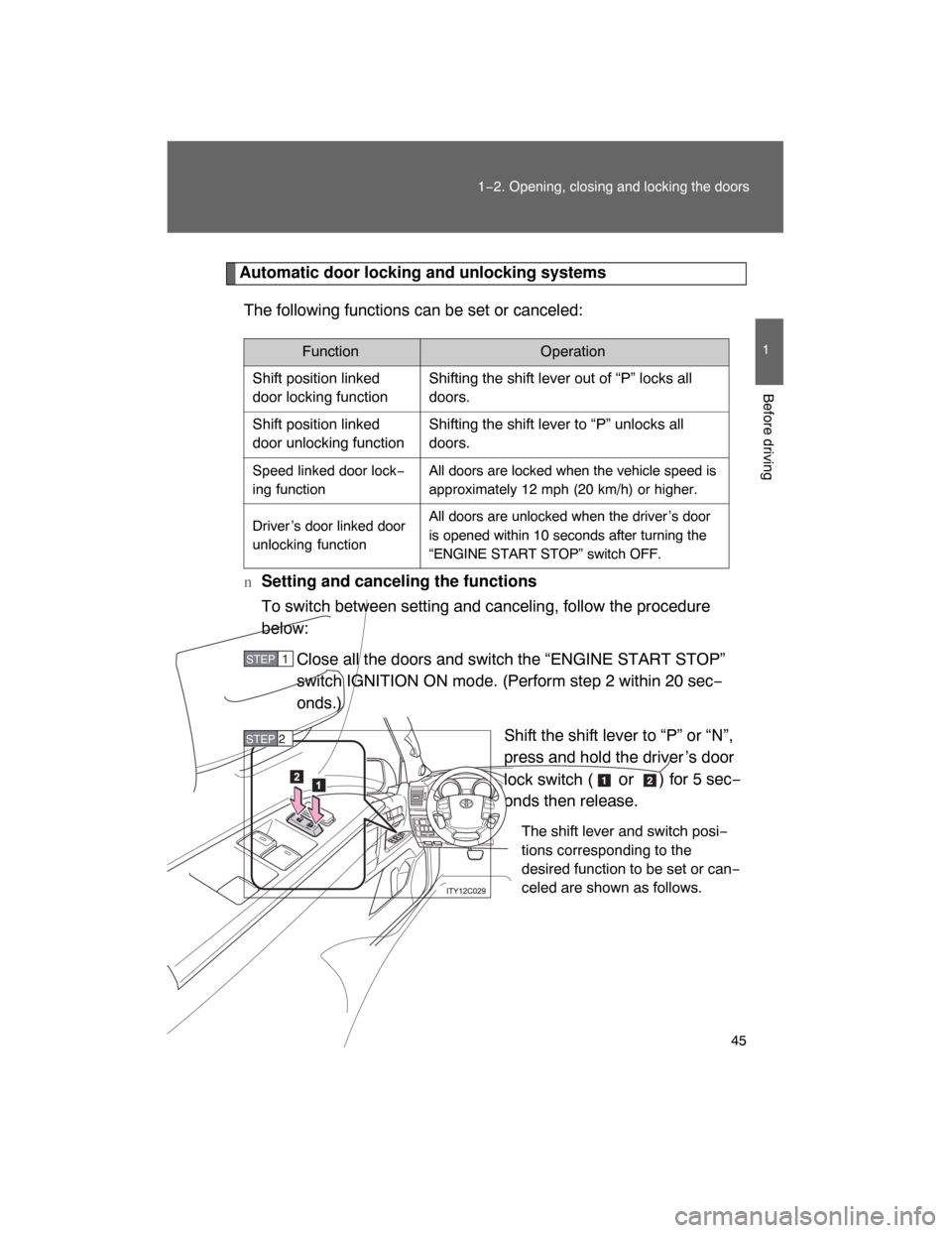
Shift the shift lever to “P” or “N”,
press and hold the driver ’s door
lock switch (
or) for 5 sec−
onds then release.
The shift lever and switch posi−
tions corresponding to the
desired function to be set or can−
celed are shown as follows.
Function Operation
Shift position linked
door locking functionShifting the shift lever out of “P” locks all
doors.
Shift position linked
door unlocking functionShifting the shift lever to “P” unlocks all
doors.
Speed linked door lock−
ing functionAll doors are locked when the vehicle speed is
approximately 12 mph (20 km/h) or higher.
Driver ’s door linked door
unlocking function
All doors are unlocked when the driver ’s door
is opened within 10 seconds after turning the
“ENGINE START STOP” switch OFF.
STEP1
STEP 2
Page 45 of 531
46 1−2. Opening, closing and locking the doors
When the setting or canceling operation is complete, all doors are
locked and then unlocked.
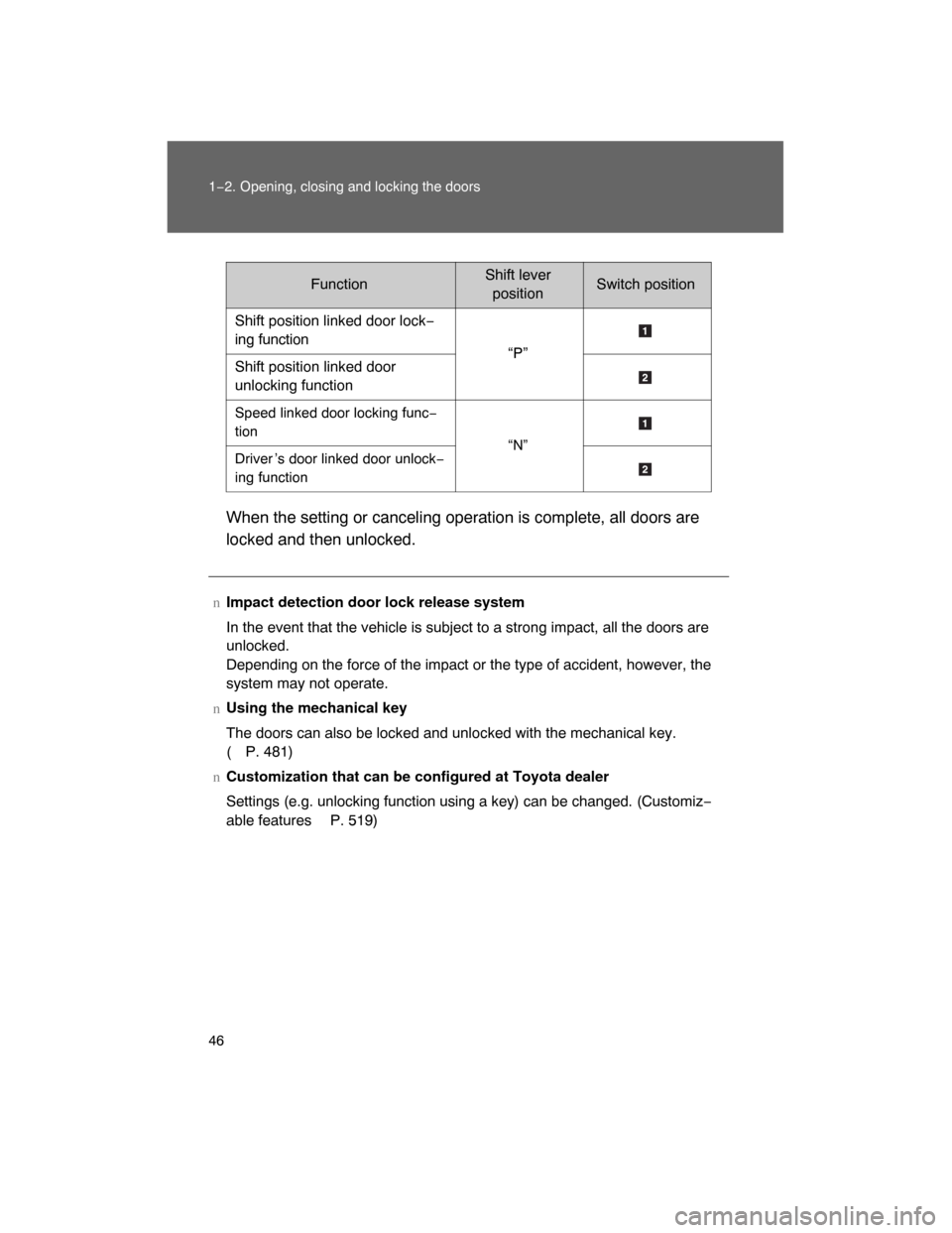
FunctionShift leverpositionSwitch position
Shift position linked door lock−
ing function
“P”
Shift position linked door
unlocking function
Speed linked door locking func−
tion
“N”
Driver ’s door linked door unlock−
ing function
nImpact detection door lock release system
In the event that the vehicle is subject to a strong impact, all the doors are
unlocked.
Depending on the force of the impact or the type of accident, however, the
system may not operate.
nUsing the mechanical key
The doors can also be locked and unlocked with the mechanical key.
(P. 481)
nCustomization that can be configured at Toyota dealer
Settings (e.g. unlocking function using a key) can be changed. (Customiz−
able features
P. 519)
Page 50 of 531
51
1
Before driving
1−3. Adjustable components (seats, mirrors, steering wheel)
Front seats
Active head restraint
When a front seatback receives
a strong impact, the head
restraint moves slightly forward
and upward to help reduce the
risk of whiplash on the seat
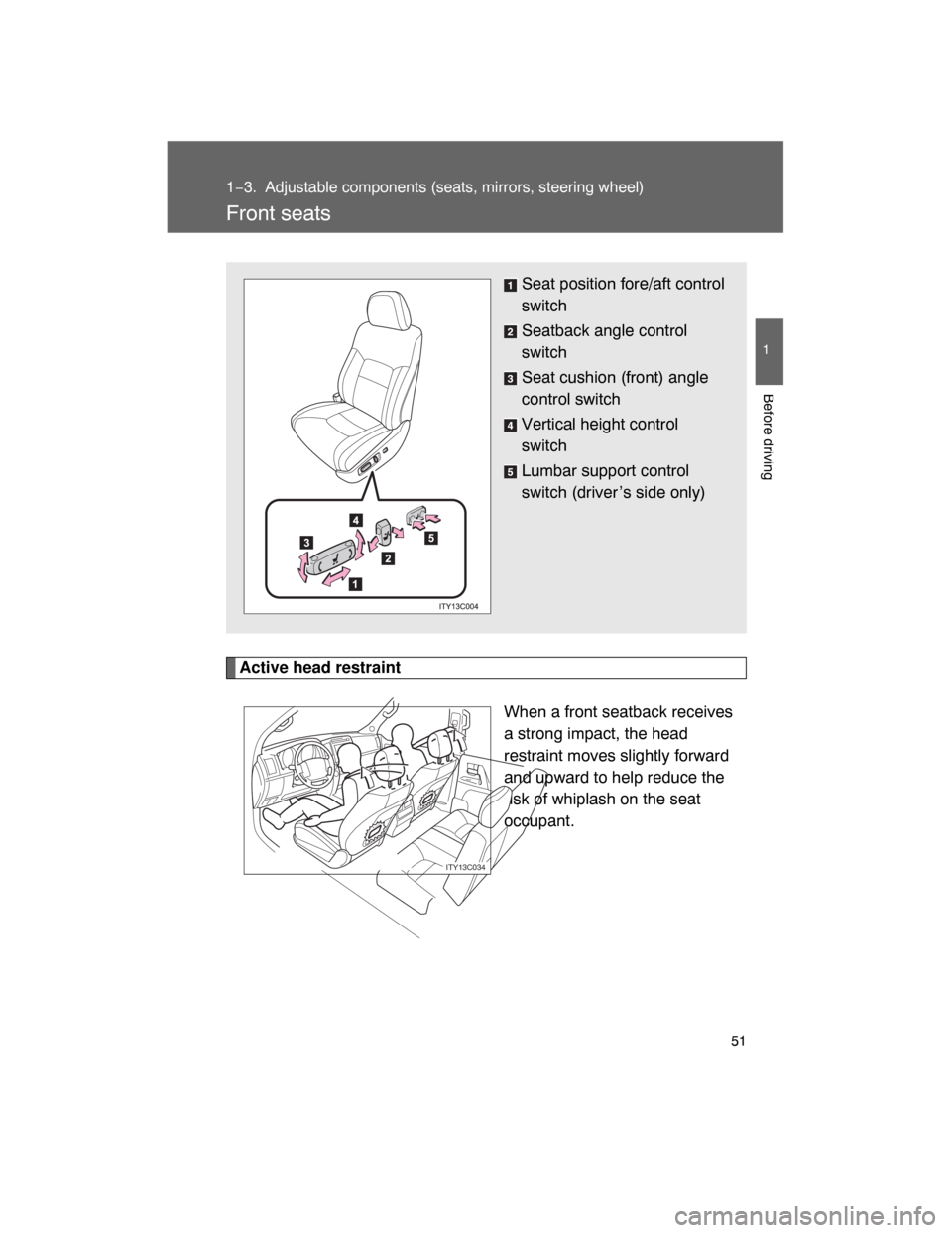
occupant.Seat position fore/aft control
switch
Seatback angle control
switch
Seat cushion (front) angle
control switch
Vertical height control
switch
Lumbar support control
switch (driver ’s side only)
ITY13C034
Page 61 of 531
62
1−3. Adjustable components (seats, mirrors, steering wheel)
Driving position memor y system
Your preferred driving position (th e position of the driver ’s seat,
steering wheel and outside rear view mirrors) can be entered into the
computer ’s memory and recalled with
the touch of a button. It is also
possible to set this function to activate automatically when the
doors are unlocked.
Three different driving positions can be entered into memory.
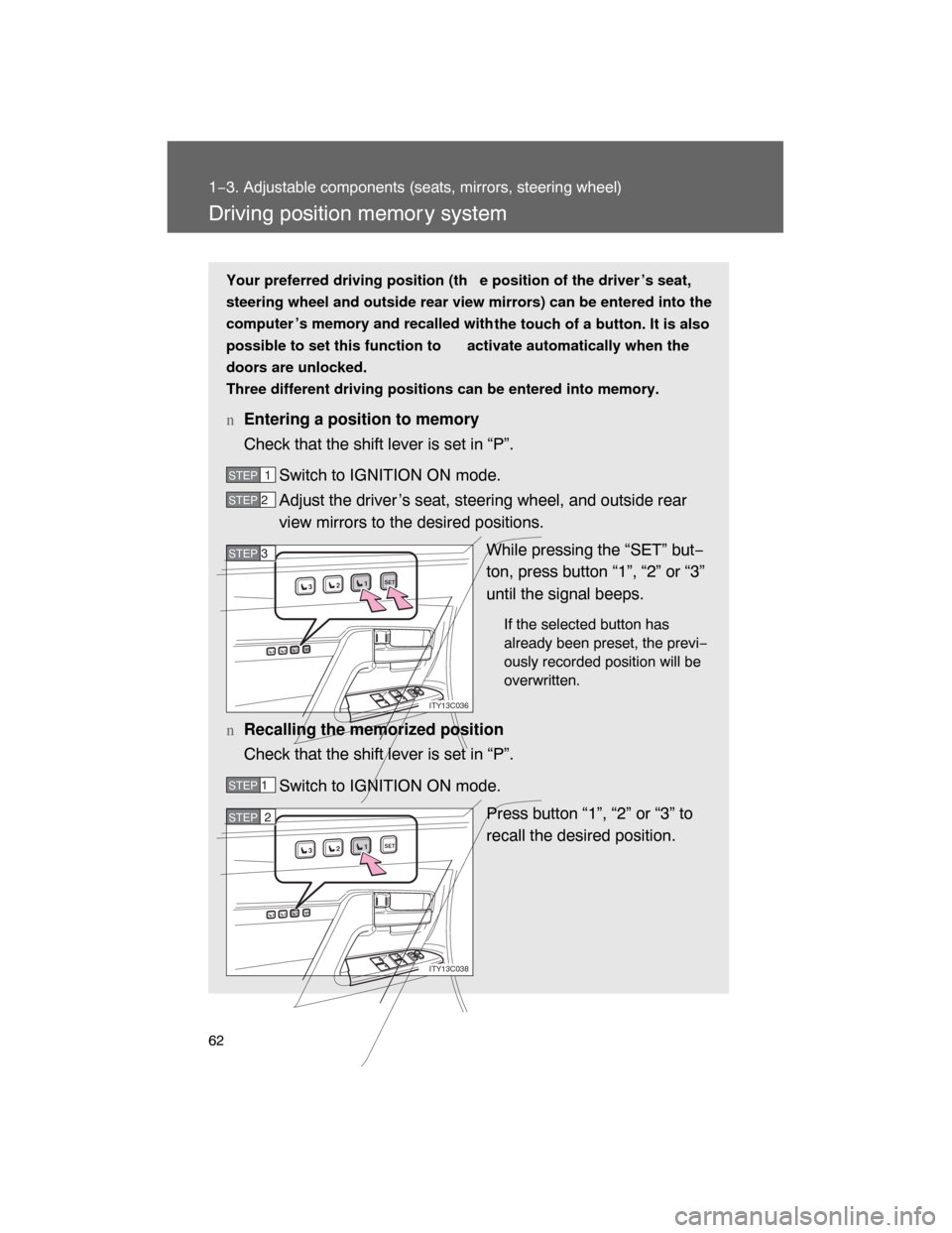
nEntering a position to memory
Check that the shift lever is set in “P”.
Switch to IGNITION ON mode.
Adjust the driver ’s seat, steering wheel, and outside rear
view mirrors to the desired positions.
While pressing the “SET” but−
ton, press button “1”, “2” or “3”
until the signal beeps.
If the selected button has
already been preset, the previ−
ously recorded position will be
overwritten.
nRecalling the memorized position
Check that the shift lever is set in “P”.
Switch to IGNITION ON mode.
Press button “1”, “2” or “3” to
recall the desired position.
STEP1
STEP 2
1SET23
1SET23
ITY13C036
STEP3STEP 3
STEP 1
1SET23
1SET23
ITY13C038
STEP2
Page 62 of 531
63
1−3. Adjustable components (seats, mirrors, steering wheel)
1
Before driving
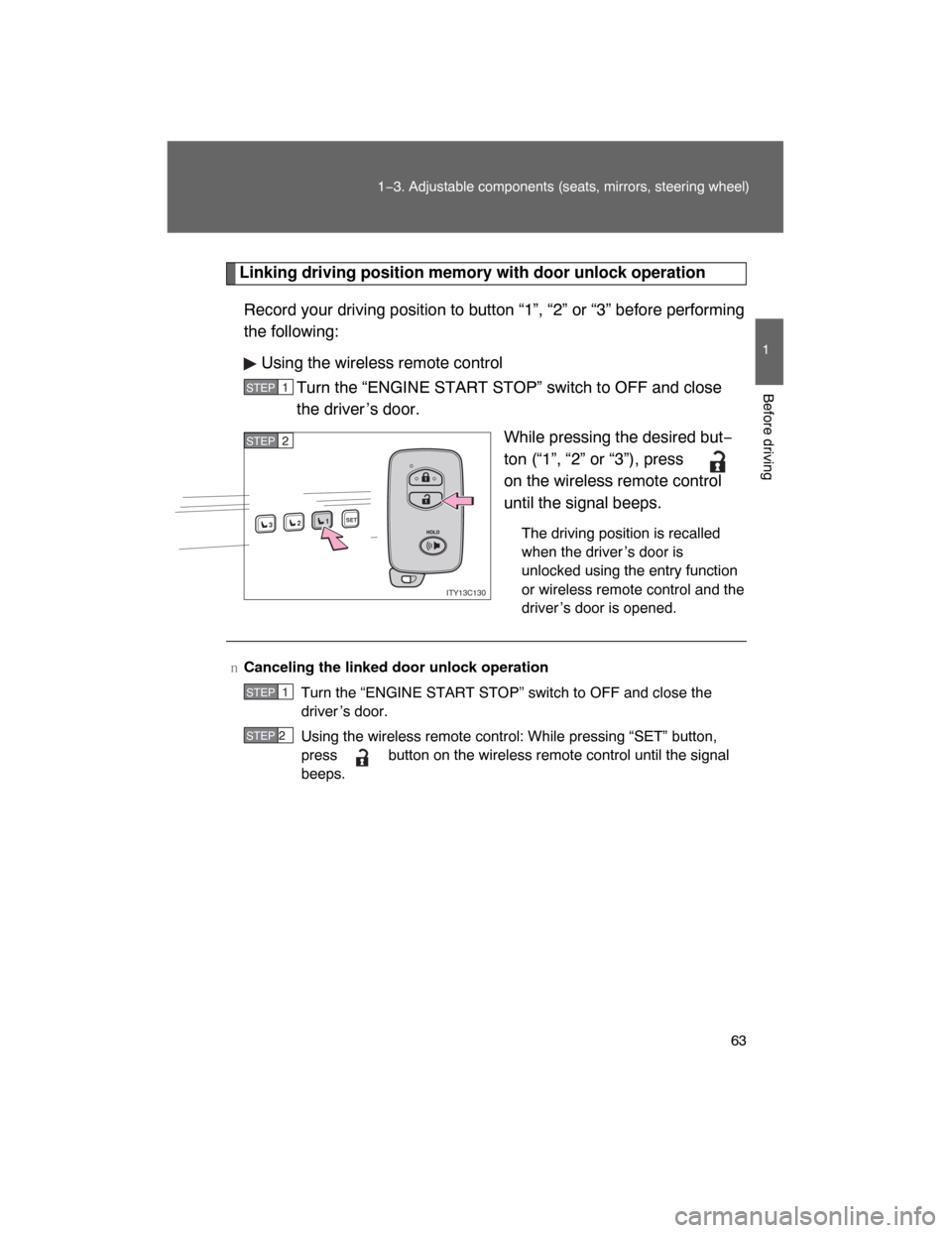
Linking driving position memory with door unlock operation
Record your driving position to button “1”, “2” or “3” before performing
the following:
Using the wireless remote control
Turn the “ENGINE START STOP” switch to OFF and close
the driver ’s door.
While pressing the desired but−
ton (“1”, “2” or “3”), press
on the wireless remote control
until the signal beeps.
The driving position is recalled
when the driver ’s door is
unlocked using the entry function
or wireless remote control and the
driver ’s door is opened.
STEP1
1SET23
ITY13C130
STEP2
nCanceling the linked door unlock operation
Turn the “ENGINE START STOP” switch to OFF and close the
driver ’s door.
Using the wireless remote control: While pressing “SET” button,
press button on the wireless remote control until the signal
beeps.
STEP1
STEP 2
Page 63 of 531
64 1−3. Adjustable components (seats, mirrors, steering wheel)
nRetained accessory power
Each memorized position (except for the steering wheel position) can be
activated within 30 seconds after the driver ’s door is opened, even if the
“ENGINE START STOP” switch turns off.
nTo cancel seat position recall
Perform any one of the following operations.
lPress the “SET” button
lPress button “1”, “2” or “3”.
lAdjust the seat using the switches (only cancels seat position recall)
nIf the battery is disconnected
The memorized positions must be reset because the computer ’s memory is
erased when the battery is disconnected.
CAUTION
nSeat adjustment caution
Take care during seat adjustment that the seat does not strike the rear pas−
senger or squeeze your body against the steering wheel.
Page 66 of 531
67
1−3. Adjustable components (seats, mirrors, steering wheel)
1
Before driving
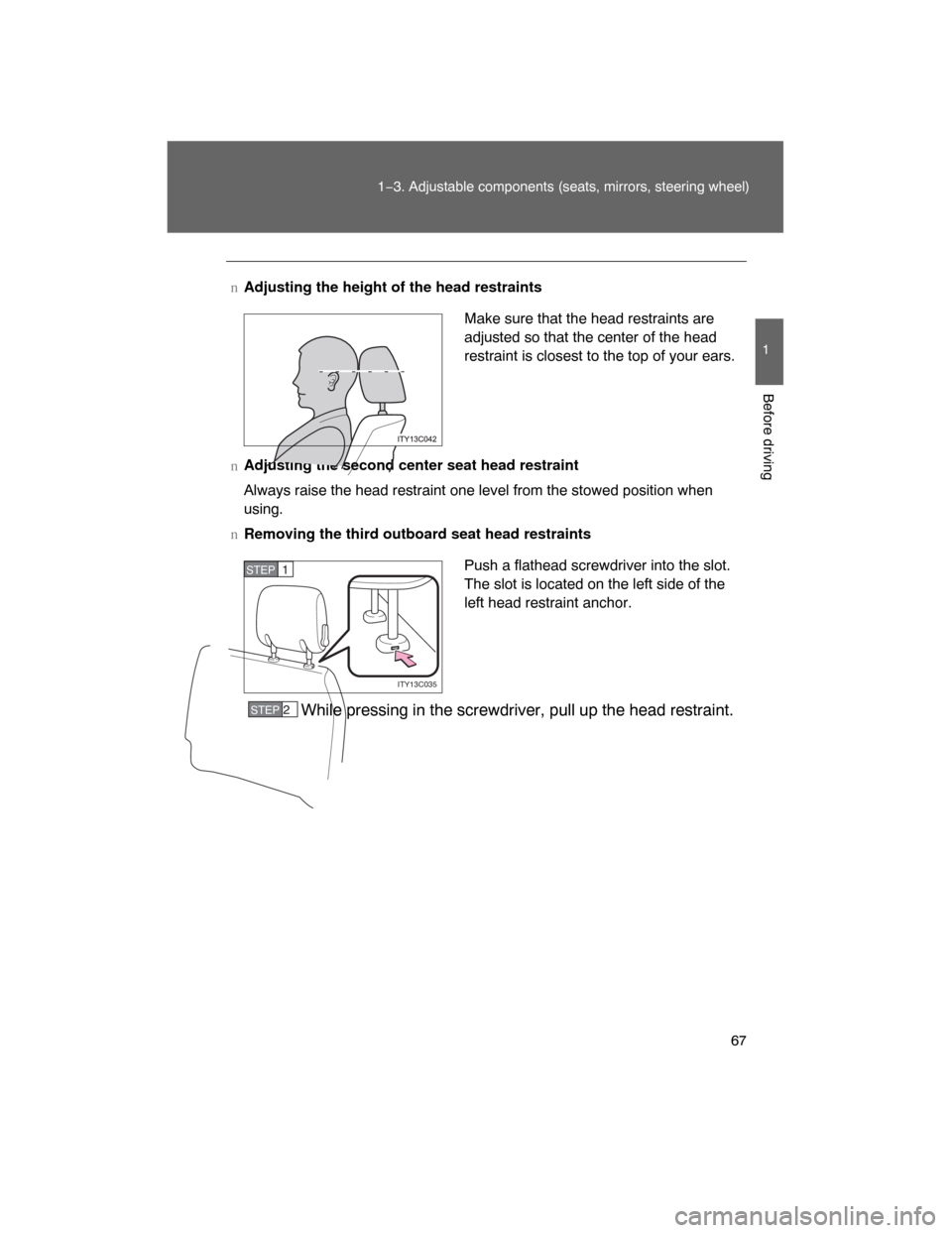
nAdjusting the height of the head restraints
nAdjusting the second center seat head restraint
Always raise the head restraint one level from the stowed position when
using.
nRemoving the third outboard seat head restraints
While pressing in the screwdriver, pull up the head restraint.
Make sure that the head restraints are
adjusted so that the center of the head
restraint is closest to the top of your ears.
Push a flathead screwdriver into the slot.
The slot is located on the left side of the
left head restraint anchor.
ITY13C035
STEP1
STEP 2
Page 67 of 531
68 1−3. Adjustable components (seats, mirrors, steering wheel)
nInstalling the third outboard seat head restraints
Align the head restraint with the installation holes.
Push down the head restraint to the lock position.
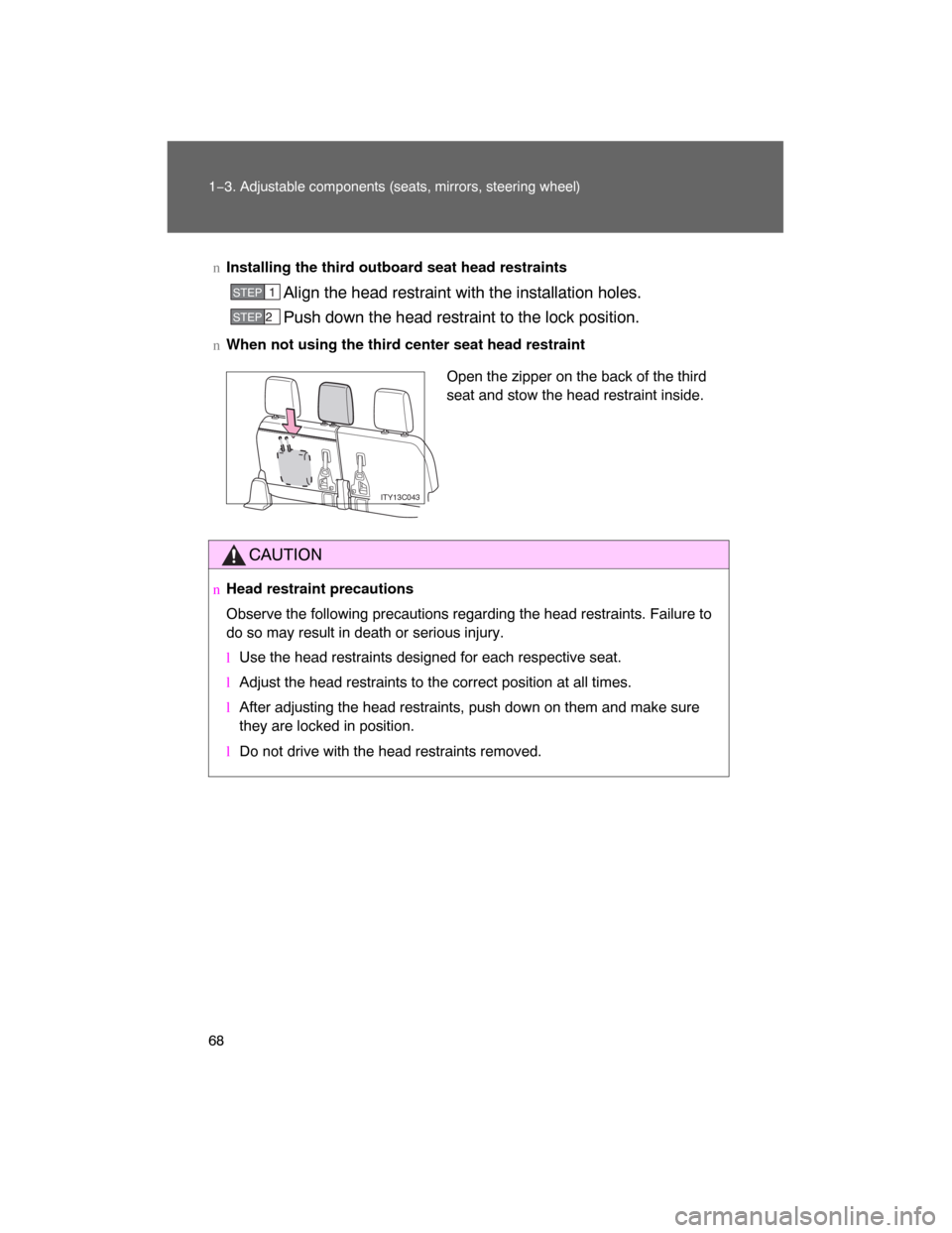
nWhen not using the third center seat head restraint
CAUTION
nHead restraint precautions
Observe the following precautions regarding the head restraints. Failure to
do so may result in death or serious injury.
lUse the head restraints designed for each respective seat.
lAdjust the head restraints to the correct position at all times.
lAfter adjusting the head restraints, push down on them and make sure
they are locked in position.
l
Do not drive with the head restraints removed.
STEP1
STEP 2
Open the zipper on the back of the third
seat and stow the head restraint inside.
ITY13C043
Page 71 of 531
72 1−3. Adjustable components (seats, mirrors, steering wheel)
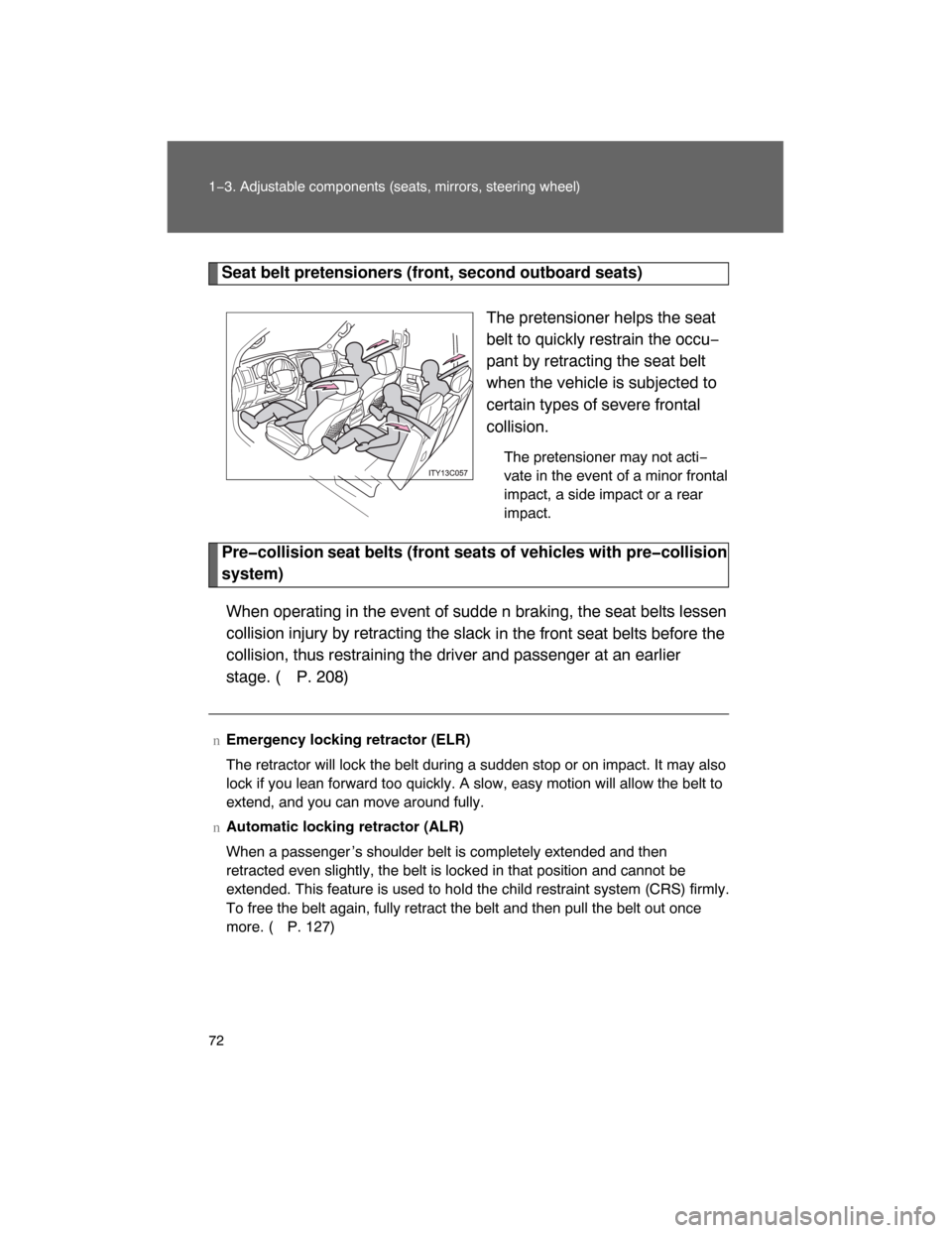
Seat belt pretensioners (front, second outboard seats)
The pretensioner helps the seat
belt to quickly restrain the occu−
pant by retracting the seat belt
when the vehicle is subjected to
certain types of severe frontal
collision.
The pretensioner may not acti−
vate in the event of a minor frontal
impact, a side impact or a rear
impact.
Precollision seat belts (front seats of vehicles with precollision
system)
When operating in the event of sudde n braking, the seat belts lessen
collision injury by retracting the slac
k in the front seat belts before the
collision, thus restraining the driver and passenger at an earlier
stage. (
P. 208)
nEmergency locking retractor (ELR)
The retractor will lock the belt during a sudden stop or on impact. It may also
lock if you lean forward too quickly. A slow, easy motion will allow the belt to
extend, and you can move around fully.
nAutomatic locking retractor (ALR)
When a passenger ’s shoulder belt is completely extended and then
retracted even slightly, the belt is locked in that position and cannot be
extended. This feature is used to hold the child restraint system (CRS) firmly.
To free the belt again, fully retract the belt and then pull the belt out once
more. (
P. 127)