change time TOYOTA LAND CRUISER 2008 J200 User Guide
[x] Cancel search | Manufacturer: TOYOTA, Model Year: 2008, Model line: LAND CRUISER, Model: TOYOTA LAND CRUISER 2008 J200Pages: 531, PDF Size: 5.6 MB
Page 283 of 531
287
3−3. Using the rear seat entertainment system
3
Interior features
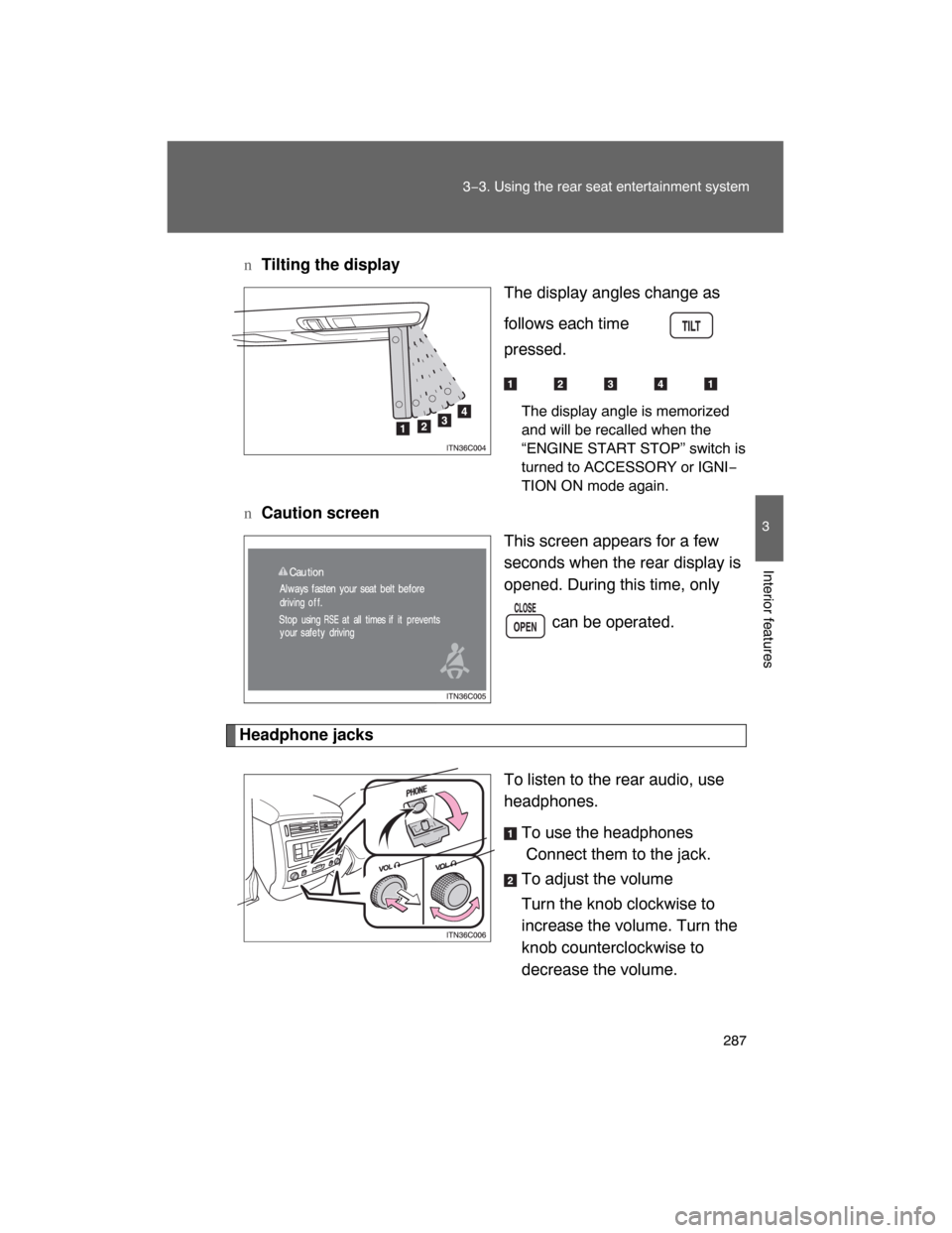
nTilting the display
The display angles change as
follows each time is
pressed.
The display angle is memorized
and will be recalled when the
“ENGINE START STOP” switch is
turned to ACCESSORY or IGNI−
TION ON mode again.
nCaution screen
This screen appears for a few
seconds when the rear display is
opened. During this time, only
can be operated.
Headphone jacks
To listen to the rear audio, use
headphones.
To use the headphones
Connect them to the jack.
To adjust the volume
Turn the knob clockwise to
increase the volume. Turn the
knob counterclockwise to
decrease the volume.
Page 322 of 531
326 3−4. Using the interior lights
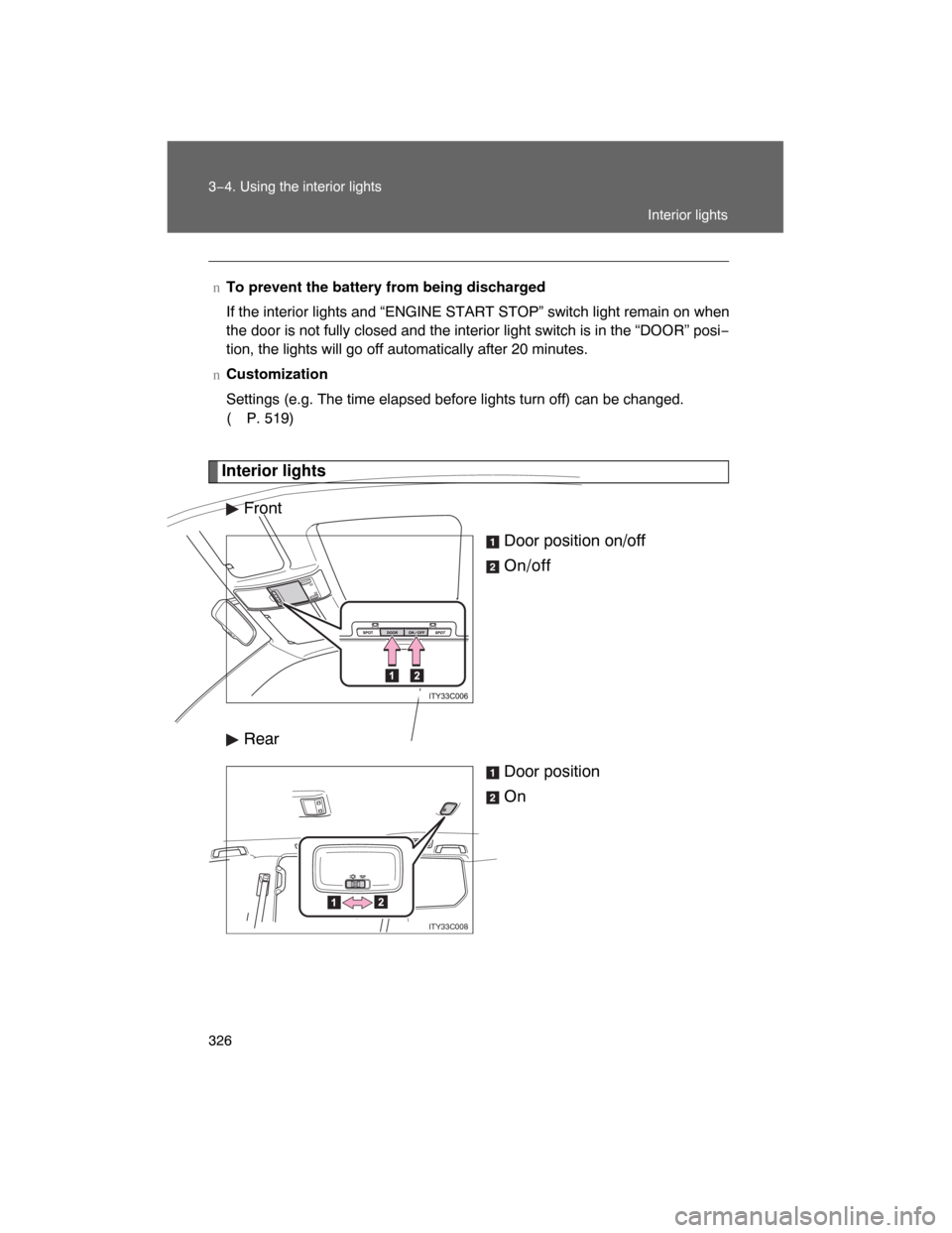
Interior lights
Front
Door position on/off
On/off
Rear
Door position
On
nTo prevent the battery from being discharged
If the interior lights and “ENGINE START STOP” switch light remain on when
the door is not fully closed and the interior light switch is in the “DOOR” posi−
tion, the lights will go off automatically after 20 minutes.
nCustomization
Settings (e.g. The time elapsed before lights turn off) can be changed.
( P. 519)
ITY33C008
Interior lights
Page 476 of 531
482 5−2. Steps to take in an emergency
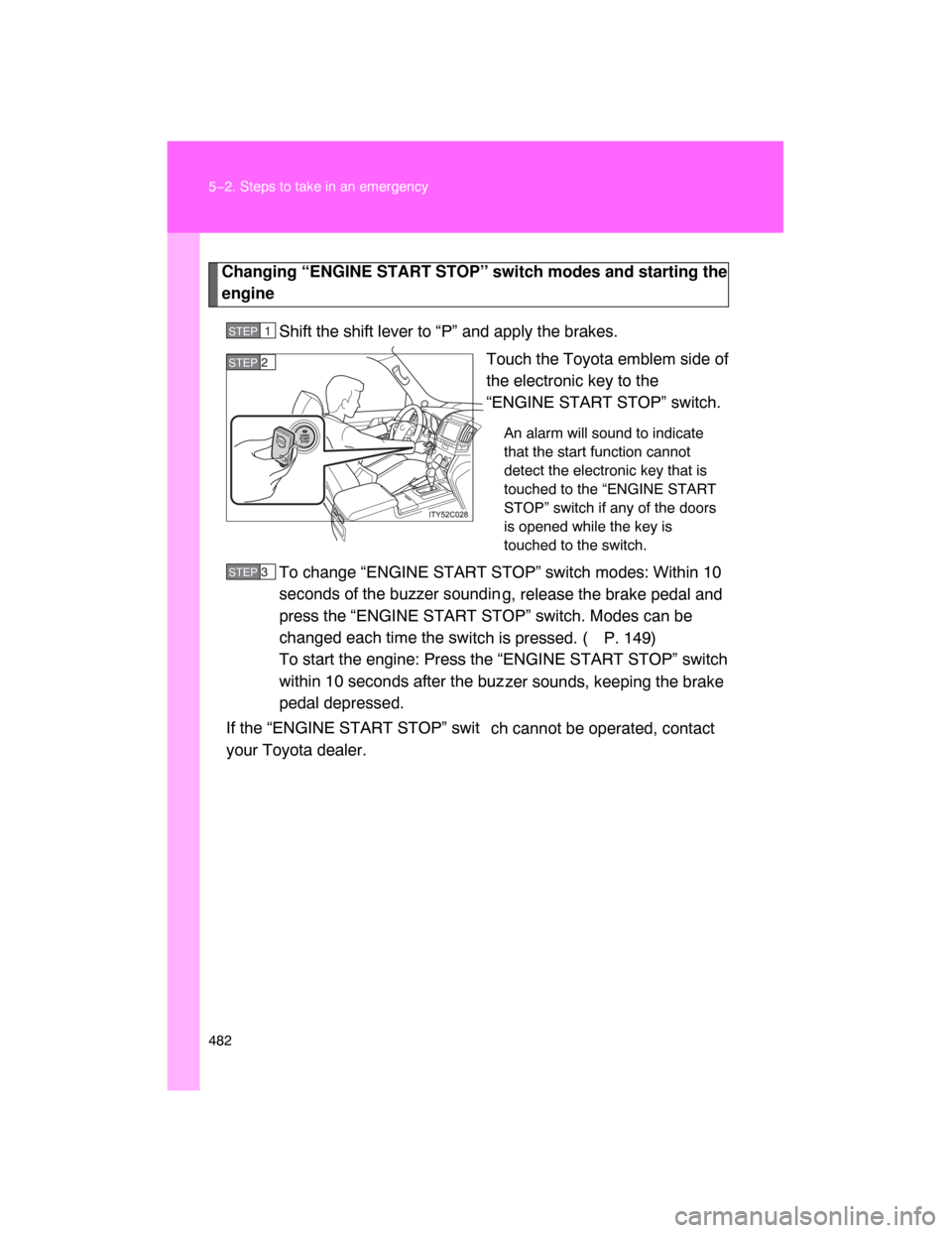
Changing “ENGINE START STOP” switch modes and starting the
engine
Shift the shift lever to “P” and apply the brakes.
Touch the Toyota emblem side of
the electronic key to the
“ENGINE START STOP” switch.
An alarm will sound to indicate
that the start function cannot
detect the electronic key that is
touched to the “ENGINE START
STOP” switch if any of the doors
is opened while the key is
touched to the switch.
To change “ENGINE START STOP” switch modes: Within 10
seconds of the buzzer soundin
g, release the brake pedal and
press the “ENGINE START STOP” switch. Modes can be
changed each time the sw
itch is pressed. ( P. 149)
To start the engine: Press the “ENGINE START STOP” switch
within 10 seconds after the buz
zer sounds, keeping the brake
pedal depressed.
If the “ENGINE START STOP” swit
ch cannot be operated, contact
your Toyota dealer.
STEP1
STEP 2
STEP 3
Page 512 of 531
519
6
Vehicle specifications
6−2. Customization
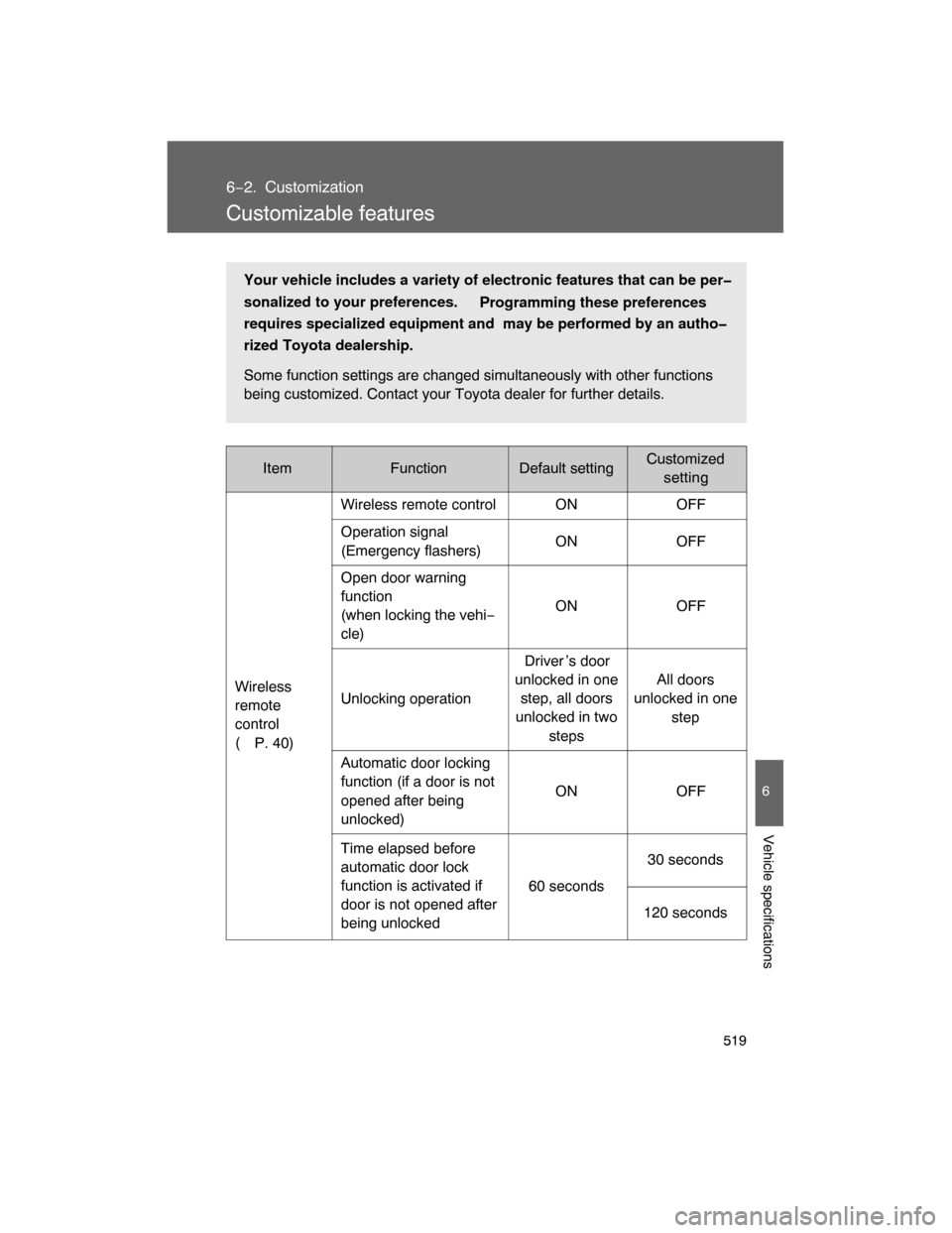
Customizable features
ItemFunctionDefault settingCustomized
setting
Wireless
remote
control
(
P. 40)Wireless remote control ON OFF
Operation signal
(Emergency flashers)ON OFF
Open door warning
function
(when locking the vehi−
cle)ON OFF
Unlocking operationDriver ’s door
unlocked in one
step, all doors
unlocked in two
stepsAll doors
unlocked in one
step
Automatic door locking
function (if a door is not
opened after being
unlocked)ON OFF
Time elapsed before
automatic door lock
function is activated if
door is not opened after
being unlocked60 seconds30 seconds
120 seconds
Your vehicle includes a variety of electronic features that can be per
sonalized to your preferences.
Programming these preferences
requires specialized equipment and may be performed by an autho
rized Toyota dealership.
Some function settings are changed simultaneously with other functions
being customized. Contact your Toyota dealer for further details.
Page 522 of 531

531
Alphabetical index
Care
Exterior ................................. 360
Interior .................................. 362
Seat belts ............................. 363
Card holder .............................. 336
Cargo capacity ........................ 214
Cargo net hooks ...................... 350
CD player/changer .................. 265
Center differential
lock/unlock switch ................ 190
Chains ...................................... 224
Childprotectors ........................ 44
Child restraint system
Booster seats, definition ....... 123
Booster seats, installation .... 127
Convertible seats,
definition............................. 123
Convertible seats,
installation .......................... 127
Front passenger occupant
classification system .......... 117
Infant seats, definition .......... 123
Infant seats, installation ........ 127
Installing CRS with lower
anchorages ........................ 133
Installing CRS with
seatbelts............................. 128
Installing CRS with top
straps ................................. 135
Child safety
Airbag precautions ............... 110
Battery precautions ...... 389, 412
Child−protectors ...................... 44
Child restraint system ........... 123
How your child should wear
the seatbelt .......................... 73
Installing child restraints ....... 127
Moon roof precautions............ 88
Power window lock switch ...... 83
Power window precautions..... 85
Removed key battery
precautions ........................ 410Seat belt extender
precautions ........................... 76
Seat belt precautions .............. 74
Seat heater precautions ........ 346
Cigarette lighter ....................... 343
Cleaning
Exterior .................................. 360
Interior ................................... 362
Seat belts .............................. 363
Clock ......................................... 339
Condenser ................................ 383
Console box ............................. 330
Cool box.................................... 330
Cooling system
Engine overheating ............... 488
Cruise control........................... 178
Cup holder ................................ 333
Crawl Control ........................... 197
Curtain shield airbags ............. 102
Customizable features............. 519
Daytime running light
system .................................... 171
Defogger
Rear window ......................... 256
Dimension................................. 494
Display
Crawl Control display ............ 197
Trip information ..................... 167
Toyota park assist system
display................................. 181
Shift position and shift
range................................... 155
Warning messages ............... 460
Doityourself maintenance..... 371
Door courtesy lights
Door courtesy lights .............. 325
Wattage ................................. 503
Door lock
Back door ................................ 48
Side door ................................. 43
Wireless remote control key .... 40
C
D