engine TOYOTA LAND CRUISER 2009 J200 Manual PDF
[x] Cancel search | Manufacturer: TOYOTA, Model Year: 2009, Model line: LAND CRUISER, Model: TOYOTA LAND CRUISER 2009 J200Pages: 556, PDF Size: 10.21 MB
Page 245 of 556
245
2-5. Driving information
2
When driving
L/C200_U (OM60D97U)
●
Note that when making a turn, th e trailer wheels will be closer than
the vehicle wheels to the inside of the turn. Compensate by making
a larger than normal turning radius.
● Crosswinds and rough roads will adversely affect handling of your
vehicle and trailer, causing sway . Periodically check the rear to
prepare for being passed by large trucks or buses, which may
cause your vehicle and trailer to sway. If swaying occurs, firmly grip
the steering wheel, reduce speed immediately but gradually, and
steer straight ahead. Never increase speed. If you make no
extreme correction with the stee ring or brakes, your vehicle and
trailer will stabilize.
● Take care when passing other vehicles. Passing requires consider-
able distance. After passing a vehicle, do not forget the length of
your trailer, and be sure you hav e plenty of room before changing
lanes.
● In order to maintain engine braking efficiency when driving on a
long steep downgrade, do not use overdrive. Transmission shift
range position must be in “4”, in “S” mode.
● Due to the added load of the trailer, your vehicle’s engine may
overheat on hot days (at temperatur es over 85°F [30°C] when driv-
ing up a long or steep grade. If the engine coolant temperature
gauge indicates overheating, immedi ately turn off the air condition-
ing (if in use), pull your vehicle off the road and stop in a safe spot.
( P. 501)
Page 246 of 556
246 2-5. Driving information
L/C200_U (OM60D97U)●
Always place wheel blocks under both the vehicle and the trailer
wheels when parking. Apply the parking brake firmly, and put the
transmission in “P”. Avoid parking on a slope, but if unavoidable,
do so only after performing the following:
Apply the brakes and keep them applied.
Have someone place wheel bloc ks under both the vehicle and
trailer wheels.
When the wheel blocks are in place, release the brakes slowly
until the blocks absorb the load.
Apply the parking brake firmly.
Shift into “P” and turn off the engine.
● When restarting after parking on a slope:
With the transmission in the “P ” position, start the engine. Be
sure to keep the brake pedal pressed.
Shift into “3”, “2”, “1”, or “R” position (if reversing).
Release the parking brake and brake pedal, and slowly pull or
back away from the wheel blocks. Stop and apply the brakes.
Have someone retrieve the blocks.
STEP1
STEP2
STEP3
STEP4
STEP5
STEP1
STEP2
STEP3
STEP4
Page 247 of 556
247
2-5. Driving information
2
When driving
L/C200_U (OM60D97U)
■
Before towing
Check that the following conditions are met:
● The vehicle’s tires are properly inflated.
● Trailer tires are inflated according to the trailer manufacturer’s recom-
mendation.
● All trailer lights work.
● All lights work each time you connect them.
● The trailer ball is set up at the proper height for the coupler on the t\
railer.
● The vehicle remains level when a loaded or unloaded trailer is hitched.
Do not drive if the vehicle is not level, and check for improper tongue
load, overloading, worn suspension, or other possible causes.
● The trailer cargo is securely loaded.
● The rear view mirrors conform to all applicable federal, state/provincial or
local regulations. If they do not, install rear view mirrors appropriate for
towing purposes.
■ Break-in schedule
Toyota recommends that you do not use a new vehicle or a vehicle with any
new power train components (engine, transmission, differential, wheel bear-
ings, etc.) to tow a trailer for the first 500 miles (800 km) of driving.
■ Maintenance
● If you tow a trailer, your vehicle will require more frequent maintenance
due to the additional load. (See “Scheduled Maintenance Guide” or
“Owner’s Manual Supplement”.)
● Retighten the fixing bolts of the towing ball after approximately 600 miles
(1000 km) of trailer towing.
Page 263 of 556
263
3-1. Using the air conditioning system
and defogger
3
Interior features
L/C200_U (OM60D97U)
CAUTION
■To prevent the windshield from fogging up
Do not use during cool air operation in extremely humid weather.
The difference between the temperature of the outside air and that of the
windshield can cause the outer surface of the windshield to fog up, blocking
your vision.
NOTICE
■To prevent battery discharge
Do not leave the air conditioning system on longer than necessary when the
engine is stopped.
Page 267 of 556
267
3-1. Using the air conditioning system
and defogger
3
Interior features
L/C200_U (OM60D97U)
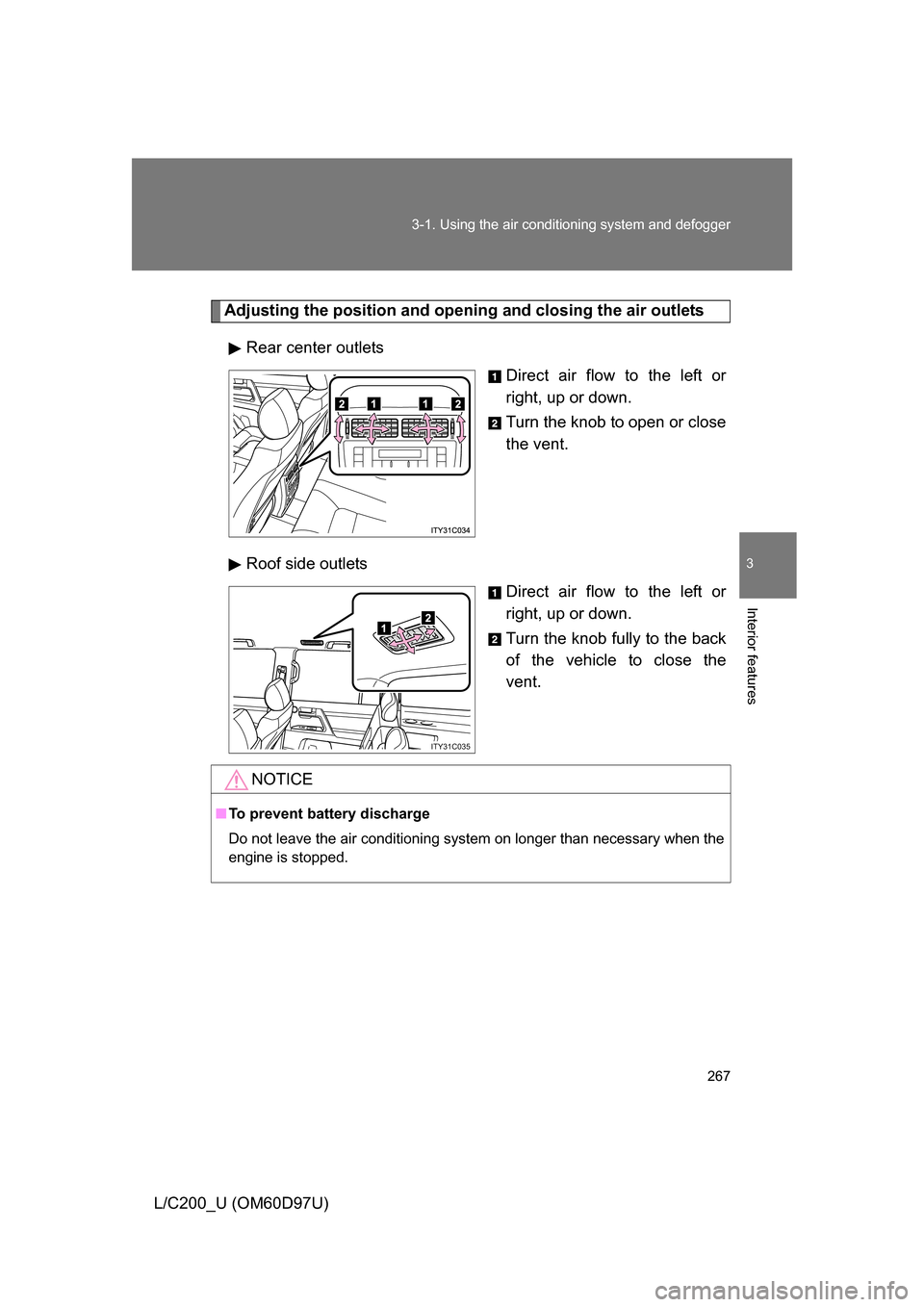
Adjusting the position and opening and closing the air outlets
Rear center outlets Direct air flow to the left or
right, up or down.
Turn the knob to open or close
the vent.
Roof side outlets Direct air flow to the left or
right, up or down.
Turn the knob fully to the back
of the vehicle to close the
vent.
ITY31C035
NOTICE
■To prevent battery discharge
Do not leave the air conditioning system on longer than necessary when the
engine is stopped.
Page 268 of 556
268
3-1. Using the air conditioning system and defogger
L/C200_U (OM60D97U)
Rear window and outside rear view mirror defoggers
■The rear window and outside rear vi ew mirror defoggers can be oper-
ated when
The “ENGINE START STOP” switch is in IGNITION ON mode.
CAUTION
■ When the outside rear view mirror defoggers are on
Do not touch the rear view mirror surfaces, as they can become very hot and
burn you.
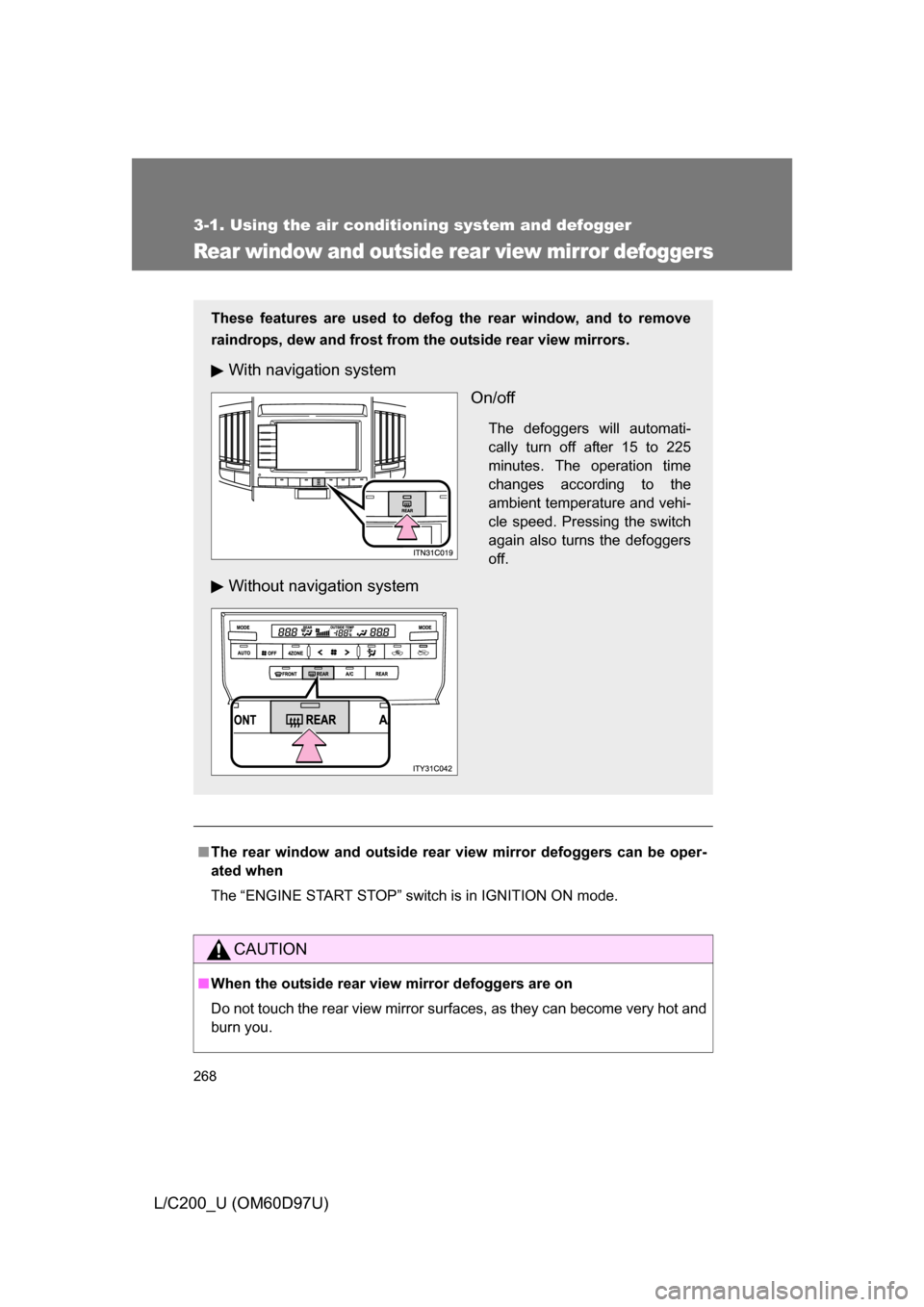
These features are used to defog the rear window, and to remove
raindrops, dew and frost from the outside rear view mirrors.
With navigation system
On/off
The defoggers will automati-
cally turn off after 15 to 225
minutes. The operation time
changes according to the
ambient temperature and vehi-
cle speed. Pressing the switch
again also turns the defoggers
off.
Without navigation system
Page 269 of 556
269
3-1. Using the air conditioning system and defogger
3
Interior features
L/C200_U (OM60D97U)
Windshield wiper de-icer
■The windshield wiper de-icer can be operated when
The “ENGINE START STOP” switch is in IGNITION ON mode.
CAUTION
■When the windshield wiper de-icer is on
Do not touch the glass at the lower part of the windshield or to the side of the
front pillars as the surfaces can become very hot and burn you.
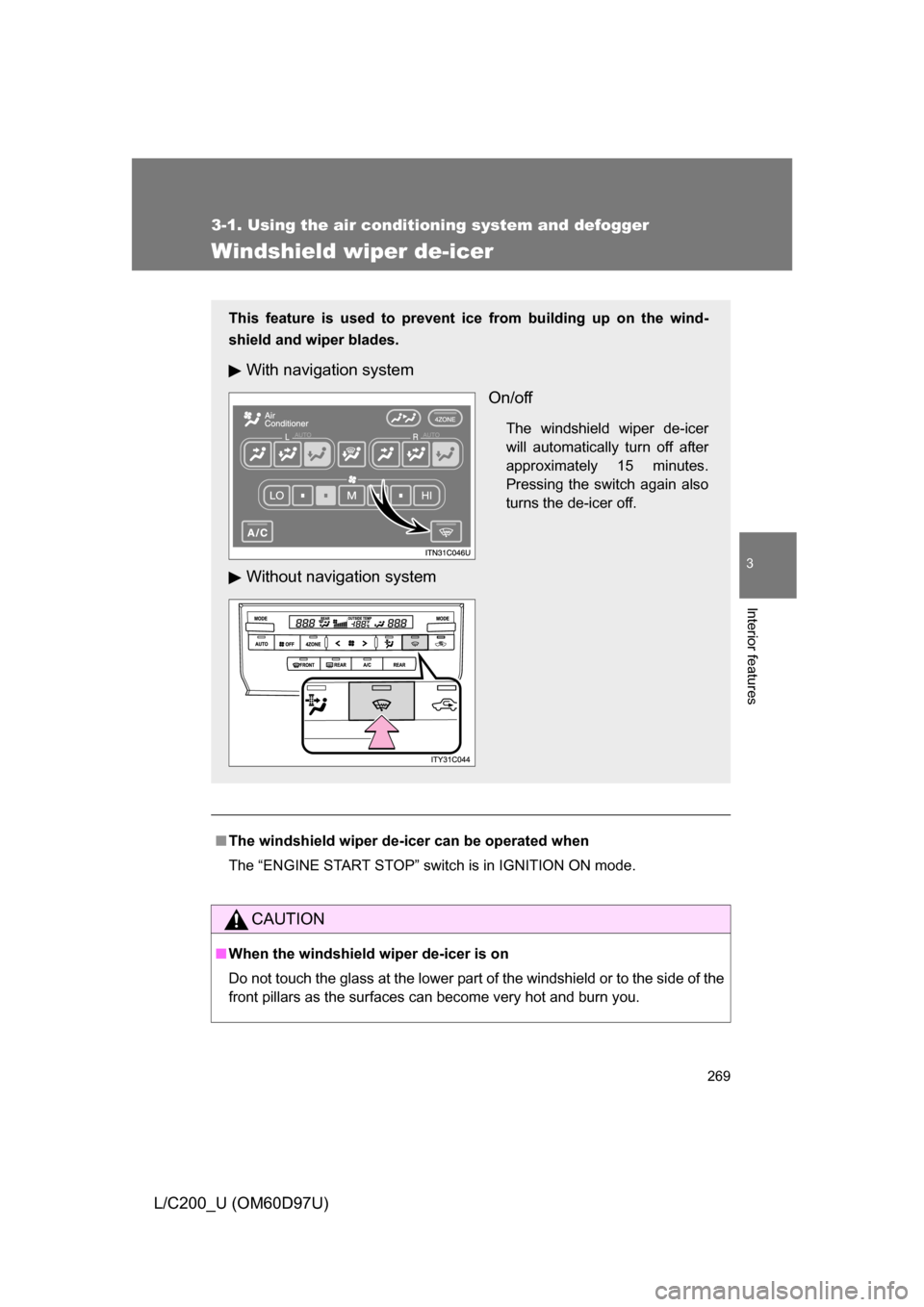
This feature is used to prevent ice from building up on the wind-
shield and wiper blades.
With navigation system
On/off
The windshield wiper de-icer
will automatically turn off after
approximately 15 minutes.
Pressing the switch again also
turns the de-icer off.
Without navigation system
Page 271 of 556
271
3-2. Using the audio system
3
Interior features
L/C200_U (OM60D97U)
■
Using cellular phones
Interference may be heard through the audio system’s speakers if a cellular
phone is being used inside or close to the vehicle while the audio syste\
m is
operating.
CAUTION
■For vehicles sold in the U.S.A.
● Part 15 of the FCC Rules
FCC Warning:
Any unauthorized changes or modifications to this equipment will void the
user’s authority to operate this device.
● Laser products
• Do not take this unit apart or attempt to make any changes yourself.
This is an intricate unit that uses a laser pickup to retrieve information
from the surface of compact discs. The laser is carefully shielded so
that its rays remain inside the cabinet. Therefore, never try to disas-
semble the player or alter any of its parts since you may be exposed to
laser rays and dangerous voltages.
• This product utilizes a laser. Use of controls or adjustments or performance of procedures other
than those specified herein may result in hazardous radiation expo-
sure.
NOTICE
■To prevent battery discharge
Do not leave the audio system on longer than necessary with the engine o\
ff.
■ To avoid damaging the audio system
Take care not to spill drinks or other fluids over the audio system.
Page 300 of 556
300 3-3. Using the rear seat entertainment system
L/C200_U (OM60D97U)■
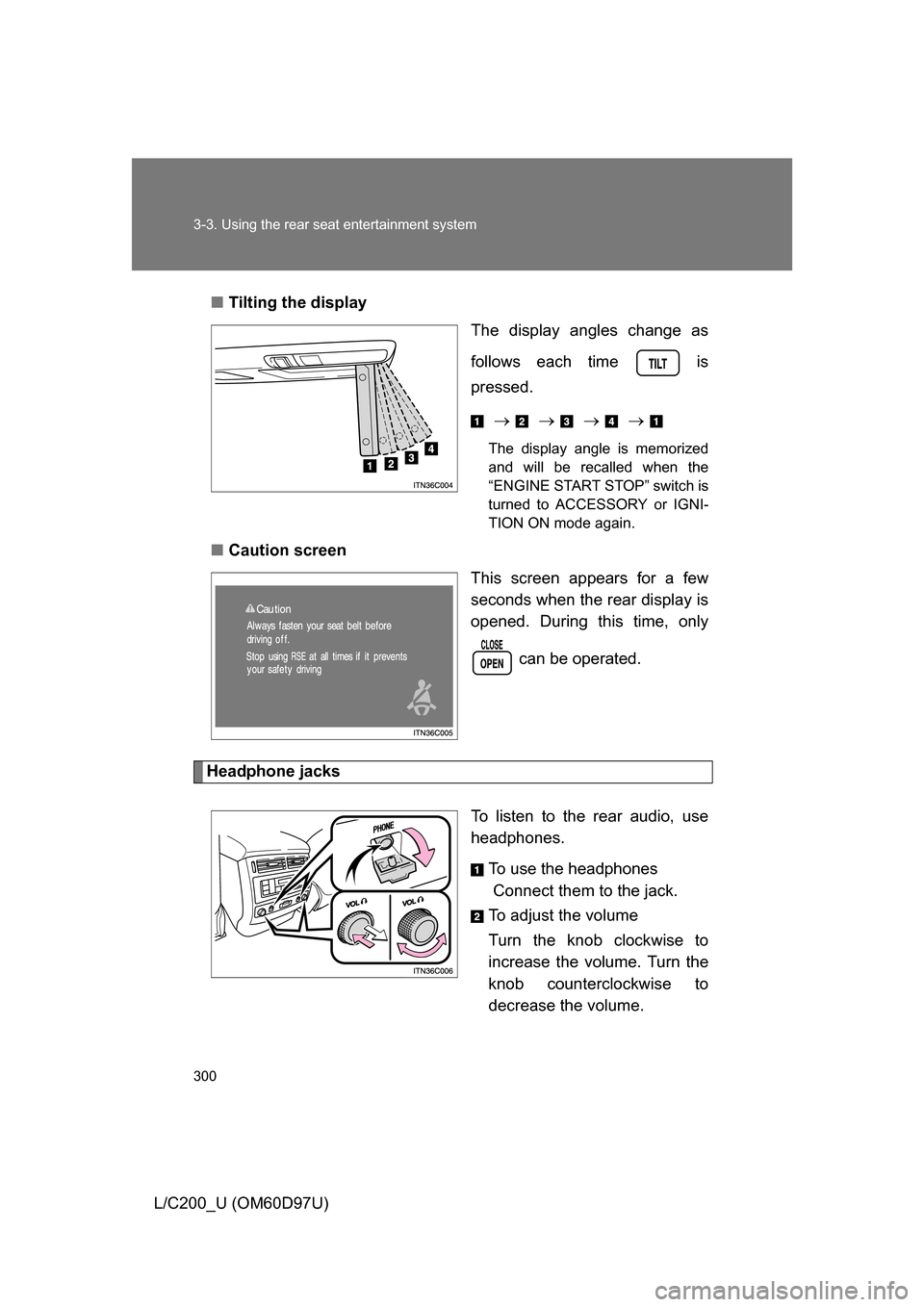
Tilting the display
The display angles change as
follows each time is
pressed.
The display angle is memorized
and will be recalled when the
“ENGINE START STOP” switch is
turned to ACCESSORY or IGNI-
TION ON mode again.
■ Caution screen
This screen appears for a few
seconds when the rear display is
opened. During this time, only
can be operated.
Headphone jacks
To listen to the rear audio, use
headphones.To use the headphones
Connect them to the jack.
To adjust the volume
Turn the knob clockwise to
increase the volume. Turn the
knob counterclockwise to
decrease the volume.
Page 302 of 556
302 3-3. Using the rear seat entertainment system
L/C200_U (OM60D97U)
■The rear seat entertainmen t system can be used when
The “ENGINE START STOP” switch is in ACCESSORY or IGNITION ON
mode.
■ Jam protection function
The display will stop closing and return to its previous position if something
gets in the way of it closing.
■ When
appears on the screen
It indicates that the selected icon cannot be used at this time.
■ Rear system lock
”Navigation System Owner’s Manual”
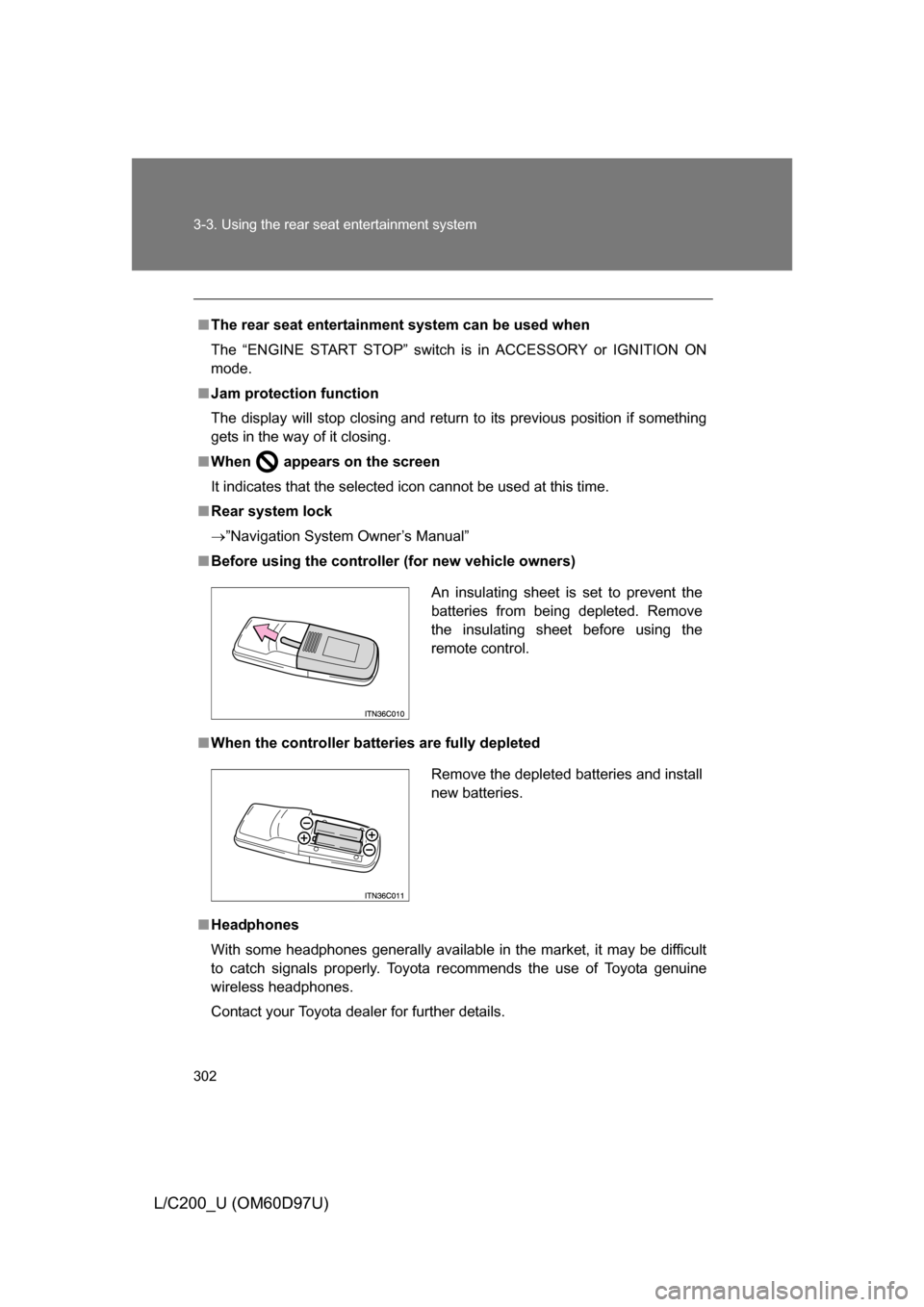
■ Before using the controller (for new vehicle owners)
■ When the controller batt eries are fully depleted
■ Headphones
With some headphones generally available in the market, it may be difficult
to catch signals properly. Toyota recommends the use of Toyota genuine
wireless headphones.
Contact your Toyota dealer for further details.
An insulating sheet is set to prevent the
batteries from being depleted. Remove
the insulating sheet before using the
remote control.
Remove the depleted batteries and install
new batteries.