engine TOYOTA LAND CRUISER 2010 J200 User Guide
[x] Cancel search | Manufacturer: TOYOTA, Model Year: 2010, Model line: LAND CRUISER, Model: TOYOTA LAND CRUISER 2010 J200Pages: 592, PDF Size: 7.98 MB
Page 34 of 592
34 1-2. Opening, closing and locking the doors
L/C200_U
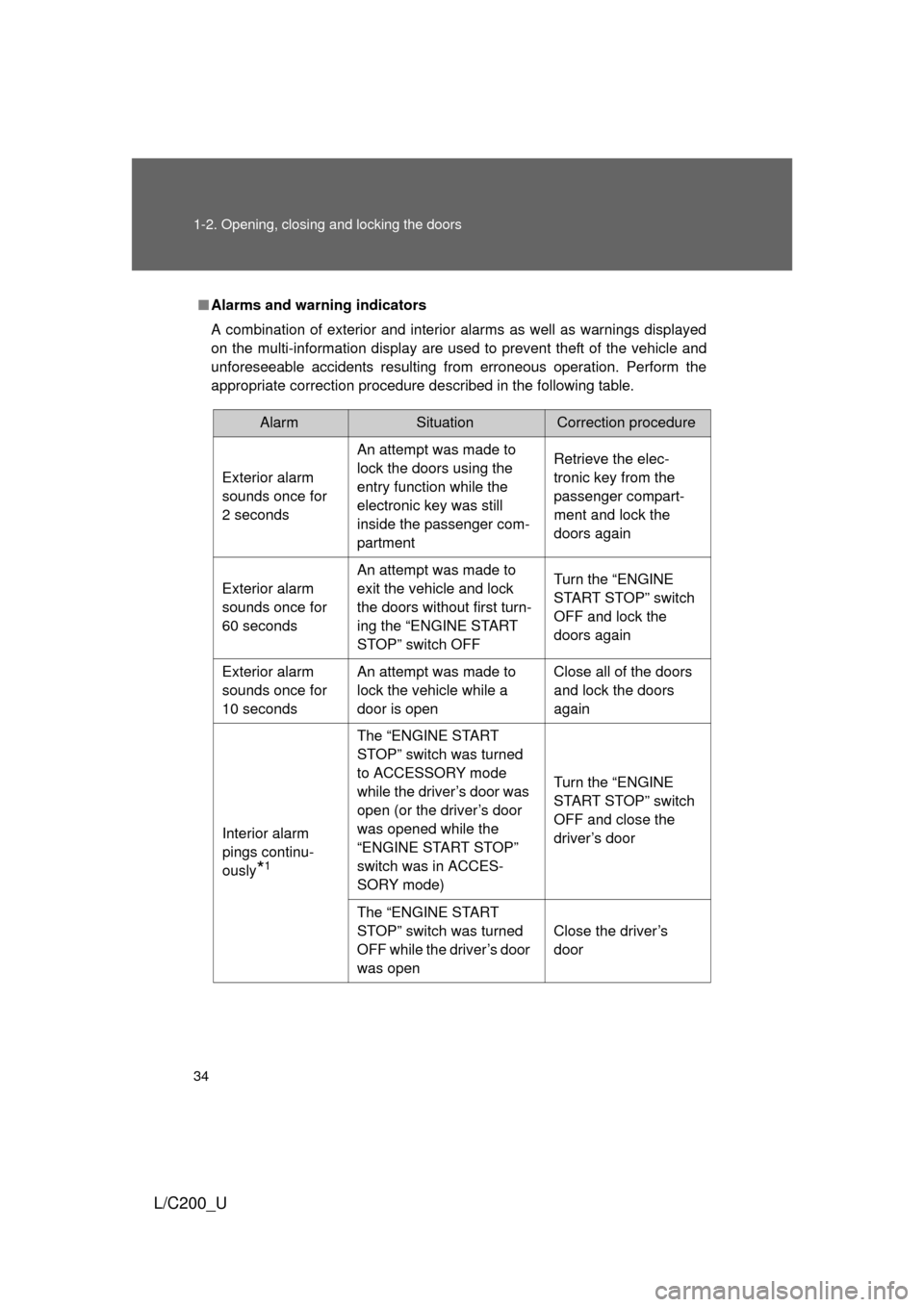
■Alarms and warning indicators
A combination of exterior and interior alarms as well as warnings displayed
on the multi-information display are used to prevent theft of the vehicle and
unforeseeable accidents resulting from erroneous operation. Perform the
appropriate correction procedure de scribed in the following table.
AlarmSituationCorrection procedure
Exterior alarm
sounds once for
2 seconds An attempt was made to
lock the doors using the
entry function while the
electronic key was still
inside the passenger com-
partment Retrieve the elec-
tronic key from the
passenger compart-
ment and lock the
doors again
Exterior alarm
sounds once for
60 seconds An attempt was made to
exit the vehicle and lock
the doors without first turn-
ing the “ENGINE START
STOP” switch OFF Turn the “ENGINE
START STOP” switch
OFF and lock the
doors again
Exterior alarm
sounds once for
10 seconds An attempt was made to
lock the vehicle while a
door is open Close all of the doors
and lock the doors
again
Interior alarm
pings continu-
ously
*1
The “ENGINE START
STOP” switch was turned
to ACCESSORY mode
while the driver’s door was
open (or the driver’s door
was opened while the
“ENGINE START STOP”
switch was in ACCES-
SORY mode) Turn the “ENGINE
START STOP” switch
OFF and close the
driver’s door
The “ENGINE START
STOP” switch was turned
OFF while the driver’s door
was open Close the driver’s
door
Page 35 of 592

35
1-2. Opening, closing and locking the doors
1
Before driving
L/C200_U
AlarmSituationCorrection procedure
Interior alarm
sounds continu-
ously
*1
When the “ENGINE
START STOP” switch is in
IGNITION ON or ACCES-
SORY mode, an attempt
was made to open the
door and exit the vehicle,
and the shift lever was not
in “P” Shift the shift lever to
“P” and turn the
“ENGINE START
STOP” switch OFF
Interior and exte-
rior alarms sound
continuously
*1
When the “ENGINE
START STOP” switch is in
IGNITION ON or ACCES-
SORY mode, the driver’s
door was closed after the
key was carried outside
the vehicle, and the shift
lever not in “P” Shift the shift lever to
“P”, turn the “ENGINE
START STOP” switch
OFF and close the
driver’s door again
Interior alarm
pings once
*1
The electronic key has a
low battery Replace the electronic
key battery
An attempt was made to
start the engine without the
electronic key being
present, or the electronic
key was not functioning
normally Start the engine with
the electronic key
present*
2
Page 36 of 592
36 1-2. Opening, closing and locking the doors
L/C200_U
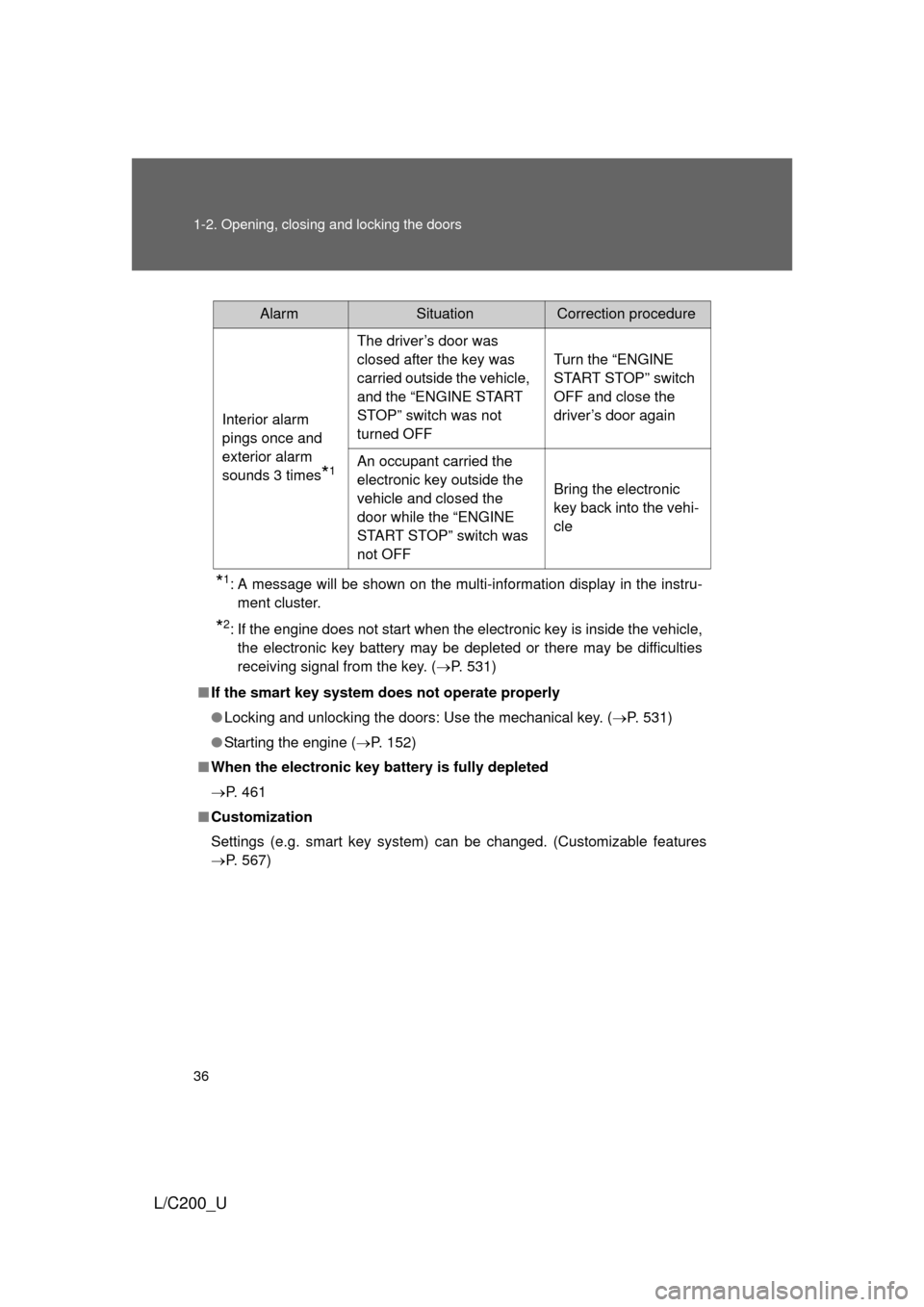
*1: A message will be shown on the multi-information display in the instru-ment cluster.
*2: If the engine does not start when the electronic key is inside the vehicle,the electronic key battery may be depleted or there may be difficulties
receiving signal from the key. ( P. 531)
■ If the smart key system does not operate properly
● Locking and unlocking the doors: Use the mechanical key. ( P. 531)
● Starting the engine ( P. 152)
■ When the electronic key battery is fully depleted
P. 461
■ Customization
Settings (e.g. smart key system) can be changed. (Customizable features
P. 567)
AlarmSituationCorrection procedure
Interior alarm
pings once and
exterior alarm
sounds 3 times
*1
The driver’s door was
closed after the key was
carried outside the vehicle,
and the “ENGINE START
STOP” switch was not
turned OFF Turn the “ENGINE
START STOP” switch
OFF and close the
driver’s door again
An occupant carried the
electronic key outside the
vehicle and closed the
door while the “ENGINE
START STOP” switch was
not OFF Bring the electronic
key back into the vehi-
cle
Page 40 of 592

40 1-2. Opening, closing and locking the doors
L/C200_U
■Alarm
Using the wireless remote control to lock the door will set the alarm system.
(P. 98)
■ Electronic key battery depletion
P. 531
■ If the wireless remote cont rol does not operate properly
● Locking and unlocking the doors: Use the mechanical key. ( P. 531)
● Starting the engine ( P. 152)
■ When the electronic key battery is fully depleted
P. 461
■ Conditions affecting operation
P. 3 0
■ Customization
Settings (e.g. 2-step unlocking function) can be changed. (Customizable
features P. 567)
Page 43 of 592
43
1-2. Opening, closing and locking the doors
1
Before driving
L/C200_U
Locking the driver’s door from the outside without a key
Move the inside lock button to the lock position.
Close the door.
The door cannot be locked if the “ENGINE START STOP” switch is in
ACCESSORY or IGNITION ON mode, or the electronic key is left
inside the vehicle.
Depending on the position of the electronic key, the key may not be
detected correctly and the door may be locked.
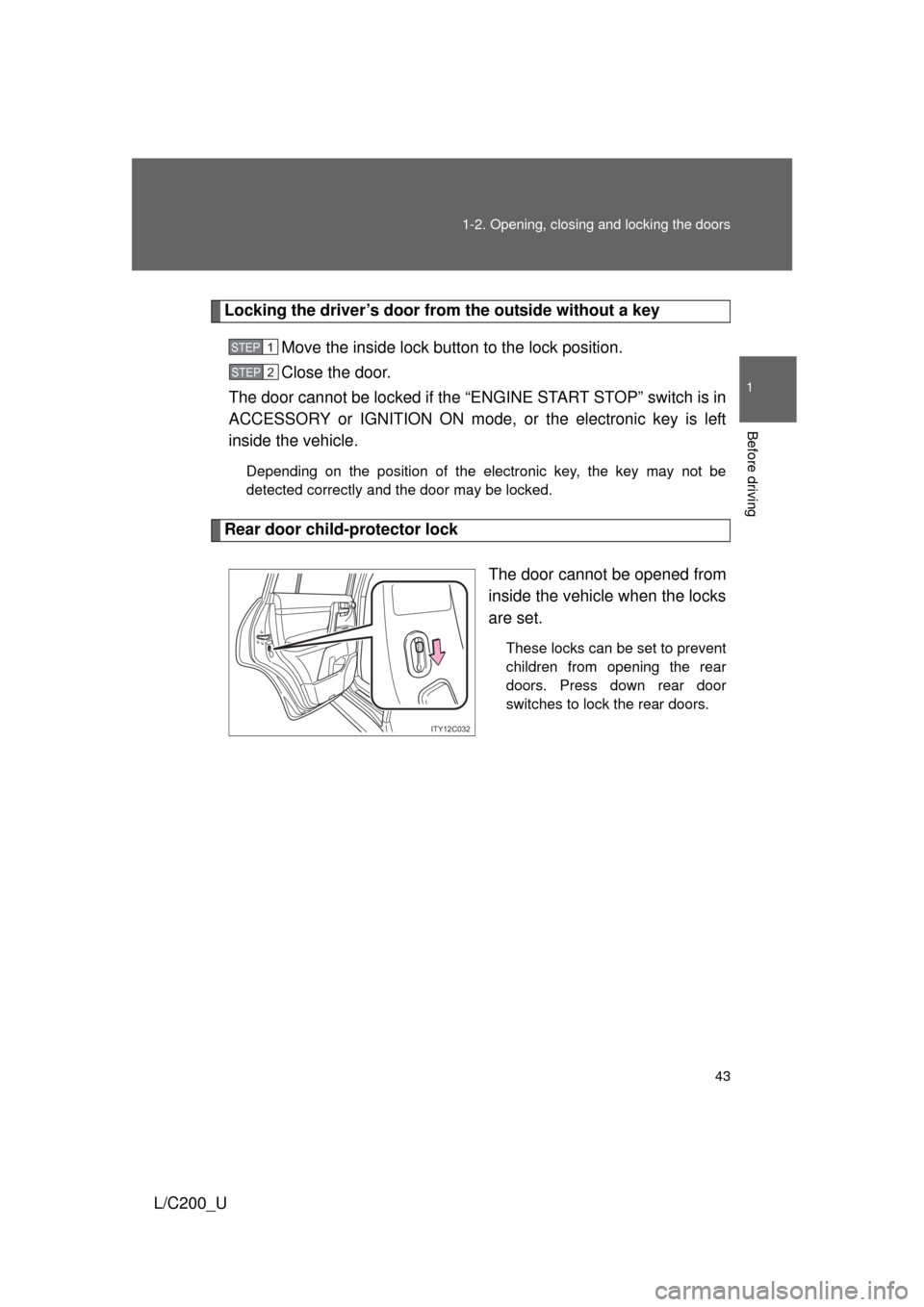
Rear door child-protector lock
The door cannot be opened from
inside the vehicle when the locks
are set.
These locks can be set to prevent
children from opening the rear
doors. Press down rear door
switches to lock the rear doors.
STEP1
STEP2
ITY12C032
Page 44 of 592
44 1-2. Opening, closing and locking the doors
L/C200_U
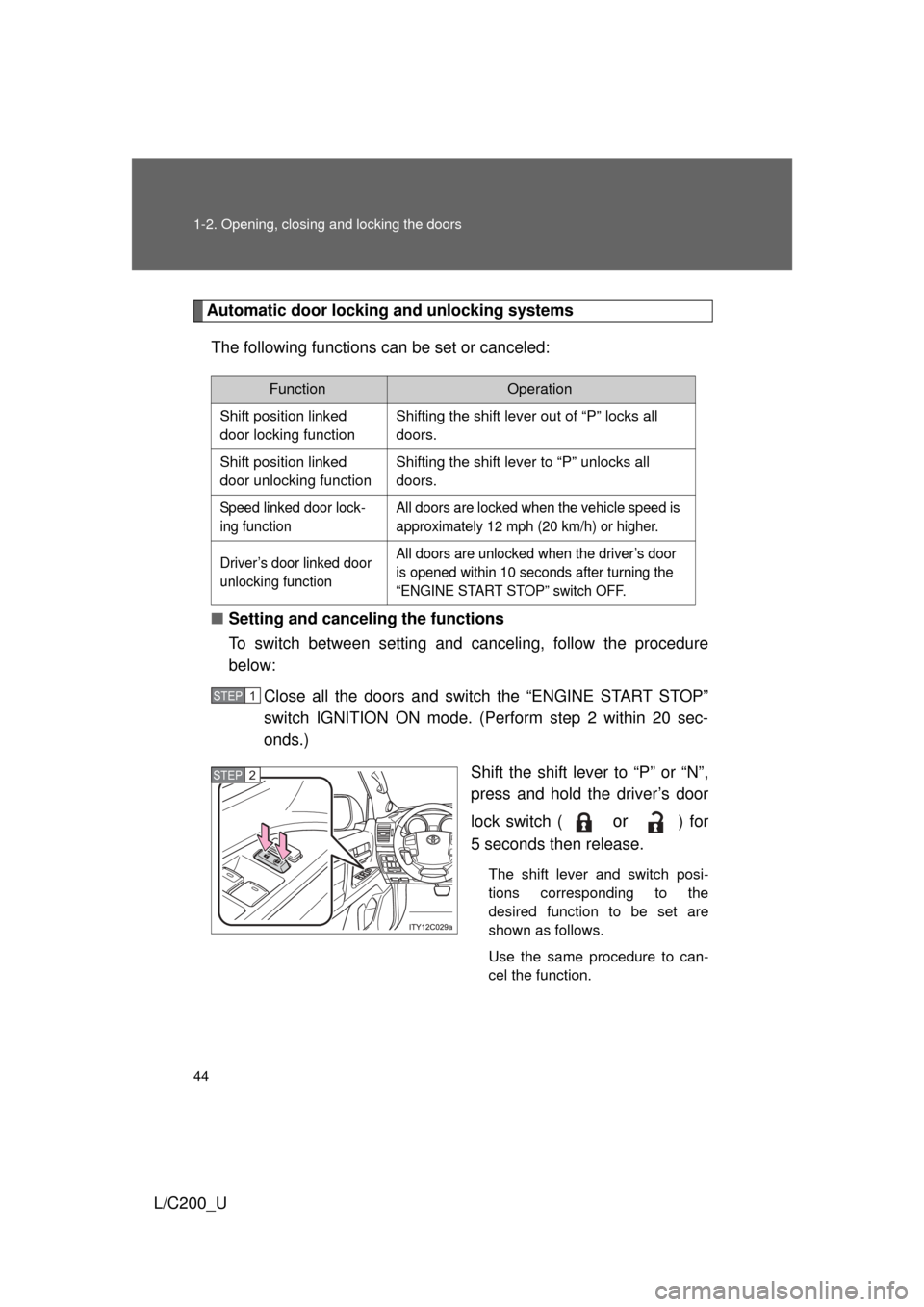
Automatic door locking and unlocking systemsThe following functions can be set or canceled:
■ Setting and canceling the functions
To switch between setting and canceling, follow the procedure
below:
Close all the doors and switch the “ENGINE START STOP”
switch IGNITION ON mode. (Perform step 2 within 20 sec-
onds.)
Shift the shift lever to “P” or “N”,
press and hold the driver’s door
lock switch (
or ) for
5 seconds then release.
The shift lever and switch posi-
tions corresponding to the
desired function to be set are
shown as follows.
Use the same procedure to can-
cel the function.
FunctionOperation
Shift position linked
door locking function Shifting the shift lever out of “P” locks all
doors.
Shift position linked
door unlocking function Shifting the shift lever to “P” unlocks all
doors.
Speed linked door lock-
ing function All doors are locked when the vehicle speed is
approximately 12 mph (20 km/h) or higher.
Driver’s door linked door
unlocking function All doors are unlocked when the driver’s door
is opened within 10 seconds after turning the
“ENGINE START STOP” switch OFF.
STEP1
STEP2
Page 63 of 592
63
1
1-3. Adjustable components (seats, mirrors, steering wheel)
Before driving
L/C200_U
Driving position memor y system
Your preferred driving position (the position of the driver’s seat,
steering wheel and outside rear view mirrors) can be entered into the
computer’s memory and recalled with the touch of a button. It is also
possible to set this function to activate automatically when the
doors are unlocked.
Three different driving positions can be entered into memory.
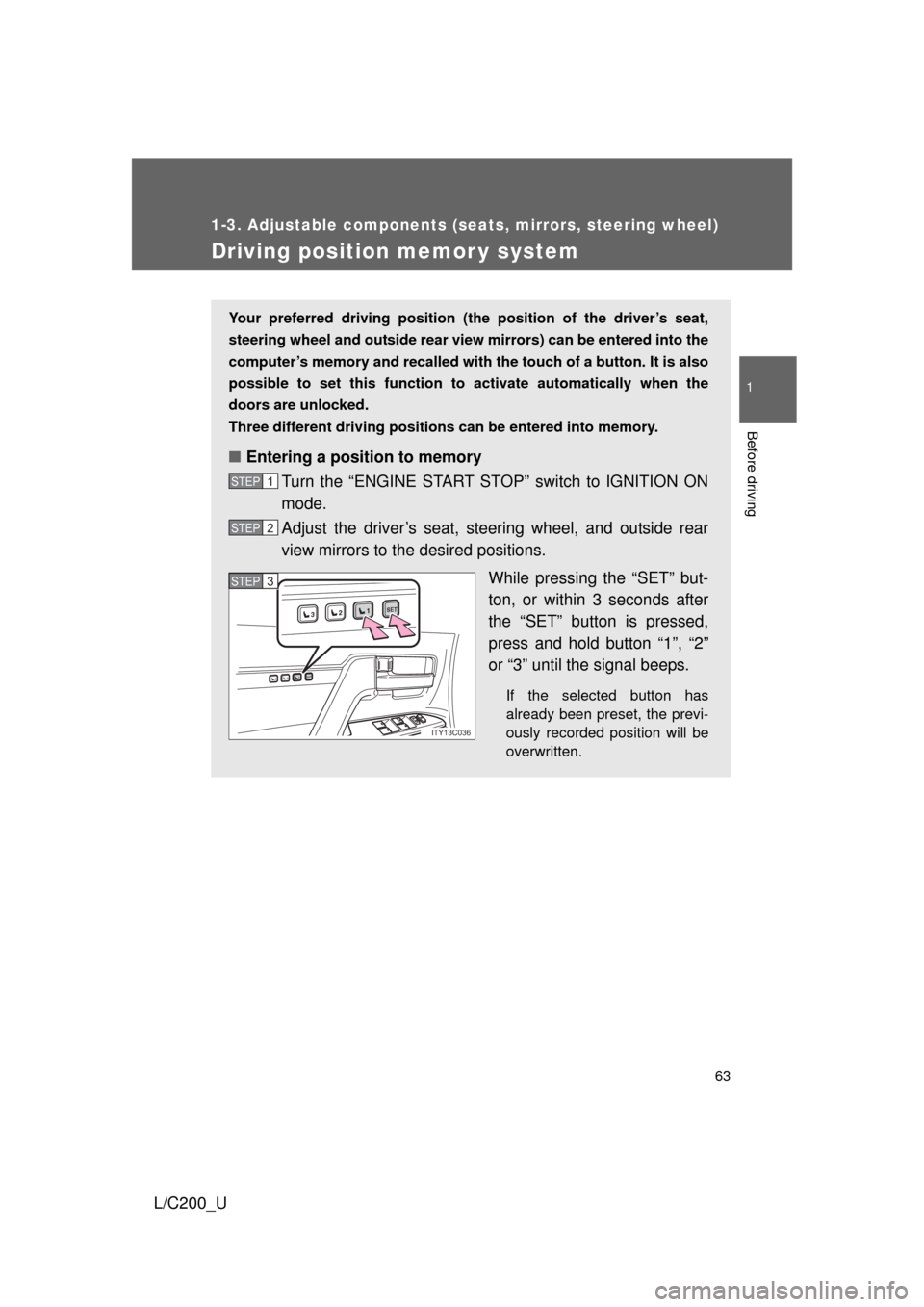
■ Entering a position to memory
Turn the “ENGINE START STOP” switch to IGNITION ON
mode.
Adjust the driver’s seat, steering wheel, and outside rear
view mirrors to the desired positions.
While pressing the “SET” but-
ton, or within 3 seconds after
the “SET” button is pressed,
press and hold button “1”, “2”
or “3” until the signal beeps.
If the selected button has
already been preset, the previ-
ously recorded position will be
overwritten.
STEP1
STEP2
1SET23
1SET23
ITY13C036
STEP3STEP3
Page 64 of 592
64 1-3. Adjustable components (seats, mirrors, steering wheel)
L/C200_U
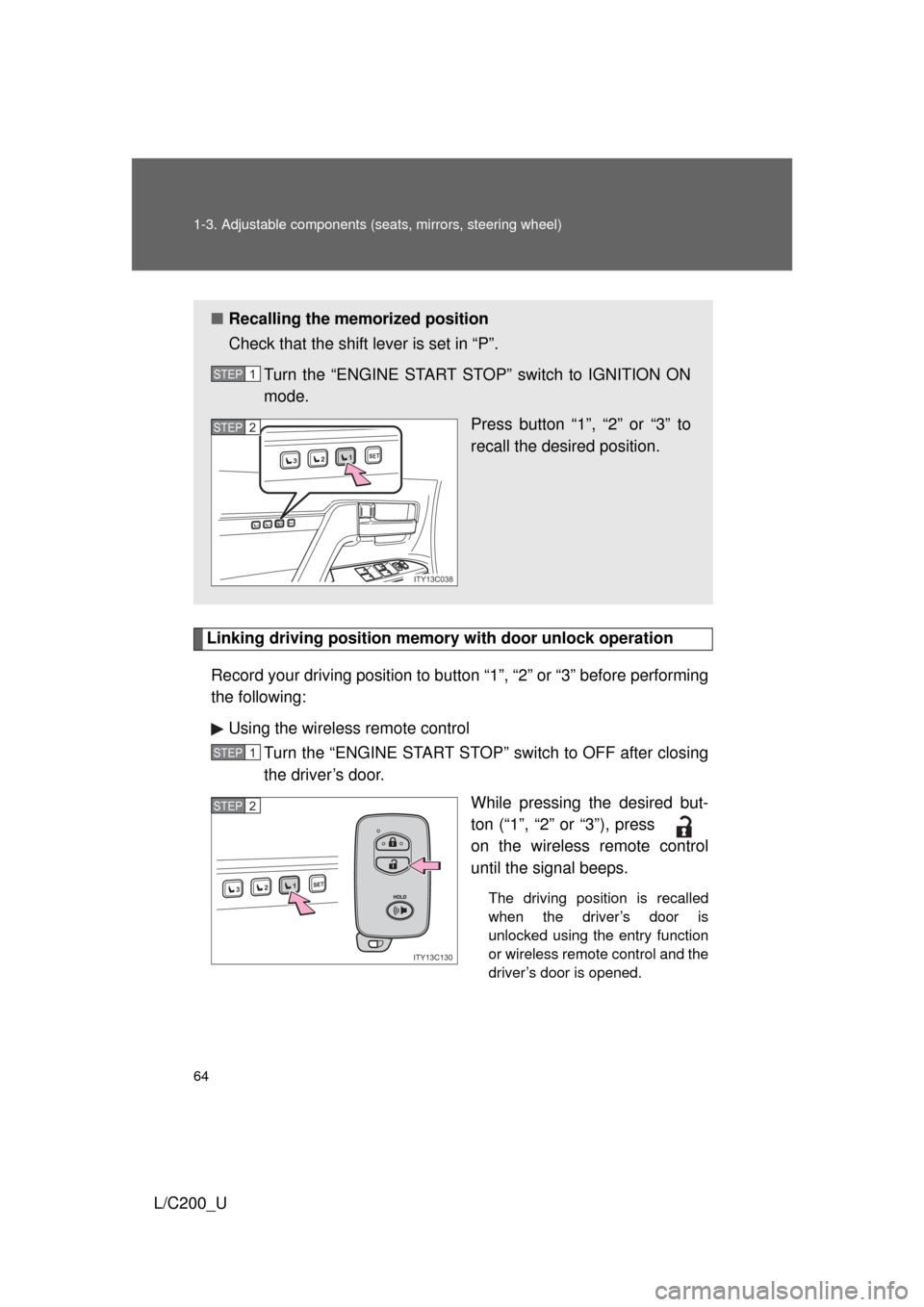
Linking driving position memory with door unlock operation
Record your driving position to button “1”, “2” or “3” before performing
the following: Using the wireless remote control Turn the “ENGINE START STOP” switch to OFF after closing
the driver’s door.
While pressing the desired but-
ton (“1”, “2” or “3”), press
on the wireless remote control
until the signal beeps.
The driving position is recalled
when the driver’s door is
unlocked using the entry function
or wireless remote control and the
driver’s door is opened.
■Recalling the memorized position
Check that the shift lever is set in “P”.
Turn the “ENGINE START STOP” switch to IGNITION ON
mode. Press button “1”, “2” or “3” to
recall the desired position.
STEP1
1SET23
1SET23
ITY13C038
STEP2
STEP1
1SET23
ITY13C130
STEP2
Page 65 of 592
65
1-3. Adjustable components (s
eats, mirrors, steering wheel)
1
Before driving
L/C200_UOpen one of the doors.
If a door is not opened within 60 seconds after is pressed, the
doors will be locked again and the alarm will automatically be set. In
case that the alarm is triggered, immediately stop the alarm.
(
P. 98)
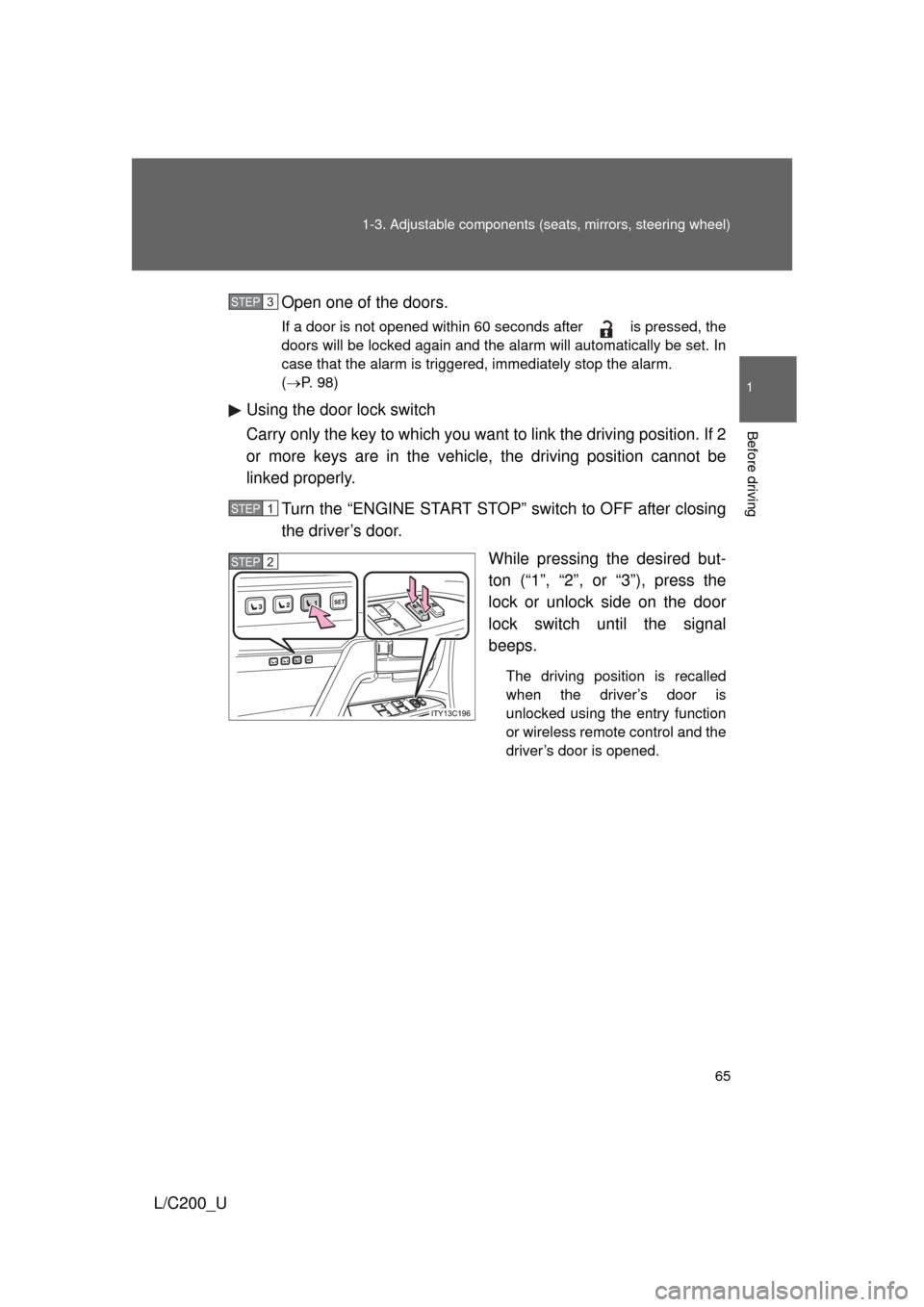
Using the door lock switch
Carry only the key to which you want to link the driving position. If 2
or more keys are in the vehicle, the driving position cannot be
linked properly.
Turn the “ENGINE START STOP” switch to OFF after closing
the driver’s door. While pressing the desired but-
ton (“1”, “2”, or “3”), press the
lock or unlock side on the door
lock switch until the signal
beeps.
The driving position is recalled
when the driver’s door is
unlocked using the entry function
or wireless remote control and the
driver’s door is opened.
STEP3
STEP1
STEP2
Page 66 of 592
66 1-3. Adjustable components (seats, mirrors, steering wheel)
L/C200_U
■Canceling the linked door unlock operation
Turn the “ENGINE START STOP” switch to OFF after closing the
driver’s door.
Using the wireless remote control: While pressing “SET” button,
press button on the wireless remote control until the signal
beeps.
Using the door lock switch: While pressing “SET” button, press the
lock or unlock side on the door lock switch until the signal beeps.
■ Retained accessory power
● Each memorized position (except for the steering wheel position) can be
activated within 3 minutes after the driver’s door is opened, even if the
“ENGINE START STOP” switch is turned off.
● Each memorized position (except for the steering wheel position) can be
activated within 60 seconds after the driver’s door is closed, even if the
“ENGINE START STOP” switch is turned off.
■ To cancel seat position recall
Perform any one of the following operations.
● Press the “SET” button
● Press button “1”, “2” or “3”.
● Adjust the seat using the switches (only cancels seat position recall)
■ If the battery is disconnected
The memorized positions must be reset because the computer’s memory is
erased when the battery is disconnected.
CAUTION
■Seat adjustment caution
Take care during seat adjustment that the seat does not strike the rear pas-
senger or squeeze your body against the steering wheel.
STEP1
STEP2