Emergency Flashers TOYOTA LAND CRUISER 2010 J200 Owners Manual
[x] Cancel search | Manufacturer: TOYOTA, Model Year: 2010, Model line: LAND CRUISER, Model: TOYOTA LAND CRUISER 2010 J200Pages: 592, PDF Size: 7.98 MB
Page 5 of 592

1
2
3
4
5
6
7
5
L/C200_U
5-1. Essential informationEmergency flashers ............ 490
If your vehicle needs to be towed ................................ 491
If you think something is wrong ................................ 496
Fuel pump shut off system .............................. 497
Event data recorder ............ 498
5-2. Steps to take in an emergency If a warning light turns on or a warning sounds... ..... 500
If a warning message is displayed........................... 511
If you have a flat tire............ 514
If the engine will not start .... 526
If the shift lever cannot be shifted from P.................... 528
If you lose your keys ........... 529
If you cannot operate back door opener .............. 530
If the electronic key does not operate properly.......... 531
If the battery is discharged ........................ 534
If your vehicle overheats ..... 537
If the vehicle becomes stuck ................................. 540 6-1. Specifications
Maintenance data (fuel, oil level, etc.) ........... 542
Fuel information.................. 552
Tire information .................. 555
6-2. Customization Customizable features........ 567
6-3. Initialization Items to initialize ................. 576
Reporting safety defects for U.S. owners ................ 578
Abbreviation list ............... 580
Alphabetical index............ 582
What to do if... .................. 590
5When trouble arises6Vehicle specifications
7For U.S. owners
Index
Page 30 of 592

30 1-2. Opening, closing and locking the doors
L/C200_U
■Operation signals
A buzzer sounds and the emergency flashers flash to indicate that the doors
have been locked/unlocked. (Locked: Once; Unlocked: Twice)
■ Conditions affecting operation
The smart key system uses weak radio waves. In the following situations,
the communication between the electronic key and the vehicle may be
affected, preventing the smart key system and wireless remote control from
operating properly. (Ways of coping P. 531)
● When the electronic key battery is depleted
● Near a TV tower, electric power plant, gas station, radio station, large dis-
play, airport or other facility that generates strong radio waves or electri-
cal noise
● When carrying a portable radio, ce llular phone, cordless phone or other
wireless communication devices
● When the electronic key has come into contact with, or is covered by a
metallic object
● When multiple electronic keys are in the vicinity
● When carrying or using the electronic key together with the following
devices that emit radio waves
• Another vehicle’s electronic key
• A wireless key that emits radio waves
• Personal computer
● If window tint with a metallic content or metallic objects are attached to
the rear window
Page 39 of 592
39
1
1-2. Opening, closing and locking the doors
Before driving
L/C200_U
Wireless remote control
■Operation signals
● Doors: A buzzer sounds and the emergency flashers flash to indicate
that the doors have been locked/unlocked. (Locked: Once; Unlocked:
Tw i c e )
● Windows and moon roof: A buzzer sounds when the windows and moon
roof begin to open.
■ Door lock buzzer
If a door is not fully closed, a buzzer sounds continuously for 10 seconds if
an attempt to lock the door is made. Fully close the door to stop the buzzer,
and lock the vehicle once more.
■ Security feature
P. 3 3
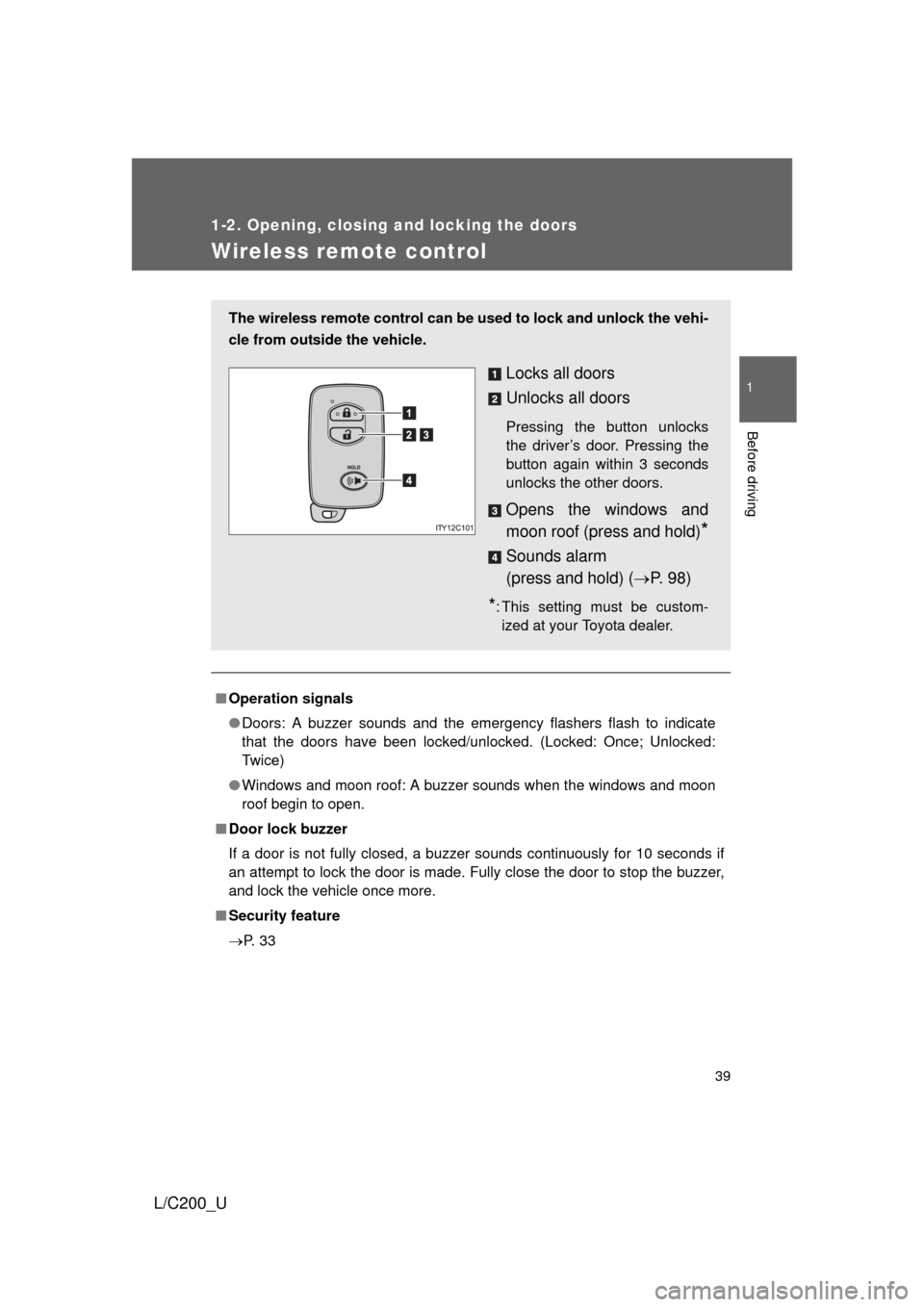
The wireless remote control can be used to lock and unlock the vehi-
cle from outside the vehicle.
Locks all doors
Unlocks all doors
Pressing the button unlocks
the driver’s door. Pressing the
button again within 3 seconds
unlocks the other doors.
Opens the windows and
moon roof (press and hold)
*
Sounds alarm
(press and hold) ( P. 9 8 )
*: This setting must be custom-
ized at your Toyota dealer.
Page 100 of 592
100 1-6. Theft deterrent system
L/C200_U
■Triggering of the alarm
The alarm may be triggered in the following situations.
(Stopping the alarm deactivates the alarm system.)
● A person inside the vehicle opens a door or hood.
● The battery is recharged or replaced when the vehicle is locked.
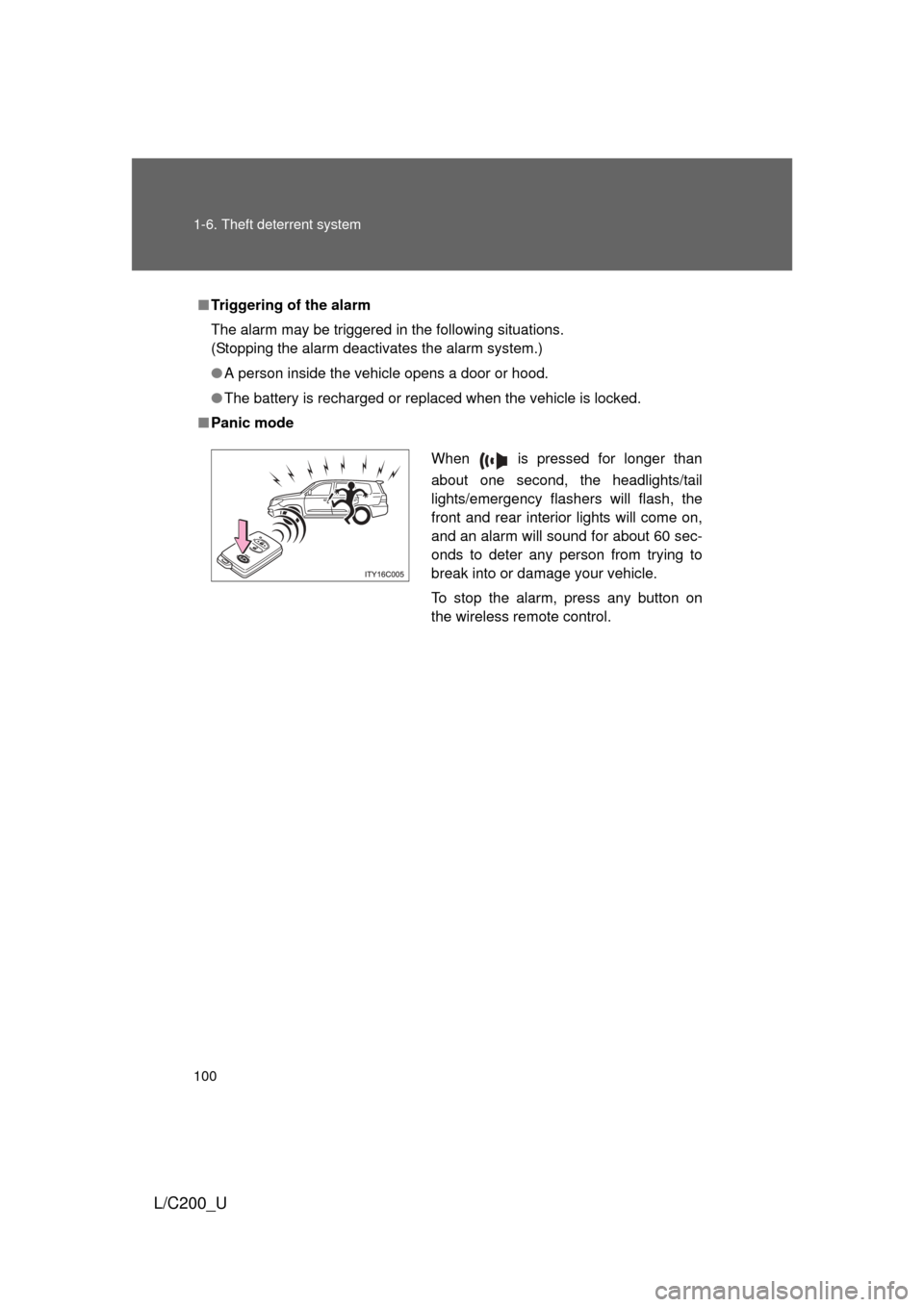
■ Panic mode
When is pressed for longer than
about one second, the headlights/tail
lights/emergency flashers will flash, the
front and rear interior lights will come on,
and an alarm will sound for about 60 sec-
onds to deter any person from trying to
break into or damage your vehicle.
To stop the alarm, press any button on
the wireless remote control.
Page 153 of 592
153
2-1. Driving procedures
2
When driving
L/C200_U
■
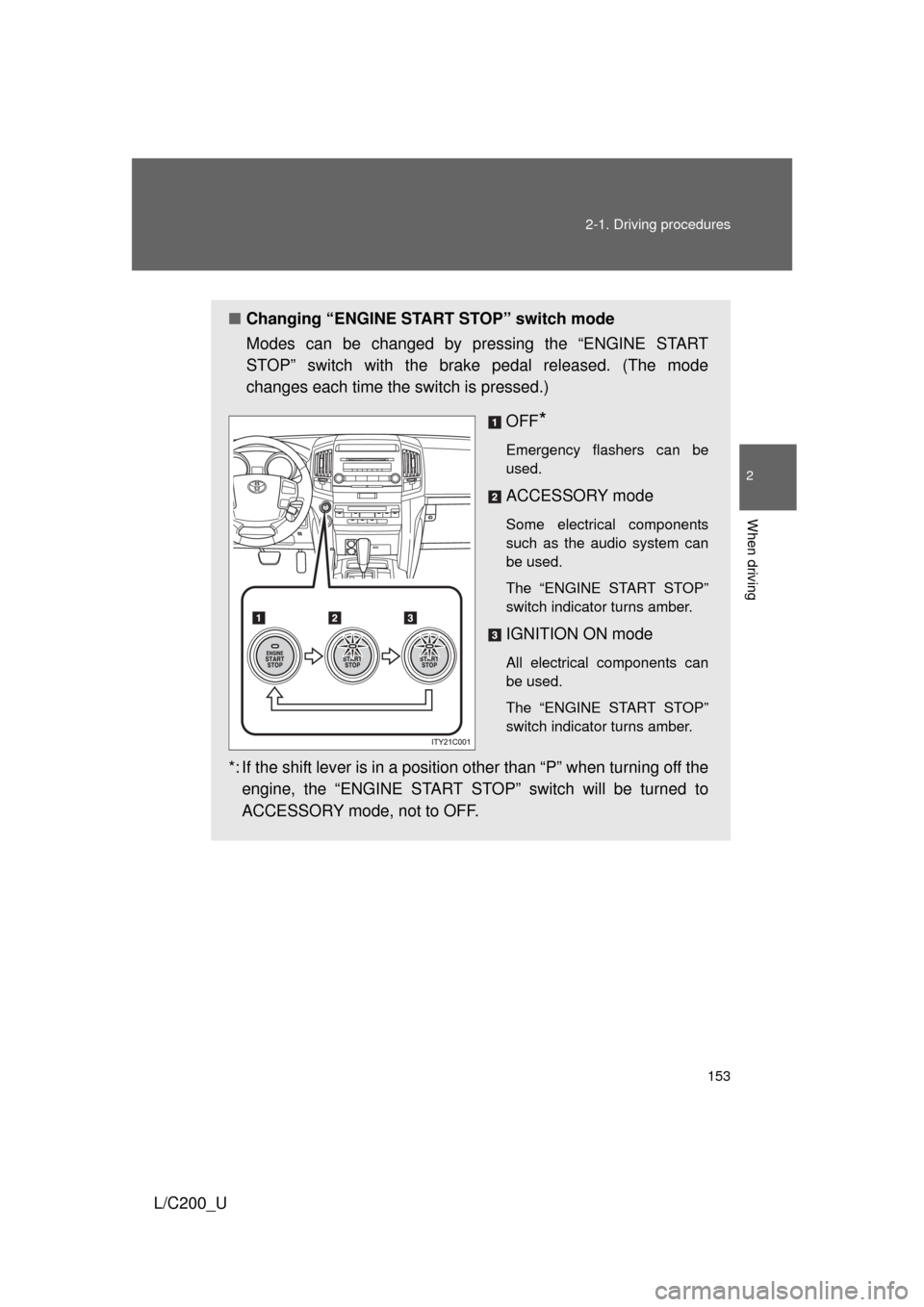
Changing “ENGINE START STOP” switch mode
Modes can be changed by pressing the “ENGINE START
STOP” switch with the brake pedal released. (The mode
changes each time the switch is pressed.)
OFF
*
Emergency flashers can be
used.
ACCESSORY mode
Some electrical components
such as the audio system can
be used.
The “ENGINE START STOP”
switch indicator turns amber.
IGNITION ON mode
All electrical components can
be used.
The “ENGINE START STOP”
switch indicator turns amber.
*: If the shift lever is in a position other than “P” when turning off theengine, the “ENGINE START STOP” switch will be turned to
ACCESSORY mode, not to OFF.
Page 472 of 592
472 4-3. Do-it-yourself maintenance
L/C200_U■
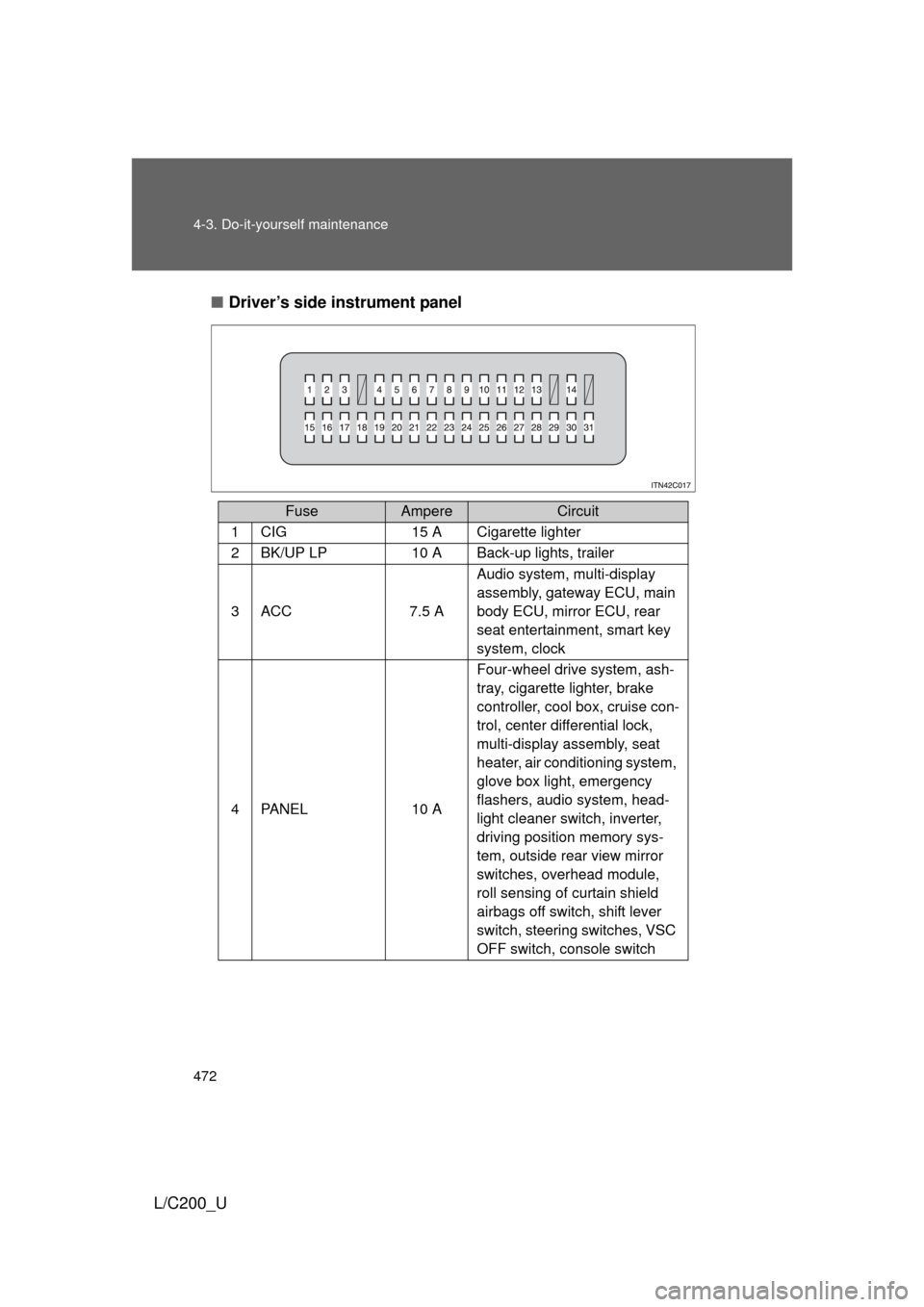
Driver’s side instrument panel
FuseAmpereCircuit
1CIG15 A Cigarette lighter
2BK/UP LP10 A Back-up lights, trailer
3ACC7.5 A Audio system, multi-display
assembly, gateway ECU, main
body ECU, mirror ECU, rear
seat entertainment, smart key
system, clock
4PA N E L10 AFour-wheel drive system, ash-
tray, cigarette lighter, brake
controller, cool box, cruise con-
trol, center differential lock,
multi-display assembly, seat
heater, air conditioning system,
glove box light, emergency
flashers, audio system, head-
light cleaner switch, inverter,
driving position memory sys-
tem, outside rear view mirror
switches, overhead module,
roll sensing of curtain shield
airbags off switch, shift lever
switch, steering switches, VSC
OFF switch, console switch
Page 489 of 592
When trouble arises5
489
L/C200_U
5-1. Essential informationEmergency flashers ......... 490
If your vehicle needs to be towed ............................. 491
If you think something is wrong ............................. 496
Fuel pump shut off system ........................... 497
Event data recorder ......... 498 5-2. Steps to take in an
emergency
If a warning light turns on or a warning
sounds... ....................... 500
If a warning message is displayed ........................ 511
If you have a flat tire......... 514
If the engine will not start ................................ 526
If the shift lever cannot be shifted from P ................. 528
If you lose your keys ........ 529
If you cannot operate back door opener ........... 530
If the electronic key does not operate properly....... 531
If the battery is discharged ..................... 534
If your vehicle overheats ....................... 537
If the vehicle becomes stuck .............................. 540
Page 490 of 592
490
L/C200_U
5-1. Essential information
Emergency flashers
NOTICE
■To prevent battery discharge
Do not leave the emergency flashers on longer than necessary when the
engine is not running.
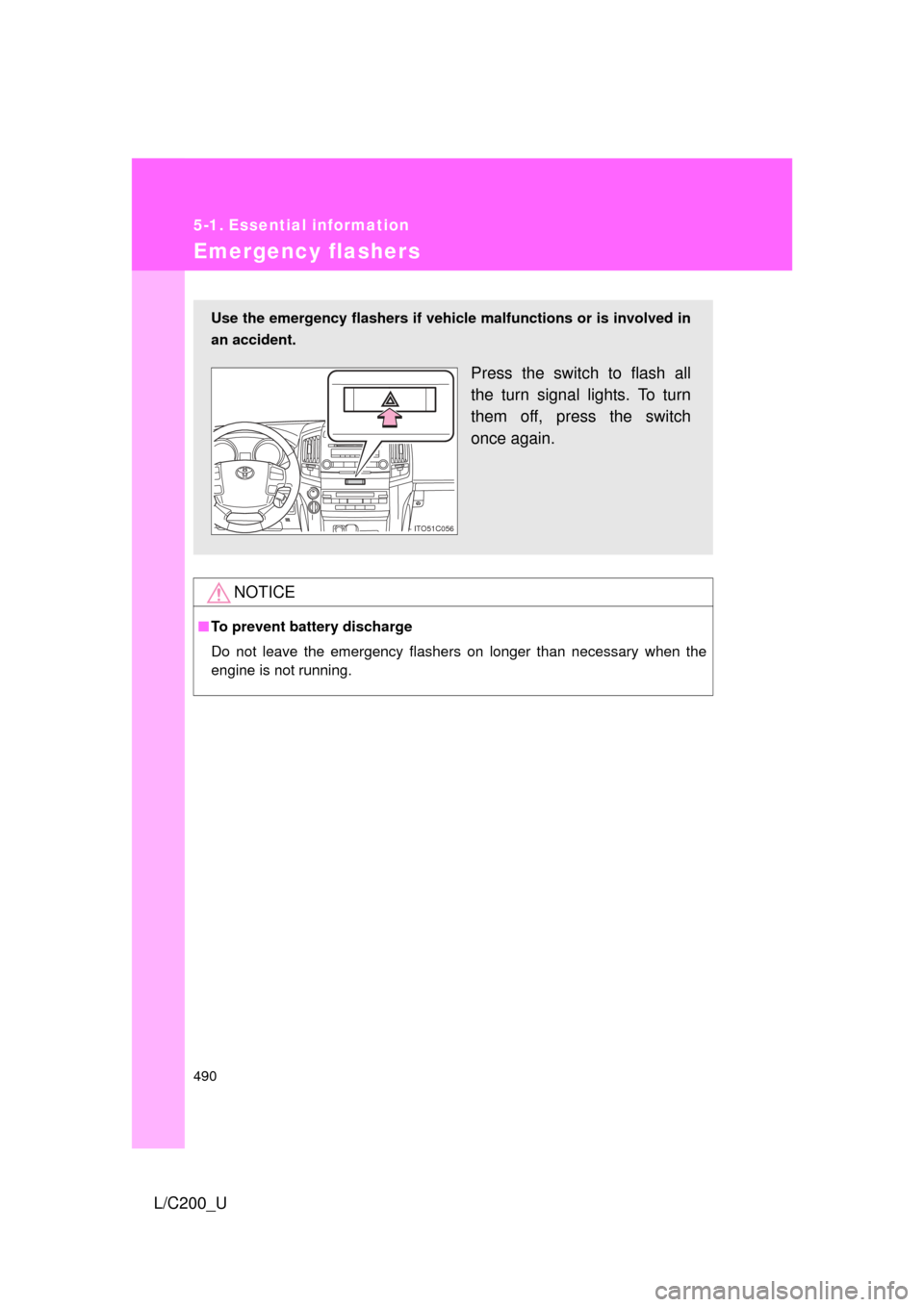
Use the emergency flashers if vehicle malfunctions or is involved in
an accident.
Press the switch to flash all
the turn signal lights. To turn
them off, press the switch
once again.
ITO51C056
Page 514 of 592
514
5-2. Steps to take in an emergency
L/C200_U
If you have a flat tire
Remove the flat tire and replace it with the spare provided.
■Before jacking up the vehicle
●Stop the vehicle on a hard, flat surface.
● Set the parking brake.
● Shift the shift lever to “P”.
● Stop the engine.
● Turn on the emergency flashers.
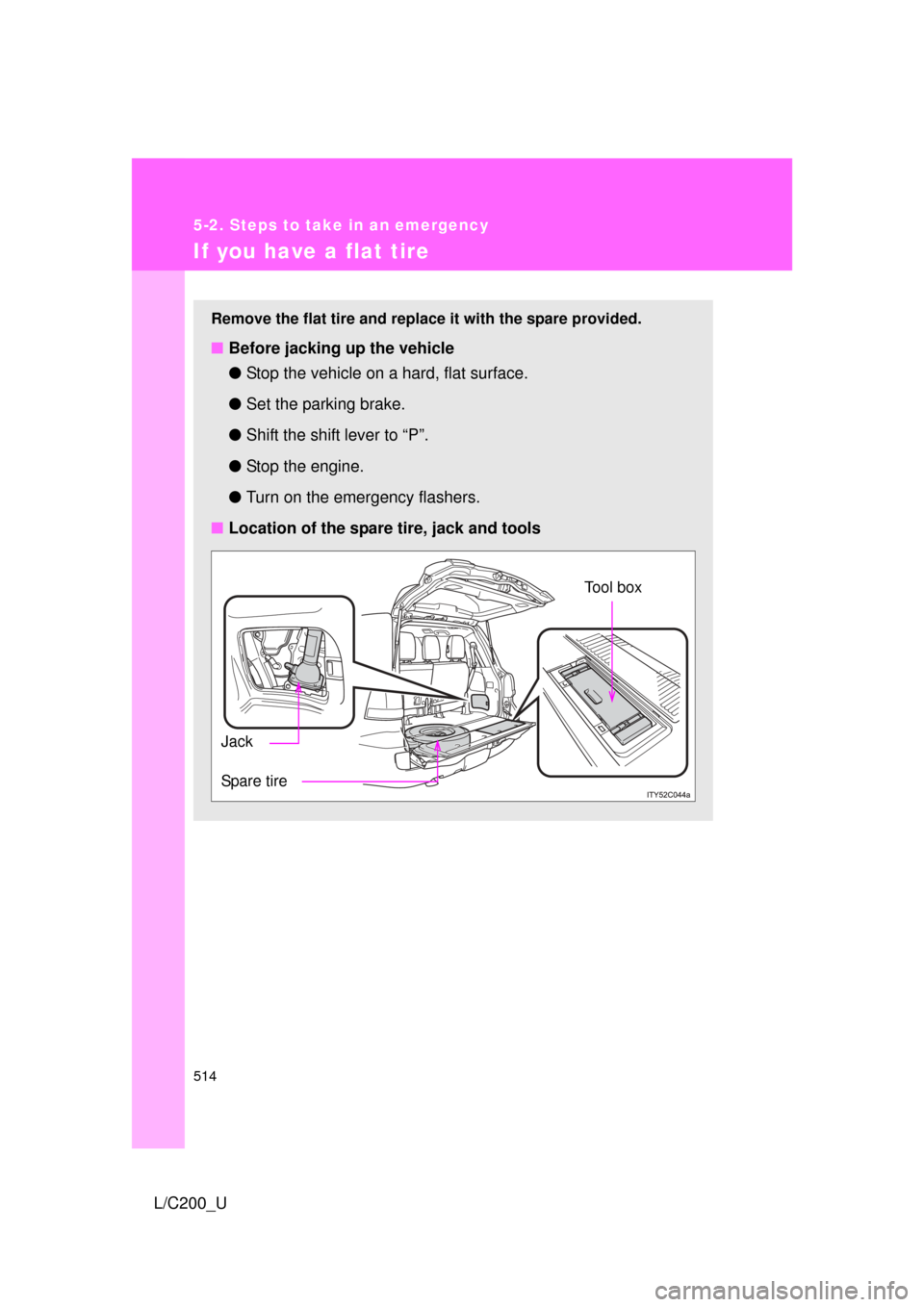
■ Location of the spare tire, jack and tools
Tool box
Spare tire Jack
Page 569 of 592
569
6-2. Customization
6
Vehicle specifications
L/C200_U
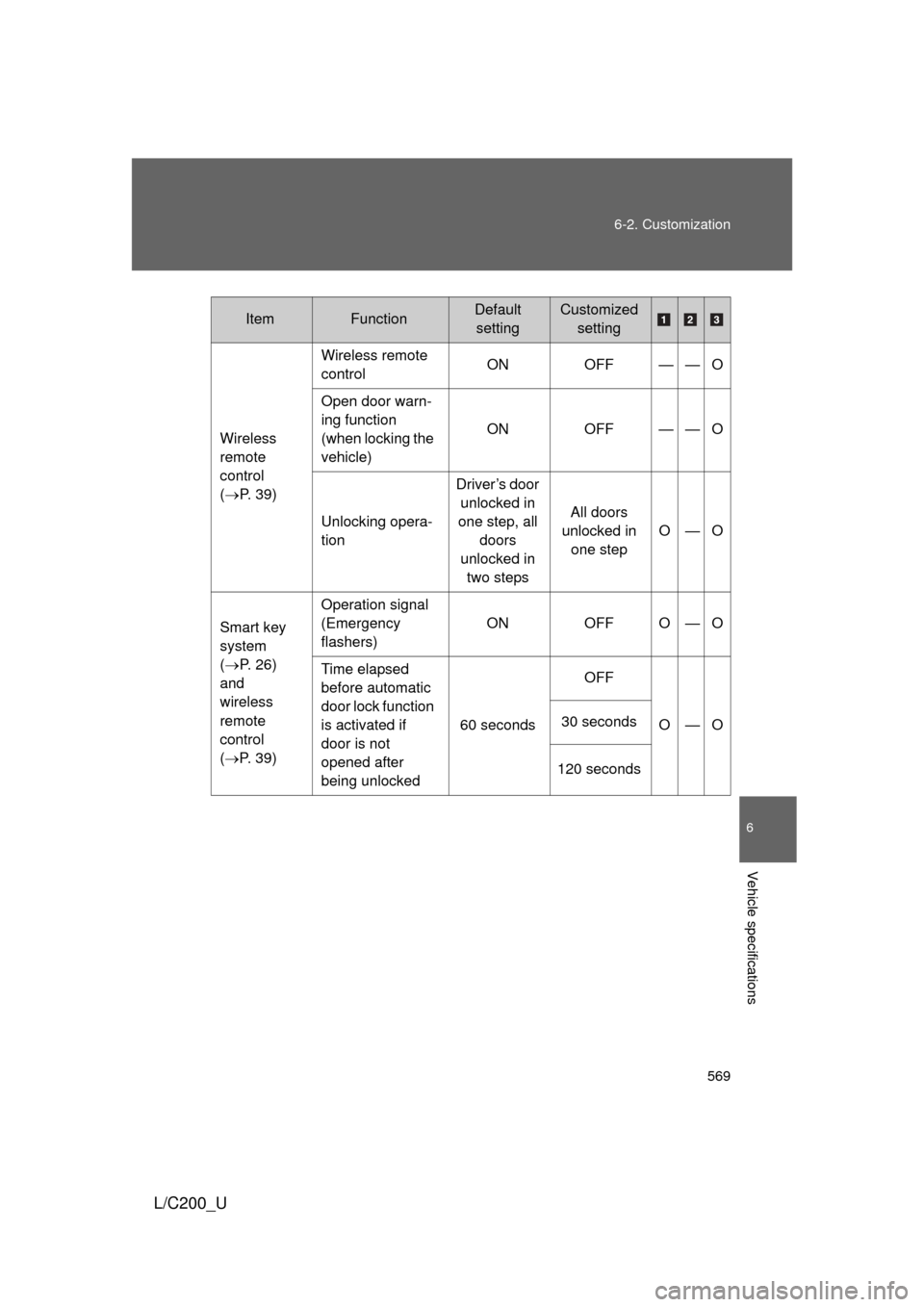
Wireless
remote
control
(
P. 39) Wireless remote
control
ON OFF — — O
Open door warn-
ing function
(when locking the
vehicle) ON OFF — — O
Unlocking opera-
tion Driver’s door
unlocked in
one step, all doors
unlocked in two steps All doors
unlocked in one step O—O
Smart key
system
( P. 26)
and
wireless
remote
control
( P. 39) Operation signal
(Emergency
flashers)
ON OFF O — O
Time elapsed
before automatic
door lock function
is activated if
door is not
opened after
being unlocked 60 seconds
OFF
O—O
30 seconds
120 seconds
ItemFunctionDefault settingCustomized setting