key TOYOTA LAND CRUISER 2010 J200 Owners Manual
[x] Cancel search | Manufacturer: TOYOTA, Model Year: 2010, Model line: LAND CRUISER, Model: TOYOTA LAND CRUISER 2010 J200Pages: 592, PDF Size: 7.98 MB
Page 2 of 592

TABLE OF CONTENTSIndex
2
L/C200_U
1-1. Key informationKeys ..................................... 24
1-2. Opening, closing and locking the doors
Smart key system................. 26
Wireless remote control ....... 39
Side doors ............................ 42
Back door ............................. 47
1-3. Adjustable components (seats, mirrors,
steering wheel)
Front seats ........................... 52
Rear seats ............................ 54
Driving position memory system ................................ 63
Head restraints ..................... 67
Seat belts ............................. 71
Steering wheel ..................... 80
Inside rear view mirror.......... 82
Outside rear view mirrors ..... 83
1-4. Opening and closing the windows and moon roof
Power windows .................... 86
Moon roof ............................. 89
1-5. Refueling Opening the fuel tank cap .... 92 1-6. Theft deterrent system
Engine immobilizer system ................................ 96
Alarm .................................... 98
1-7. Safety information Correct driving posture ....... 101
SRS airbags ....................... 103
Front passenger occupant classification system ......... 118
Child restraint systems ....... 124
Installing child restraints ..... 128
2-1. Driving procedures Driving the vehicle .............. 142
Engine (ignition) switch....... 152
Automatic transmission ...... 156
Turn signal lever ................. 161
Parking brake ..................... 162
Horn .................................... 163
2-2. Instrument cluster Gauges and meters ............ 164
Indicators and warning lights ................................. 167
Multi-information display ..... 170
2-3. Operating the lights and wipers
Headlight switch ................. 174
Fog light switch ................... 176
1Before driving
2When driving
Page 4 of 592

TABLE OF CONTENTSIndex
4
L/C200_U
3-5. Using the interior lightsInterior lights list ................. 369
• Interior lights .................... 370
• Personal lights ................. 371
3-6. Using the storage features List of storage features....... 372
• Glove box ......................... 373
• Console box ..................... 374
• Overhead console ............ 375
• Cup holders...................... 376
• Bottle holders ................... 377
• Card holders .................... 379
• Auxiliary box..................... 379
3-7. Other interior features Cool box ............................. 380
Sun visors .......................... 382
Vanity mirror ....................... 383
Clock .................................. 384
Outside temperature display .............................. 385
Ashtrays ............................. 386
Cigarette lighter .................. 388
Power outlets ..................... 389
Seat heaters ....................... 391
Armrest............................... 393
Floor mats .......................... 394
Luggage compartment features ............................ 395
Garage door opener ........... 397
Safety Connect................... 404 4-1. Maintenance and care
Cleaning and protecting the vehicle exterior ........... 412
Cleaning and protecting the vehicle interior ............ 415
4-2. Maintenance Maintenance requirements .................... 418
General maintenance ......... 420
Emission inspection and maintenance (I/M)
programs .......................... 423
4-3. Do-it-yourself maintenance Do-it-yourself service precautions ....................... 424
Hood ................................... 427
Engine compartment .......... 428
Tires.................................... 443
Tire inflation pressure ......... 452
Wheels................................ 456
Air conditioning filter ........... 458
Electronic key battery ......... 461
Checking and replacing fuses ................................. 464
Light bulbs .......................... 477
4Maintenance and care
Page 5 of 592
1
2
3
4
5
6
7
5
L/C200_U
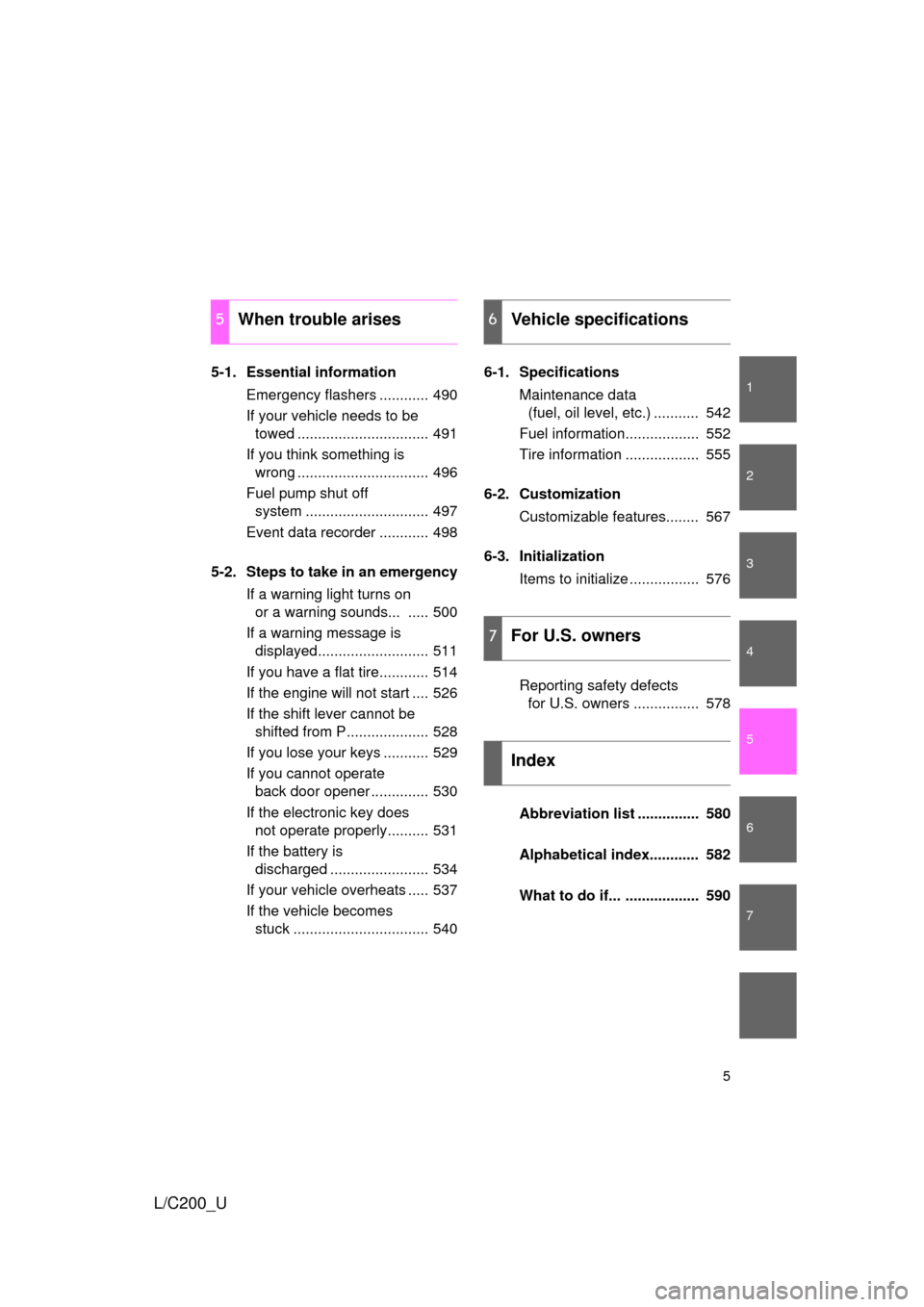
5-1. Essential informationEmergency flashers ............ 490
If your vehicle needs to be towed ................................ 491
If you think something is wrong ................................ 496
Fuel pump shut off system .............................. 497
Event data recorder ............ 498
5-2. Steps to take in an emergency If a warning light turns on or a warning sounds... ..... 500
If a warning message is displayed........................... 511
If you have a flat tire............ 514
If the engine will not start .... 526
If the shift lever cannot be shifted from P.................... 528
If you lose your keys ........... 529
If you cannot operate back door opener .............. 530
If the electronic key does not operate properly.......... 531
If the battery is discharged ........................ 534
If your vehicle overheats ..... 537
If the vehicle becomes stuck ................................. 540 6-1. Specifications
Maintenance data (fuel, oil level, etc.) ........... 542
Fuel information.................. 552
Tire information .................. 555
6-2. Customization Customizable features........ 567
6-3. Initialization Items to initialize ................. 576
Reporting safety defects for U.S. owners ................ 578
Abbreviation list ............... 580
Alphabetical index............ 582
What to do if... .................. 590
5When trouble arises6Vehicle specifications
7For U.S. owners
Index
Page 20 of 592

20
L/C200_U
CAUTION
■General precautions while driving
Driving under the influence: Never drive your vehicle when under the influ-
ence of alcohol or drugs that have impaired your ability to operate your vehi-
cle. Alcohol and certain drugs delay reaction time, impair judgment and
reduce coordination, which could lead to an accident that could result in
death or serious injury.
Defensive driving: Always drive defensively. Anticipate mistakes that other
drivers or pedestrians might make and be ready to avoid accidents.
Driver distraction: Always give your full attention to driving. Anything that dis-
tracts the driver, such as adjusting controls, talking on a cellular phone or
reading can result in a collision with resulting death or serious injury to you,
your occupants or others.
■ General precaution regarding children’s safety
Never leave children unattended in the vehicle, and never allow children to
have or use the key.
Children may be able to start the vehicle or shift the vehicle into neutral.
There is also a danger that children may injure themselves by playing with
the cigarette lighter, the windows, the moon roof, or other features of the
vehicle. In addition, heat build-up or extremely cold temperatures inside the
vehicle can be fatal to children.
Page 23 of 592
Before driving1
23
L/C200_U
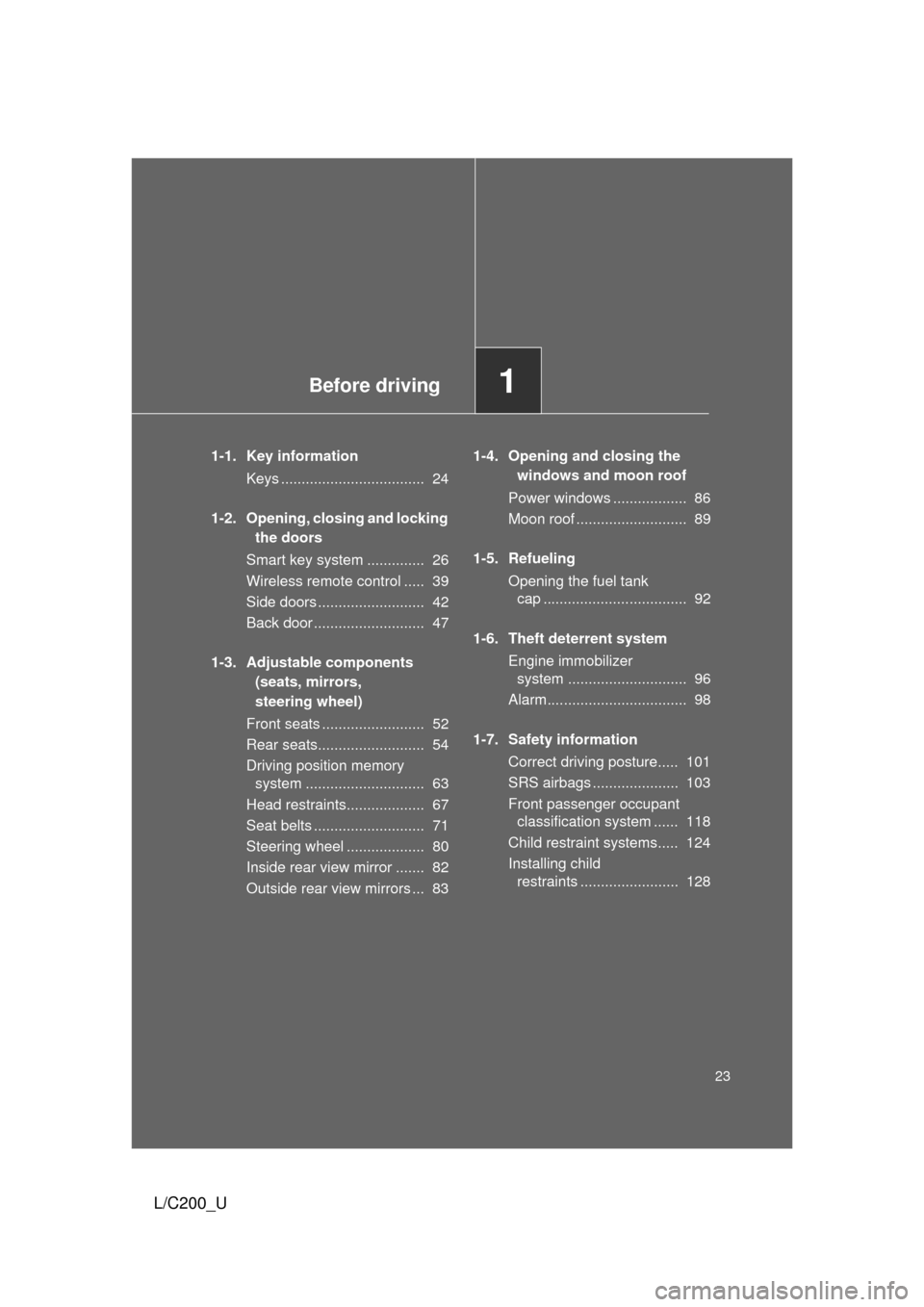
1-1. Key informationKeys ................................... 24
1-2. Opening, closing and locking the doors
Smart key system .............. 26
Wireless remote control ..... 39
Side doors .......................... 42
Back door ........................... 47
1-3. Adjustable components (seats, mirrors,
steering wheel)
Front seats ......................... 52
Rear seats.......................... 54
Driving position memory system ............................. 63
Head restraints................... 67
Seat belts ........................... 71
Steering wheel ................... 80
Inside rear view mirror ....... 82
Outside rear view mirrors ... 83 1-4. Opening and closing the
windows and moon roof
Power windows .................. 86
Moon roof ........................... 89
1-5. Refueling Opening the fuel tank cap ................................... 92
1-6. Theft deterrent system Engine immobilizer system ............................. 96
Alarm.................................. 98
1-7. Safety information Correct driving posture..... 101
SRS airbags ..................... 103
Front passenger occupant classification system ...... 118
Child restraint systems..... 124
Installing child restraints ........................ 128
Page 24 of 592
24
L/C200_U
1-1. Key information
Keys
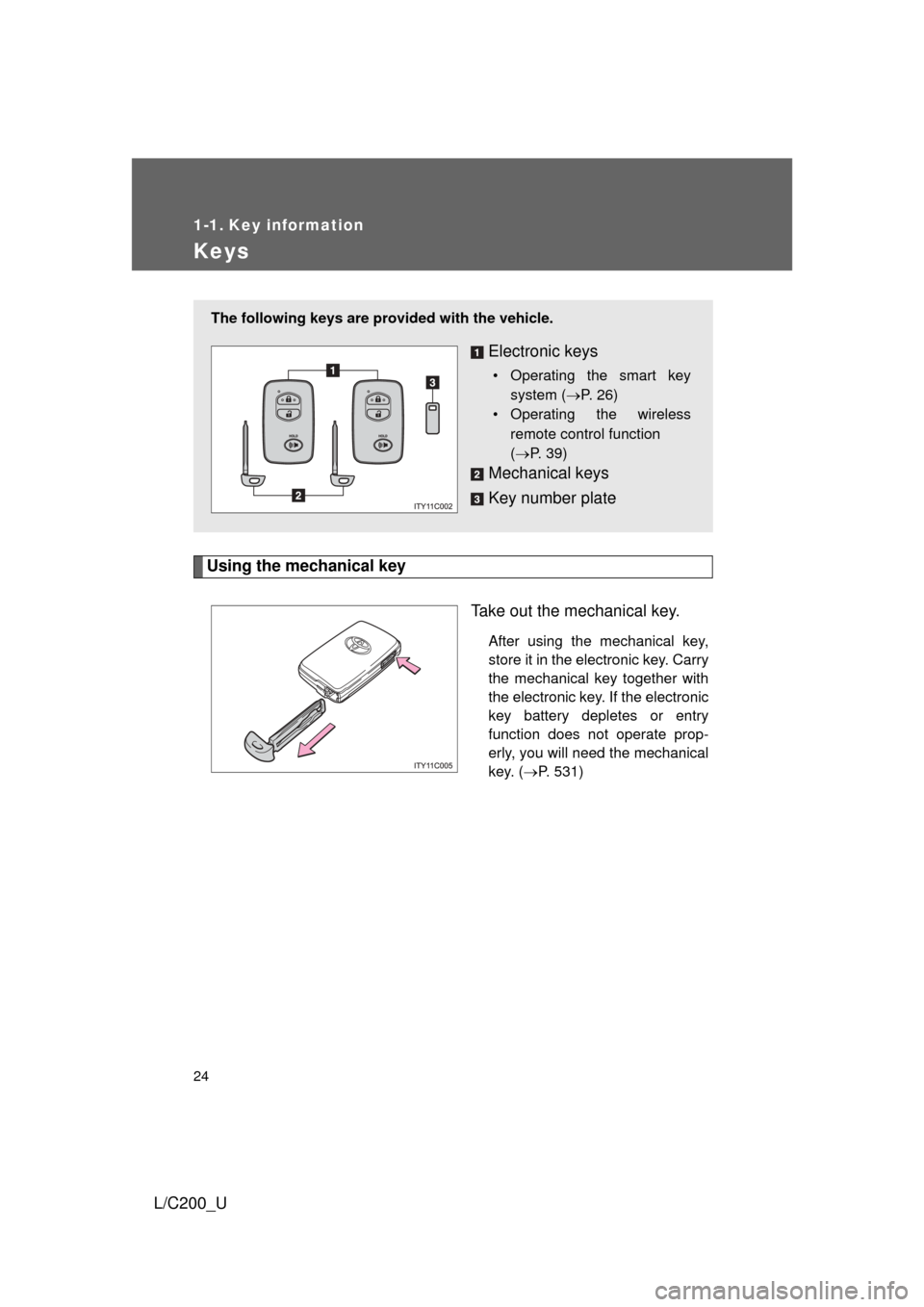
Using the mechanical keyTake out the mechanical key.
After using the mechanical key,
store it in the electronic key. Carry
the mechanical key together with
the electronic key. If the electronic
key battery depletes or entry
function does not operate prop-
erly, you will need the mechanical
key. (P. 531)
The following keys are prov ided with the vehicle.
Electronic keys
• Operating the smart key
system ( P. 26)
• Operating the wireless
remote control function
(P. 39)
Mechanical keys
Key number plate
Page 25 of 592
25
1-1. Key information
1
Before driving
L/C200_U
■
When required to leave the vehicle’s key with a parking attendant
Lock the glove box as circumstances demand. (P. 373)
Remove the mechanical key for your own use and provide the attendant with
the electronic key only.
■ Key number plate
Keep the plate in a safe place such as your wallet, not in the vehicle. In the
event that a key is lost, a new key can be made at your Toyota dealer using
the key number plate. ( P. 529)
■ When riding in an aircraft
When bringing an electronic key onto an aircraft, make sure you do not
press any buttons on the electronic key while inside the aircraft cabin. If you
are carrying an electronic key in your bag etc., ensure that the buttons are
not likely to be pressed accidentally. Pressing a button may cause the elec-
tronic key to emit radio waves that could interfere with the operation of the
aircraft.
NOTICE
■ To prevent key damage
● Do not subject the keys to strong shocks, expose them to high tempera-
tures by placing them in direct sunlight, or get them wet.
● Do not expose the keys to electromagnetic materials or attach any mate-
rial that blocks electromagnetic waves to the key surface.
● Do not disassemble the electronic key.
Page 26 of 592
26
L/C200_U
1-2. Opening, closing and locking the doors
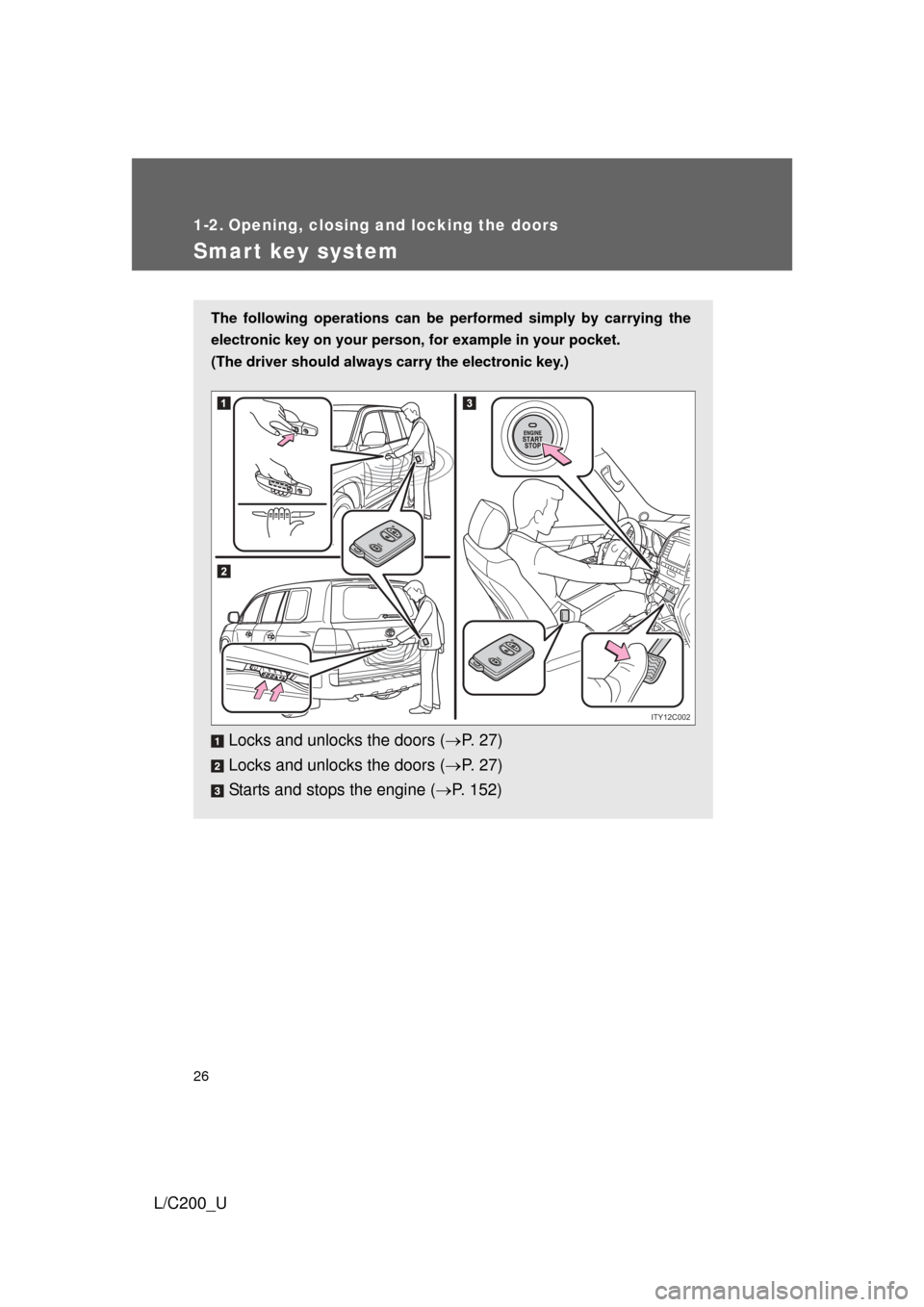
Smart key system
The following operations can be performed simply by carrying the
electronic key on your person, for example in your pocket.
(The driver should always carry the electronic key.)
Locks and unlocks the doors ( P. 2 7 )
Locks and unlocks the doors ( P. 2 7 )
Starts and stops the engine ( P. 152)
ITY12C002
Page 29 of 592
29
1-2. Opening, closing and locking the doors
1
Before driving
L/C200_U
■
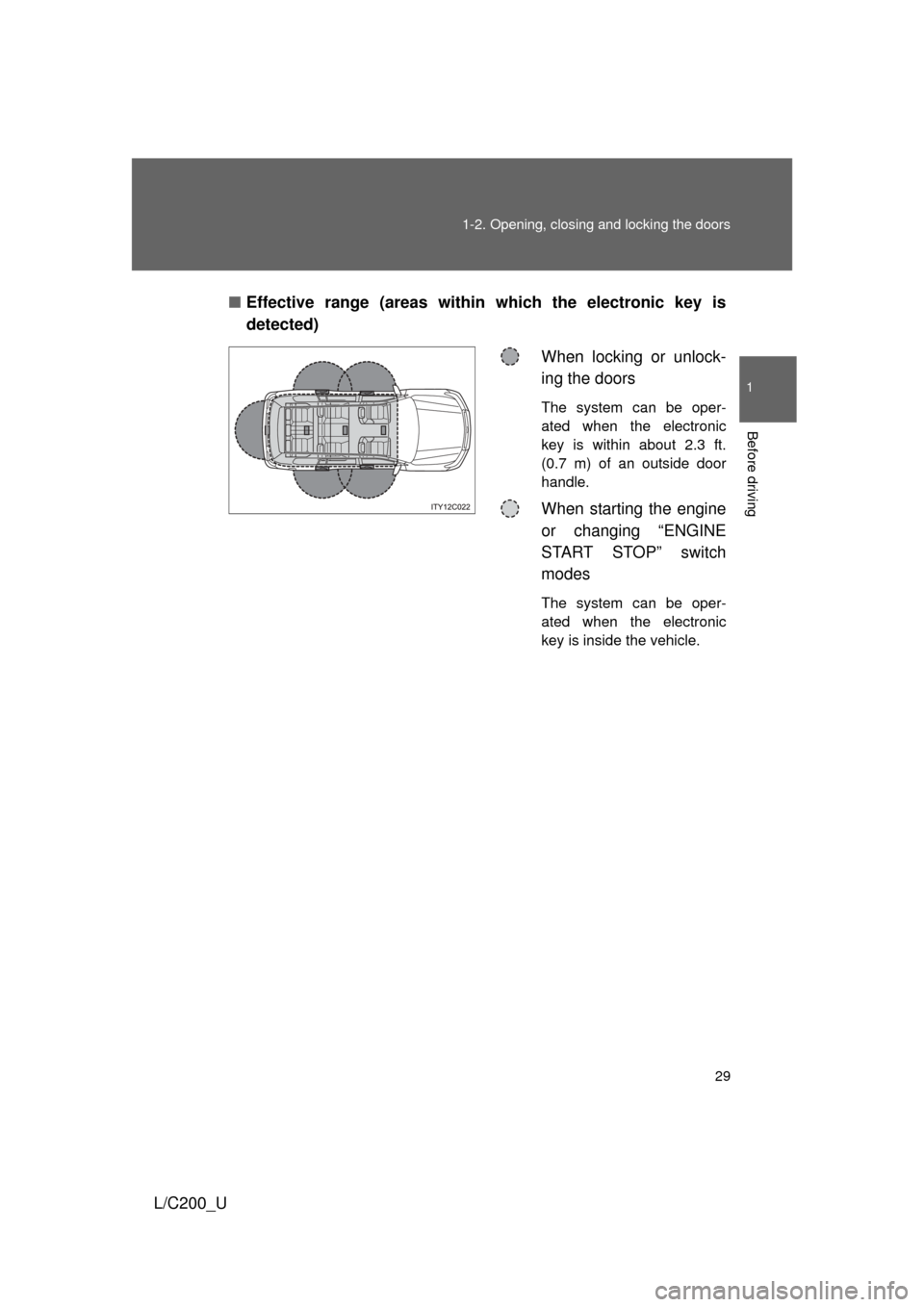
Effective range (areas within which the electronic key is
detected)
When locking or unlock-
ing the doors
The system can be oper-
ated when the electronic
key is within about 2.3 ft.
(0.7 m) of an outside door
handle.
When starting the engine
or changing “ENGINE
START STOP” switch
modes
The system can be oper-
ated when the electronic
key is inside the vehicle.
Page 30 of 592

30 1-2. Opening, closing and locking the doors
L/C200_U
■Operation signals
A buzzer sounds and the emergency flashers flash to indicate that the doors
have been locked/unlocked. (Locked: Once; Unlocked: Twice)
■ Conditions affecting operation
The smart key system uses weak radio waves. In the following situations,
the communication between the electronic key and the vehicle may be
affected, preventing the smart key system and wireless remote control from
operating properly. (Ways of coping P. 531)
● When the electronic key battery is depleted
● Near a TV tower, electric power plant, gas station, radio station, large dis-
play, airport or other facility that generates strong radio waves or electri-
cal noise
● When carrying a portable radio, ce llular phone, cordless phone or other
wireless communication devices
● When the electronic key has come into contact with, or is covered by a
metallic object
● When multiple electronic keys are in the vicinity
● When carrying or using the electronic key together with the following
devices that emit radio waves
• Another vehicle’s electronic key
• A wireless key that emits radio waves
• Personal computer
● If window tint with a metallic content or metallic objects are attached to
the rear window