TOYOTA LAND CRUISER 2010 J200 Quick Reference Guide
LAND CRUISER 2010 J200
TOYOTA
TOYOTA
https://www.carmanualsonline.info/img/14/6489/w960_6489-0.png
TOYOTA LAND CRUISER 2010 J200 Quick Reference Guide
Page 16 of 30
14
FEATURES/OPERATIONS
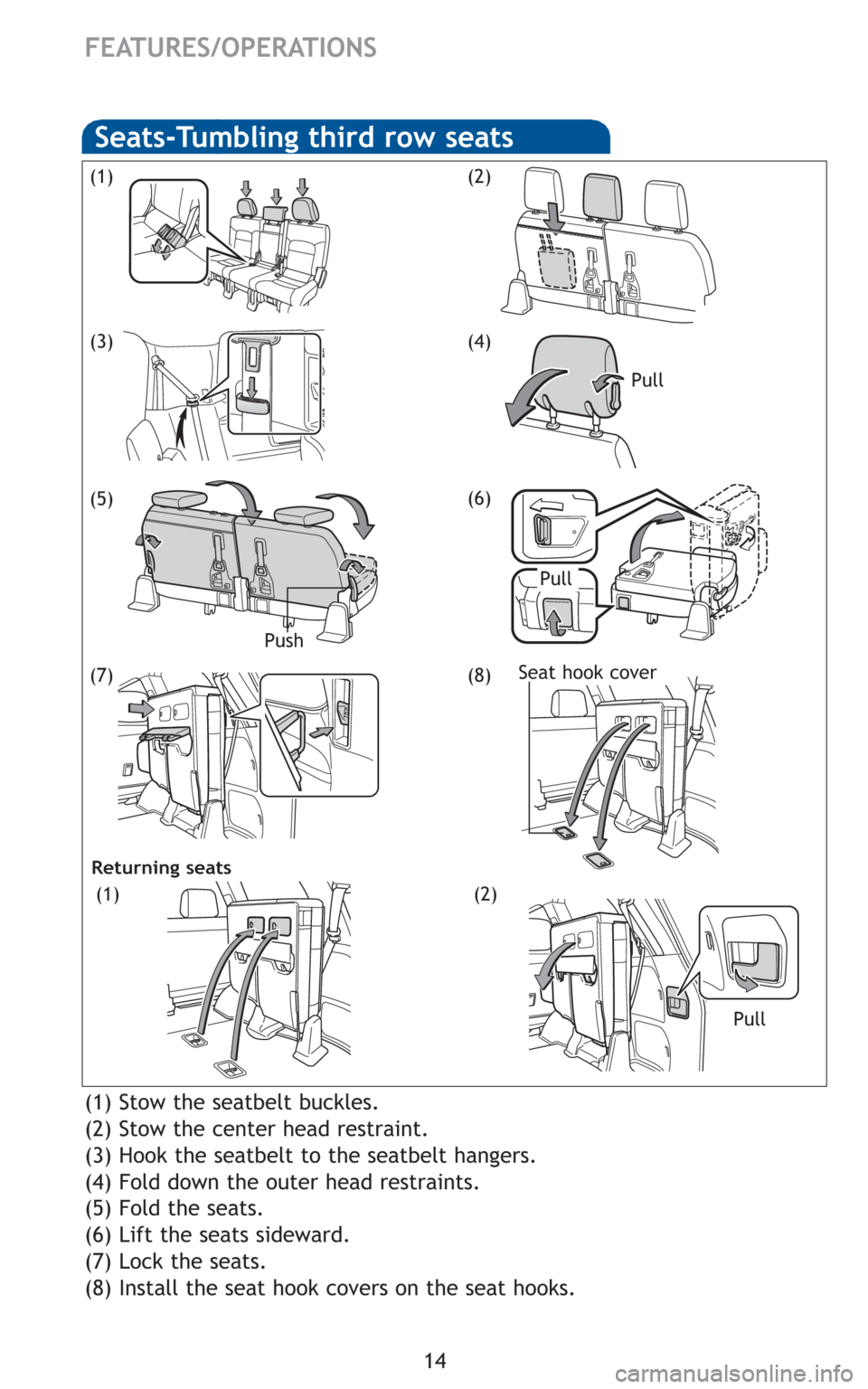
(1) Stow the seatbelt buckles.
(2) Stow the center head restraint.
(3) Hook the seatbelt to the seatbelt hangers.
(4) Fold down the outer head restraints.
(5) Fold the seats.
(6) Lift the seats sideward.
(7) Lock the seats.
(8) Install the seat hook covers on the seat hooks.
(1)
(5)
(3)
(2)
Seats-Tumbling third row seats
(4)
Push
(6)
Pull
(7)(8)Seat hook cover
Pull Pull
Returning seats
(1)(2)
Page 18 of 30
16
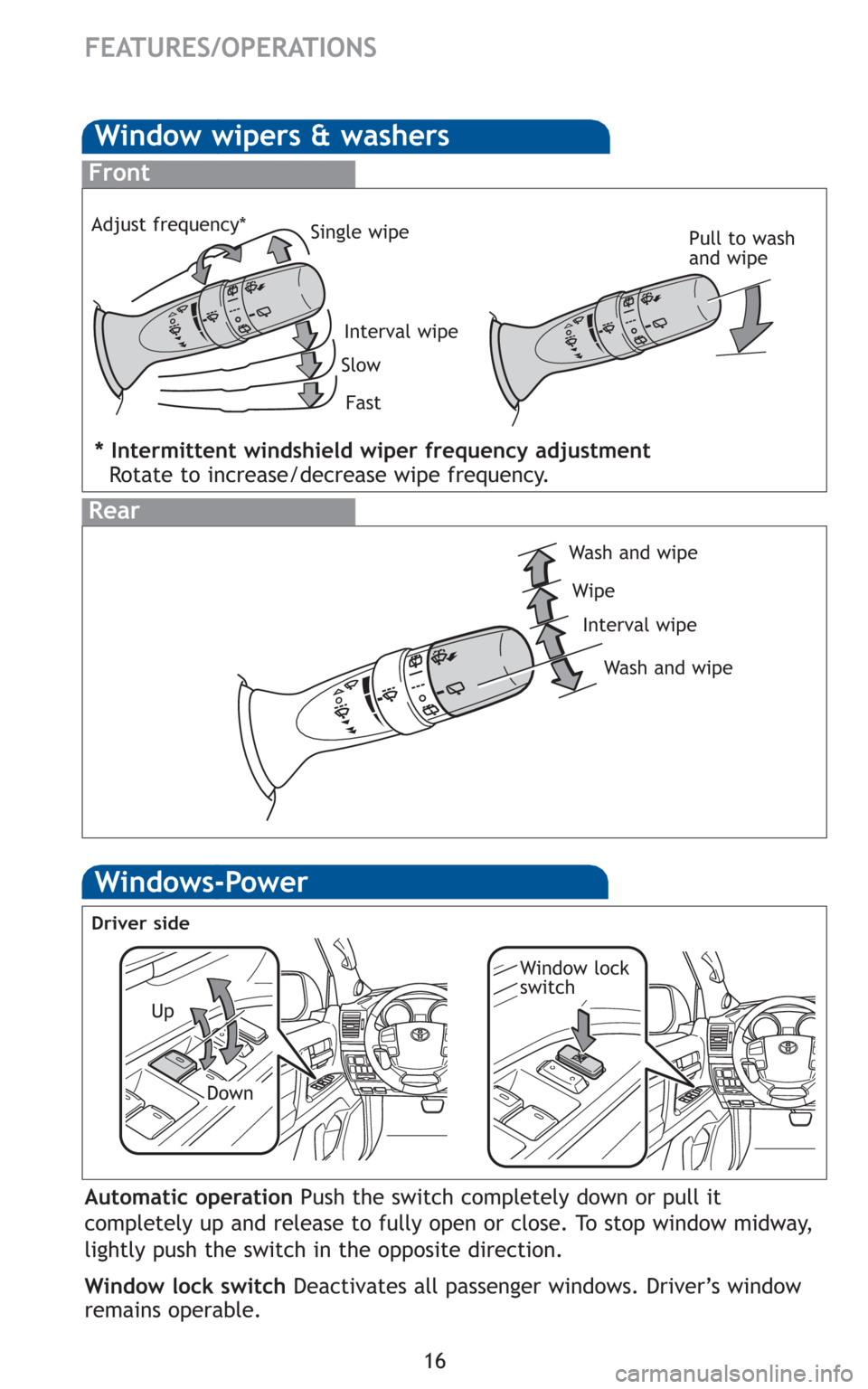
Window wipers & washers
Interval wipe Single wipe
Slow
Fast
Pull to wash
and wipe
Front
Rear
Wash and wipe
Wipe
Interval wipe
Wash and wipe
FEATURES/OPERATIONS
* Intermittent windshield wiper frequency adjustment
Rotate to increase/decrease wipe frequency.
Adjust frequency*
Windows-Power
Up
Down
Driver side
Window lock
switch
Automatic operation Push the switch completely down or pull it
completely up and release to fully open or close. To stop window midway,
lightly push the switch in the opposite direction.
Window lock switch Deactivates all passenger windows. Driver’s window
remains operable.
Page 19 of 30
17
OVERVIEW
FEATURES/OPERATIONS
SAFETY AND EMERGENCY FEATURES
Back door
Pull Unlock
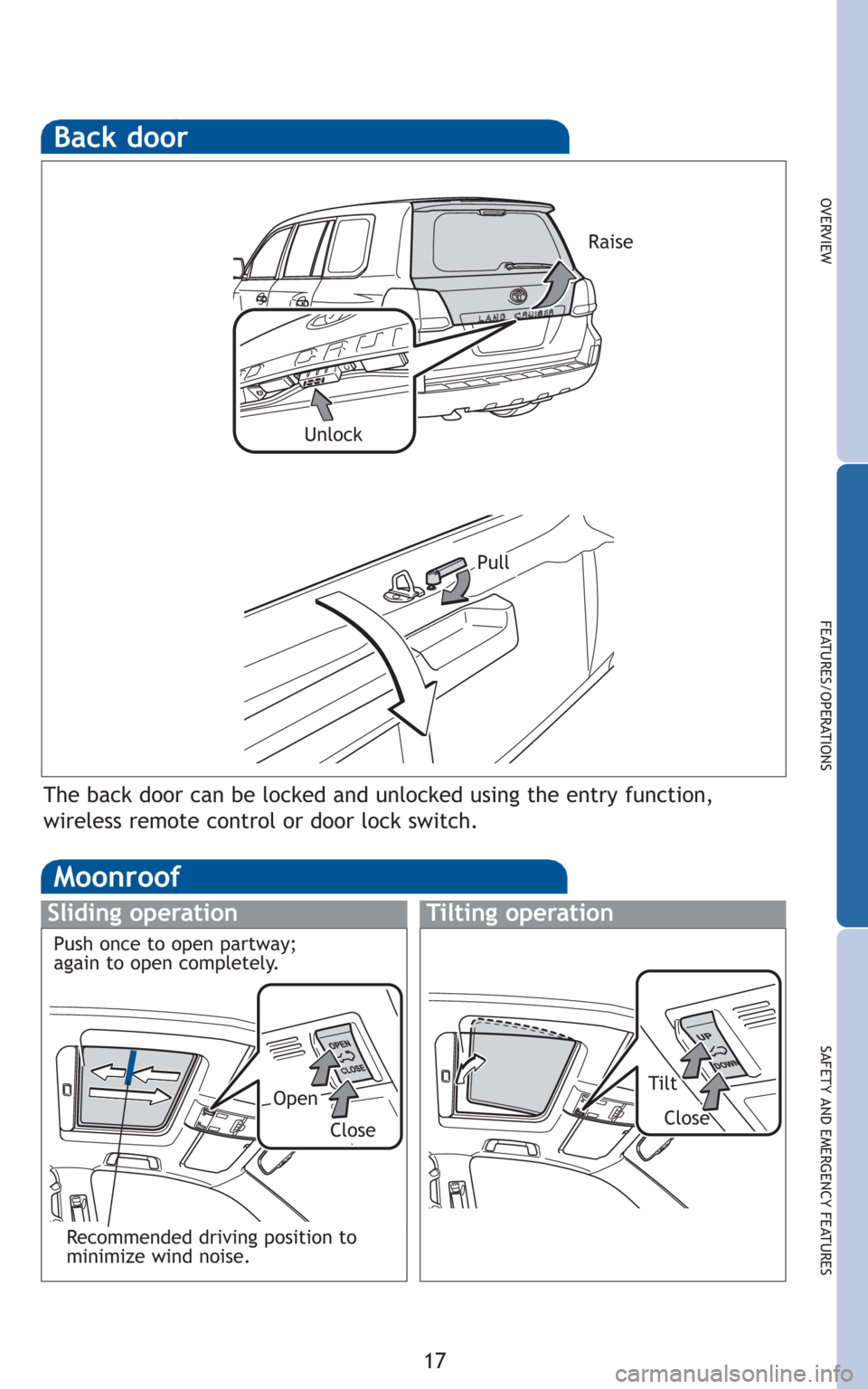
The back door can be locked and unlocked using the entry function,
wireless remote control or door lock switch.
Raise
Moonroof
Sliding operationTilting operation
OpenTilt
CloseClose
Recommended driving position to
minimize wind noise. Push once to open partway;
again to open completely.
Page 21 of 30
19
OVERVIEW
FEATURES/OPERATIONS
SAFETY AND EMERGENCY FEATURES
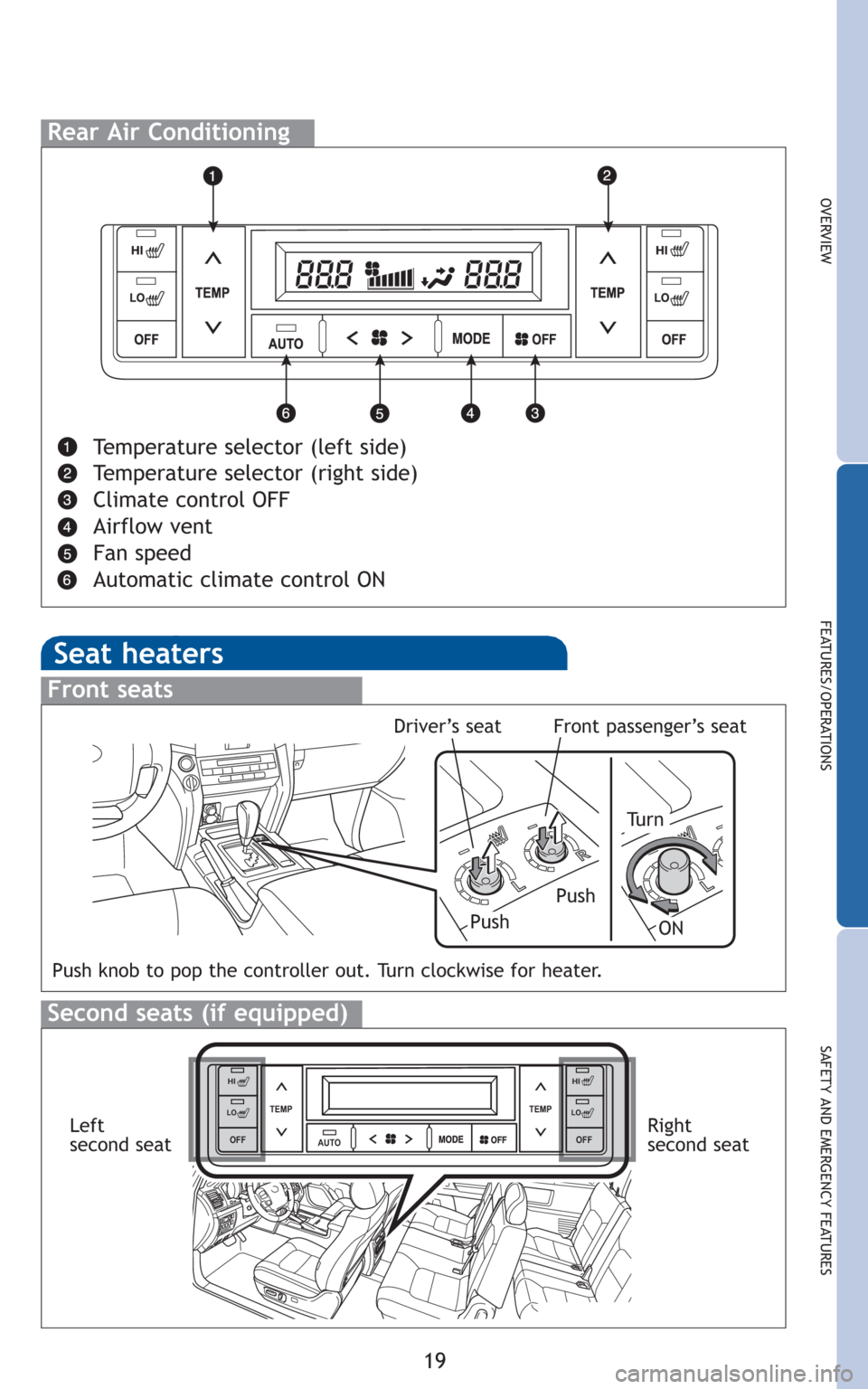
Rear Air Conditioning
Temperature selector (left side)
Temperature selector (right side)
Climate control OFF
Airflow vent
Fan speed
Automatic climate control ON
Seat heaters
L
R
L
Front seats
Push
Tu r n
Push knob to pop the controller out. Turn clockwise for heater.
Push
Second seats (if equipped)
Driver’s seatFront passenger’s seat
AUTO TEMP
OFFTEMP
HI
LO
OFF
HI
LO
OFF
HI
LO
OFF
HI
LOLeft
second seatRight
second seat
ON
Page 26 of 30
24
FEATURES/OPERATIONS
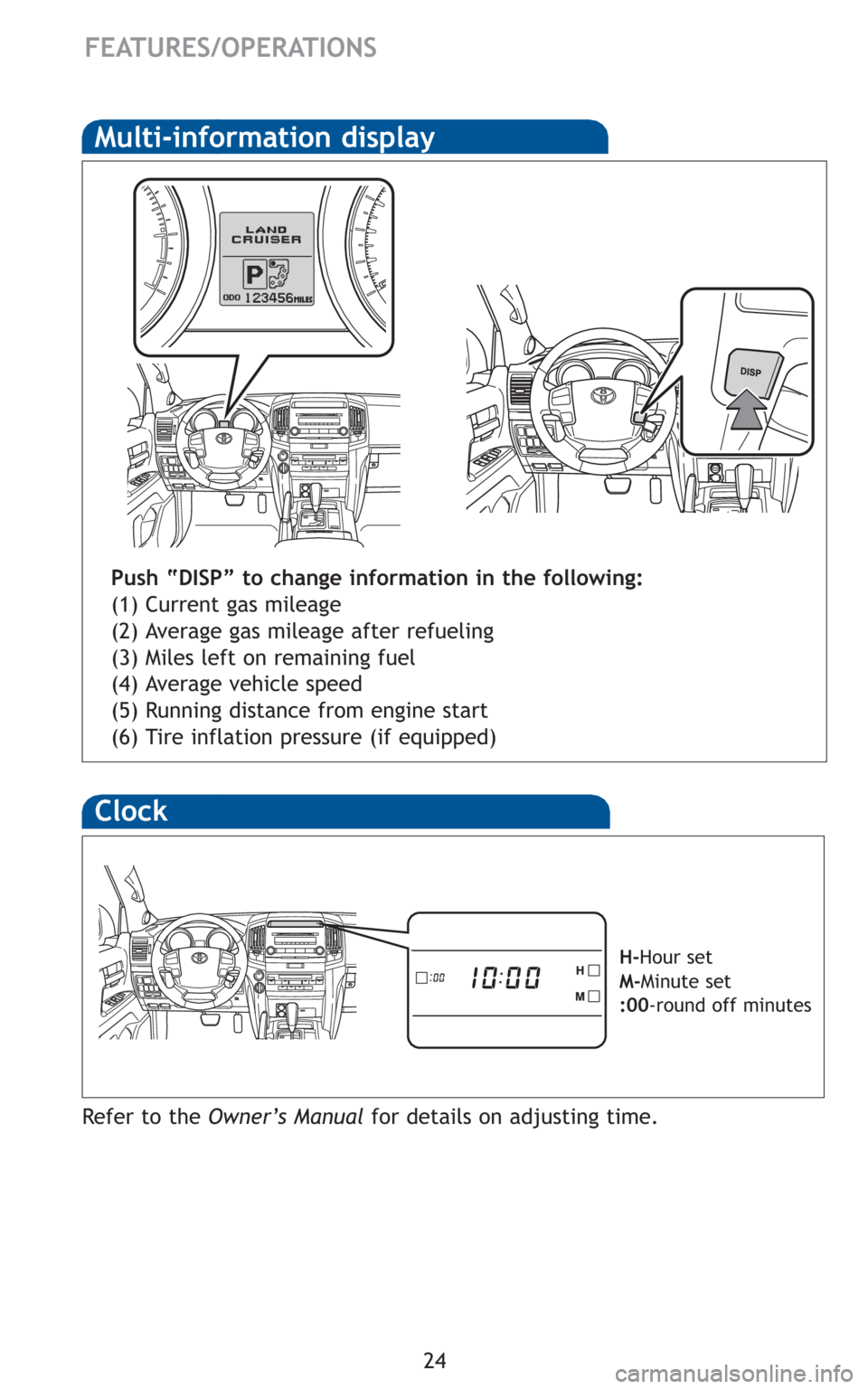
Multi-information display
Push “DISP” to change information in the following:
(1) Current gas mileage
(2) Average gas mileage after refueling
(3) Miles left on remaining fuel
(4) Average vehicle speed
(5) Running distance from engine start
(6) Tire inflation pressure (if equipped)
Clock
H-Hour set
M-Minute set
:00-round off minutes
Refer to the Owner’s Manualfor details on adjusting time.
Page 27 of 30
25
OVERVIEW
FEATURES/OPERATIONS
SAFETY AND EMERGENCY FEATURES
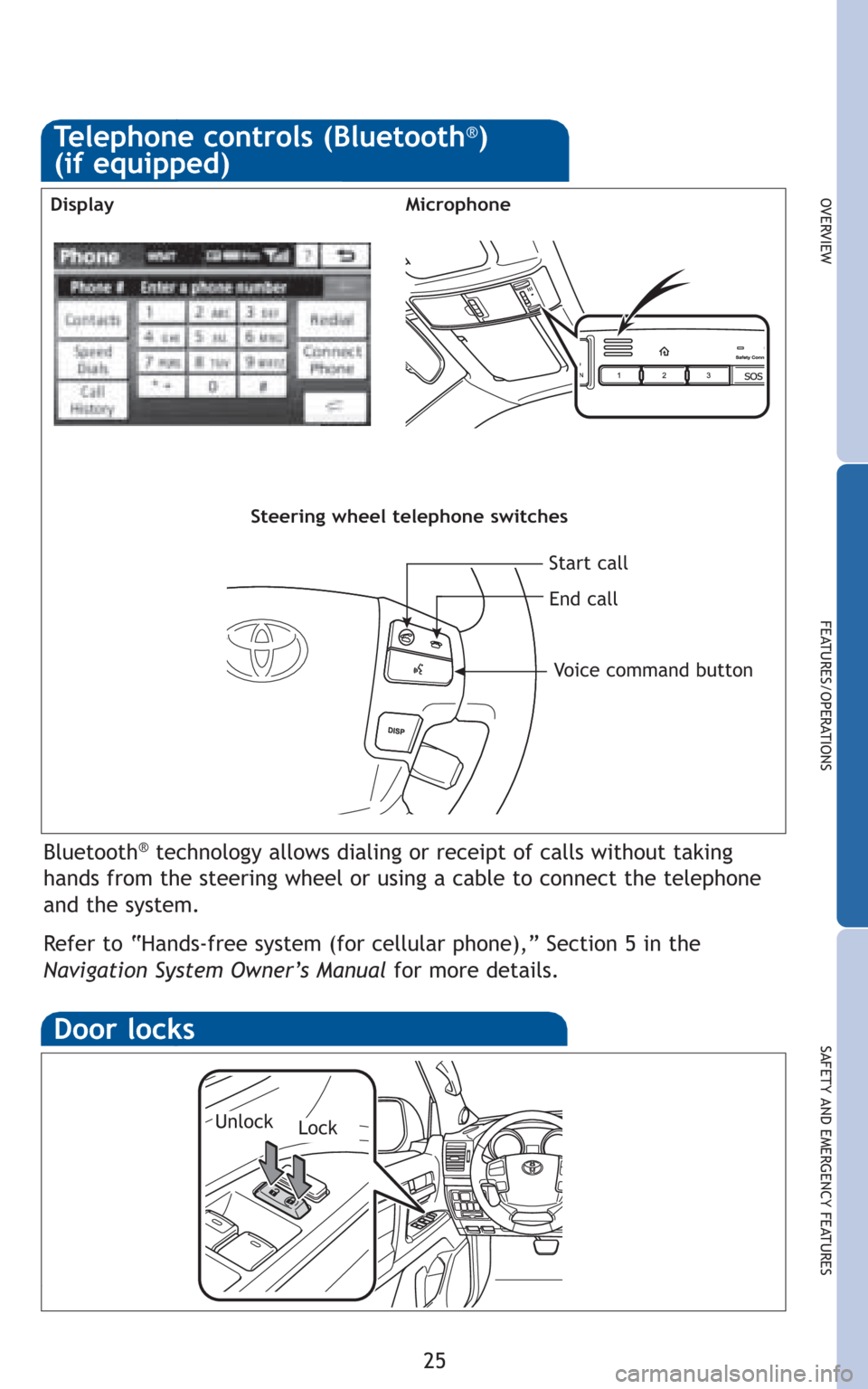
Bluetooth®technology allows dialing or receipt of calls without taking
hands from the steering wheel or using a cable to connect the telephone
and the system.
Refer to “Hands-free system (for cellular phone),” Section 5 in the
Navigation System Owner’s Manualfor more details.
Telephone controls (Bluetooth®)
(if equipped)
MicrophoneDisplay
Steering wheel telephone switches
Start call
End call
Voice command button
Door locks
LockUnlock
Page 30 of 30
28
SAFETY AND EMERGENCY FEATURES
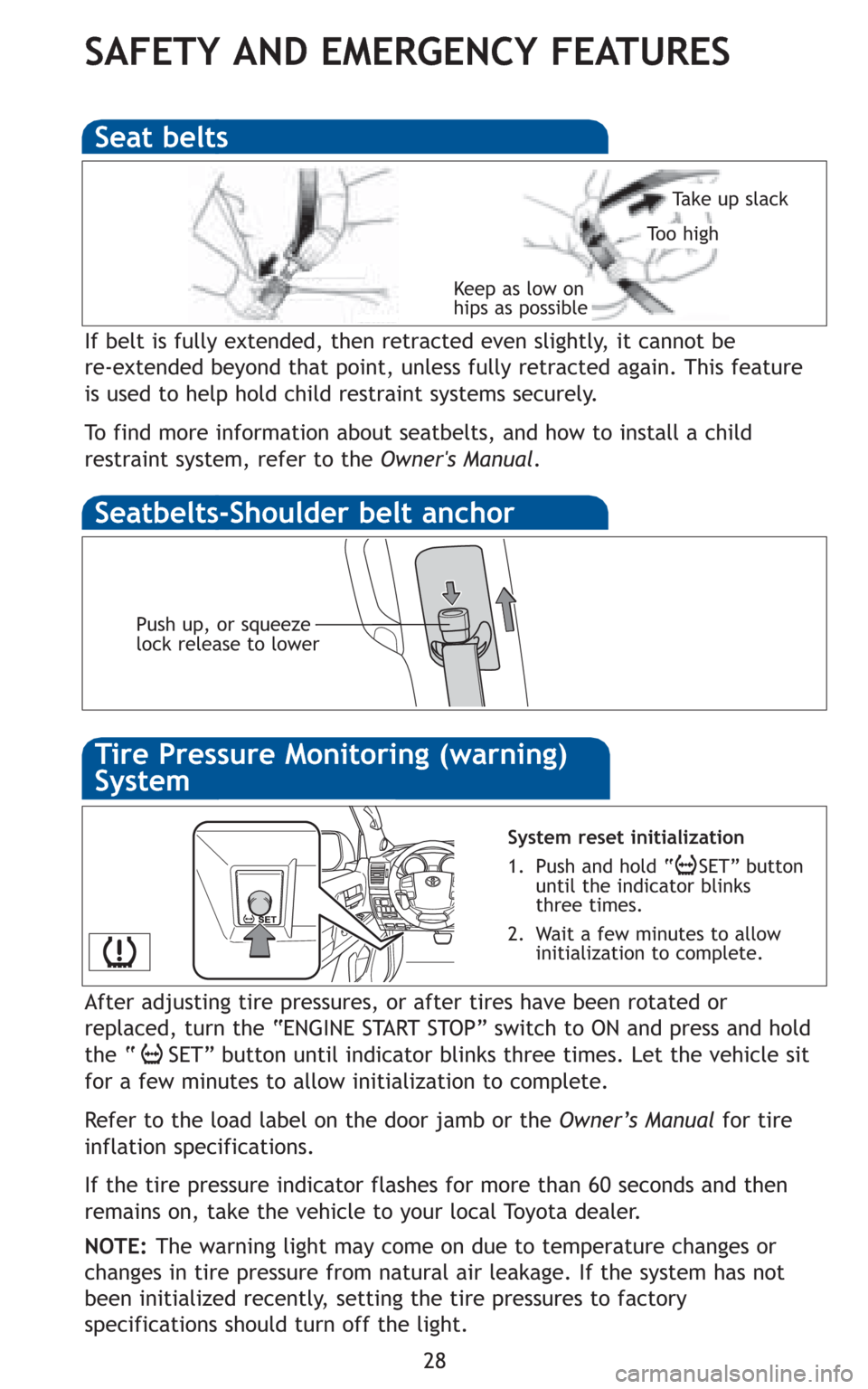
If belt is fully extended, then retracted even slightly, it cannot be
re-extended beyond that point, unless fully retracted again. This feature
is used to help hold child restraint systems securely.
To find more information about seatbelts, and how to install a child
restraint system, refer to the Owner's Manual.
Keep as low on
hips as possible
Take up slack
Too high
Seat belts
Push up, or squeeze
lock release to lower
System reset initialization
1. Push and hold “ SET” button
until the indicator blinks
three times.
2. Wait a few minutes to allow
initialization to complete.
Seatbelts-Shoulder belt anchor
After adjusting tire pressures, or after tires have been rotated or
replaced, turn the “ENGINE START STOP” switch to ON and press and hold
the “ SET” button until indicator blinks three times. Let the vehicle sit
for a few minutes to allow initialization to complete.
Refer to the load label on the door jamb or the Owner’s Manualfor tire
inflation specifications.
If the tire pressure indicator flashes for more than 60 seconds and then
remains on, take the vehicle to your local Toyota dealer.
NOTE:The warning light may come on due to temperature changes or
changes in tire pressure from natural air leakage. If the system has not
been initialized recently, setting the tire pressures to factory
specifications should turn off the light.
Tire Pressure Monitoring (warning)
System