CD player TOYOTA LAND CRUISER 2014 J200 Navigation Manual
[x] Cancel search | Manufacturer: TOYOTA, Model Year: 2014, Model line: LAND CRUISER, Model: TOYOTA LAND CRUISER 2014 J200Pages: 427, PDF Size: 25.75 MB
Page 7 of 427
7
1
2
3
4
5
6
7
8
9
L/C200_Navi_OM60L27U_(U)
13.06.03 19:56
10
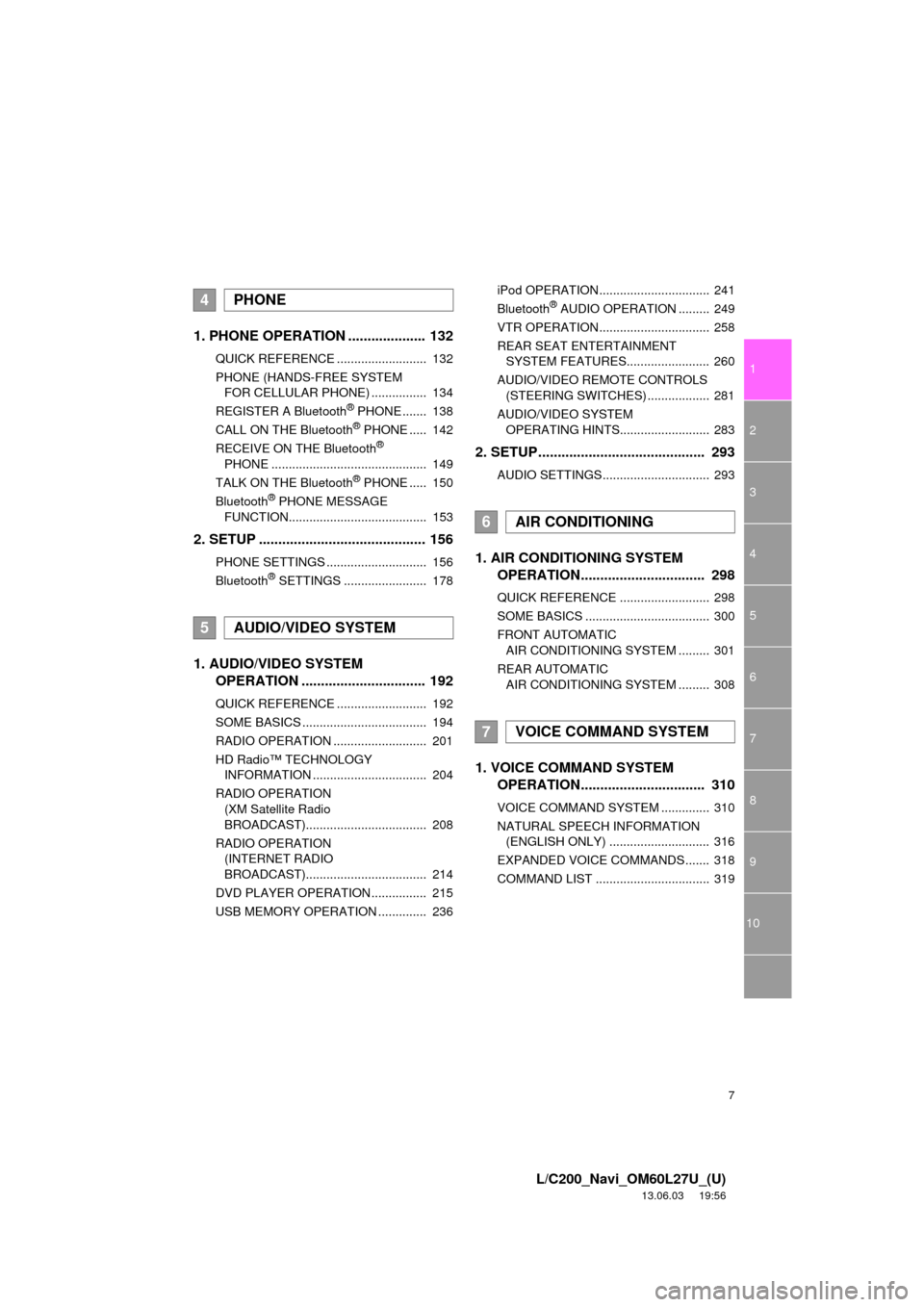
1. PHONE OPERATION .................... 132
QUICK REFERENCE .......................... 132
PHONE (HANDS-FREE SYSTEM
FOR CELLULAR PHONE) ................ 134
REGISTER A Bluetooth
® PHONE ....... 138
CALL ON THE Bluetooth® PHONE ..... 142
RECEIVE ON THE Bluetooth®
PHONE ............................................. 149
TALK ON THE Bluetooth
® PHONE ..... 150
Bluetooth® PHONE MESSAGE
FUNCTION........................................ 153
2. SETUP ........................................... 156
PHONE SETTINGS ............................. 156
Bluetooth® SETTINGS ........................ 178
1. AUDIO/VIDEO SYSTEM
OPERATION ................................ 192
QUICK REFERENCE .......................... 192
SOME BASICS .................................... 194
RADIO OPERATION ........................... 201
HD Radio™ TECHNOLOGY
INFORMATION ................................. 204
RADIO OPERATION
(XM Satellite Radio
BROADCAST)................................... 208
RADIO OPERATION
(INTERNET RADIO
BROADCAST)................................... 214
DVD PLAYER OPERATION ................ 215
USB MEMORY OPERATION .............. 236iPod OPERATION................................ 241
Bluetooth
® AUDIO OPERATION ......... 249
VTR OPERATION................................ 258
REAR SEAT ENTERTAINMENT
SYSTEM FEATURES........................ 260
AUDIO/VIDEO REMOTE CONTROLS
(STEERING SWITCHES) .................. 281
AUDIO/VIDEO SYSTEM
OPERATING HINTS.......................... 283
2. SETUP........................................... 293
AUDIO SETTINGS............................... 293
1. AIR CONDITIONING SYSTEM
OPERATION................................ 298
QUICK REFERENCE .......................... 298
SOME BASICS .................................... 300
FRONT AUTOMATIC
AIR CONDITIONING SYSTEM ......... 301
REAR AUTOMATIC
AIR CONDITIONING SYSTEM ......... 308
1. VOICE COMMAND SYSTEM
OPERATION................................ 310
VOICE COMMAND SYSTEM .............. 310
NATURAL SPEECH INFORMATION
(ENGLISH ONLY) ............................. 316
EXPANDED VOICE COMMANDS....... 318
COMMAND LIST ................................. 319
4PHONE
5AUDIO/VIDEO SYSTEM
6AIR CONDITIONING
7VOICE COMMAND SYSTEM
Page 131 of 427
4
131
1
2
3
4
5
6
7
8
L/C200_Navi_OM60L27U_(U)
13.06.03 19:43
9
10
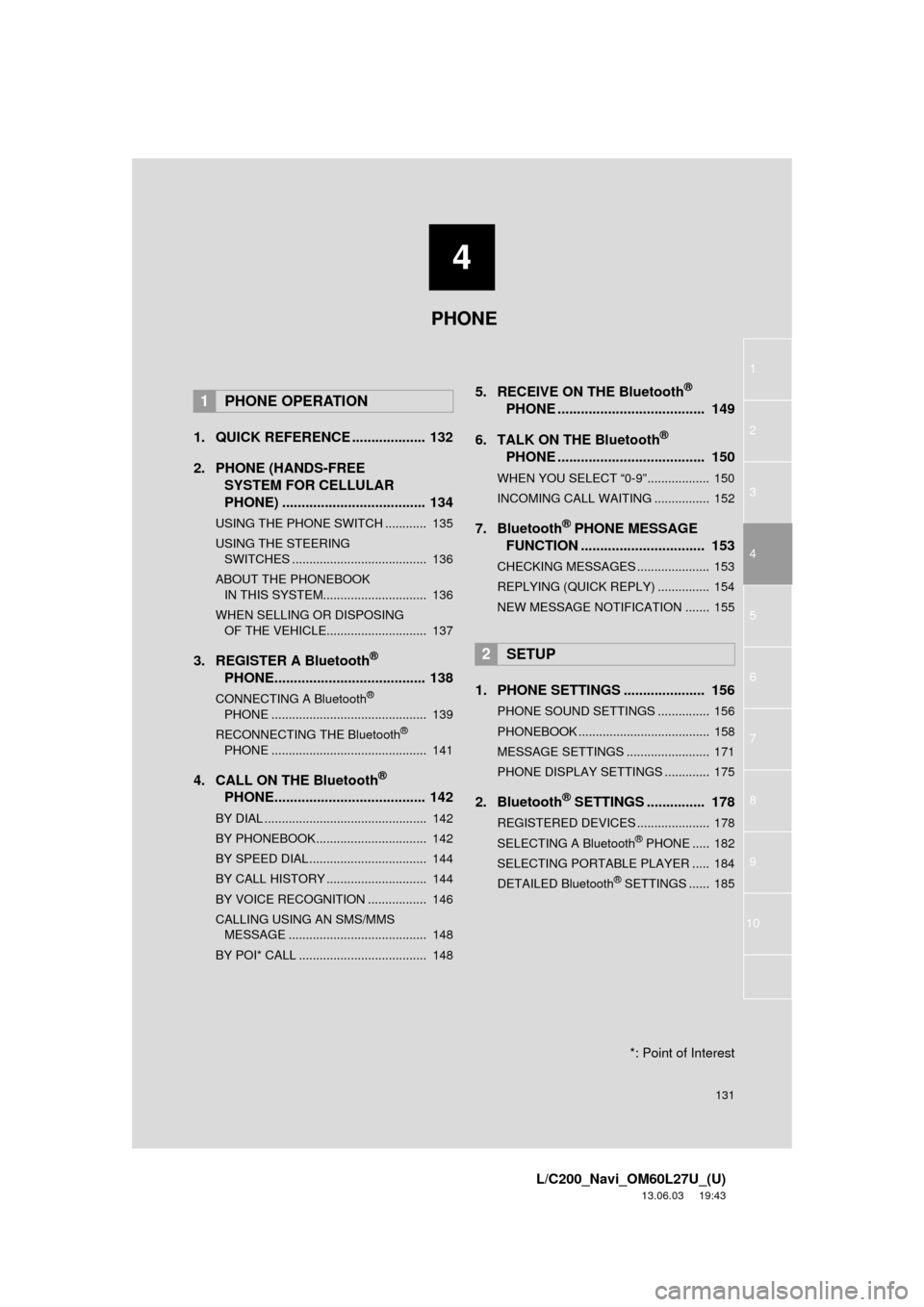
1. QUICK REFERENCE ................... 132
2. PHONE (HANDS-FREE
SYSTEM FOR CELLULAR
PHONE) ..................................... 134
USING THE PHONE SWITCH ............ 135
USING THE STEERING
SWITCHES ....................................... 136
ABOUT THE PHONEBOOK
IN THIS SYSTEM.............................. 136
WHEN SELLING OR DISPOSING
OF THE VEHICLE............................. 137
3. REGISTER A Bluetooth®
PHONE....................................... 138
CONNECTING A Bluetooth®
PHONE ............................................. 139
RECONNECTING THE Bluetooth
®
PHONE ............................................. 141
4. CALL ON THE Bluetooth®
PHONE....................................... 142
BY DIAL ............................................... 142
BY PHONEBOOK................................ 142
BY SPEED DIAL.................................. 144
BY CALL HISTORY ............................. 144
BY VOICE RECOGNITION ................. 146
CALLING USING AN SMS/MMS
MESSAGE ........................................ 148
BY POI* CALL ..................................... 148
5. RECEIVE ON THE Bluetooth®
PHONE ...................................... 149
6. TALK ON THE Bluetooth
®
PHONE ...................................... 150
WHEN YOU SELECT “0-9”.................. 150
INCOMING CALL WAITING ................ 152
7. Bluetooth® PHONE MESSAGE
FUNCTION ................................ 153
CHECKING MESSAGES ..................... 153
REPLYING (QUICK REPLY) ............... 154
NEW MESSAGE NOTIFICATION ....... 155
1. PHONE SETTINGS ..................... 156
PHONE SOUND SETTINGS ............... 156
PHONEBOOK ...................................... 158
MESSAGE SETTINGS ........................ 171
PHONE DISPLAY SETTINGS ............. 175
2. Bluetooth® SETTINGS ............... 178
REGISTERED DEVICES ..................... 178
SELECTING A Bluetooth® PHONE ..... 182
SELECTING PORTABLE PLAYER ..... 184
DETAILED Bluetooth
® SETTINGS ...... 185
1PHONE OPERATION
2SETUP
PHONE
*: Point of Interest
Page 179 of 427
179
2. SETUP
4
PHONE
L/C200_Navi_OM60L27U_(U)
13.06.03 19:43
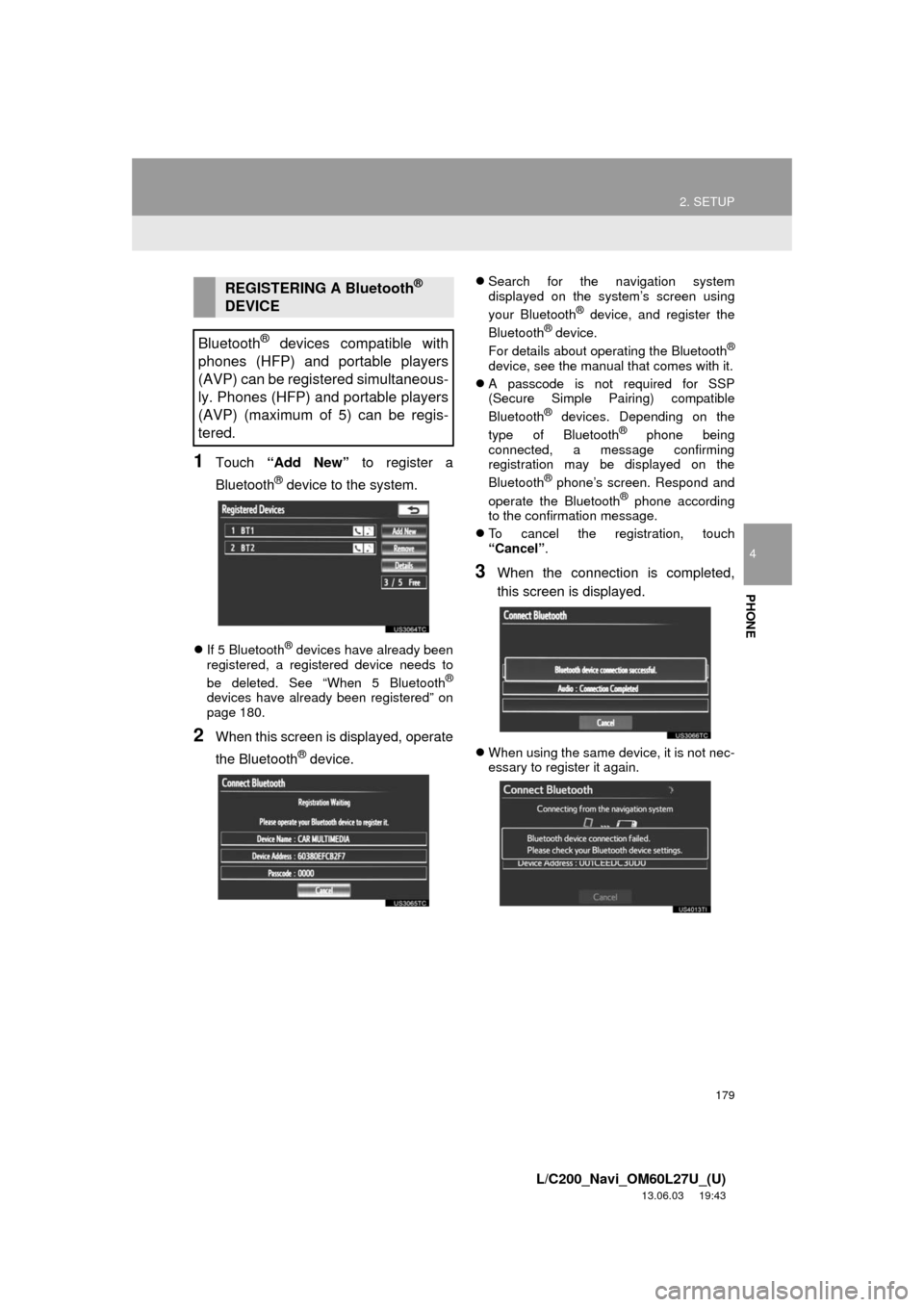
1Touch “Add New” to register a
Bluetooth
® device to the system.
If 5 Bluetooth® devices have already been
registered, a registered device needs to
be deleted. See “When 5 Bluetooth
®
devices have already been registered” on
page 180.
2When this screen is displayed, operate
the Bluetooth
® device.
Search for the navigation system
displayed on the system’s screen using
your Bluetooth
® device, and register the
Bluetooth® device.
For details about operating the Bluetooth®
device, see the manual that comes with it.
A passcode is not required for SSP
(Secure Simple Pairing) compatible
Bluetooth
® devices. Depending on the
type of Bluetooth® phone being
connected, a message confirming
registration may be displayed on the
Bluetooth
® phone’s screen. Respond and
operate the Bluetooth® phone according
to the confirmation message.
To cancel the registration, touch
“Cancel”.
3When the connection is completed,
this screen is displayed.
When using the same device, it is not nec-
essary to register it again.
REGISTERING A Bluetooth®
DEVICE
Bluetooth
® devices compatible with
phones (HFP) and portable players
(AVP) can be registered simultaneous-
ly. Phones (HFP) and portable players
(AVP) (maximum of 5) can be regis-
tered.
Page 181 of 427
181
2. SETUP
4
PHONE
L/C200_Navi_OM60L27U_(U)
13.06.03 19:43
“Device Name”: The name of the
Bluetooth® device which is displayed on
the screen. It can be changed to a desired
name.
• Even if the device name is changed, the
name registered in your Bluetooth®
device does not change.
“Device Address”: The device address is
unique to each device. It cannot be
changed.
• If 2 Bluetooth® devices have been regis-
tered with the same device name, the
devices can be distinguished referring to
the device’s address.
“My Phone Number”: The phone number
of the Bluetooth® phone is displayed on
the screen. Depending on the type of
phone, the phone number may not be dis-
played.
“Profiles”: The compatibility profile of the
Bluetooth
® device is displayed on the
screen.
“Connect Portable Player from”: There
are 2 portable player connection settings
available; “Vehicle” and “Portable Play-
er”.
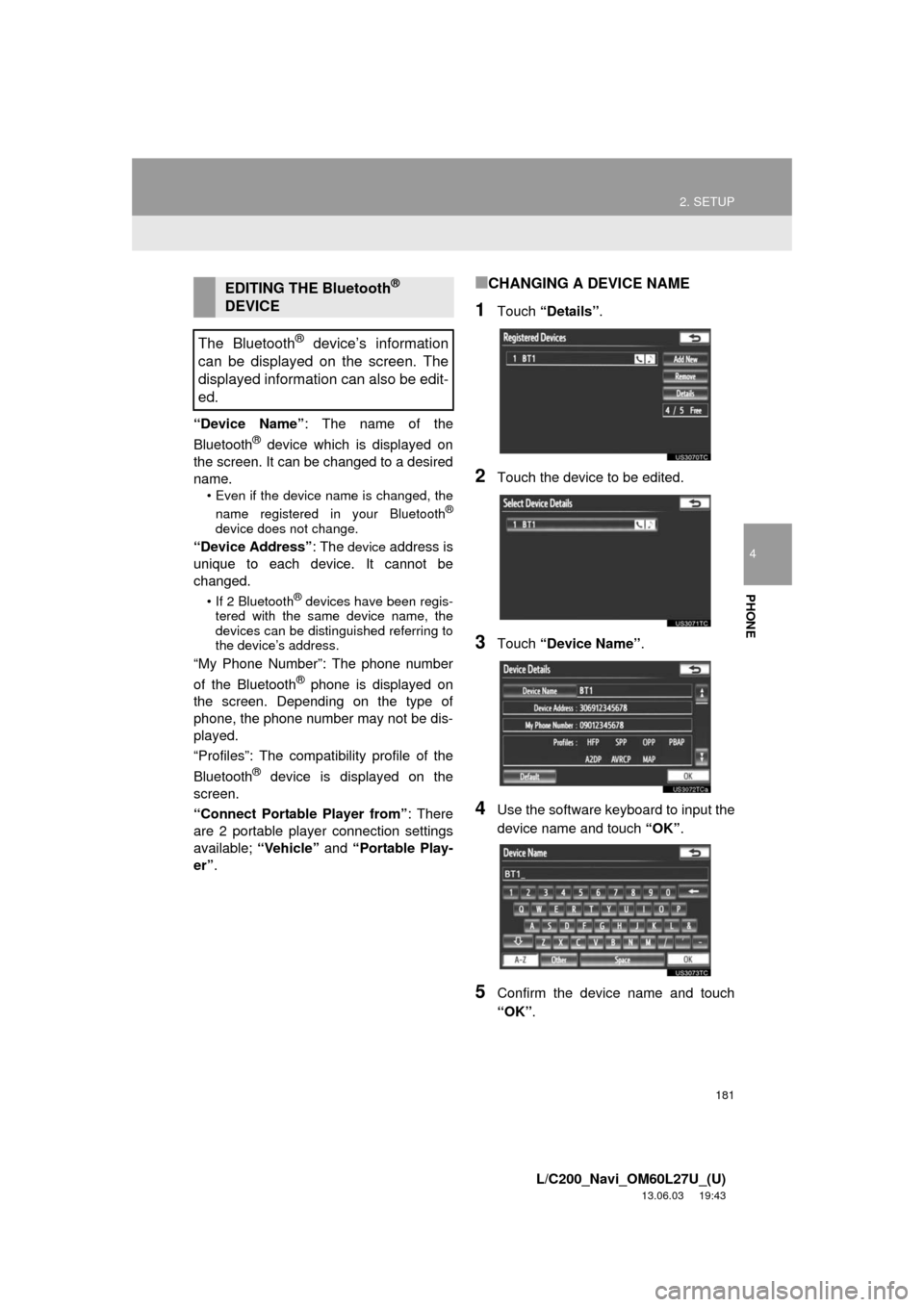
■CHANGING A DEVICE NAME
1Touch “Details”.
2Touch the device to be edited.
3Touch “Device Name”.
4Use the software keyboard to input the
device name and touch “OK”.
5Confirm the device name and touch
“OK”.
EDITING THE Bluetooth®
DEVICE
The Bluetooth
® device’s information
can be displayed on the screen. The
displayed information can also be edit-
ed.
Page 182 of 427
182
2. SETUP
L/C200_Navi_OM60L27U_(U)
13.06.03 19:43
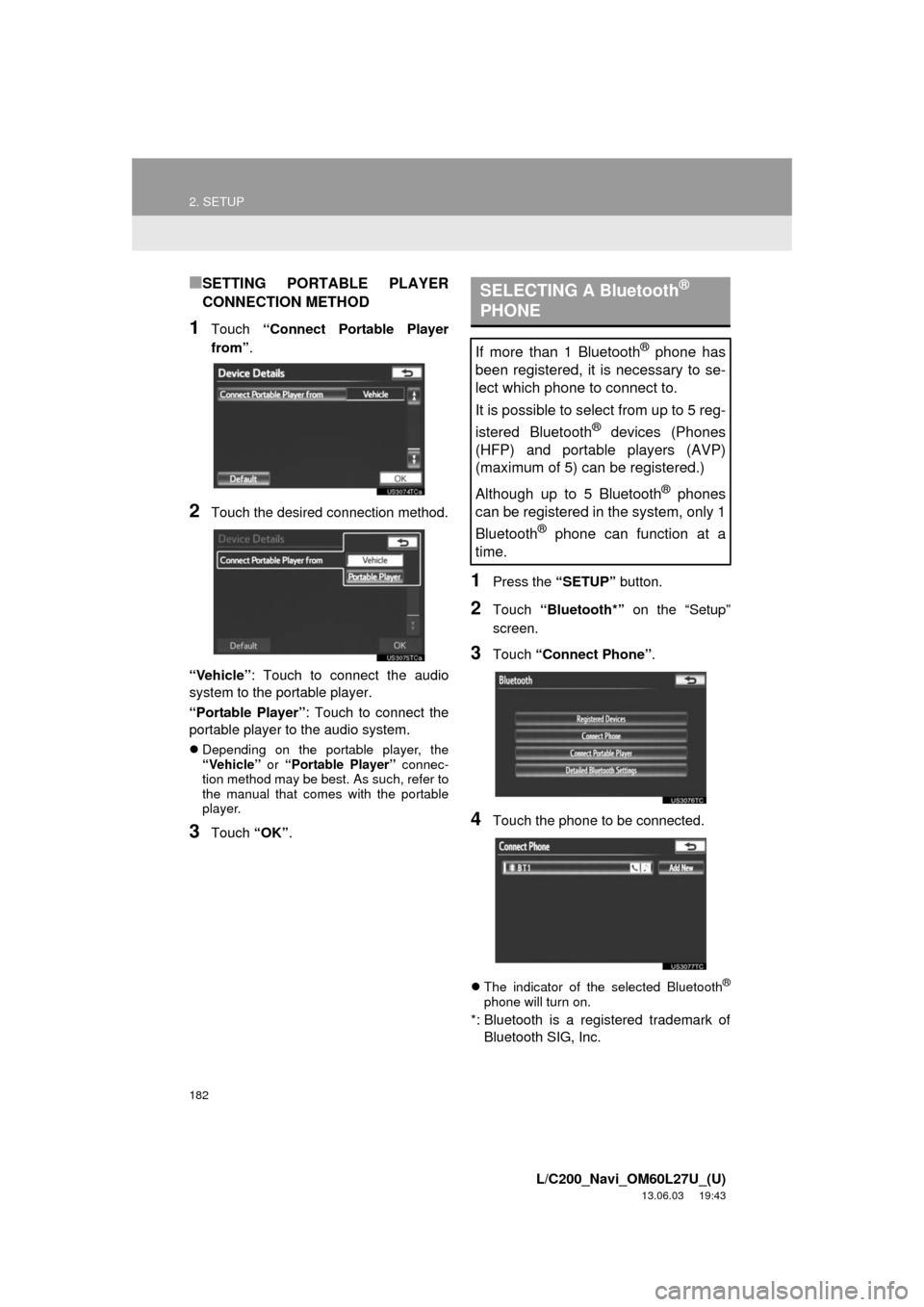
■SETTING PORTABLE PLAYER
CONNECTION METHOD
1Touch “Connect Portable Player
from”.
2Touch the desired connection method.
“Vehicle”: Touch to connect the audio
system to the portable player.
“Portable Player”: Touch to connect the
portable player to the audio system.
Depending on the portable player, the
“Vehicle” or “Portable Player” connec-
tion method may be best. As such, refer to
the manual that comes with the portable
player.
3Touch “OK”.
1Press the “SETUP” button.
2Touch “Bluetooth*” on the “Setup”
screen.
3Touch “Connect Phone”.
4Touch the phone to be connected.
The indicator of the selected Bluetooth®
phone will turn on.
*: Bluetooth is a registered trademark of
Bluetooth SIG, Inc.
SELECTING A Bluetooth®
PHONE
If more than 1 Bluetooth® phone has
been registered, it is necessary to se-
lect which phone to connect to.
It is possible to select from up to 5 reg-
istered Bluetooth
® devices (Phones
(HFP) and portable players (AVP)
(maximum of 5) can be registered.)
Although up to 5 Bluetooth
® phones
can be registered in the system, only 1
Bluetooth
® phone can function at a
time.
Page 184 of 427
184
2. SETUP
L/C200_Navi_OM60L27U_(U)
13.06.03 19:43
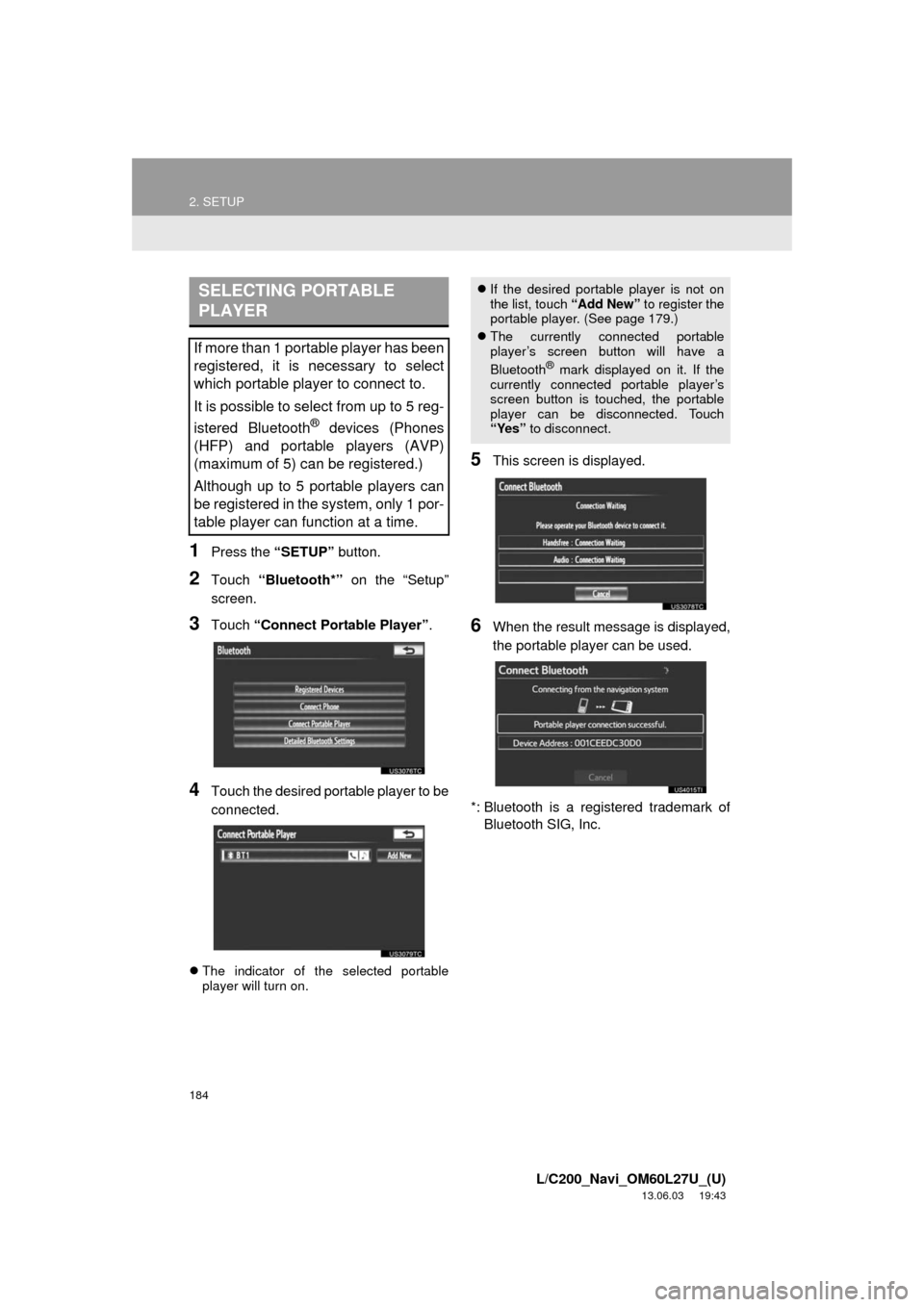
1Press the “SETUP” button.
2Touch “Bluetooth*” on the “Setup”
screen.
3Touch “Connect Portable Player”.
4Touch the desired portable player to be
connected.
The indicator of the selected portable
player will turn on.
5This screen is displayed.
6When the result message is displayed,
the portable player can be used.
*: Bluetooth is a registered trademark of
Bluetooth SIG, Inc.
SELECTING PORTABLE
PLAYER
If more than 1 portable player has been
registered, it is necessary to select
which portable player to connect to.
It is possible to select from up to 5 reg-
istered Bluetooth
® devices (Phones
(HFP) and portable players (AVP)
(maximum of 5) can be registered.)
Although up to 5 portable players can
be registered in the system, only 1 por-
table player can function at a time.
If the desired portable player is not on
the list, touch “Add New” to register the
portable player. (See page 179.)
The currently connected portable
player’s screen button will have a
Bluetooth
® mark displayed on it. If the
currently connected portable player’s
screen button is touched, the portable
player can be disconnected. Touch
“Yes” to disconnect.
Page 188 of 427
188
2. SETUP
L/C200_Navi_OM60L27U_(U)
13.06.03 19:43
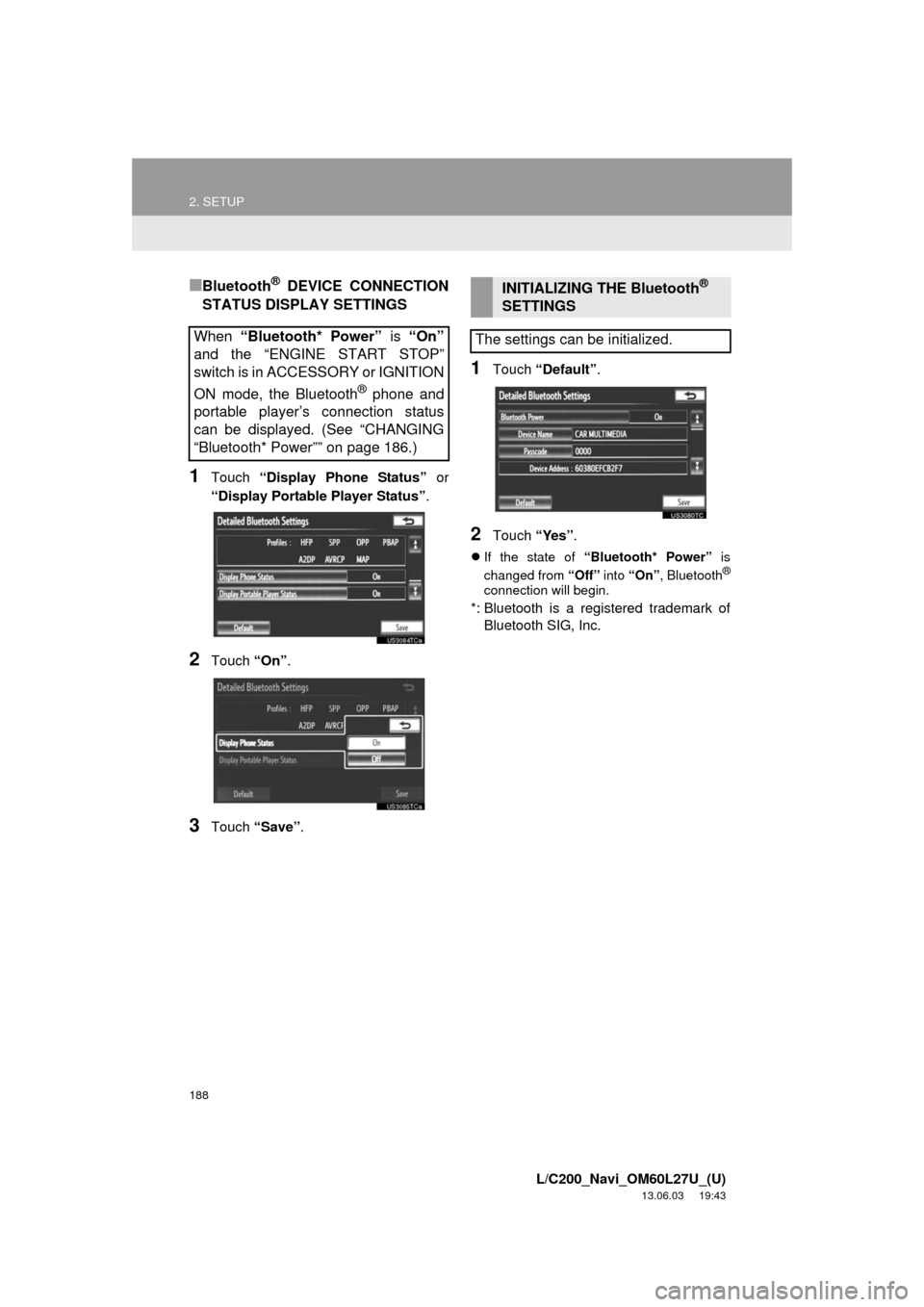
■Bluetooth® DEVICE CONNECTION
STATUS DISPLAY SETTINGS
1Touch “Display Phone Status” or
“Display Portable Player Status”.
2Touch “On”.
3Touch “Save”.
1Touch “Default”.
2Touch “Yes”.
If the state of “Bluetooth* Power” is
changed from “Off” into “On”, Bluetooth®
connection will begin.
*: Bluetooth is a registered trademark of
Bluetooth SIG, Inc.
When “Bluetooth* Power” is “On”
and the “ENGINE START STOP”
switch is in ACCESSORY or IGNITION
ON mode, the Bluetooth
® phone and
portable player’s connection status
can be displayed. (See “CHANGING
“Bluetooth* Power”” on page 186.)
INITIALIZING THE Bluetooth®
SETTINGS
The settings can be initialized.
Page 190 of 427
190
L/C200_Navi_OM60L27U_(U)
13.06.03 19:43
1. QUICK REFERENCE ................... 192
2. SOME BASICS............................. 194
VOICE COMMAND SYSTEM .............. 195
AUDIO SPLIT SCREEN DISPLAY ...... 195
TURNING THE SYSTEM ON AND OFF .................................... 195
SWITCHING BETWEEN FUNCTIONS ..................................... 196
DSP CONTROL ................................... 197
TONE AND BALANCE......................... 197
SELECTING SCREEN SIZE................ 198
DVD PLAYER ...................................... 199
AUX PORT........................................... 200
A/V INPUT PORT ................................ 200
USB PORT........................................... 200
3. RADIO OPERATION .................... 201
LISTENING TO THE RADIO ............... 201
PRESETTING A STATION .................. 201
SELECTING A STATION..................... 202
RADIO BROADCAST DATA SYSTEM............................................ 202
TRAFFIC ANNOUNCEMENT .............. 203
4. HD Radio™ TECHNOLOGY INFORMATION .......................... 204
USING HD Radio™
TE
CHNOLOGY ................................. 204
AVAILABLE HD Radio™ TECHNOLOGY ................................. 205
TROUBLESHOOTING GUIDE ............ 206
5. RADIO OPERATION (XM Satellite Radio
BROADCAST) ............. .............. 208
HOW TO SUBSCRIBE TO
AN XM Satellite Radio ....................... 208
DISPLAYING THE RADIO ID............... 209
LISTENING TO SATELLITE RADIO ............................................... 209
CHANNEL CATEGORY ....................... 210
PRESETTING A CHANNEL ................. 210
SELECTING A CHANNEL ................... 210
DISPLAYING THE TITLE AND NAME ........................................ 211
IF THE SATELLITE RADIO TUNER MALFUNCTIONS .............................. 212
6. RADIO OPERATION (INTERNET RADIO
BROADCAST) ............. .............. 214
LISTENING TO INTERNET
RADIO ............................................... 214
7. DVD PLAYER OPERATION........ 215
INSERTING A DISC ............................. 215
EJECTING A DISC............................... 215
PLAYING A DISC ................................. 216
PLAYING AN AUDIO DISC .................. 216
PLAYING AN MP3/WMA DISC ............ 218
OPERATING A DVD DISC................... 221
PLAYING A DVD DISC ........................ 222
DVD OPTIONS..................................... 224
IF THE PLAYER MALFUNCTIONS ..... 233
DVD PLAYER AND DVD VIDEO DISC INFORMATION ........................ 234
1AUDIO/VIDEO SYSTEM
OPERATION
5
AUDIO/VIDEO SYSTEM
Page 191 of 427
5
191
1
2
3
4
5
6
7
8
L/C200_Navi_OM60L27U_(U)
13.06.03 19:43
9
10
8. USB MEMORY OPERATION ...... 236
CONNECTING A USB MEMORY ....... 236
PLAYING A USB MEMORY ................ 237
9. iPod OPERATION ....................... 241
CONNECTING iPod ............................ 241
PLAYING iPod MUSIC ........................ 242
PLAYING iPod VIDEO......................... 245
iPod VIDEO OPTIONS ........................ 248
10. Bluetooth® AUDIO
OPERATION .............................. 249
CONNECTING A Bluetooth®
AUDIO PLAYE
R................................ 252
PLAYING Bluetooth
® AUDIO .............. 253
11. VTR OPERATION ........................ 258
CONNECTING AUDIO/VIDEO DEVICE ............................................. 258
PLAYING VTR ..................................... 259
VTR OPTIONS .................................... 259
12. REAR SEAT ENTERTAINMENT SYSTEM FEATURES ................ 260
DISPLAY ............................................. 261
REAR SEAT ENTERTAINMENT SYSTEM CONTROLLER .................. 261
HEADPHONE JACKS ......................... 262
HEADPHONES ................................... 262
VOLUME ............................................. 262
OPENING AND CLOSING THE DISPLAY ........................................... 263
TILTING THE DISPLAY ...................... 263
CAUTION SCREEN ............................ 263
CHANGING THE SOURCE ................. 264
CHANGING THE SPEAKER OUTPUT ........................................... 264 OPERATION FROM THE
FRONT SEATS ................................. 266
USING THE RADIO ............................. 266
USING THE RADIO (INTERNET RADIO BROADCAST)....................... 267
PLAYING iPod ..................................... 268
PLAYING A USB MEMORY ................ 269
PLAYING Bluetooth
® AUDIO ............... 269
PLAYING AN AUDIO CD/CD TEXT ..................................... 270
PLAYING MP3/WMA DISCS ............... 271
PLAYING DVD VIDEO......................... 271
USING THE VIDEO MODE ................. 277
CHANGING SETTINGS....................... 278
13. AUDIO/VIDEO REMOTE CONTROLS (STEERING
SWITCHES)............................... 281
14. AUDIO/VIDEO SYSTEM OPERATING HINTS.................. 283
RADIO RECEPTION............................ 283
iPod ...................................................... 284
USB MEMORY .................................... 285
CARING FOR YOUR DVD PLAYER AND DISC.................. 285
MP3/WMA FILES ................................. 287
CD-R AND CD-RW DISCS .................. 289
TERMS ................................................ 289
1. AUDIO SETTINGS ...................... 293
HD Radio™ SYSTEM SETTINGS ....... 293
iPod AND EXTERNAL VIDEO SETTINGS ........................................ 294
2SETUP
AUDIO/VIDEO SYSTEM
Page 196 of 427
196
1. AUDIO/VIDEO SYSTEM OPERATION
L/C200_Navi_OM60L27U_(U)
13.06.03 19:41
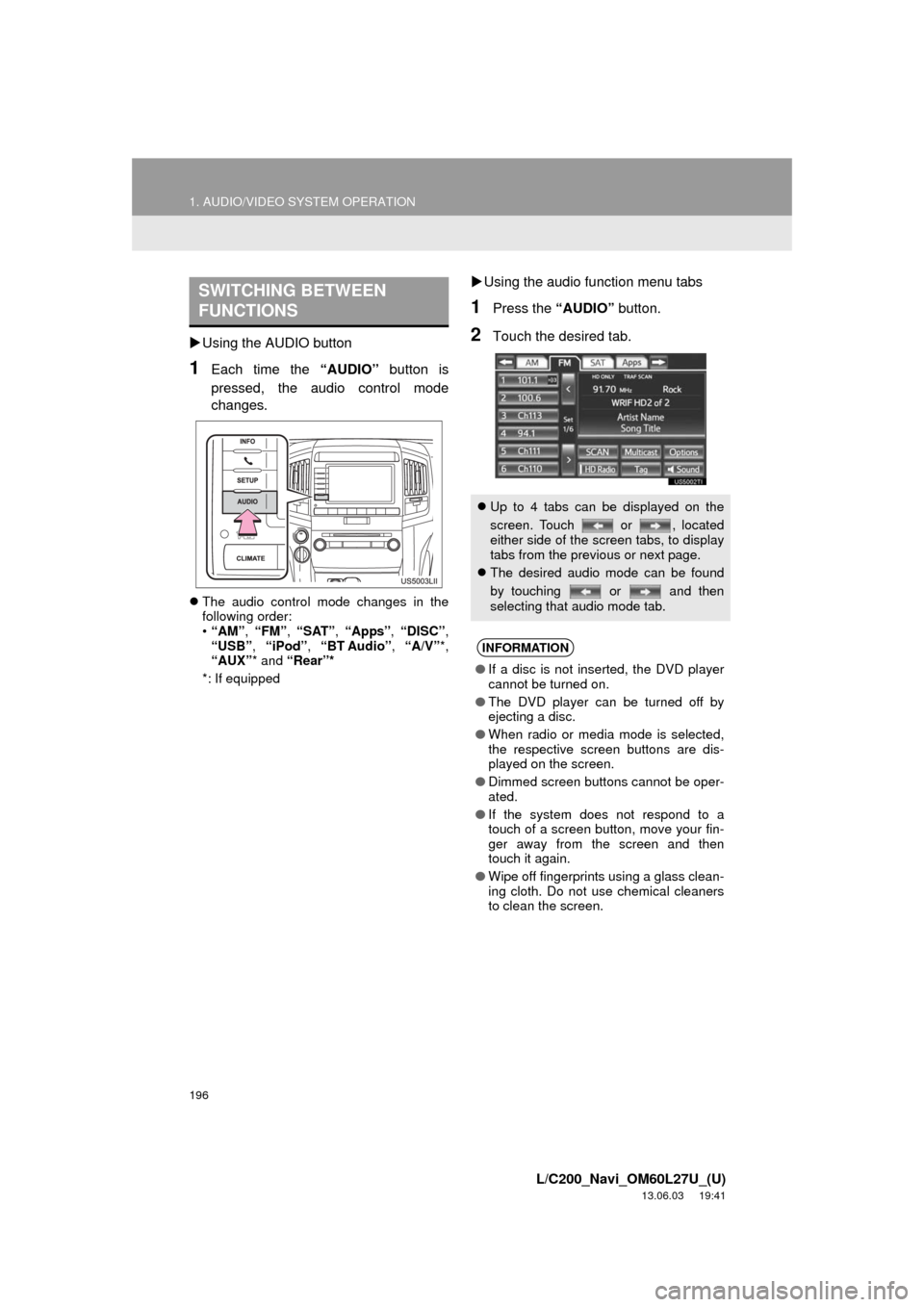
Using the AUDIO button
1Each time the “AUDIO” button is
pressed, the audio control mode
changes.
The audio control mode changes in the
following order:
•“AM”, “FM”, “SAT”, “Apps”, “DISC”,
“USB”, “iPod”, “BT Audio”, “A/V”*,
“AUX”* and “Rear”*
*: If equipped
Using the audio function menu tabs
1Press the “AUDIO” button.
2Touch the desired tab.
SWITCHING BETWEEN
FUNCTIONS
Up to 4 tabs can be displayed on the
screen. Touch or , located
either side of the screen tabs, to display
tabs from the previous or next page.
The desired audio mode can be found
by touching or and then
selecting that audio mode tab.
INFORMATION
●If a disc is not inserted, the DVD player
cannot be turned on.
●The DVD player can be turned off by
ejecting a disc.
●When radio or media mode is selected,
the respective screen buttons are dis-
played on the screen.
●Dimmed screen buttons cannot be oper-
ated.
●If the system does not respond to a
touch of a screen button, move your fin-
ger away from the screen and then
touch it again.
●Wipe off fingerprints using a glass clean-
ing cloth. Do not use chemical cleaners
to clean the screen.