lock TOYOTA LAND CRUISER 2015 J200 Owners Manual
[x] Cancel search | Manufacturer: TOYOTA, Model Year: 2015, Model line: LAND CRUISER, Model: TOYOTA LAND CRUISER 2015 J200Pages: 728, PDF Size: 10.53 MB
Page 486 of 728
486
3-7. Other interior features
LC200_OM_OM60L83U_(U)
Ashtrays
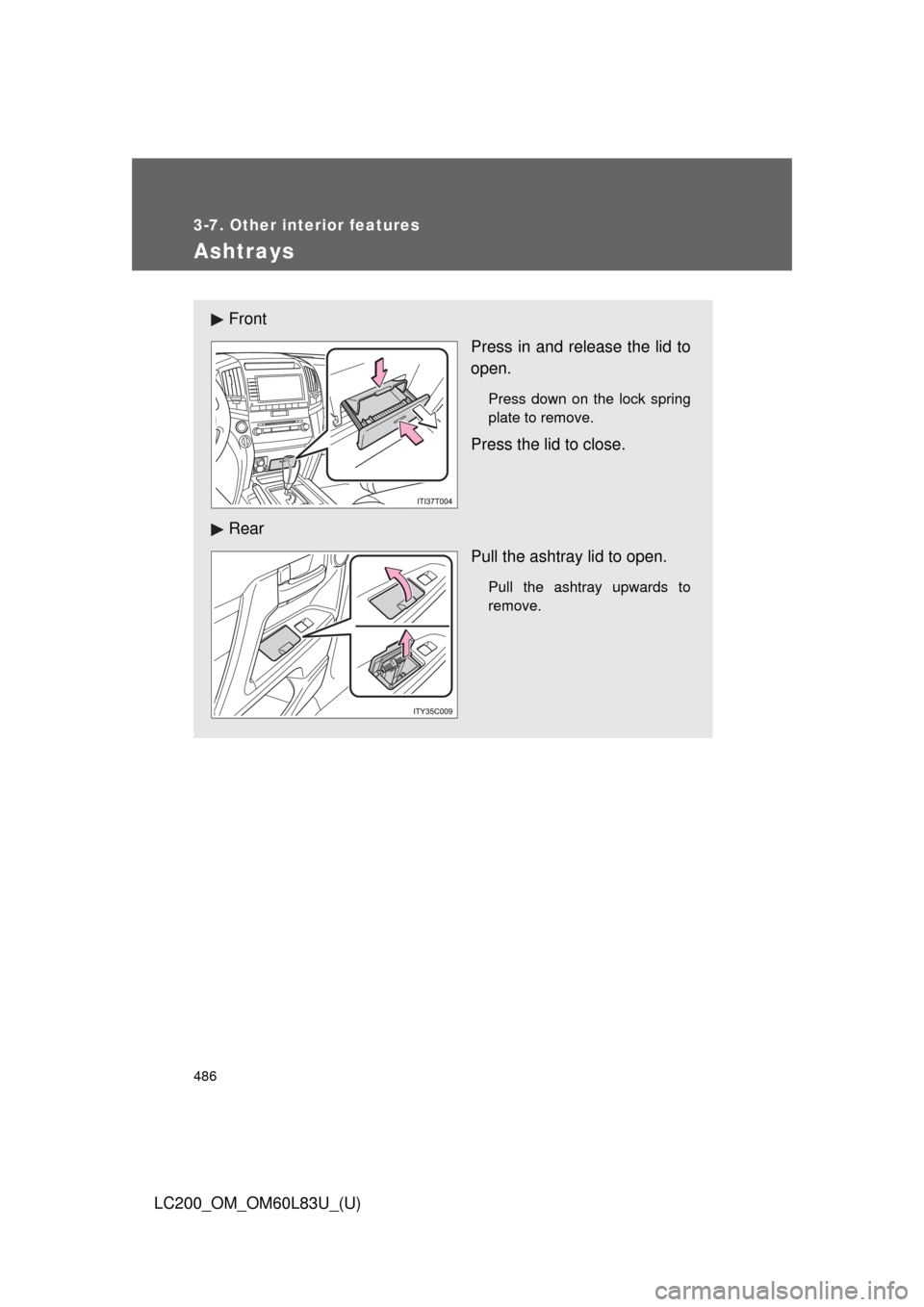
FrontPress in and release the lid to
open.
Press down on the lock spring
plate to remove.
Press the lid to close.
Rear Pull the ashtray lid to open.
Pull the ashtray upwards to
remove.
Page 493 of 728
493
3-7. Other interior features
3
Interior features
LC200_OM_OM60L83U_(U)
Seat heaters and ventilators
The seat heaters and ventilators heat the seats and maintain good
airflow by blowing air from the seats.
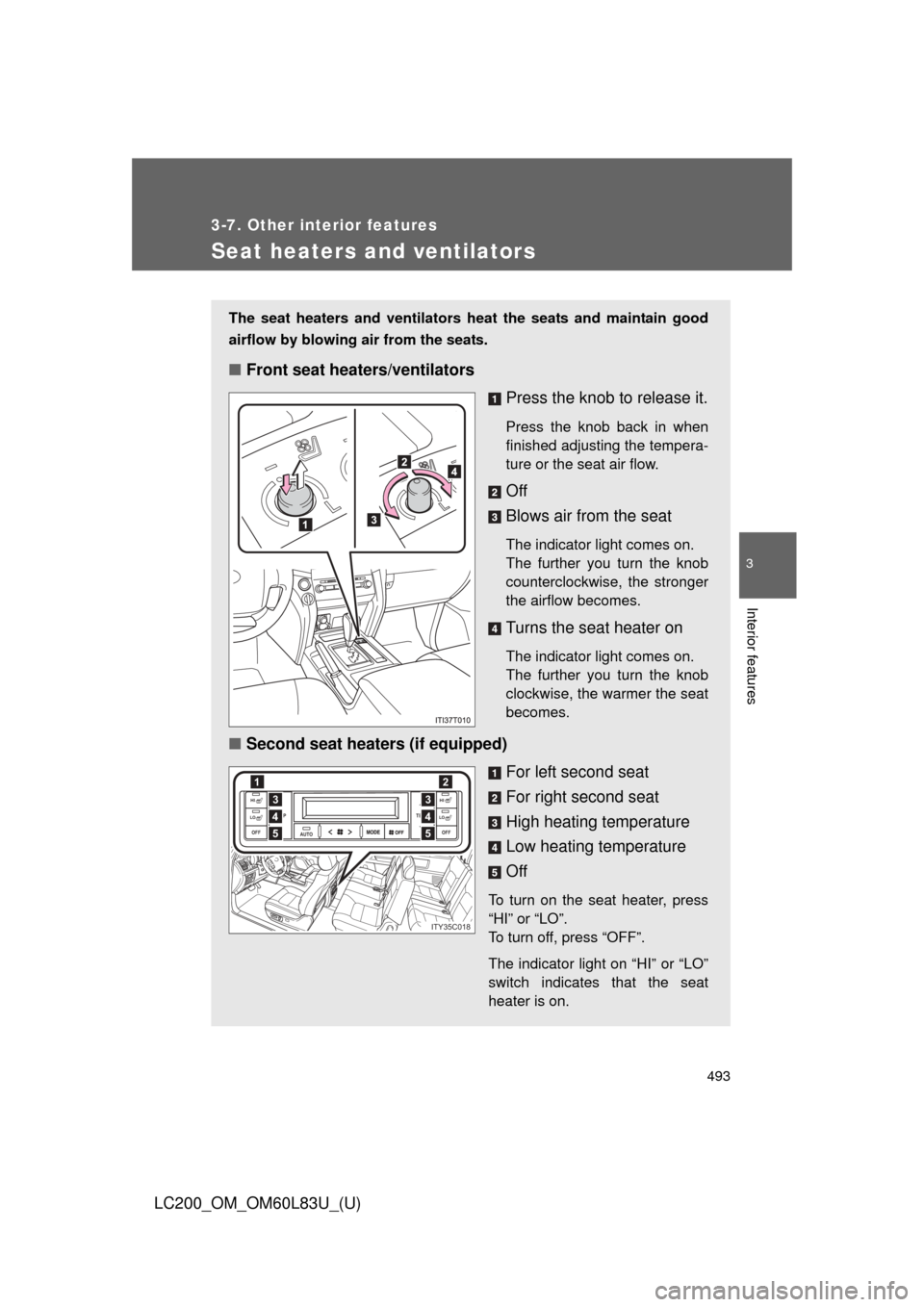
■Front seat heaters/ventilators
Press the knob to release it.
Press the knob back in when
finished adjusting the tempera-
ture or the seat air flow.
Off
Blows air from the seat
The indicator light comes on.
The further you turn the knob
counterclockwise, the stronger
the airflow becomes.
Turns the seat heater on
The indicator light comes on.
The further you turn the knob
clockwise, the warmer the seat
becomes.
■Second seat heaters (if equipped)
For left second seat
For right second seat
High heating temperature
Low heating temperature
Off
To turn on the seat heater, press
“HI” or “LO”.
To turn off, press “OFF”.
The indicator light on “HI” or “LO”
switch indicates that the seat
heater is on.
AUTO
TEMP
OFF TEMP
HI
LOOFF
HI
LO4
12
3
5
4
3
5
ITY35C018
Page 501 of 728
501
3-7. Other interior features
3
Interior features
LC200_OM_OM60L83U_(U)
Garage door opener
The garage door opener (HomeLink Universal Transceiver) is manufac-
tured under license from HomeLink.
Programming HomeLink (for U.S.A. owners)
The HomeLink
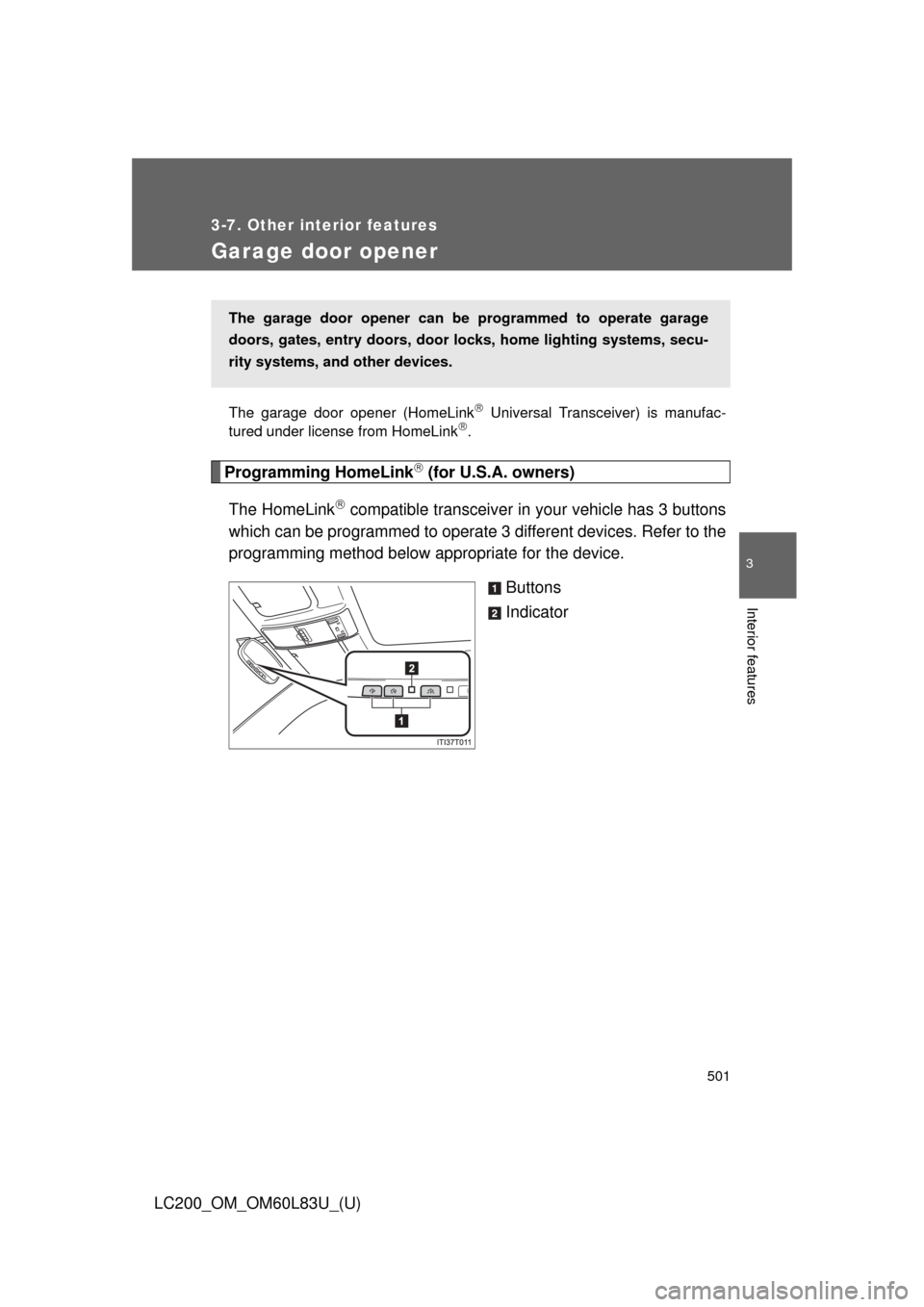
compatible transceiver in your vehicle has 3 buttons
which can be programmed to operate 3 different devices. Refer to the
programming method below appropriate for the device.
Buttons
Indicator
The garage door opener can be programmed to operate garage
doors, gates, entry doors, door locks, home lighting systems, secu-
rity systems, and other devices.
Page 505 of 728
505
3-7. Other interior features
3
Interior features
LC200_OM_OM60L83U_(U)
■
Programming an entry gate (f or U.S.A. owners)/Programming
all devices in the Canadian market
Place your transmitter 1 to 3 in. (25 to 75 mm) away from the
surface of the HomeLink
.
Keep the HomeLink indicator light in view while programming.
Press and hold the selected HomeLink button.
Repeatedly press and releas e (cycle) the device’s remote
control button for 2 second s each until is completed.
When the indicator light on the HomeLink
compatible trans-
ceiver starts to flash rapidly, release the buttons.
Test the operation of the HomeLink
by pressing the newly
programmed button. Check to see if the gate/device operates
correctly.
Repeat the steps above to program another device for each of
the remaining HomeLink
buttons.
■ Programming other devices
To program other devices such as home security systems, home
door locks or lighting, contact y our Toyota dealer for assistance.
■ Reprogramming a button
The individual HomeLink
buttons cannot be erased but can be
reprogrammed. To reprogram a button, follow the “Reprogramming
a HomeLink
button” instructions.
STEP1
STEP2
STEP3
STEP4
STEP4
STEP5
STEP6
Page 525 of 728
525
4-2. Maintenance
4
Maintenance and care
LC200_OM_OM60L83U_(U)
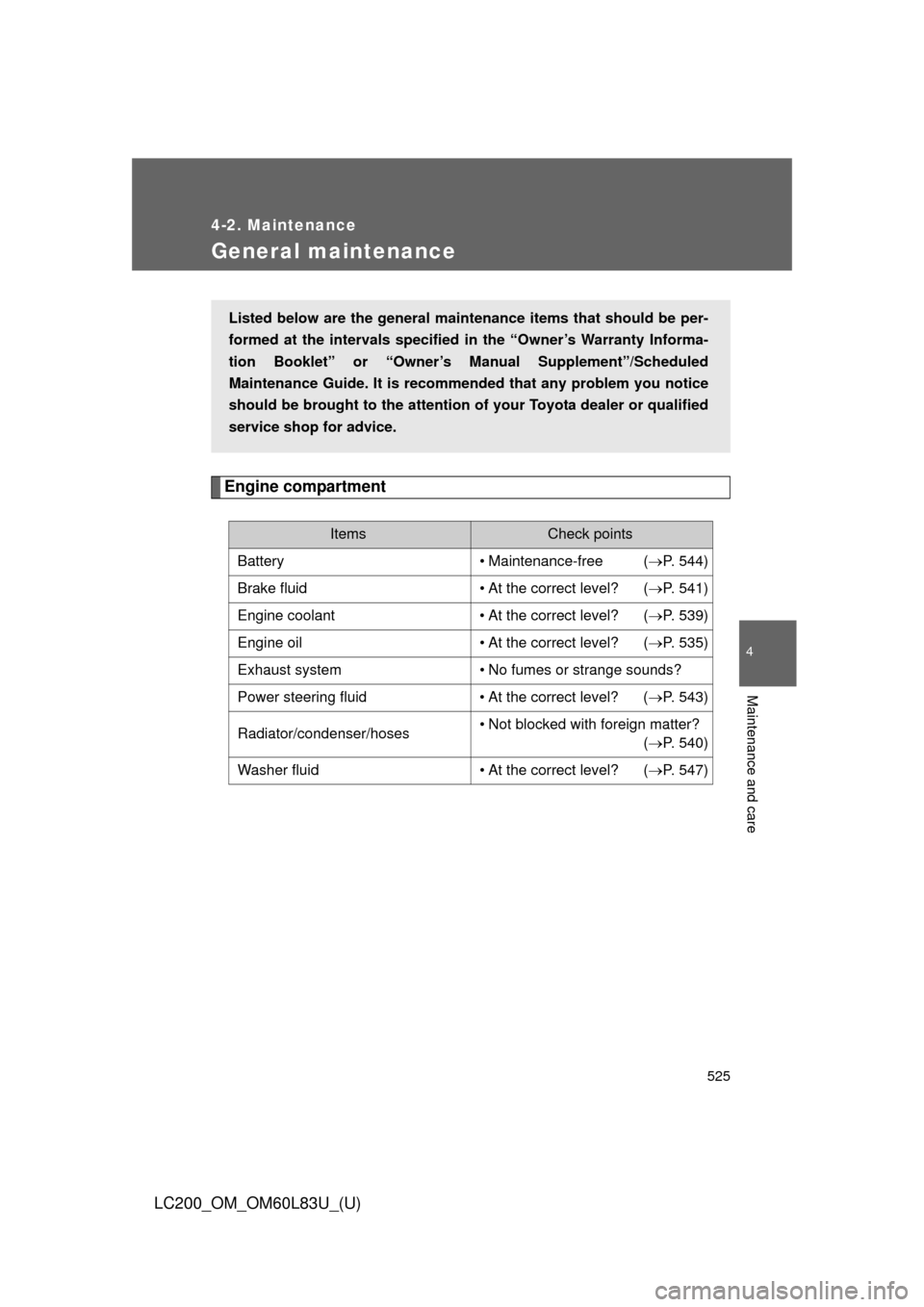
General maintenance
Engine compartment
ItemsCheck points
Battery • Maintenance-free (P. 544)
Brake fluid • At the correct level? (P. 541)
Engine coolant • At the correct level? (P. 539)
Engine oil • At the correct level? (P. 535)
Exhaust system • No fumes or strange sounds?
Power steering fluid • At the correct level? (P. 543)
Radiator/condenser/hoses • Not blocked with foreign matter?
(P. 540)
Washer fluid • At the correct level? (P. 547)
Listed below are the general maintenance items that should be per-
formed at the intervals specified in the “Owner’s Warranty Informa-
tion Booklet” or “Owner’s Manual Supplement”/Scheduled
Maintenance Guide. It is recomme nded that any problem you notice
should be brought to the attention of your Toyota dealer or qualified
service shop for advice.
Page 526 of 728

526 4-2. Maintenance
LC200_OM_OM60L83U_(U)
Vehicle interior
ItemsCheck points
Accelerator pedal • Moves smoothly (without uneven
pedal effort or catching)?
Automatic transmission “Park”
mechanism • Can the vehicle be hold securely
on an incline with the shift lever in
“P”?
Brake pedal • Moves smoothly?
• Does it have appropriate clear-
ance and correct amount of free
play?
Brakes • Pulls to one side when applied?
• Loss of brake effectiveness?
• Spongy feeling brake pedal?
• Pedal almost touches floor?
Head restraints • Move smoothly and lock
securely?
Indicators/buzzers • Function properly?
Lights • Do all the lights come on?
• Headlights aimed correctly?
Parking brake • Moves smoothly?
• Can hold the vehicle securely on
an incline?
Seat belts • Does the seat belt system oper-
ate smoothly?
• Are the belts undamaged?
Seats • Do the seat controls operate
properly?
Steering wheel • Moves smoothly?
• Has correct free play?
• No strange noises?
Page 527 of 728
527
4-2. Maintenance
4
Maintenance and care
LC200_OM_OM60L83U_(U)
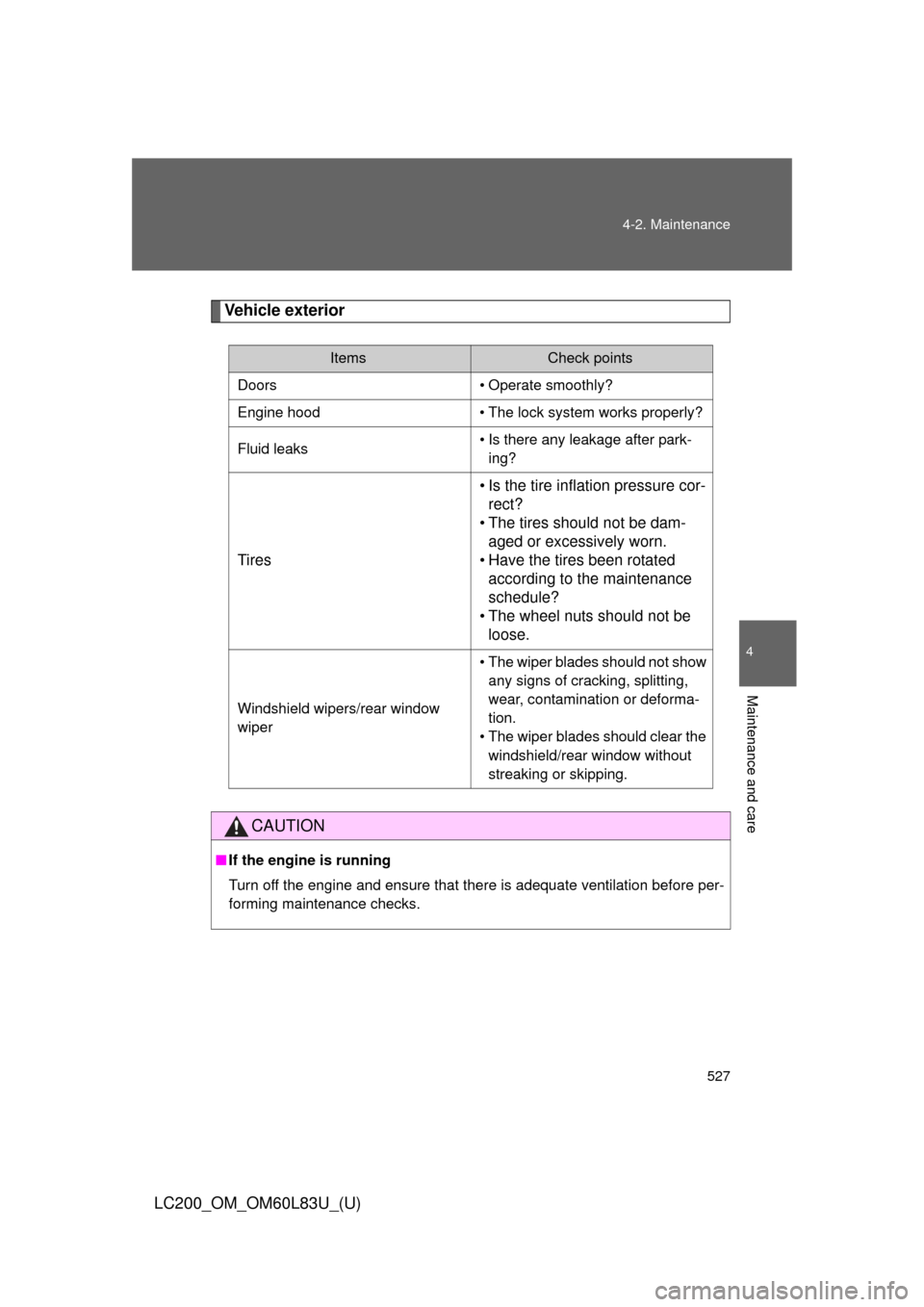
Vehicle exterior
ItemsCheck points
Doors • Operate smoothly?
Engine hood • The lock system works properly?
Fluid leaks • Is there any leakage after park-
ing?
Tires • Is the tire inflation pressure cor-
rect?
• The tires should not be dam- aged or excessively worn.
• Have the tires been rotated according to the maintenance
schedule?
• The wheel nuts should not be loose.
Windshield wipers/rear window
wiper • The wiper blades should not show
any signs of cracking, splitting,
wear, contamination or deforma-
tion.
• The wiper blades should clear the
windshield/rear window without
streaking or skipping.
CAUTION
■ If the engine is running
Turn off the engine and ensure that there is adequate ventilation before per-
forming maintenance checks.
Page 532 of 728
532
4-3. Do-it-yourself maintenance
LC200_OM_OM60L83U_(U)
Hood
CAUTION
■Pre-driving check
Check that the hood is fully closed and locked.
If the hood is not locked properly it may open while the vehicle is in motion
and cause an accident, which may result in death or serious injury.
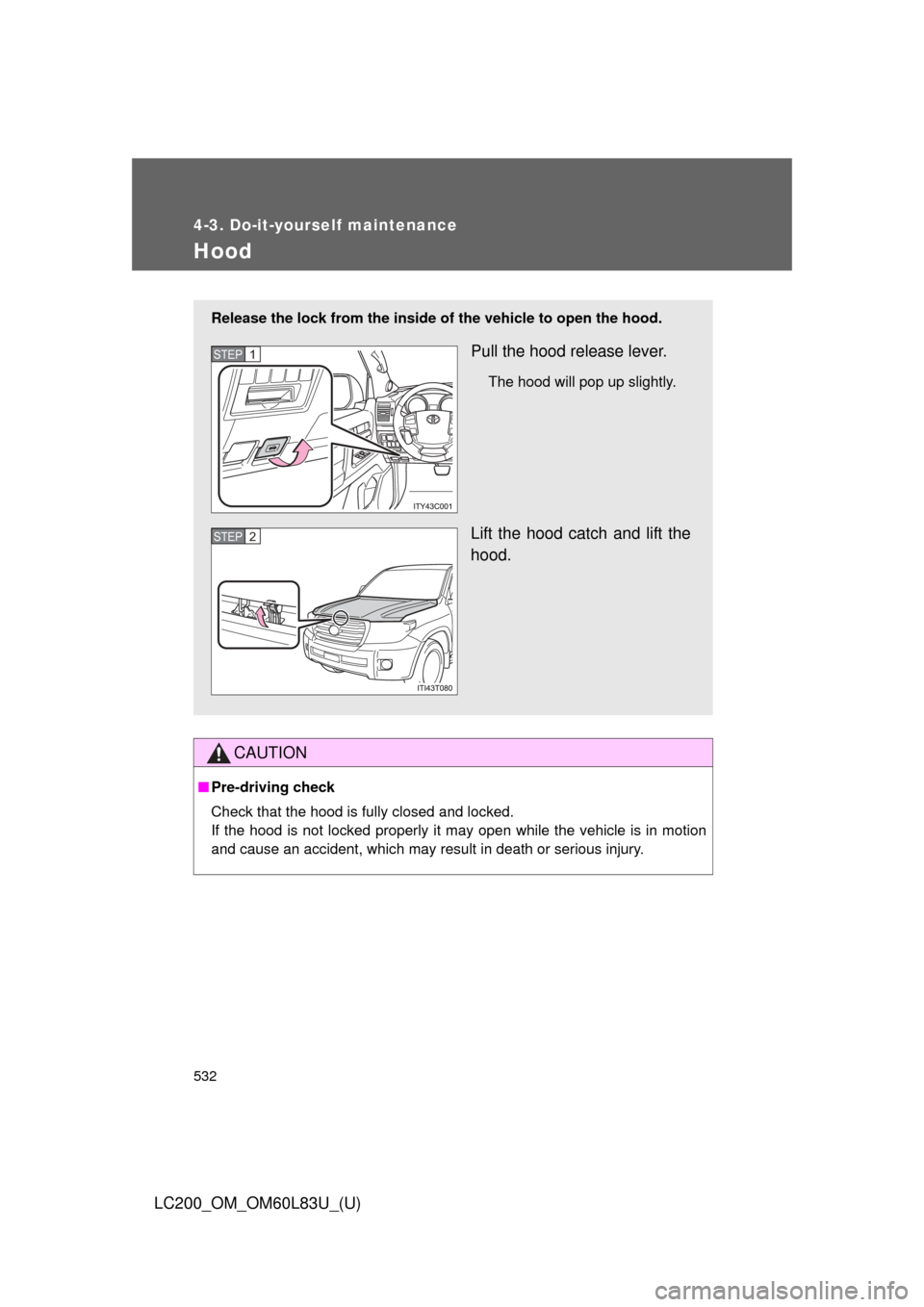
Release the lock from the inside of the vehicle to open the hood.
Pull the hood release lever.
The hood will pop up slightly.
Lift the hood catch and lift the
hood.
STEP1
STEP2
Page 536 of 728
536 4-3. Do-it-yourself maintenance
LC200_OM_OM60L83U_(U)■
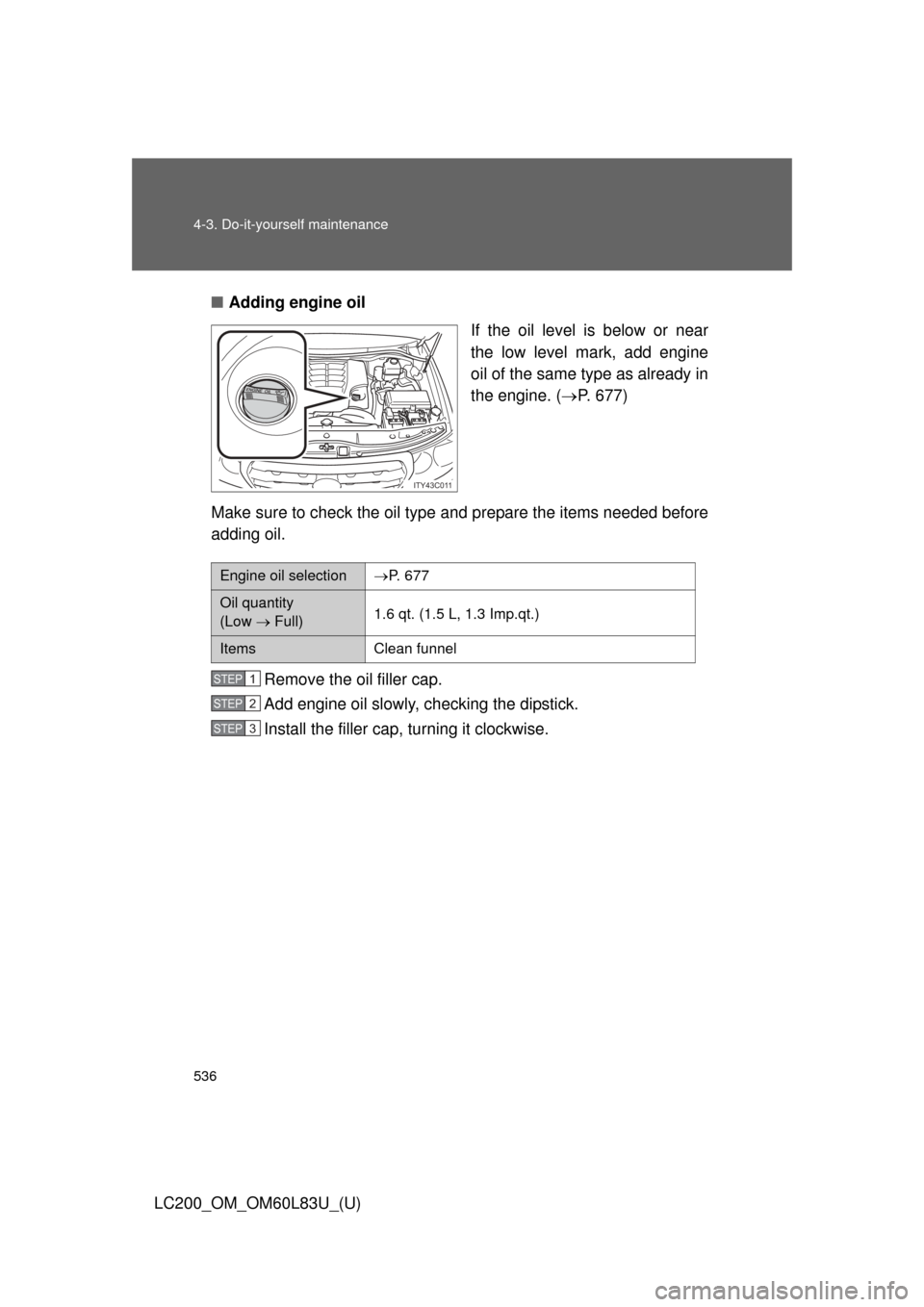
Adding engine oil
If the oil level is below or near
the low level mark, add engine
oil of the same type as already in
the engine. (P. 677)
Make sure to check the oil type and prepare the items needed before
adding oil.
Remove the oil filler cap.
Add engine oil slowly, checking the dipstick.
Install the filler cap, turning it clockwise.
ITY43C011
Engine oil selectionP. 677
Oil quantity
(Low Full)1.6 qt. (1.5 L, 1.3 Imp.qt.)
ItemsClean funnel
STEP1
STEP2
STEP3
Page 543 of 728
543
4-3. Do-it-yourself maintenance
4
Maintenance and care
LC200_OM_OM60L83U_(U)
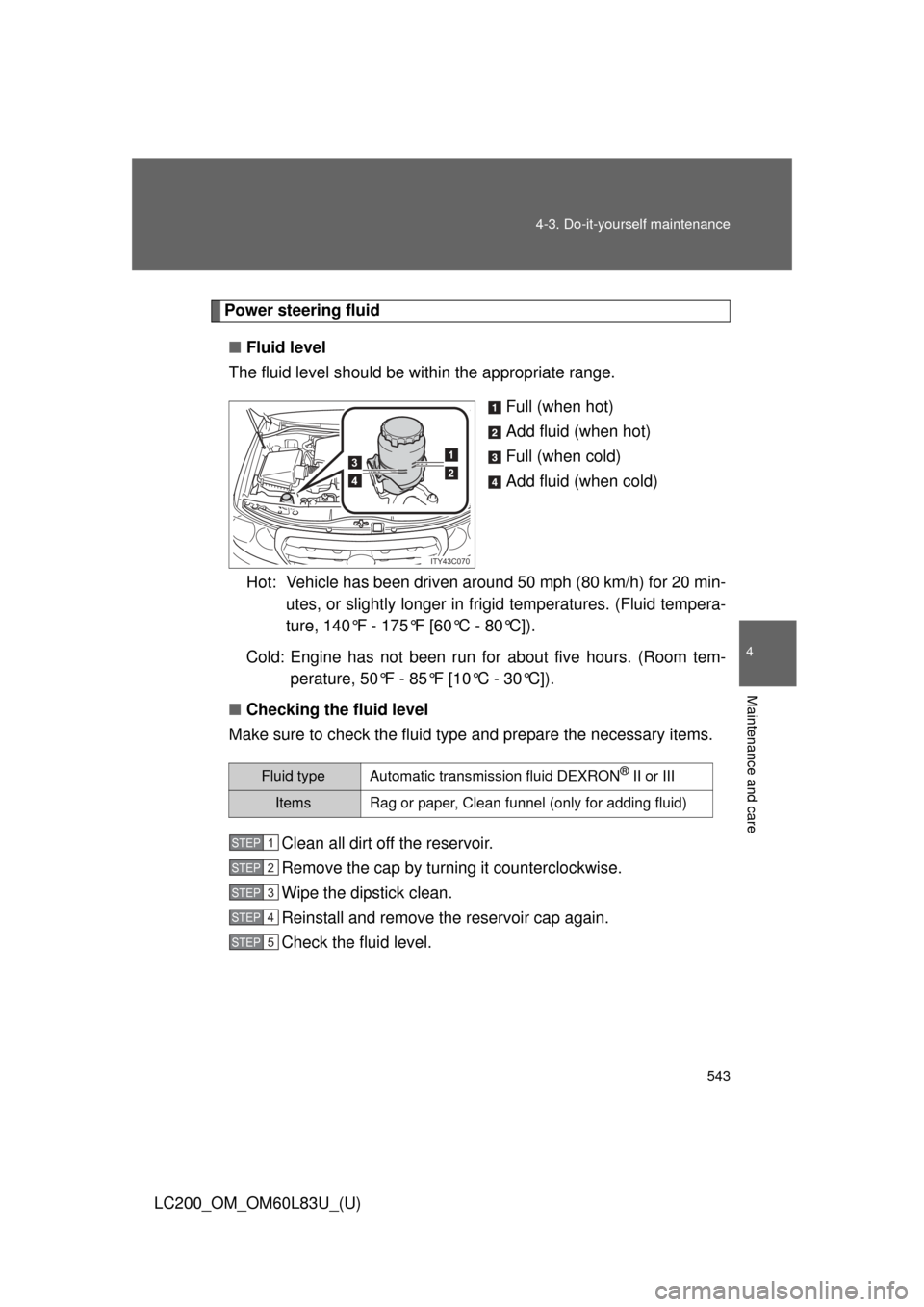
Power steering fluid
■ Fluid level
The fluid level should be within the appropriate range.
Full (when hot)
Add fluid (when hot)
Full (when cold)
Add fluid (when cold)
Hot: Vehicle has been driven around 50 mph (80 km/h) for 20 min- utes, or slightly longer in frig id temperatures. (Fluid tempera-
ture, 140°F - 175°F [60°C - 80°C]).
Cold: Engine has not been run for about five hours. (Room tem- perature, 50°F - 85°F [10°C - 30°C]).
■ Checking the fluid level
Make sure to check the fluid type and prepare the necessary items.
Clean all dirt off the reservoir.
Remove the cap by turning it counterclockwise.
Wipe the dipstick clean.
Reinstall and remove the reservoir cap again.
Check the fluid level.
1
23
4
ITY43C070
Fluid typeAutomatic transmission fluid DEXRON® II or III
ItemsRag or paper, Clean funnel (only for adding fluid)
STEP1
STEP2
STEP3
STEP4
STEP5