change wheel TOYOTA LAND CRUISER 2015 J200 Owners Manual
[x] Cancel search | Manufacturer: TOYOTA, Model Year: 2015, Model line: LAND CRUISER, Model: TOYOTA LAND CRUISER 2015 J200Pages: 728, PDF Size: 10.53 MB
Page 19 of 728
19
LC200_OM_OM60L83U_(U)
D
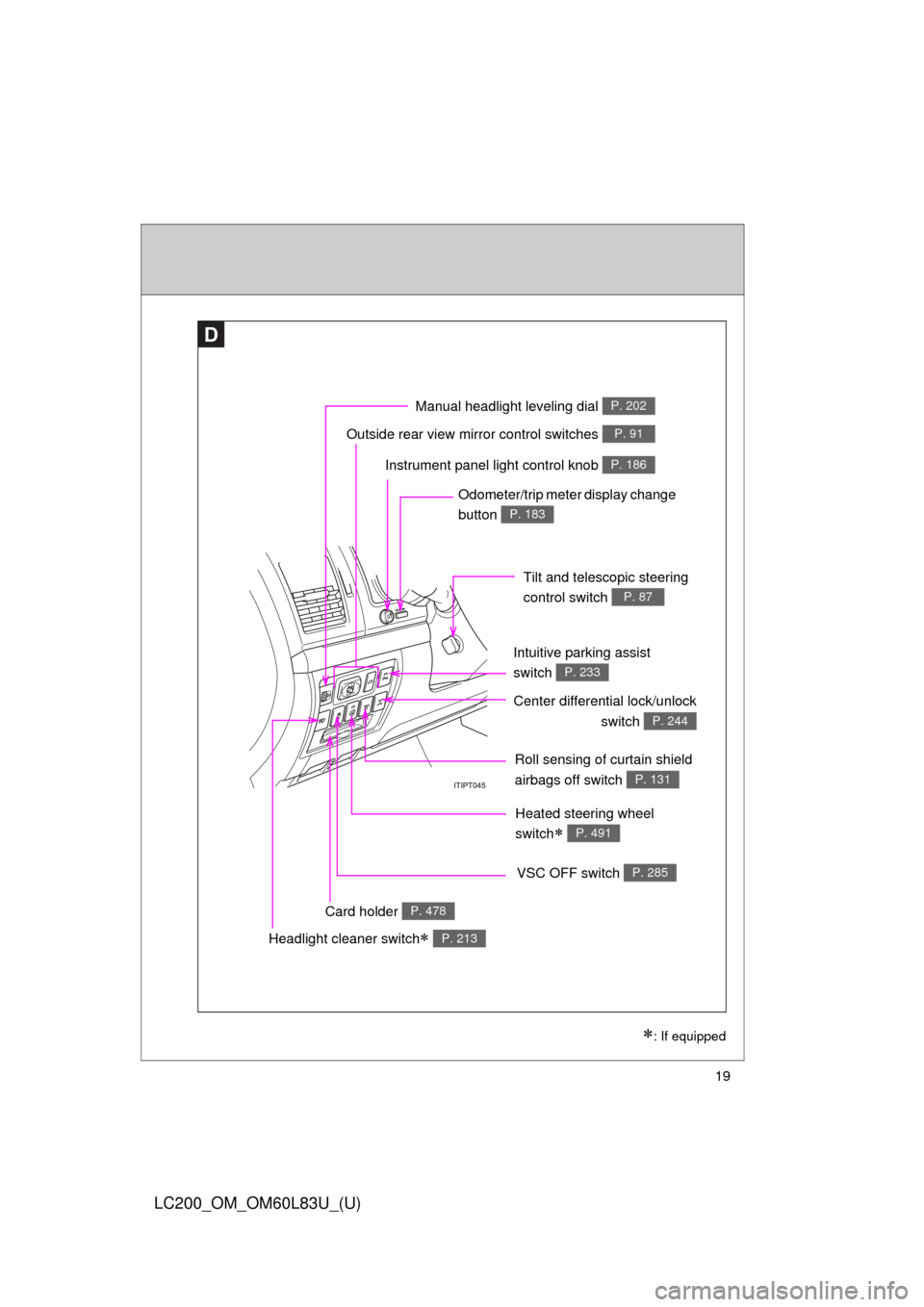
Roll sensing of curtain shield
airbags off switch
P. 131
Headlight cleaner switch P. 213
Outside rear view mirror control switches P. 91
Intuitive parking assist
switch
P. 233
: If equipped
Instrument panel light control knob P. 186
Odometer/trip meter display change
button
P. 183
Tilt and telescopic steering
control switch
P. 87
Card holder P. 478
VSC OFF switch P. 285
Center differential lock/unlockswitch
P. 244
Heated steering wheel
switch
P. 491
Manual headlight leveling dial P. 202
Page 92 of 728

92 1-3. Adjustable components (seats, mirrors, steering wheel)
LC200_OM_OM60L83U_(U)
Linked mirror function when reversing
When the mirror select switch is in the L or R position, the outside
rear view mirror will automatically angle downwards when the vehicle
is reversing in order to give a better view of the ground.
To disable this function, move the mirror select switch to the neutral
position (between L and R).
■ Adjusting the mirror angle when the vehicle is reversing
With the shift lever in R, adjust the mirror angle at a desired posi-
tion. The adjusted angle will be memorized and the mirror will auto-
matically tilt to the memorized angle whenever the shift lever is
shifted to R from next time.
The memorized tilt position of mirror is linked to the normal position
(angle adjusted with the shift lever in other than R). Therefore, if the nor-
mal position is changed after adjustment, the tilt position will also
change.
When the normal position is changed, readjust the angle in reversing.
Page 125 of 728

125
1-7. Safety information
1
Before driving
LC200_OM_OM60L83U_(U)
CAUTION
■
SRS airbag precautions
Observe the following precautions regarding the SRS airbags.
Failure to do so may cause death or serious injury.
●The driver and all passengers in the vehicle must wear their seat belts
properly.
The SRS airbags are supplemental devices to be used with the seat belts.
● The SRS driver airbag deploys with considerable force, and can cause
death or serious injury especially if the driver is very close to the airbag.
The National Highway Traffic Safety Administration (“NHTSA”) advises:
Since the risk zone for the driver’s airbag is the first 2 - 3 in. (50 - 75 mm)
of inflation, placing yourself 10 in. (250 mm) from your driver airbag pro-
vides you with a clear margin of safety. This distance is measured from the
center of the steering wheel to your breastbone. If you sit less than 10 in.
(250 mm) away now, you can change your driving position in several
ways:
• Move your seat to the rear as far as you can while still reaching the pedals comfortably.
• Slightly recline the back of the seat. Although vehicle designs vary, many drivers can achieve the 10 in.
(250 mm) distance, even with the driver seat all the way forward, sim-
ply by reclining the back of the seat somewhat. If reclining the back of
your seat makes it hard to see the road, raise yourself by using a firm,
non-slippery cushion, or raise the seat if your vehicle has that feature\
.
• If your steering wheel is adjustable, tilt it downward. This points the air- bag toward your chest instead of your head and neck.
The seat should be adjusted as recommended by NHTSA above, while
still maintaining control of the foot pedals, steering wheel, and your view of
the instrument panel controls.
Page 169 of 728

169
2-1. Driving procedures
2
When driving
LC200_OM_OM60L83U_(U)
NOTICE
■
If you get a flat tire while driving
A flat or damaged tire may cause the following situations. Hold the steering
wheel firmly and gradually press the brake pedal to slow down the vehicle.
●It may be difficult to control your vehicle.
● The vehicle will make abnormal sounds.
● The vehicle will behave abnormally.
Replace a flat tire with a new one. ( P. 641)
■ When encountering flooded roads
Do not drive on a road that has flooded after heavy rain etc. Doing so may
cause the following serious damage to the vehicle.
●Engine stalling
● Short in electrical components
● Engine damage caused by water immersion
In the event that you drive on a flooded road and the vehicle is flooded, be
sure to have your Toyota dealer check the following.
● Brake function
● Changes in quantity and quality of oil and fluid used for the engine, trans-
mission, transfer, differentials, etc.
● Lubricant condition for the propeller shaft, bearings and suspension joints
(where possible) and the function of all joints, bearings, etc.
Page 172 of 728
172 2-1. Driving procedures
LC200_OM_OM60L83U_(U)
■Operation of the “ENGINE START STOP” switch
When operating the “ENGINE START STOP” switch, one short, firm press is
enough. If the switch is pressed improperly, the engine may not start or the
“ENGINE START STOP” switch mode may not change. It is not necessary to
press and hold the switch.
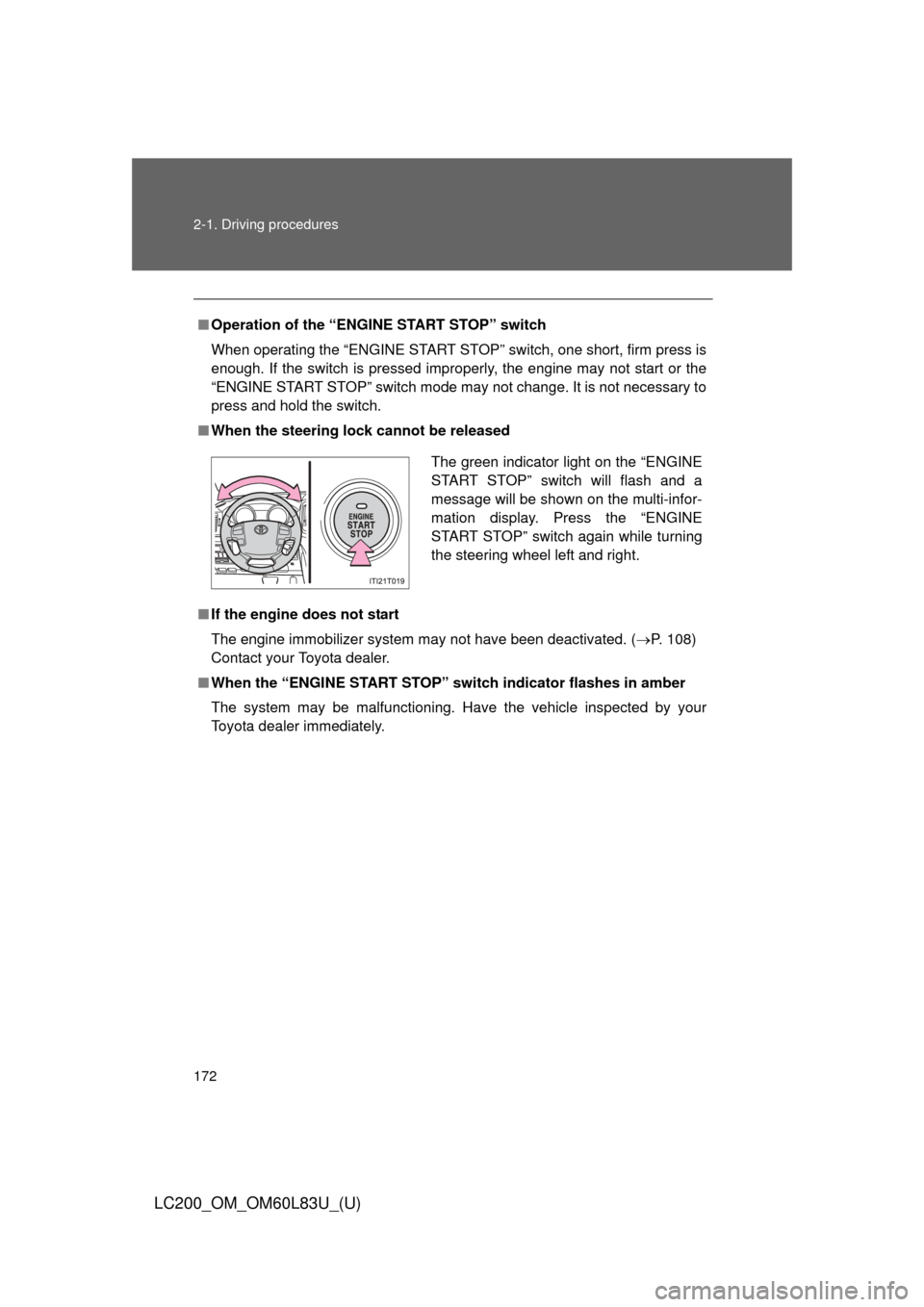
■ When the steering lock cannot be released
■ If the engine does not start
The engine immobilizer system may not have been deactivated. ( P. 108)
Contact your Toyota dealer.
■ When the “ENGINE START STOP” s witch indicator flashes in amber
The system may be malfunctioning. Have the vehicle inspected by your
Toyota dealer immediately.
The green indicator light on the “ENGINE
START STOP” switch will flash and a
message will be shown on the multi-infor-
mation display. Press the “ENGINE
START STOP” switch again while turning
the steering wheel left and right.
Page 268 of 728
268 2-4. Using other driving systems
LC200_OM_OM60L83U_(U)
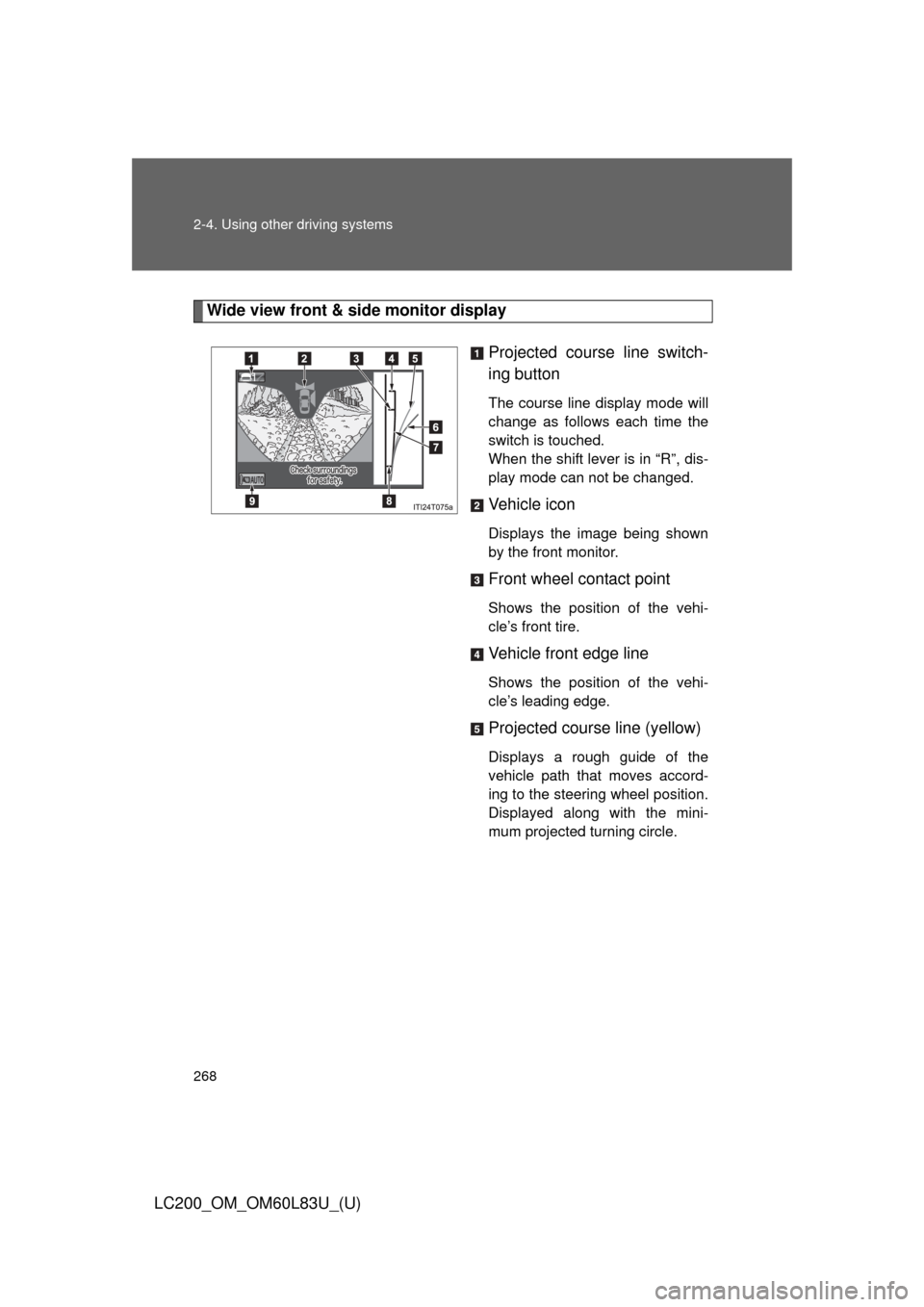
Wide view front & side monitor displayProjected course line switch-
ing button
The course line display mode will
change as follows each time the
switch is touched.
When the shift lever is in “R”, dis-
play mode can not be changed.
Vehicle icon
Displays the image being shown
by the front monitor.
Front wheel contact point
Shows the position of the vehi-
cle’s front tire.
Vehicle front edge line
Shows the position of the vehi-
cle’s leading edge.
Projected course line (yellow)
Displays a rough guide of the
vehicle path that moves accord-
ing to the steering wheel position.
Displayed along with the mini-
mum projected turning circle.
Page 284 of 728

284 2-4. Using other driving systems
LC200_OM_OM60L83U_(U)
CAUTION
■Conditions which may affect the Multi-terrain Monitor system
●If the tires are changed, the position of the guide lines displayed on the
screen may be incorrect. When changing the tires, consult your Toyota
dealer.
● Depending on the circumstances of the vehicle (number of passengers,
amount of luggage, etc.), the position of the guide lines displayed on the
screen may change. Be sure to check visually behind and all around the
vehicle before proceeding.
● Depending on the overall length of the vehicle (if a frontal protection sys-
tem is installed or the bumper has been replaced, etc.), the position of the
distance guidelines displayed on the front monitor may change. Be sure to
check visually behind and all around the vehicle before proceeding.
● When washing the vehicle, do not apply intensive bursts of water to the
camera or camera area. Doing so may result in the camera malfunction-
ing.
NOTICE
■When using the Multi-terrain Monitor
●Even if an obstacle is no longer visible on the side monitor, do not turn the
steering wheel further in the direction the vehicle is turning until the vehicle
has moved completely past the obstacle. If the steering wheel is turned to
full lock, the vehicle will turn in the smallest possible turning circle, and
may collide with the obstacle.
● It may be difficult to judge distance with the image from the front camera
due to the characteristics of the lens. Drive carefully while checking the
actual distance to the obstacles displayed on the screen. Also, give your
full attention to sudden bumps in the road.
Page 418 of 728

418 3-3. Using the Bluetooth
® audio system
LC200_OM_OM60L83U_(U)
Switching the displayPress .
Each time the button is pressed, the display changes in the following
order: Elapsed time Album title Track title Artist name
Using the steering wheel audio switches
P. 4 0 2
■Bluetooth® audio system functions
Depending on the portable player that is connected to the system, certain
functions may not be available.
■ Display
P. 373
■ Error messages
“Memory Error”: This indicates a problem in the system.
Page 622 of 728

622 5-2. Steps to take in an emergency
LC200_OM_OM60L83U_(U)
■If the tire pressure warning light frequently comes on after blinking
for 1 minute
If the tire pressure warning light frequently comes on after blinking for 1
minute when the “ENGINE START STOP ” switch is turned to IGNITION
ON mode, have it checked by Toyota dealer.
CAUTION
■If the tire pressure warning light comes on
Be sure to observe the following precautions. Failure to do so could
cause loss of vehicle control and re sult in death or serious injury.
●Stop your vehicle in a safe place as soon as possible. Adjust the tire
inflation pressure immediately.
●If the tire pressure warning light comes on even after tire inflation pres-
sure adjustment, it is pr obable that you have a flat tire. Check the tires.
If the tire is flat, change to the spare tire and have the flat tire repaired
by the nearest Toyota dealer.
●Avoid abrupt maneuvering and braking. If the vehicle tires deteriorate,
you could lose control of the steering wheel or the brakes.
■If a blowout or sudden air leakage should occur
The tire pressure warning syste m may not activate immediately.
Page 716 of 728

716
LC200_OM_OM60L83U_(U)
Alphabetical index
Alphabetical index
A/CAir conditioning filter .............. 564
Automatic air conditioning
system (vehicles without
navigation system) .............. 340
Automatic air conditioning system (vehicles with
navigation system)
*
ABS ........................................... 285
Active traction control ............. 285
Air conditioning filter............... 564
Air conditioning system(vehicles without
navigation system)Air conditioning filter .............. 564
Automatic air conditioning
system ................................ 340
Air conditioning system
(vehicles with navigation
system)
*
Airbags Airbag operating conditions... 120
Airbag precautions for your child .................................... 125
Airbag warning light............... 615
Curtain shield airbag operating conditions............ 120
Curtain shield airbag precautions ......................... 125
Front passenger occupant
classification system ........... 132
General airbag precautions ... 125
Locations of airbags .............. 116
Modification and disposal of airbags ................................ 128
Proper driving posture ... 114, 125
Roll sensing of curtain shield
airbags off switch ................131
Side airbag operating
conditions............................ 120
Side airbag precautions ........ 125
SRS airbags .......................... 116 Alarm......................................... 110
Antenna .................................... 365
Anti-lock brake system ........... 285
Armrest ..................................... 495
Ashtrays ................................... 486
Assist grips .............................. 496
Audio input ............................... 401
Audio system (vehicles
without navigation system)Antenna................................. 365
Audio input ............................ 401
AUX port ............................... 401
CD player/changer ................ 369
iPod ....................................... 384
MP3/WMA disc ..................... 377
Optimal use ........................... 399
Portable audio device ........... 401
Radio..................................... 360
Steering wheel audio switch.................................. 402
USB memory......................... 391
Audio/video system (vehicles with navigation
system)
*
Automatic air conditioningsystem (vehicles without
navigation system) ................ 340
Automatic air conditioning system (vehicles with
navigation system)
*
Automatic light control system .................................... 200
Automatic transmission
Automatic transmission ......... 175
If the shift lever cannot be shifted from “P” ................... 657
“S” mode ............................... 177
AUX port ................................... 401
Auxiliary box .................... 470, 478
A