check engine TOYOTA LAND CRUISER 2015 J200 Owners Manual
[x] Cancel search | Manufacturer: TOYOTA, Model Year: 2015, Model line: LAND CRUISER, Model: TOYOTA LAND CRUISER 2015 J200Pages: 728, PDF Size: 10.53 MB
Page 5 of 728
1
2
3
4
5
6
7
5
LC200_OM_OM60L83U_(U)
3-6. Using the storage featuresList of storage features ....... 470
• Glove box.......................... 471
• Console box ...................... 472
• Overhead console............. 473
• Cup holders ...................... 474
• Bottle holders .................... 476
• Card holders ..................... 478
• Auxiliary boxes.................. 478
3-7. Other interior features Cool box .............................. 479
Sun visors ........................... 481
Vanity mirror........................ 482
Clock ................................... 483
Outside temperature display............................... 484
Ashtrays .............................. 486
Cigarette lighter................... 488
Power outlets ...................... 489
Heated steering wheel ........ 491
Seat heaters and ventilators ......................... 493
Armrest ............................... 495
Assist grips.......................... 496
Floor mats ........................... 497
Luggage compartment features ............................. 499
Garage door opener............ 501
Safety Connect ................... 508 4-1. Maintenance and care
Cleaning and protecting the vehicle exterior ........... 516
Cleaning and protecting the vehicle interior ............ 519
4-2. Maintenance Maintenance requirements .................... 522
General maintenance ......... 525
Emission inspection and maintenance (I/M)
programs .......................... 528
4-3. Do-it-yourself maintenance Do-it-yourself service precautions....................... 529
Hood ................................... 532
Engine compartment .......... 533
Tires ................................... 548
Tire inflation pressure ......... 557
Wheels ............................... 561
Air conditioning filter ........... 564
Electronic key battery ......... 567
Checking and replacing fuses ................. 570
Headlight aim ..................... 584
Light bulbs .......................... 586
4Maintenance and care
Page 22 of 728

22
LC200_OM_OM60L83U_(U)
For your information
Main Owner’s Manual
Please note that this manual applies to all models and explains all equip-
ment, including options. Therefore, you may find some explanations for
equipment not installed on your vehicle.
All specifications provided in this manual are current at the time of printing.
However, because of the Toyota policy of continual product improvement, we
reserve the right to make changes at any time without notice.
Depending on specifications, the vehicle shown in the illustrations may differ
from your vehicle in terms of equipment.
Noise from under vehicle after turning off the engine
Approximately five hours after the engine is turned off, you may hear sound
coming from under the vehicle for several minutes. This is the sound of a fuel
evaporation leakage check and, it does not indicate a malfunction.
Accessories, spare parts and modification of your Toyota
A wide variety of non-genuine spare parts and accessories for Toyota vehi-
cles are currently available in the market. You should know that Toyota does
not warrant these products and is not responsible for their performance,
repair, or replacement, or for any damage they may cause to, or adverse
effect they may have on, your Toyota vehicle.
This vehicle should not be modified with non-genuine Toyota products. Mod-
ification with non-genuine Toyota products could affect its performance,
safety or durability, and may even violate governmental regulations. In addi-
tion, damage or performance problems resulting from the modification may
not be covered under warranty.
Page 39 of 728
39
1-2. Opening, closing and locking the doors
1
Before driving
LC200_OM_OM60L83U_(U)
■
Note for the smart key system
●Even when the electronic key is within the effective range (detection
areas), the system may not operate properly in the following cases:
• The electronic key is too close to the window or outside door handle,
near the ground, or in a high place when the doors are locked or
unlocked.
• The electronic key is near the ground or in a high place, or too close to the rear bumper center when the back door is locked or unlocked.
• The electronic key is on the instrument panel, floor or in the glove box when the engine is started or “ENGINE START STOP” switch modes
are changed.
● Do not leave the electronic key on top of the instrument panel or near the
door pockets when exiting the vehicle. Depending on the radio wave
reception conditions, it may be detected by the antenna outside the cabin
and the door will become lockable from the outside, possibly trapping the
electronic key inside the vehicle.
● As long as the electronic key is within the effective range, the doors may
be locked or unlocked by anyone.
● Even if the electronic key is not inside the vehicle, it may be possible to
start the engine if the electronic key is near the window.
● The doors may unlock if a large amount of water splashes on the door
handle, such as in the rain or in a car wash. (The doors will automatically
be locked after approximately 60 seconds if the doors are not opened
and closed.)
● Gripping the door handle when wearing a glove may not unlock the door.
● If the wireless remote control is used to lock the doors when the elec-
tronic key is near the vehicle, there is a possibility that the door may not
be unlocked by the smart key system. (Use the wireless remote control to
unlock the doors.)
● A sudden approach to the effective range or door handle operation may
prevent the doors from being unlocked. In this case, return the door han-
dle to the original position and check that the doors unlock before pulling
the door handle.
■ When the vehicle is not dr iven for extended periods
To prevent theft of the vehicle, do not leave the electronic key within 6 ft. (2
m) of the vehicle.
Page 44 of 728
44
1-2. Opening, closing and locking the doors
LC200_OM_OM60L83U_(U)
Wireless remote control
■Operation signals
●Doors: A buzzer sounds and the emergency flashers flash to indicate
that the doors have been locked/unlocked. (Locked: Once; Unlocked:
Tw i c e )
● Windows and moon roof: A buzzer sounds when the windows and moon
roof begin to open.
■ Operating conditions
The wireless remote control will not operate when the “ENGINE START
STOP” switch is in any position other than OFF.
■ Door lock buzzer
If a door is not fully closed, a buzzer sounds continuously for 5 seconds if an
attempt to lock the door is made. Fully close the door to stop the buzzer, and
lock the vehicle once more.
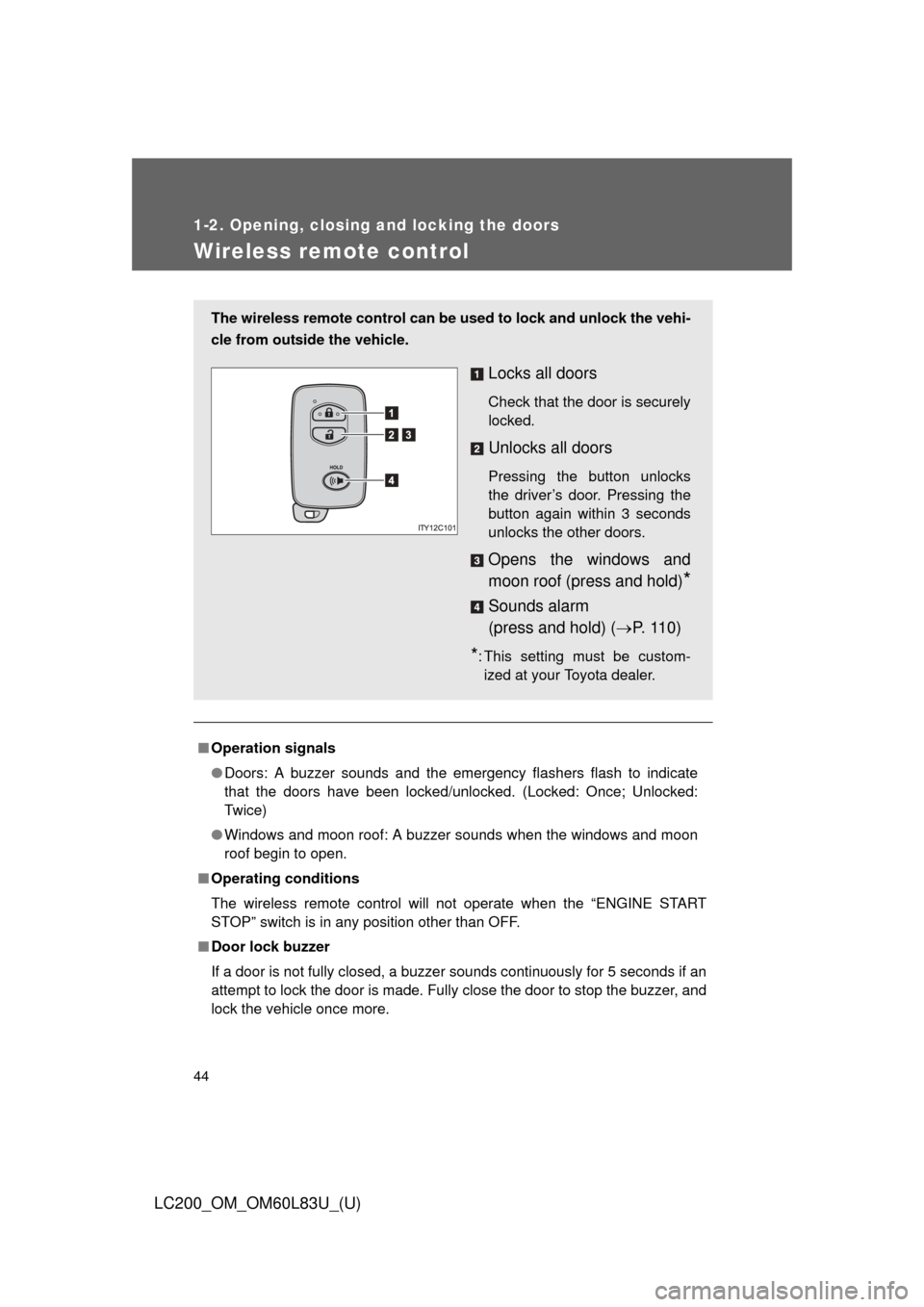
The wireless remote control can be used to lock and unlock the vehi-
cle from outside the vehicle.
Locks all doors
Check that the door is securely
locked.
Unlocks all doors
Pressing the button unlocks
the driver’s door. Pressing the
button again within 3 seconds
unlocks the other doors.
Opens the windows and
moon roof (press and hold)
*
Sounds alarm
(press and hold) ( P. 110)
*: This setting must be custom-
ized at your Toyota dealer.
Page 70 of 728
70 1-3. Adjustable components (seats, mirrors, steering wheel)
LC200_OM_OM60L83U_(U)
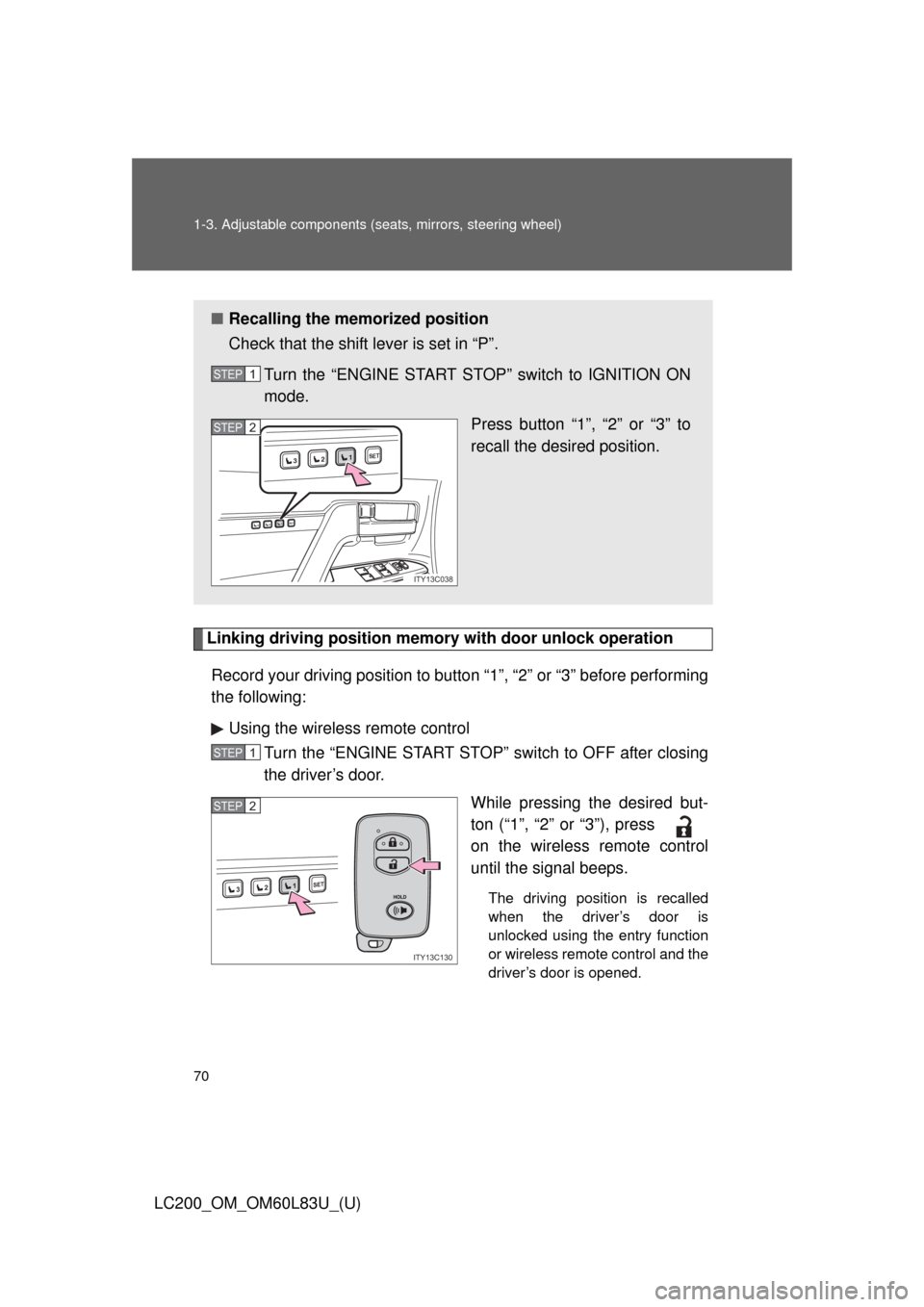
Linking driving position memory with door unlock operation
Record your driving position to button “1”, “2” or “3” before performing
the following: Using the wireless remote control Turn the “ENGINE START STOP” switch to OFF after closing
the driver’s door.
While pressing the desired but-
ton (“1”, “2” or “3”), press
on the wireless remote control
until the signal beeps.
The driving position is recalled
when the driver’s door is
unlocked using the entry function
or wireless remote control and the
driver’s door is opened.
■Recalling the memorized position
Check that the shift lever is set in “P”.
Turn the “ENGINE START STOP” switch to IGNITION ON
mode. Press button “1”, “2” or “3” to
recall the desired position.
STEP1
1SET23
1SET23
ITY13C038
STEP2
STEP1
1SET23
ITY13C130
STEP2
Page 98 of 728
98 1-4. Opening and closing the windows and moon roof
LC200_OM_OM60L83U_(U)
CAUTION
■Closing the windows
Observe the following precautions.
Failing to do so may result in death or serious injury.
●The driver is responsible for all the power window operations, including the
operation for the passengers. In order to prevent accidental operation,
especially by a child, do not let a child operate the power windows. It is
possible for children and other passengers to have body parts caught in
the power window. Also, when riding with a child, it is recommended to use
the window lock switch. ( P. 95)
● Check to make sure that all passengers do not have any part of their body
in a position where it could be caught when a window is being operated.
● When using the smart key system, wireless remote control or mechanical
key and operating the power windows, operate the power window after
checking to make sure that there is no possibility of any passenger having
any of their body parts caught in the window. Also, do not let a child oper-
ate window by the smart key system, wireless remote control or mechani-
cal key. It is possible for children and other passengers to get caught in the
power window.
● When exiting the vehicle, turn the “ENGINE START STOP” switch off,
carry the key and exit the vehicle along with the child. There may be acci-
dental operation, due to mischief, etc., that may possibly lead to an acci-
dent.
■ Jam protection function
●Never try jamming any part of your body to activate the jam protection
function intentionally.
● The jam protection function may not work if something gets caught just
before the window fully closes.
Page 103 of 728
103
1-4. Opening and closing the windows and moon roof
1
Before driving
LC200_OM_OM60L83U_(U)
CAUTION
■
Closing the moon roof
Observe the following precautions.
Failing to do so may result in death or serious injury.
●The driver is responsible for moon roof opening and closing operations.
In order to prevent accidental operation, especially by a child, do not let a
child operate the moon roof. It is possible for children and other passen-
gers to have body parts caught in the moon roof.
● Check to make sure that all passengers do not have any part of their bod-
ies in a position where they could be caught when the moon roof is being
operated.
● When using the smart key system, wireless remote control or mechanical
key and operating the moon roof, operate the moon roof after checking to
make sure that there is no possibility of any passenger having any of their
body parts caught in the moon roof. Also, do not let a child operate moon
roof by the smart key system, wireless remote control or mechanical key. It
is possible for children and other passengers to get caught in the moon
roof.
● When exiting the vehicle, turn the “ENGINE START STOP” switch off,
carry the key and exit the vehicle along with the child. There may be acci-
dental operation, due to mischief, etc., that may possibly lead to an acci-
dent.
■ Jam protection function
●Never try jamming any part of your body to activate the jam protection
function intentionally.
● The jam protection function may not work if something gets caught just
before the moon roof fully closes.
Page 111 of 728
111
1-6. Theft deterrent system
1
Before driving
LC200_OM_OM60L83U_(U)
■
System maintenance
The vehicle has a maintenance-free type alarm system.
■ Items to check before locking the vehicle
To prevent unexpected triggering of the alarm and vehicle theft, make sure
of the following.
●Nobody is in the vehicle.
● The windows and moon roof are closed before the alarm is set.
● No valuables or other personal items are left in the vehicle.
■ Deactivating or stopping the alarm
Do one of the following to deactivate or stop the alarm.
●Unlock the doors.
● Turn the “ENGINE START STOP” switch to ACCESSORY or
IGNITION ON mode, or start the engine. (The alarm will be
deactivated or stopped after a few seconds.)
Page 161 of 728
161
2-1. Driving procedures
2
When driving
LC200_OM_OM60L83U_(U)
■
When turning off the engine
Emission system operating sounds may continue for a short time after the
engine is turned off. This is not a malfunction, and helps to ensure optimal
performance of the emission system.
CAUTION
■When starting the vehicle
Always keep your foot on the brake pedal while stopped with the engine run-
ning. This prevents the vehicle from creeping.
■ When driving the vehicle
●Do not drive if you are unfamiliar with the location of the brake and accel-
erator pedals to avoid depressing the wrong pedal.
• Accidentally depressing the accelerator pedal instead of the brake
pedal will result in sudden acceleration that may lead to an accident
that could result in death or serious injury.
• When backing up, you may twist your body around, leading to a diffi- culty in operating the pedals. Make sure to operate the pedals properly.
• Make sure to keep a correct driving posture even when moving the vehicle only slightly, allowing you to depress the brake and accelerator
pedals properly.
• Depress the brake pedal using your right foot. Depressing the brake pedal using your left foot may delay response in an emergency, result-
ing in an accident.
● Do not drive the vehicle over or st op the vehicle near flammable materials.
The exhaust system and exhaust gases can be extremely hot. This may
cause a fire if there is any flammable material nearby.
● Do not let the vehicle roll backwards while the shift lever is in a driving
position, or roll forward while the shift lever is in “R”.
Doing so may cause the engine to stall and lead to poor steering perfor-
mance, resulting in an accident or damage to the vehicle.
● If the smell of exhaust is noticed inside the vehicle, open the windows and
check that the back door is closed. Large amounts of exhaust in the vehi-
cle can cause driver drowsiness and an accident, resulting in death or a
serious health hazard. Have the vehicle inspected by your Toyota dealer
immediately.
Page 162 of 728
162 2-1. Driving procedures
LC200_OM_OM60L83U_(U)
CAUTION
●Do not shift the shift lever to “P” while the vehicle is moving.
Doing so can damage the transmission and may result in a loss of vehicle\
control.
● Do not shift the shift lever to “R” while the vehicle is moving forward.
Doing so can damage the transmission and may result in a loss of vehicle\
control.
● Do not shift the shift lever to “D” while the vehicle is moving backward.
Doing so can damage the transmission and may result in a loss of vehicle\
control.
● Moving the shift lever to “N” while the vehicle is moving will disengage the
engine from the transmission. Engine br aking is not available when “N” is
selected.
● During normal driving, do not turn off the engine. Turning the engine off
while driving will not cause loss of steering or braking control, but the
power assist to these systems will be lost. This will make it more difficult to
steer and brake, so you should pull over and stop the vehicle as soon as it
is safe to do so.
However, in the event of an emergency, such as if it becomes impossible
to stop the vehicle in the normal way: P. 670
● Use engine braking (downshift) to maintain a safe speed when driving
down a steep hill.
Using the brakes continuously may cause the brakes to overheat and lose
effectiveness. ( P. 175)
● When stopped on an inclined surface, use the brake pedal and parking
brake to prevent the vehicle from rolling backward or forward and causing
an accident.
● Do not adjust the position of the steering wheel, the seat, or the inside or
outside rear view mirrors while driving.
Doing so may result in a loss of vehicle control that can cause accidents
that may result in death or serious injury.
● Always check that all passengers’ arms, heads or other parts of their bod-
ies are not outside the vehicle, as this may result in death or serious injury.