park assist TOYOTA LAND CRUISER 2015 J200 Owners Manual
[x] Cancel search | Manufacturer: TOYOTA, Model Year: 2015, Model line: LAND CRUISER, Model: TOYOTA LAND CRUISER 2015 J200Pages: 728, PDF Size: 10.53 MB
Page 3 of 728

1
2
3
4
5
6
7
3
LC200_OM_OM60L83U_(U)
2-1. Driving proceduresDriving the vehicle............... 158
Engine (ignition) switch ....... 170
Automatic transmission ....... 175
Turn signal lever ................. 180
Parking brake ...................... 181
Horn .................................... 182
2-2. Instrument cluster Gauges and meters ............ 183
Indicators and warning lights ................................. 188
Multi-information display ..... 193
2-3. Operating the lights and wipers
Headlight switch .................. 200
Fog light switch ................... 205
Windshield wipers and washer ....................... 206
Rear window wiper and washer ....................... 212
Headlight cleaner switch ..... 213 2-4. Using other driving systems
Cruise control ..................... 214
Dynamic radar cruise control .............................. 218
Intuitive parking assist ........ 233
Four-wheel drive system .... 244
Crawl Control (with Turn Assist function) ................. 249
Multi-terrain Select ............. 255
Multi-terrain Monitor ........... 261
Driving assist systems ........ 285
Pre-Collision System .......... 293
2-5. Driving information Off-road precautions........... 300
Cargo and luggage ............. 305
Vehicle load limits............... 312
Winter driving tips ............... 313
Trailer towing ...................... 318
Dinghy towing ..................... 336
2When driving
Page 19 of 728
19
LC200_OM_OM60L83U_(U)
D
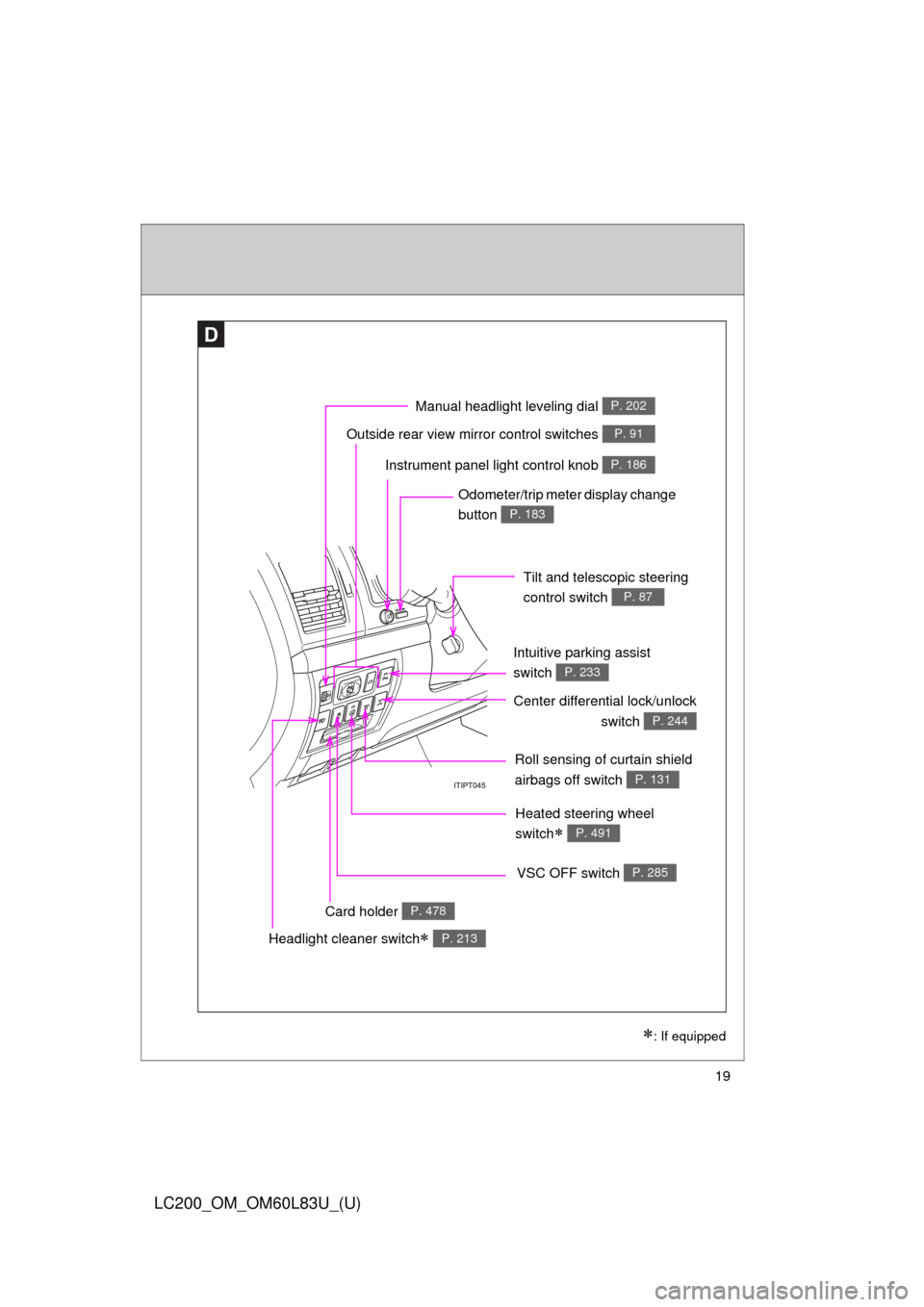
Roll sensing of curtain shield
airbags off switch
P. 131
Headlight cleaner switch P. 213
Outside rear view mirror control switches P. 91
Intuitive parking assist
switch
P. 233
: If equipped
Instrument panel light control knob P. 186
Odometer/trip meter display change
button
P. 183
Tilt and telescopic steering
control switch
P. 87
Card holder P. 478
VSC OFF switch P. 285
Center differential lock/unlockswitch
P. 244
Heated steering wheel
switch
P. 491
Manual headlight leveling dial P. 202
Page 157 of 728
When driving2
157
LC200_OM_OM60L83U_(U)
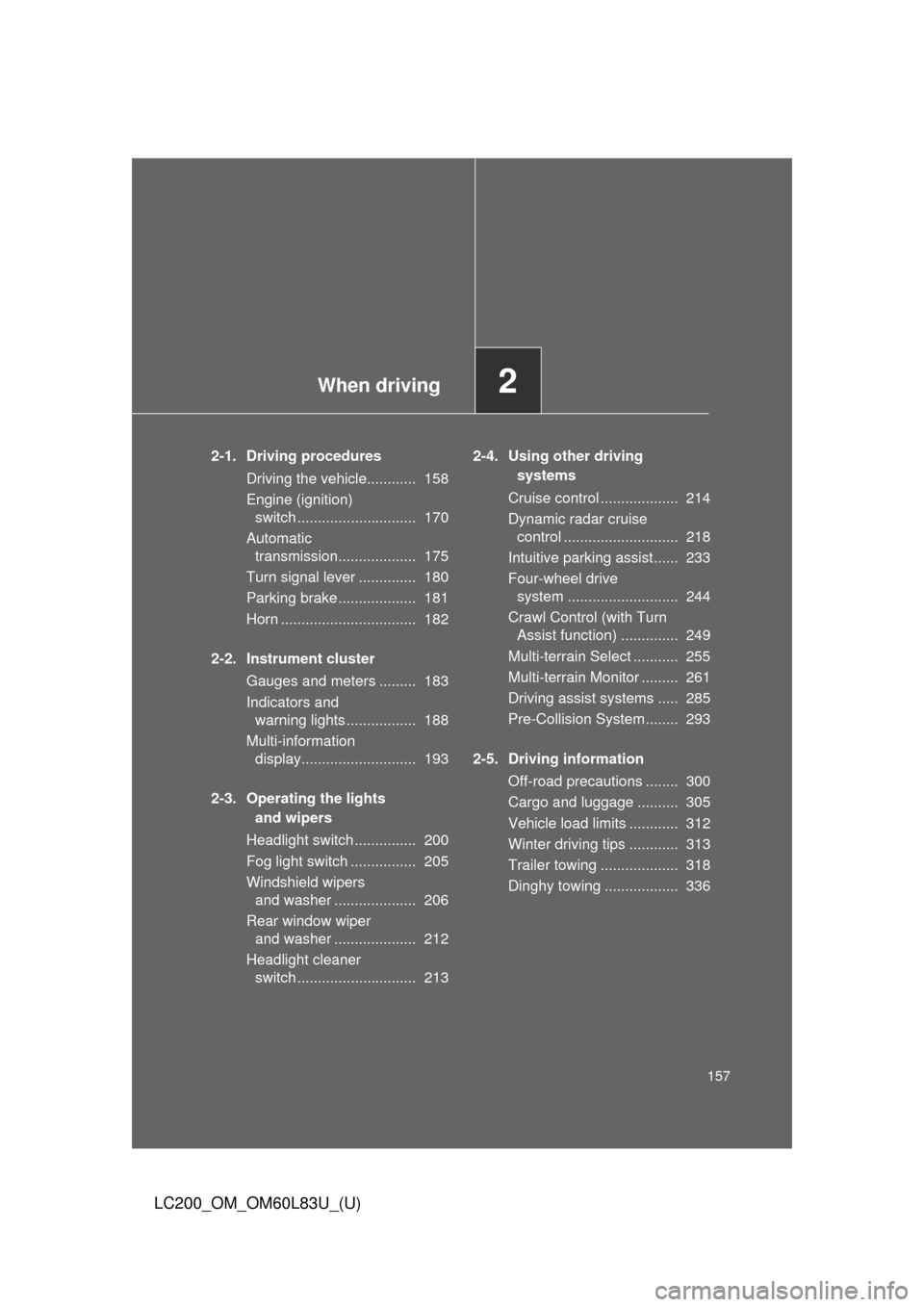
2-1. Driving proceduresDriving the vehicle............ 158
Engine (ignition) switch ............................. 170
Automatic transmission................... 175
Turn signal lever .............. 180
Parking brake ................... 181
Horn ................................. 182
2-2. Instrument cluster Gauges and meters ......... 183
Indicators and warning lights ................. 188
Multi-information display............................ 193
2-3. Operating the lights and wipers
Headlight switch ............... 200
Fog light switch ................ 205
Windshield wipers and washer .................... 206
Rear window wiper and washer .................... 212
Headlight cleaner switch ............................. 213 2-4. Using other driving
systems
Cruise control ................... 214
Dynamic radar cruise control ............................ 218
Intuitive parking assist...... 233
Four-wheel drive system ........................... 244
Crawl Control (with Turn Assist function) .............. 249
Multi-terrain Select ........... 255
Multi-terrain Monitor ......... 261
Driving assist systems ..... 285
Pre-Collision System........ 293
2-5. Driving information Off-road precautions ........ 300
Cargo and luggage .......... 305
Vehicle load limits ............ 312
Winter driving tips ............ 313
Trailer towing ................... 318
Dinghy towing .................. 336
Page 162 of 728

162 2-1. Driving procedures
LC200_OM_OM60L83U_(U)
CAUTION
●Do not shift the shift lever to “P” while the vehicle is moving.
Doing so can damage the transmission and may result in a loss of vehicle\
control.
● Do not shift the shift lever to “R” while the vehicle is moving forward.
Doing so can damage the transmission and may result in a loss of vehicle\
control.
● Do not shift the shift lever to “D” while the vehicle is moving backward.
Doing so can damage the transmission and may result in a loss of vehicle\
control.
● Moving the shift lever to “N” while the vehicle is moving will disengage the
engine from the transmission. Engine br aking is not available when “N” is
selected.
● During normal driving, do not turn off the engine. Turning the engine off
while driving will not cause loss of steering or braking control, but the
power assist to these systems will be lost. This will make it more difficult to
steer and brake, so you should pull over and stop the vehicle as soon as it
is safe to do so.
However, in the event of an emergency, such as if it becomes impossible
to stop the vehicle in the normal way: P. 670
● Use engine braking (downshift) to maintain a safe speed when driving
down a steep hill.
Using the brakes continuously may cause the brakes to overheat and lose
effectiveness. ( P. 175)
● When stopped on an inclined surface, use the brake pedal and parking
brake to prevent the vehicle from rolling backward or forward and causing
an accident.
● Do not adjust the position of the steering wheel, the seat, or the inside or
outside rear view mirrors while driving.
Doing so may result in a loss of vehicle control that can cause accidents
that may result in death or serious injury.
● Always check that all passengers’ arms, heads or other parts of their bod-
ies are not outside the vehicle, as this may result in death or serious injury.
Page 167 of 728
167
2-1. Driving procedures
2
When driving
LC200_OM_OM60L83U_(U)
CAUTION
■
When braking the vehicle
●When the brakes are wet, drive more cautiously.
Braking distance increases when the brakes are wet, and may cause one
side of the vehicle to brake differently than the other side. Also the parking
brake may not securely hold the vehicle.
● If the power brake assist function does not operate, do not follow other
vehicles closely and avoid hills or sharp turns that require braking.
In this case, braking is still possible, but the brake pedal should be
depressed more firmly than usual. Also, the braking distance will increase.
Have your brakes fixed immediately.
● Do not pump the brake pedal if the engine stalls.
Each push on the brake pedal uses up the reserve for the power-assisted
brakes.
● The brake system consists of 2 individual hydraulic systems: if one of the
systems fails, the other will still operate. In this case, the brake pedal
should be depressed more firmly than usual and the braking distance will
increase.
Have your brakes fixed immediately.
Page 193 of 728
193
2-2. Instrument cluster
2
When driving
LC200_OM_OM60L83U_(U)
Multi-information display
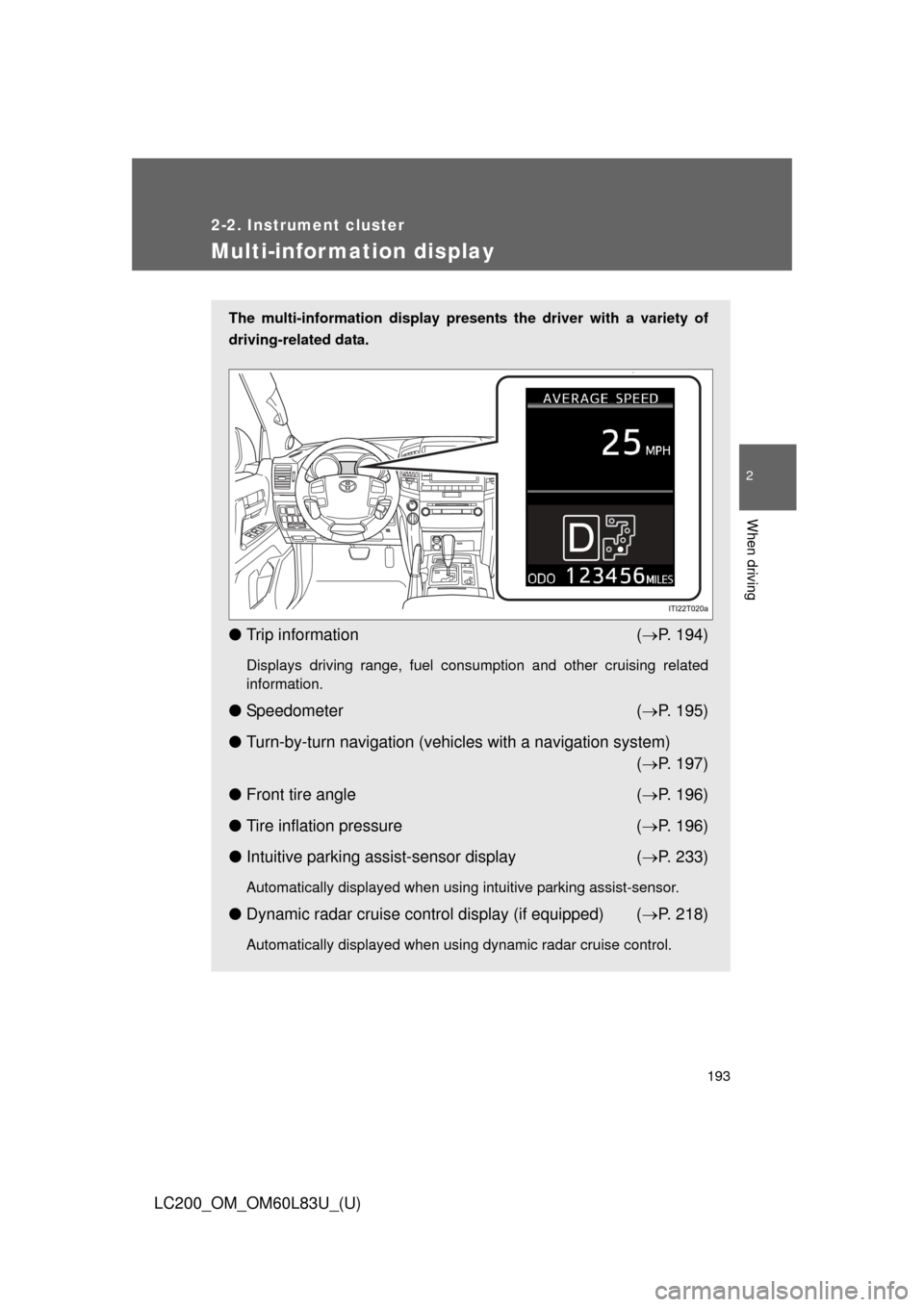
The multi-information display presents the driver with a variety of
driving-related data.
● Trip information ( P. 194)
Displays driving range, fuel consumption and other cruising related
information.
● Speedometer ( P. 195)
● Turn-by-turn navigation (vehicles with a navigation system)
( P. 197)
● Front tire angle ( P. 196)
● Tire inflation pressure ( P. 196)
● Intuitive parking assist-sensor display ( P. 233)
Automatically displayed when using intuitive parking assist-sensor.
● Dynamic radar cruise control display (if equipped) ( P. 218)
Automatically displayed when using dynamic radar cruise control.
Page 233 of 728
233
2-4. Using other driving systems
2
When driving
LC200_OM_OM60L83U_(U)
Intuitive parking assist
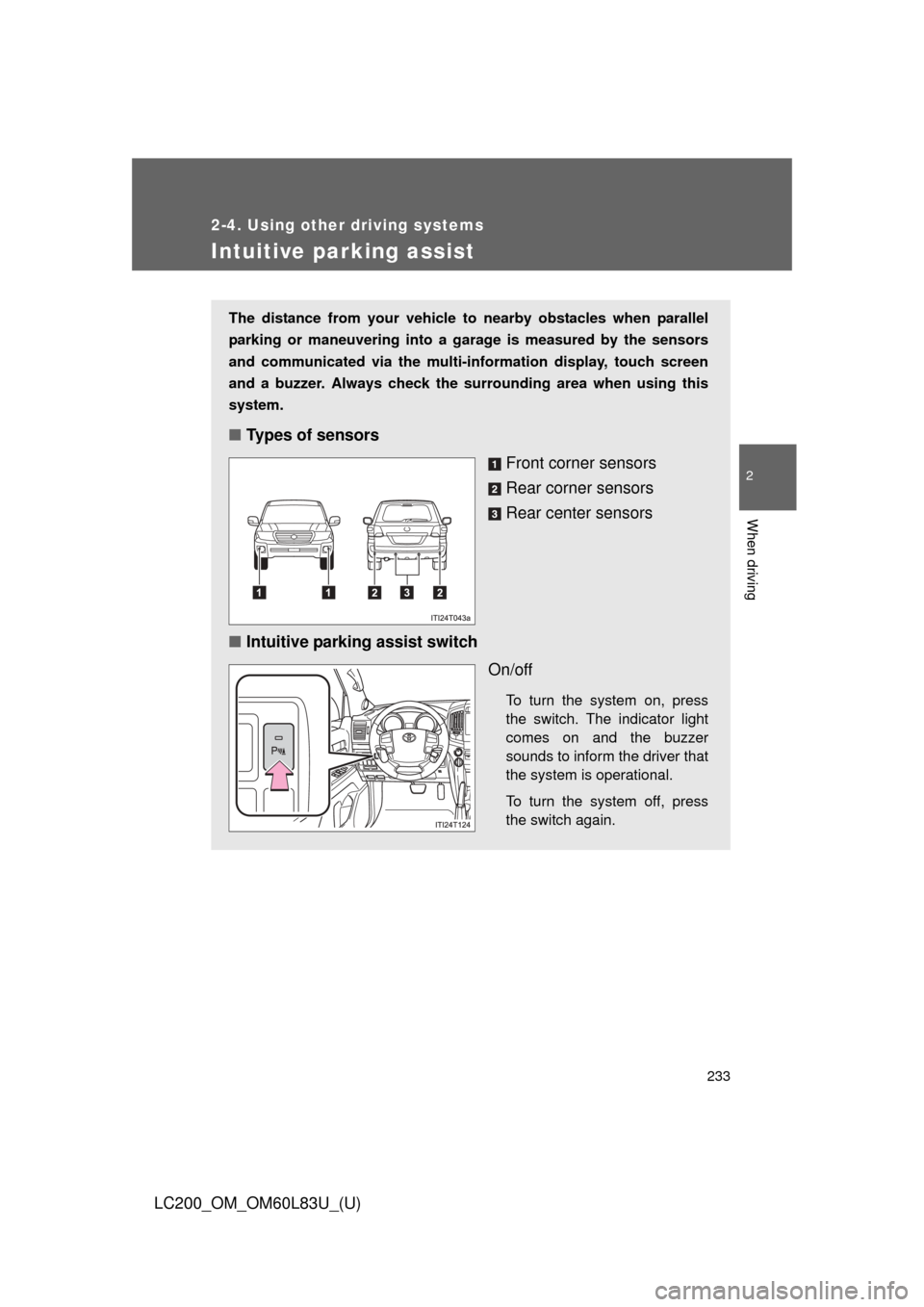
The distance from your vehicle to nearby obstacles when parallel
parking or maneuvering into a garage is measured by the sensors
and communicated via the multi-in formation display, touch screen
and a buzzer. Always check the surrounding area when using this
system.
■ Types of sensors
Front corner sensors
Rear corner sensors
Rear center sensors
■ Intuitive parking assist switch
On/off
To turn the system on, press
the switch. The indicator light
comes on and the buzzer
sounds to inform the driver that
the system is operational.
To turn the system off, press
the switch again.
Page 234 of 728
234 2-4. Using other driving systems
LC200_OM_OM60L83U_(U)
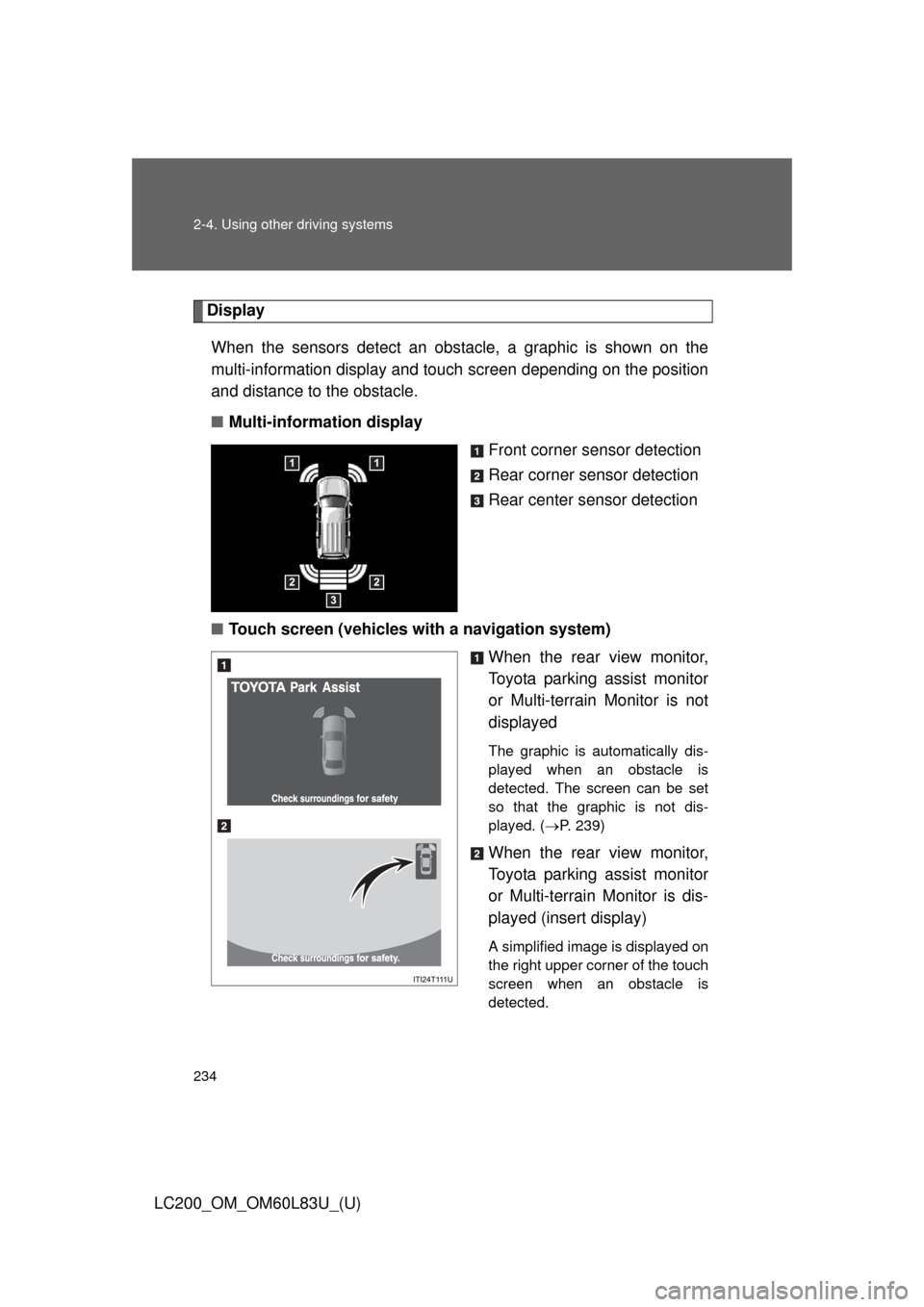
DisplayWhen the sensors detect an obstacle, a graphic is shown on the
multi-information display and touch screen depending on the position
and distance to the obstacle.
■ Multi-information display
Front corner sensor detection
Rear corner sensor detection
Rear center sensor detection
■ Touch screen (vehicles with a navigation system)
When the rear view monitor,
Toyota parking assist monitor
or Multi-terrain Monitor is not
displayed
The graphic is automatically dis-
played when an obstacle is
detected. The screen can be set
so that the graphic is not dis-
played. (P. 239)
When the rear view monitor,
Toyota parking assist monitor
or Multi-terrain Monitor is dis-
played (insert display)
A simplified image is displayed on
the right upper corner of the touch
screen when an obstacle is
detected.
Page 239 of 728
239
2-4. Using other
driving systems
2
When driving
LC200_OM_OM60L83U_(U)
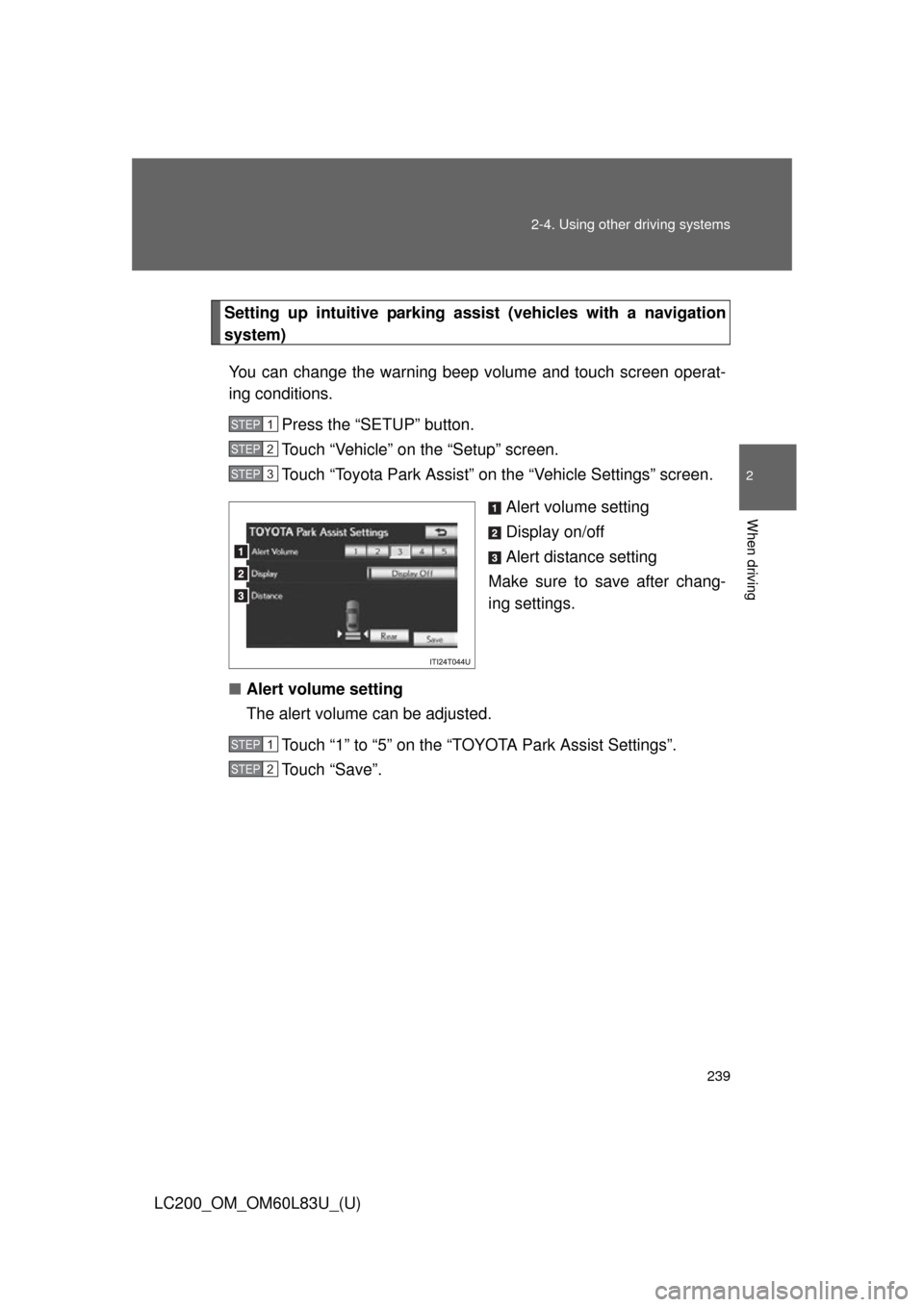
Setting up intuitive park ing assist (vehicles with a navigation
system)
You can change the warning beep volume and touch screen operat-
ing conditions. Press the “SETUP” button.
Touch “Vehicle” on the “Setup” screen.
Touch “Toyota Park Assist” on the “Vehicle Settings” screen.
Alert volume setting
Display on/off
Alert distance setting
Make sure to save after chang-
ing settings.
■ Alert volume setting
The alert volume can be adjusted.
Touch “1” to “5” on the “TOYOTA Park Assist Settings”.
Touch “Save”.
STEP1
STEP2
STEP3
STEP1
STEP2
Page 240 of 728

240 2-4. Using other driving systems
LC200_OM_OM60L83U_(U)■
Display on/off setting
On or off can be selected for intuitive parking assist display.
Touch “Display Off”.
When the “Display Off” indicator is turned on, the display of intuitive
parking assist will be off. Touch “Display Off” again to turn the display
of intuitive parking assist on.
Touch “Save”.
■ Alert distance setting
Front or rear center sensors display and tone indication can be set.
Touch “Rear”.
Long distance or short distance can be selected.
Touch “Save”.
■The intuitive parking assist can be operated when
●Front corner sensors:
• The “ENGINE START STOP” switch is in IGNITION ON mode.
• The shift lever is in a position other than “P”.
• The vehicle speed is less than approximately 6 mph (10 km/h).
● Rear corner and rear center sensors:
• The “ENGINE START STOP” switch is in IGNITION ON mode.
• The shift lever is in “R”.
■ Intuitive parking assist display
When an obstacle is detected while the rear view monitor system, Toyota
parking assist monitor or Multi-terrain Monitor is in use, the warning indicator
will appear in the top right of the screen even if the display setting has been
set to off.
STEP1
STEP2
STEP1
STEP2