rear entertainment TOYOTA LAND CRUISER 2016 J200 Navigation Manual
[x] Cancel search | Manufacturer: TOYOTA, Model Year: 2016, Model line: LAND CRUISER, Model: TOYOTA LAND CRUISER 2016 J200Pages: 275, PDF Size: 28.47 MB
Page 156 of 275
LC200_Navi_OM60N15U_(U)
15.07.08 16:49
1564. Rear seat entertainment system operation
WA R N I N G
●While driving
• Do not use headphones. Doing so
may cause an accident, resulting in
death or serious injury.
●To prevent accidents and electric shock
• Do not disassemble or modify the
remote control.
●When the remote control is not used
• Stow the remote control. Injuries may
result in the event of sudden braking,
sudden swerving or an accident.
●Conversational speech on some DVDs
is recorded at a low volume to empha-
size the impact of sound effects. If you
adjust the volume assuming that the
conversations represent the maximum
volume level that the DVD will play, you
may be startled by louder sound effects
or startled when you change to a differ-
ent audio source. The louder sounds
may have a significant impact on the
human body or pose a driving hazard.
Keep this in mind when you adjust the
volume.
●Removed battery and other parts:
• Keep away from children. These
parts are small and if swallowed by a
child they can cause choking. Failure
to do so could result in death or seri-
ous injury.
NOTICE
●Cleaning the display
• Wipe the display with a dry soft cloth.
• If the screen is wiped with a rough
cloth, the surface of the screen may
be scratched.
●To prevent damage to the remote control
• Keep the remote control away from
direct sunlight, temperature heat and
high humidity.
• Do not drop or knock the remote con-
trol against hard objects.
• Do not sit on or place heavy objects
on the remote control.
●For normal operation after replacing the
battery, observe the following precau-
tions to prevent accidents:
• Always work with dry hands. Moisture
may cause the battery to rust.
• Do not touch or move any other com-
ponents inside the remote control.
• Do not bend either of the battery ter-
minals.
Page 157 of 275
LC200_Navi_OM60N15U_(U)
15.07.08 16:49
Audio/visual system
4
1574. Rear seat entertainment system operation
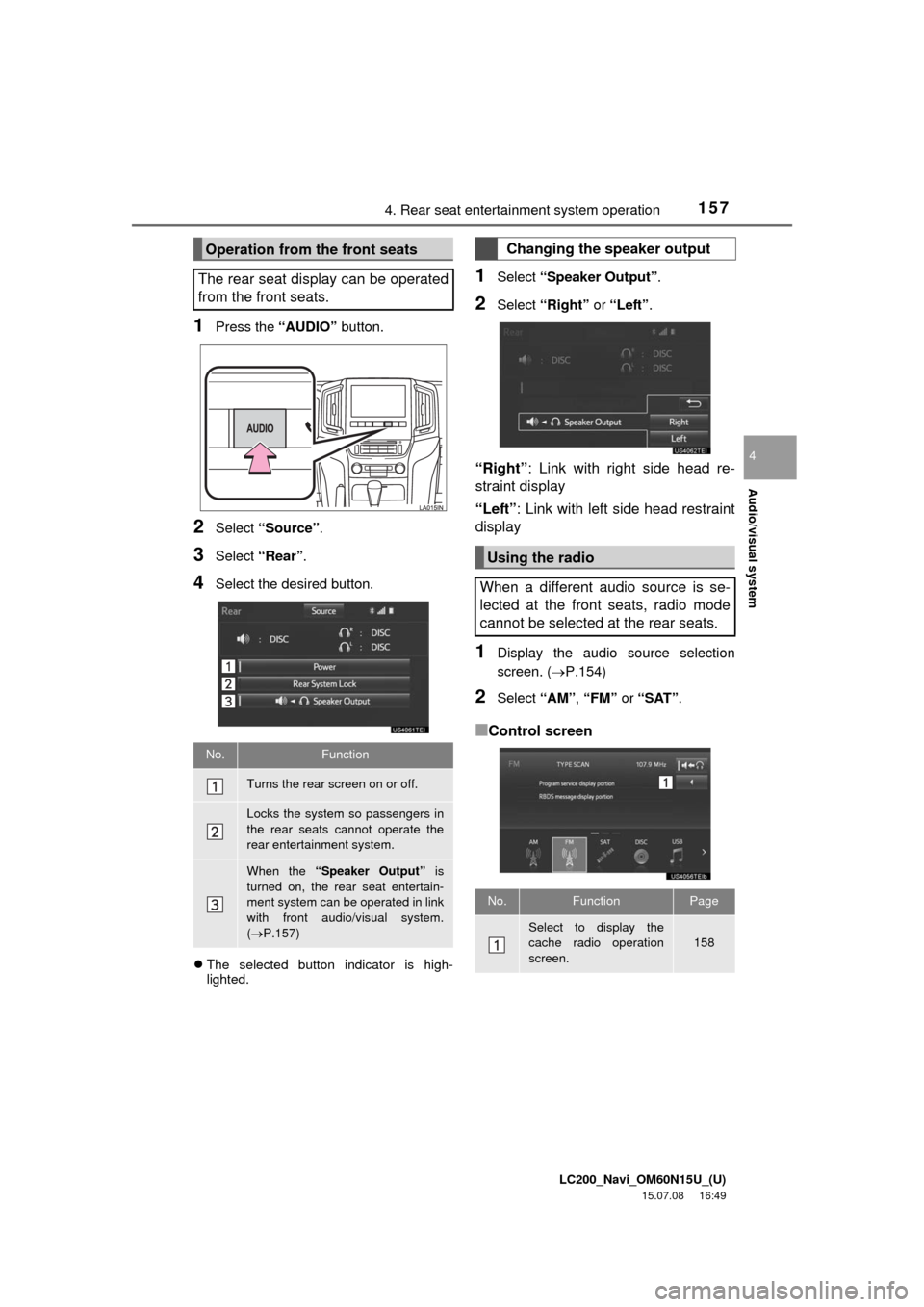
1Press the “AUDIO” button.
2Select “Source”.
3Select “Rear”.
4Select the desired button.
The selected button indicator is high-
lighted.
1Select “Speaker Output”.
2Select “Right” or “Left”.
“Right”: Link with right side head re-
straint display
“Left”: Link with left side head restraint
display
1Display the audio source selection
screen. (P.154)
2Select “AM”, “FM” or “SAT”.
■Control screen
Operation from the front seats
The rear seat display can be operated
from the front seats.
No.Function
Turns the rear screen on or off.
Locks the system so passengers in
the rear seats cannot operate the
rear entertainment system.
When the “Speaker Output” is
turned on, the rear seat entertain-
ment system can be operated in link
with front audio/visual system.
(P.157)
Changing the speaker output
Using the radio
When a different audio source is se-
lected at the front seats, radio mode
cannot be selected at the rear seats.
No.FunctionPage
Select to display the
cache radio operation
screen.158
Page 158 of 275
LC200_Navi_OM60N15U_(U)
15.07.08 16:49
1584. Rear seat entertainment system operation
■Controller
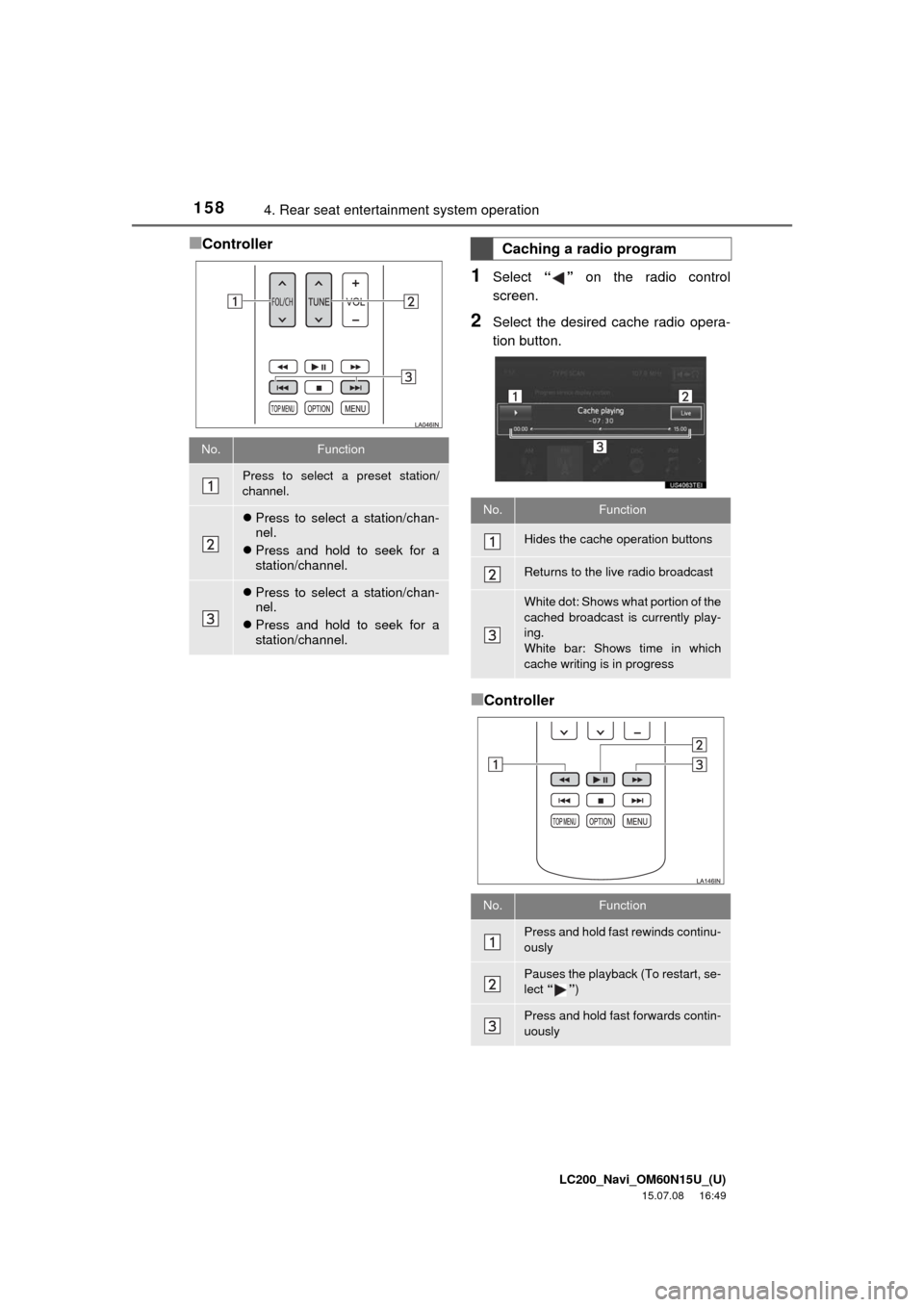
1Select “” on the radio control
screen.
2Select the desired cache radio opera-
tion button.
■Controller
No.Function
Press to select a preset station/
channel.
Press to select a station/chan-
nel.
Press and hold to seek for a
station/channel.
Press to select a station/chan-
nel.
Press and hold to seek for a
station/channel.
Caching a radio program
No.Function
Hides the cache operation buttons
Returns to the live radio broadcast
White dot: Shows what portion of the
cached broadcast is currently play-
ing.
White bar: Shows time in which
cache writing is in progress
No.Function
Press and hold fast rewinds continu-
ously
Pauses the playback (To restart, se-
lect “”)
Press and hold fast forwards contin-
uously
Page 159 of 275
LC200_Navi_OM60N15U_(U)
15.07.08 16:49
Audio/visual system
4
1594. Rear seat entertainment system operation
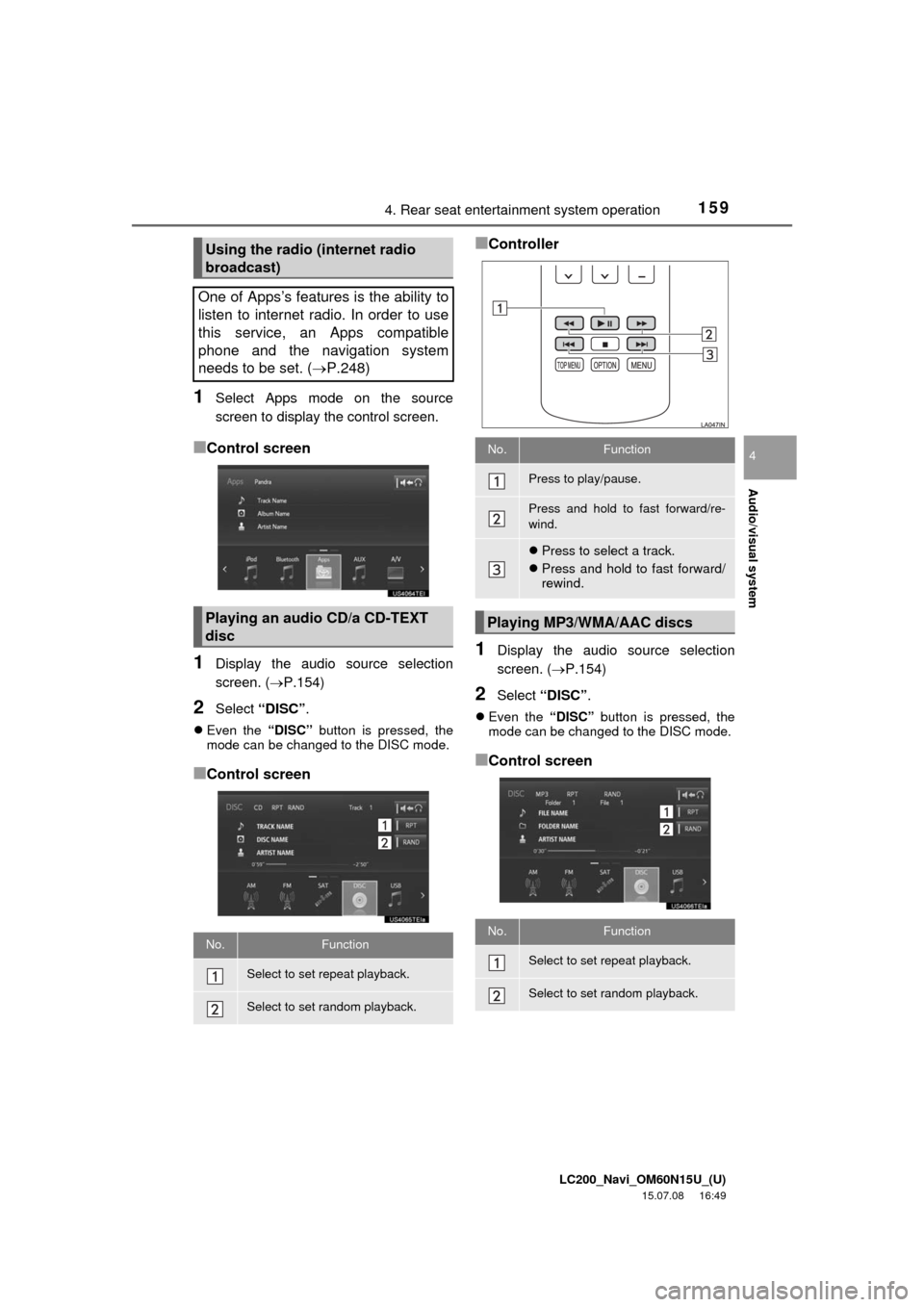
1Select Apps mode on the source
screen to display the control screen.
■Control screen
1Display the audio source selection
screen. (P.154)
2Select “DISC”.
Even the “DISC” button is pressed, the
mode can be changed to the DISC mode.
■Control screen
■Controller
1Display the audio source selection
screen. (P.154)
2Select “DISC”.
Even the “DISC” button is pressed, the
mode can be changed to the DISC mode.
■Control screen
Using the radio (internet radio
broadcast)
One of Apps’s features is the ability to
listen to internet radio. In order to use
this service, an Apps compatible
phone and the navigation system
needs to be set. (P.248)
Playing an audio CD/a CD-TEXT
disc
No.Function
Select to set repeat playback.
Select to set random playback.
No.Function
Press to play/pause.
Press and hold to fast forward/re-
wind.
Press to select a track.
Press and hold to fast forward/
rewind.
Playing MP3/WMA/AAC discs
No.Function
Select to set repeat playback.
Select to set random playback.
Page 160 of 275
LC200_Navi_OM60N15U_(U)
15.07.08 16:49
1604. Rear seat entertainment system operation
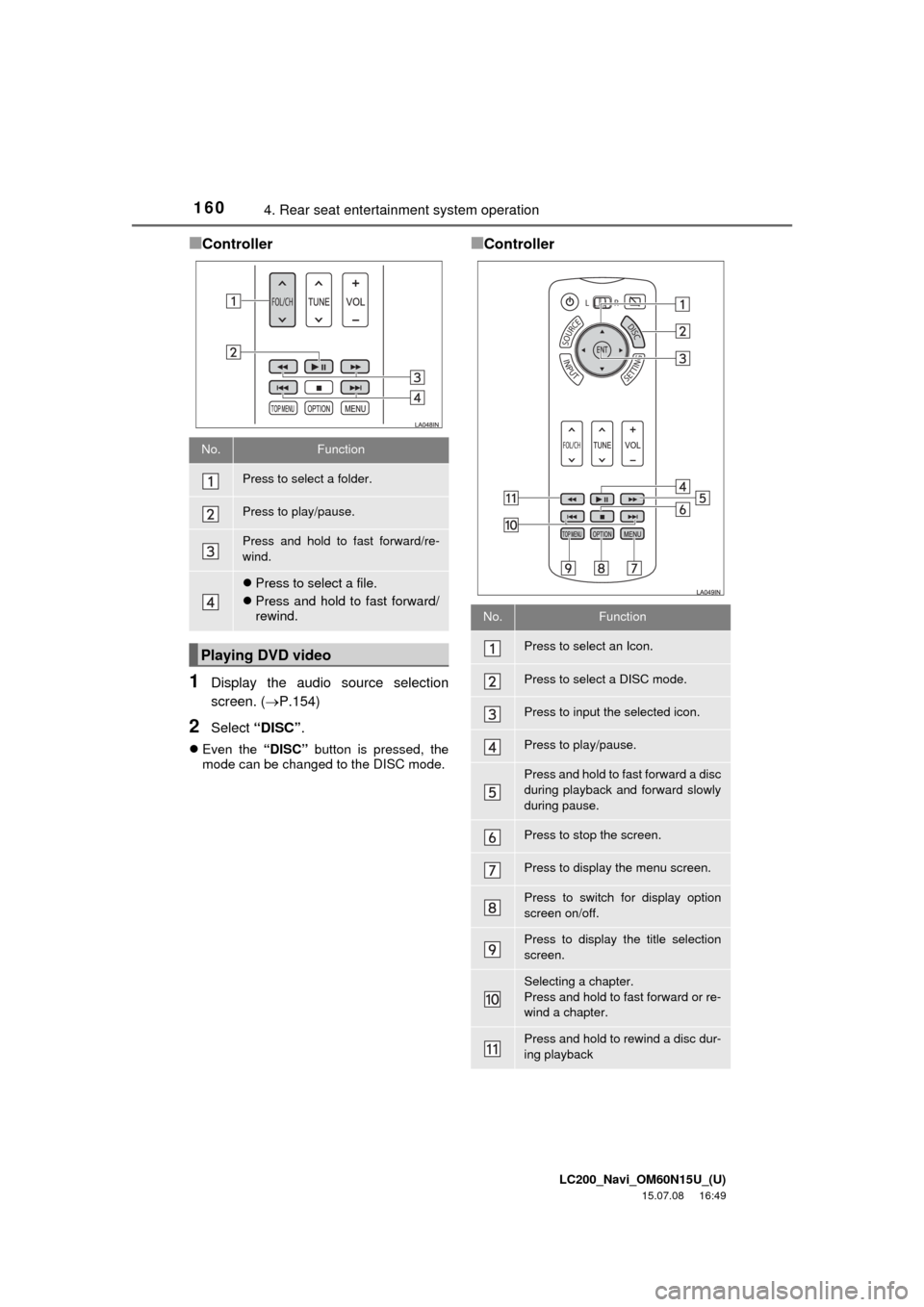
■Controller
1Display the audio source selection
screen. (P.154)
2Select “DISC”.
Even the “DISC” button is pressed, the
mode can be changed to the DISC mode.
■Controller
No.Function
Press to select a folder.
Press to play/pause.
Press and hold to fast forward/re-
wind.
Press to select a file.
Press and hold to fast forward/
rewind.
Playing DVD video
No.Function
Press to select an Icon.
Press to select a DISC mode.
Press to input the selected icon.
Press to play/pause.
Press and hold to fast forward a disc
during playback and forward slowly
during pause.
Press to stop the screen.
Press to display the menu screen.
Press to switch for display option
screen on/off.
Press to display the title selection
screen.
Selecting a chapter.
Press and hold to fast forward or re-
wind a chapter.
Press and hold to rewind a disc dur-
ing playback
Page 161 of 275
LC200_Navi_OM60N15U_(U)
15.07.08 16:49
Audio/visual system
4
1614. Rear seat entertainment system operation
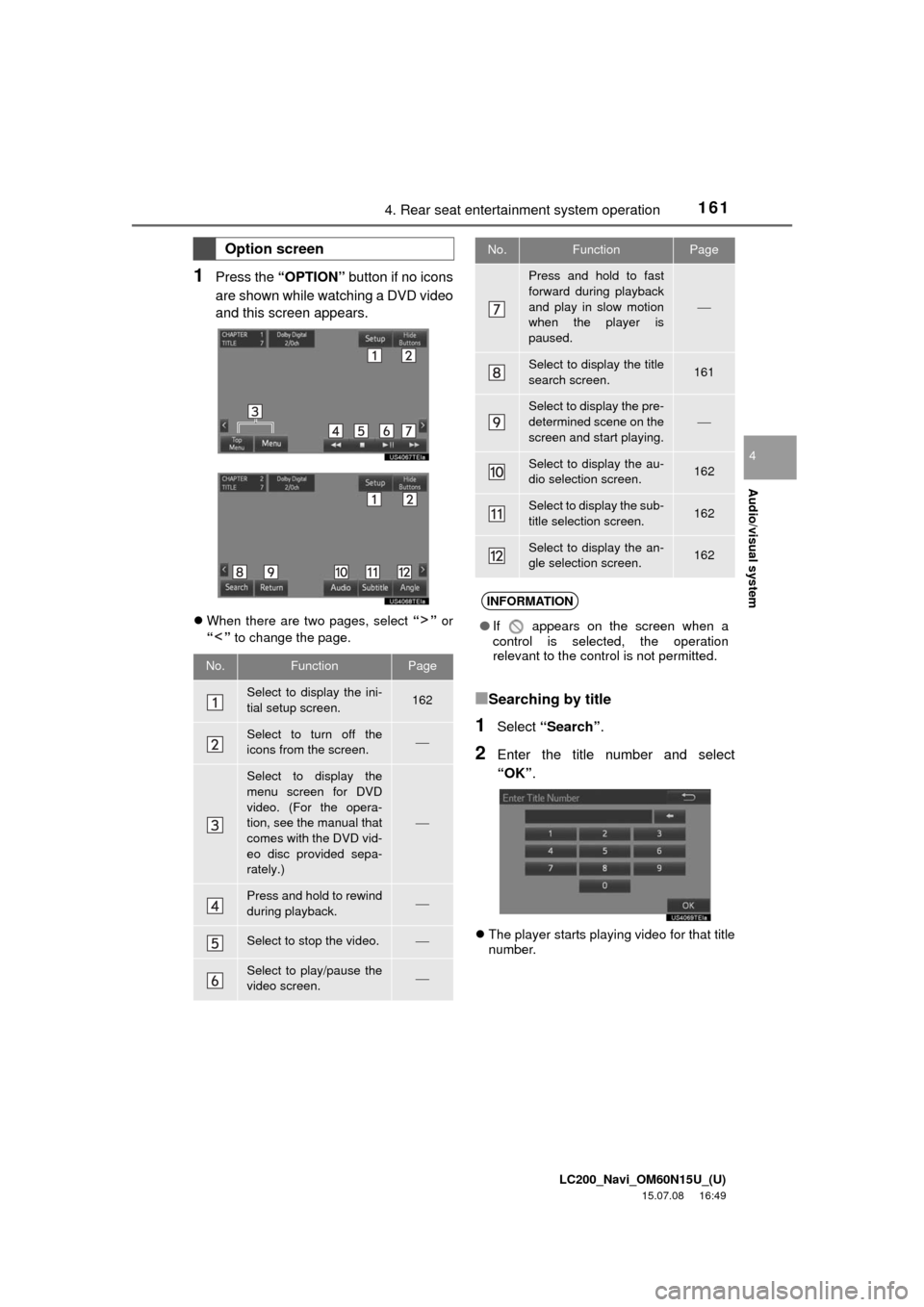
1Press the “OPTION” button if no icons
are shown while watching a DVD video
and this screen appears.
When there are two pages, select “” or
“” to change the page.
■Searching by title
1Select “Search”.
2Enter the title number and select
“OK”.
The player starts playing video for that title
number.
Option screen
No.FunctionPage
Select to display the ini-
tial setup screen.162
Select to turn off the
icons from the screen.
Select to display the
menu screen for DVD
video. (For the opera-
tion, see the manual that
comes with the DVD vid-
eo disc provided sepa-
rately.)
Press and hold to rewind
during playback.
Select to stop the video.
Select to play/pause the
video screen.
Press and hold to fast
forward during playback
and play in slow motion
when the player is
paused.
Select to display the title
search screen.161
Select to display the pre-
determined scene on the
screen and start playing.
Select to display the au-
dio selection screen.162
Select to display the sub-
title selection screen.162
Select to display the an-
gle selection screen.162
INFORMATION
●If appears on the screen when a
control is selected, the operation
relevant to the control is not permitted.
No.FunctionPage
Page 162 of 275
LC200_Navi_OM60N15U_(U)
15.07.08 16:49
1624. Rear seat entertainment system operation
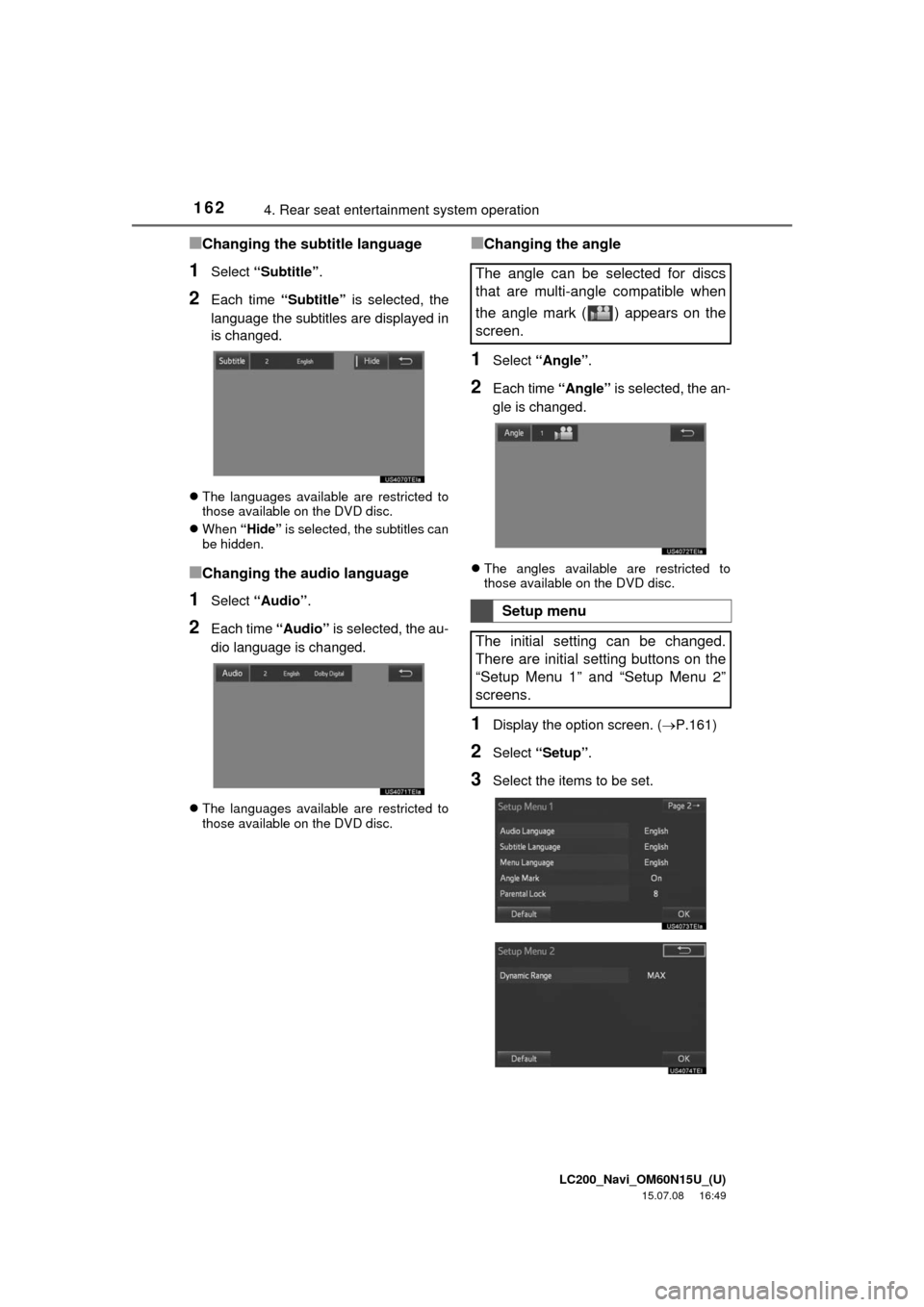
■Changing the subtitle language
1Select “Subtitle”.
2Each time “Subtitle” is selected, the
language the subtitles are displayed in
is changed.
The languages available are restricted to
those available on the DVD disc.
When “Hide” is selected, the subtitles can
be hidden.
■Changing the audio language
1Select “Audio”.
2Each time “Audio” is selected, the au-
dio language is changed.
The languages available are restricted to
those available on the DVD disc.
■Changing the angle
1Select “Angle”.
2Each time “Angle” is selected, the an-
gle is changed.
The angles available are restricted to
those available on the DVD disc.
1Display the option screen. (P.161)
2Select “Setup”.
3Select the items to be set.
The angle can be selected for discs
that are multi-angle compatible when
the angle mark ( ) appears on the
screen.
Setup menu
The initial setting can be changed.
There are initial setting buttons on the
“Setup Menu 1” and “Setup Menu 2”
screens.
Page 163 of 275
LC200_Navi_OM60N15U_(U)
15.07.08 16:49
Audio/visual system
4
1634. Rear seat entertainment system operation
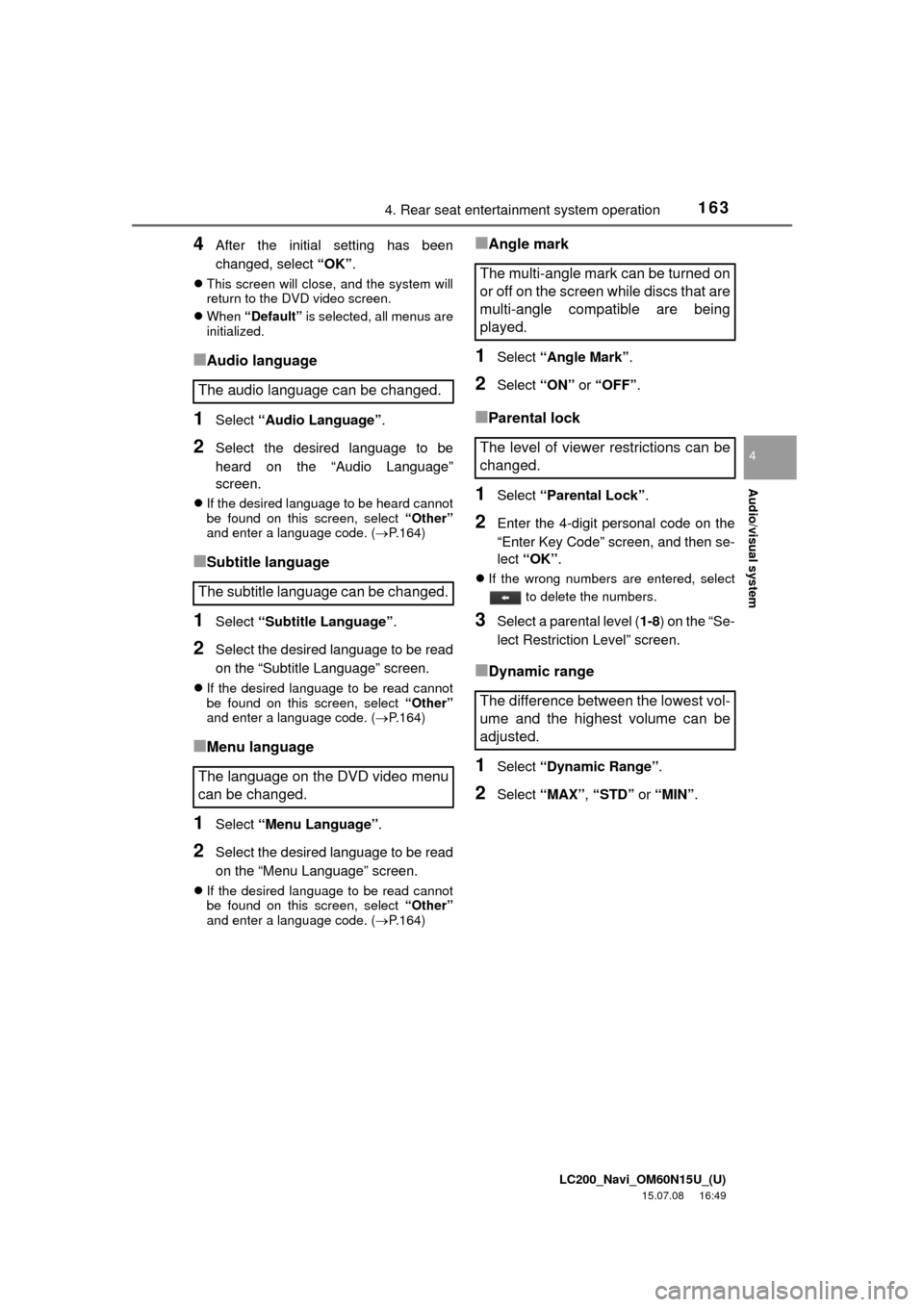
4After the initial setting has been
changed, select “OK”.
This screen will close, and the system will
return to the DVD video screen.
When “Default” is selected, all menus are
initialized.
■Audio language
1Select “Audio Language”.
2Select the desired language to be
heard on the “Audio Language”
screen.
If the desired language to be heard cannot
be found on this screen, select “Other”
and enter a language code. (P.164)
■Subtitle language
1Select “Subtitle Language”.
2Select the desired language to be read
on the “Subtitle Language” screen.
If the desired language to be read cannot
be found on this screen, select “Other”
and enter a language code. (P.164)
■Menu language
1Select “Menu Language”.
2Select the desired language to be read
on the “Menu Language” screen.
If the desired language to be read cannot
be found on this screen, select “Other”
and enter a language code. (P.164)
■Angle mark
1Select “Angle Mark”.
2Select “ON” or “OFF”.
■Parental lock
1Select “Parental Lock”.
2Enter the 4-digit personal code on the
“Enter Key Code” screen, and then se-
lect “OK”.
If the wrong numbers are entered, select
to delete the numbers.
3Select a parental level (1-8) on the “Se-
lect Restriction Level” screen.
■Dynamic range
1Select “Dynamic Range”.
2Select “MAX”, “STD” or “MIN”.
The audio language can be changed.
The subtitle language can be changed.
The language on the DVD video menu
can be changed.
The multi-angle mark can be turned on
or off on the screen while discs that are
multi-angle compatible are being
played.
The level of viewer restrictions can be
changed.
The difference between the lowest vol-
ume and the highest volume can be
adjusted.
Page 164 of 275
LC200_Navi_OM60N15U_(U)
15.07.08 16:49
1644. Rear seat entertainment system operation
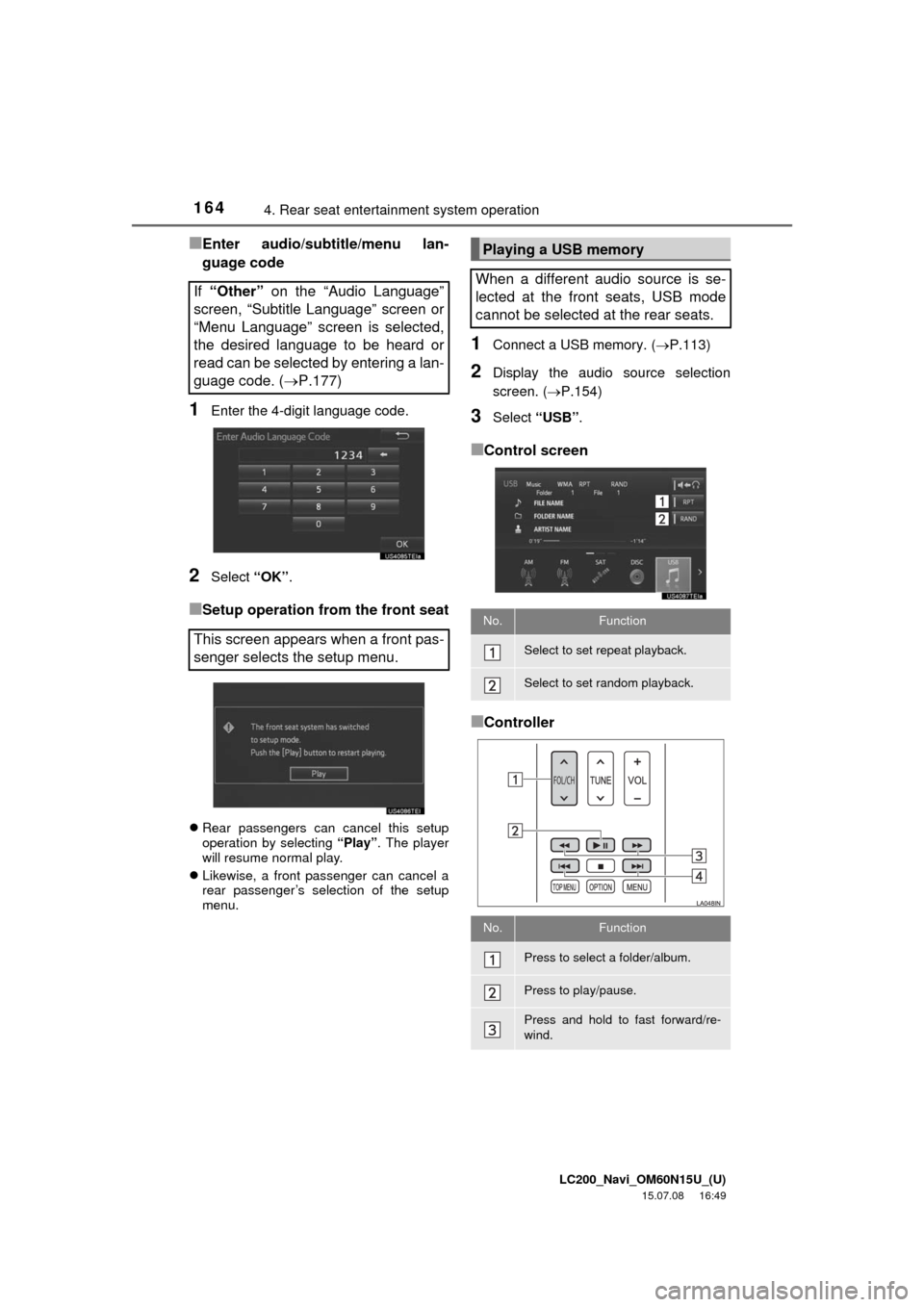
■Enter audio/subtitle/menu lan-
guage code
1Enter the 4-digit language code.
2Select “OK”.
■Setup operation from the front seat
Rear passengers can cancel this setup
operation by selecting “Play”. The player
will resume normal play.
Likewise, a front passenger can cancel a
rear passenger’s selection of the setup
menu.
1Connect a USB memory. (P.113)
2Display the audio source selection
screen. (P.154)
3Select “USB”.
■Control screen
■Controller If “Other” on the “Audio Language”
screen, “Subtitle Language” screen or
“Menu Language” screen is selected,
the desired language to be heard or
read can be selected by entering a lan-
guage code. (P.177)
This screen appears when a front pas-
senger selects the setup menu.
Playing a USB memory
When a different audio source is se-
lected at the front seats, USB mode
cannot be selected at the rear seats.
No.Function
Select to set repeat playback.
Select to set random playback.
No.Function
Press to select a folder/album.
Press to play/pause.
Press and hold to fast forward/re-
wind.
Page 165 of 275
LC200_Navi_OM60N15U_(U)
15.07.08 16:49
Audio/visual system
4
1654. Rear seat entertainment system operation
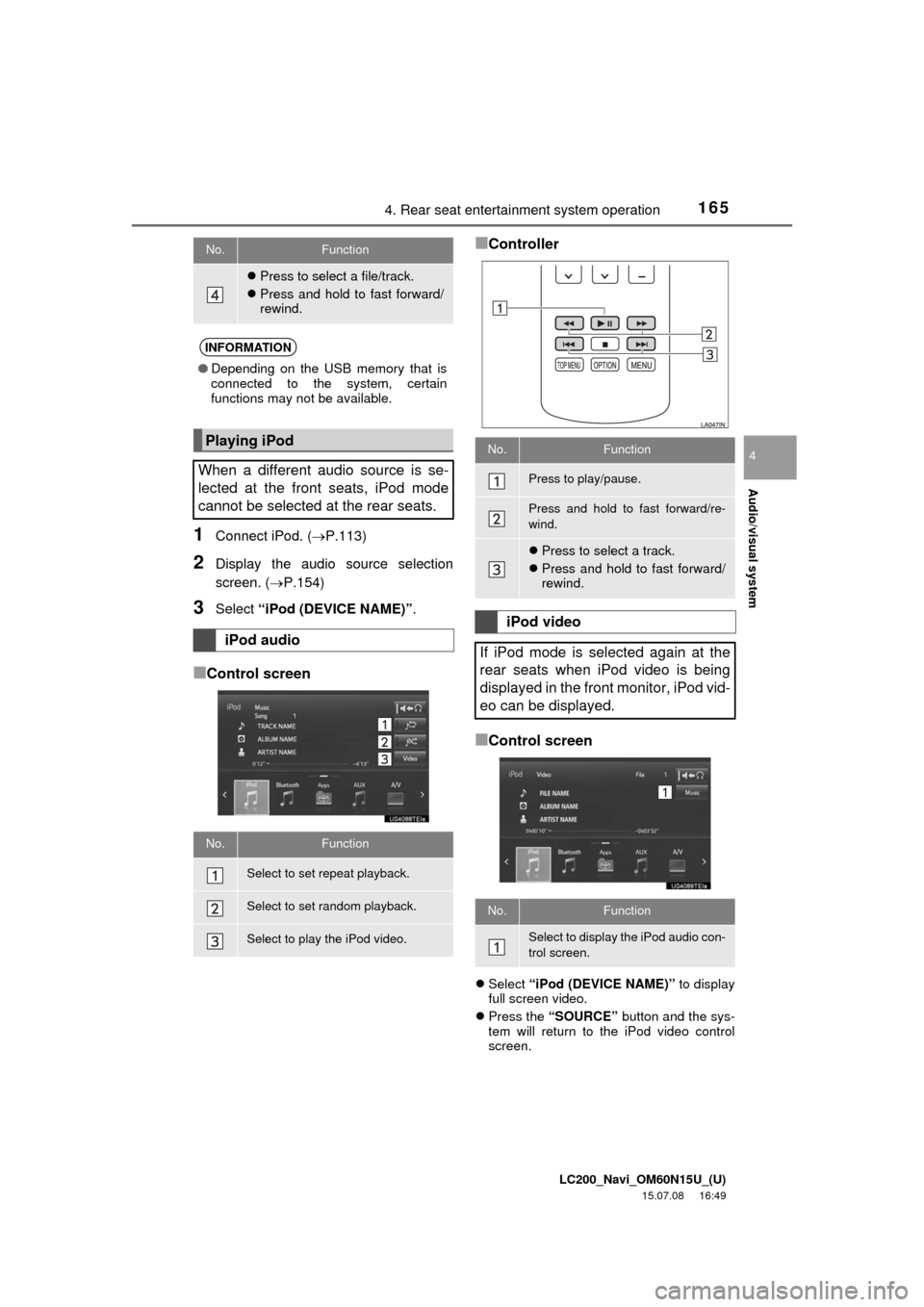
1Connect iPod. (P.113)
2Display the audio source selection
screen. (P.154)
3Select “iPod (DEVICE NAME)”.
■Control screen
■Controller
■Control screen
Select “iPod (DEVICE NAME)” to display
full screen video.
Press the “SOURCE” button and the sys-
tem will return to the iPod video control
screen.
Press to select a file/track.
Press and hold to fast forward/
rewind.
INFORMATION
●Depending on the USB memory that is
connected to the system, certain
functions may not be available.
Playing iPod
When a different audio source is se-
lected at the front seats, iPod mode
cannot be selected at the rear seats.
iPod audio
No.Function
Select to set repeat playback.
Select to set random playback.
Select to play the iPod video.
No.Function
No.Function
Press to play/pause.
Press and hold to fast forward/re-
wind.
Press to select a track.
Press and hold to fast forward/
rewind.
iPod video
If iPod mode is selected again at the
rear seats when iPod video is being
displayed in the front monitor, iPod vid-
eo can be displayed.
No.Function
Select to display the iPod audio con-
trol screen.