check engine TOYOTA LAND CRUISER 2016 J200 Owner's Manual
[x] Cancel search | Manufacturer: TOYOTA, Model Year: 2016, Model line: LAND CRUISER, Model: TOYOTA LAND CRUISER 2016 J200Pages: 608, PDF Size: 10.91 MB
Page 194 of 608
194
LC200_OM_OM60M88U_(U)
4-2. Driving procedures
Stop the vehicle.
Shift the shift lever to P.
Set the parking brake. (P. 204)
Press the engine switch.
Release the brake pedal and check that the display on the instru-
ment cluster is off.
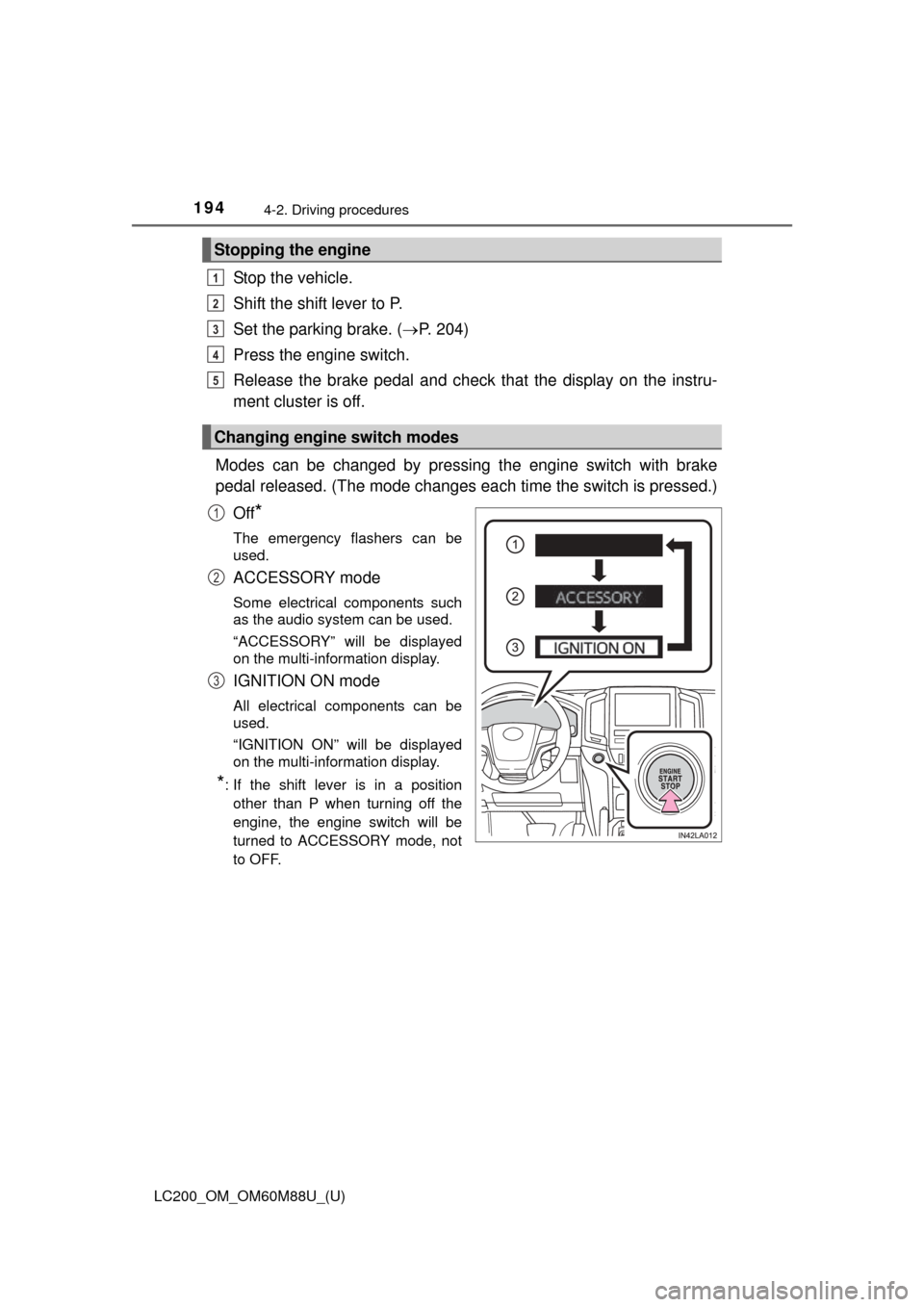
Modes can be changed by pressing the engine switch with brake
pedal released. (The mode changes ea ch time the switch is pressed.)
Off
*
The emergency flashers can be
used.
ACCESSORY mode
Some electrical components such
as the audio system can be used.
“ACCESSORY” will be displayed
on the multi-information display.
IGNITION ON mode
All electrical components can be
used.
“IGNITION ON” will be displayed
on the multi-information display.
*: If the shift lever is in a position other than P when turning off the
engine, the engine switch will be
turned to ACCESSORY mode, not
to OFF.
Stopping the engine
Changing engine switch modes
1
2
3
4
5
1
2
3
Page 195 of 608
LC200_OM_OM60M88U_(U)
1954-2. Driving procedures
4
Driving
If the engine is stopped with the shift lever in a position other than P,
the engine switch will not be turned off but instead be turned to
ACCESSORY mode. Perform the following procedure to turn the
switch off:
Check that the parking brake is set.
Shift the shift lever to P.
Check that “Turn Off Vehicle” is displayed on the multi-information
display and then press the engine switch once.
Check that “Turn Off Vehicle” on th e multi-information display is off.
■Auto power off function
If the vehicle is left in ACCESSORY mode for more than 20 minutes or IGNI-
TION ON mode (the engine is not running) for more than an hour with th\
e
shift lever in P, the engine switch will automatically turn off. However, this
function cannot entirely prevent battery discharge. Do not leave the vehicle
with the engine switch in ACCESSORY or IGNITION ON mode for long peri-
ods of time when the engine is not running.
■ Operation of the engine switch
●When operating the engine switch, one short, firm press is enough. If the
switch is pressed improperly, the engine may not start or the engine switch
mode may not change. It is not necessary to press and hold the switch.
● If attempting to restart the engine immediately after turning the engine
switch off, the engine may not start in some cases. After turning the engine
off, please wait a few seconds before restarting the engine.
■ Electronic key battery depletion
P. 104
■ Conditions affecting operation
P. 122
■ Note for the entry function
P. 123
■ If the engine does not start
●The engine immobilizer system may not have been deactivated. ( P. 74)
Contact your Toyota dealer.
● Check that the shift lever is securely set in P. The engine may not start if the
shift lever is displaced out of P.
A message will be displayed on the multi-information display.
When stopping the engine with the shift lever in a position other
than P
1
2
3
4
Page 196 of 608
196
LC200_OM_OM60M88U_(U)
4-2. Driving procedures
■Steering lock
After turning the engine switch off and opening and closing the doors, the
steering wheel will be locked due to the steering lock function. Operating the
engine switch again automatically cancels the steering lock.
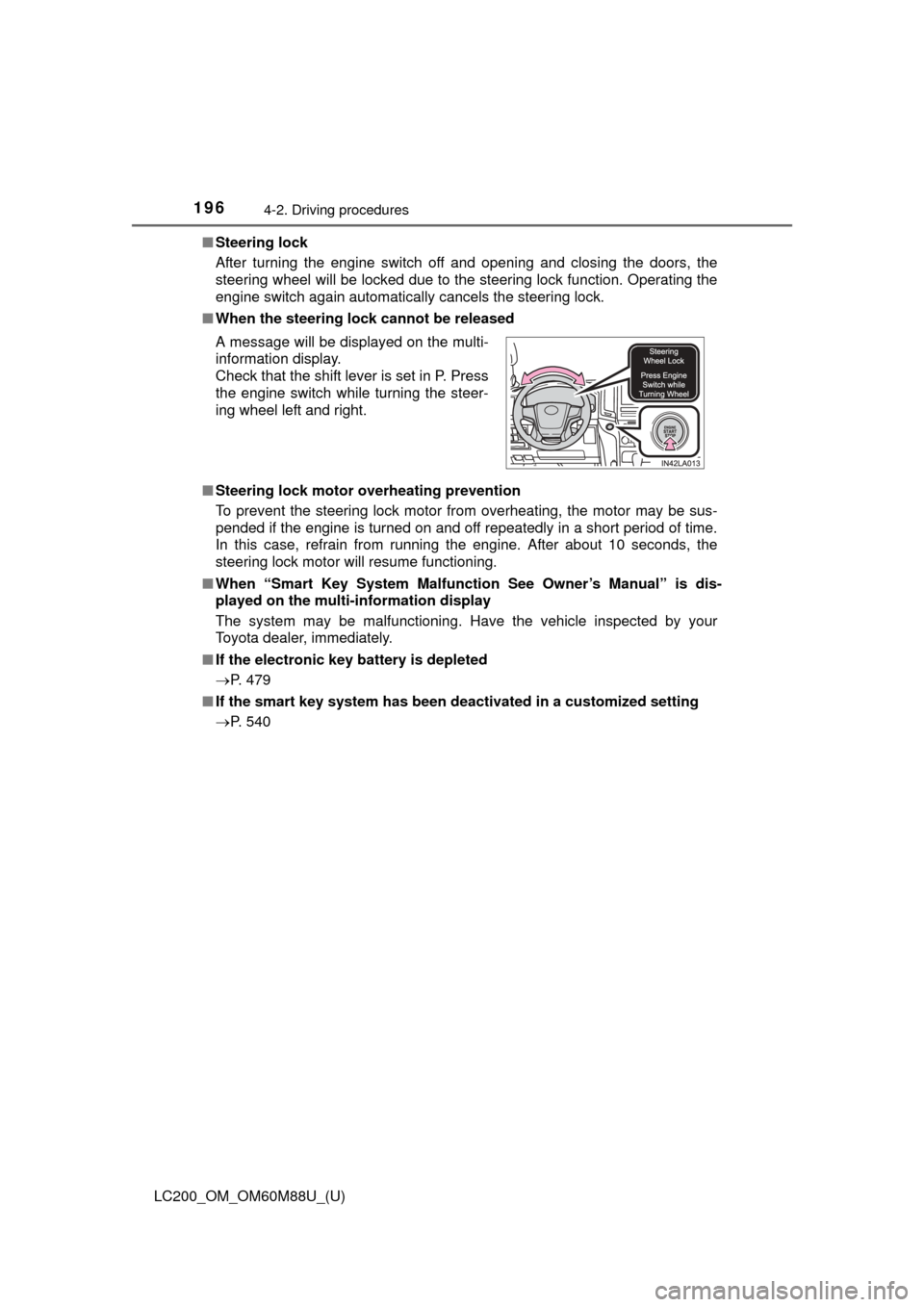
■ When the steering lock cannot be released
■ Steering lock motor overheating prevention
To prevent the steering lock motor from overheating, the motor may be sus-
pended if the engine is turned on and off repeatedly in a short period of time.
In this case, refrain from running the engine. After about 10 seconds, the
steering lock motor will resume functioning.
■ When “Smart Key Syst em Malfunction See Owner’s Manual” is dis-
played on the multi-information display
The system may be malfunctioning. Have the vehicle inspected by your
Toyota dealer, immediately.
■ If the electronic key battery is depleted
P. 479
■ If the smart key system has been deactivated in a customized setting
P. 540 A message will be displayed on the multi-
information display.
Check that the shift lever is set in P. Press
the engine switch while turning the steer-
ing wheel left and right.
Page 198 of 608

198
LC200_OM_OM60M88U_(U)
4-2. Driving procedures
NOTICE
■To prevent battery discharge
●Do not leave the engine switch in ACCESSORY or IGNITION ON mode
for long periods of time without the engine running.
● If “ACCESSORY” or “IGNITION ON” is displayed on the multi-information
display, the engine switch is not off. When exiting the vehicle, always
check that the engine switch is off.
● Do not stop the engine when the shift lever is in a position other than P. If
the engine is stopped in another shift lever position, the engine switch will
not be turned off but instead be turned to ACCESSORY mode. If the vehi-
cle is left in ACCESSORY mode, battery discharge may occur.
■ When starting the engine
●Do not race a cold engine.
● If the engine becomes difficult to star t or stalls frequently, have your vehi-
cle checked by your Toyota dealer immediately.
■ Symptoms indicating a malfunction with the engine switch
If the engine switch seems to be operating somewhat differently than usual,
such as the switch sticking slightly, there may be a malfunction. Contact
your Toyota dealer immediately.
Page 203 of 608
203
LC200_OM_OM60M88U_(U)
4-2. Driving procedures
4
Driving
Turn signal lever
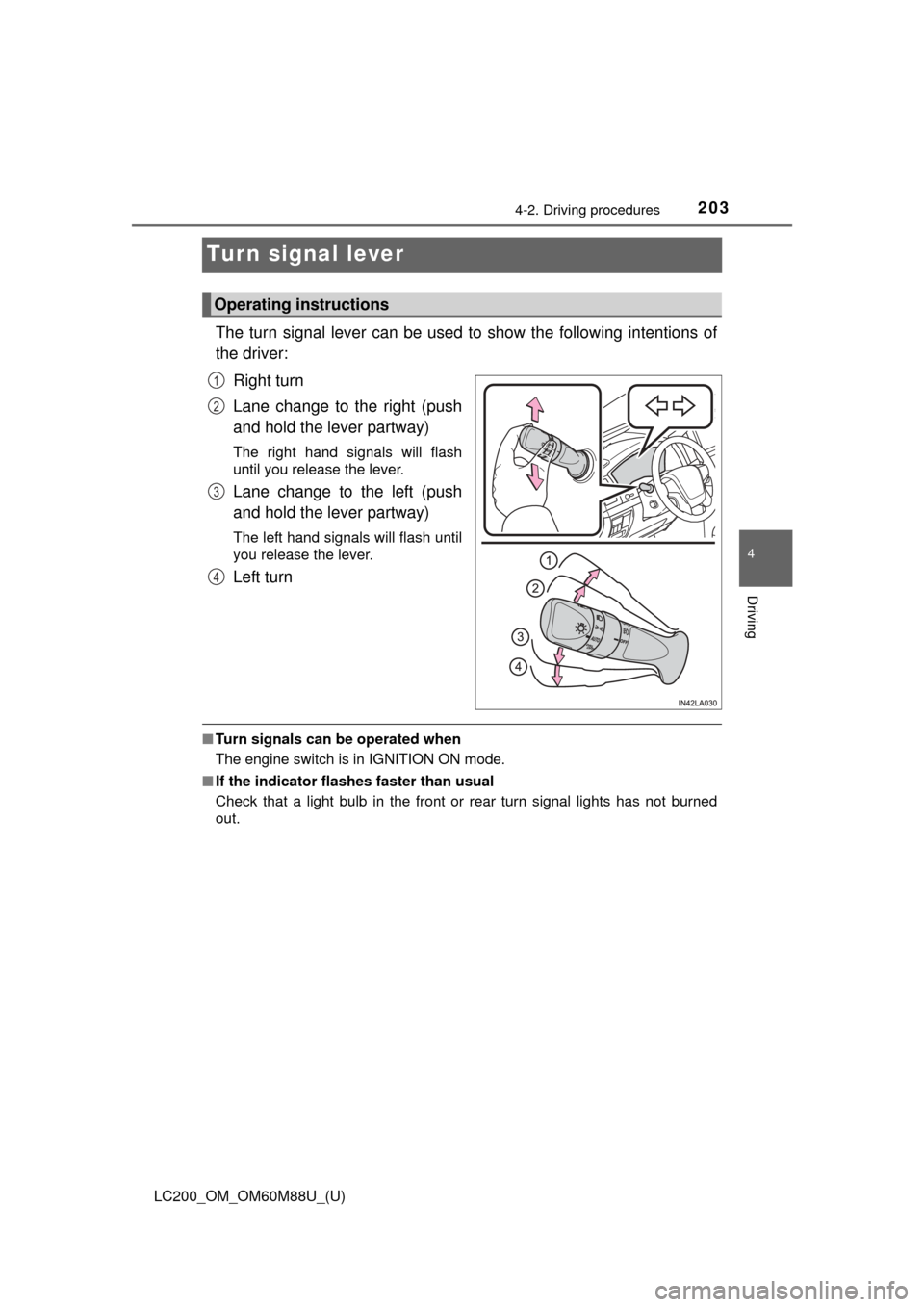
The turn signal lever can be used to show the following intentions of
the driver:Right turn
Lane change to the right (push
and hold the lever partway)
The right hand signals will flash
until you release the lever.
Lane change to the left (push
and hold the lever partway)
The left hand signals will flash until
you release the lever.
Left turn
■Turn signals can be operated when
The engine switch is in IGNITION ON mode.
■ If the indicator flashes faster than usual
Check that a light bulb in the front or rear turn signal lights has not burned
out.
Operating instructions
1
2
3
4
Page 220 of 608

220
LC200_OM_OM60M88U_(U)
4-3. Operating the lights and wipers
■The rear window wiper and w asher can be operated when
The engine switch is in IGNITION ON mode.
■ If no washer fluid sprays
Check that the washer nozzles are not blocked if there is washer fluid in the
washer fluid reservoir.
NOTICE
■When the rear window is dry
Do not use the wiper, as it may damage the rear window.
■ When the washer fluid tank is empty
Do not operate the switch continually as the washer fluid pump may over-
heat.
Page 288 of 608

288
LC200_OM_OM60M88U_(U)
4-5. Using the driving support systems
■When depressing the accelerator pedal while the Crawl Control is oper-
ating
Multi-terrain Select operates in AUTO mode. ( P. 290)
■ Sounds and vibrations caused by the Crawl Control system
● A sound may be heard from the engine compartment when the engine is
started or just after the vehicle begins to move. This sound does not indicate
that a malfunction has occurred in Crawl Control system.
● Either of the following conditions may occur when the Crawl Control system
is operating. None of these are indicators that a malfunction has occurred.
• Vibrations may be felt through the vehicle body and steering.
• A motor sound may be heard after the vehicle comes to a stop.
■ When there is a malfunction in the system
Warning lights and/or warning messages will turn on. ( P. 510, 519)
WARNING
■When using Crawl Control
Do not rely solely on the Crawl Control. This function does not extend the
vehicle’s performance limitations. Always thoroughly check the road condi-
tions, and drive safely.
■ These conditions may cause the syst em not to operate properly
When driving on the following surfaces, the system may not be able to
maintain a fixed low speed, which may result in an accident:
● Extremely steep inclines.
● Extremely uneven surfaces.
● Snow-covered roads, or other slippery surfaces.
NOTICE
■When using Turn Assist function
The Turn Assist function is a function to assist turning performance when
driving off road. The function may be less effective on paved road surfaces.
Page 368 of 608

368
LC200_OM_OM60M88U_(U)
4-6. Driving tips
NOTICE
■To prevent the water damage
Take all necessary safety measures to ensure that water damage to the
engine or other components does not occur.
●Water entering the engine air intake will cause severe engine damage.
● Water entering the automatic transmission will cause deterioration in shift
quality, locking up of your transmission accompanied by vibration, and ulti-
mately damage.
● Water can wash the grease from wheel bearings, causing rusting and pre-
mature failure, and may also enter the differentials, transmission and
transfer case, reducing the gear oil’s lubricating qualities.
■ When you drive through water
If driving through water, such as when crossing shallow streams, first check
the depth of the water and the bottom of the riverbed for firmness. Drive
slowly and avoid deep water.
■ Inspection after off-road driving
●Sand and mud that has accumulated in brake drums and around brake
discs may affect braking efficiency and may damage brake system compo-
nents.
● Always perform a maintenance inspection after each day of off-road driv-
ing that has taken you through rough terrain, sand, mud, or water. For
scheduled maintenance information, refer to the “Scheduled Maintenance
Guide” or “Owner’s Manual Supplement”.
Page 369 of 608
369
LC200_OM_OM60M88U_(U)
4-6. Driving tips
4
Driving
Winter driving tips
●Use fluids that are appropriate to the prevailing outside tempera-
tures.
• Engine oil
• Engine coolant
• Washer fluid
● Have a service technician ins pect the condition of the battery.
● Have the vehicle fitted with four snow tires or purchase a set of tire
chains for the rear tires.
Ensure that all tires are the same size and brand, and that chains match
the size of the tires.
Perform the following accordin g to the driving conditions:
● Do not try to forcibly open a window or move a wiper that is frozen.
Pour warm water over the frozen area to melt the ice. Wipe away
the water immediately to prevent it from freezing.
● To ensure proper operation of the climate control system fan,
remove any snow that has accumulated on the air inlet vents in
front of the windshield.
● Check for and remove any excess ice or snow that may have accu-
mulated on the exterior lights, ve hicle’s roof, chassis, around the
tires or on the brakes.
● Remove any snow or mud from the bottom of your shoes before
getting in the vehicle.
Carry out the necessary preparations and inspections before
driving the vehicle in winter. Always drive the vehicle in a man-
ner appropriate to the prevailing weather conditions.
Pre-winter preparations
Before driving the vehicle
Page 433 of 608

433
LC200_OM_OM60M88U_(U)
6Maintenance and care
6-1. Maintenance and careCleaning and protecting the vehicle exterior .......... 434
Cleaning and protecting the vehicle interior ........... 437
6-2. Maintenance Maintenance requirements ................... 440
General maintenance........ 443
Emission inspection and maintenance (I/M)
programs ......................... 446
6-3. Do-it-yourself maintenance Do-it-yourself service precautions ..................... 447
Hood ................................. 449
Engine compartment ......... 450
Tires .................................. 463
Tire inflation pressure ....... 472
Wheels .............................. 475
Air conditioning filter.......... 477
Electronic key battery........ 479
Checking and replacing fuses ............................... 481
Headlight aim .................... 485
Light bulbs......................... 487